LM341 - Laminator Wallner - Free user manual and instructions
Find the device manual for free LM341 Wallner in PDF.


| Brand | Wallner |
| Model | LM341 |
| Product Type | Hot and Cold Laminator |
| Laminating Width | 330 mm |
| Laminating Thickness | 80 to 250 microns |
| Warm-Up Time | Approximately 1 minute (for 80 micron pouch) |
| Lamination Speed | 300 mm/min |
| Voltage | 220-240V, 50Hz |
| Control Buttons | Mode button (pouch thickness selection), Reverse button (jam release) |
| LED Indicators | Power/Cold light (red/green), thickness selection LEDs |
| Cold Lamination | Yes; requires 20-30 minute cool-down after hot use |
| Recommended Pouch Margin | Approximately 3 mm from each side |
| Pouch Type Compatibility | Envelope-type recommended; non-envelope may cause jams |
| Roller Cleaning | Use cleaning paper or rough cardboard (approx. 250 g/m²) with machine warm |
| Cover Cleaning | Soft wet cloth; do not use solvents or petrol |
| Safety Features | Reverse button for jam clearance, power switch, thermal vents (do not cover) |
| Warnings | Do not open casing; keep away from water, flammable substances, and children |
| Disposal | Do not dispose with household waste; recycle per EU Directive 2002/96/EU |
| Warranty | Refer to warranty card; repair by authorized dealer only |
| Included Accessories | Not specified; likely cleaning paper (not stated) |
Frequently Asked Questions - LM341 Wallner
User questions about LM341 Wallner
0 question about this device. Answer the ones you know or ask your own.
Ask a new question about this device
Download the instructions for your Laminator in PDF format for free! Find your manual LM341 - Wallner and take your electronic device back in hand. On this page are published all the documents necessary for the use of your device. LM341 by Wallner.
USER MANUAL LM341 Wallner
natural_image
White and black electronic device with power cord and control buttons (no visible text or symbols on body)LAMINATOR WALLNER LM341 / LM441
Read all instructions before use.
PART NAMES
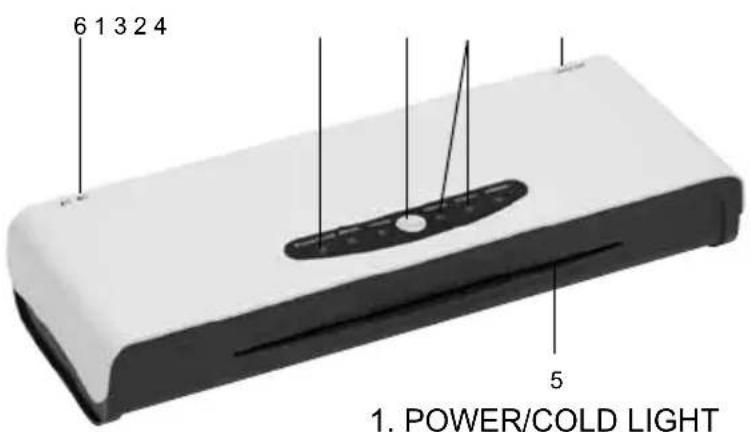
- POWER/COLD LIGHT
- LED LIGHTS
- MODE BUTTON - POUCH THICKNESS REGULATOR
- MAIN SWITCH (I/O)
- ENTRY
- REVERSE BUTTON
- Before laminating it is advisable to carry out a test lamination to familiarise yourself with the machine and to make sure that it is working correctly.
- Plug the machine into an appropriate and easy-to-reach socket.
- Set the main switch (4) placed on the side of the laminating machine in the „I” position.
- Press the MODE BUTTON to select the pouch thickness. The correspondent LED would turn into red and flash.
- The machine is ready to use when the LED light turns to green and stays steady.
- Insert the document with the sealed side first into the entry (5).
- The laminating process is finished when the whole document comes out from the other end of the machine.
- If the document is not properly laminated, repeat steps 6 and 7.
- If the pouch gets jammed inside, push the REVERSE BUTTON (6).
- If you are not using the machine, turn it off. This will guarantee best laminating results each time.

CAUSION!
It is important to use the pouch similar to the size of the laminating document. Documents need to be inserted into the laminating pouch squarely and centrally, with a margin of around 3 mm from each side. A wider margin may cause folding, bending or blocking of the laminated document.
COLD LAMINATION
- Set the main switch (4) placed on the side of the laminating machine in the „I” position and press the MODE BUTTON to select the COLD lamination. The correspondent LED would turn into red and flash.
- The machine is ready to use when the POWER/COLD LED light turns to green and stays steady.
- Insert the document with the sealed side first into the entry (5).
- Take out the laminated document

CAUSION!
Always make sure the machine is cool when you use cold lamination. Do not use cold lamination if you just finished the hot laminating process. Let the machine cool down for about 20-30 minutes.
HOW TO TURN OFF THE LAMINATING MACHINE
Turn the main switch (4) placed on the side of the machine to position „O“, then unplug the machine from the socket. The machine is turned off now.
Before and after the lamination use a cleaning paper to clean the rollers from dust and glue. When the temperature is rising, place the cleaning paper and make it go through the laminating machine a few times. It will protect the machines from laminating pouches being pulled between the rollers. The cleaning paper may be replaced with a cardboard of the grammature around 250 g/m^2 with a rough texture.
CLEANING THE COVER
- When the cover is dirty, use a soft wet cloth to clean it.
- Do not use solvents or petrol.
- Do not unscrew the cover to clean the rollers! It may cause electric shock!
HOW TO OBTAIN THE BEST RESULTS
- If your laminating pouch is not envelope-type it may be pulled in during the lamination. The use of laminating pouches other than recommended may cause trouble during lamination.
- Lines or wrinkles may appear, if the laminating pouch is not placed straight.
- If the margin of the laminating pouch is wider then 3mm, pouches may fold on both edges of the document.
- Laminated edges may not hold if the document is thicker than 300 mic.
- The lamination of documents of the thickness lower than 150 mic or the use of laminating pouches of the thickness lower than 80 mic, especially cheap pouches where the PET layer is thicker than 50 mic, may cause wrinkles. In such cases it is advised to use a relatively low temperature (around 90°C) or to use a carrier.
- If the laminated pouch is misty or does not show good gluing qualities, then you need to use a higher temperature.
- If the laminated pouch is curved or wrinkled on the side, then you need to use a lower temperature
- Too high temperature may cause the pulling of the document into the rollers - use the RELEASE button to release the document and clean the rollers from the glue.
TECHNICAL DATA
| Model LM441 LM341 | ||
| Voltage 220-240V/ 50Hz 220-240V/ 50Hz | ||
| Laminating width to 240 mm to 330 mm | ||
| Laminating thickness 80-250 mic | 80-250 mic | |
| Warm - up time ~1 min (80 mic) | ~1 min (80 mic) | |
| Lamination speed 300 mm/min | 300 mm/min |
SAFETY INSTRUCTIONS
SAFETY NOTICE
- Do not leave cable where other may trip.
- Do not attempt to open the casing.
- Do not use if wet.
- Switch off and unplug the machine, when not in use.
- Do not cover the heat vents when in use.
- Do not touch the heat vents when the machine is working.
- Do not put any items through the heat vents.
- Do not use if machine, cable, or socket is damaged.
-
Do not laminate in the vicinity of flammable substances
-
Do not use force while laminating.
-
Materials with rough edges or very thick ones may cause damage to the rollers.
-
After finishing the lamination process, wait for the pouch to cool down, it may be hot.
-
When, according to the temperature limits in point 4.5.4 of the EN 60950-1:2006 norm, the risk of burning due to overpassing those limits appears, on the machine's casing is placed a warning: UWAGA! GORĄCA POWIERZCHNIA NIE DOTYKAĆ or
symbol

IMPORTANT RECOMMENDATIONS / WARNINGS
For your own safety please maintain particular care while installing and using the machine.
GENERAL
- Keep hands, long hair, loose articles of clothing, jewellery and ties away from device to avoid serious injury.
• Unstable surfaces may cause the fall of the device, which can result in body injuries. - Please avoid fast stopping, use of additional force or surface unevenness while transporting the device on trolley, casters or table.
- Do not remove mechanical and electrical securities such as locks, covers or others.
- It is forbidden to use objects not dedicated to do so or liquids.
ELECTRICAL
- The machine should be plugged to the electric circuit only as presented in the manual.
- The socket must be in close vicinity with easy access to the device. While moving the machine, pull the plug from the socket.
- To turn off the appliance unplug it from the socket. Socket should be in close vicinity with easy access to device.
- Do not use the machine when the wire or plug are damaged or after noticing symptoms of machine's damage. Please contact seller to obtain help.
- When the device is equipped with a plug with grounding, then it has to be connected to a socket with grounding!
SERVICE
Proceed only with routine actions according to the manual. Do not repair or service machines on your own. Unplug the machine from the circuit and contact seller when one or more of the following faults occur:
• liquid gets into the machine
• machine malfunctions as a result of improper use
• machine does not work accordingly to the manual
If any faults should appear, please pass the machine along with the warranty card to the seller or closest authorised dealer. The machine might be passed further, thus the user should maintain the original and complete packaging. In cases when the machine is passed for repair in a not original or incomplete package, the risks of further damages that might arise in transportation are on the user's side. Thus, in such a case, it is in the user's best interest to make the best possible replacement packaging.
NOTE ON ENVIRONMENTAL PROTECTION:
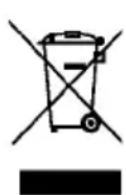
After the implementation of the European Directive 2002/96/EU in the national legal system, the following applies: Electrical and electronic devices may not be disposed of with domestic waste.
Consumers are obliged by law to return electrical and electronic devices at the end of their service lives to the public collecting points set up for this purpose or point of sale. Details to this are defined by the national law of the respective country. This symbol on the product, the instruction manual or the package indicates that a product is subject to these regulations. By recycling, reusing the materials or other forms of utilising old devices, you are making an important contribution to protecting our environment.
- LAMINATOR WALLNER LM341 / LM441
- PART NAMES
- CAUSION!
- COLD LAMINATION
- HOW TO TURN OFF THE LAMINATING MACHINE
- CLEANING THE COVER
- HOW TO OBTAIN THE BEST RESULTS
- TECHNICAL DATA
- SAFETY INSTRUCTIONS
- SAFETY NOTICE
- IMPORTANT RECOMMENDATIONS / WARNINGS
- GENERAL
- ELECTRICAL
- SERVICE
- NOTE ON ENVIRONMENTAL PROTECTION:
Brand : Wallner
Model : LM341
Category : Laminator