Arcade - Headphones KitSound - Free user manual and instructions
Find the device manual for free Arcade KitSound in PDF.


User questions about Arcade KitSound
0 question about this device. Answer the ones you know or ask your own.
Ask a new question about this device
Download the instructions for your Headphones in PDF format for free! Find your manual Arcade - KitSound and take your electronic device back in hand. On this page are published all the documents necessary for the use of your device. Arcade by KitSound.
USER MANUAL Arcade KitSound
JB. 3411 / Made in China. © KitSound * 2014. Christchurch, Dorset. BH23 4FL

natural_image
Close-up of a transparent plastic headband with metallic case (no text or symbols visible)
KITSOUND
ARCADE
BLUETOOTH EARPHONES
User Manual
natural_image
Close-up of a black and white electronic audio workstation with multiple input knobs and capacitors (no visible text or labels)We are craftspeople. We are musicians. We are KitSound
And we all commit ourselves to achieving are shared goal: Bringing people closer to their music. By truly understanding music we stay true to its craft. Pure, rich, incredible sound. We'll settle for nothing less.
TH
At KS we believe your music deserves to be showcased on great quality products that don't cost the earth. We might not all share the same taste in music (the ferocious disputes on music forums prove that), but whether it's Irish folk, death metal or any number of obscure genres which seem to be multiplying by the minute, the artists responsible for connecting with you through their craft have bared their souls to do so. And we think that's worth celebrating.

natural_image
Crowd silhouettes raising hands at a concert with dramatic lighting (no text or symbols visible)
natural_image
Close-up of hexagonal mesh structures with central holes, no text or symbols visibleLike the musicians we're honouring, we're obsessed with our craft; fine-tuning and tweaking our products to make sure we constantly deliver full-bodied, symphonic sound. So from a single note played on a piano, to the full impact of a bass guitar, you can rest assured that you'll always be doing justice to your music.
Please read this manual carefully before use.
Box contents
• KS Arcade bluetooth earphones
- Mini USB charge cable
• 3.5 mm audio cable
- User manual
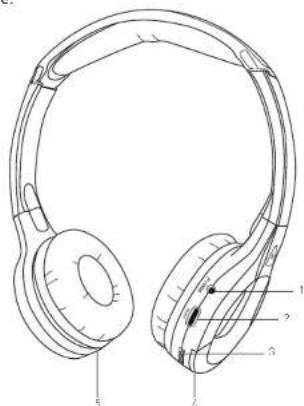
Functions
- LED indicator
- ON/OFF button
- MFB [Multi Function Button]
- Aux input
- Mini USB charge port
text_image
Technical line drawing of a multi-band headphones with numbered labels pointing to different ear regions.Charging the battery
The Arcade has a built-in rechargeable lithium battery. Make sure the Arcade is switched off. Connect one end of the mini USB charge cable to the mini USB charge port I51 on the Arcade and connect the other end to your PC or USB mains adaptor. The battery will start charging.
• It takes up to 4 hours to fully charge the battery
- Whilst charging, the LED indicator |1| will be solid green
- When fully charged, the LED indicator (1) will turn off
Getting started
To turn the Arcade on, press and hold the ON/OFF button [2] for 3 seconds. To turn the Arcade off, press and hold the ON/OFF button [2] for 3 seconds whilst they are on.
Bluetooth Setup
Pairing a Bluetooth device for the first time
With the Arcade turned off:
- Press and hold the ON/OFF button (2) for 5 seconds
- The LED indicator (1) will flash green and red
- Activate the Bluetooth feature on your device and search for Bluetooth devices [check your device's manual if you're unsure how to do this]
- Select 'KSARCADE' from the list of found devices
- If asked for a passcode, enter '0000' and the Arcade will then be connected to your device
- After pairing successfully, the LED indicator [1] will intermittently flash red
- The next time the Arcade is switched on, it will automatically search for and attempt to connect to the last paired device
Note: If your device is not connecting automatically, it's because it is not the last paired device.
Simply delete 'KSARCADE' from the list of Bluetooth devices on your device and re-pair.
Re-pairing or pairing new devices
- Make sure the Bluetooth is turned off on any previously paired devices
- Follow 'Pairing a Bluetooth device' instructions from step 1
Playing audio wirelessly
- Follow the instructions in the 'Pairing a Bluetooth device' section
- Use the controls on your device to select content
- Audio played through the connected Bluetooth device will now be heard through the headphones
- To play or pause the selected track, use the controls on your device or press the MFB [3] inwards
- To skip track, use the controls on your device or push [don't hold] the MFB [3] to the left for previous and to the right for next track
- The volume can be adjusted on both your device and the Arcade. To change the volume on the Arcade, push and hold the MFB (3) to the left to increase the volume and to the right to decrease the volume
Note: Track control functions from the buttons on the Outrun will require your device to have Bluetooth profile AVRCP. Please check your device's manual if unsure.
Using the aux audio input
- With the Arcade turned off, insert the 3.5 mm audio cable into the aux input (4) on the Arcade
- Plug the other end of the aux cable into the audio/headphone output on an MP3 player or other audio source
- Audio played through the connected device will now be heard through the headphones
- The volume can be adjusted on your device only
Note: The controls on the Arcade do not operate in aux mode. There is no need to turn the Arcade headphones on in aux mode as they will operate like normal wired headphones.
PLEASE NOTE:
Your device will have an internal amplifier and if it is playing digital files like MP3s it will also have an integrated DAC (Digital Audio Converter). If you turn up the volume to 100%, your device will be sending distorted signals to the Arcade. To avoid this and to get the best sound quality from the speaker, we recommend that you do not run your device any higher than 95% volume
Call-handling
Answer a call
When a call comes through, the Arcade will play a ringtone. Press the ON/OFF [2] button to answer. During the call you can decrease/increase the volume by pushing (do not hold) the MFB I3I to the right or left respectively.
End call During a call, press the ON/OFF button (2) to end the call.
Redial
To redial the last called number, press and hold the ON/OFF button (2) for 2 seconds (let go when you hear the long beep).
Care for your Arcade
Please DON'T:
- Get the Arcade wet
- Drop the Arcade as this will invalidate your warranty
- Open up the Arcade as there are no user serviceable parts inside
- Expose the Arcade to extreme temperatures or rapid changes of hot to cold or vice versa
Please DO:
- Clean the Arcade with a soft dry cloth and no detergents
Specifications
| Bluetooth V3.0 | |
| Bluetooth range up to 10 m | |
| Aux input 3.5 mm | |
| Battery Li-Po 200 mAh | |
| Frequency response 20 Hz | - 20kHz |
| Play time up to 6 hours | |
| Charging time up to 4 hours | |
Troubleshooting
We hope you've now got all the information you need to get started, but if you're having problems with anything, please feel free to contact us at: support@kitsound.co.uk
We apologise for any inconvenience caused by minor inconsistencies in these instructions, which may occur as a result of product improvement and development.