Metro - Headphones KitSound - Free user manual and instructions
Find the device manual for free Metro KitSound in PDF.


User questions about Metro KitSound
0 question about this device. Answer the ones you know or ask your own.
Ask a new question about this device
Download the instructions for your Headphones in PDF format for free! Find your manual Metro - KitSound and take your electronic device back in hand. On this page are published all the documents necessary for the use of your device. Metro by KitSound.
USER MANUAL Metro KitSound
Warning: To prevent possible hearing damage, do not listen at high volume levels for long periods. For your own safety, please be aware of your surroundings when using these earphones. Not suitable for children.
Your product and batteries must be recycled or disposed of properly. Please contact your local recycling centre for more information on proper disposal. All trademarks are acknowledged as the property of their respective owners. Unless otherwise stated their use does not imply that the trademark owner is affiliated with KitSound or encorsses the products herein.

JB. 55/4-a / KSME / Made in China. © KILSound is a trademark of Kondor Limited, 2017. Christchurch, Dorsel, BH23 4FL, UK

METRO
WIRELESS
HEADPHONES
USER MANUAL
Please read this manual carefully before use.
Box contents
• KS Metro Wireless headphones
- USB charge cable
- 3.5 mm cable
- User manual
Functions
- Multi Function Button (MFB)
- Previous track/Volume—
- Micro USB charging port
4.3.5 mm aux-in - Next track/Volume+
- Microphone
- LED indicator
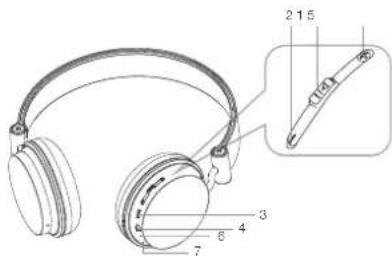
text_image
Technical diagram of a pair of headphones with labeled parts and an inset showing a cable clip assembly.Instructions for use
Charging the battery
- Connect the micro USB end of the charging cable to the Micro USB charging port (3) and the standard USB end to a PC USB port or USB mains charger
- The LED indicator (7) will be red whilst charging and will turn off after around 2 hours. The battery is now fully charged
Note: The first charge may take up to 3 hours to complete.
Battery information
- Your device is powered by a rechargeable battery. Unplug the charger from the electrical plug and the device when not in use
- If left unused, a fully charged battery will lose its charge over time. We recommend a full charge twice a month to ensure battery integrity
- Please do not leave the device in hot or cold places, such as in a closed car in summer or winter conditions as it will reduce the capacity and lifetime of the battery
- Do not dispose of batteries in a fire as they may explode. Batteries may also explode if damaged
Pairing a wireless device
- Press and hold the MFB (1) to turn headphones on. The LED indicator (7) will flash quickly blue when headphones are on
- Turn your iOS, Android, or Windows device's Bluetooth ON and search for new devices (check your device's manual if you're unsure how to do this)
- Select 'METRO' from the list of found devices
- If asked for a passcode, enter '0000' or '1234' and the headphones will then be connected to your device
- After pairing successfully, the LED indicator (7) will flash blue occasionally; you can then answer the phone or listen to your music
- The next time the headphones are switched on, they will automatically search for and attempt to connect to the last paired device
Note: 'Bluetooth' is a trademark of Bluetooth SIG, Inc. This product is in no way affiliated with or endorsed by Bluetooth SIG Inc.
Re-pairing or pairing new devices
- Make sure the wireless connectivity is turned off on any previously paired devices
- Follow the 'Pairing a wireless device' instructions from step 1
Call-handling
| Answer a call Press the MFB | (1) to answer. During the call you can increasethe volume by using the Volume+ (5) and Volume- (2) buttonson the headset |
| End call During a call, press | the MFB (1) to end call |
Playing music
| Play/Pause Press (don't hold) | the MFB (1) to switch between play and pause status |
| Adjusting the volume Hold the Volume+ (5) and Volume- (2) buttons to control the volume. The volume can also be adjusted on your device | |
| Music selection Press (don't hold) | the Previous track (2) or Next track (5) buttons to switch songs |
Wired use
- Ensure that the headphones are switched off during wired use
- Connect the 3.5 mm cable into the 3.5 mm aux-in (4)
- Connect the other end of the 3.5 mm cable into your device
Note: Inserting 3.5 mm cable disables wireless functions.
Care for your Metro
Please DON'T:
- Get the Metro wet
- Drop the Metro as this will invalidate your warranty
- Open up the Metro. There are no user serviceable parts inside
- Expose the Metro to extreme temperatures or rapid changes of hot to cold or vice versa
Please DO:
- Clean the Metro with a soft dry cloth and no detergents
Specifications
| Works with Bluetooth V2.1 | |
| Wireless connectivity distance up to 10 m | |
| Frequency response 20 Hz – 20 kHz | |
| Talk time up to 8 hours | |
| Play time up to 8 hours | |
| Charge time up to 2 hours | |
| Standby time up to 150 hours | |
| Battery type LiPo 250 mAh, rechargeable | |
Troubleshooting
- If you cannot connect the headphones to your device, please try the following:
- Ensure that the headphones are charged, switched on, paired with and connected to your device
- Check the headphones are within 10 metres (30 feet) of your device and that there are no obstructions (such as walls or other electronic devices) between the headphones and the device
- Only one device may be paired to these headphones at a time, so please ensure there are no conflicting wireless devices trying to connect to the headphones
- If the headphones will not switch off, they can be reset back to normal by putting them on charge
- If you receive an intermittent signal, please ensure the headphones are fully charged before continuing use
- If you do not use the headphones for longer than 3 minutes whilst not connected to a device, they will automatically power off to conserve power
We hope you've now got all the information you need to get started, but if you're having problems with anything, please feel free to contact us at: support@kitsound.co.uk
Hersby, Kondor Ltd declares that the radio equipment type, KSME Metro Wireless Headphones, is in compliance with Directive 2014/53/EU. The full text of the EU declaration of conformity is available at the following internet address: http://kondor.co.uk/product-documents.
Please do not attempt to open this product. There are no user serviceable parts inside, in particular if your product has an embedded, non-replaceable battery, do not attempt to access or remove the battery as this may cause personal injury and will damage the product.
Making any attempt to open the product or carry out repair voids any and all warranties.
We apologise for any inconvenience caused by minor inconsistencies in these instructions, which may occur as a result of product improvement and development.