18639 Smart Touch - Cooker Lakeland - Free user manual and instructions
Find the device manual for free 18639 Smart Touch Lakeland in PDF.


| Product Type | Induction Hob |
| Model | 17883 / 18639 |
| Brand | Lakeland |
| Dimensions (approx) | 36 x 28 x 6 cm |
| Weight (approx) | 3 kg |
| Power Supply | 220-240 V, 50/60 Hz |
| Rated Power | 200 - 1300 W |
| Fuse Rating | 3 A (BS1362) |
| Cooking Modes | Hot Pot, Pan Fry, Stir Fry, Simmer, Boil, Keep Warm |
| Temperature Control | Touch dial for power/temperature adjustment (Hot Pot, Pan Fry, Stir Fry modes) |
| Timer | Yes, adjustable up to 120 minutes (default for Simmer mode) |
| Child Safety Lock | Yes, press and hold 2 seconds to activate/deactivate |
| Safety Features | Pan detection, boil dry protection, auto shutoff, overheat protection |
| Pan Compatibility | Induction-suitable pans with flat base, 12-26 cm diameter |
| Display | LED display for mode, power/temperature, timer |
| Cooling Fan | Automatic, runs for 1 minute after use |
| Cleaning | Wipe with damp cloth; do not use abrasives or immerse in water |
| Storage | Store with loosely coiled cable; keep away from walls (min 10 cm clearance) |
| Spare Parts / Repair | Contact Lakeland customer care at 015394 88100 for service |
| Warranty | Standard Lakeland warranty; refer to manual |
Frequently Asked Questions - 18639 Smart Touch Lakeland
User questions about 18639 Smart Touch Lakeland
0 question about this device. Answer the ones you know or ask your own.
Ask a new question about this device
Download the instructions for your Cooker in PDF format for free! Find your manual 18639 Smart Touch - Lakeland and take your electronic device back in hand. On this page are published all the documents necessary for the use of your device. 18639 Smart Touch by Lakeland.
USER MANUAL 18639 Smart Touch Lakeland
Smart Touch Induction Hob
MODEL 17883/18639
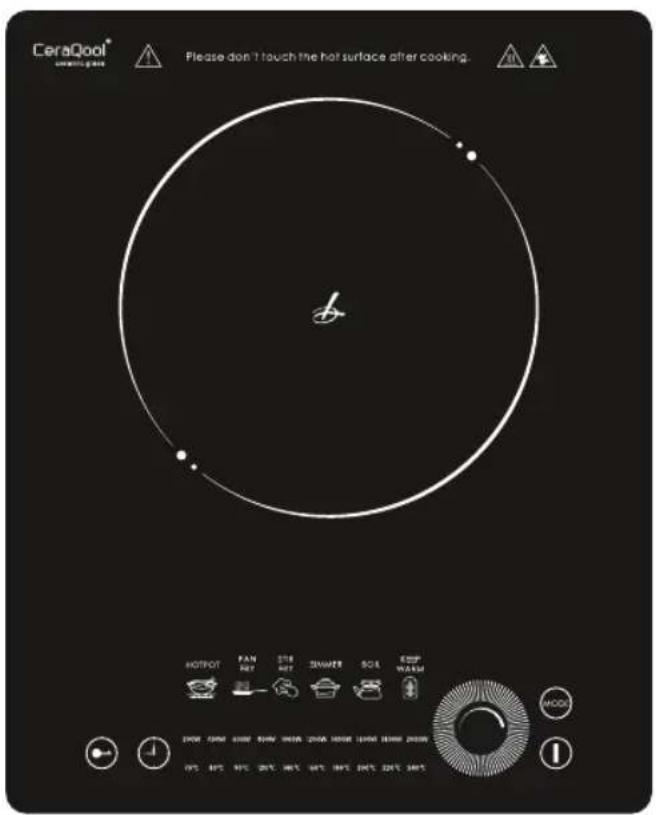
LAKELAND SMART TOUCH INDUCTION HOB
Thank you for choosing this Lakeland Smart Touch Induction Hob.
Please take a little time to read this booklet before you use your induction hob, and then keep it in a safe place for future reference.
We are sure you will be delighted with the performance and will enjoy many years of use from your hob. This lightweight, slim hob is easy to store in your kitchen, it wipes clean easily, heats quickly, makes cooking simple, quick and is very energy efficient.
An award winning family-owned business, here at Lakeland we still have the same values of excellent quality, value for money and exceptional customer care as we did when we first set up the company in the 1960s. Our products are carefully selected and rigorously tested to meet our high standards, so you can be assured that any product you purchase will be easy-to-use and highly durable.
CONTENTS
Product Features 4
Safety Cautions 5
Using the Induction Hob and its Features 7
Troubleshooting 9
Hints and tips 10
Care and cleaning 10
Recycling your electricals 10
Electrical connections 1.1
PRODUCT FEATURES
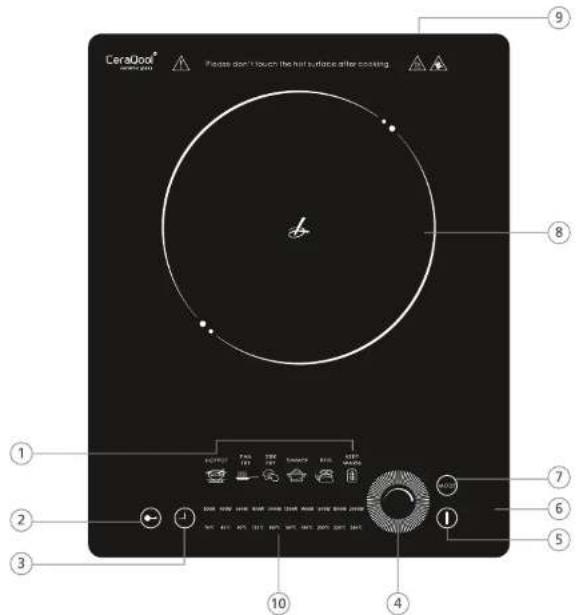
- LED Display to show selected mode
- Child Safety Lock
- Timer button
- Heat control dial
- On/Off Switch
- Control panel
- MODE button
- Cooking hotplate
- Air cooling vents
- Power / temperature display
SAFETY CAUTIONS
Carefully read all the instructions before using the appliance and keep in a safe place for future reference. Always follow these safety cautions when using the appliance to avoid personal injury or damage to the appliance. This appliance should be used only as described in this instruction book.
• Make sure your electricity supply matches the voltage shown on the appliance.
- Ensure all packaging materials and any promotional labels or stickers are removed from the appliance before the first use.
• Always inspect the appliance before use for noticeable signs of damage. Do not use the appliance if it is damaged or has been dropped. In the event of damage, or if the appliance develops a fault contact the Lakeland customer care team on 015394 88100.
- Do not use this appliance if the lead is damaged. If the lead is damaged it must be replaced with a special lead contact the Lakeland customer care team on 015394 88100.
• Always use the appliance on a dry, level, heat resistant surface.
- Unplug from the mains when not in use and before cleaning. Allow to cool before cleaning the appliance. To disconnect, turn the socket to "off" and remove the plug from the mains socket.
- This appliance is not intended for use by persons (including children) with reduced physical, sensory or mental capabilities, or lack of experience and knowledge, unless they have been given supervision or instruction concerning the use of the appliance by a person responsible for their safety.
• Children should always be supervised to ensure they do not play with this product.
- Do not use any accessories or attachments with this appliance other than those recommended by Lakeland.
- To protect against fire, electric shock or personal injury, do not immerse cord, plug or unit in water or other liquids.
- Do not leave the lead hanging over the edge of a kitchen table or worktop. Avoid contact between the lead and hot surfaces.
- For indoor use only.
- For domestic use only.
- This appliance should be used for preparation of food as described within the instructions for use that accompany it.
• Always ensure that your hands are dry before removing the plug from the mains socket. Never pull the plug out of the mains socket by its lead.
• To avoid injury or possible fire, do not cover the appliance when in use.
- Do not connect this appliance to an external timer or remote control system.
- An extension cable may be used with care. The electrical rating of the cable should be at least as great as the appliance. Do not allow the cable to hang over the edge of the worktop or touch any hot surfaces.
- This appliance complies with the basic requirements of Directives 04/108/EC (Electromagnetic Compatibility) and 06/95/EC (Safety of Domestic Electrical Appliances).
- WARNING; A cut off plug inserted into a 13amp socket is a serious safety (shock) hazard. Ensure the cut off plug is disposed of safely.
- The hob surfaces can be very hot when the appliance is in use. DO NOT TOUCH hot surfaces as possible injury could occur. Allow the hob to cool completely before handling or moving this appliance.
- CAULIN; the plastic bags used to wrap this appliance or the packaging may be dangerous. To avoid risk of suffocation, keep these bags out of reach of babies and children. These bags are not toys.
- The induction hob should be sited at least 10cm away from a wall, so the airflow through the hob is not compromised. Do not insert anything in the air outlets.
- Do not place metal or magnetic articles such as credit cards, computer discs, etc. which are affected by magnetic fields on the hob.
- The induction hob heats very rapidly, so place the food into the pan first before turning the hob on. Heating an empty pan can discolour the metal and may warp the base.
- Place all pans centrally on the glass. Do not use a pan with a base larger than 26cm as the heat created may cause the plastic casings to deform.
- Do not use a heat diffuser or place any other material between the hob and the pan when in use.
- If the glass hob surface is cracked, turn the power off immediately and do not use.
- The induction hob has fully integrated safety features including pan detection, boil dry protection and auto shutoff.
Note: Customers with implanted cardiac pacemakers or other electronic medical implants may be advised by their doctors to avoid proximity to induction cooking surfaces and other sources of magnetic fields. We therefore do not recommend the Lakeland Induction Hob for sale to these customers.
USING THE INDUCTION HOB AND ITS FEATURES
Induction cooking uses an electromagnetic coil to convert energy into heat. When the hob is turned on, and when an induction suitable pan is in place on the hob, a magnetic field is generated which heats the pan and therefore the food inside it.
Only use flat-bottomed pans that are induction suitable with this hob. If you are unsure whether the cookware you have is suitable for use with this hob test by holding a magnet to the base of the pan. If you find that the magnet sticks, the pan can be used on the hob. If the cookware is unsuitable for use, the hob will not detect the pan.
The induction hob is suitable for pans with a base diameter of 12cm–26cm. Metal cooking utensils are not recommended since they can be heated through the induction hob if left in the pan during cooking.
Turning the hob on and off
Place the pan with food on the hob. Turn the hob on by pressing and holding the on/off button. The six red mode lights will blink on and off.
To turn off the hob press the on/off switch. The fan will run automatically for a minute to cool the hob.
Selecting the mode and changing the power/temperature
Press the MODE button until the LED below the mode you require is illuminated on the display. The unit will make a small sound as the electromagnetic coil is activated and the magnet 'grips' the pan and starts to heat.
The power/temperature can only be changed on the Hot Pot, Pan Fry and Stir Fry modes. To change the power/temperature, sweep your finger around the heat control dial. Red indicator lights will highlight the power and equivalent temperature on the display.
On the other modes the power/temperature is pre-set.
See the table of Cooking Modes on page 8.
Timer
This induction hob has a timer function that allows you to cook for a certain amount of time before switching off, this prevents food boiling dry or burning.
To set the timer, set your dish to cook on the desired mode setting. Then press the timer button, the time is shown in minutes, and the display will show 000 to indicate that no time has been set. Sweep your finger around the heat control dial to set your desired length of cooking time. On Simmer mode the timer default setting is 120 minutes.
The hob will wait 6 seconds after you have set the time and then start heating. The display will then count down the time left to cook. At the end of the timed session, 'End' will be displayed when the cycle has finished. The hob will turn off and the fan will run for a minute to cool the hob. During timer cooking on the Hot Pot, Pan Fry and Stir Fry modes you can adjust the heat up or down using the heat control dial.
To stop the timer, turn the hob off, then back on again and it will reset to 000.
See the table of Cooking Modes on page 8.
Child safety lock
To turn on the lock, when you've selected the mode and power/temperature, press the Child safety lock for 2 seconds. A red light above the button will indicate the lock is on. When the lock is on, only the On/Off switch can be used, all the other buttons will be locked. Press the child lock button again for 2 seconds to unlock the hob.
COOKING MODES
| MODE POWER / | TEMPERATURE TIMER | |
| Hot Pot | The power / temperature can be adjusted manually, when the power / temperature is too high the hob will automatically switch off. | The timer is 'off' by default, and can be set manually. |
| Pan Fry | The power / temperature can be adjusted manually. | The timer is 'off' by default, and can be set manually. |
| Stir Fry | The power / temperature can be adjusted manually, when the power / temperature is too high, the hob will NOT switch off, it automatically regulates the temperature. | The timer is 'off' by default, and can be set manually. |
| Simmer | The power / temperature cannot be adjusted.The hob is programmed to first use medium-high power to reach boiling point, then automatically decreases for simmering. The simmering time is the remaining lime shown on the timer."END" will be displayed when the cycle is finished. | The timer is 'on' by default, automatically set to 120 minutes. You can adjust this timing by pressing the timer button and sweeping your finger around the heat control dial to set your cooking time. |
| Boil | The power / temperature cannot be adjusted. The hob is programmed to boil water as quickly as possible. The unit senses the rising temperature, and will let the water boil for a while longer, then the hob will automatically turn off. It will show "END" on the display. | The timer is 'off by default', and can be set manually. |
| Keep Warm | The power / temperature cannot be adjusted. The hob will keep food warm at about 60c. | The timer is 'off by default', and can be set manually. |
TROUBLESHOOTING
Following are some common problems that can occur when using the Induction Hob. Please review the problems, their possible cause and any corrective action that should be taken to ensure successful cooking and results.
| Problem Possible Cause Solution | ||
| The hob does not recognise that I have placed a pan on the hob. | The pan being used is not compatible with this hob. | Check that a magnet will stick to base of pan, indicating it would be suitable for this hob. |
| My food keeps burning. This hob | is very efficient, and so often cooks faster at a lower temperature than electric or gas hobs. | Reduce the cooking time and the cooking temperature from what you would use on other hobs. |
| My food started to heat then the hob turned off. | It is likely your pan has turned itself off as it spilled over. | Lift pan, dry hob and return pan to heat then turn on again. |
| The hob stops cooking and displays 'E1' or 'E2'. | The power source voltage is too high or too low. | Turn off the cooker and check your power supply is compatible with the voltage on the rating label. |
| The hob stops cooking and displays 'E3' or 'E9'. | Your pan is overheating or dry heating. | Remove the pan and allow it to cool. Add oil or water to the pan, wait until the hob cools down and resume cooking. |
| The hob stops cooking and displays 'E4' or 'E10'. | The fan air vent may be blocked, the fan has stopped running, or it is too hot in the room you are using the hob in. | Switch the hob off and make sure there is nothing blocking the air vent. Remove any items from around the hob which may be emitting heat. Contact the Lakeland customer care team on 015394 88100 if the problem continues. |
| The hob stops cooking and displays 'E5', 'E6', 'E12' or 'E13'. | There is a fault with the temperature sensor. | Contact the Lakeland customer care team on 015394 88100. |
HINTS AND TIPS
It will take you a few times cooking with your induction hob to understand how quick and efficient it is and to adapt your cooking times accordingly.
- The first few times you use this hob, it may seem very fast, don't use the timer, stay with your food so you can alter heat if required.
- Because the hob is so efficient, you may want to start with a lower cooking temperature than you usually would.
- Even though the hob may not look hot, it could be very warm so do not touch until completely cool after cooking.
CARE AND CLEANING
- Unplug the Induction Hob and allow to cool completely before cleaning.
• To clean the unit and control panel, wipe with a clean, damp cloth and dry before storing. - Do not use abrasive cleaners, steel wool or abrasive materials or cleansers. You may use specialist glass hob cleaner to wipe surface if required, but always try on a small area before first use.
• Periodically check all parts before use - Never immerse the unit in water or any other liquid.
- Store the Induction Hob with the power cable loosely coiled. Never wrap it tightly around the base of the hob unit.
RECYCLING YOUR ELECTRICALS
Along with many other high street retailers, Lakeland has joined a scheme whereby customers can take their unwanted electricals to recycling points set up around the country. Visit www.recycle-more.co.uk to find your nearest recycling point.

ELECTRICAL CONNECTIONS
THIS APPLIANCE MUST BE EARTHED
This appliance is fitted with a fused three-pin plug to BS1363 which is suitable for use in all homes fitted with sockets to current specifications. If the fitted plug is not suitable for your socket outlets, it should be cut off and carefully disposed of. To avoid an electric shock, do not insert the discarded plug into a socket.
FITTING A NEW PLUG
If for any reason you need to fit a new plug, the flexible mains lead must be connected as shown here. The wires in the mains lead fitted to this appliance are coloured in accordance with the following code:
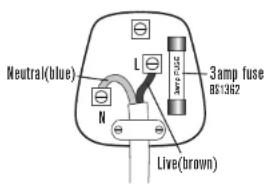
Connect BLUE to Neutral (N)
Connect BROWN to Live (L)
3 amp fuse to be used
If the colours of the wires in the mains lead of this appliance do not correspond with the coloured markings identifying the terminals in your plug, proceed as follows. The wire which is coloured green and yellow MUST be connected to the terminal which is marked with the letter E (Earth) or coloured green. The wire which is coloured blue MUST be connected to the terminal which is marked with the letter N (Neutral) or coloured black. The wire which is coloured brown MUST be connected to the terminal which is marked with the letter L (Live) or coloured red.
Before refitting the plug cover, check that there are no cut or stray strands of wire inside the plug. Use a 3 amp BS1362 fuse. Only BSI or ASTA approved fuses should be used. If you are at all unsure which plug or fuse to use, always refer to a qualified electrician.
Note: after replacing or changing a fuse on a moulded plug which has a fuse cover, the cover must be refitted to the plug; the appliance must not be used without a fuse cover. If lost, replacement fuse covers can be obtained from an electrical shop. This appliance complies with the following EC Directives: 2006/95/EC (Low Voltage Directive) and 2004/108/EC (EMC Directive).
LAKELAND
GEBRAUCHSANWEISUNG
Smart Touch Induktionskochfeld
MODELL 17883/18639
LAKELAND SMART TOUCH INDUKTIONSKOCHFELD
- Smart Touch Induction Hob
- LAKELAND SMART TOUCH INDUCTION HOB
- CONTENTS
- SAFETY CAUTIONS
- USING THE INDUCTION HOB AND ITS FEATURES
- Turning the hob on and off
- Selecting the mode and changing the power/temperature
- Timer
- Child safety lock
- TROUBLESHOOTING
- HINTS AND TIPS
- CARE AND CLEANING
- RECYCLING YOUR ELECTRICALS
- ELECTRICAL CONNECTIONS
- THIS APPLIANCE MUST BE EARTHED
- FITTING A NEW PLUG
- GEBRAUCHSANWEISUNG
- Smart Touch Induktionskochfeld
- LAKELAND SMART TOUCH INDUKTIONSKOCHFELD
Brand : Lakeland
Model : 18639 Smart Touch
Category : Cooker