SPK207 - Loudspeaker Manta - Free user manual and instructions
Find the device manual for free SPK207 Manta in PDF.


| Product Type | Bluetooth Speaker |
| Model | SPK207 |
| Brand | Manta |
| Color | Black |
| Power Supply | AC 230V~ 50Hz via DC adapter (15V 3000mA) or internal rechargeable battery |
| Bluetooth Version | Bluetooth (compatible with most devices) |
| Bluetooth Range | Up to 10 meters |
| FM Radio | Yes, with auto search and storage |
| USB Port | Yes, for MP3 playback |
| SD Card Slot | Yes, for MP3 playback |
| RCA Audio Input | Yes, for external devices |
| Display | LCD display |
| Controls | Standby/Mode, PREV, PLAY/PAUSE, NEXT, RESET, BASS/TREBLE, Volume buttons |
| Remote Control | Included (Power, Mute, Mode, Bass/Treble, Prev/Next, Vol+/-, Sleep, Reset, Pair, FM, Search, Seek, +1/+10, Repeat) |
| Speaker Output Power | Approximately 15W RMS |
| Frequency Response | 80Hz - 20kHz |
| Impedance | 4 ohms |
| Dimensions (approx.) | 25 cm (height) x 12 cm (diameter) |
| Weight (approx.) | 1.5 kg |
| Battery | Internal rechargeable Li-ion battery |
| Battery Charging Time | Approximately 4-5 hours |
| Battery Playback Time | Approximately 4-6 hours (depending on volume) |
| Included Accessories | AC-DC adapter, remote control, user manual |
| Safety | Overheat protection, do not expose to water |
| Disposal | WEEE compliant, recycle responsibly |
Frequently Asked Questions - SPK207 Manta
User questions about SPK207 Manta
0 question about this device. Answer the ones you know or ask your own.
Ask a new question about this device
Download the instructions for your Loudspeaker in PDF format for free! Find your manual SPK207 - Manta and take your electronic device back in hand. On this page are published all the documents necessary for the use of your device. SPK207 by Manta.
USER MANUAL SPK207 Manta
natural_image
Exterior view of a black cylindrical electronic device with a circular top and speaker grille (no visible text or symbols)Instrukcja obsługi
User's Manual
Bedienungsanleitung
Manual de usuario
Istruzioni d'uso
Návod k obsluze
natural_image
Symbol of a trash bin with crossed lines indicating no waste or discharge, and a solid black rectangle below (no text or labels)IMPORT ANT INSTRUCTIONS
When used in the directed manner, this unit has been designed and manufactured to ensure your personal safety. However, improper use can result in potential electrical shock or fire hazards. Please read all safety and operating instructions carefully before installation and use, and keep these instructions handy for future reference. Take special note of all warnings listed in these instructions and on the unit.
- Read these instructions – All the safety and operating instructions should be read before the appliance is operated.
- Keep these instructions – The safety and operating instructions should be kept for future reference.
- Heed all warnings – All warnings on the appliance and in the operating instructions should be adhered to.
- Follow all instructions – All operation and use instructions should be followed.
- Do not use this apparatus near water – The appliance should not be used near water; for example, near a bath tub, washbowl, kitchen sink, laundry tub, in a wet basement, or near a swimming pool.
- Clean only with dry cloth – The appliance should be cleaned only as recommended by the manufacturer.
- Do not block any ventilation openings. Install in accordance with the manufacturer's instructions. The appliance should be situated so that its location or position does not interfere with its proper ventilation. For example, the appliance should not be situated on a bed, sofa, rug, or similar surface that may block the ventilation openings; or placed in a built-in installation, such as a bookcase or cabinet that may impede the ow of air through the ventilation openings.
- Do not install near any heat sources such as radiators, heat registers, stoves, or other apparatus (including amplifiers) that produce heat.
- AC adaptor is used as disconnect device and it should remain readily operable during intended use. In order to disconnect the apparatus from the mains completely, the AC adaptor should be disconnected from the mains socket outlet completely.
- Only use attachments / accessories specied by the manufacturer.
- Use only with a cart, stand, tripod, bracket, or table specied by the manufacturer, or sold with the apparatus. When a cart is used, use caution when moving the cart/apparatus combination to avoid injury from tip-over.
- Unplug this apparatus during lightning storms or when unused for long periods of time.
- Refer all servicing to qualified service personnel. Servicing is required when the apparatus has been damaged in any way, such as power-supply cord or plug is damaged, liquid has been spilled or objects have fallen into the apparatus, the apparatus has been exposed to rain or moisture, does not operate normally, or has been dropped.
- This appliance shall not be exposed to dripping or splashing water and that no object filled with liquids such as vases shall be placed on the apparatus.
- Power Sources – The appliance should be connected to a power supply only of the type described in the operating instructions or as marked on the appliance. Do not overload wall outlet.

- Danger of explosion if battery is incorrectly replaced. Replace only with the same or equivalent type.
- There is a high energy rechargeable battery inside the speaker box, do not throw it into re to avoid danger of explosion.
- Do not charge the internal rechargeable battery longer than specified to prevent danger of fire. Overcharging rechargeable batteries may shorten their life span.
- Do not attempt to dismantle, open or repair this product yourself. If a fault occurs, seek advice from your local qualified service technician or contact the distributor via the telephone number at the back of this instruction manual.
- Caution marking and nameplate are located on back of product.
IMPORT ANT NOTES
Avoid installing the unit in locations described below:
- Places exposed to direct sunlight or close to heat radiating appliances such as electric heaters.
● Dusty, humid or moist places. - Places subject to constant vibration.
PROTECT YOUR FURNITURE
This model is equipped with non-skid rubber 'feet' to prevent the product from moving when you operate the controls. These 'feet' are made from non-migrating rubber material specially formulated to avoid leaving any marks or stains on your furniture. However certain types of oil based furniture polishes, wood preservatives, or cleaning sprays may cause the rubber 'feet' to soon, and leave marks or a rubber residue on the furniture. To prevent any damage to your furniture we strongly recommend that you purchase small self-adhesive felt pads, available at hardware stores and home improvement centers everywhere, and apply these pads to the bottom of the rubber 'feet' before you place the product on ne wooden furniture.
LOCATION OF CONTROLS
MAIN UNIT
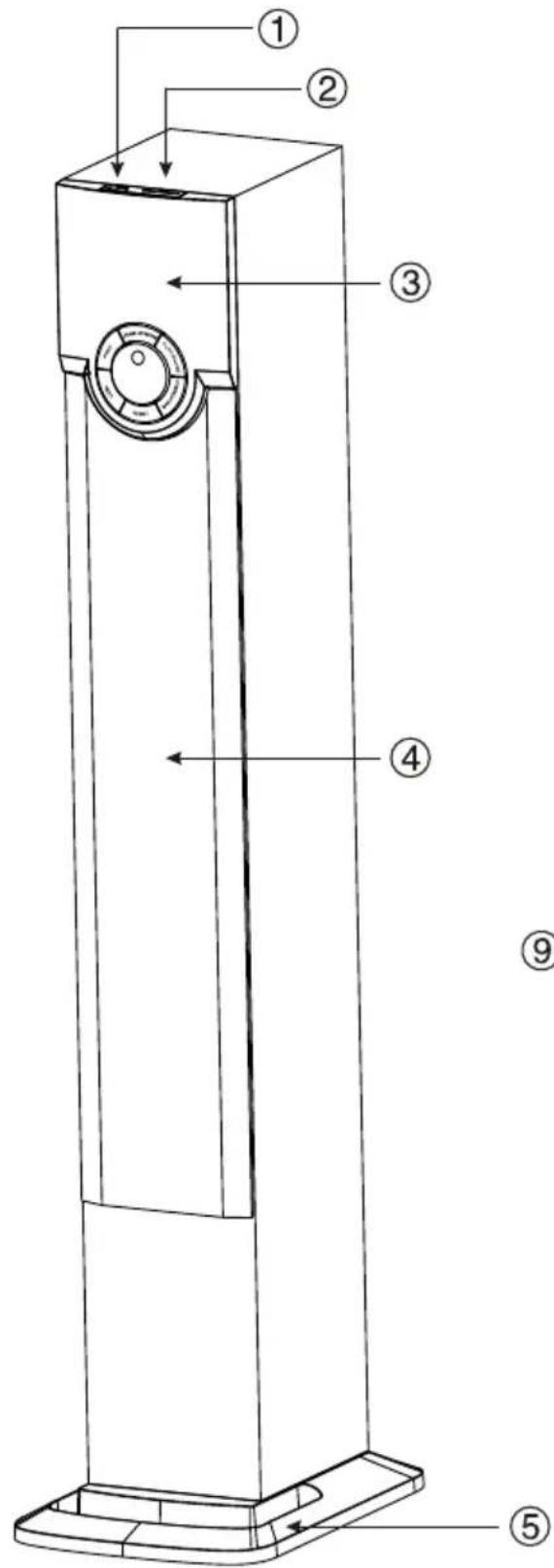


- USB Port
- SD Port
- LCD display
- Frabic cover .
- Plastic base
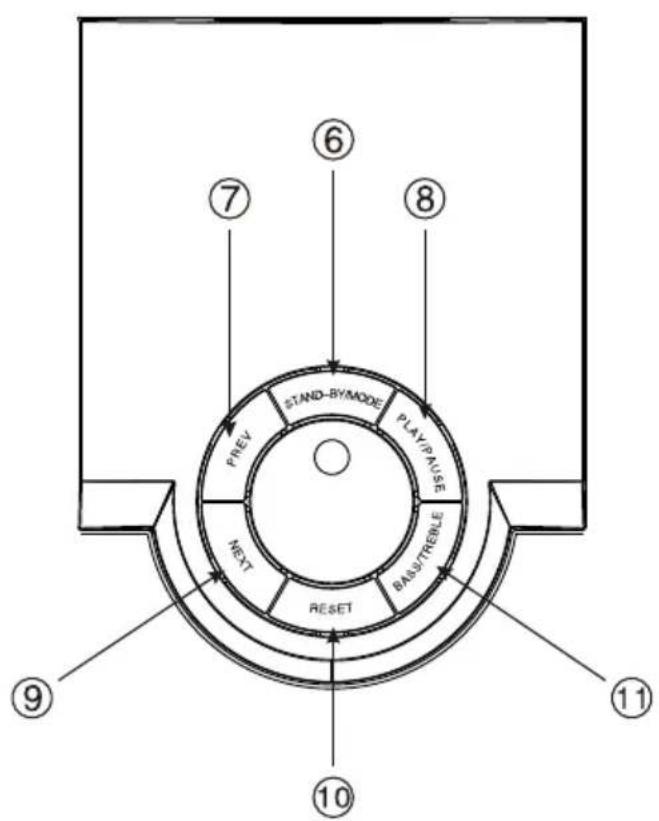
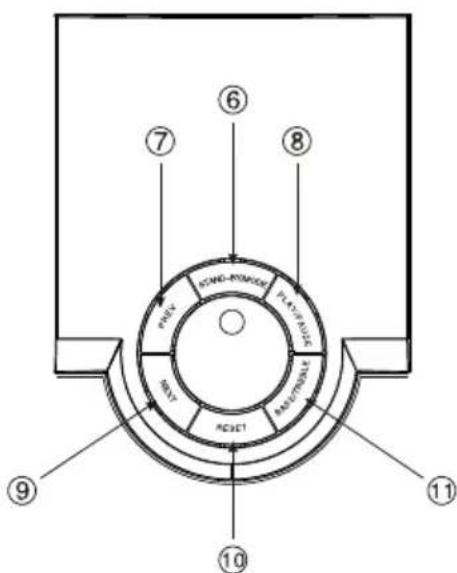
- Standby/Mode
- PREV
- PLAY/PAUSE
- NEXT
- RESET
- BASS/TREBLE
- VOLUME BUTTON.
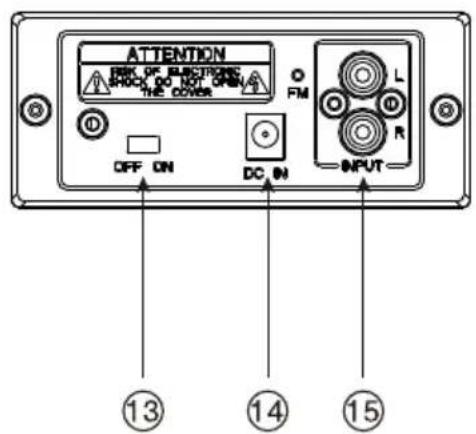
- Power on/off switch
- DC IN jack
- RCA jack
Bluetooth blue Ambient Light Indicatio
| Descripon | LED Blue Light Status |
| RCA/USB/SD | Solid on |
| Bluetooth mode and ready to link | Flashing |
| Paired | Solid on |
| Paired device is out of range or turned off | Flashing |
POWER SOURCE
This unit can be operated using either AC power
AC POWER OPERATION
An AC-DC Adaptor with the output of 15V DC 3000mA (included) is required for operating the main unit when using AC power mode. To connect the AC-DC Adaptor to the unit and 230V\~ 50Hz AC Outlet:
1.) Firmly and securely insert the DC plug of the adaptor into the DC Jack on the back of the unit.
2.) Plug the AC Adaptor plug into the 230V AC outlet. Connecting this system to any other power source may cause damage to the system.
NOTE: These speakers are not magnetically shielded and may cause color distortion on the screen of some TVs or video monitors. To avoid this, you may need to move the speakers further away from the TV or monitor if unnatural color shis or image distortion occurs.
Power on/off the unit
When using either the AC adaptor, rst slide the main power switch on the back of the unit to the ON position prior to use. The display backlight turns on and the icon shows on the display.
- To place the unit power on or into Standby mode, press and hold the FUNCTION/① button.
- To switch off the unit, slide the main power switch to OFF position.
LISTENING TO THE USB/SD
- Press and hold the "Stand-by/Mode" button to turn on the unit.
- Tap the "Stand-by/Mode" button to select USB/SD mode, the 'USB/SD' icon on display.
- Put USB or SD device into the USB/SD port, To select any track please tap the "PREV" or "NEXT" button.
If the SPK207 has never been paired with a Bluetooth device before, you will need to follow the pairing instructions below to link the SPK207 with your Bluetooth device.
- Turn the unit on, tap the "Stand-by/Mode" button to select Bluetooth mode, the blue led icon ashing will show on the display. The SPK207 is now ready to pair (link) with your Bluetooth device.
- Turn on the Bluetooth feature of your cell phone and enable the search or scan feature to nd the SPK207
- Select "SPK207" from the device list when it appears on your device screen. If required, enter the pass code "0000" to pair (link) the unit with your device.
- After successfully pairing (linking) the Bluetooth enable device, the blue ambient light will stop ashing and light steadily and a short beep will be heard. You can now play music from your cell phone or Bluetooth device wirelessly to the SPK207.
- If you want to connect the SPK207 to another cell phone after pairing successfully, press and hold the' /PAIRING' button for 2 seconds, the Blue LED backlight will change to ashing again, repeat step 2-4 above.
Notes: 1.) The SPK207 may automatically reconnected to a previously linked device that is in range, so you may need to turn off the Bluetooth on any paired device rst before going through the above steps
FM Radio
Under the FM mode, Press NEXT 1 seconds to search and store the channels automatically.
Under the FM mode, Press PREV 1 seconds to Transfer Previous Stored channels automatically
RCA INPUT
This unit provides an auxiliary audio signal input jack for connecting external audio device like MP3 players, CD players and listen to your external source through the speakers of this system.
- Use an audio cable (not included) with one 3.5 mm stereo plug on each end of the cable.
- Plug one end into the RCA jack on the main unit and plug the other end of the cable into the Line-out or Headphone Jack of your external audio device.
- Turn ON the unit and your external audio device.
- To select auxiliary audio input, tap the FUNCTION/ ^① button to select RCA mode. "AUX" icon appears on display.
- The volume level can now be controlled through the main unit. Operate all other functions on the auxiliary device as usual.
Note:
If you connect this unit to the line-Out Jack of your external device, you only need to adjust the volume control of this unit. If you connect the Headphone Jack of your external device then you may need to adjust both volume controls of your external device and this unit to obtain the desirable volume setting.
Press and hold the “Stand-by/Mode” button to turn off the unit when you have nished listening. Don't forget to switch off the power of your external device as well.
Note:
- Some smart phones and portable devices use proprietary USB connections and circuitry, so they may not charge when plugged into the USB port. Please refer to your device user manual before you aempt to charge them.
- It is normal if the unit gets warm while the USB port is in use and charging your
smart phone or portable device.
- Do not charge your smart phone over 12 hours continuously. Disconnect your smart phone or other portable device from the USB cord once it is fully charged.
Remote Control Key function
Power : Power switch button
MUTE: Press to keep the system quite
MODE: Press to change the volume for Bass and Treble. USB/SD/AUX/BT/FM
BASS-:bass-button BASS+:bass+button Treble-:treble-button Treble : treble+button
Prev:
- It's next song when it is in the state of USB/SD/BT.
- It's next channel or fine-tuning to next channel
Stop/Play:
- In the state of USB/SD/BT, press PLAY/PAUSE means pause, press PLAY/PAUSE once again means revert to play.
- In the state of FM, long press PLAY/PAUSE for 2Seconds means FM automatic channel searching and locking, press PLAY/PAUSE once again means stopping automatic channel searching, use with LAST SONG/NEXT SONG for UP/DOWN channel seraching of automatic channel searching and locking
Next:
- It's next song when it is in the state of USB/SD/BT.
- It's next channel or fine-tuning to next channel
Vol-:Press to decrease the volume Vol+:Press to increase the volume
SLEEP: Press to set desired play time 30-60-90-120 Min-Sleep off
RESET: Press to reset the sound system.
PAIR: PAIR Button
FM: It is for FM playing
SEARCH: Under the FM mode, Press and Hold this key 3 seconds to search and store the channels automatically.
SEEK+: Under the FM mode, Press to seek the next station manually. Press and Hold to search and store the next station automatically
SEEK-: Under the FM mode, Press to seek the previous station manually. Press and Hold to search and store the previous station automatically
+1: Selections function; It's effective at the time of playing USB/SD, Single selections, press +1 ech time, the song will be changed in 0\~9 digital order
+10: Selections function; It's effective at the time of playing USB/SD, Decade selections, press +10 ech time, the song will be changed in 10\~90 digital order.
ARROUND: Press to repeat one song. ONE will show on the display
natural_image
Symbol of a trash bin with crossed lines indicating no waste or restriction, and a solid black rectangle below (no text or labels)Correct Disposal of this product.
This marking indicates that this product should not be disposed with other household wastes throughout the EU. To prevent possible harm to the environment or human health from uncontrolled waste disposal, recycle it responsibly to promote the sustainable reuse of material resources. To return your used device, please use the return and collecon systems or contact the retailer where the product was purchased. They can take this product for environmental safe recycling.
Note!
Product design and Technical parameters may be change without noce. This mainly concerns parameters technical, software and user manual present. User's Manual is a general orientation on service product. Manufacturer and distributor do not assume any responsibility as compensation for any inaccuracies errors in the descripons appearing in this user manual.

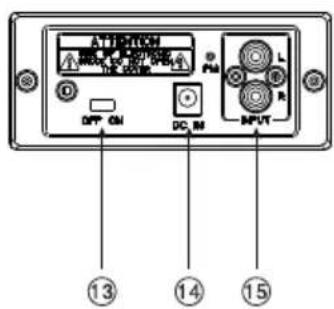
- USB Port
- SD Port
- LCD Display
- Hülle
- Kunststoffbasis
- Standby/Modus
- PREV (VORHERIGER)
- PLAY/PAUSE (WIEDERGABE/PAUSE)
- NEXT (NÄCHSTER)
- RESET (NEUSTART)
- BASS/TREBLE (BÄSSE/HOCHTÖNE)
- VOLUME BUTTON (LAUTSTÄRKEREGLER)
- Power on/off switch (Schalter fürs Anschalten/Ausschalten)
- DC IN Interface
- RCA Interface
ANSCHAL TEN/ABSCHAL TEN DER VERSORGUNG

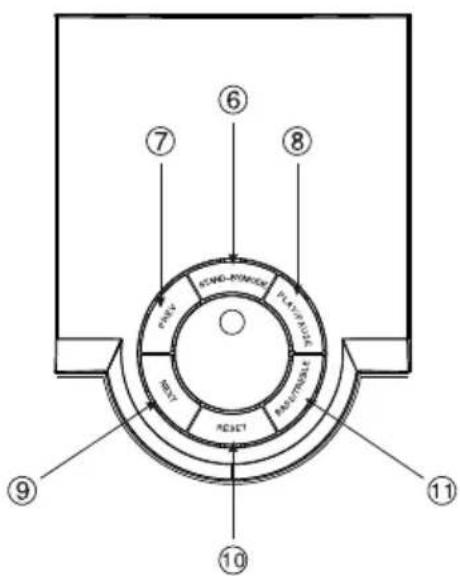
- Puerto USB
- Slot SD
- Pantalla LCD
- Funda
- Soporte de plástico
- Botón Standby/Modo
- PREV (ANTERIOR)
- PLAY/PAUSE (REPRODUCIR/PAUSA)
- NEXT (SIGUIENTE)
- RESET (RESETEAR)
- BASS/TREBLE (TONOS BAJOS / ALTOS)
- VOLUME BUTTON (REGULADOR DEL VOLUMEN)
- Power on/off switch (conmutador encendido / apagado)
- Conector DC IN
- Conector RCA


natural_image
Abstract black-and-white circular logo with interlocking curved shapes (no text or symbols)MANTA
INFOLINIA SERWISOWA
from Monday to Friday. 9.00-17.00
The manufacturer reserves the right to make changes to product specificaons without noce.
Home: www.manta.com.pl
Home support: www.manta.info.pl

Made in P.R.C.
FOR MANTA EUROPE
- IMPORT ANT INSTRUCTIONS
- IMPORT ANT NOTES
- PROTECT YOUR FURNITURE
- LOCATION OF CONTROLS
- POWER SOURCE
- AC POWER OPERATION
- Power on/off the unit
- LISTENING TO THE USB/SD
- FM Radio
- RCA INPUT
- Note:
- Remote Control Key function
- Prev:
- Stop/Play:
- Next:
- Correct Disposal of this product.
- Note!
- ANSCHAL TEN/ABSCHAL TEN DER VERSORGUNG
- MANTA
- INFOLINIA SERWISOWA
Brand : Manta
Model : SPK207
Category : Loudspeaker