BMHX40 - Headphones Exibel - Free user manual and instructions
Find the device manual for free BMHX40 Exibel in PDF.


| Product Type | Wireless Headset |
| Brand | Exibel |
| Model | BMHX40 |
| Art. No. | 38-5866, 38-5867 |
| Bluetooth Version | V2.1 + EDR |
| Bluetooth Profiles | Handsfree 1.5, Headset 1.1, A2DP 1.2 (Class 2) |
| Wireless Range | Up to 10 m |
| Standby Time | 100 hours |
| Talk Time | 10 hours |
| Music Playback Time | 6–8 hours |
| Charging Time | 5 hours (first charge 7 hours) |
| Battery Type | Rechargeable (USB) |
| Weight | 115 g |
| Controls | Multifunction button (power/Bluetooth), Play/Pause, Previous/Next Track, Volume +/-, Call Management |
| Microphone | Built-in |
| Audio Input | Bluetooth or 3.5 mm audio cable |
| Headband Adjustment | Adjustable |
| Auto Power Off | After 5 minutes if no signal |
| LED Indicators | Red (charging), Blue (Bluetooth pairing and connection) |
| Package Contents | Headset, USB charger lead, audio cable, instruction manual |
| Safety Features | Hearing protection advice, volume management, automatic shutdown |
| Care | Clean with lightly moistened cloth, mild agents only |
Frequently Asked Questions - BMHX40 Exibel
User questions about BMHX40 Exibel
0 question about this device. Answer the ones you know or ask your own.
Ask a new question about this device
Download the instructions for your Headphones in PDF format for free! Find your manual BMHX40 - Exibel and take your electronic device back in hand. On this page are published all the documents necessary for the use of your device. BMHX40 by Exibel.
USER MANUAL BMHX40 Exibel
Art.no. Model
38-5866 BMHX40
38-5867 BMHX40
English 2
Svenska 6
Norsk 10
Suomi 14
Deutsch 18
Wireless Headset
Art.no 38-5866, 38-5867 Model BMHX40
Please read the entire instruction manual before using the product and save it for future reference. We reserve the right for any errors in text or images and any necessary changes made to technical data. If you have any questions regarding technical problems please contact our Customer Services.
Safety
- Check your local regulations regarding mobile phone and handsfree use in combination with driving or in other situations which may require your extra attention.
- Shut off both the headset and mobile phone in areas where you are required to do so, such as in hospitals, aeroplanes or in areas where there is the risk of explosion.
- Protect the headset from extreme heat, cold and moisture.
- Never subject the headset to strong vibrations, knocks or blows.
- Do not dismantle the headset or its accessories. This product contains no parts that you can repair yourself.
- Only use the supplied charge cable.
Protecting your hearing
- Long-term exposure to high volume can cause permanent hearing loss.
- Do not wear the headset when first turning it on as it can produce a loud sharp popping noise when turned on. • Make it a habit to turn down the headset volume before turning it off. • Take off the headset when turning the connected audio source (stereo, mobile, computer, etc.) on/off or when plugging into or unplugging from these sources.
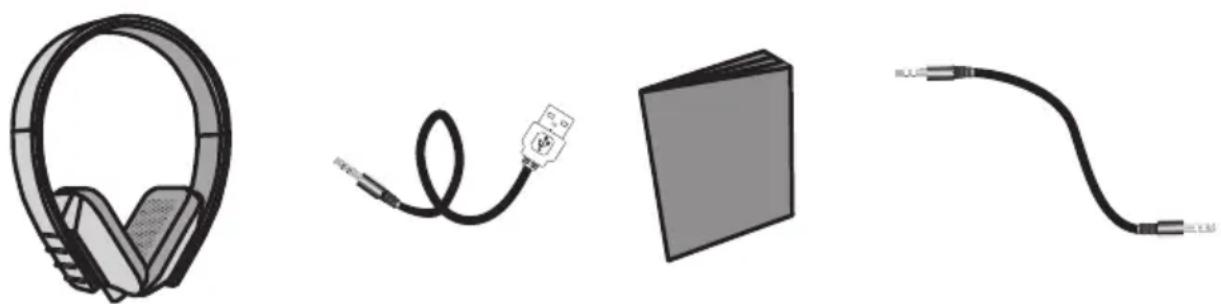
Package contents:
- Headset
- USB charger lead
- Instruction manual
- Audio cable
Buttons and functions
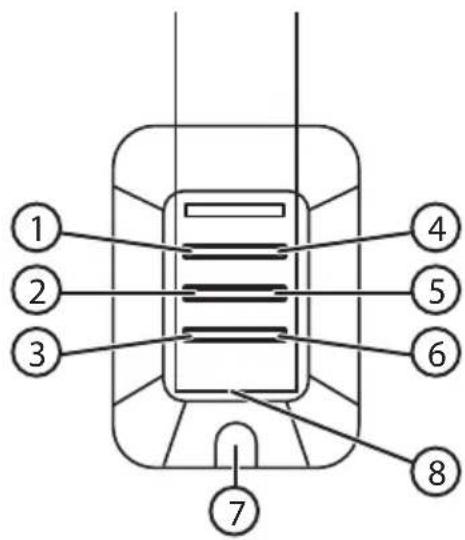
- [💡 Multifunction button: Headset on/off, activate Bluetooth
- [I◀◀] Previous track
- [-] Decrease volume
- [)] Multifunction button: Start/stop playback, call management
- [▶▶] Next track
- [+] Increase volume
- Audio and charger socket.
- Microphone
Getting started
Charging
Note: Charge the headset for 7 hours before using it for the first time. The headset cannot be connected via Bluetooth when the charge cable is connected.
- Connect the included charge cable to the headset and then to a USB port. The red LED will then come on.
- Normal charge time for the headset is 5 hours.
- The LED will turn off once the battery is fully charged.

Power on/off
Power on:
Press and hold [⏻] for 3 seconds to turn the headset on. The blue LED will begin flashing and an audible signal will be emitted.
Power off:
Depress and hold [⏻] until the red LED starts to flash. The red LED will flash when turning off the unit and an audible signal will be heard.
Note: The headset will automatically turn off after 5 minutes in order to save battery capacity if no signal is received.
Connecting to a mobile phone or other Bluetooth device
- Make sure that the headset is turned off (no LEDs lit).
- Hold in [💡] for about 5 seconds until the LED begins alternatively flashing between red and blue, and then release.
- Activate Bluetooth on the device to be paired and place it into search mode.
- The headset will appear as "BMHX40" on your device. Select this as the device to be connected and establish a connection. Refer to your device's instruction manual if you are unsure.
Note: If you are prompted to enter a PIN code on your mobile phone, you should enter "0000" (four noughts). Certain mobile phones may even require you to approve the connection.
When the connection is successful, the LED will flash blue in two second intervals and an audible signal will be heard.
Note: The headset's Bluetooth mode will be active for about 1.5 minutes. The headset will automatically turn off if it does not establish contact with another Bluetooth device within this time frame.
- Once the headset connects to any Bluetooth device it will be stored into memory and connect automatically to that device again if it is within range (max 10 m) provided that both devices are on and that Bluetooth is activated on your device.
- The headset will automatically try to connect to the last connected Bluetooth device. If you desire to connect to another Bluetooth device, first turn off the Bluetooth feature on the current device and repeat the connecting procedure with the other device.
Operating instructions
The headband is adjustable. Extend it to the correct size.
Place the side with the controls over the right ear.

Music playback
You can use the following controls to control the playback of your mobile or any other Bluetooth connected device:
Play/pause: []
Previous track: [I◀◀]
Next track: [▶▶I]
Volume: [-]/[+]
Call management
Note: Refer to your mobile phone's owner's manual for instructions on how to connect to the headset.
Once your mobile is connected via Bluetooth, you can use the following controls to manage calls:
• Answering calls: Press []. • Ending calls: Press []. - Calling: Calls will be automatically transferred to the headset when calling from your phone. - Voice activation: Press and hold [] for about 2 seconds. Valid only if your mobile supports this function.
- Redial: Press [] twice. Valid only if your mobile supports this function.
- Call blocking: Press [] twice to block the incoming call. Valid only if your mobile supports this function. • Volume control: Adjusts the headset's volume with the [+] and [-] buttons.
3.5 mm audio cable
Connect the headset to your device's 3.5 mm socket using the supplied audio cable.
The headset cannot be connected via Bluetooth when the audio cable is connected.
Care and maintenance
Clean the headset using a lightly moistened cloth. Only use mild cleaning agents, never solvents or corrosive chemicals.
Troubleshooting guide
| The headset cannot be turned on. | Charge the headset's battery. Connect the charge cable to the headset and a USB charge source. See the Charging section. |
| No sound. • Adjust | the volume both on the device and headset.Make sure that the Bluetooth connection is functioning properly. See the Connecting to a mobile phone or other Bluetooth device.Test the playback from your external device before connecting it to eliminate it as the source of the problem.Try playback using another file. The file you are attempting to play may be damaged.Make sure the devices are within range of each other. The distance between them may not exceed 10 m. |
Disposal
This product should be disposed of in accordance with local regulations.
If you are unsure how to proceed, contact your local authority.
Specifications
Bluetooth Supports V2.1 + EDR with handsfree profile 1.5, headset profile 1.1 and A2DP profile 1.2 (class 2)
Standby time 100 hours
Talk time 10 hours
Audio playback 6–8 hours
Range up to 10 m
Weight 115 g
Wireless headset
Art. no. 38-5866, 38-5867 Model BMHX40
Turning on and off
To turn on the headset:
Listening to music
Turning on and off
To turn on the headset:
Listening to music
When the phone or device is connected to the headset via Bluetooth, you can control the playback of audio files as follows:
Play/pause: [☐] Previous track: [I◀◀] Next track: [▶▶I] Volume: [-]/[+]
Handling calls
Note! Read the user manual for the phone that will be connected to the headset.
When the phone is connected to the headset via Bluetooth, you can handle calls as follows:
Call management
Listening to music
Declaration of Conformity
CE
Hereby, Clas Ohlson AB, declares that these Bluetooth wireless headphones:
38-5866 / 38-5867
BMHX40
are in compliance with the essential requirements and other relevant provisions of Directive 1999/5/EC and 2006/95/EC.
Article 3.1a (Health): EMF/SAR 99/519 EC Council
Recommendation
Article 3.1a (Safety): EN 60065
Article 3.1b (EMC): EN 301489-1
EN 301489-17
Article 3.2 (Radio): EN 300328
C€1797
Insjön, Sweden, July 2013

Klas Balkow
President
Clas Ohlson, 793 85 Insjön, Sweden
CUSTOMER SERVICE tel: 0247/445 00
fax: 0247/445 09
e-mail: kundservice@clasohlson.se
INTERNET
www.clasohlson.se
MAIL Clas Ohlson AB, 793 85 INSJÖN
NORWAY
CUSTOMER SERVICE tel.: 23 21 40 00
fax: 23 21 40 80
e-mail: kundesenter@clasohlson.no
INTERNET
www.clasohlson.no
Clas Ohlson AS, Postboks 485 Sentrum, 0105 OSLO
FINLAND
CUSTOMER SERVICE tel.: 020 111 2222
10 – 13 Market Place
Kingston Upon Thames
Surrey
KT1 1JZ
GERMANY
CUSTOMER SERVICE


- WIRELESS HEADSET
- SAFETY
- PROTECTING YOUR HEARING
- PACKAGE CONTENTS
- BUTTONS AND FUNCTIONS
- GETTING STARTED
- CHARGING
- POWER ON/OFF
- POWER ON
- POWER OFF
- CONNECTING TO A MOBILE PHONE OR OTHER BLUETOOTH DEVICE
- OPERATING INSTRUCTIONS
- MUSIC PLAYBACK
- CALL MANAGEMENT
- 3.5 MM AUDIO CABLE
- CARE AND MAINTENANCE
- TROUBLESHOOTING GUIDE
- DISPOSAL
- SPECIFICATIONS
- TURNING ON AND OFF
- TO TURN ON THE HEADSET
- LISTENING TO MUSIC
- HANDLING CALLS
- DECLARATION OF CONFORMITY
- CE
- NORWAY
- FINLAND
- GERMANY
Brand : Exibel
Model : BMHX40
Category : Headphones