
EXH09ML1WI - Air-conditioner ELECTROLUX - Free user manual and instructions
Find the device manual for free EXH09ML1WI ELECTROLUX in PDF.


| Product Type | Split-type Air Conditioner (Wall-mounted indoor unit) |
| Brand | Electrolux |
| Model | EXH09ML1WI |
| Operating Modes | Auto, Cool, Heat, Dry, Fan |
| Temperature Range | 16-30 °C (61-86 °F) |
| Fan Speeds | Auto, Low, Medium Low, Medium, Medium High, High |
| Special Functions | Turbo, X-Fan, I Feel, Quiet, Sleep (1/2/3), Energy Saving, 8 °C Heating, Health Filter (Ion) |
| Timer Functions | Timer On / Timer Off (programmable) |
| Airflow Control | Vertical swing (SWING-V) and Horizontal swing (SWING-H) |
| Display | Indoor unit display with on/off (LIGHT button) |
| Remote Control | Wireless, operates with 2 x 1.5V AAA batteries |
| Refrigerant Type | R410A |
| Indoor Unit Air Filter | Washable mesh filter (clean every 3 months) |
| Health Filter | Ion filter (replaceable, service interval ~1 year) |
| Electrical Safety | Type I appliance; requires grounding; recommended residual-current device (RCD) and air switch (16A for 09-12K BTU) |
| Power Supply | Dedicated mains circuit; voltage per local regulations (typical 220-240 V ~50 Hz) |
| Installation Requirements | Indoor unit at least 230 cm above floor; outdoor unit max height difference 5 m, pipe length max 10 m |
| Operating Temperature Range (Outdoor) | Cooling: -15 to 48 °C; Heating: -20 to 24 °C |
| Anti-Freeze Protection | Compressor stops if heat exchanger temperature drops below zero in Cool mode |
| Defrost Function | Automatic defrost in Heat mode; indoor fan stops 3-12 minutes |
| Spare Parts and Repairability | Use original spare parts; contact authorized service center; user-replaceable batteries and filters |
Frequently Asked Questions - EXH09ML1WI ELECTROLUX
User questions about EXH09ML1WI ELECTROLUX
0 question about this device. Answer the ones you know or ask your own.
Ask a new question about this device
Download the instructions for your Air-conditioner in PDF format for free! Find your manual EXH09ML1WI - ELECTROLUX and take your electronic device back in hand. On this page are published all the documents necessary for the use of your device. EXH09ML1WI by ELECTROLUX.
USER MANUAL EXH09ML1WI ELECTROLUX
www.electrolux.com/productregistration

Купите аксесоари, консумативи и оригинални резервни части за вашия уред:
www.electrolux.com/shop
natural_image
Illustration of hands installing or maintaining a wall-mounted air conditioner unit (no text or symbols)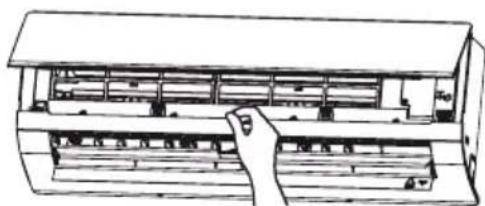
natural_image
Line drawing of a hand inserting a component into a rack (no text or symbols)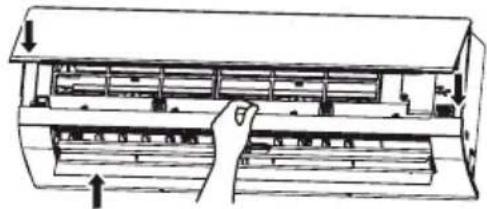
natural_image
Diagram of a hand inserting a component into an air conditioner unit (no text or labels)
ВНИМАНИЕ
flowchart
graph LR
    A["Square"] --> B["Block"]
    C["Square"] --> D["Block"]
    E["Square"] --> F["Block"]
    G["Square"] --> H["Block"]
    I["Square"] --> J["Block"]
    K["Square"] --> L["Block"]
    M["Square"] --> N["Block"]
    O["Square"] --> P["Block"]
    Q["Square"] --> R["Block"]
    S["Square"] --> T["Block"]
    U["Square"] --> V["Block"]
    W["Square"] --> X["Block"]
    Y["Square"] --> Z["Block"]
    AA["Square"] --> AB["Block"]
    AC["Square"] --> AD["Block"]
    AE["Square"] --> AF["Block"]
    AG["Square"] --> AH["Block"]
    AI["Square"] --> AJ["Block"]
    AK["Square"] --> AL["Block"]
    AM["Square"] --> AN["Block"]
    AO["Square"] --> AP["Block"]
    AQ["Square"] --> AR["Block"]
    AS["Square"] --> AT["Block"]
    AU["Square"] --> AV["Block"]
    AW["Square"] --> AX["Block"]
    AY["Square"] --> AZ["Block"]
Инсталиране
Cleaning and maintenance 32
Troubleshooting.... 33
Operation tips 35
Installation 36
Health filter 45
WE'RE THINKING OF YOU
Thank you for purchasing an Electrolux appliance. You've chosen a product that brings with it decades of professional experience and innovation. Ingenious and stylish, it has been designed with you in mind. So whenever you use it, you can be safe in the knowledge that you'll get great results every time.
Welcome to Electrolux.
Visit our website for:

Get usage advice, brochures, trouble shooter, service information: www.electrolux.com

Register your product for better service: www.electrolux.com/productregistration

Buy Accessories, Consumables and Original spare parts for your appliance: www.electrolux.com/shop
CUSTOMER CARE AND SERVICE
We recommend the use of original spare parts.
When contacting Service, ensure that you have the following data available.
The information can be found on the rating plate. Model, PNC, Serial Number.

Warning / Caution-Safety information

General information and tips

Environmental information
Subject to change without notice.
SAFETY PRECAUTIONS
- Read the manual carefully before operation.
- Keep the manual for further reference.
- This appliance is not intended for use by persons (including children) with reduced physical, sensory or mental capabilities or lack of experience and knowledge, unless they have been given supervision or instruction concerning use of the appliance by a person responsible for their safety.
- Children should be supervised to ensure they are away from the appliance.
- If something abnormal occurs (e.g. unpleasant smells of burning), disconnect the unit from the power supply and contact an authorised service centre. If the abnormality remains, the air conditioner may be damaged or even cause electric shock or fire.
- Before cleaning or maintenance, switch off the unit and disconnect the unit from the power supply. If the unit is connected to a fuse box, remove the fuse.
- Do not damage the mains cord or the signal control wire. If the mains cord or the signal control wire is damaged, have it replaced by a qualified electrician.
- Do not use an unspecified mains cord to prevent electric shock or fire.
- The unit must be installed according to national regulations for electrical safety. Incorrect wiring can lead to over heat or fire in the cable, the plug or the electrical outlet. Do not switch on and off the unit frequently.
- If the voltage is too high, electrical elements will be damaged easily. If the voltage too low, the compressor will vibrate fiercely and damage the cooling system or the compressor. Electrical components cannot be operated.
• Make sure that the unit is properly grounded to prevent electric shock.
- Do not attempt to repair the unit yourself to prevent electric shock or fire. Have the unit repaired by an authorised service centre.
- Keep combustible materials at least 1 m from the unit to prevent fire or explosion.
• Install the outdoor unit firmly to prevent personal injury.
- Do not stand on the outdoor unit. Do not place heavy things on the outdoor unit.
- Do not block the air inlet or the air outlet.
- Do not splash water on the unit to prevent electric shock.
- Do not operate the unit with wet hands to prevent electric shock.
- Do not insert your hands or objects into the air inlet or the air outlet.
- Do not expose animals or plants directly to the air flow.
- Do not expose yourself to cold air directly for a long time.
- Do not use the unit for any other purpose, such as preserving food or drying clothes.
- Select the most appropriate temperature to save electric energy.
- Do not keep windows and doors open for a long time during operation.
- To change the airflow direction, use remote control to adjust the horizontal and vertical airflow direction.
- Do not dispose this product as unsorted municipal waste. Collection of such waste separately for special treatment is necessary.
DESCRIPTION
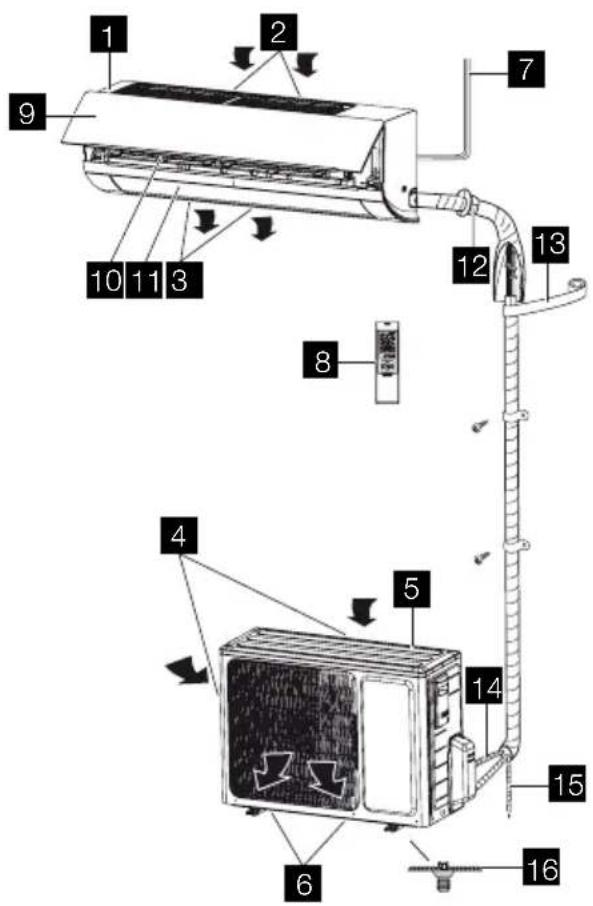
1 Indoor unit
2 Air inlet (indoor unit)
3 Air outlet (indoor unit)
4 Outdoor unit
5 Air inlet (outdoor unit)
6 Air outlet (outdoor unit)
7 Mains cord
8 Remote control
9 Front panel
10 Filter
11 Horizontal louvre
12 Wall pipe
13 Binding tape
14 Connection pipe
15 Drain hose
16 Drain connector
REMOTE CONTROL
The remote control can be used for different models. Depending on the model, some functions on the remote control might not be available.

CAUTION
- Do not drop or throw the remote control.
- Do not pour liquid onto the remote control.
- Do not expose the remote control to direct sunlight.
- Do not place the remote control in areas where it is very hot.
NOTE
- Make sure that there are no objects between the signal transmitter on the remote control and the signal receiver of the unit.
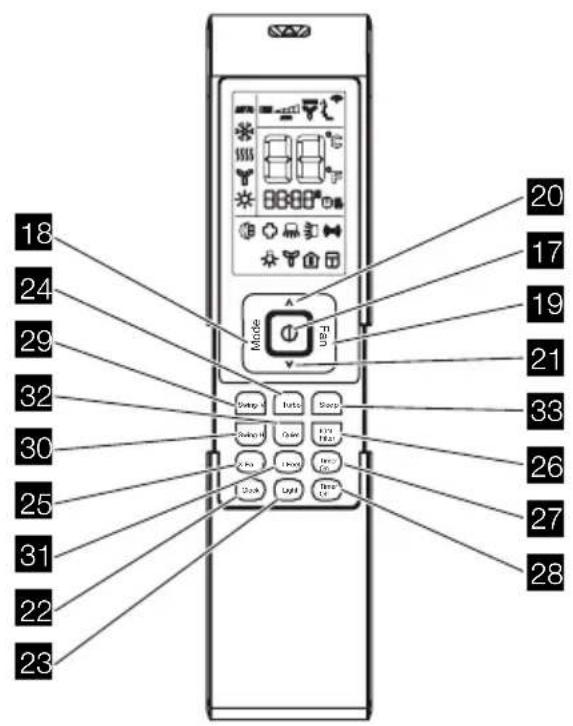
Explanation of buttons
| Nr. Button Explanation |
| 17 ON/OFF Press the button to switch on the unit. Press the button again to switch off the unit. |
| 18 MODE Press the button to set the operation mode: AUTO, COOL, DRY, FAN and HEAT. Default setting: AUTO. |
| In the AUTO mode, the temperature is not shown. In HEAT mode, the initial value is 28 °C (82 °F). In other modes, the initial value is 25 °C (77 °F). |
| 19 FAN Press the button to set the fan speed: AUTO, LOW, MEDIUM LOW, MEDIUM, MEDIUM HIGH and HIGH. Default setting: AUTO. In the DRY mode, only LOW can be set. |
| 20 UP ^ Press the button to increase the temperature. Keep the button pressed for two seconds to accelerate the process. Release the button to set the temperature and send the order that the °C/°F signal will be displayed constantly. |
| Temperature range: 16-30 °C (61-86 °F). |
| In AUTO mode, the temperature cannot be set. If you press the UP or DOWN button, a beep will sound. |
| 21 DOWN v Press the button to decrease the temperature. Keep the button pressed for two seconds to accelerate the process. Release the button to set the temperature and send the order that the °C/°F signal will be displayed constantly. |
| Temperature range: 16-30 °C (61-86 °F). |
| In AUTO mode, the temperature cannot be set, but the order can be sent by pressing the button. |
| 22 CLOCK Press the button to set the clock. If the clock symbol blinks, press the UP or DOWN button to set the time. Keep the button pressed for two seconds to accelerate the process. Press the CLOCK button again to set the clock. The clock symbol stops blinking. |
| After battery replacement, “12:00 PM” will be shown. If the clock symbol is visible, the actual time will be shown. If the clock symbol is not visible, the timer will be shown. |
| 23 LIGHT Press the button to switch the display of the indoor unit on or off. Default setting: OFF. |
| 24 TURBO In COOL or HEAT mode, press the button to enable or disable the turbo function. If the turbo function is enabled, the turbo symbol will be shown. Default setting: OFF. |
| If the turbo function is enabled, the unit will operate at turbo speed to cool or heat rapidly so that the ambient temperature approaches the set temperature as soon as possible. |
| If the operation mode or the fan speed is changed, the turbo symbol will not be shown. | |
| 25 X-FAN In COOL or DRY mode, press the button to enable or disable the X-FAN function. If the X-FAN function is enabled, the X-FAN symbol will be shown. Default setting: OFF. | |
| If the X-FAN function is enabled, the indoor fan will continue operation at low speed for 2 minutes after switching off the unit. This function prevents the possible condensation on cold parts of the indoor unit. Press the X-FAN button to switch off the unit during the process. | |
| If the X-FAN function is disabled, the unit will be switched off immediately. | |
| In AUTO, FAN or HEAT mode, X-FAN is not available. | |
| 26 ION-FILTER Press the button to enable or disable the operation of the health filter. | |
| 27 TIMER ON Press the button to set the timer function for switching on the unit. If the TIMER ON symbol blinks, press the UP or DOWN button to set the time. Keep the button pressed for two seconds to accelerate the process. Press the button to set the timer. Default setting: 8:00 AM (12-hour mode). Press the button again to cancel the timer function. | |
| 28 TIMER OFF Press the button to set the timer function for switching off the unit. If the TIMER OFF symbol blinks, press the UP or DOWN button to set the time. Keep the button pressed for two seconds to accelerate the process. Press the button to set the timer. Default setting: 5:00 PM (12-hour mode). Press the button again to cancel the timer function. | |
| 29 SWING-V Press the button to enable or disable the vertical swing function. | |
| 30 SWING-H Press the button to enable or disable the horizontal swing function. | |
| 31 I FEEL Press the button to enable or disable the I FEEL function. If the I FEEL function is enabled, the I FEEL symbol will be shown. | |
| If the I FEEL symbol is enabled, the remote control will send the ambient temperature to the main unit every 10 minutes or when you press one of the buttons. | |
| 32 QUIET Press the button to enable or disable the QUIET function. If the QUIET function is enabled, the indoor fan operates at ultra-low speed so that the indoor noise is low. | |
| 33 SLEEP Press the button to select (SLEEP 1, SLEEP 2, SLEEP 3 or SLEEP CANCEL). Default setting: SLEEP CANCEL. | |
| SLEEP 1 In COOL and DRY mode: | |
| Sleep status after 1 hour of operation: The temperature will increase by 1 °C. | |
| Sleep status after 2 hours of operation: The temperature will increase by 2 °C. | |
| After this time the unit continues to use the new temperature. | |
| In HEAT mode: | |
| Sleep status after 1 hour of operation: The temperature will decrease by 1 °C. | |
| Sleep status after 2 hours of operation: The temperature will decrease by 2 °C. | |
| After this time the unit continues to use the new temperature. | |
| SLEEP 2 In COOL mode: | |
| If you set a temperature of 16-23 °C, the temperature will increase by 1 °C every hour. After 3 °C, the temperature will be maintained. After 7 hours, the temperature will decrease by 1 °C. After this time the unit continues to use the new temperature. | |
| If you set a temperature of 24-27 °C, the temperature will increase by 1 °C every hour. After 2 °C, the temperature will be maintained. After 7 hours, the temperature will decrease by 1 °C. After this time the unit continues to use the new temperature. | |
| If you set a temperature of 28-29 °C, the temperature will increase by 1 °C every hour. After 1 °C, the temperature will be maintained. After 7 hours, the temperature will decrease by 1 °C. After this time the unit continues to use the new temperature. | |
| If you set a temperature of 30 °C, the temperature will decrease by 1 °C after 7 hours. After this time the unit continues to use the new temperature. | |
| In HEAT mode: | |
| If you set a temperature of 16 °C, the unit will operate at this temperature. | |
| If you set a temperature of 17-20 °C, the temperature will decrease by 1 °C every hour. After 1 °C, the temperature will be maintained. | |
| If you set a temperature of 21-27 °C, the temperature will decrease by 1 °C every hour. After 2 °C, the temperature will be maintained. | |
| If you set a temperature of 28-30 °C, the temperature will decrease by 1 °C every hour. After 3 °C, the temperature will be maintained. | |
| SLEEP 3 The user-dejned behaviour mode. The time on remote control will show “1hour”. The temperature to use after 1 hour will blink. | |
| Press the UP and DOWN buttons to set the desired temperature. Press the TURBO button again to conjrm. | |
| The value "1hour" will increase to the value "2hours", "3hours" or "8hours". In each step the corresponding temperature will blink. | |
| Repeat the above (2 3) operation for the "2hours", "3hours" and "8hours" steps. | |
| Sleep3: Display the set temperatures:Select SLEEP 3 without changing temperature. Press the TURBO button to conjrm. | |
| Note: The above setting or enquiry procedure terminates if no button is pressed for 10 seconds. The ON/OFF button, the MODE button and the SLEEP button also terminate the setting or enquiry procedure. | |
General operation
- Disconnect the unit from the power supply.
- Press the ON/OFF button to start the unit.
- Press the MODE button to set the operation mode.
- Press the UP and DOWN buttons to set the temperature. (Note: It is unnecessary to set the temperature in AUTO mode.)
- Press the FAN button to set the fan speed.
- Press the SWING-H and SWING-V buttons to set the swing.
Optional operation
- Press the SLEEP button to enable or disable the sleep mode.
- Press the TIMER ON and TIMER OFF buttons to enable or disable the timer function.
- Press the LIGHT button to turn on or to turn off the display of the indoor unit.
- Press the TURBO button to enable or disable the turbo function.
Special functions
AUTO mode
The temperature will not be displayed. The unit automatically sets the operation mode.
Locking/unlocking the remote control Simultaneously press the SWING-V button and the ION-FILTER button to lock or unlock the remote control. If the remote control is locked, the LOCK symbol will be shown. Press any button to make the LOCK symbol blink 3 times and unlock the remote control. If the remote control is unlocked, the LOCK symbol will not be shown.
Celsius (°C) \~ Fahrenheit (°F)
If the unit is switched off, simultaneously press the SWING-H button and the ION-FILTER button to switch between Celsius (°C) and Fahrenheit (°F).
Energy-saving function
In COOL mode, simultaneously press the ION-FILTER button and the CLOCK button to enable or disable the energy-saving function. The display shows "SE".
8 °C heating function
In HEAT mode, simultaneously press the ION-FILTER button and the CLOCK button to enable or disable the 8 °C heating function. The display shows "8 °C" ("46 °F"). The unit starts to heat when the temperature drops below 8 °C. Fan Speed will be AUTO and cannot be changed.
Replacng the batteries
The remote control operates with two 1.5V AAA batteries.
- Open the battery compartment.
- Remove the old batteries.
- Insert the new batteries. Make sure that the positive (+) and negative (-) markings on the batteries match the positive (+) and negative (-) markings on the battery compartment.
- Close the battery compartment.

CAUTION
- Always use new batteries of the same type. Do not use old batteries or different batteries types.
- Remove the batteries when the remote control will not be used for a long time.
NOTE
- Operate the remote control within its transmitting and receiving range.
-
Operate the remote control at least 1 m away from your TV set or stereo sound set.
-
Aim the remote control at the receiver of the main unit to improve the receiving sensitivity of the main unit.
- If the remote control transmits a signal, the transmitting symbol will blink for 1 second. The bell will ring if the main unit receives the signal.
- If the remote control does not operate normally, remove the batteries and insert them again 30 seconds later. If the remote control still does not operate normally, replace the batteries.
Emergency operation
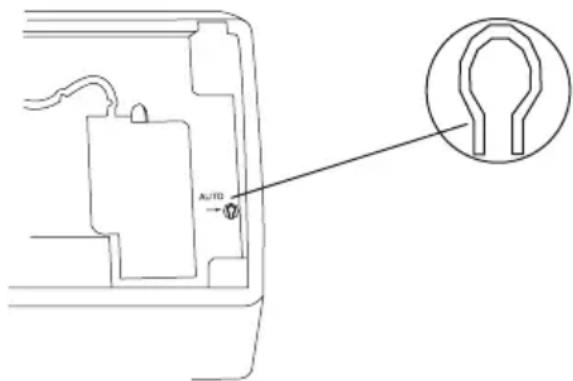
If the remote control cannot be used, use the AUTO/STOP button on the main unit. The unit will operate in AUTO mode. The temperature or fan speed cannot be changed.
-
Press the AUTO/STOP button to switch on the unit. The unit automatically sets the operation mode.
-
Press the AUTO/STOP button again to switch off the unit.
| Mode Model Temperature setting Fan speed |
| AUTO Cooling only 25 °C (COOL, FAN) AUTO |
| AUTO Heat pump 25 °C (COOL, FAN) AUTO |
| AUTO Heat pump 20 °C (HEAT) AUTO |
CLEANING AND MAINTENANCE

WARNING
- Before cleaning and maintenance, disconnect the unit from the power supply.
- Do not immerse the unit in water or other liquids. If the unit is immersed in water or other liquids, do not remove the unit with your hands. Immediately disconnect the unit from the power supply. If the unit is immersed in water or other liquids, do not use the unit again.
- Do not splash water on the unit to prevent electric shock.

CAUTION
- Do not use aggressive liquids (e.g. thinner or gasoline) to clean the unit. Clean the unit using a soft, dry cloth or a cloth slightly moistened with water or cleaner.
Cleaning the front panel
-
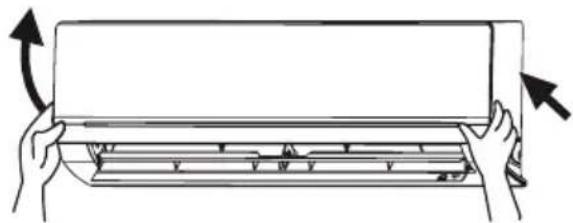
Remove the front panel.
-
Clean the front panel using a cloth slightly moistened with water.
-
Install the front panel.
Cleaning the air filter
The air filter must be cleaned every 3 months.
natural_image
Illustration of hands holding a rectangular panel with arrows indicating rotation (no text or symbols)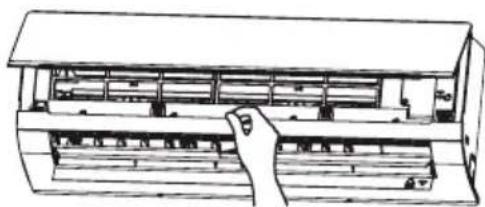
natural_image
Line drawing of a hand placing a component into a rack or storage unit (no text or symbols visible)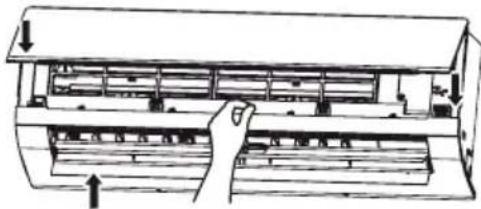
natural_image
Diagram of a hand inserting air filters into a rack (no text or labels)
WARNING
- Do not touch the fin of the indoor unit to prevent personal injury.

CAUTION
- Do not use water above 45 °C to clean the air filter to prevent deformation or discoloration.
-
Open the front panel.
-
Remove the air filter.
-
Remove dust from the air filter using a vacuum cleaner.
-
If the air filter is dirty, clean the air filter with warm water and a mild detergent. Allow the air filter to dry naturally in a cool, dark place.
-
Install the air filter.
-
Close the front panel.
Check before use
• Make sure that nothing obstructs the air inlet or the air outlet.
- Make sure that the installation stand of the outdoor unit is not damaged. If the installation stand is damaged, consult a qualified technician.
• Make sure that the batteries are inserted into the remote control.
Maintenance after use
- Disconnect the unit from the power supply.
- Clean the filters and the housings of the indoor unit and the outdoor unit.
- Remove any obstructions from the outdoor unit.
TROUBLESHOOTING

CAUTION
- The unit is not user-serviceable. Do not attempt to repair the unit yourself to prevent electric shock or fire. Have
the unit repaired by an authorised service centre. The following checks can save you time and money before consulting an authorised service centre.
| Problem Solution |
| The unit does not operate. The unit does not operate if it is switched on immediately after switching off the unit. After switching off the unit, wait for approximately 3 minutes before switching on the unit. |
| Odours are emitted. Some odours may be emitted from the indoor unit as the result of room smells (furniture, tobacco, etc.) which have been taken into the unit. If the odours persist, contact an authorised service centre. |
| Water-kowing noise. The water-kowing noise is the refrigerant kowing inside the unit. |
| Mist is emitted in COOL mode. During cooling operation, mist may be emitted from the indoor unit due to high room temperature and humidity. The mist will disappear if the room temperature and humidity decrease. |
| Cracking noise. The cracking noise is the sound of friction caused by expansion and/or contraction of the front panel or other parts due to the change in temperature. |
| The unit cannot be started. Is the unit disconnected from the power supply? |
| Is the mains plug loose? |
| Is the circuit protection device tripped off? |
| Is the voltage higher or lower? (tested by professionals) |
| Is the timer function used correctly? |
| The cooling/heating effect is poor. Is the temperature set correctly? |
| Is the air inlet or the air outlet blocked? |
| Is the air jiter dirty? |
| Is the window or the door open? |
| Is a low fan speed set? |
| Are there heat sources in the room? |
| The remote control does not work. | Is there any magnetic or electrical interference near the unit? If yes, remove and reinsert the batteries. |
| Is the remote control within its transmitting and receiving range without any obstructions? If necessary, replace the batteries. | |
| Is the remote control damaged? | |
| Water leakage in indoor unit. The room humidity is high. | |
| Condensing water overkows. | |
| The drain hose is loose. | |
| Water leakage in outdoor unit. In COOL mode, water condensate is generated around the pipes and connection joints. | |
| In HEAT mode, the water on the heat exchanger drips out. | |
| In defrost mode, the thaw water kows out. | |
| Noise from indoor unit. The noise emitted when the fan or compressor relay is switched on or off. | |
| If the defrost mode is started or stopped, you will hear the sound of refrigerant kowing in the reverse direction. | |
| The indoor unit cannot blow air. In HEAT mode, when the temperature of the indoor heat exchanger is low, the airkow is stopped within 2 minutes in order to prevent cold air. | |
| In HEAT mode, when the outdoor temperature is low or the outdoor humidity is high, frost will be formed on the outdoor heat exchanger. The unit will defrost automatically and the indoor unit will stop blowing air for 3-12 minutes. | |
| In DRY mode, the indoor fan will stop blowing air for 3-12 minutes in order to avoid condensing water being vapourised again. | |
| In defrost mode, water or vapour may be emitted. | |
| Moisture on air outlet. If the unit operates at high humidity for a long time, moisture will be generated on the grill of the air outlet. | |
| C5: Malfunction of connector jumper. | Check if the connector jumper contacts properly. If necessary, replace the old circuit board with a new circuit board. |
| F1: Malfunction of indoor ambient temperature sensor. | Check if the indoor room temperature sensor is connected properly. |
| F2: Malfunction of evaporator temperature sensor. | Check if the evaporator temperature sensor is connected properly. |
| There is harsh sound during operation. | Immediately stop operation, disconnect the unit from the power supply and contact an authorised service centre. |
| Strong odours are emitted during operation. | Immediately stop operation, disconnect the unit from the power supply and contact an authorised service centre. |
| Water is leaking from the indoor unit. | Immediately stop operation, disconnect the unit from the power supply and contact an authorised service centre. |
| The air switch or protection switch often interrupts power supply. | Immediately stop operation, disconnect the unit from the power supply and contact an authorised service centre. |
| Water or other liquid is splashed into the unit. | Immediately stop operation, disconnect the unit from the power supply and contact an authorised service centre. |
| Mains cord and mains plug are overheated. | Immediately stop operation, disconnect the unit from the power supply and contact an authorised service centre. |
OPERATION TIPS
Cooling operation
Air conditioners absorb heat from indoor and transmit the heat to the outdoor unit in order to decrease the room temperature. The cooling capacity will increase or decrease according to the outdoor temperature.
Anti-freezing function
If the unit is in COOL mode and in a low ambient temperature, frost will be formed on the heat exchanger of the indoor unit. If the temperature of the heat exchanger decreases below zero, the compressor will stop operation to protect the unit.
Heating operation
Air conditioners absorb heat from outdoor and transmit the heat to the indoor unit in order to increase the room
temperature. The heating capacity will increase or decrease according to the outdoor temperature.
Defrosting
- If the outdoor temperature is low and the outdoor humidity is high, frost will form on the outdoor unit during extended operation. The heating capacity will decrease. The unit may stop operation during defrosting.
- During defrosting, the fan motors of the indoor unit and outdoor unit will stop operation.
- During defrosting, the indoor indicator flashes and the outdoor unit may emit vapour. This is normal operation to remove frost from the heat exchanger of the outdoor unit.
- After defrosting, the heating operation will resume automatically.
Anti-cold air function
In HEAT mode, the indoor fan will not operate in order to prevent cold air from blowing out if the indoor heat exchanger does not reach a certain temperature in one of the following situations:
• when the heating operation starts;
- when the defrosting operation is finished;
- when heating at low temperature.
Gentle breeze
The indoor unit may blow gentle breeze and the horizontal louvre rotates to a certain position in one of the following situations:
- In HEAT mode, the compressor does not start operation after switching on the unit.
- In HEAT mode, the temperature reaches the set value and the compressor has stopped operation for 1 minute.
Opetaring temperature range
The operating temperature range for cooling-only units is -15-(+48)^ . The operating temperature range for heat-pump units is -20-(+24)^ .
| Indoor side (°C) Outdoor side (°C) | |
| Max. cooling 32 48 | |
| Min. cooling 21 -15 | |
| Max. heating 27 24 | |
| Min. heating 20 -20 |
Tip for energy saving
- Do not overcool or overheat. Setting the temperature at a moderate level helps energy saving.
- Cover windows with a blind or a curtain. Blocking sunlight and air from outdoor is favorable for cooling.
- Clean air filters every two weeks. Clogged air filters lead to inefficient operation and energy waste.
Tip for relative humidity
- If the unit is operated in an area with a relative humidity of more than 80% for a long time, condensate may drip from the indoor unit.
INSTALLATION
Installation notes
- Not following the instructions can cause personal injury and/or property damage.
- Not following the instructions can cause the unit to fail.
- Let the unit be installed by an authorised service centre.
- Let the unit be installed in compliance with local and governmental regulations.
-
Let the unit be installed according to the instructions from this manual.
-
First contact an authorised service centre before relocating an already installed unit
- Disconnect power before working on the unit.
- Let the mains cable be repaired by an authorised service centre or qualified technician for units with Y-attachment.
- The mains plug must remain accessible after installation.
- Keep sufficient distance between the interconnection cable and the
refrigerant circuit because the circuit operating temperature is high.
- The pipes connecting the indoor and outdoor unit are not included in the unit.
- The outdoor unit is powered by the indoor unit.
Installation site
- Do not install the unit in areas with:
- strong heat sources;
- vapours or flammable gasses;
- contamination with oil particles;
- high frequency electromagnetic equipment (e.g. welding equipment or medical devices);
- high salinity (e.g. close to coastal areas);
- sulphuric gas (e.g hot water springs);
- poor air quality.
Indoor unit
- Maintain the minimum installation distances specified in this document. Do not block the air inlet or the air outlet.
- Do not use the unit in places with extremely high humidity.
• Install the indoor unit out of reach of children. - The wall must be strong enough to support the weight and vibration of the unit.
• Install the indoor unit at least 230 cm above the floor surface. - Leave sufficient space for cleaning and maintenance.
• The air filter should remain accessible. - Leave at least 1 m distance between the unit and other electrical appliances.
- Install the indoor unit in a place where the condensate water can be easily drained.
• Install at a location protected from direct sunlight.
Outdoor unit
- Maintain the minimum installation distances specified in this document.
- Do not block the air inlet or the air outlet.
- Install the outdoor unit out of reach of children.
• Install the outdoor unit where there is sufficient ventilation.
• Install the outdoor unit where produced noise and airflow will not disturb neighbors or animals.
• Install the outdoor unit in a dry place. - Install the outdoor unit in a place not exposed to direct sunlight or strong wind.
• Install the unit in a place that supports the weight and vibration of the unit. - The height difference between the indoor unit and the outdoor unit must be less than 5 m.
- The length of the connecting pipes must be less than 10 m.
- Leave sufficient space for cleaning and maintenance.
- The outdoor unit is powered by the indoor unit.
Safety precautions for electrical appliances
• Use a dedicated mains circuit.
• The unit must be properly grounded.
• Install a Residual-current device (RCD) to protect against personal injury in case of leakage currents.
- Use an all pole disconnection switch with a contact separation of at least 3 mm in all poles in fixed wiring. For models with a mains plug, make sure that the mains plug is within reach after installation.
- The installation must comply with local electrical safety regulations and with other relevant local regulations
- The unit must be installed in accordance with national wiring regulations.
- Do not subject the mains cable to force.
- The distance between the unit and heat sources is at least 1.5 m.
- Use an air switch. The air switch must have functions for magnetic tripping
and heat tripping to prevent short circuit and overload. The suitable capacity is specified in the following table.
Air conditioner (Btu) Air switch capacity
09-12K 16A
NOTE
- Make sure that the live wire, the neutral wire and the ground wire in the mains socket are properly connected.
- Inadequate or incorrect electrical connections can cause electric shock or fire.
Grounding requirements
- The unit is a type I electrical appliance. Make sure that the unit is properly grounded.
- The yellow-green wire is the ground wire that cannot be used for other purposes. Improper grounding can cause electric shock.
- The ground resistance must comply with local regulations.
- The mains supply must have reliable ground terminal. Do not connect the ground wire to water pipes, gas pipes, contamination pipes or other possible unsafe places.
- Fuses must comply with the prescribed model and rating printed on the fuse cover or circuit board.
Installation drawing
The dimensions required for proper installation of the unit include the minimum permissible distances to adjacent parts.
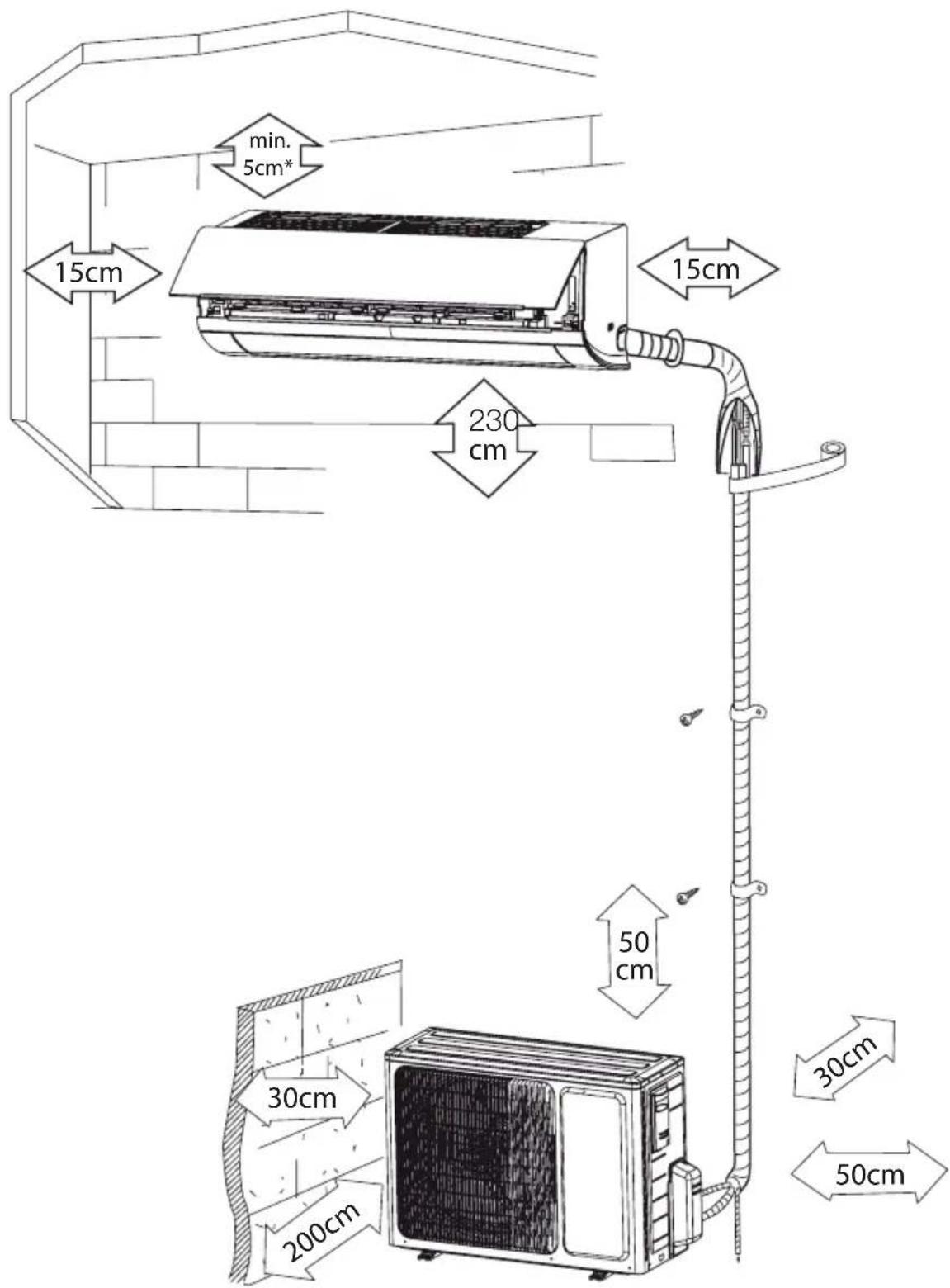
* Recommended distance for maximum airflow is 15 cm.
Indoor unit
Installing the mounting plate
- Install the mounting plate horizontally.
- Fix the mounting plate to the wall with screws. Make sure that the mounting plate is fixed firmly enough to support approximately 60 kg. The weight must be evenly shared by each screw.
Drill piping hole
- Slant the piping hole (∅ 55 mm) on the wall slightly downward to the outdoor side.
- Insert the piping-hole sleeve into the hole to prevent damage to the connection piping and wiring.
Installing the drain hose
- Connect the drain hose to the outlet pipe of the indoor unit. Bind the joint with rubber belt.
- Put the drain hose into the insulating tube.
- Wrap the insulating tube with wide rubber belt to prevent the insulating tube from shifting. Slant the drain hose slightly downward for smooth drainage of the condensate water.
NOTE
- The insulating tube must be connected reliably with the sleeve outside the outlet pipe. The drain must be slanted downward slightly without distortion, bulge or fluctuation. Do not put the outlet of the drain hose in water to prevent the drain hose from freezing.
Electrical wiring indoor unit:
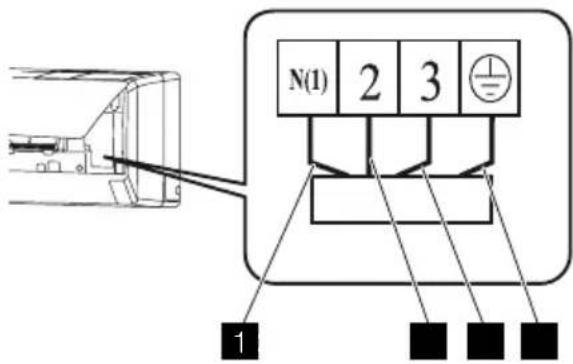
| Nr. Colour |
| 1 Blue (neutral) |
| 2 Black |
| 3 Brown |
| 4 Yellow (ground) |

CAUTION
- Check the wiring to make sure that there is no short circuit. Incorrect wiring can cause malfunction.
- Open the front panel.
- Remove the wiring cover.
- Fix the mains cord to the terminal board (as shown).
- Guide the mains cord through the hole at the back of the indoor unit.
- Install the cord anchorage and wiring cover.
- Close the front panel.
NOTE
- The electrical wiring between the indoor unit and the outdoor unit must be connected by a qualified electrician.
• Tighten the terminal screws tightly. - After tightening the screws, pull the wire slightly to confirm whether it's firm or not.
• Make sure that the electrical connections are properly grounded to prevent electric shock.
- Make sure that the wiring connections are secure and that the cover plates are properly mounted to prevent electric shock.
Installing the indoor unit
The piping can be output from the right, the right rear, the left or the left rear.
- When routing the piping and wiring from the left or right of indoor unit, cut off the tailings from the chassis when necessary.
- Remove the piping from the body case.
- Wrap the piping, the mains cords and the drain hose with the tape.
- Guide the piping, the mains cords and the drain hose through the piping hole.
- Firmly hang the mounting slots of the indoor unit on the upper hooks of the mounting plate.
- The installation site must be at least 50 cm above the floor surface.
Installing the connection pipe
- Align the center of the piping flare with the related valve.
- Screw in the flare nut by hand and then tighten the nut with spanner and torque wrench. Refer to the following table.
| Hex nut diameter (mm) | Tightening torque (Nm) |
| ∅ 6 15-20 | |
| ∅ 9.52 30-40 | |
| ∅ 12 45-55 | |
| ∅ 16 60-65 | |
| ∅ 19 70-75 |
NOTE
- First connect the connection pipe to the indoor unit and then to the
outdoor unit. Handle the piping bending with care. Do not damage the connection pipe. Firmly tighten the joint nut to prevent leakage.
- The pipes connecting the indoor and outdoor unit are not included in the unit.
- In case the connective pipe length is longer than 7.5m charge the unit with additional refrigerant. Add 20g/m of R410A for models with a capacity of less than 6500W. Add 50g/m for the other models.
Outdoor unit
Electrical wiring
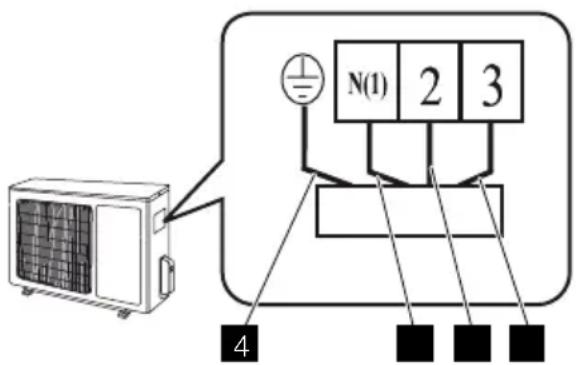
Nr. Colour
| 1 | Blue (neutral) |
| 2 Black |
| 3 Brown |
| 4 Yellow (ground) |

CAUTION
- Check the wiring to make sure that there is no short circuit. Incorrect wiring can cause malfunction.
- Remove the handle (x2) on the right side plate of outdoor unit.
- Remove mains cord anchorage.
- Connect the mains cord to the terminal board.
- Lock the position of the cord with wire clamps.
-
Check for improper connections.
-
Reinstall the handle.
NOTE
- Check for free space between the connection and the lock positions.

CAUTION
- Open the stem of the packed valve until it hits against the stopper. Do not try to open it further. Close the stem of the packed valve with a special tool. Close the cap of the packed valve with a spanner.
NOTE
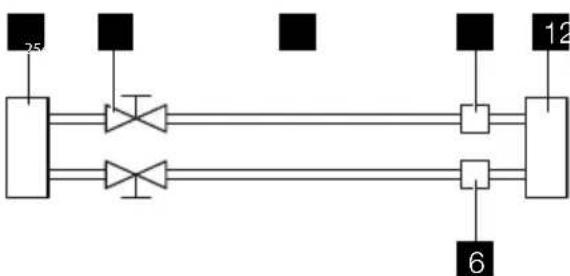
The outdoor unit has two outlets, the low side outlet and the high side outlet. Only the low side outlet contains a charging port. The low side outlet is shown below.
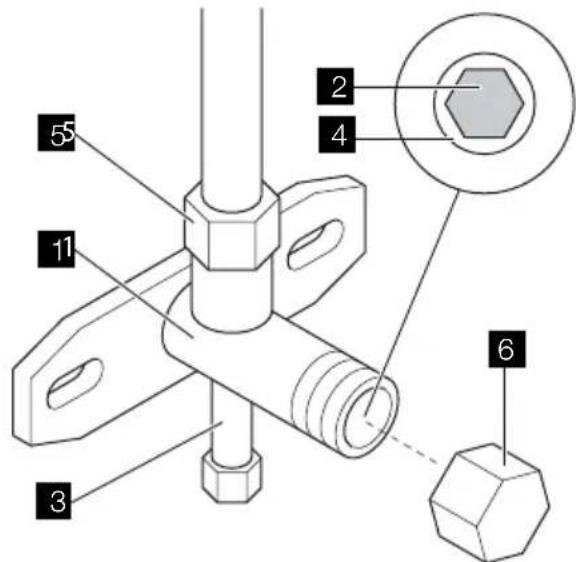
1 Valve body
2 Valve stem
3 Charge port
4 Stopper
5 Flare nut
6 Cap
flowchart
graph LR
    A["25 Pin"] --> B["Diode"]
    A --> C["Diode"]
    B --> D["Switch"]
    C --> E["Switch"]
    D --> F["Terminal 12"]
    E --> G["Terminal 6"]
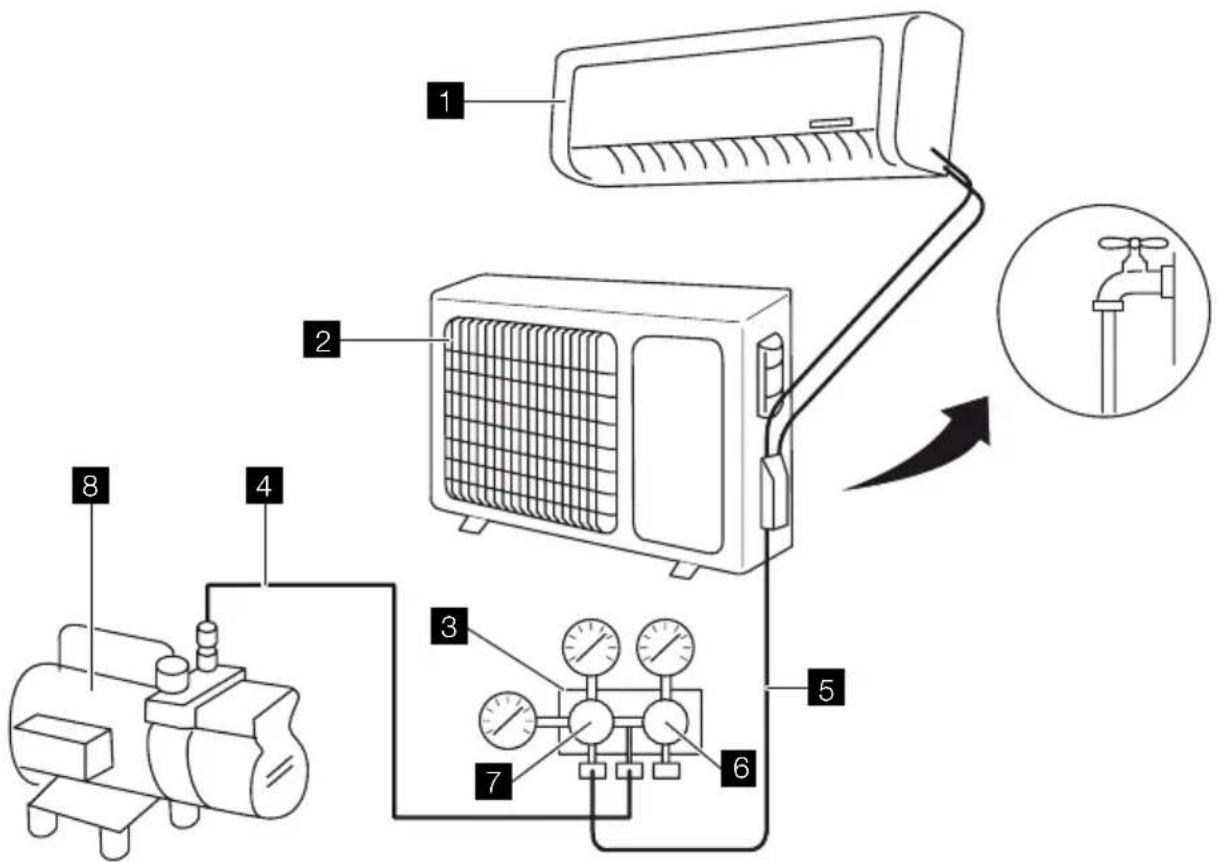
1 Indoor unit
2 Outdoor unit
3 Refrigerant
4 Gas
5 Packed valve
6 Half union
1 Valve body
2 Valve stem
3 Charge port
4 Stopper
5 Flare nut
6 Cap
Using the vacuum pump
-
Fully tighten the flare nuts at connection point A, B, C and D.
-
Connect vacuum hose between charging port and the manifold.
-
Connect the other charge hose between manifold and the vacuum pump.
-
Fully open the handle Lo of the manifold valve.
-
Operate the vacuum pump to evacuate.
-
Slightly loosen the flare nut of the Lo valve on the gas pipe side.
-
Check if air is entering (noise of the vacuum pump changes and
compound meter indicates 0 instead of minus).
-
Tighten the flare nut.
-
Make evacuation for 15 minutes or more and check that the compound meter indicates -7.6 × 10^5 mHg ( -1 × 10^5 Pa) (-0,7Bar).
-
Fully close the handle Lo of the manifold valve and stop the operation of the vacuum pump.
-
Turn the stem of the packed valve B about 45° counterclockwise for 6\~7 seconds after the gas comes out, then tighten the flare nut again.
-
Make sure the pressure display in the pressure indicator is a little higher than the atmosphere pressure. This to verify if the refrigerant does flow correctly through the tubes.
-
Remove the vacuum hose.
-
Replace the charging port cap.
-
Fully open the packed valve stems B and A.
-
Securely tighten the cap of the packed valves.
Outdoor condensate drainage (heat-pump unit only)
During heating operation, condensate water and defrosting water must be drained through the drain hose.
-
Install the outdoor drain connector in a ∅ 25 mm hole on the base plate.
-
Attach the drain hose to the connector so that water in the outdoor unit can be drained. The hole diameter 25 must be plugged.
Check after installation
| Items to be checked Possible malfunction | |
| Has the unit been jxed jrmly? The unit may drop, shake or emit noise. | |
| Have you done the refrigerant leakage test? | Insufjcient cooling or heating. |
| Is the thermal insulation suficient? Condensation. | |
| Is the water drainage satisfactory? Water leakage. | |
| Is the voltage in accordance with the rated voltage on the nameplate? | Electrical malfunction or damage to the unit. |
| Is the electrical wiring or piping connection installed correctly and securely? | Electrical malfunction or damage to the parts. |
| Has the unit been securely grounded? Electrical leakage. | |
| Is the mains cable as specijed? Electrical malfunction or damage to parts. | |
| Is the air inlet or the air outlet blocked? Insufjcient cooling or heating. | |
| Is the length of the connection pipes and the refrigerant capacity as specijed | Inaccurate refrigerant capacity. |
| Is the length of the connection pipes and the refrigerant capacity as specijed | Inaccurate refrigerant capacity. |
Operation test
Before operation test
- Do not connect the unit to the power supply before the installation is completed.
- The electrical wiring must be connected correctly and securely.
- The cut-off valves of the connection pipes must be opened. Refer to the section "Vacuuming and leakage test".
• The unit must be cleaned thoroughly.
Operation test method
- Connect the unit to the power supply.
- Press the ON/OFF button to switch on the unit.
- Press the MODE button to set the operation mode and check whether the operation is as expected.
HEALTH FILTER
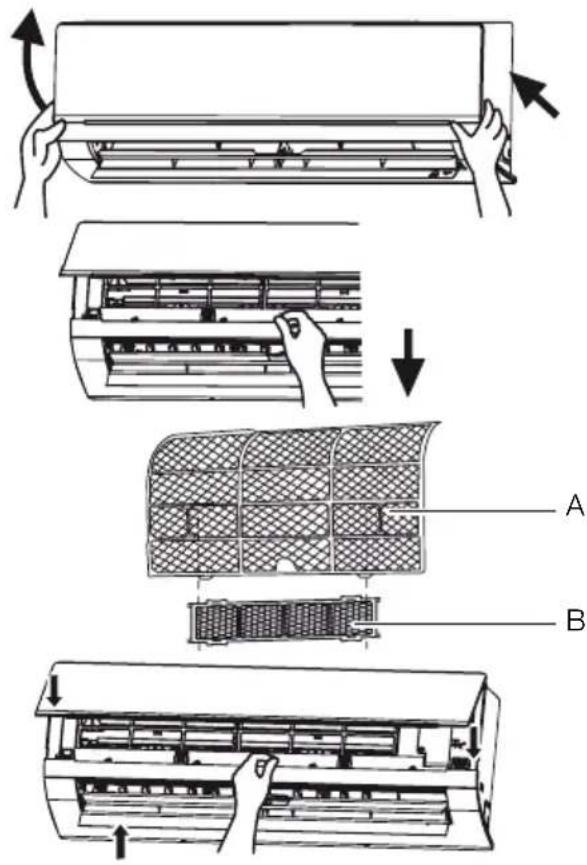
Installation
- Open the front panel.
- Remove the air filter (A).
- Attach the health filter (B) to the air filter (A).
- Install the air filter (A).
- Close the front panel.
Cleaning and maintenance
- Remove the health filter.
- Remove dust from the health filter using a vacuum cleaner.
- If the health filter is dirty, clean the health filter with warm water and a mild detergent. Allow the health filter to dry naturally in a cool, dark place.
- Install the health filter.
Service interval
The service interval for the health filter is approximately one year under normal condition. The health filter must be replaced when the surface becomes black (green).
SPIS TREŚCI
www.electrolux.com/productregistration

natural_image
Illustration of hands installing or adjusting a wall-mounted air conditioner panel (no text or symbols)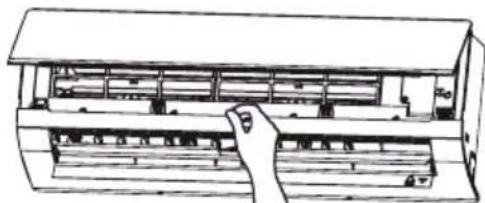
natural_image
Line drawing of a hand inserting a component into a rack (no text or symbols)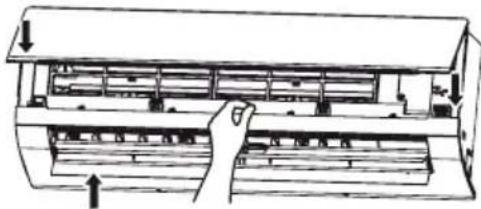
natural_image
Diagram of a multi-tiered air conditioner unit with hand operating the panel (no text or labels)!
OSTRZEŻENIE
Instalacja
natural_image
Diagram showing two views of an air conditioner unit with hands holding the panel, no text or symbols present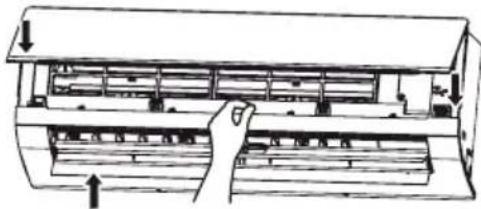
natural_image
Diagram of a hand inserting a component into an air conditioner unit (no text or labels)
VAROVANIE
1 Teleso ventilu
2 Piest ventilu
3 Plniaci otvor
4 Pútač
5 Rozširovacia matica
6 Viečko