CM-1040D - Rear Camera Camos - Free user manual and instructions
Find the device manual for free CM-1040D Camos in PDF.


User questions about CM-1040D Camos
0 question about this device. Answer the ones you know or ask your own.
Ask a new question about this device
Download the instructions for your Rear Camera in PDF format for free! Find your manual CM-1040D - Camos and take your electronic device back in hand. On this page are published all the documents necessary for the use of your device. CM-1040D by Camos.
USER MANUAL CM-1040D Camos
B.4'/10.4' TFT LCD DIGITAL MONITOR
CAMOS
CM-840D/CM-1040D
Thank you for choosing this product. Please read this instruction manual carefully before operating this product.

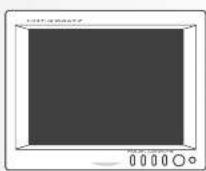
Contents
- Safety Rules 3
- Before Use 8
- Special Features of the product 10
- Terms of part 11
- Remote Control 12
- Functions 14
- Connections 23
- Changing Remote Control Battery 25
- Specifications 28
1. Safety Rules
Please read the "Safety Rules" carefully before using this product. Following of the safety rules prevents users from any damage related with the misuse of this product.
It is very important that users follow these safety rules. We show "Caution" and "Warning" to clarify any potential for damage associated with measure of the product.

May cause badly harm or ever dear? Users grow warnings to the safety rules.

Key cause partly harm or ever doesn't users grove cautions in the safety rules.
Prevalence
© 16-04
DE TO
1. "Follow directions cause by"
Warning
Place the product where it doesn't prevent the driver from driving.
- Stock options are not allowed.
The list which of open the a broker with the moving. This may have a large accident.
Do not place the products now the passenger-side airbag.
--- Actions of the (people) (100% or 0%) and are there again regularly arrive
- On a test, overall use and operation will not be ready.
No. 10-45-3-2018
Do not use in bathtub. Do not pull the plug with wet hands.
- The may cause of this work.
Do no, 100 watts reserved power voltage.
② The may cause the use of a cable stock.
Do not use Unapproved Cigarette Lighter Adapter.
--- 112. may cause the, occurring changes and/or further change.
© Dr. Wei, zhunwen at based support card. De cori plasan spars obietely on plan die man
DO NOT SAIMAGE OF 30% BOCATE COW — T1P may cause the from electric forks.
- 本次股东大会决议的有效期
Do not use damaged steam in hand.
① 10.14.2023年1月1日
Denoptulpinsneediosintheproductrolostricordolproduct.
- The request was the place of the 1974. 1975 and the date of the week, 2003, and the last
Do no, place any containers with water or any small metal objects on top of the product or nearby it.
- Display the product, often much or similar, contains in contact with the product. Continues just may cause fire,
electric shock end-of-translomer.
Stop using the product immediately when you drop it or damage the outside shell.
- On track in use may cause the electric shock and/or methionism
© In a whole health and fishing care
No careful when thunder and tip
There is a change of electric shock.
Do not use non-specified double socket and extended car battery screw.
In smycouwocexcoscfozand/orilla
Do not obtain a user, disposables or amis the required list and you know what an additional service should
This may cause a stock and/or market today. You should request an authorized service dealer for any inspection and
work of the product
Caution
Do not put the product in a place where sudden temperature increase occurs such as the vehicle's destination.

-
-
-
-
-
-
-
-
-
-
-
-
-
-
-
-
-
-
-
-
-
-
-
-
-
-
-
-
-
-
-
-
-
-
-
-
-
-
-
-
-
-
-
-
-
-
-
-
-
-
-
-
-
-
-
-
-
-
-
-
-
-
-
-
-
-
-
-
-
-
-
-
-
-
-
-
-
-
-
-
-
-
-
-
-
- 99.
-
-
-
-
-
-
-
-
-
-
-
-
-
-
-
-
-
-
-
-
-
-
-
-
-
-
-
-
-
-
-
-
-
-
-
-
-
-
-
-
-
-
-
-
-
-
-
-
-
-
-
-
-
-
-
-
-
-
-
-
-
-
-
-
-
-
-
-
-
-
-
-
-
-
-
-
-
-
-
-
-
-
-
-

Do not allow the product we can job. Best producers and/or the direct use of the supply or as

This may cause the action shock and/or a land fire.

The following table provides the information in a tabular format:

Do not put the product in an unstable place where the product may be exposed to shock and/or impact.

[10]武川市“速冻奶(2023年)

Do not place electric core near a heating product.

— The cord surface may fall and cause the ankle plastic shock.

Do not press or drop LCD panel.

— You should not give any stock on LED screen because it may cause damage.

4.2.1.1.1.2.3.4.5.6.7.8.9.10.11.12.13.14.15.16.17.18.19.20.21.22.23.24.25.26.27.28.29.30.31.32.33.34.35.36.37.38.39.40.41.42.43.44.45.46.47.48.49.50.51.52.53.54.55.56.57.58.59.60.61.62.63.64.65.66.67.68.69.70.71.72.73.74.75.76.77.78.79.80.81.82.83.84.85.86.87.88.89.90.91.92.93.94.95.96.97.98.99.100

— Del connection may cause the.

Then, we'd be a result that

Keep electric card properly positioned.

- 1) Reporting Company's share of \$20 will remain in the above section which will have a portion of the company's share.
! Untop the product and service costs when moving — EOE OEMO COGS 200 CHF, ANASIO OEMO CO
The car engine should be running when you use the product in a car.
Do not a lot the can't be wise you understand it.
Hold the plug what you plug the product. Put a battery in the remote control properly with - - signs as directed in this manual.
The call product when you can't lose to be past a lot of time, but on the cause electric shock, electric shock is after the.
Unable the product when you clean or care for it.
Do not watch Monitor or a long period of time — The day's date is season.
When you transport the product remove all cords and do not give any shock.
For all phone vehicles instead such as in-situaries on the product. The product should not use a contact with rubber or vinyl for so long period off time.
The price of the product may change and point you need it.
If you find any strange occurrences or malfunction in the product or any foreign substance gets into the product, please contact the authorized retailer where you purchased the product.
- Do not use the product in the following locations.
This may cause malfunction.
- In direct rays of the sun and near heating products
- High in humidity and with bed ventilation
● Dusty or oily locations
● Unstable environment
2. Before Use
- To safety use the product, please read the user's manual carefully before use.
- Connect all lines as directed in the product connection map in the manual.
- Do not touch the LCD panel.
- Use the product at the temperature range of 0°C \~ 50°C
- Screen may be a little dark when the product is operated in low temperature areas. Screen will be shown normal luminosity after a few minutes.
- Do not disassemble and modify the product in any way. This may cause fire and/or electric shock.
- When you install the product in a car, do not set a volume level too loud for others to hear outside.
- When you install the product in a car and watch TV, the car engine should be running as there might occur excessive discharge of the car battery.
- Any liquid leaking into product may cause malfunction.
■ Precautions (when you use the product in a car)
- The driver should not use the product while he/she is driving
● Quality of pictures on screen may vary depending on the radio field strength in different locations.
You should use video equipment where you experience week radio field strength. - Follow traffic laws when you use the Navigation Route System
- Be cautious of humidity and shock when you use the product in a car.
- The product should not be placed on the dashboard or near engine
- Cover the product when exposed to direct rays of the sun for a long period of time.
(You should keep the product at a temperature range of -20°C \~ 60°C)
3. Special Features of the Product
• Applied high resolution and low reflection DIGITAL TFT LCD (800 x 600)
• All electronic control functions
- Convenent Graphic OSD
- All functions are displayed on screen (OSD function)
- System auto recognition function (PAL/NTSC/AUTO)
• PC(RGB) auto adjustment
- 7 Languages display
(English, French, German, Spanish, Italian, Japanese, Korean)
• PC/RGB y AV / S-VIDEO selection function
• One-touch Dimmer (Remote control)
- 0.5W speaker built-in
• STAND BY Function
- Low Power consumption
• Audio rule (Redicate control)
4. Terms of part
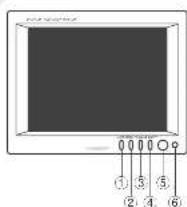
MODE
AVS VIDEO/PC(RGB) selection function. Press the mode
button to be installed should select USD box and press the DC/NN. UF button or mode button repeatedly press
The media is on the wall. The content in the stand highlighted source.
■ ITEC cure tube set to 100 mm x 40 mm horizontal or vertical screen size, press the mode button screen size: 2 - 3 seconds and wait for a 10 second
Button to Setup Screen and Function. Press the menu button to be appeared Menu OSG box and press the mode button repeatedly to select the main menu, picture menu, Setup menu, Audio menu, then press the DOWN or UP button to enter to sub menu, press the mode button repeatedly to highlight from that case wants, press the DOWN, UP button to increase, decrease or change the function. Push the menu button once to return to the main menu to select another function or press twice to exit from the OSG.
DOWN
Select the sub menu, which is selected function, but key
②UP
Select the sub menu, increase the selected function, hot key
POWE
ON/OFF button
(Remote Sensor Window Sensor for receiving signal from the remote control.
5. Remote Control
text_image
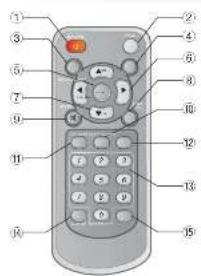
Diagram of a remote control with numbered labels pointing to various ports and function keys①POWER Power ON/OFF Key
②TV/IAV DSUB analog, external video, e-video
③RECALL Displays present status and volume level
②SLEEP The key does not use (only TV MODE)
⑤VENU Select menu and charges function.
VOL Controls Volume and change MENU level
7 ▼▲CH Selects channel and moves to MENU
AUTO PIC Selects DYNAMIC, NORMAL, MILD, USER for PICTURE
:WHITE For mating seed
Returns to the previous sound level when you push again
SETUP Setup selection button
30 PICTURE Picture selection button
②SOUND Sound selection button
SOSKEY The key does not use (only TV MODE)
©A.MENO The key does not use (only TV/MODE)
SICHSET The key does not use only TV/MODE)
6. Functions
26) E. P. M. S. N. M. A. C. D. E. F. G. H. I. J. K. L. M. N. O. P. Q. R. S. T. U. V. W. X. Y. Z. A. B. C. D. E. F. G. H. I. J. K. L. M. N. O. P. Q. R. S. T. U. V. W. X. Y. Z. A. B. C. D. E. F. G. H. I. J. K. L. M. N. O. P. Q. R. S. T. U. V. W. X. Y. A. B. C. D. E. F. G. H. I. J. K. L. M. N. O. P. Q. R. S. T. U. V. W. X. Y. A. B. C. D. E. F. G. H. I. J. K. L. M. N. O. P. Q. R. S. T. U. V. W. X. I
1 POWER (POWER)
● POWER ON/OFF KEY
(1) Push POWER(POWER) button. POWER is on.
(2) Push POWER (POWER) button again. POWER is OFF
2 MODE(TV/AV)
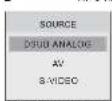
● It is function to change external video signals in 2018 ANALOGVIDEO \$-VIDEO
AVIS VIDEODGUB ANALOG!
CM-840D/CM-1040D
■ DSUB ANALOGIC DIGITALAV1 AV2
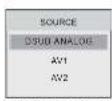
CM-840D/CM-1040D
- Adjust it with CH ▶▼: - Adjust it with Mode (key button)
③ MENU (MENU)
AVI'S-VIDEO
■ PICTURE(FICTURE)
| FIGURE | HEIGHTNESS | 10 |
| angle | EXTRIANS | 10 |
| SOUND | RUMBERG | 14 |
| COLOR TIMT | 40 | |
| COLOR TONE | 40 | |
| SYMBOL | AUDID 0.00178 |
| * Min VCEE, go to 200 VENL, After adjusting to 50 VENL,prece 50% JTE 40. |
CORTHNESS Adjust the legalness of words without altering R23's legalness
2 CONTRAST Admal the principal of value without affecting ROR's control.
ASHAGNESS Adjust the share price of a stock price
LOO OR TINT Engrise the express of color
©COORDTONE
② EQUITY
MELA, A., A.10
- Power MENU button (in an in the Main menu)
■ 208. S1-12[SL-3]
| POTATO | |
| MILK | |
| SOUND | |
| LANGUAGE | |
| CAUL TYPE | 11 |
| INJOGAL TYPE | 11 |
| CAUL MUSA | 11 |
| CAUL MUS | 11 |
| FACILITY MODEL | OFF |
* P. M. M. M. M. M. M. M. M. M. M. M. M. M. M. M. M. M. M. M. M. M. M. M. M. M. M. M. M. M. M. M. M. M. M. M. M. M. M. M. M. M. M. M. M. M. M. M. M. M. M.
©LANGUAGE Change language English, German, Italian, Japanese, Korean., SpanishFrench
COSD TIME The number of seconds that the GSD will remain visible before disappearing
2 TRANSLICENT Change the uponness of the background of the OSO
(005DH POE. Move the OSO Window to the Horizontal direction.
(ISO VPOS Move the ISO Window to the vertical direction.
Factory 10:51. A factory default reset will dear all of OSU information
-Press MENU button to go to the Main menu.
■ SOUND(SOUND)
| VOLUME | |
| 100 | - |
| 150 | - |
| 200 | 0 |
▶ MTR (VCL go to SUD MENU. After adjusting in SUD MENU.
2018年5月29日
Mute the sound temporarily. Mute is released when you change channel and adjust volume.
VOLUME Adjust the sound volume.
4TREBLE Empirical high frequency data
20 BASS Emphasize low frequency and
*Press MENU button to go to the Main menu.
PC{ANALOG}
PICTURE
| FIGURE | ISO 140-15000 | 7.0 |
| COLOR | 30 | - |
| SETUP | 30 | - |
| MASK | 30 | - |
| PHASE | 12 | |
| PAULFRED | 100 |
* ▶ I, M is 2015 pts to GUD VENJ. After stopping is GUD VENJ. PRAVE VENJ 10x11.
① BRIGHTNESS Adjust the brightness of video without affecting RGB's brightness.
ECONTRAST Adjust the rootmost of video without affecting RGB a control.
②H POSITION Adjust the horizontal position of the Image.
(CV POSITION) Adjust the vertical position of the Image.
- PLEASE Remove the noises. When phase value is wrong, the image has vertices less especially in 1 dot on and off.
©PIXEL FREQ Adjust the sampling frequency of DSJB analog signal
■Press MENU button to go to the Main menu.
COLOR
The lone of color can be changed from red-dish while to bluish white.
The individual other components are also used to crystallize
| FIGURE | ITEMS | ITEMS | ITEMS | ITEMS | ITEMS |
| CO.00 | |||||
| SETUP | |||||
| SOUND |
• ▶ (in 2015) pp. 2016, 1997, 31 May 2016
① 9000K. Change color temperature : Red 42 Green 62 Blue 56
27300K Change color temperature: Red 51 Green 48 Blue 48
\$6500K Change color temperature : Rec 40 Green 54 Blue 54
②USER User customizable. (RED, GREEN, BLUE)
iPress MENU button to go in the menu
: DISPLAY MODES
For the display modes listed below, the screen image has been optimized during manufacture.
| Mode Resolution | Horizontal Frequency(KHz) | Vertical Frequency(Hz) | Pixel Clock Frequency(MHz) | Sync Polarity (kV) | |
| VGA | 720 x 400 31.489 70.087 28.322 - /+ | ||||
| 840 x 480 31.489 59.940 25.175 | - /- | ||||
| 840 x 480 37.500 75.000 31.500 | - /- | ||||
| SVGA | 800 x 600 | 37.880 | 40.0000 500 | + / + | |
| 900 x 600 | 46.875 | 75.000 | 49.500 | + / + | |
④ RECALL Displays present status and volume level.
5 AUTO PIC Selects DYNAMIC, NORMAL, MILD, USER for PICTURE
TV/AV External video, s-videoDSUB analog
7 MUTE
- It is a function of Hube control.
When you push MUTE button, OGD display this image.
This image can be logpie.

8 OSD MESSAGE
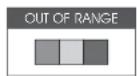
① The screen shows this when signal is out of range
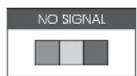
② The screen shows when there is no signal.this
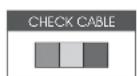
③ The screen shows when the signal cable is not connected.this
7. Connections
text_image
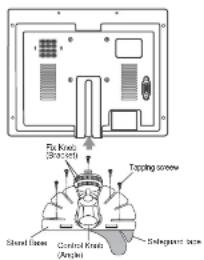
Fix Knit (Shractin) Tapping screw Shand Base Control Knit (Angle) Subgegent base- Choose a location where you install the Monitor. Clean the place for the Stand with cleanser and remove the Safeguard tape. And then attach it exactly where you want.
- Fasten the Monitor with Tapping Screw.
- Adjust angle of Stand and install Monitor.
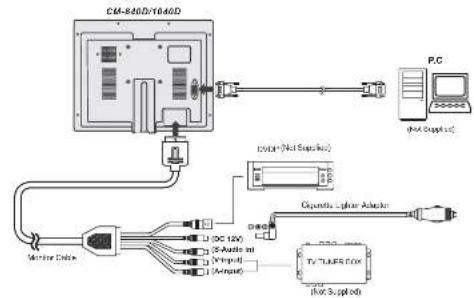
- Connect each connecting cable as in the product installation reference.
flowchart
graph TD
    A["CM-840D/T640D"] --> B["Monitor Cable"]
    A --> C["Cigarette Lysis Adapter"]
    A --> D["PC"]
    A --> E["Light Supplied"]
    B --> F["DC 12V"]
    B --> G["5-Autoil in"]
    B --> H["Input"]
    B --> I["Output"]
    C --> J["Diode"]
    D --> K["TV+LARE/FOX"]
    E --> L["light Supplied"]
8. Changing Remote Control Battery

natural_image
Three-step illustration of a device with a handle and internal components, showing progressive assembly (no text or symbols)- Slide and open the battery cover.
- Insert new battery and ensure that the polarities are correct when inserting.
- Slide and close the battery cover.
9. Specifications
CM-840D(8.4*)
| 1 T FM | SPECIFICATION | ||
| NTSC | PAL | ||
| LCD Panel | Size | 21.308 cm (8.4 inch) | |
| Display format | 480.00Patts, 240V x 500F inches | ||
| Dot pitch | 3.212W x 6.212F mm | ||
| 3.030W x 6.300F inch | |||
| Ingherese | 30Kx 4 | ||
| Contrast ratio(D/s) | 7.5 G - 1 | ||
| Active area | 179.5W x 126.4W mm | ||
| 5.712W x 6.305W inch | |||
| Wide angle(°/U/D) | ±30deg / 35deg / ±30deg | ||
| Power supply | Voltage Consumption | DC12V | |
| 16.8 Watt MAX | |||
| Rear input Power | DC12V | ||
| Input system | NISC (PAL) AUTO | ||
| OLED Display | 71 languages | ||
| Input send/rechen | TTL Separate Composites | ||
| LTFM | SPECIFICATION | ||
| NTSC | FW. | ||
| Frequency | Horizontal Vertical | 15.73GHz60 Hz | 15.63GHz50 Hz |
| Input signal | Video | Analog ROSE 0.7Vp. Compcatic VIDEO, B VIDEO (76 atm 1Vp pt) | |
| Audio | Micro input 480 mms | ||
| Sound signal | 0.5 Wall max | ||
| User control | POWER circuit, MEMU MODEPRO upload | ||
| Regulation | IUC, E-MUK | ||
| Operating temperature | -10 °C to +20 °C (-0.22°F to +1.22°F) * | ||
| Storage temperature | -30 °C to +90 °C (-1.4°F to +1.6°F) * | ||
| Dimension (W x H x D) | 228 W/Hz x 178 (Hz) x 34.5 GHz=0.70W/Hz x 7.0/10 Hz x 1.35GHz/h | ||
| Weight | 1.2kg (2.6/55 lb) (Caduce Monitor Breakdown) | ||
| Accessories | Remote controller (xib. Bailey)Monitor code Ass yCigarette lighter acoustylase 2A(Logic Note) (ACC y) | ||
CM-1040D(10.4")
| ITEM | SPECIFICATION | ||
| NTSC | PAL | ||
| LCD Panel | Size | 26.418 cm (10.4 inch) | |
| Display format | 489.030 Pads (50Hz x 50Hz) Dose | ||
| Dot pitch | 0.254(W) x 0.264(H) mm | ||
| 0.016(W) x 0.016(H) inch | |||
| Inghitness | Z20cc X | ||
| Contrast, pole(C) | 410-1 | ||
| Active area | 211.7(W) x 156.6(H) mm | ||
| 5.034(W) x 0.226(H) inch | |||
| Wire angle(°)V/Ω | ±30deg / ±0deg - ±60deg | ||
| Power supply | Voltage | DC12V | |
| Consumption | 9.6 Watt MAX | ||
| Rear input Power | DC12V | ||
| Input system | N35C / PAL / AUTO | ||
| OLED Display | 7 Langu-gas | ||
| Input synchronous | TTL Separate Composite | ||
Caudors: The design and specifications of this product in order to improve its quality may be changed without notice.
| ITEM | SPECIFICATION | ||
| NTSC | PAL | ||
| Frequency | HorizontalVertical | 15.73GHz80 Hz | 15.63GHz50 Hz |
| Input signal | Video | Analog RGB 0.7Vp gCompostic VIDEO, B VIDEO (75 ohm 1Vp pt) | |
| Audio | Micro input 490 mVrms | ||
| Sound signal | 0.5 Vol/mos | ||
| User controls | POWER output, MENU MODEPRO shutdown | ||
| Regulation | 10C L-WANK | ||
| Operating temperature | -10°C to +26°C (-122°F to 112°F) * | ||
| Storage temperature | -30°C to +56°C (-4°F to 110°F) * | ||
| Dimension (W x H x D) | 254 (99) to 202 (94) x 28 (D/mm10/60) / 200 (F to 11402 inch) | ||
| Weight | 1.5kg (3.3lbs (Excluto Monitor Bracket)) | ||
| Accessories | Remote encoder (with Battery)Monitor cable AssyCigarette lighter anchor (F or 2A)Stand Assy(Work Assy) | ||
MEMOMEMO