
HXS 800 BT - Hi-Fi System XORO - Free user manual and instructions
Find the device manual for free HXS 800 BT XORO in PDF.


| Type | Hi-Fi System |
| Model | HXS 800 BT |
| Brand | Xoro |
| Functions | CD player, FM radio, Bluetooth, USB, AUX input, remote control |
| Bluetooth | Yes, for wireless music streaming |
| Speaker Type | 2-way stereo speakers (pair) |
| Power Output | 2x 20W RMS (approx.) |
| Power Supply | AC 100-240V, 50/60Hz |
| Dimensions (Main Unit) | 200 x 250 x 300 mm (approx.) |
| Weight (Main Unit) | 3.5 kg (approx.) |
| Dimensions (Speakers) | 150 x 200 x 250 mm each (approx.) |
| Weight (Speakers) | 1.5 kg each (approx.) |
| Display | LCD screen with backlight |
| Supported Discs | CD, CD-R, CD-RW, MP3-CD |
| Radio Bands | FM, AM (if applicable) |
| USB Port | Yes, for playback of MP3 files |
| Headphone Jack | Yes, 3.5mm |
| Remote Control | Included (batteries not included) |
| Cleaning | Wipe with a soft dry cloth; avoid liquids |
| Safety | Do not expose to moisture or heat sources |
| Repairability | Spare parts available through Xoro service centers |
Frequently Asked Questions - HXS 800 BT XORO
User questions about HXS 800 BT XORO
0 question about this device. Answer the ones you know or ask your own.
Ask a new question about this device
Download the instructions for your Hi-Fi System in PDF format for free! Find your manual HXS 800 BT - XORO and take your electronic device back in hand. On this page are published all the documents necessary for the use of your device. HXS 800 BT by XORO.
USER MANUAL HXS 800 BT XORO
FREE TO CHOOSE INNOVATIONS
XORO®
HX5 800 BT

User Guide (English)

FREE TO CHOOSE INNOVATIONS
XORO®
HX5 800 BT

User Guide (English)


The lightning flash with an arrowhead symbol within an equilateral triangle is intended to alert the user of the presence of un-insulated "dangerous voltage" within the product's enclosure that may be of sufficient magnitude to constitute a risk of electric shock to persons.
The exclamation point within an equilateral triangle is intended to alert the user of the presence of important operating and maintenance (servicing) instructions in the literature accompanying the appliance. This device complies with Part 15 of the FCC Rules. The FCC Rules are developed to avoid or reduce the interference of electrical devices at home. This device may cause radio wave. If it is not installed as instructed, it may cause. interference to radio or TV, especially at the moment of switching on and off.
User's Manual
- All the safety precautions and the operating instructions should be followed.
• The safety and operating instructions should be retained for future reference.
Bluetooth
- The radio wave of this Bluetooth Speaker may impair the operation of other electric or medical devices. Keep this Bluetooth Speaker at least 40cm from pacemakers or other medical devices. Switch off the device in areas where the use is prohibited (For example: Aircraft, medical facilities, refuelling points or close to automatic controlled devices.)
General
- Never touch the device with wet hands.
- This device works only with the voltage marked on the rear panel.
- Keep the appliance away from rain and moisture.
- If you want to pull the plug out of the plug socket, always pull directly on the plug. Never pull on the cable as it could tear.
• Make sure that the power cable is not bent, caught or run over and that it does not come into contact with heat sources. - Make sure that the power cable is not wound around the device while in operation.
• Never place the machine on the power cable while it is being operated.
• Only use extension cables that are designed for the power consumption level of the machine. - Only operate the machine if the electrical voltage stated on the type plate beneath the machine agrees with the voltage on your plug socket. The wrong voltage can destroy the machine.
- Do not open the appliance.
• Pull out the mains plug if the appliance is not to be used over a longer period of time.
• Take care that nobody can trip over the power supply cable.
• Do not connect accessories on the box which are not defined by the manufacturer. - Do not place this product on an unstable cart, stand, tripod, bracket, or table. The product may fall, causing serious injury to a child or adult, and serious damage to the product. Use only with a cart, stand, tripod, bracket, or table recommended by the manufacturer, or sold with the product. Any mounting of the product should follow the manufacturer's instructions, and should use a mounting accessory recommended by the manufacturer.
• A product and cart combination should be moved with care. Quick stops, excessive force, and uneven surfaces may cause the product and cart combination to overturn.
Safety Information
- Do not increase the volume when the box is just playing very quiet sections. This cold damage the speaker if very loud passages starts all of a sudden after the quiet section.
- Switch the box off by the Off/On switch if it is not going to used for a longer period of time. Please unplug the power cable from the wall outlet.
- Disconnect the main plug during thunderstorms.
- Slots and openings in the cabinet are provided for ventilation and to ensure reliable operation of the product and to protect it from overheating, and these openings must not be blocked or covered.
- The openings should never be blocked by placing the product on a bed, sofa, rug, or other similar surface.
- This product should not be placed in a built-in installation such as a bookcase or rack unless proper ventilation is provided or the manufacturer's instructions have been adhered to.
- Protect the device against weather influences, moistures and high temperature.
- Never spill liquid of any kind on the product.
- Do not expose the device to direct sunlight
Rechargeable Battery
- If the device is not used for a long period of time, the battery may lose its charge. Please recharge the battery.
• Do not attempt to open the Bluetooth Speaker, the rechargeable battery or the battery pack. - Keep batteries out of reach of small children. If swallowed, consult a health professional immediately. Should a battery leak, the device may become damaged. Clean the battery compartment immediately, avoiding contact with your skin.
• Leaving the Device in hot or cold places, such as in a closed car in summer or winter conditions, will reduce the capacity and lifetime of the integrated battery. Always try to keep the battery between 15° C and 25° C ( 59° F and 77° F). A device with a hot or cold battery may not work temporarily, even when the battery is fully charged.
Technical Data
Bluetooth-Version 2.1+EDR (2,4GHz)
Profiles A2DP, AVRCP, HFP, HSP
Operating Range approx. 10m
Speaker 2x6W (THD=10%)
Battery 7,4V, 1000mA/h (Lilon)
Supply Voltage 9V DC, max. 1A
Dimensions 200mm(Diameter)x55mm(Heigth)
Weight approx. 800g (incl. Power Supply Unit)
Defect
-
Do not attempt to service this product yourself as opening or removing covers may expose you to dangerous voltage or other hazards. Refer to qualified service personnel.
-
Refer to qualified service personnel under the following conditions:
a. When the power-supply cord or plug is damaged. b. If liquid has been spilled, or objects have fallen into the product. c. If the product has been exposed to rain or water.
d. If the product does not operate normally by following the operating instructions. Adjust only those controls that are covered by the operating instructions as an improper adjustment of other controls may result in damage and will often require extensive work by a qualified technician to restore the product to its normal operation. e. If the product has been dropped or damaged in any way.
-
When the product exhibits a distinct change in performance this indicates a need for service.
-
When replacement parts are required, be sure the service technician has used replacement parts specified by the manufacturer or have the same characteristics as the original part. Unauthorized substitutions may result in fire, electric shock, or other hazards.
-
Nicotine can damage the electronic components. In case of service regarding too much nicotine, than the warranty/guarantee expired.
-
Please read in the section Troubleshooting our service address and phone number.
Xoro Customer Care Service:
Phone: +49 4161 800 24 24 (Mo-Fr, 11.00 to 17.00)
eMail:support@ersservice.de
Recycling of electronic devices
This product is designed and manufactured with high quality materials and components which can be recycled and reused. This symbol means that electrical and electronic equipment, at their end-of-life, should be disposed of separately from your household waste.
Please, dispose of this equipment at your local community waste collection/recycling centre. In the European Union there are separate collection systems for used electrical and electronic product. Please, help us to conserve the environment we live in!
Recycling of paper and carton
The material recycling symbol on the carton and user manual denotes that they are recyclable. Dispose them not with the normal household waste.
Recycling of plastic parts
The material recycling symbol on the plastic parts denotes that they are recyclable. Dispose them not with the normal household waste.
Green Dot
The "Grüne Punkt" denotes that the MAS Elektronik AG pays a duty to the "Society for Waste Prevention and Secondary Resource Generation".
Batteries
-
The batteries can be returned free of charge after use in the shop or in their immediate vicinity.
-
The consumer is legally obliged to return used batteries.
-
The icons on batteries are with one of the two following characters, consisting of a strikethrough trashcan and the chemical symbol of heavy metals decisive for classification as contaminant-laden.
-
Both symbols have the same meaning.
-
Batteries that contain pollutants are characterised by chemical symbols: Pb = battery contains lead, Cd = battery containing cadmium, Hg = battery contains mercury.
Every consumer is legally obliged to dispose these batteries at the collection point of his community or dealer for a environmental friendly disposal. We dispose used batteries for you free of charge and environmental friendly.



Accessories
- HXS 800 BT
• Power Supply Unit - User Manual
Notes:
- Please use the speaker with original accessories only.
- Please contact your dealer immediately in case of missing accessories.
Control Elements

1 Power Switch
2 AUX (Audio-Input,3,5mm jack plug)
3 DC (Connector for Power Supply Unit)
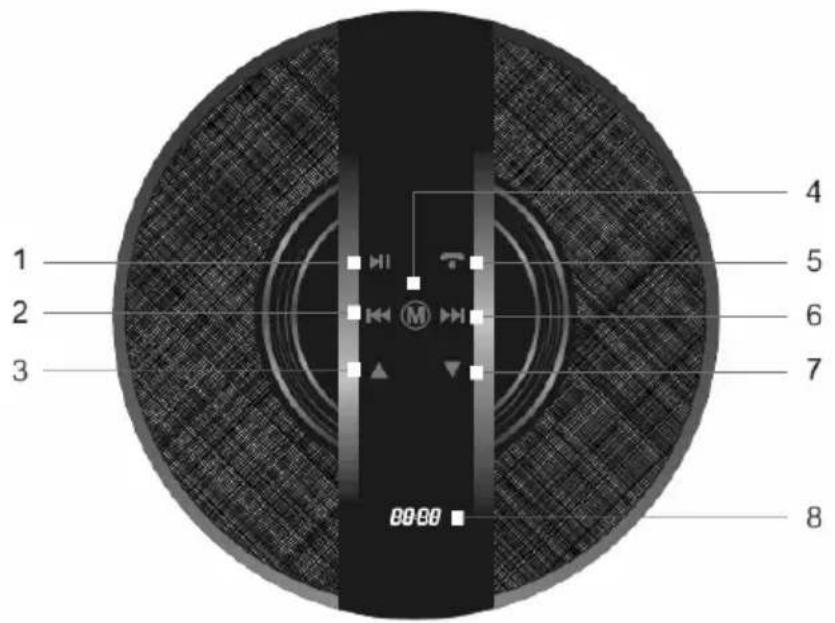
1 PLAY/PAUSE (Bluetooth-Connection only)
Touch this button to pause music playback. Touch this button again to continue playback (Requires compatible Bluetooth device).
2/6 Previous/Next Track (Bluetooth-Connection only)
Touch this buttons to select the next or previous Track in the Play List of you Bluetooth-Device (Requires compatible Bluetooth device).
3/7 Volume Control
Touch this buttons to increase or decrease the speakers volume. This setting is independent from the Volume Control of your Bluetooth-Device. You may have to set the Volume on your Bluetooth Device separately.
4 M
Touch this button to select the Connection (Signal Source) (CH1 BT= Bluetooth, CH2 AUX= wired connection, AUX).
Touch and hold this button to enable (ON) or disable (OFF) the "Non Clip"-Function. When enabled, you can play music at high volume without distortions. (Default Setting is: ON)
5 Answer a call/hang up (Hands free, Bluetooth-Connection only)
Touch this button to answer an incoming phone call. Touch this button again to hang up (Requires compatible Bluetooth device).
8 DISPLAY
The Display shows the select connection and the battery status.
Notes:
• The illumination of the control panel will be turned off a few seconds after last usage.
- The Speaker will switch to sleep mode if it is receiving no signal for 15mins. You have to switch it off and on using the Power Switch to get it back in an operating condition.
First Use - Charging the Battery
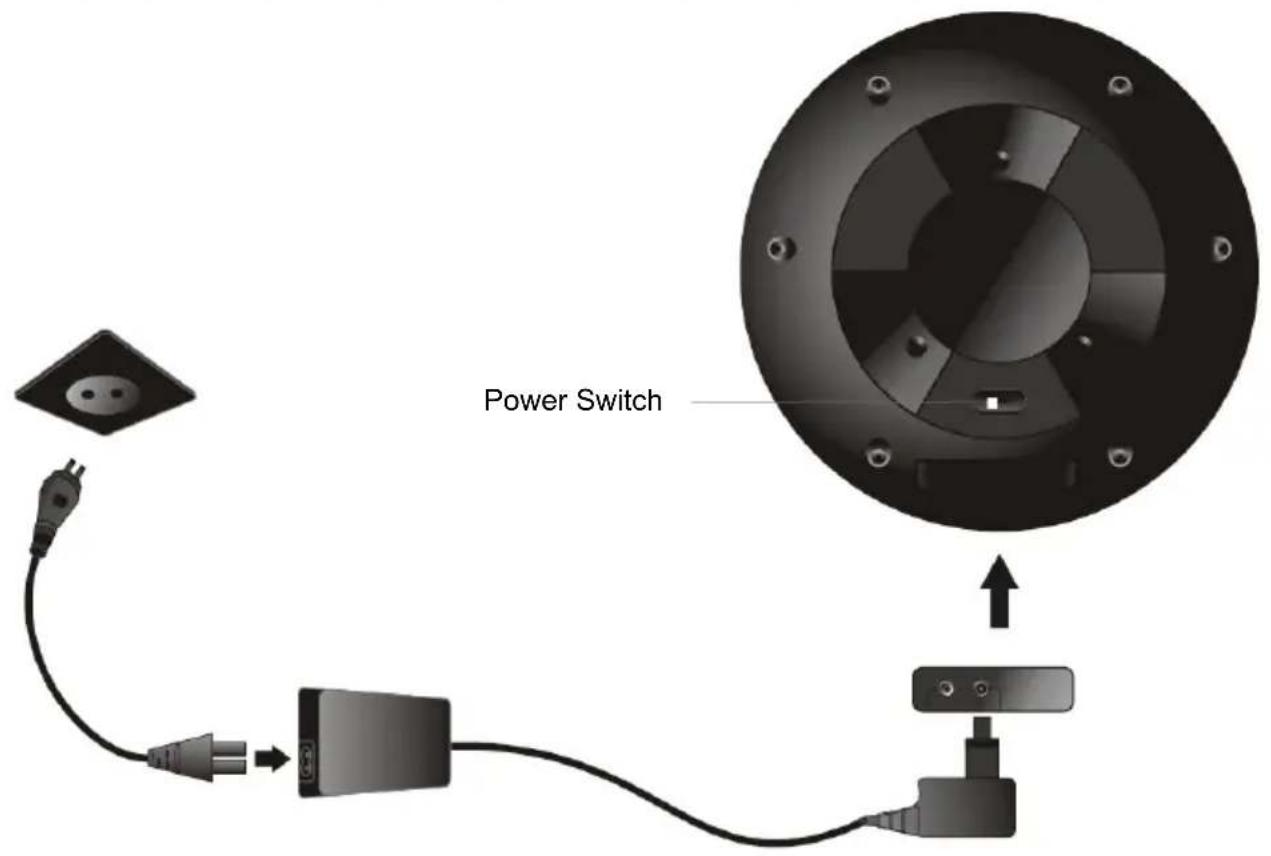
- Connect the power supply unit to the Speaker (DC 9V).
- Plug the power supply unit to a power socket. The power supply unit gets warm during charging the Battery. Please ensure proper air ventilation.
• Power on the speaker using the Power switch.
• A complete charge take up to approx. 4 hours. The display shows the battery status.
First Use - Establish a Bluetooth connection
- Switch off the Speaker using the power switch. Wait a few seconds until the display stops to light.
- Switch on the Speaker using the power switch.
- Check if the Display shows "CH 1 BT". If not, touch the button M to activate the Bluetooth connection.
- An acoustic signal followed by another acoustic signal signals that the speaker is ready for a new connection.
- Activate the Bluetooth-Function of your Bluetooth-Device (Cell Phone, Tablet PC) and search for new devices (Please refer to the manual of your Bluetooth-Device).
- The Speaker will be detected as "Xoro HXS 800 BT".
- If your Bluetooth-Device is asking for a Passcode, please enter 0 0 0 0.
First Use - Wired Connection

- Switch off the Speaker using the power switch.
- Connect your signal source to the AUX-Input (3,5mm Jack Plug. Cable sold separately).
- Switch on the Speaker using the power switch.
- Touch the button "M" to select CH02 AUX.
In case the products delivered are not free from defects in material or workmanship, MAS Elektronik AG has the right to either repair or replace the defective product at its choice. MAS Elektronik AG manufactures and repairs goods using components which are new or equivalent to new in accordance with industry

standards and practice. The warranty for wearing parts (e.g. rechargeable batteries) is limited to 6 months.
In case the device is equipped with internal data storage (e.g. hard disc drive, Flash drive), the customer is responsible to backup his data before sending the device. MAS Elektronik AG is not liable for any data loss on returned devices. MAS Elektronik AG reserves the right to reset returned devices to factory defaults. Please note your personal settings for this reason.
MAS Elektronik AG is not liable for any accessories not belonging to original package content such as DVDs, hard disc drives, Flash storage devices, batteries, etc.
This limited warranty covers the warranty requirements set by authorities in your country.
This limited warranty only is valid in the country the product was purchased. This limited warranty does not cover finishes, accessories or batteries, nor does it cover damage resulting from accident, misuse, abuse, dirt, water, battery leakage, tampering, servicing performed or attempted by unauthorized service agencies. This limited warranty does not cover damages resulting from firmware upgrades. Only in case of firmware upgrades needed to add functions promised at time of purchase, such damages are covered by this limited warranty. For a correct and frictionless completion of warranty or repairs you need a RMA No. You may obtain a RMA on the internet at www.mas.de/FAQ or by telephone.
Please send the device in its original packing material, all standard accessories and a copy of the invoice, a description of defect and the RMA No. to following address. Please note the RMA number clear and in large numbers on the outer package.
MAS Elektronik AG
Weidegrund 3
21614 Buxtehude
Germany
Support
e-mail: support@ersservice.de
Hotline: +49 (0) 4161 800 24 24
FREE TO CHOOSE INNOVATIONS

XORO by MAS Elektronik AG


- XORO®
- USER'S MANUAL
- BLUETOOTH
- GENERAL
- SAFETY INFORMATION
- RECHARGEABLE BATTERY
- TECHNICAL DATA
- DEFECT
- XORO CUSTOMER CARE SERVICE
- RECYCLING OF ELECTRONIC DEVICES
- RECYCLING OF PAPER AND CARTON
- RECYCLING OF PLASTIC PARTS
- GREEN DOT
- BATTERIES
- ACCESSORIES
- NOTES
- CONTROL ELEMENTS
- 1 PLAY/PAUSE (BLUETOOTH-CONNECTION ONLY)
- 2/6 PREVIOUS/NEXT TRACK (BLUETOOTH-CONNECTION ONLY)
- 3/7 VOLUME CONTROL
- 4 M
- 5 ANSWER A CALL/HANG UP (HANDS FREE, BLUETOOTH-CONNECTION ONLY)
- 8 DISPLAY
- FIRST USE - ESTABLISH A BLUETOOTH CONNECTION
- FIRST USE - WIRED CONNECTION
- XORO BY MAS ELEKTRONIK AG
Brand : XORO
Model : HXS 800 BT
Category : Hi-Fi System