
13A22 - Television TOSHIBA - Free user manual and instructions
Find the device manual for free 13A22 TOSHIBA in PDF.



| Product Type | Color Television |
| Brand | TOSHIBA |
| Model | 13A22 |
| Screen Size | 13 inches (335 mm diagonal) |
| Power Consumption | 54 Watts |
| Power Supply | 120 V AC, 60 Hz |
| Dimensions (W x H x D) | 362 x 320.5 x 360 mm |
| Weight | 9.5 kg |
| Tuner | 181 channels, quartz PLL frequency synthesizer |
| On-Screen Display | 3 languages (English, Spanish, French) |
| Sleep Timer | Up to 120 minutes |
| V-Chip | US rating system (TV and MPAA) |
| Closed Captioning | Built-in decoder (CAP/TEXT) |
| Lock | Channel lock, video lock, game timer |
| Audio/Video Input | 1 jack (front) |
| Headphone Jack | 1/8" mini jack (mono) |
| Remote Control | Infrared, AAA batteries (supplied) |
| Speaker | 3 inches, 8 ohms, 1 watt |
| Warranty (parts and labor) | 90 days labor, 1 year parts, 2 years CRT |
Frequently Asked Questions - 13A22 TOSHIBA
User questions about 13A22 TOSHIBA
0 question about this device. Answer the ones you know or ask your own.
Ask a new question about this device
Download the instructions for your Television in PDF format for free! Find your manual 13A22 - TOSHIBA and take your electronic device back in hand. On this page are published all the documents necessary for the use of your device. 13A22 by TOSHIBA.
USER MANUAL 13A22 TOSHIBA
© 2002 TOSHIBA CORPORATION All Rights Reserved
Owner's Record
The model number and serial number are on the back of your TV. Record these numbers in the spaces below. Refer to these numbers whenever you communicate with your Toshiba dealer about this TV.
Thank you for purchasing this Toshiba TV. This manual will help you use the many exciting features of your new TV. Before operating the TV, please read this manual completely, and keep it nearby for future reference.
Safety Precautions
WARNING
TO REDUCE THE RISK OF FIRE OR ELECTRIC SHOCK, DO NOT EXPOSE THIS APPLIANCE TO RAIN OR MOISTURE.
WARNING
RISK OF ELECTRIC SHOCK
DO NOT OPEN

WARNING: TO REDUCE THE RISK OF ELECTRIC SHOCK, DO NOT REMOVE COVER (OR BACK). NO USER-SERVICEABLE PARTS INSIDE. REFER SERVICING TO QUALIFIED SERVICE PERSONNEL.
The lightning symbol in the triangle tells you that the voltage inside this product may be strong enough to cause an electric shock. DO NOT TRY TO SERVICE THIS PRODUCT YOURSELF.
The exclamation mark in the triangle tells you that important operating and maintenance instructions follow this symbol.
NOTE TO CATV INSTALLERS IN THE USA
This is a reminder to call the CATV system installer's attention to Article 820-40 of the NEC, which provides guidelines for proper grounding and, in particular, specifies that the cable ground shall be connected to the grounding system of the building, as close to the point of cable entry as practical. For additional antenna grounding information, see items 24 and 25 on page 3.
NOTICE OF POSSIBLE TV STAND INSTABILITY

DANGER: RISK OF SERIOUS PERSONAL INJURY OR DEATH! Use this TV with
the TOSHIBA TV stand recommended in the
"Specifications" section only. Use with other stands may result in instability, causing possible injury or death.
NOTICE OF POSSIBLE ADVERSE EFFECTS ON TV PICTURE TUBE
If a fixed (non-moving) pattern remains on the TV screen for long periods of time, the image can become permanently engrained in the picture tube. This type of damage is NOT COVERED BY YOUR WARRANTY. See item 32 on page 3.
Child Safety
It Makes A Difference Where Your TV Stands

natural_image
Two baby babies sitting side by side, one covering face with hand on cheek, the other looking down (no text or symbols)Congratulations on your purchase! As you enjoy your new TV, keep these safety tips in mind:
The Issue
☐ If you are like most Americans, you have a TV in your home. Many homes, in fact, have more than one TV.
☐ The home theater entertainment experience is a growing trend, and larger TVs are popular purchases; however, they are not always supported on the proper TV stands.
☐ Sometimes TVs are improperly secured or inappropriately situated on dressers, bookcases, shelves, desks, audio speakers, chests, or carts. As a result, TVs may fall over, causing unnecessary injury.
Toshiba Cares!
☐ The consumer electronics industry is committed to making home entertainment enjoyable and safe.
☐ The Consumer Electronics Association formed the Home Entertainment Support Safety Committee, comprised of TV and consumer electronics furniture manufacturers, to advocate children's safety and educate consumers and their families about television safety.
Tune Into Safety
☐ One size does NOT fit all! Use appropriate furniture large enough to support the weight of your TV (and other electronic components).
☐ Use appropriate angle braces, straps, and anchors to secure your furniture to the wall (but never screw anything directly into the TV).
□ Carefully read and understand the other enclosed instructions for proper use of this product.
☐ Do not allow children to climb on or play with furniture and TVs.
☐ Avoid placing any item on top of your TV (such as a VCR, remote control, or toy) that a curious child may reach for.
☐ Remember that children can become excited while watching a program and can potentially push or pull a TV over.
☐ Share our safety message about this hidden hazard of the home with your family and friends. Thank you!


Consumer Electronics Association
2500 Wilson Blvd.
Arlington, VA 22201 U.S.A.
Tel. 703-907-7600 Fax 703-907-7690
vw.CE.org
CEA is the Sponsor, Producer and
Manager of the International CES®
Important Safety Instructions
1) Read these instructions.
2) Keep these instructions.
3) Heed all warnings.
4) Follow all instructions.

5) Do not use this apparatus near water.
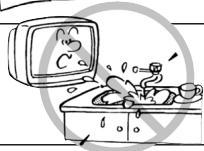
6) Clean only with a dry cloth.
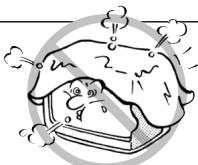
7) Do not block any ventilation openings. Install in accordance with the manufacturer's instructions.
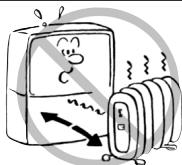
8) Do not install near any heat sources such as radiators, heat registers, stoves, or other apparatus (including amplifiers) that produce heat.
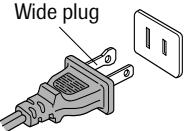
9) Do not defeat the safety purpose of the polarized or grounding type plug. A polarized plug has two blades with one wider than the other. A grounding type plug has two blades and a third grounding prong. The wide blade or the third prong are provided for your safety. If the provided plug does not fit into your outlet, consult an electrician for replacement of the obsolete outlet.
CAUTION: TO PREVENT ELECTRIC SHOCK DO NOT USE THIS POLARIZED PLUG WITH AN EXTENSION CORD, RECEPTACLE OR OTHER OUTLET UNLESS THE BLADES CAN BE INSERTED TO PREVENT BLADE EXPOSURE.
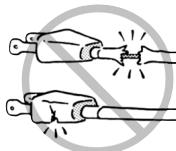
10) Protect the power cord from being walked on or pinched, particularly at plugs, convenience receptacles, and the point where it exits the apparatus.
11) Only use attachments/accessories specified by the manufacturer.
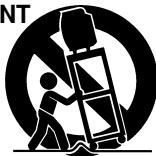
12) Use only with the cart, stand, tripod, bracket, or table specified by the manufacturer, or sold with the apparatus. When a cart is used, use caution when moving the cart/apparatus combination to avoid injury from tip-over.

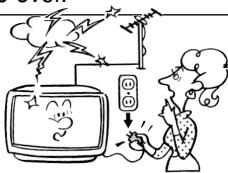
13) Unplug this apparatus during lightning storms or when unused for long periods of time.
natural_image
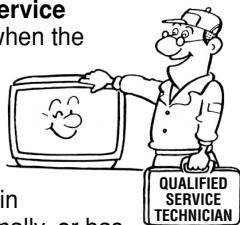
Cartoon illustration of a person watching a TV with lightning, smoke, and a power button (no text or symbols)14) Refer all servicing to qualified service personnel. Servicing is required when the apparatus has been damaged in any way, such as power supply cord or plug is damaged, liquid has been spilled or objects have fallen into the apparatus, the apparatus has been exposed to rain or moisture, does not operate normally, or has been dropped.
text_image
service when the in nolly, or has QUALIFIED SERVICE TECHNICIANInstallation, Care, and Service Installation
Follow these recommendations and precautions and heed all warnings when installing your TV:
15) Never modify this equipment. Changes or modifications may void: a) the warranty, and b) the user's authority to operate this equipment under the rules of the Federal Communications Commission.
16)

DANGER: RISK OF SERIOUS PERSONAL INJURY, DEATH, OR EQUIPMENT
DAMAGE! Never place the TV unstable cart, stand, or table. may fall, causing serious personal death, or serious damage to the TV.
17) Never place or store the TV in direct sunlight; hot, humid areas; areas subject to excessive dust or vibration; or locations with temperatures at or below 41^ F ( 5^ C).
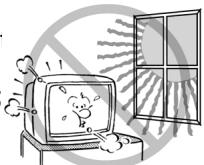
18) Always place the TV on the floor or a sturdy, level, stable surface that can support the weight of the unit.
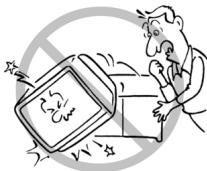
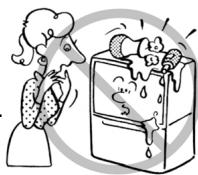
19) Never place items such as vases, aquariums, or candles on top of the TV.
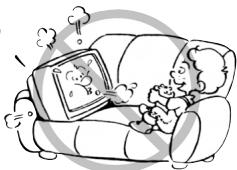
20) Never block or cover the slots or openings in the TV cabinet back, bottom, and sides. Never place the TV:
- on a bed, sofa, rug, or similar surface;
- too close to drapes, curtains, or walls; or
- in a confined space such as a bookcase, built-in cabinet, or any other place with poor ventilation.
The slots and openings are provided to protect the TV from overheating and to help maintain reliable operation of the TV.
natural_image
Illustration of a person reading on a sofa with a TV, no text or symbols present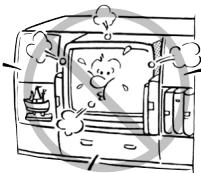
21) Never allow anything to rest on or roll over the power cord, and never place the TV where the power cord is subject to wear or abuse.
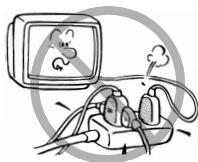
22) Never overload wall outlets and extension cords.
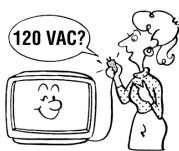
23) Always operate this equipment from a 120 VAC, 60 Hz power source only.
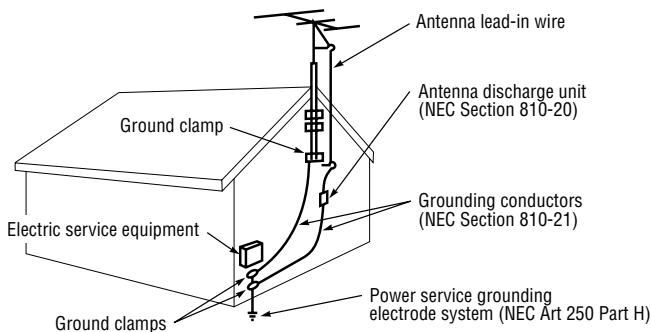
24) Always make sure the antenna system is properly grounded to provide adequate protection against voltage surges and built-up static charges (see Section 810 of the National Electric Code).
text_image
Antenna lead-in wire Antenna discharge unit (NEC Section 810-20) Ground clamp Grounding conductors (NEC Section 810-21) Electric service equipment Power service grounding electrode system (NEC Art 250 Part H) Ground clamps25)

DANGER: RISK OF SERIOUS PERSONAL INJURY OR DEATH!
Use extreme care to make sure you are never in a position where your body (or any item you are in contact with, such as a ladder or screwdriver) can accidentally touch overhead power lines. Never locate the antenna near overhead power lines or other electrical circuits.
- Never attempt to install any of the following during lightning activity: a) an antenna system; or b) cables, wires, or any home theater component connected to an antenna or phone system.
Care
For better performance and safer operation of your TOSHIBA TV, follow these recommendations and precautions:
26) Always sit approximately 10–25 feet away from the TV and as directly in front of it as possible. The picture can appear dull if you sit too far to the left or right of the TV, or if sunlight or room lights reflect on the screen. Turn the TV off to check for reflections on the screen, and then remove the source of reflections while viewing the TV.
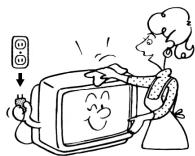
27) Always unplug the TV before cleaning. Never use liquid or aerosol cleaners.
28)

WARNING: RISK OF ELECTRIC SHOCK! Never spill liquids or push objects of any kind into the TV cabinet slots.
29) [This item applies to projection TVs only.] If the air temperature rises suddenly (for example, when the TV is first delivered), condensation may form on the lenses. This can make the picture appear distorted or the color appear faded. If this happens, turn off the TV for 6 to 7 hours to allow the condensation to evaporate.
30) For added protection of your TV from lightning and power surges, always unplug the power cord and disconnect the antenna from the TV if you leave the TV unattended or unused for long periods of time.
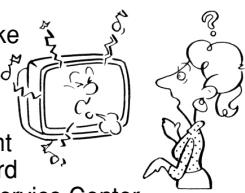
31) During normal use, the TV may make occasional snapping or popping sounds. This is normal, especially when the unit is being turned on or off. If these sounds become frequent or continuous, unplug the power cord and contact a Toshiba Authorized Ser
text_image
ke at d Service Center32) Possible Adverse Effects on TV Picture Tube: If a fixed (non-moving) pattern remains on the TV screen for long periods of time, the image can become permanently engrained in the picture tube and cause subtle but permanent ghost images. This type of damage is NOT COVERED BY YOUR WARRANTY. Never leave your TV on for long periods of time while it is displaying the following formats or images:
- Fixed Images, such as PIP/POP windows, stock tickers, video game patterns, TV station logos, and websites.
- Special Formats that do not use the entire screen. For example, viewing letterbox style (16:9) media on a normal (4:3) display (gray bars at top and bottom of screen); or viewing normal style (4:3) media on a widescreen (16:9) display (gray bars on left and right sides of screen).
Service
33)

WARNING: RISK OF ELECTRIC
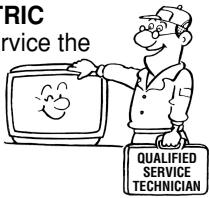
SHOCK! Never attempt to service the
TV yourself. Opening and removing the covers may expose you to dangerous voltage or other hazards. Refer all servicing to a Toshiba Authorized Service Center.
text_image
RIC rvice the QUALIFIED SERVICE TECHNICIAN34) If you have the TV serviced:
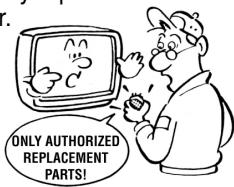
- Ask the service technician to use on parts specified by the manufacturer.
- Upon completion of service, ask the service technician to perform routine safety checks to determine that the TV is in safe operating condition.
text_image
ONLY AUTHORIZED REPLACEMENT PARTS!35) When the TV reaches the end of its useful life, ask a qualified service technician to properly dispose of the TV. Improper disposal may result in a picture tube implosion and possible personal injury.
FEATURES
- 181 Channel Tuner - The tuning system is capable of receiving all 68 VHF/UHF standard broadcast channels that are available in your area. When operating on a cable system, it can tune to the standard VHF channel frequencies plus up to 113 cable channel frequencies. The actual number of channels received depends upon channel reception in your area or your cable system.
- On-Screen 3 Language Display - This TV can display the on-screen language in English, Spanish or French.
- Sleep Timer - Operable from the remote control, this TV can be programmed up to 120 minutes to turn off automatically.
- Memory Back Up - This system prevents loss of memorized channel selections in case a power interruption to the TV should occur.
- V-Chip - The V-Chip function can read the rating of a TV program or movie content if the program is encoded with this information. V-Chip will allow you to set a restriction level. (designed to work with the U. S. V-Chip system only)
- Picture Control Adjustments - The On-Screen display allows precise remote control adjustment of BRIGHTNESS, COLOR, CONTRAST, SHARPNESS and TINT.
- Closed Captioned Decoder - Displays text captions or 1/2 of full screen text on the screen for hearing impaired viewers.
- Lock feature - This feature has three functions, LOCKING CHANNELS, LOCKING VIDEO INPUT and SETTING THE GAME TIMER.
LOCATION OF CONTROLS
FRONT
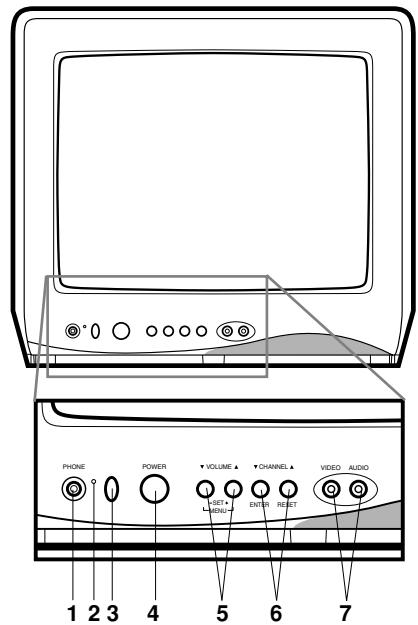
text_image
PHONE POWER VOLUME CHANNEL VIDEO AUDIO 1 2 3 4 5 6 7-
PHONE (Earphone) Jack - Plug an earphone or monaural headphones with a 1/8 miniplug into this jack for private listening.
-
POWER indicator - Lights up when the power is turned on.
-
Remote Sensor - Signals from the Remote Control unit are received here.
-
POWER Button - Press to turn the TV on or off.
-
VOLUME ▲/▼ Buttons - Press to raise or lower the level of the sound.
(MENU Buttons) - Press both VOLUME ▲/▼ buttons at the same time to display the On-Screen menu functions.
(SET + / - Buttons) - Press to select the desired setting during On-Screen operations.
BACK
natural_image
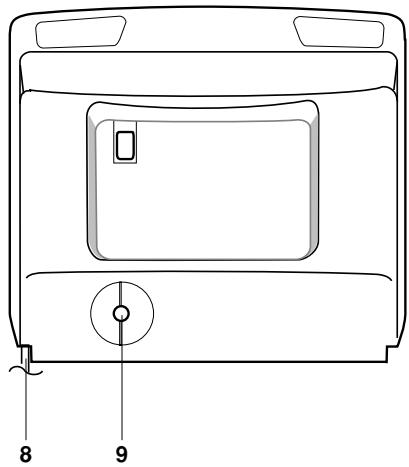
Line drawing of a front view of a washing machine with labeled parts (no text or symbols beyond numbers)- CHANNEL ▲/▼ Buttons - Press to select a higher or lower numbered channel set into memory. (ENTER Button) - Press to enter or select information for On-Screen operations. (RESET Button) - Press, while in the On-Screen menu mode, to reset the On-Screen picture adjustments to their factory preset positions.
- AUDIO/VIDEO IN Jacks - Audio and video signal cables from an external source can be connected here.
- AC Power Cord - Plug into an outlet with 120V, 60 Hz AC power only.
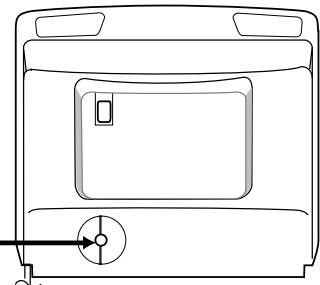
- VHF/UHF IN (ANT) Jack - Connect a VHF/UHF antenna or CATV cable to this jack.
REMOTE CONTROL
text_image
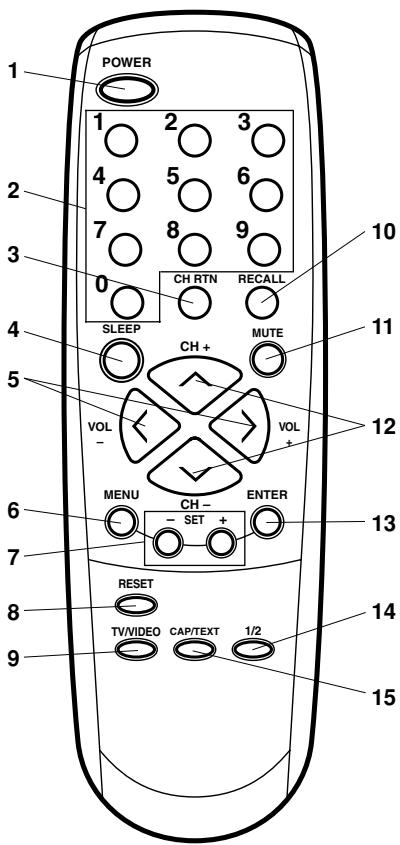
POWER 1 2 3 4 5 6 7 8 9 0 CH RTN RECALL SLEEP MUTE CH + VOL VOL - MENU CH- ENTER - SET + RESET TV/VIDEO CAP/TEXT 1/2 10 11 12 13 14 15- POWER Button - Press to turn on the TV. Press again to turn off the TV.
- Direct Channel Selection Buttons (0-9) - Allows direct access to any channel.
-
CH RTN Button - This button allows you to go back to the previous channel selected by pressing the CH RTN button. Press this button again to return to the channel you were watching.
-
SLEEP Button - To set the TV to turn off after a preset amount of time, press the SLEEP button on the remote control. The clock will count down 10 minutes each time the button is pressed in the order of 120, 110, 100, …… 20, 10, 0. After the sleep time is programmed, the display will disappear then reappear momentarily every ten minutes to remind you the sleep timer function is operating. To confirm the sleep time setting, press the SLEEP button once and the remaining time will be momentarily displayed. To cancel sleep time, press the SLEEP button repeatedly until the display turns to 0.
- VOL (VOLUME) + / - Buttons - Press the + button to increase, or the - button to decrease the volume level.
- MENU Button - Press to display the On-Screen menu function.
- SET + / - Buttons - Press to select the desired setting during On-Screen operations.
- RESET Button - Press to reset the On-Screen picture adjustments to their factory preset positions.
- TV/VIDEO Button - Switches between TV and external inputs.
- RECALL Button - When you press this button, the channel number will appear in the upper right corner of the screen. Press the button again to remove it from the screen.
- MUTE Button - To turn off the sound, press this button once. The TV will be silenced and the symbol MUTE will appear on the screen. The muting feature can be released by pressing the MUTE button again or one of the VOL + or - buttons.
- CH (CHANNEL) + / - Buttons - Press the + button to change to a higher numbered channel set into memory. Press the - button to change to a lower numbered channel set into memory.
- ENTER Button - Press to enter or select information for On-Screen operations.
- 1/2 Button - Switches between Channel 1 and Channel 2 in the Closed Caption mode.
- CAP/TEXT Button - Press this button to switch between normal TV and the two Closed Caption modes (captions and 1/2 of full screen text). Closed Captioning will display text on-screen for hearing impaired viewers.
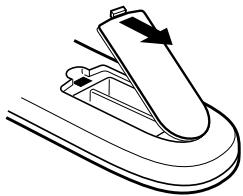
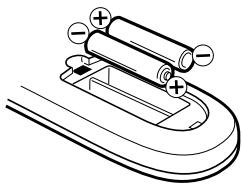
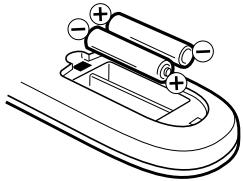
Before using the remote control, batteries must first be installed.
HOW TO INSTALL BATTERIES
- Open the battery compartment cover.
natural_image
Diagram of a mechanical component with arrows indicating direction (no text or symbols)- Install two "AAA" (penlight size) batteries.
natural_image
Simple line drawing of a U-shaped battery with two batteries and one partially submerged in liquid (no text or symbols)- Replace the battery compartment cover.
Use two "AAA" size penlight batteries (supplied) for the transmitter. The batteries may last approximately one year depending on how much the remote control is used. For best performance, it is recommended that batteries should be replaced on a yearly basis, or when the remote operation becomes erratic. Do not mix old and new batteries or different types.
BATTERY PRECAUTIONS
These precautions should be followed when using batteries in this device:
- Use only the size and type of batteries specified.
- Be sure to follow the correct polarity when installing the batteries as indicated in the battery compartment. Reversed batteries may cause damage to the device.
- Do not mix different types of batteries together (e.g. Alkaline and Carbon-zinc) or old batteries with fresh ones.
- If the device is not to be used for a long period of time, remove the batteries to prevent damage or injury from possible battery leakage.
- Do not try to recharge batteries not intended to be recharged; they can overheat and rupture. (Follow battery manufacturer's directions.)
ANTENNA/CATV CONNECTIONS
flowchart
graph TD
    A["Combination VHF/UHF Antenna"] --> B["Single 75 ohm Cable"]
    A --> C["300 ohm Twin-lead Wire"]
    A --> D["Splitter"]
    D --> E["Take off the Splitter"]
    F["UHF Antenna"] --> G["300 ohm Twin-lead Wire"]
    F --> H["300 ohm Twin-lead Wire"]
    I["VHF Antenna"] --> J["Single 75 ohm Cable"]
    I --> K["300 ohm Twin-lead Wire"]
    I --> L["300-75 OHM MATCHING TRANSFORMER (not supplied)"]
    M["Incoming CATV"] --> N["CONVERTER/DESCRAMBLER"]
    M --> O["CONVERTER/DESCRAMBLER"]
    P["SPLITTER"] --> Q["A/B SWITCH"]
    R["COMBINER (not supplied)"] --> S["300-75 OHM MATCHING TRANSFORMER (not supplied)"]
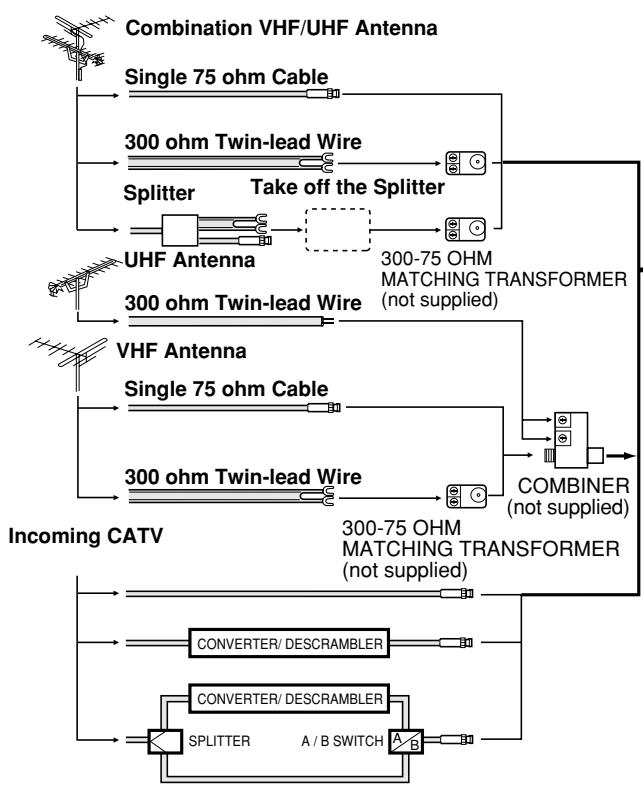
Combination VHF/UHF Antenna (Single 75 ohm cable or 300 ohm twin-lead wire)
Connect the 75 ohm cable from a combination VHF/UHF antenna to the antenna jack.
If your combination antenna has a 300 ohm twin-lead wire, use the 300-75 ohm matching transformer (not supplied).
Combination VHF/UHF Antenna (Separate VHF and UHF 300 ohm twin-leads)
Connect the UHF twin-lead wire to a combiner (not supplied). Connect the VHF twin-lead to the 300-75 ohm matching transformer (not supplied). Attach the transformer to the combiner. Attach the combiner to the antenna jack.
natural_image
Line drawing of a front view of a microwave oven with a central door and ventilation slots (no text or symbols)This television has an extended tuning range and can tune most cable channels without using a cable company supplied converter box. Some cable companies offer "premium pay channels" in which the signal is scrambled. Descrambling these signals for normal viewing requires the use of a descrambler device which is generally provided by the cable company.
Separate VHF/UHF Antennas
Connect the 75 ohm cable from the VHF antenna and the UHF antenna twin-lead to a combiner (not supplied). Attach the combiner to the antenna jack.
NOTE: If your VHF antenna has a twin-lead wire, use the 300-75 ohm matching transformer (not supplied), then connect the transformer to the combiner.
For Subscribers to Basic Cable TV Service
For basic cable service not requiring a converter/descrambler box, connect the CATV 75 ohm coaxial cable directly to the antenna jack on the back of the television.
For Subscribers to Scrambled Cable TV Service
If you subscribe to a cable service which requires the use of a converter/descrambler box, connect the incoming cable to the converter/descrambler box and connect the output of the box to the antenna jack on the back of the television. Follow the connections shown left. Set the television to the output of the converter/descrambler box (usually channel 3 or 4) and use the converter/descrambler box to select channels.
For Subscribers to Unscrambled Basic Cable with Scrambled Premium Channels
If you subscribe to a cable service in which basic cable channels are unscrambled and premium channels require the use of a converter/descrambler box, you may wish to use a two-set signal splitter (sometimes called a "two-set coupler") and an A/B switch box from the cable installer or an electronics supply store. Follow the connections shown left. With the switch in the "B" position, you can directly tune any nonscrambled channels on your TV. With the switch in the "A" position, tune your TV to the output of the converter/descrambler box (usually channel 3 or 4) and use the box to tune scrambled channels.
CONNECTION TO OTHER EQUIPMENT
The exact arrangement you use to interconnect various video and audio components to the TV is dependent on the model and features of each component. Check the Owner's Manual provided with each component for the location of video and audio inputs and outputs. The connection diagrams in the following are offered as suggestions. You may need to modify them to accommodate your particular assortment of components. The diagrams are intended to show component video and audio interconnections only.
TV/VIDEO SELECTION
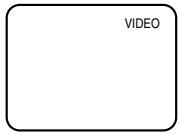
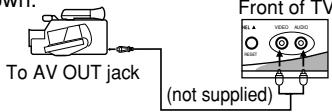
If you connect the TV to a VCR, camcorder or TV game, you can select by pressing TV/VIDEO.
Press TV/VIDEO repeatedly to select the desired mode."VIDEO" will display on the screen for 4 seconds.
- To connect the TV to a VCR
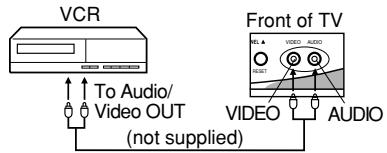
text_image
VCR To Audio/ Video OUT (not supplied) Front of TV REL A VIDEO AUDIO RESET VIDEO AUDIO2. To connect the TV to a TV Game
The TV also can be used as a display device for many video games. However, due to the wide variety of different types of signal generated by these devices and subsequent hook-up variations required, they have not all been included in the suggested connection diagrams. You will need to consult each component's Owner's Manual for additional information.
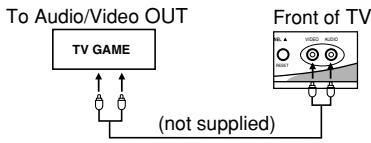
flowchart
graph TD
    A["To Audio/Video OUT"] --> B["TV GAME"]
    B --> C["(not supplied)"]
    D["Front of TV"] --> E["Antenna 1"]
    D --> F["Antenna 2"]
    D --> G["Antenna 3"]
- To connect the TV to a camcorder
To playback from the camcorder, connect the camcorder to the TV as shown. Front of TV
SETTING LANGUAGE
This TV can display the channel number, on-screen displays and picture adjustments on the screen in English, Spanish or French.
On-screen language selection (step 3) will automatically appear on the screen when you press the MENU button initially. Select the language you prefer first, then proceed with the other menu options.
1 Press MENU.
2 Press SET + or - to select the LANGUAGE mode, then press ENTER.
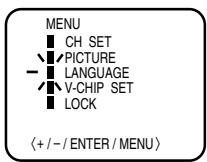
3 Press SET + or – until the "▶" indicator points to the desired language: English (ENGLISH), Spanish (ESPAÑOL) or French (FRANCAIS), then press ENTER.
LANGUAGE / IDIOMA / LANGUE ▶ ENGLISH ESPAÑOL FRANCAIS 〈+ / - / ENTER / MENU〉
4 Press MENU again.
NOTE:
If Spanish or French is chosen, the Closed Caption indicators will be in the selected language, but the Closed Caption text will not be affected by the language selection.
TV OPERATION
1 To turn on the TV, press POWER.
2 The VOLUME can be adjusted to a desired level by pressing VOL (VOLUME) + or −.
The sound level will be indicated on the TV screen by GREEN BARS AND A NUMBER. As the sound level increases, so do the number of BARS AND THE NUMBER on the screen. The same is true for decreasing the level.
3 Set the TV/CABLE menu option to the appropriate position. When shipped from the factory, this menu option is in the CATV setting. See "TO MEMORIZE CHANNELS."
TV - VHF/UHF channels CABLE - CABLE TV channels
4 CH (CHANNEL) + and - buttons
Press and release CH (CHANNEL) + or -. The channel automatically stops at the next channel set into memory. Press and hold the button down to change channels more quickly.
For proper operation, before selecting channels, they should be set into the TV's memory. See "TO MEMORIZE CHANNELS."
DIRECT CHANNEL SELECTION buttons (0-9) - Press these buttons to select a channel. The channel number will appear on the upper right corner of the TV screen. If an invalid channel number is selected, the display will revert to the previous channel.
TV MODE DIRECT CHANNEL SELECTION - When the TV/CABLE menu option is in the TV position, all channels can be instantly selected by using two buttons (For example, to select channel 2, press "0," then "2." If you press only "2," channel selection will be delayed for a few seconds). For channels 10 and above, press the two digits in order.
CABLE mode direct channel selection
When the TV/CABLE menu option is in the CABLE position, channels can be selected as follows:
1-9 Press "0" twice, then 1-9 as needed. Example, to select channel 2, press "002".
10-12 Press "0", then remaining 2 digits. Example, to select channel 12, press "012".
13-99 Press the 2 digits in order.
Example, to select channel 36, press "36".
100-125 Press the 3 digits in order.
Example, to select channel 120, press "120".
NOTE: If the station being viewed stops broadcasting, the TV will automatically shut off after 15 minutes.
TO MEMORIZE CHANNELS
This TV is equipped with a channel memory feature that allows the TV to skip up or down to the next channel set into memory, skipping over unwanted channels.
Before selecting channels, they must be programmed into the TV's memory. In addition to normal VHF and UHF channels, this TV can receive up to 113 Cable TV channels. To use this TV with an antenna, set the TV/CABLE menu option to the TV setting. When shipped from the factory, this menu option is in the CABLE setting.
TV/CABLE SELECTION

Press MENU.

Press SET + or – until the indicator next to "CH SET" begins to flash, then press ENTER.

Press SET + or – until the indicator next to "TV/CABLE" begins to flash.

Press ENTER to select the TV or CABLE mode. The arrow indicates the selected mode.

Press MENU repeatedly until the MENU screen is cleared.
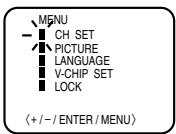
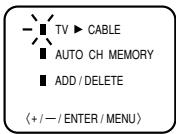
NOTE:
Contact your cable company to determine the type of cable system used in your area.
AUTOMATIC CHANNEL MEMORY

Press MENU.

Press SET + or – until the indicator next to "CH SET" begins to flash, then press ENTER.

Press SET + or – until the indicator next to "AUTO CH MEMORY" begins to flash, then press ENTER. The TV will begin memorizing all the channels available in your area. Channel numbers will remain red until auto memorizing is complete.
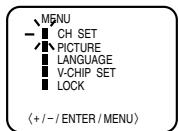
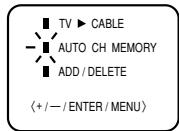

Press MENU repeatedly until the MENU screen is cleared.
TO ADD/DELETE CHANNELS

Press MENU.

Press SET + or – until the indicator next to "CH SET" begins to flash, then press ENTER.

Press SET + or – until the indicator next to "ADD/DELETE" begins to flash, then press ENTER.

Select the desired channels to be added or deleted using the Direct Channel Selection buttons (0-9), CH + or - or SET + or -.
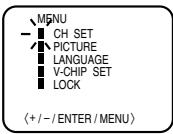
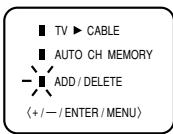

Press ENTER to select ADD or DELETE.
If an unmemorized channel was selected (step 4), the channel indication will be red. Press ENTER if you wish to ADD the unmemorized channel. The channel indicator will change from red to green when a channel is added and the channel will be memorized.
If a memorized channel was selected (step 4), the channel indication will be green. Press ENTER if you wish to DELETE the channel from memory.
The channel indicator will change from green to red when a channel is deleted. Repeat Steps 4 and 5 for each channel to be added or deleted.
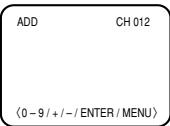

Press MENU repeatedly until the MENU screen is cleared.
ADJUSTING PICTURE
You can adjust the settings for color, sharpness, contrast, brightness and tint.

Press MENU.

Press SET + or – until the indicator next to "PICTURE" begins to flash, then press ENTER.

Press ENTER repeatedly to select the item you want to adjust.
BRIGHTNESS → CONTRAST → COLOR → TINT → SHARPNESS

Press SET + or – button to adjust the setting.
| + | - | |
| BRIGHTNESS | increase brightness | decrease brightness |
| CONTRAST | increase contrast | decrease contrast |
| COLOR | brilliant color | pale color |
| TINT | greenish color | reddish color |
| SHARPNESS | makes picture clearer | makes picture softer |
TO RETURN TO INITIAL SETTING
Press RESET while the picture adjusting mode appears on-screen.
CLOSED CAPTION
WHAT IS CLOSED CAPTIONING?
This television has the capability to decode and display Closed Captioned television programs. Closed Captioning will display text on the screen for hearing impaired viewers or it will translate and display text in another language.
TO VIEW CLOSED CAPTIONS
Press CAP/TEXT on the remote control to switch between normal TV and the two Closed Caption Modes (Captions and 1/2 of Full Screen Text).
Captions: This Closed Caption Mode will display text on the screen in English or another language (depending on the setting of Closed Captions 1/2. Generally, Closed Captions in English are transmitted on Captions Channel 1 and Closed Captions in other languages are transmitted on Captions Channel 2.
The Captions will appear in places on the screen where they will least interfere with the picture, usually on the bottom of the screen. News programs will usually show three-line Closed Captions which scroll onto the screen. Most other shows provide two or three lined Captions placed near the character who is speaking so the viewer can follow the dialogue. Words in italics or underlined describe titles, words in foreign languages or words requiring emphasis. Words that are sung usually appear enclosed by musical notes.
Text: The Text Closed Caption Mode will usually fill 1/2 of full screen with a programming schedule or other information. After selecting a Closed Caption Mode, it will stay in effect until it is changed, even if the channel is changed. If the Captions signal is lost due to a commercial or a break in the signal, the Captions will reappear when the signal is received again. If the channels are changed, the Captions will be delayed approximately 10 seconds.
For television programs broadcasting with Closed Captions, look in your TV guide for the Closed Captions symbol (CC).
- When activating the Closed Captioned Decoder, there will be a short delay before the Closed Captioned text appears on the screen.
- Closed Captioned text is only displayed in locations where it is available.
- If no caption signal is received, no captions will appear, but the television will remain in the Caption Mode.
- Misspellings or unusual characters may occasionally appear during Closed Captioning. This is normal with Closed Captioning, especially with live programs. This is because during live programs, captions are also entered live. These transmissions do not allow time for editing.
- When Captions are being displayed, on-screen displays, such as volume and mute may not be seen or may interfere with Closed Captions.
- Some cable systems and copy protection systems may interfere with the Closed Captioned signal.
- If using an indoor antenna or if TV reception is very poor, the Closed Caption Decoder may not appear or may appear with strange characters or misspelled words. In this case, adjust the antenna for better reception or use an outdoor antenna.
SETTING V-CHIP
The V-Chip function is available only for the U. S. V-Chip system. The Canadian V-Chip system is not supported.
This TV is fitted with a V-CHIP controller that provides you with channel viewing access controls and restrictions. This function is to prevent your children from watching violent or sexual scenes that you may choose to exclude.
1 Press MENU and press SET + or – until the indicator next to "V-CHIP SET" begins to flash, then press ENTER.
2 Enter your password (4 digits) using the Direct channel selection buttons (0-9).
In the event of entering an incorrect password press RESET. Then press ENTER.
3 Enter the same password for confirmation, then press ENTER.
4 Press SET + or – until the indicator next to "V-CHIP" begins to flash.
Press ENTER to select ON.
5 Press SET + or – until the indicator next to "TV RATING" or "MPAA RATING" begins to flash. Press ENTER.
6 Press SET + or – to select the desired rating for the applicable video or TV channel. Press ENTER.
7 Press MENU repeatedly until the MENU screen is cleared.
TV RATING
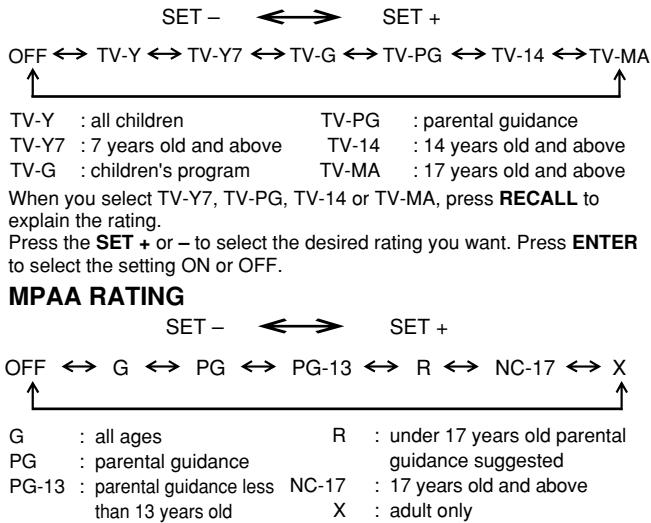
flowchart
graph TD
    A["SET -"] --> B["SET +"]
    C["OFF ↔ TV-Y ↔ TV-Y7 ↔ TV-G ↔ TV-PG ↔ TV-14 ↔ TV-MA ↑"] --> D["TV-Y : all children TV-PG : parental guidance"]
    C --> E["TV-Y7 : 7 years old and above TV-14 : 14 years old and above"]
    C --> F["TV-G : children's program TV-MA : 17 years old and above"]
    D --> G["When you select TV-Y7, TV-PG, TV-14 or TV-MA, press RECALL to explain the rating. Press the SET + or – to select the desired rating you want. Press ENTER to select the setting ON or OFF."]
    H["SET -"] --> I["SET +"]
    J["OFF ↔ G ↔ PG ↔ PG-13 ↔ R ↔ NC-17 ↔ X ↑"] --> K["G : all ages R : under 17 years old parental guidance guidance suggested"]
    J --> L["PG : parental guidance"]
    J --> M["PG-13 : parental guidance less NC-17 : 17 years old and above"]
    J --> N["than 13 years old X : adult only"]
NOTES:
• V-Chip function is based on specifications for the United States and therefore may not work properly in Canada.
- If you want to change your password, follow steps 1 and 2 and select "CHANGE PASSWORD" option. Then enter your new password.
- The V-Chip function is activated only on programs and tapes that have the rating signal.
- Once you block a program using the V-Chip function, the blocked program cannot be watched based on the content of the show. When the program starts, the "INPUT PASSWORD" will appear on the screen. When you want to release the V-Chip temporarily, enter the password.
If you change the channel or turn off the TV while the V-Chip function was temporarily released, the original setting will be resumed. If you return to the channel you were watching you must re-enter your password to temporarily release your V-Chip function again.
- When you watch the TV using a cable box or a VCR and the TV is tuned to channel 3 or 4, you must release the V-Chip temporarily. The V-Chip setting will not be resumed until you turn off the TV. The TV channel is not used in this case.
- When changing the channel with the cable box or the VCR, approximately 10 seconds will pass until the program appears.
USING THE LOCK MENU
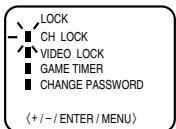
The LOCK menu includes the CH LOCK, VIDEO LOCK, GAME TIMER and CHANGE PASSWORD functions.
You can use these functions after entering the correct PASSWORD. (This password is the same one selected under "SETTING V-CHIP".)
LOCKING CHANNELS
With the CH LOCK feature, you can lock specific channels. You will not be able to tune locked channels unless you clear the setting. You can choose to lock up to nine TV channels and nine cable channels.
1 Use the Channel Number Buttons (0-9) to display the television channel you wish to lock.
2 Press MENU, then press SET + or – until the indicator next to "LOCK" begins to flash. Then press ENTER.
③ Use the Channel Number buttons (0-9) to enter your password, then press ENTER.
The LOCK menu appears.
4 Press SET + or – until the indicator next to "CH LOCK" begins to flash, then press ENTER.
5 Press SET + or – to select:
- INPUT to select the channel as one to be locked. Then press ENTER.
- ALL CLEAR to clear all channels from the list of locked channels. Then press ENTER
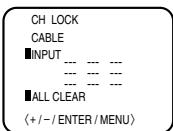
6 Repeat steps 1 through 5 to lock other channels. When you are finished locking channels, press MENU repeatedly until the MENU screen is cleared.
If you try to tune a locked channel, the TV will not display it, but will display the nearest unblocked channel.
NOTES:
- If you are accessing the LOCK menus or V-chip menus for the first time, choose a four-digit number to be your password.
- After programming CH LOCK, change channels before turning off the television.
- If you want to unlock channels, select ALL CLEAR on step 5, then press ENTER.
LOCKING VIDEO INPUT
With the VIDEO LOCK feature, you can lock out the input source (VIDEO) and channel 3 and 4. You will not be able to select the input sources with the TV/VIDEO button or Channel buttons unless you clear the setting.
1 Press MENU, then press SET + or – until the indicator next to "LOCK" begins to flash, then press ENTER.
2 Use the Channel Number buttons (0-9) to enter your password, then press ENTER. The LOCK menu appears.
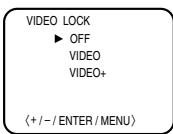
3 Press SET + or – until the indicator next to "VIDEO LOCK" begins to flash, then press ENTER.
4 Press SET + or – to select:
• OFF: Unlocks all video input sources.
• VIDEO: Locks VIDEO.
• VIDEO +: Locks VIDEO, channel 3 and channel 4. This option should be used if you use the antenna to play a video tape.
5 Press MENU to return to normal viewing.
SETTING THE GAME TIMER
With the GAME TIMER feature, you can automatically activate the VIDEO LOCK feature (VIDEO setting) to set a time limit for playing a TV game (30, 60, or 90 minutes).
1 Press MENU, then press SET + or – until the indicator next to "LOCK" begins to flash, then press ENTER.
2 Use the Channel Number buttons (0-9) to enter your password, then press ENTER. The LOCK menu appears.
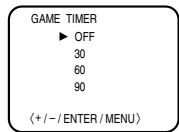
3 Press SET + or – until the indicator next to "GAME TIMER" begins to flash, then press ENTER.
4 Press SET + or – to select a time limit (30 minutes, 60 minutes, 90 minutes or OFF).
5 Press MENU repeatedly until the MENU screen is cleared. After the GAME TIMER is programmed, the display will appear briefly every ten minutes to remind you that the GAME TIMER is operating. When the programmed end time is reached, the display will change the last channel automatically.
TROUBLESHOOTING GUIDE
Before requesting service, please refer to the following chart for the symptom and possible solution.
| SYMPTOMS | POSSIBLE SOLUTIONS |
| TV does not operate | Make sure the power cord is plugged in.Try another AC outlet.Power is off; check fuse or circuit breaker.Unplug unit for an hour, then plug it back in. |
| Poor sound or No sound | Station or CATV experiencing problems; tune to another station.Check sound adjustments (VOLUME and MUTE).Check for sources of possible interference. |
| Poor picture or No picture | Station or CATV experiencing problems; tune to another station.Make sure channels are set into memory.Check antenna or CATV connections; adjust antenna.Check for sources of possible interference.Check picture control adjustments. |
| Poor reception on some channels | Station or CATV experiencing problems; tune to another station.Make sure channels are set into memory.Station is weak; adjust antenna to receive desired station.Check for sources of possible interference. |
| Poor color or no color | Station or CATV experiencing problems; tune to another station.Make sure channels are set into memory.Check picture control adjustments.Check antenna or CATV connection. Adjust antenna. |
| Picture wobbles or drifts | Station or CATV experiencing problems; tune to another station.Make sure channels are set into memory.CATV company is scrambling signal.Adjust antenna. |
| SYMPTOMS | POSSIBLE SOLUTIONS |
| No CATV reception | Check all CATV connections.Set TV/CABLE menu option to the CABLE mode.Station or CATV system problems; try another station. |
| Horizontal or diagonal bars on screen | Check antenna connections; reorient antenna.Check for sources of possible interference. |
| No reception above channel 13 | Make sure TV/CABLE menu option is in the appropriate mode.If using antenna, check UHF antenna connections. |
| No Remote operation | Batteries are weak, dead or inserted incorrectly.Remote is out of range; move closer to TV (within 15 feet).Make sure Remote is aimed at sensor.Confirm there are no obstructions between the Remote and the TV.Make sure the power cord is plugged in. |
| TV shuts off | No broadcast on station tuned.Sleep Timer is set.Power interrupted. |
| Closed - Caption is not activated | TV station experiencing problems or program tuned is not closed captioned. Try another channel.Check CATV connection or VHF/UHF antenna, reposition or rotate antenna.Press CAP/TEXT to turn on the closed caption decoder. |
| Display is not shown in your language | Select proper language in the menu options. |
SPECIFICATIONS
AC Power Input:
AC Power Consumption:
Picture Tube:
Audio Power Output Rating:
Speaker:
Tuner Type:
Remote Control:
Receiving Channels:
120V, 60Hz
54 Watts
Type 13 (335mm diagonal)
1.0 Watts
3 inches (76mm) Full Range, 8 ohm x 1
181 Channel, Quartz PLL Frequency Synthesized
Infrared, Direct Access, 2 x AAA batteries (supplied)
VHF 2-13
UHF 14-69
CATV 01-97 (5A)-(A-3)
98-99 (A-2)-(A-1)
14-22 (A)-(I)
23-36 (J)-(W)
37-65 (AA)-(FFF)
66-125 (GGG)-(125)
75 Ohm (VHF/UHF) Coaxial Input
Video: 1.0 Vp-p 75 ohm
Audio: 300 mV, 47k ohm
Width: 14-1/4 inches (362mm)
Height: 12-5/8 inches (320.5mm)
Depth: 14-3/16 inches (360mm)
20.9 lbs (9.5 kg)
ACCESSORY
Remote Control with two size "AAA" batteries
Design and specifications are subject to change without notice.
12
Limited United States Warranty
For 24" FST PURE® and All Smaller Television Models
Toshiba America Consumer Products, Inc. (“TACP”) and Toshiba Hawaii, Inc. (“THI”) make the following limited warranties to original consumers in the United States. THESE LIMITED WARRANTIES EXTEND TO THE ORIGINAL CONSUMER PURCHASER OR ANY PERSON RECEIVING THIS TELEVISION AS A GIFT FROM THE ORIGINAL CONSUMER PURCHASER AND TO NO OTHER PURCHASER OR TRANSFEREE.
PRODUCTS PURCHASED IN THE U.S.A. AND USED IN CANADA ARE NOT COVERED BY THESE WARRANTIES.
PRODUCTS PURCHASED IN CANADA AND USED IN THE U.S.A. ARE NOT COVERED BY THESE WARRANTIES.
Limited Ninety (90) Day Warranty on Labor\*
TACP/THI warrant this television and its parts against defects in materials or workmanship for a period of ninety (90) days after the date of original retail purchase. DURING THIS PERIOD, TACP/THI WILL, AT TACP/THI'S OPTION, REPAIR OR REPLACE A DEFECTIVE PART WITH A NEW OR REFURBISHED PART WITHOUT CHARGE TO YOU FOR PARTS OR LABOR. YOU MUST DELIVER THE ENTIRE TELEVISION TO AN AUTHORIZED TACP/THI SERVICE STATION. YOU MUST PAY FOR ALL TRANSPORTATION AND INSURANCE CHARGES FOR THE TELEVISION TO AND FROM THE SERVICE STATION.
Limited One (1) Year Warranty on Parts\*
TACP/THI further warrant the parts in this television against defects in materials or workmanship for a period of one (1) year after the date of original retail purchase. DURING THIS PERIOD, TACP/THI WILL, AT TACP/THI'S OPTION, REPAIR OR REPLACE A DEFECTIVE PART WITH A NEW OR REFURBISHED PART WITHOUT CHARGE TO YOU FOR THE PART, PROVIDED THAT IF A DEFECTIVE PART IS REPAIRED OR REPLACED AFTER NINETY (90) DAYS FROM THE DATE OF ORIGINAL RETAIL PURCHASE, YOU MUST PAY ALL LABOR CHARGES INVOLVED IN THE REPAIR OR REPLACEMENT. YOU MUST DELIVER THE ENTIRE TELEVISION TO AN AUTHORIZED TACP/THI SERVICE STATION. YOU MUST PAY FOR ALL TRANSPORTATION AND INSURANCE CHARGES FOR THE TELEVISION TO AND FROM THE SERVICE STATION.
Limited Two (2) Year Warranty on Picture Tube\*
TACP/THI further warrant the picture tube in this television against defects in materials or workmanship for a period of two (2) years after the date of original retail purchase. DURING THIS PERIOD, TACP/THI WILL, AT TACP/THI'S OPTION, REPAIR OR REPLACE A DEFECTIVE PICTURE TUBE WITH A NEW OR REFURBISHED PICTURE TUBE WITHOUT CHARGE TO YOU, EXCEPT THAT IF A DEFECTIVE PICTURE TUBE IS REPAIRED OR REPLACED AFTER NINETY (90) DAYS FROM THE DATE OF THE ORIGINAL RETAIL PURCHASE, YOU MUST PAY ALL LABOR CHARGES INVOLVED IN THE REPAIR OR REPLACEMENT. YOU MUST DELIVER THE ENTIRE TELEVISION TO AN AUTHORIZED TACP/THI SERVICE STATION. YOU MUST PAY FOR ALL TRANSPORTATION AND INSURANCE CHARGES FOR THE TELEVISION TO AND FROM THE SERVICE STATION.
Rental Units
The warranty for rental units begins with the first rental or thirty (30) days from the date of shipment to the rental firm, whichever comes first.
\*Commercial Units
Televisions sold and used for commercial purposes have a limited ninety (90) day warranty for all parts, labor and picture tube.
Owner's Manual and Demographic Card
You should read this owner's manual thoroughly before operating this television. You should complete and mail the enclosed Demographic card within ten days after you, or the person who has given you this product as a gift, purchased this television. This is one way to enable TACP/THI to provide you with better customer service and improved product. Failure to return the Demographic card will not affect your rights under this warranty.
Your Responsibility
THE ABOVE WARRANTIES ARE SUBJECT TO THE FOLLOWING CONDITIONS:
(1) You must provide your bill of sale or other proof of purchase.
(2) All warranty servicing of this television must be made by an Authorized TACP/THI Service Station.
(3) The warranties from TACP and THI are effective only if the television is purchased and operated in the U.S.A. or Puerto Rico.
(4) Labor service charges for set installation, set up, adjustment of customer controls and installation or repair of antenna systems are not covered by these warranties. Reception problems caused by inadequate antenna systems are your responsibility.
(5) Warranties extend only to defects in materials or workmanship as limited above and do not extend to any television or parts which have been lost or discarded by you or to damage to television or parts caused by misuse, accident, Acts of God, such as lightning or fluctuations in electric power, improper installation, improper maintenance or use in violation of instructions furnished by TACP/THI; or to units which have been modified or had the serial number removed, altered, defaced or rendered illegible.
How to Obtain Warranty Services
If, after following all of the operating instructions in this manual and checking the section “Troubleshooting”, you find that service is needed:
(1) To find the nearest TACP/THI Authorized Service Station:
For televisions purchased in the United States, except Hawaii, visit TACP's web site at www.toshiba.com/tacp or call toll free 1-800-631-3811.
For televisions purchased in Hawaii, contact Toshiba Hawaii, Inc., 327 Kamakee Street, Honolulu, HI 96814, (808) 591-9281.
(2) Present your bill of sale or other proof of purchase to the Authorized Service Station. You must deliver the entire television to an Authorized TACP/THI Service Station. You must pay for all transportation and insurance charges for the television to and from the Service Station.
For additional information, visit TACP's web site: www.toshiba.com/tacp.
ALL WARRANTIES IMPLIED BY THE LAW OF ANY STATE OF THE U.S.A., INCLUDING THE IMPLIED WARRANTIES OF MERCHANTABILITY AND FITNESS FOR A PARTICULAR PURPOSE, ARE EXPRESSLY LIMITED TO THE DURATION OF THE LIMITED WARRANTIES SET FORTH ABOVE. WITH THE EXCEPTION OF ANY WARRANTIES IMPLIED BY THE LAW OF ANY STATE OF THE U.S.A. AS HEREBY LIMITED, THE FOREGOING WARRANTY IS EXCLUSIVE AND IN LIEU OF ALL OTHER WARRANTIES, GUARANTEES, AGREEMENTS AND SIMILAR OBLIGATIONS OF TACP OR THI WITH RESPECT TO THE REPAIR OR REPLACEMENT OF ANY PARTS. IN NO EVENT SHALL TACP OR THI BE LIABLE FOR CONSEQUENTIAL OR INCIDENTAL DAMAGES.
No person, agent, distributor, dealer or company is authorized to change, modify or extend the terms of these warranties in any manner whatsoever. The time within which action must be commenced to enforce any obligation of TACP or THI arising under this warranty or under any law of the United States or of any state thereof is hereby limited to 90 days from the date you discover or should have discovered, the defect. This limitation does not apply to implied warranties arising under the law of any state of the U.S.A.
THIS WARRANTY GIVES YOU SPECIFIC LEGAL RIGHTS, AND YOU MAY ALSO HAVE OTHER RIGHTS WHICH MAY VARY FROM STATE TO STATE IN THE U.S.A. SOME STATES OF THE U.S.A. DO NOT ALLOW LIMITATIONS ON HOW LONG AN IMPLIED WARRANTY LASTS, WHEN AN ACTION MAY BE BROUGHT, OR THE EXCLUSION OR LIMITATION OF INCIDENTAL OR CONSEQUENTIAL DAMAGES, SO THE ABOVE LIMITATIONS OR EXCLUSIONS MAY NOT APPLY TO YOU UNDER SUCH CIRCUMSTANCES.
FST PURE ^® is a registered trademark of Toshiba America Consumer Products, Inc.
Limited Canada Warranty
For 24" FST PURE® and All Smaller Television Models
Toshiba of Canada Limited (“TCL”) makes the following limited warranties to original consumers in Canada. THESE LIMITED WARRANTIES EXTEND TO THE ORIGINAL CONSUMER PURCHASER OR ANY PERSON RECEIVING THIS TELEVISION AS A GIFT FROM THE ORIGINAL CONSUMER PURCHASER AND TO NO OTHER PURCHASER OR TRANSFEREE.
PRODUCTS PURCHASED IN THE U.S.A. AND USED IN CANADA ARE NOT COVERED BY THESE WARRANTIES.
PRODUCTS PURCHASED IN CANADA AND USED IN THE U.S.A. ARE NOT COVERED BY THESE WARRANTIES.
Limited Ninety (90) Day Warranty on Labor\*
TCL warrants this television and its parts against defects in materials or workmanship for a period of ninety (90) days after the date of original retail purchase. DURING THIS PERIOD, TCL WILL, AT TCL'S OPTION, REPAIR OR REPLACE A DEFECTIVE PART WITH A NEW OR REFURBISHED PART WITHOUT CHARGE TO YOU FOR PARTS OR LABOR. YOU MUST DELIVER THE ENTIRE TELEVISION TO AN AUTHORIZED TCL SERVICE STATION. YOU MUST PAY FOR ALL TRANSPORTATION AND INSURANCE CHARGES FOR THE TELEVISION TO AND FROM THE SERVICE STATION.
Limited One (1) Year Warranty on Parts\*
TCL further warrants the parts in this television against defects in materials or workmanship for a period of one (1) year after the date of original retail purchase. DURING THIS PERIOD, TCL WILL, AT TCL'S OPTION, REPAIR OR REPLACE A DEFECTIVE PART WITH A NEW OR REFURBISHED PART WITHOUT CHARGE TO YOU FOR THE PART, PROVIDED THAT IF A DEFECTIVE PART IS REPAIRED OR REPLACED AFTER NINETY (90) DAYS FROM THE DATE OF ORIGINAL RETAIL PURCHASE, YOU MUST PAY ALL LABOR CHARGES INVOLVED IN THE REPAIR OR REPLACEMENT. YOU MUST DELIVER THE ENTIRE TELEVISION TO AN AUTHORIZED TCL SERVICE STATION. YOU MUST PAY FOR ALL TRANSPORTATION AND INSURANCE CHARGES FOR THE TELEVISION TO AND FROM THE SERVICE STATION.
Limited Two (2) Year Warranty on Picture Tube\*
TCL further warrants the picture tube in this television against defects in materials or workmanship for a period of two (2) years after the date of original retail purchase. DURING THIS PERIOD, TCL WILL, AT TCL'S OPTION, REPAIR OR REPLACE A DEFECTIVE PICTURE TUBE WITH A NEW OR REFURBISHED PICTURE TUBE WITHOUT CHARGE TO YOU, EXCEPT THAT IF A DEFECTIVE PICTURE TUBE IS REPAIRED OR REPLACED AFTER NINETY (90) DAYS FROM THE DATE OF THE ORIGINAL RETAIL PURCHASE, YOU PAY ALL LABOR CHARGES INVOLVED IN THE REPAIR OR REPLACEMENT. YOU MUST DELIVER THE ENTIRE TELEVISION TO AN AUTHORIZED TCL SERVICE STATION. YOU MUST PAY FOR ALL TRANSPORTATION AND INSURANCE CHARGES FOR THE TELEVISION TO AND FROM THE SERVICE STATION.
Rental Units
The warranty for rental units begins with the first rental or thirty (30) days from the date of shipment to the rental firm, whichever comes first.
\*Commercial Units
Televisions sold and used for commercial purposes have a limited ninety (90) day warranty for all parts, labor and picture tube.
Owner's Manual
You should read this owner's manual thoroughly before operating this television.
Your Responsibility
THE ABOVE WARRANTIES ARE SUBJECT TO THE FOLLOWING CONDITIONS:
(1) You must provide your bill of sale or other proof of purchase.
(2) All warranty servicing of this television must be made by an Authorized TCL Service Station.
(3) The warranties from TCL are effective only if the television is purchased in Canada from an authorized TCL dealer and operated in Canada.
(4) Labor service charges for set installation, set up, adjustment of customer controls and installation or repair of antenna systems are not covered by these warranties. Reception problems caused by inadequate antenna systems are your responsibility.
(5) Warranties extend only to defects in materials or workmanship as limited above and do not extend to any television or parts which have been lost or discarded by you or to damage to television or parts caused by misuse, accident, Acts of God, such as lightning or fluctuations in electric power, improper installation, improper maintenance or use in violation of instructions furnished by TCL; or to units which have been modified or had the serial number removed, altered, defaced or rendered illegible.
How to Obtain Warranty Services
If, after following all of the operating instructions in this manual and checking the section “Troubleshooting”, you find that service is needed:
(1) To find the nearest TCL Authorized Service Station visit TCL's web site at www.toshiba.ca
(2) Present your bill of sale or other proof of purchase to the Authorized Service Station. You must deliver the entire television to an Authorized TCL Service Station. You must pay for all transportation and insurance charges for the television to and from the Service Station.
For additional information, visit TCL's web site: www.toshiba.ca
ALL WARRANTIES IMPLIED BY THE LAW OF ANY PROVINCE OF CANADA, INCLUDING THE IMPLIED WARRANTIES OF MERCHANTABILITY AND FITNESS FOR A PARTICULAR PURPOSE, ARE EXPRESSLY LIMITED TO THE DURATION OF THE LIMITED WARRANTIES SET FORTH ABOVE. WITH THE EXCEPTION OF ANY WARRANTIES IMPLIED BY THE LAW OF ANY PROVINCE OF CANADA AS HEREBY LIMITED, THE FOREGOING WARRANTY IS EXCLUSIVE AND IN LIEU OF ALL OTHER WARRANTIES, GUARANTEES, AGREEMENTS AND SIMILAR OBLIGATIONS OF TCL WITH RESPECT TO THE REPAIR OR REPLACEMENT OF ANY PARTS. IN NO EVENT SHALL TCL BE LIABLE FOR CONSEQUENTIAL OR INCIDENTAL DAMAGES.
No person, agent, distributor, dealer or company is authorized to change, modify or extend the terms of these warranties in any manner whatsoever. The time within which action must be commenced to enforce any obligation of TCL arising under this warranty or under any law of Canada or of any province thereof, is hereby limited to 90 days from the date you discover or should have discovered, the defect. This limitation does not apply to implied warranties arising under the law of any province of Canada.
THIS WARRANTY GIVES YOU SPECIFIC LEGAL RIGHTS, AND YOU MAY ALSO HAVE OTHER RIGHTS WHICH MAY VARY FROM PROVINCE TO PROVINCE IN CANADA. SOME PROVINCES OF CANADA DO NOT ALLOW LIMITATIONS ON HOW LONG AN IMPLIED WARRANTY LASTS, WHEN AN ACTION MAY BE BROUGHT, OR THE EXCLUSION OR LIMITATION OF INCIDENTAL OR CONSEQUENTIAL DAMAGES, SO THE ABOVE LIMITATIONS OR EXCLUSIONS MAY NOT APPLY TO YOU UNDER SUCH CIRCUMSTANCES.
FST PURE® is a registered trademark of Toshiba America Consumer Products, Inc.
MEMO
FRANÇAIS
Cher client,
natural_image
Black-and-white photo of two babies sitting side by side, one smiling and the other making a gesture (no text or symbols visible)Le problème

Consumer Electronics Association
2500 Wilson Blvd.
Arlington, VA 22201 U.S.A.
Tél. 703-907-7600 Téléc. 703-907-7690
www.CE.org
natural_image
Cartoon illustration of a surprised man and a smiling woman looking up at a TV (no text or symbols)natural_image
Line drawing of a front view of a device casing with labeled parts (no text or symbols beyond numbers)natural_image
Line drawing of a mechanical component with an arrow indicating direction (no text or symbols)natural_image
Diagram of a battery cell with positive and negative terminals, no text or symbols presentnatural_image
Line drawing of a front view of a microwave oven with a dial indicator (no text or symbols)natural_image
Black-and-white photo of two babies sitting side by side, one covering face with hand on cheek, the other looking surprised (no text or symbols)
Consumer Electronics Association
2500 Wilson Blvd.
Arlington, VA 22201 U.S.A.
Tel. 703-907-7600 Fax 703-907-7690
www.CE.org
natural_image
Cartoon illustration of a child playing on a couch with a computer (no text or symbols)text_image
Antenna lead-in wire Antenna discharge unit (NEC Section 810-20) Ground clamp Grounding conductors (NEC Section 810-21) Electric service equipment Power service grounding electrode system (NEC Art 250 Part H) Ground clamps25)

text_image
do. vicionatural_image
Line drawing of a front view of a rectangular device with labeled parts (no text or symbols beyond numbers)natural_image
Diagram of a mechanical component with arrows indicating direction (no text or symbols)- Instale dos pilas "AAA" (tipo lápiz).
natural_image
Pure electrical circuit lines without any symbolsnatural_image
Line drawing of a front-loading washing machine with handle and vent (no text or symbols)CATV 01-97 (5A)-(A-3)
98-99 (A-2)-(A-1)
14-22 (A)-(I)
23-36 (J)-(W)
37-65 (AA)-(FFF)
66-125 (GGG)-(125)
Entrada coaxial de 75 ohmios (VHF/UHF/CATV)
Video: 1,0 Vp-p 75 ohmios
Audio: 300 mV, 47k ohmios
Ancho: 14-1/4" (362 mm)
Alto: 12-5/8" (320,5 mm)
Fondo: 14-3/16" (360 mm)
20,9 lbs (9,5 kg)
82 Totowa Road, Wayne, NJ 07470
Factory Service Center
1420B Toshiba Drive, Lebanon, TN 37087
TOSHIBA HAWAII, INC
Head Office
327 Kamakee Street, Honolulu, HI 96814
TOSHIBA OF CANADA LIMITED
191 McNabb Street
Markham, Ontario L3R 8H2
PRINTED IN THAILAND
3L11401B

02/06