
OVC-026 - Vacuum Cleaner ORION - Free user manual and instructions
Find the device manual for free OVC-026 ORION in PDF.


User questions about OVC-026 ORION
0 question about this device. Answer the ones you know or ask your own.
Ask a new question about this device
Download the instructions for your Vacuum Cleaner in PDF format for free! Find your manual OVC-026 - ORION and take your electronic device back in hand. On this page are published all the documents necessary for the use of your device. OVC-026 by ORION.
USER MANUAL OVC-026 ORION
natural_image
Line drawing of a vacuum cleaner with coiled hose and handle (no text or symbols)Please read it carefully before use and save it
Dear Customer,
Thank you for buying ORION products! Welcome to use!
Please read this User's Guide carefully before use and save it.
Best regards,
ORION ELECTRONICS Team
More details: http://www.orion.ua
Mail to us: support@orion.ua
I. Importance & Safety
- Your vacuum cleaner is an electric appliance: it should be operated under normal conditions. Basic precautions should always be followed to reduce the risk of fire, electrical shock, and injure to person, including the following:
-
Material listed as following should not be sucked in, otherwise it may damage the appliance (cause fire, or injure to persons).
-
Hot material, such as ashes, flaming cigarette.
- Big piece of scraps, such as glass.
- Poison material (impregnant, corrosive), erosive material (acid material, detergent).
-
Any flammable or volatile liquid as gasoline or alcohol goods.
-
When not in used, cut off the power. Remove the plug from the wall socket before any service like clean, check or repair. Never switch off the appliances by pulling the plug.
- Avoid to pull or fold the hose, otherwise may cause deformation or damage.
- Make sure the rated voltage is conform with the supplied power.
- Do not let the power cord go through sharp material to avoid damage.
- Do not immerse the appliance into water, or never put the appliance directly in sun or near any heater or the like to avoid deforming of the plastic components or fire accident.
- Never move the appliances by pulling the power cord.
- Never let children play the appliance to avoid suddenness.
- Do not operate the vacuum cleaner if the appliance be drop down and operates abnormally obviously or the power cord is damaged. You should take the
appliance to the authorized maintenance store if happen conditions listed above.
- Never operate the appliance when the inlet has been blocked to avoid heat or deforming of the plastic component or damage of the motor. If the power cord is damaged, it should be replaced by the manufacture or its service agent in order to avoid a hazard.
II. Structure and Components
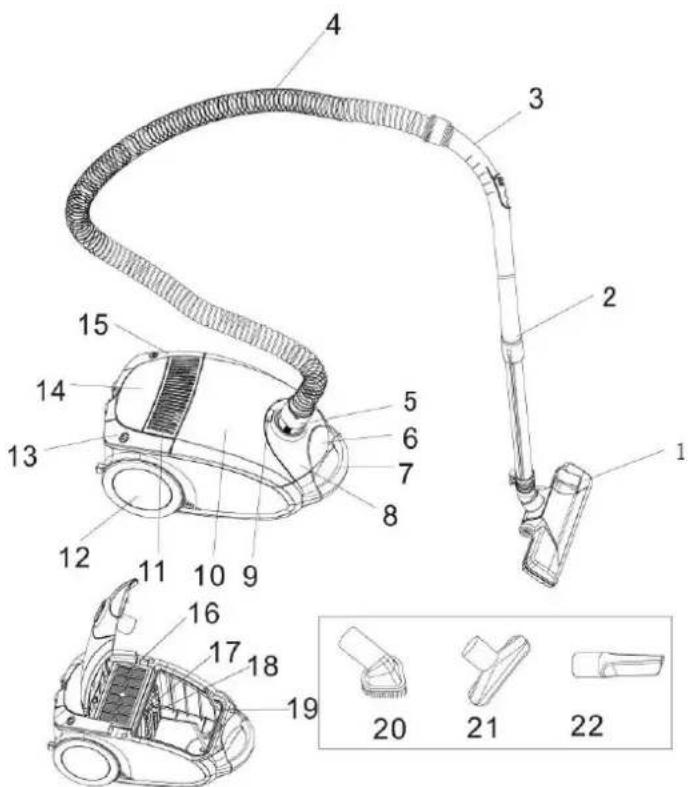
A. Structure figure
text_image
Technical diagram of a vacuum cleaner with numbered parts and exploded view, including labeled parts 1 through 22.-
Floor nozzle
-
Adjustable Tube
-
Remote handle
-
Hose
-
Inhale plug
-
Front cover buckle
-
Handle
-
Front cover
-
Inhale button
-
Accessories cover 11. Wind outlet 12. Big wheel
-
Cord rewind button 14. Indicator screen 15. Power Switch
-
HEPA 17. Filter 18. Filter rack
-
Dust bag rack 20. Combined brush 21. Suction nozzle
-
Crevice nozzle
B. Operation Guidance
natural_image
Line drawing of a vacuum cleaner with handle and clasp (no text or symbols)
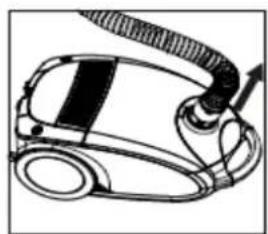
Take out the Inhale Plug by pressing the button according to the direction indicated in the figure at the left side.
natural_image
Illustration of a hand using a vacuum cleaner to press or install a device (no text or symbols visible)
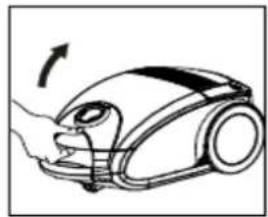
Open the Rear cover according to the direction indicated in the figure at left side.
natural_image
Technical line drawing of a car interior showing internal components (no text or symbols)
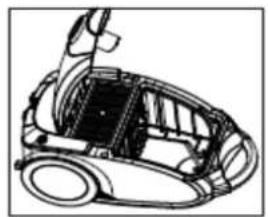
After opening the front cover, check the HEPA and the filter to make sure they're installed properly.
natural_image
Illustration of a robotic vacuum cleaner with hands operating the component (no text or symbols visible)
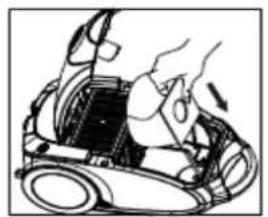
Insert the dust bag into its rack according to the direction indicated in the figure at left side.
natural_image
Illustration of a hand using a vacuum cleaner to press or install a device (no text or symbols visible)
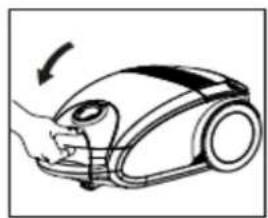
Close the front cover.
flowchart
graph TD
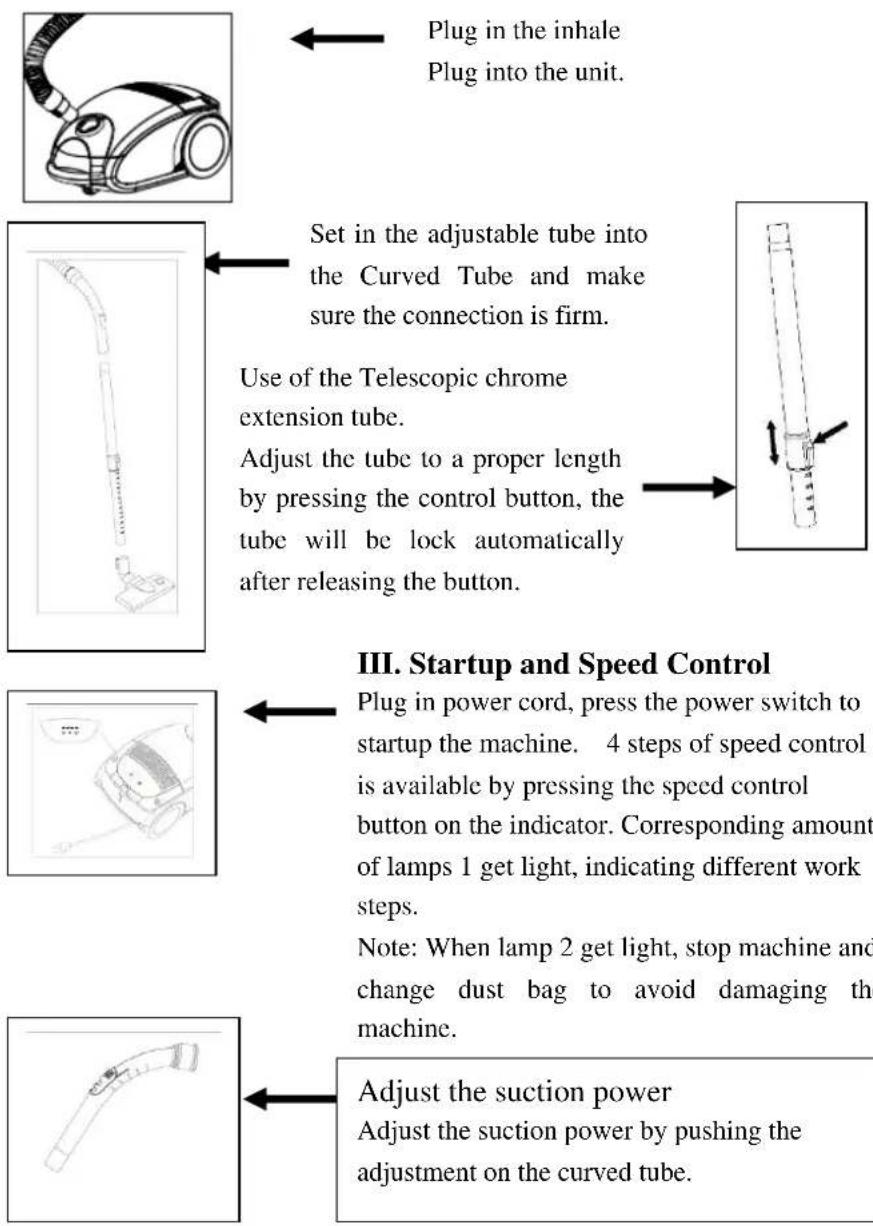
    A["Plug in the inhale Plug into the unit."] --> B["Set in the adjustable tube into the Curved Tube and make sure the connection is firm. Use of the Telescopic chrome extension tube.<br>Adjust the tube to a proper length by pressing the control button, the tube will be lock automatically after releasing the button."]
    B --> C["II. Startup and Speed Control<br>Plug in power cord, press the power switch to startup the machine. 4 steps of speed control is available by pressing the speed control button on the indicator. Corresponding amount of lamps 1 get light, indicating different work steps.<br>Note: When lamp 2 get light, stop machine and change dust bag to avoid damaging the machine."]
    C --> D["III. Startup and Speed Control<br>Adjust the suction power Adjust the suction power by pushing the adjustment on the curved tube."]
natural_image
Line drawing of a vacuum cleaner's clamped component with a black arrow pointing to the clamped part (no text or symbols present)
Combination floor nozzle
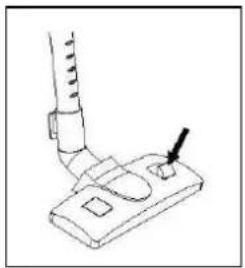
This double-duty brush can be use for cleaning carpet and floor. Adjust the duty of the brush for bare floor cleaning and carpet cleaning by press the relative button. When the floor nozzle extends out brush, it is for bare floor, if without, for carpet.
natural_image
Diagram of a vacuum cleaner with internal components and directional arrows indicating motion (no text or symbols)
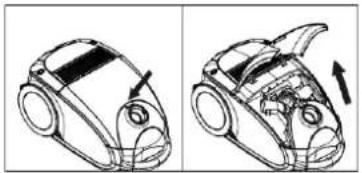
Press the accessory cover and open it. Take out the accessories. When use, insert it into the telescopic tube.
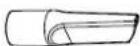
Combination nozzle is use for cleaning gap, corner, baseboard and liner gap. The nozzle head can be rotate to the mode of nozzle and brush.
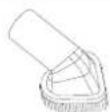
Use the small brush can avoid to injuring surface of furniture and carpet.

Use for place of dustfull, but the floor nozzle can not reach to.
natural_image
Line drawing of a car with a cable and directional arrow indicating motion (no text or symbols)
Stop working of the machine
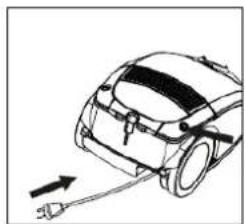
Press the power switch, pull out the plug from the socket, rewind the power cord by pressing the rewinder switch and hold the plug at the mean time to avoid being injured.
natural_image
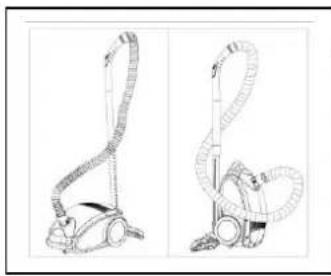
Line drawings of a two-hinged vacuum cleaner (no text or symbols present)
Disposal
Dispose the hose around the telescopic tube, park the floor nozzle onto the rear or the bottom of machine body by a hook on the floor nozzle.
- Note: Avoid to putting the machine under rain or sun.
IV. Dust Empty and Maintenance
A. Empty Dust
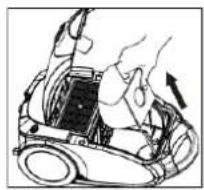

Take out the dust bag from the machine according to the left figure. Pour out the sewage into a dustbin.
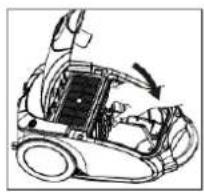
B. Maintenance

Take the filtration rack apart from the machine according to the direction indicated in the figure at left side.

natural_image
Line drawing of a car interior with open hood and inset showing a textured surface (no text or symbols)
Take out the filter, cleaning in water and let it dry naturally.
- Importance:
- The filter should be cleaned twice a year. Or if it is visibly dustied, clean it at once.
- When operation, dustbag should be fit in.
- Check if the dust bag is fitted in properly or been damaged before use the machine once.
natural_image
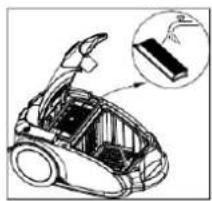
Technical illustration of a car interior with an open hood and internal components, showing a close-up inset (no text or symbols)
Open the front cover and take out the HEPA, cleaning in water and let it dry naturally
- Note: HEPA should be cleaned at least once a year.
V. Trouble Shooting
Note: Cut off power and pull out the plug before starting to get rid of troubles.
If the vacuum power decreasing, and sounds abnormally, stop vacuuming or motor over heat:
Some vacuum components may be blocked.....dredge the blocked component.
Filter been blocked ....clean or replace.
If the trouble still exists, please contact maintenance service department.
VI. Technical Data Require
| Model | ORION |
| Power | Max.2000W |
| Suction Power 300W | |
| Rated Voltage 230V~ | |
| Rated Frequency 50Hz | |
| Noise ≤78db(A) | |
| Dustbag volume 4,5L | |
| Power cord length 5m | |
| Net weight (without accessories) 5,2kg | |
| Net weight (with accessories) | 6,5kg |
| Gross weight (with accessories) | 7,1kg |
| Body size 473x280x238mm | |
| Box size | 535x335x290mm |
| Approvals | CE, GS, RoHS |
| Protection Class | Class II Electric Appliance |
OVC-026
Extra information on ORION company web-site www.orion.ua
We take your opinion and offers by E-mail support@orion.ua