
32REDP - Monitor ORION - Free user manual and instructions
Find the device manual for free 32REDP ORION in PDF.


| Product Type | Monitor |
| Brand | ORION |
| Model | 32REDP |
| Display Size | 32 inches |
| Max Resolution | 1920 x 1080 @ 60Hz |
| Aspect Ratio | 16:9 |
| Brightness | 360 cd/m² |
| Contrast Ratio | 1400:1 |
| Response Time | Less than 8ms (Gray to Gray) |
| Pixel Pitch | 0.364 x 0.364 mm |
| Viewing Angle (H/V) | 178° / 178° |
| Display Colors | 16.7 million (8-bit) |
| Video System | NTSC / PAL |
| Interfaces | BNC Video In/Out (2 In/2 Out), S-Video In/Out (1 In/1 Out), Component In (1), DVI-D In (1), HDMI In (2), VGA In (1), Audio In (3 RCA), PC Stereo In (1) |
| Built-in Speakers | Yes, 7.5W x 2 |
| Special Features | PIP/PBP, 3D Comb Filter, Deinterlacing, Noise Reduction, Auto Power Recovery, Auto Pixel Shift, Auto Source Sequencing, Trigger Sensor |
| Power Consumption | Less than 150W |
| Input Voltage | AC 100-240V, 50/60Hz |
| Dimensions (with stand) | 28.82" x 18.98" x 5.91" |
| Net Weight | 23.9 kg (52.9 lbs) |
| VESA Mount Size | 200 x 200 mm |
| Material / Color | Electronic galvanized Iron / Black |
| Warranty (Parts/Labor) | 2 years / 2 years |
| Operating Temperature | 0°C to 40°C (32°F to 104°F) |
| Storage Temperature | -20°C to 60°C (-4°F to 140°F) |
| Recommended Cleaning | Use a soft, dry cloth. Avoid harsh chemicals. |
Frequently Asked Questions - 32REDP ORION
User questions about 32REDP ORION
0 question about this device. Answer the ones you know or ask your own.
Ask a new question about this device
Download the instructions for your Monitor in PDF format for free! Find your manual 32REDP - ORION and take your electronic device back in hand. On this page are published all the documents necessary for the use of your device. 32REDP by ORION.
USER MANUAL 32REDP ORION
natural_image
Modern flat-screen TV displaying a vibrant yellow flower with a black center, placed on a blue textured surface (no text or symbols visible)
natural_image
Large black CRT television displaying a vibrant pink and white flower wallpaper on a blue grid background (no text or symbols visible)



32REDP
BUILT TO RUN 24 X 7 X 365 CONTINUOUSLY
OVERVIEW
The ORION PREMIUM WIDE Series is our high performance, feature rich monitor line with an All Metal Cabinet, PIP / PBP, Dual Analog In, Auto Source Sequencing (up to 7 sources), Trigger Alarm / Sensor, 3D Comb Filter, Deinterlace, Noise Reduction. This series has the versatility and configuration options you need to support your security surveillance applications.
FEATURES
Metal Chassis
1920 x 1080p FULL HD
PIP / PBP Multi Display Function
3D Comb Filter / Deinterlace, Noise Reduction, Advanced Auto Power Recovery, Auto Source Sequencing, Trigger Source Switching, Auto Pixel Shift Multi-Language Support
BNC Video 2 In / 2 Out, S-Video 1 In / 1 Out, VGA 1 In, Component 1 In, DVI-D 1 In, HDMI 2 In, Audio 2 In, PC Stereo 1 In
» Built-In Speakers
» Wall and Rack Mount Kit


natural_image
Close-up of a black mechanical component with a white base, labeled 'Flexible' in the top right corner (no other text or symbols visible)SPECIFICATIONS
32REDP
| Display | |
| Screen Size | 32 Inch |
| Max. Resolution | 1920 x 1080 @ 60Hz |
| Pixel Pitch | 0.364 x 0.364mm |
| Brightness | 360cd/m^2 |
| Contrast Ratio | 1400 : 1 |
| Aspect Ratio | 16 : 9 |
| Viewing Angle (H/V) | 178 / 178 |
| Display Color | 8bits / 16.7 Million |
| Response Time | < 8ms (Gray to Gray) |
| Video System | NTSC / PAL |
| Interface | |
| Video In / Out (BNC Type) | 2 In / 2 Out |
| S-Video In / Out | 1 In / 1 Out |
| Component | 1 In |
| DVI-D In / HDMI In | 1 In / 2 In |
| VGA In (15Pin D-Sub) | 1 In |
| Audio In (RCA Type) | 3 Left & Right |
| PC Stereo In | 1 In |
| Transmitter | |
| Remote Control | Yes |
| Audio | |
| Built-in Speakers | Yes (7.5W x 2) |
| Features | |
| Multi Display Function | PIP / PBP |
| Filter Type | 3D Comb Filter |
| Deinterlacing | Yes |
| Advanced Auto Power Recovery | Yes |
| Noise Reduction Control (NR) | Yes |
| LCD Protection Glass | N/A |
| Auto Pixel Shift | Yes |
| Auto Source Sequencing | Yes |
| Trigger Sensor | Yes (NO / NC) |
| Multi Language | English, Spanish, French, German, Italian |
| General | |
| Outline Dimension (w/ stand) | 28.82" x 18.98" x 5.91" |
| Net Weight | 23.9 Kg (52.9 lbs) |
| Material / Color | Electronic galvanized iron / Black |
| Desk Top Stand | Yes |
| Part / Labor | 2year / 2year |
| Consumption: < On | < 150W |
| AC100 ~ 240V(50/60Hz) | |
| Operating Temperature | 0 ~ 40°C / 32 ~ 104°F |
| Storage Temperature | -20 ~ 60°C / -4 ~ 140°F |
| Mounts | |
| VESATM Mount Size | 200 x 200mm |
| Wall | WB-2642 |
| Ceiling | CMK-01 w/ FMA-01 |
*Design and specifications are subject to change without notice
INPUT INTERFACE
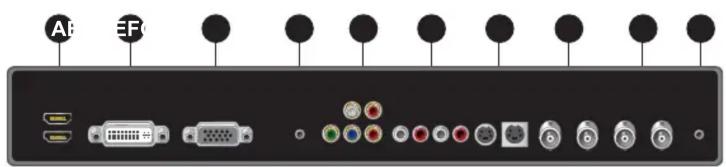
A HDMI1 / HDMI2 In
B DVI-D In
© VGA In
D PC Stereo In
E Component
F Audio In
G S-Video In / Out
H Video1 In / Out
I Video2 In / Out
J Trigger
DIMENSIONS

OPTIONAL MOUNTS

ADVANTAGES
3D Comb Filter, Noise Reduction and Deinterlacing provides high quality color producing the best color sense
Analog & Digital
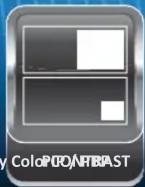
Picture-in-Picture (PIP) mode allows an image from an AV source to be displayed as a picture with in the image from a PC source (or vice-versa). Picture-by-Picture (PBP) mode permits images from an AV and PC source to be displayed side by side for split-screen viewing.

natural_image
Two underwater photos: one showing a coral reef and another showing a supermarket refrigerated section with a person inside (no visible text or symbols)Auto Pixel ShiftDual Screen Display / Dual Signal In
Minutely moves pixels diagonally to prevent after-image / static image burn in

Brand : ORION
Model : 32REDP
Category : Monitor