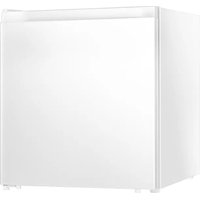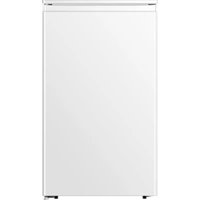
EVBI603 - Fridge Everglades - Free user manual and instructions
Find the device manual for free EVBI603 Everglades in PDF.


| Product type | Refrigerator with freezer compartment |
| Brand | Everglades |
| Model | EVBI603 |
| Dimensions (H x W x D) | 180 cm x 60 cm x 65 cm |
| Net weight | 62 kg |
| Power supply | 220-240 V ~ 50 Hz |
| Climate class | N-ST (ambient temperature 16°C to 38°C) |
| Total volume | 280 L (refrigerator 200 L, freezer 80 L) |
| Main functions | Adjustable thermostat, LED interior lighting, removable glass shelves, vegetable crisper, door bins, 3-star freezer compartment |
| Power failure storage time | Approximately 10 hours |
| Noise level | 42 dB(A) |
| Energy class | E (according to EU standard 2019) |
| Annual consumption | Approximately 250 kWh/year |
| Defrost | Manual (refrigerator) / automatic (freezer) |
| Care and cleaning | Clean with a soft cloth and soapy water; defrost regularly; check door seals |
| Refrigerant | R600a (isobutane) |
| Safety | Automatic door closing, child lock (depending on model) |
| Spare parts and repairability | Available via customer service; repairability index: 6.5/10 |
| Manual | Free download in PDF format |
Frequently Asked Questions - EVBI603 Everglades
User questions about EVBI603 Everglades
0 question about this device. Answer the ones you know or ask your own.
Ask a new question about this device
Download the instructions for your Fridge in PDF format for free! Find your manual EVBI603 - Everglades and take your electronic device back in hand. On this page are published all the documents necessary for the use of your device. EVBI603 by Everglades.
USER MANUAL EVBI603 Everglades
natural_image
White refrigerator with open shelves displaying fresh fruits and beverages (no visible text or labels)Dear customer,
Before placing your new refrigerator/freezer into operation please read these operating instructions carefully. They contain important information for safe use, for installation and for care of the appliance.
Please keep these operating instructions for future reference. Pass them on to possible new owners of the appliance.
Notes which are important for your safety or for the proper functioning of the appliance are stressed with a warning triangle and/or with signal words (Warning!, Caution!, Important!). Please observe the following carefully.
Supplementary information regarding operation and practical applications of the appliance appear after this symbol.
Tips and notes concerning economical and environmentally sound use of the appliance are marked with the cloverleaf.
The operating instructions contain instructions for the correction of possible malfunctions by the user in the section “Trouble shooting”. If these instructions should not be sufficient, contact your local Service Force Center.
Printed on paper manufactured with environmentally sound processes he who thinks ecologically acts accordingly...
Contents
Important safety instructions.... 3
Remove transport packaging .... 5
Installation 5
Building in 6
Positioning....8
Description of the appliance....9
Starting up and temperature regulation 9
Interior accessories....10
Switching off the appliance.... 12
Cleaning and Care 12
Energy Saving tips 13
Trouble shooting 13
Changing the light bulb 14
Noises during Operation 15
Regulations, Standards, Guidelines 15
Disposal of the appliance.... 15
Important safety instructions
These warnings are provided in the interests of your safety. Ensure you fully understand them before installing or using the appliance.
Your safety is not paramount importance. If you are unsure about the meaning of these warnings contact the Customer Care Department for assistance.
Intended use
The refrigerator is intended for use in the home. It is suitable for the storage of food at low temperature. If the appliance is used for purposes other than those intended or used incorrectly, no liability can be accepted by the manufacturer for any damage that may be caused.
Alterations or changes to the refrigerator are not permitted for reasons of safety.
If you use the refrigerator in a commercial application or for purposes other than the cooling of foods, the manufacturer accepts no liability for any damages that may occur.
Prior to initial start-up
Check the appliance for transport damage. Under no circumstances should a damaged appliance be plugged in. In the event of damage, please contact your supplier.
Refrigerant
The refrigerant isobutene (R600a) is contained within the refrigerant circuit of the appliance, a natural gas with a high level of environmental compatibility, which is nevertheless flammable. During transportation and installation of the appliance, ensure that none of the components of the refrigerant circuit becomes damaged.
The refrigerant (R600a) is flammable.

Caution: risk of fire
If the refrigerant circuit should become damaged:
- Avoid open flames and sources of ignition.
● Thoroughly ventilate the room in which the appliance is situated.
The instructions shall include the warnings:
WARNING!—Keep ventilation openings, in the appliance enclosure or in the built-in structure, clear of obstruction.
WARNING!—Do not use mechanical devices or other means to accelerate the defrosting process, other than those recommended by the manufacturer.
WARNING!—Do not damage the refrigerant circuit.
WARNING!—Do not use electrical appliances inside the food storage compartments of the appliance, unless they are of the type recommended by the manufacturer.
WARNING!—This appliance is not intended for use by persons (including children) with reduced physical, sensory or mental capabilities, or lack of experience and knowledge, unless they have been given supervision or instruction concerning use of the appliance by a person responsible for their safety
WARNING!—Young children should be supervised to ensure that they do not play with the appliance
WARNING!—If the supply cord is damaged, it must be replaced by the manufacturer, its service agent or similarly qualified persons in order to avoid a hazard.
WARNING!—When disposing of the appliance, do so only at an authorized waste disposal centre. Do not expose to flame.
WARNING!—Please keep the appliance away from substance, which can cause ignition.
WARNING!--- Before obtaining access to terminals, all supply circuits must be disconnected.
WARNING!--- Please remove all the doors before you dispose your refrigerator.
WARNING!--- The fridge is only applied with power supply of single phase alternating current of 220\~240V/50Hz. If fluctuation of voltage in the district of user is so large that the voltage exceeds the above scope, for safety sake, be sure to apply A.C. Automatic voltage regulator of more than 350W to the fridge. The fridge must employ a special power socket instead of common one with other electric appliances. Its plug must match the socket with ground wire.
Safety of children
Packaging (e.g. wraps, polystyrene) can be dangerous for children.
There is a risk of suffocation! Keep packaging material away from children!
Make old appliances unusable prior to disposal. Pull out the mains plug, cut off the mains cable, break or remove spring or bolt catches, if fitted. By doing this you ensure that children cannot lock themselves in the appliance when playing (there is risk of suffocation!) or get themselves into other dangerous situations.
Often children cannot recognize the hazards present in household appliances. It is therefore important that you ensure adequate supervision and never let children play with the appliance!
Daily Operation
Containers with flammable gases or liquids can leak at low temperatures. There is a risk of an explosion! Do not store any containers with flammable materials such as spray cans, fire extinguisher refill cartridges etc in the refrigerator and/or freezer.
Do not operate any electrical appliances in the refrigerator and/or freezer (e.g. electric ice cream makers, mixers etc.).
Before cleaning the appliance, always switch off the appliance and unplug it, or pull the house fuse or switch off the circuit breaker.
When unplugging always pull the plug from the mains socket, do not pull on the cable.
In case of malfunction
If a malfunction occurs on the appliance, please look first in the “Trouble shooting” section of these instructions. If the information given there does not help, please do not perform any further repairs yourself.
Under no circumstance should you attempt to repair the appliance yourself. Repairs carried out by inexperienced persons may cause injury or serious malfunctioning. Contact your local AEG Service Force Center.
Remove transport packaging
The appliance and the interior fittings are protected for transportation. Pull off the adhesive tape on the left and right side of the door. You can remove any remnants of adhesive using white spirit. Remove all adhesive tape and packing pieces from the interior of the appliance.
Installation
Installation Location
Before installing, carefully read the instruction in the end in order to avoid a certain number of problems.
Warning: to avoid a hazard due to instability of the appliance, it must be fixed according to the instructions:
Building in
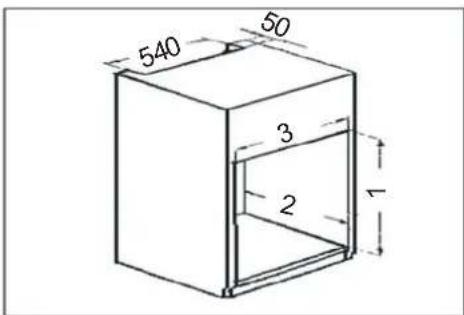
Dimensions of the recess
Height (1) mm 880
Depth (2) mm 550
Width (3) mm 560
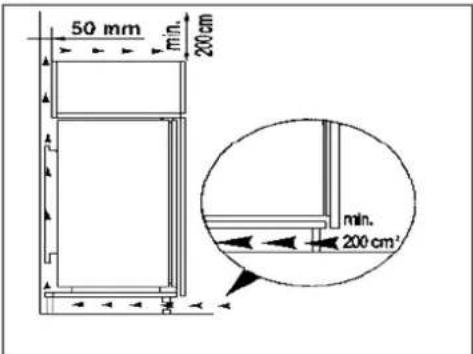
It is necessary that the cabinet has a ventilation recess with the following dimensions :
Depth 50mm
Width 540 mm
text_image
540 50 3 2 1For appropriate venting, follow indications in the figure.
text_image
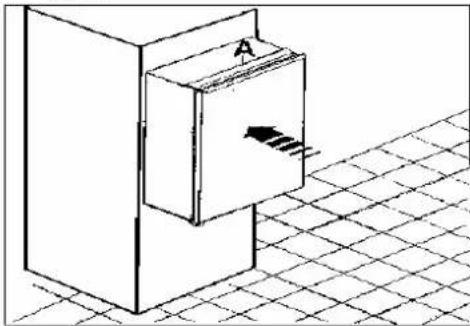
50 mm min. 200cm min. 200 cm²- Push the appliance into the housing until stop strip (A) touches the kitchen unit.
natural_image
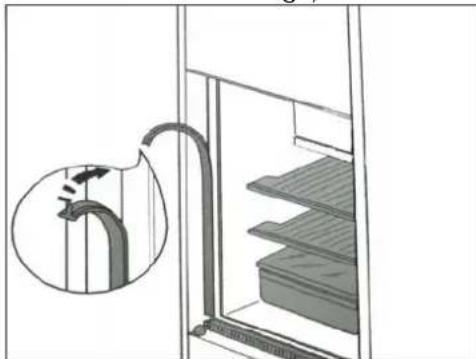
Isometric line drawing of a cabinet with an arrow indicating direction, placed on a tiled floor (no text or symbols)- Press in the joint covers between the appliance and the kitchen furniture (only on the side without hinge)
natural_image
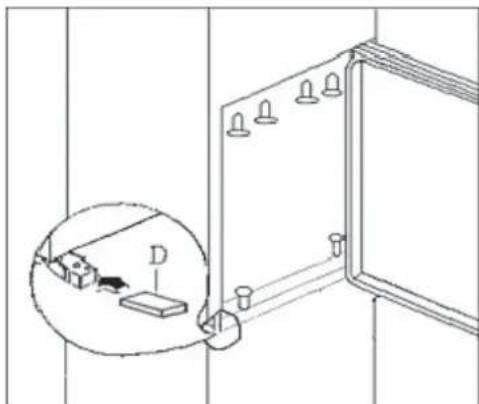
Diagram showing a pipe inserted into a storage unit with a magnified inset (no text or symbols)- Open the door and push the appliance against the side of kitchen furniture opposite to that of appliance hinges. Fasten the appliance with 6 screws provided in the kit included with the appliance. Snap hinge cover (D) into position.
natural_image
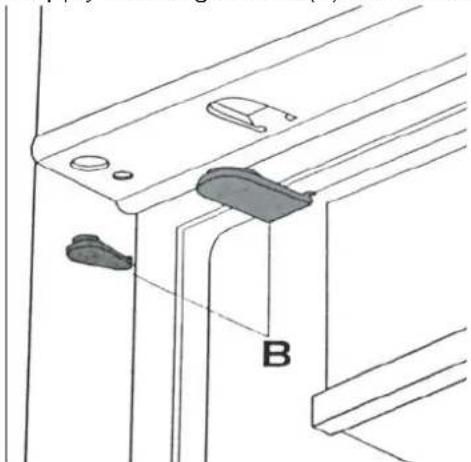
Technical line drawing of a door frame with a magnified inset showing a small component labeled D (no text or symbols present)- Apply blanking covers (B) as indicated.
natural_image
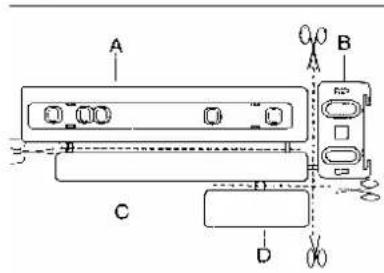
Technical line drawing of a mechanical bracket or panel assembly with labeled component B (no text or symbols beyond label)- Separate parts A,B,C,D as shown in the figure.
text_image
A B C D- Place guide (A) on the side part of the furniture door, up and down as shown in the figure and mark the position of external holes. After having drilled holes, fix the guide with the screws supplied.
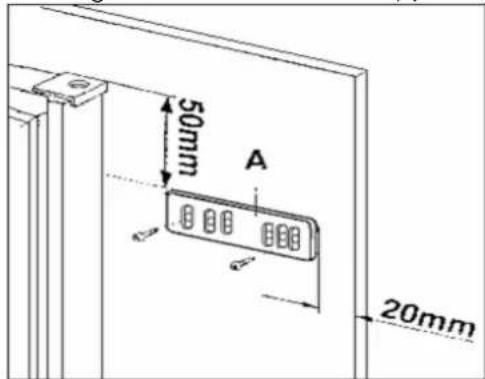
text_image
50mm A 20mm- Fix cover ( C ) on guide (A) until it clips into place.
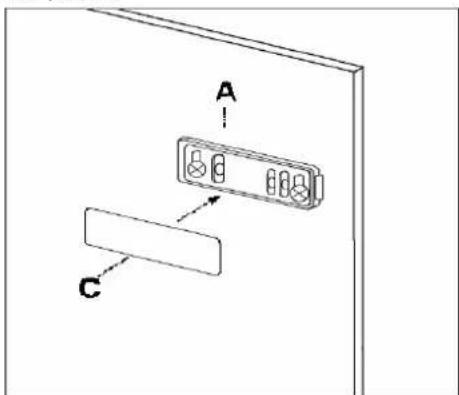
text_image
A C- Open the appliance door and the furniture door at 90o. Insert the small square (B) into guide (A). Push together the appliance door and the furniture door and mark the holes as indicated in the figure remove the squares and drill holes with 2mm at 8mm from the outer edge
of the door . Place the small square onthe guide again and fix it with the screwssupplied.
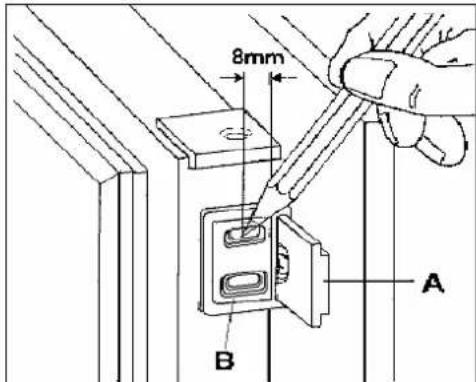
text_image
8mm A B- Should the lining up of the furniture door be necessary, use the clearance of slots. At the end of operations, it is necessary to check the door of the furniture closes properly.
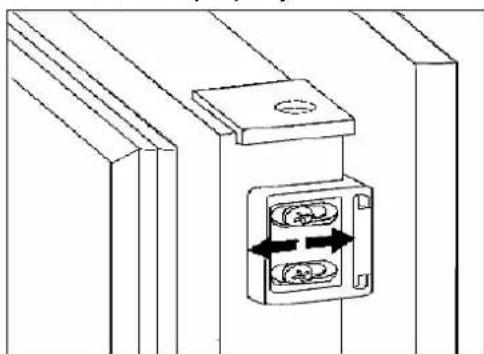
natural_image
Technical line drawing of a mechanical assembly with two circular components and directional arrows indicating movement (no text or symbols)- Fix cover (D) on guide (B) until it clips into place.
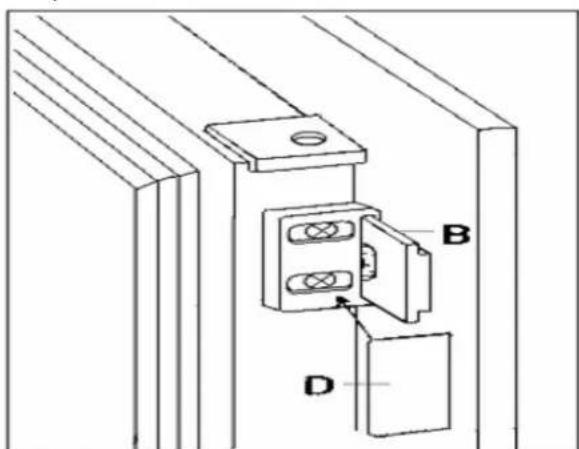
text_image
Technical diagram showing a mechanical assembly with labeled components A, B, and DPositioning
Position the appliance away from sources of heat such as stoves, radiators, direct sunlight etc. Maximum performance and safety are guaranteed by maintaining the correct indoor temperature for the class of unit concerned, as specified on the rating plate. This application perform well from N to ST. The Appliance may not work properly if it is left for a longer period at a temperature above or below the indicated range.
| Climate classification Ambient temperature | |
| SN | 10~32°C |
| N | 16~32°C |
| ST | 16~38°C |
| T | 16~43°C |
Appliances must not be exposed to rain. Sufficient air must be allowed to circulate in the lower rear section of appliances, as poor air circulation can affect performance. Built-in appliances should be positioned away from heat sources such as heaters and direct sunlight.
Reversing the door
The side at which the door opens can be changed from the right side (as supplied) to the left side, if the installation site requires. Tilt the appliance slightly towards the rear and prop it securely. Unscrew the door hinge screws and remove the hinge pin bracket. Open the door a little way and take it out downwards.
Unscrew the upper pin and screw it into place on the opposite side. Fit the door into the upper pin and close it. Screw the hinge pin bracket securely into place on the opposite side using the screws.
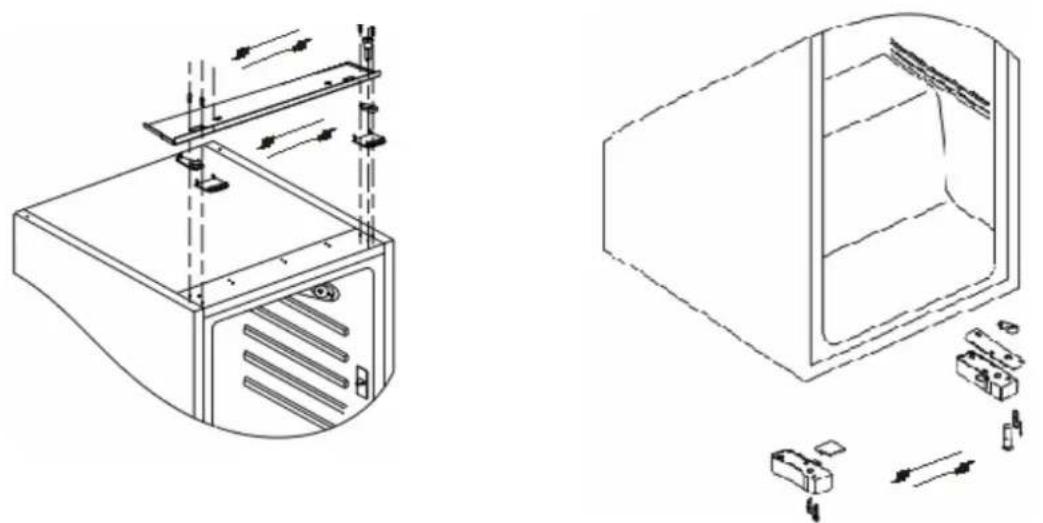
natural_image
Technical line drawings of a computer case with internal components and assembly, showing no text or symbolsWarning!
When changing the side at which the door opens, the appliance must not be connected to the mains. Remove plug from the mains beforehand.
Description of the appliance
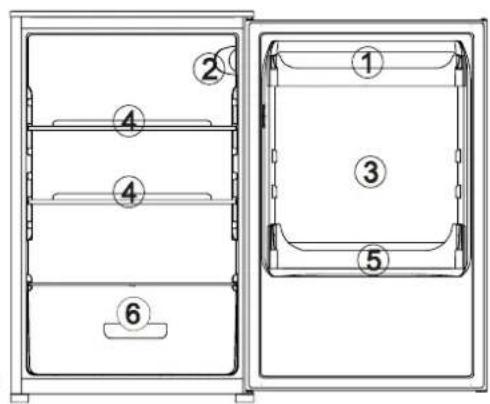
View of the appliance
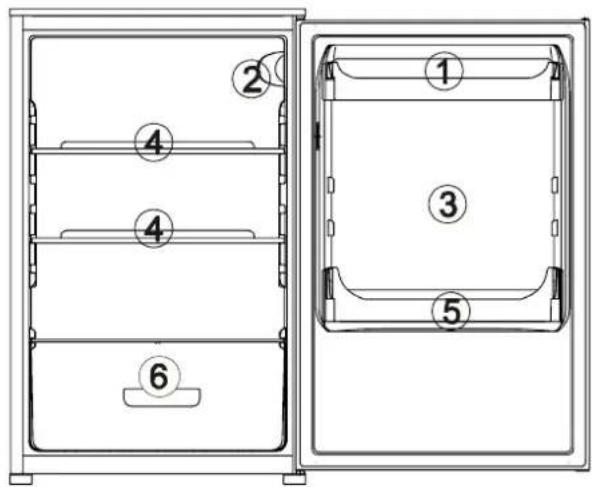
text_image
Technical diagram of a refrigerator with numbered compartments and labeled parts- Butter/cheese compartments with flap and egg storage insert
- Temperature regulator
- Door storage compartment
4.Storage shelves - Bottle shelf
- Vegetable drawers
Starting up and temperature regulation
Insert the plug of the connection lead into the plug socket with protective earth contact. When the refrigerator compartment door is opened, the internal lighting is switched on. The temperature selector knob is located on the RH side of the refrigerator compartment.
Setting 0 means:
Off.
Turning clockwise in direction Refrigerating unit on, the latter then operating
automatically.
Setting 1 means:
Highest temperature, warmest setting.
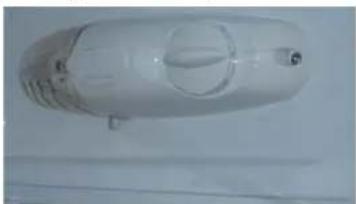
natural_image
Top-down view of a transparent plastic cylindrical object with internal circular features (no visible text or symbols)Setting 7 (end-stop) means:
Lowest temperature, coldest setting.
Important!
Normally we advise you select setting of 2 or 3 or 4, if you want the temperature warmer or colder please turn the knob to lower or higher setting accordingly.
When you turn the knob to lower which can lead to the more energy efficiency.
Otherwise, it would result the energy-consuming.
Important!
High ambient temperatures (e.g. on hot summer days) and a cold setting on the temperature regulator (position 6 to 7) can cause the compressor to run continuously or even non-stop!
Reason: when the ambient temperature is high, the compressor must run continuously to maintain the low temperature in the appliance.
Interior accessories
Storage shelves/wire tray
Various glass or plastic storage shelves and wire trays are included with your appliance - different models have different combinations.
You should always slide one of the full size glass storage shelves into the lowest set of guides, above the fruit and vegetable containers, and keep it in this position.
The height of the storage shelves can be adjusted:
To do this, pull the storage shelf forward until it can be swiveled upwards or downwards and removed.
Please do the same in reverse to insert the shelf at a different height.
IMPORTANT! – in order to make the most of the volume of the fresh food storage compartment and frozen-food storage compartment, the user can removed one or more shelves, drawers, out of the appliance, according to your daily use.
Correct storage
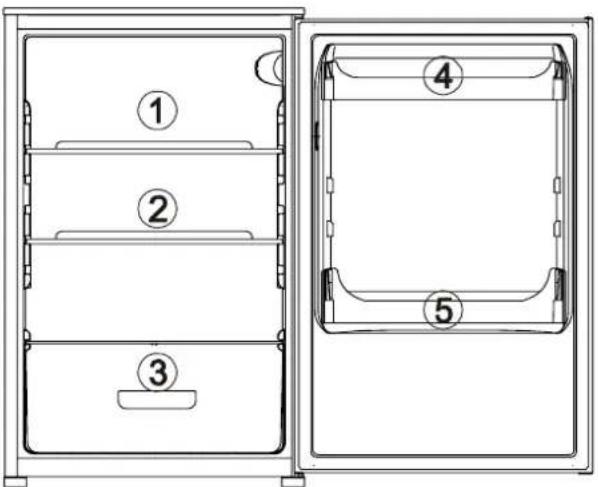
text_image
Technical diagram of a refrigerator with numbered compartments and labeled parts- Meat, salami, cold cuts, dairy
- Ready meals, pastries
- Cheese storage, fruit, and vegetables
4.Preserves
5.Drinks
Tips:
Food in the refrigerator should always be covered or packaged, to prevent drying and tainting of other food.
The following are suited for packaging:
Polyethylene airtight bags and wraps,
Plastic containers with lids;
Special plastic covers with elastic,
Aluminium foil.
Defrosting
Why defrosting
Water contained in food or getting into air inside the fridge be opening doors may form a layer pf frost inside. It will weaken the refrigeration when the frost is thick. While it is more than 10mm thick, you should defrost.
Defrosting in fresh food storage compartment
It is automatically controlled by switching the temperature regulator on or off so that there is no need of operation of defrosting. Water from defrosting will be drained into an drip tray through a drain pipe at the back of the fridge automatically.
Warning!
Switching off the appliance.
To switch off the appliance, turn the temperature regulator to position "0".
Important!
The fridge should be defrosted at least every one month. During the using process, if the door was opened frequently or using the appliance in the extreme humidity, we advise the user to defrost every two weeks.
If the appliance is not going to be used for an extended period:
Remove all refrigerated packages.
Switch off the appliance by turning the temperature regulator to position "0".
Remove the mains plug or switch off or disconnect the electricity supply.
Clean thoroughly (see section: Cleaning and Care)
Leave the door open to avoid the build up of odors.
Cleaning and Care
For hygienic reasons the appliance interior, including interior accessories, should be cleaned regularly.
Warning!
The appliance may not be connected to the mains during cleaning. Danger of electrical shock! Before cleaning switch the appliance off and remove the plug from the mains, or switch off or turn out the circuit breaker or fuse.
Never clean the appliance with a steam cleaner. Moisture could accumulate in electrical components, danger of electrical shock! Hot vapors can lead to the damage of plastic parts.
The appliance must be dry before it is placed back into service.
Important!
Ethereal oils and organic solvents can attack plastic parts, e.g. lemon juice or the juice from orange peel, butyric acid, cleanser that contain acetic acid.
Do not allow such substances to come into contact with appliance parts.
Do not use any abrasive cleansers.
Remove the food from the refrigerator. Store it in a cool place, well covered.
Switch the appliance off and remove the plug from the mains, or switch off or turn out the circuit breaker or fuse.
Clean the appliance and the interior accessories with a cloth and lukewarm water.
Commercially available dish washing detergents may also be used.
After cleaning wipe with fresh water and rub dry.
Accumulation of dust at the condenser increases energy consumption.
For this reason carefully clean the condenser at the back of the appliance once a year with a soft brush or a vacuum cleaner.
Check the water drain hole on the rear wall of the fridge.
Clear a blocked drain hole with the aid of the green peg in the pack of accessories included with the appliance.
After everything is dry place appliance back into service.
Energy Saving tips
- Do not place warm foods into the appliance. Allow warm foods to cool first. Do not install the appliance near cookers, radiators or other sources of warmth. High ambient temperatures cause longer, more frequent operation of the compressor
- When the product works, please do not open the door too often or leave the door open any longer than necessary.
- Do not set temperature any colder than necessary.
- The direct cooling refrigerator (with a freezer) needs to be defrosted when necessary. This will improve the cold transfer and reduce energy consumption.
- The sketch map shows the right combination of the drawers, crisper and shelves which can lead to the more energy efficiency. If users adjust the combination, it would result in the energy-consuming.
- Store food logically. Do not exceed the storage period specified.
Trouble shooting
Correcting Malfunctions
Spare parts:
The following spare parts can be ordered from your local AEG Service Force Center. You can fit these yourself without any special skill or training, e.g.:
butter/cheese compartment,
egg holders,
door racks,
fruit and vegetable drawers,
storage racks.
A malfunction may be caused by only a minor fault that you can rectify yourself using the following instructions. Do not perform any other work on the appliance if the following information does not provide assistance in your specific case.
Important!
Repairs to refrigerators/freezers may only be performed by competent service engineers. Improper repairs can give rise to significant hazards for the user. If your appliance needs repairing, please contact your specialist dealer or your local Service Force Center.
| Symptom | Possible Cause | Remedy |
| Appliance does not work. | Appliance is not switched on. Switch on the appliance. | |
| Mains plug is not plugged in or is loose. | Insert mains plug. | |
| Fuse has blown or is defective. Check fuse, replace if necessary. | ||
| Socket is defective. Mains malfunctions are to be corrected by an electrician. | ||
| Appliance cools too much. Temperature is set too cold. Turn the temperature regulator to a warmer setting | ||
| temporarily. | ||
| The food is too warm. | Temperature is not properly adjusted. | Please look in the “initial Start Up” section. |
| Door was open for an extended period. | Open the door only as long as necessary. | |
| A large quantity of warm food was placed in the appliance within the last 24 hours. | Turn the temperature regulation to a colder setting temporarily. | |
| The appliance is near a heat source. | Please look in the “installation location” section. | |
| Interior lighting does not work. | Light bulb is defective. Please look in the “changing the Light Bulb “section. | |
| Heavy build-up of frost, possibly also on the door seal. | Door seal is not air-tight(possibly after reversing the door). | Carefully warm the leaking sections of the door seal with a hair dryer(on a cool setting). At the same time shape the warmed door seal by hand such that it sits correctly. |
| Unusual noises. | Appliance is not level. Readjust the feet. | |
| The appliance is touching the wall or other objects. | Move the appliance slightly. | |
| A component, e.g. a pipe, on the rear of the appliance is touching another part of the appliance or the wall. | If necessary, carefully bend the component out of the way. | |
| The compressor does not start immediately after changing the temperature setting. | This is normal, no error has occurred. | The compressor starts after a period of time. |
| Water on the floor or storage shelves. | Water drain hole is blocked. See the “cleaning and care” section. | |
Changing the light bulb
Warning!
Before changing the light bulb, switch off the appliance and unplug it, or pull the fuse or the circuit breaker.
Light bulb data: 220-240V, max. 15 W
To switch off the appliance, set the temperature regulator to position "0".
Unplug the mains plug.
To change the light bulb, undo the screw.
Press the light bulb cover as shown and slide it backwards.
Change the defective light bulb.
Refit the light bulb cover and the screw.
Put the refrigerator back into operation.
Noises during Operation
The following noises are characteristic of refrigeration appliances:
Clicks
Whenever the compressor switches on or off, a click can be heard.
Humming
As soon as the compressor is in operation, you can hear it humming.
Bubbling
When refrigerant flows into thin tubes, you can hear bubbling or splashing noises.
Splashing
Even after the compressor has been switched off, this noise can be heard for a short time.
Regulations, Standards, Guidelines
This appliance is in accordance with the following EU guidelines:
-73/23/EEC low voltage guidelines.
-89/336/EEC EMC Directive
-2009/125/EC. framework for the setting of ecodesign requirements for energy-using
- EC.643/2009. requirements for household refrigerating appliances.
Disposal of the appliance
It is prohibited to dispose of this appliance in domestic household waste.
For disposal there are several possibilities:
a) The municipality has established collection systems, where electronic waste can be disposed of at least free of charge to the user.
b) The manufacturer will take back the old appliance for disposal at least free of charge to the user.
c) As old products contain valuable resources, they can be sold to scrap metal dealers.
Wild disposal of waste in forests and landscapes endangers your health when hazardous substances leak into the ground-water and fin their way into the food chain.
Correct Disposal of this product
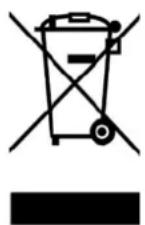
This marking indicates that this product should not be disposed with other household wastes throughout the EU. To prevent possible harm to the environment or human health from uncontrolled waste disposal, recycle it responsibly to promote the sustainable reuse of material resources. To return your used device, please use the return and collection systems or contact the retailer where the product was purchased. They can take this product for environmental safe recycling.
Everglades®
REFRIGERATEUR BUILT-IN
EVBI603
i AVERTISSEMENTS ET CONSEILS IMPORTANTS
natural_image
Technical line drawing of a mechanical component labeled 'A' with no visible text or symbolsDécongélation
natural_image
Line drawing of a hand inserting a component into a shelf with no visible text or symbols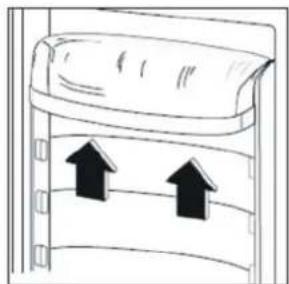
natural_image
Diagram of a door with two upward arrows indicating movement or force (no text or symbols)i CONSEILS
natural_image
Isometric line drawing of a mechanical component with an arrow indicating force or motion, placed on a grid-patterned surface (no text or symbols)natural_image
Diagram showing a pipe inserted into a storage unit with a magnified inset of the pipe (no text or symbols present)natural_image
Technical line drawing of a door frame with an inset showing a component labeled D (no text or symbols present)natural_image
Technical line drawing of a mechanical assembly with labeled component B (no text or symbols beyond label)text_image
50mm A 20mmnatural_image
Technical line drawing of a mechanical assembly with two circular components and directional arrows indicating movement (no text or symbols)text_image
Technical diagram showing labeled components A, B, and D for a mechanical or electrical assembly.INVERSEZ LA PORTE
natural_image
Technical line drawing of a computer case with mounting bracket and ventilation slots (no text or symbols)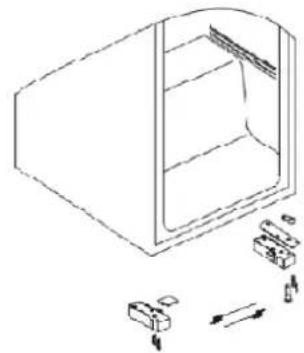
natural_image
Line drawing of a refrigerator with internal compartments and exploded view showing mechanical parts (no text or symbols)DESCRIPTION DE L'APPAREIL
text_image
Technical diagram of a two-part refrigerator with numbered compartments and labeled partsnatural_image
Simple line drawing of a refrigerator with label A pointing to the refrigerator (no text or symbols beyond label)natural_image
Line drawing of a hand inserting a card into a device (no text or symbols)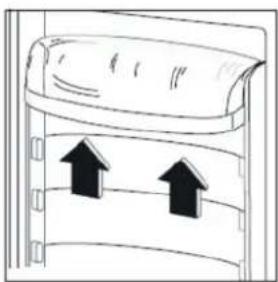
natural_image
Diagram of a refrigerator with two upward arrows indicating airflow or movement (no text or symbols)ONDERHOUD

natural_image
Illustration of a hand using a tool to apply a component on a surface, with no visible text or symbols.Het ontdooien
natural_image
Diagram showing a hand holding a tool inside a circular component, with arrows indicating motion direction (no text or symbols)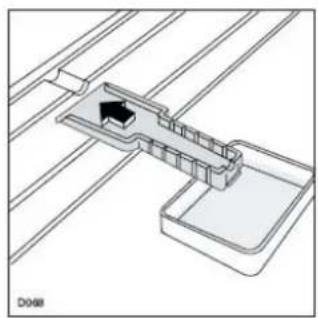
natural_image
Pure technical diagram of a mechanical assembly with no visible text, numbers, or symbolsBelangrijk:
natural_image
Isometric line drawing of a rectangular box with an arrow inside, placed on a grid-patterned surface (no text or symbols)natural_image
Diagram showing a pipe connection to a storage cabinet with a magnified inset (no text or symbols)natural_image
Technical line drawing of a door frame with an inset showing a small component labeled 'D' (no text or symbols present)natural_image
Technical line drawing of a mechanical bracket or panel assembly with labeled component 'B' (no text or symbols beyond label)text_image
50mm A 20mmnatural_image
Technical line drawing of a mechanical assembly with two circular components and directional arrows (no text or symbols)text_image
Technical diagram showing labeled components A, B, and D for a mechanical or electrical assembly.OMKEREN VAN DEUR
text_image
1 2 3/4 7 5/6natural_image
Two cartoon illustrations of a smiling book and a lamp under sunlight, no text or symbols present.natural_image
Cartoon illustration of a smiling refrigerator with expressive faces and warning symbols around it (no text or labels)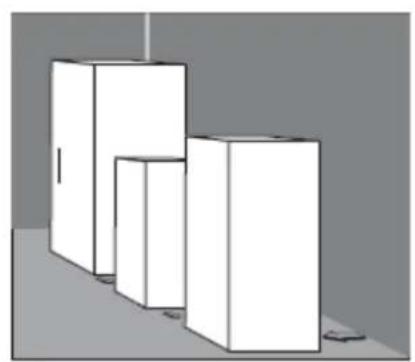
natural_image
3D rendering of three white rectangular blocks arranged in a staggered layout on a gray background (no text or symbols)natural_image
Isometric diagram of a rectangular block with an arrow labeled 'A' and a diagonal line, placed on a grid-patterned surface (no text or symbols)natural_image
Technical line drawing of a door frame with hanging fixtures and directional arrows indicating movement (no text or symbols)text_image
50mm A 20mmnatural_image
Technical line drawing of a mechanical assembly with two circular components and directional arrows indicating movement (no text or symbols)text_image
Technical diagram showing a mechanical assembly with labeled components A, B, and D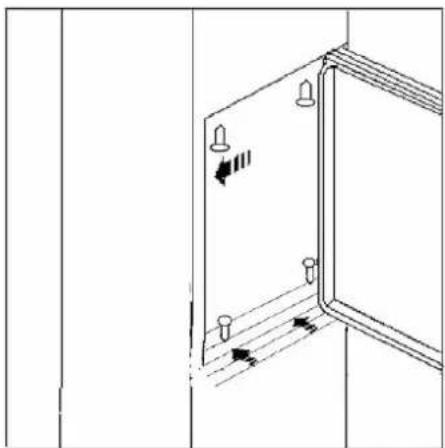
natural_image
Technical line drawing of a door frame with mounting holes and directional arrows indicating movement (no text or symbols)natural_image
Cartoon illustration of a sad document character and a chef cooking with steam (no text or symbols)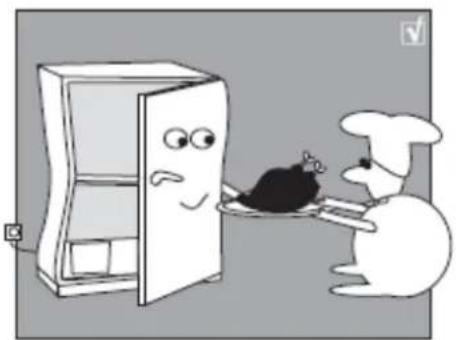
natural_image
Cartoon illustration of a dog and a refrigerator with a chicken on a tray (no text or symbols)natural_image
Pure technical diagram showing mechanical components with arrows indicating direction (no text or symbols)natural_image
Cartoon illustration of a chef next to an open refrigerator with a thermometer and a question mark above (no text or symbols)