DECT 8048B - Phone AUDIOLINE - Free user manual and instructions
Find the device manual for free DECT 8048B AUDIOLINE in PDF.


User questions about DECT 8048B AUDIOLINE
0 question about this device. Answer the ones you know or ask your own.
Ask a new question about this device
Download the instructions for your Phone in PDF format for free! Find your manual DECT 8048B - AUDIOLINE and take your electronic device back in hand. On this page are published all the documents necessary for the use of your device. DECT 8048B by AUDIOLINE.
USER MANUAL DECT 8048B AUDIOLINE
natural_image
Two silver Audioline phone models with rotary keypad and display screens (no visible text or symbols on devices)OperatingInstructions__23
D
Pleasereadthisoperatinginstructionmanualthoroughly.
Intendeduse
Thistelephoneisdesignedforusewhenconnectedtoatelephonenetwork.Anyother useisconsideredunintendeduse.Unauthorisedmodificationandreconstructionisnot permitted.Undernocircumstancesopenthedeviceorcompleteanyrepairworkyourself.
Installationlocation
Preventexcessiveexposureosmoke,dust,vibration,chemicals,moisture,heatand directsunlight.
Donotusethehandsetinpotentiallyexplosiveareas.
Powersupply

Caution: Only us the power adapter plugs supplied because other powers supplies could destroy the telephone. Acces to the power adapter plug must not be obstructed by furniture or such.
Rechargeablebatteries

Caution: Donotthrowbatteriesintoafireorimmersetheminwater.
Powerfailure
Thetelephone cannot be used to make calls in the event of a power failure. Always keep acord connected telephone which operates without an external powers supply available in the case of emergencies situations.
Medicalequipment

Caution: Neverusethetelephoneinthevicinityofmedicalequipment. It cannot befullyruledoutthatequipmentwillnotbeaffected.
DECT ^1 telephonescancauseanunpleasanthummingsoundinhearingaids.
Disposal
You are obliged to dispose of consumable goods in accordance with legal regulations. The adjacent symbol on the telephone indicate that electrical and electronic equipment and batteries no longer required must be disposed of separate from domestic waste.
Electricalorelectronicequipmentmustbedisposedofatcollectionpoints providedbythepublicwasteauthorities.
Batteries must be returned to the point of sale or appropriate collection points provided by the public waste authorities.
Packingmaterial must be disposed of according to local regulations.


1 DECT: Digitally Enhanced Cordless Telephone = Standard for cordless telephones.
PuttingtheTelephoneintoOperation
2PuttingtheTelephoneintoOperation
Safetynote

Caution: It is essential to read the safety information in Chapter 1 before preparing the telephone for use.
Checkingthepackagecontents
Thepackagecontains:
-abasestationwithpoweradapterplug (large)
-achargingstationwithpoweradapter plug(small)
-twohandsets-fourbatteries
-atelephoneconnectioncable-anoperatingmanual
Connectingthebasestation

Caution: Position the base station with a distance of at least 1 meter to other electron equipment because it could lead to mutual disturbance.
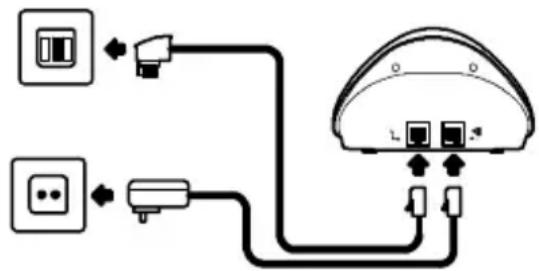
Connectthebasestationasillustratedinthediagram. Forreasonsofsafety, onlyusethe poweradapterplugandtelephoneconnectioncablesupplied.
Telephonelinesocket
text_image
Diagram showing connections between two electrical outlets and a device with labeled ports and connectionsMainspoweroutlet
Connectingthechargingstation
Plugthepoweradapterpluginaproperlyinstalledmainspoweroutlet.
Insertingthebatteries
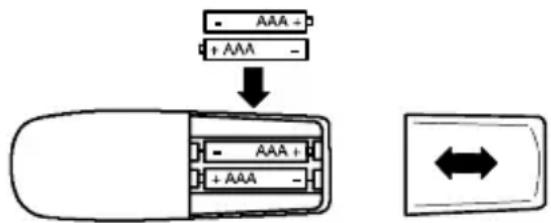
Openthebatterycompartmentandinsertthebatteries.OnlyusebatteriesofthetypeAAANi-MH 1.2V.Payattentiontothecorrectpolarity.Close thebatterycompartmentcover.
text_image
- AAA + + AAA -GB
PuttingtheTelephoneintoOperation
Chargingthebatteries
Beforeusingthehandsetforthefirsttime,placeitinthebasestation/chargingstationfor atleast14hours.Whenthehandsetiscorrectlyinsertedinthebasestation/charging station,anacousticsignalissuedandthechargecontrollamplightsup.Thehandset warmsupduringthechargingprocess.Thisisnormalanddoesnotrepresentarisk.Do notchargethehandsetwithchargingunitsfromothermanufacturers.Thecurrentbattery chargestatusisindicatedinthedisplay:


FullHalfemptyWeakEmpty
Privatebranchexchanges
If you want to connect the telephone to a private branch exchange, more information is provided on Page 34.
OperatingElements
3OperatingElements
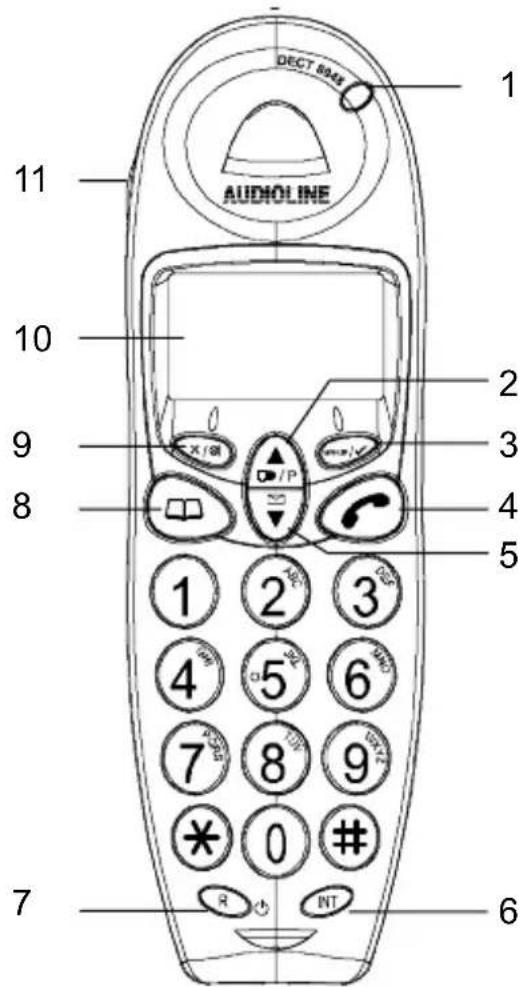
Handset
- Callindicator
- Scrollingbutton/Rediallingbutton
- Menubutton
- Callbutton
- Scrollingbutton/CallslistCLIP
- Internal calls
7.Rbutton
8.Phonebook/Exitmenu
9.Mutingbutton/Clearbutton
10.Display
11.Handsfreemode
Basestation
- Pagingbutton(locatehandset)
- Callandpowerindicator
3.LED, chargecontrollamp
Chargingstation
- LED, chargecontrollamp
text_image
DECT 804x AUDIOLINE 1 11 10 9 8 2 3 4 5 1 2 3 4 5 6 7 8 9 * 0 # R NT 6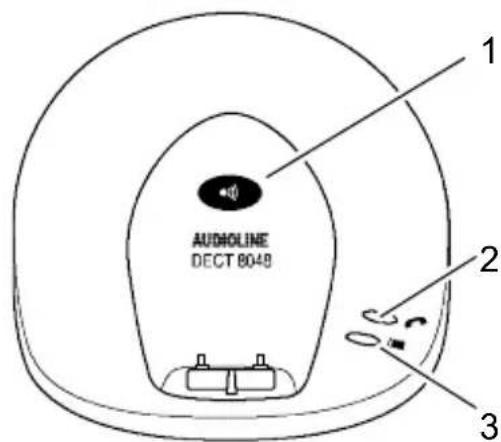
text_image
AUDIOLINE DECT 8048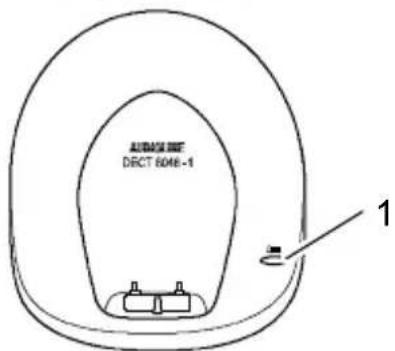
text_image
ALABAA DUT DECT 6046-1 1GB
OperatingtheTelephone
4OperatingtheTelephone
Illustrationanddescriptionofoperations
| Enterdigitsorletters | |
| ×/⊗ | Pressthebuttondepictedbriefly |
| 2 sec | ×/⊗ Pressthebuttondepictedfor2seconds |
| Pressandhold | ×/⊗ Pressandholdthebuttondepicted |
| Release | ×/⊗ Releasethebuttondepicted |
| (( ) Handsetrings | |
| (( ) Basestationrings | |
| Removethehandsetfromthebasestation | |
| Placethehandsetinthebasestation | |
| EXAMPLE or Y | Textoriconsinthedisplay |
Iconsinthedisplay
| Icon | Description |
| On:Acalliscurrentlybeingmade. | |
| On:Handsfreemodehasbeenswitchedon. | |
| EXT | On:Anexternalcalliscurrentlybeingmade.Flashing:Anexternalcallhasbeenreceived. |
| INT | On:Aninternalcalliscurrentlybeingmade.Flashing:Aninternalcallhasbeenreceived. |
| On:Youhaveopenedthecallerlist(CLIP).Flashing:Newcallshavebeenstoredinthecallslist(CLIP). | |
| On: This phone number in the calls list has not been called back. | |
| On: This phone number in the calls list has already been called back. | |
| Flashing:Pleasechargethehandset.On:Displaysbatterycapacity.Runsthroughthesegments:Thehandsetisbeingrecharged. | |
| On:Appearswhenusingthephonebook. | |
| On:Appearsimmediatelyprogrammingmodehasbeenactivated. | |
| On: The key lock function is switched on. | |
| On:Theconnectiontothebasestationisgood.Flashing:Thehandsetisoutofrangeofthebasestation. | |
| On: The phone number is in excess of 12 digits. |
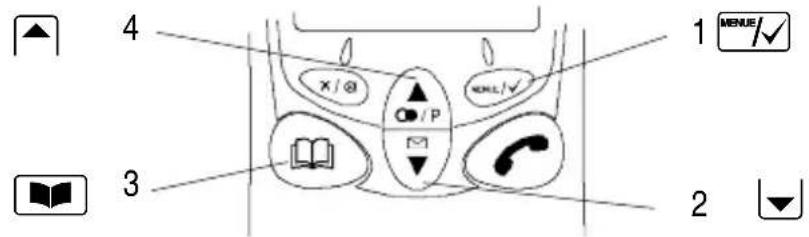
Navigationbuttons
AlldescriptionsinthisoperatingmanualassumethatthehandsetisinStandbymode. Standbymodeisactivatedbypassingthe button.
text_image
1 MENU/✓ 4 X / @ O / P OKL ✓ 3 2
Thebuttonsdepictedinthedescriptivepassagesofthismanualhaveeastandard appearance,i.e.thecontoursandiconsinthebuttonscoulddifferslightlyfromthe actualappearance.
| ButtonInStandbymodelthemenu | ||
| 1 MENUE/√ | -Opensthemainmenu-Opensthemenudisplayed | |
| 2 ▼ | -Opensthecallslist | -Scrollthroughthemenu-Changethesettings |
| 3 ▲ | - Opens the phone book | - Skip one level back |
| 4 ▲ | -Openstherediallinglist | -Scrollthroughthemenu-Changethesettings |
| R | - Switch the handset on /off | - No function |
Navigationinthemenu
Allthefunctionscanbeaccessedviathedifferentmenus.
Refer to Menu Structure ☐ Page 35 for information on how to access each respective function.
| MENU/✓ | Openthemainmenu |
| or▼ | Selecttherequiredsubmenu |
| MENU/✓ | Openthesubmenu |
| Usethedigitkeystoenternumbersorletters | |
| MENU/✓ | Confirmtheinput |
| Skiponelevelback | |
| 2 sec | Interrupt the programming and saving processes and returntoStandbymode |

Everyprocessisautomaticallycancelledifthereisnoinputwithin30seconds.
OperatingtheTelephone
Creatingphonebookentries-example
The example in Creating phone book entries explains how to navigate and make entriesinthephonebook. The phonebookmemoryhasacapacityof30entries.

Openthemainmenu

Select the function and confirm it



Proceedinthesamewayasinthisexampleforallsettings. RefertoMenuStructure Page35.
5Telephoning
Switchingthehandseton/off
2 sec R Switchthehandseton
2 sec R Switchthehandsetoff
Takingacall

Take the call
Endingacall

Makingacall
Enterthephonenumber(max.20digits)
✗/⊗ Followingincorrectinput, presstodeletethelastdigit
Dialthephonenumber

ItisalsopossibletopresstheCallbuttonfirsttoobtainanoutsideline. Thedigits of thephonenumberenteredaredialledimmediately. Itisnotpossibletocorrect anywrongdigitsin thephonenumberenteredwhenusingthisdiallingmethod.
Redialling
Thetelephonestorestelastfivenumbersdialledinarediallinglist.
▲ Opentherediallinglist

Select the entry required and dial the number
Callingbackcallsreceived
Thetelephonestorestelast30callsreceivedinacallslist.
▼ Openthecallslist

Select the entry required and dial the number
Diallingphonenumbersfromthephonebook
Phonenumbermusthavebeenstoredinthephonebook. Page35.
Openthephonebook

Select the entry required and dial the number
Internalcalls
Makinginternalcalls
Inordertobeabletomakefreeinternalcalls,twoormorehandsets(HS1,HS2,...)must beregisteredonabasestation.
HS1: INT, e.g. 2
Dial the internal phone number of the handset required
HS2:
Take the internal call on the other handset
HS1/HS2:
Endtheinternalcall
Telephoning
Transferringexternalcallsinternally
HS1: INT, e.g. 2 Dial the internal phone number during the external call
HS2: ↗ Taketheinternalcallontheotherhandset
HS1: Transferthecall

If the handset called does not answer, take the external callback by pressing the INT button.
Holdingacall/Brokering
Whileanexternalcallisinprogress,itispossibletodialanotherhandsetinordertoconsultwithsomeone.Theexternalcallerisputonholdwhileyouconversewiththesecond,internalpersoncalled.Youcanswitchbetweenthetwocallersasoftenasnecessary.
HS1: INT, e.g. 2 Dial the internal phone number during the external call
HS2: ↗ Taketheinternalcallontheotherhandset
HS1: INT Switchbetweenthecallers
Conferencecalls
Anexternalcallcanbetransferredtoanotherinternalhandsetforaconferencecall.
HS1: INT, e.g. 2 Dial the internal phone number during the external call
HS2: ↗ Taketheinternalcallontheotherhandset
HS1:2sec INT Starttheconferencefacility
HS1 / HS2: The conference call is ended when one of the internal callersendsthecall
Settingthereceivervolume
Thevolumecanbeadjustedtooneof5levelsduringacall.
or Pressthebuttonduringthecall
Displayingthedurationofacall
Thedurationofacallisdisplayedinhours,minutesandsecondsduringacallandfora shortperiodafterithasbeenended.
Handsfreemode
Usethisfunctiontobeabletolistentothecallerthroughtheloudspeaker.
Switchonhandsfreemode
Switchoffhandsfreemode
Mutingthemicrophoneinthehandset
Themicrophoneinthehandsetcanbeactivatedanddeactivatedduringatelephoneconversation.
×/⊗| Switchthemicrophoneoff(mutingfunction)
×/⊗ Switchthemicrophoneon
Keylock
Incomingcallscanstillbetakeninthenormalwayevenwiththekeylockactivated.

Temporarytonedialling
Evenifyoucanonlyoperatethetelephoneusingpulsedialling,youcanswitchtotone diallingtemporarilyduringacallinorder,forexample,toaccessanansweringmachine.
* Activatetemporarytonedialling
* Deactivatetemporarytonedialling
Diallingpause
Whenthephoneisintegratedinaprivatebranchexchange,itisnecessarytodialaspecificnumber(e.g.0or9)inordertoobtainthedialllingtoneforanoutsideline.Inthecase ofolderexchanges,itcantakesometimeuntilthedialllingtonecanbeheard.Inserta diallingpauseinsuchcases.

Thepausecanalsobeenteredwiththephonenumbersinthephonebook.
0,2sec P ,1234...Insertthepause
Handsetringingmelody
Thehandsetringingmelodycanbedeactivated Page35.

Thebasestationthenringsintheeventofanincomingcallbutnotthehandset.
Locatingthehandset(Paging)
If you havemislaid the handset, it can be located easily by means of an acoustic signal.
●)) (( " [ ] ") Activatetheacousticsignaltolocatethehandset
or Stopheacousticsignal
Range
Thehandsethasarangeofapprox.50metersindoorsandapprox.300metersoutdoors. When the connection to the base station is good, the 1 ^n icon appears in the display. If the handset is moved too far from the base station, the 1 ^n icon flashes and acoustic warning signalsareissued.Movenearertothebasestation,otherwisethecallwillbedisconnected.
GB
PrivateBranchExchanges/SupplementaryServices 6PrivateBranchExchanges/SupplementaryServices
Rbuttonwithprivatebranchexchanges
If the telephone is connected to a private branch exchange, all the functions associated with the R-button, such as transferring calls, automatic call back, etc., can be used. Pleaserefertotheoperating manual provided with your private branch exchange to determine which Recall time must be set to be able to set the functions. Theretailer where you purchased the exchange can provide information at whether the telephone will work properly with the exchange. Setting therecall time Page 35.
Diallingpause
When using private branch exchanges, it is necessary to dial as specific number to obtain the dial lington tone for an outsideline. With some older private branch exchanges, it takes a little time before the dial lington tone becomes audible. Enter adialling pause in the case of such private branch exchanges. You canthendial the phonenumber without having to wait forthedial lington tone. Setting the dial lington pause Page 33.

Thepausecanalsobeenteredwiththephonenumbersinthephonebook.
R-buttonandsupplementaryservices
Thetelephonesupportsthesupplementaryservicesofferedbyyourtelephonenetwork provider,suchasbrokering,callwaitingandconferencecalls.Thesesupplementaryservices can be used in conjunction with the R-button. Please ask your telephone network providerwhichrecalltimemustbesetinordertousethesupplementaryservices.Contact yourtelephonenetworkproviderwithregardtoenablingsupplementaryservices.Setting therecalltimePage35.
Answeringmachineinthetelephonenetwork
If yourtelephonenetworkprovider includes an answering machine for you in the tele- phonenetwork, the envelope icon (VMWI ^1 ) appear to indicate new messages have been recorded for you. The availability of an external answering machine and indication of new messages via the envelope icon are optional services offered by the telephonenetwork provider. These functions can only be used when yourtelephonenetworkprovider actually offer the service. Contact your network provider for further information.
Callernumberdisplay(CLIP 2)
If this function is available with your telephone, then number of the caller appears in the display when the phonerings. If the caller has suppressed transfer of his phonenumber, the corresponding message appears in the display. The phonenumber is not displayed and, thus, cannot be stored in the calls list.

Thecallernumberdisplayfunctionisanoptionalserviceofferedbytelephone networkproviders.Contactyournetworkproviderforfurtherinformation.
1 VMWI: VisualMessageWaitingIndication
2 CLIP: Calling Line Identification Presentation
7MenuStructure
PHONEBOOKADDENTRY
| DELETEENTRY | |||
| MODIFYENTRY | |||
| SETUPBASEVOLUME1,2,3,OFF | |||
| BASEMELODYMELODY1,2,3 | |||
| DELHANDSETPIN? | 5 | HANDSET? | |
| PINCODE | PIN? 5 | NEWPIN?RETYPE | |
| DIALMODETONE | |||
| PULSE | |||
| RECALLRECALL1(100ms) | |||
| RECALL2(300ms) | |||
| DEFAULTPIN? | 5 | CONFIRM | |
| HANDSET | BEEP | KEYTONE | ON - OFF |
| LOWBATTERY | ON-OFF | ||
| RANGE | ON-OFF | ||
| INTRINGVOL | VOLUME1,2,3,OFF | ||
| EXTRINGVOL | VOLUME1,2,3,OFF | ||
| INTMELODY | MELODY1,2,3 | ||
| EXTMELODY | MELODY1,2,3 | ||
| AUTOANSWER | ON-OFF 2 | ||
| NAME | ...... | ||
| LANGUAGE(7LANGUAGES) | |||
| KEYLOCK | ...... | ||
| REGISTER | SELECTBASE | BASE1_ | |
| REGBASE | BASE1234 | ||
^5 DefaultsystemPIN:0000
2 If the function has been activated, an incoming call is automatically taken on removing the handset from the basestation.
ExpandingtheTelephoneSystem
8ExpandingtheTelephoneSystem
The internationally recognisedGAP ^1 standardensuresthecompatibilityofhandsetsand basestationsfromdifferentmanufacturers. ThisenablesAUDIOLINEequipmentandthat fromothermanufacturerstobeintegratedinonetelephonesystem.
Multiplehandsets
Upto4handsetscanberegisteredonthebasestation.
Registeringhandsets
Before beginning with the registration procedure for ahandset, switch therelevant base station to Register mode.
3 sec ●) ActivateRegistermode
Complete the registration process for your handset ☐ Page 35. Use the PIN code currentlysetfortheregistrationprocess☐Page35.
Afterbeingregistered, the handset is assigned an internal call number. This internal call number appears in the display.

Toregisterhandsetsfromothermanufacturers,readtheoperatingmanualprovidedwiththerespetivehandset.
Deregisteringhandsets

Ahandsetregisteredonabasestationcanonlybederegisteredbyanotherhandsetregisteredtothesamebasestation.
Multiplebasestations
Thehandsetscanbesimultaneouslyregisteredonupto4differentbasestations.Each basestationrequiresitsowntelephonelinesocket.Connectionswiththesameordifferentcallnumberscanbeused.

Callsinprogress, however, cannot betransferred from one basestation to another.
Increasingtherange
Positionthebasestationssothattherangesoftheindividualbasestationsoverlap.Test therangeofyourhandsetsbecauseobstructionsinbuildingsrestricttherange.Register the handset on all the base stations. Activate the Select Base function on the base stations Page 35. The handset automatically searches for the nearest base station with thebestconnection.
Mobilitythroughdifferentinstallationlocations
Registerthehandsetonvariousbasestationsatdifferentlocations.ActivatetheSelect Base function on the base stations Page 35. Regardless of your current location, the handsetautomaticallysearchesforabasestationinrange.
1 GAP: Generic Access Profile = Standard for the interoperation of handsets and base stations from other manufacturers.
9lfProblemsOccur
Servicehotline
Shouldproblemsarisewith the telephone, pleasereferto the following information first of all. In the case of technical problems, contact our Service Hotline, tel. 01805001388 (Telekom costs at time of going to print: 12ct/min). In the case of claims under the terms of guarantee, please contact your sales outlet. There is a year period of guarantee.
Problemsandsolutions
| ProblemsSolutions | |
| Noconnectiontobasesta-tionpossible | -CheckthatthehandsethasbeenregisteredonthebasestationwiththecorrectPINcode.35 |
| Notelephonecallspossible-Thetelephonelineisnotcorrectedproperlyorisdefective.Onlyusethetelephoneconnectioncablesup-plied.-Testwhetherthetelephoneconnectionisinorderbyusinganothertelephone.-Thepoweradaptorplugisnotpluggedinorthereisacompletepowerfailure.-Therechargeablebatteriesareemptyordefective.-Thehandsetistoofarfromthebasestation.-Theincorrectdiallingmodeisset.35 | |
| Connectionisdisturbedorcutoff | -Thehandsetistoofarfromthebasestation.-Thebasestationisinanunsuitablelocation. |
| Thesystemnolongerre-sponds | -Resetallthefunctionstotheirdefaultsettings.35-Disconnectthepoweradapterplugbrieflyfromthepowersocket. |
| Thebatteriesareemptyafteraveryshorttime | -Thebatteriesareemptyordefective.-Placethehandsetinthebasestationproperly.Cleanthecontactsurfacesonthehandsetandbasestationusingasoft,drycloth.-Insertthehandsetinthebasestationfor14hours. |
| Thecallernumberdisplay(CLIP)doesnotfunction | -Thecallernumberdisplayfunctionisanoptionalser-viceofferedbytelephonenetworkproviders.Contactyournetworkproviderforfurtherinformation.-Thecallerhassuppressedthetransmissionoftheirphonenumber. |
GB
TechnicalSpecifications
10TechnicalSpecifications
Technicaldata
| FeatureValue | |
| StandardDECT-GAP | 1 |
| PowersupplyInput:220/230V,50Hz | Output:6.5V,150mA |
| RangeOutdoors:Approx.300m | Indoors:Approx.50m |
| StandbyUpto150h | |
| Max.talktimeUpto11h | |
| Rechargeable batteries | 2 x 1.2 V, size: AAA |
| DiallingmodeTonediallingmode(default) | Pulsediallingmode |
| Permissibleambienttemperature | 10°Cto30°C |
| Permissiblerelativehumidity | 20%to75% |
| Flashfunction | 100ms,300ms |
| Handsetname | DECT8048(adjustable) |
| Phonebook | 30entries |
| Callslist | 30entries |
| Rediallinglist | 5entries |
| Batterychargewarningindicator | Yes |
| Keytone | On/Off |
| Outofrangewarning | Yes |
| Automaticanswering | On/Off |
| Ringingvolume,handset(internalandex-ternal) | 3levelsandoff |
| Receivervolume | 5levels |
| Ringingmelody,handset(internalandex-ternal) | 3 melodies |
| Keylock | Yes |
| Ringingvolume,basestation | 3levelsandoff |
| PINcode | 0000(default) |
^1 DECT: Digitally Enhanced Cordless Telephone = Standard for cordless telephones. GAP: Generic Access Profile = Standard for the interoperation of handsets and base stations from other manufacturers.
TechnicalSpecifications
| HandsfreemodeYes | |
| RPASYes | |
| No.ofhandsetsperbasestationMax.4 | |
| Languages7 | |
| AccesstophonebookduringcallYes | |
| ConferencefacilityYes |
Hearingaidcompatibility
Thetelephoneiscompatiblewithmostpopularhearingaidsonthemarket. However, it cannotbeguaranteedthatallhearingaidswillworkperfectly.
If your hearing aid is not compatible with the telephone and interference occurs, try the following solutions:
-Donotswitchthehearingaidto"T".
-Usethehandsfreefacilityonthehandsetandsetthevolumeasloudaspossible.
-Holdthehandsetapprox.15cmfromthehearingaid.
DeclarationofConformity
This device fulfilstherequirements stipulated in the EU directive:
1999/5/EU directive on radio equipment and telecommunication terminal equipment and the mutual recognition of their conformity. Conformity with the abovementioned directive is confirmed by the CE symbol on the device.
ToviewthecompleteDeclarationofConformity, pleaserefertothefreedownloadavailableonourwebsitewww.audioline.de.

GB
Maintenance/Guarantee
11 Maintenance/Guarantee
Maintenance
- Cleanthehousing surfaces with asoft, fluff-freecloth.
- Neverusecleaningagentsorsolvents.
Guarantee
AUDIOLINE equipment is produced and tested according to the latest production methods. The implementation of carefully chosen materials and highly developed technologies ensure trouble-free functioning and long service life. The term so guaranteed not apply where the cause of equipment malfunction is the fault of the telephone network operator or any interposed private branch extension system. The term so guaranteed not apply to the batteries or power packs used in the products. The period of guarantee is 24 months from the date of purchase.
Alldeficienciesresultingfrommaterialorproductionfaultswhichoccurduringtheperiod ofguaranteewillbeeliminatedfreeofcharge.Rightstocaimsunderthetermsofguaranteeareannulledfollowinginterventionbythepurchaserorthirdparties.Damagecaused asaresultofimproperhandlingoroperation,incorrectpositioningorstoring,improper connectionorinstallation,ActsofGodorotherexternalinfluencearenotcoveredbythe termsofguarantee.Inthecaseofcomplaints,wereservetherighttorepairorreplacedefectpartsorprovideareplacementdevice.Replacementpartsordevicesbecomeour property.Rightstocompensationinthecaseofdamageareexcludedwherethereisno evidenceofintentorgrossnegligencebythemanufacturer.
If your devices show sign of defect during the period of guarantee, pleasereturnitto the sales outlet in which you purchase the AUDIOLINE device together with the purchase receipt. All right to claims under the term so guarantee in accordance with this agreement must be asserted exclusively with regard to your sales outlet. Two years after the purchase and transfer of four products, claims under the term so guarantee can longer be asserted.
12Index
A
Answeringmachineinthe telephonenetwork,34
Automaticdialling,36
B
Basestation,27
Batteries,24
Batterychargestatus,26
Brokering,32
C
Callandpowerindicator,27
Callbutton,27
Callindicator,27
Callernumberdisplay,34
Callingbackmissedcalls,31
Chargecontrollamp,27
Chargingthebatteries,26
Checkingthepackage contents,25
Conferencecalls,32
Connectingthebase station,25
Connectingthecharging station,25
Creatingphonebook entries,30
D
DeclarationofConformity,39
Deregisteringhandsets,36
Descriptions,28
Diallingpause,33,34
Diallingphonenumbers from the phonebook, 31
Display,27
Disposal,24
E
Endingacall,31
ExpandingtheTelephone System,36
G
Guarantee,40
H
Handset,27
Handsfreemode,27,32
Holdingacall,32
|
Iconsinthedisplay,28
Increasingtherange,36
Insertingthebatteries,25
Installationlocation,24
Intendeduse,24
Internalcalls,27,31
K
Keylock,33
L
Locatingthehandset,33
M
Maintenance,40
Makingacall,31
Makinginternalcalls,31
Medicalequipment,24
Menubutton,27
Mobility,36
Multiplebasestations,36
Multiplehandsets,36
Mutingthemicrophone,32
Muting/Clearbutton,27
N
Navigation,29
Navigationbuttons,29
0
OperatingtheTelephone,28
P
Paging,33
Pagingbutton,27
Phonebook/Exitmenu,27
Powerfailure,24
Privatebranchexchanges,34
Problemsandsolutions,37
Puttingthetelephoneinto operation,25
R
Rbutton,27
Rbuttonwithprivatebranch exchanges,34
R-buttonandsupplementary services,34
Range,33
Receivervolume,32
Redialling,31
Registeringhandsets,36
Representations,28
Ringingmelody,33
S
Safetyinformation,24
Scrollingbutton/ CallslistCLIP,27
Scrolling/Rediallingbutton,27
ServiceHotline,37
Supplementary services, 34
T
Takingacall,31
Talktime,32
Technicaldata,38
Telephoning,31
Temporarytonedialling,33
Transferringexternal callsinternally,32
V
VMWI,34