Football DECT200 - Phone AUDIOLINE - Free user manual and instructions
Find the device manual for free Football DECT200 AUDIOLINE in PDF.


User questions about Football DECT200 AUDIOLINE
0 question about this device. Answer the ones you know or ask your own.
Ask a new question about this device
Download the instructions for your Phone in PDF format for free! Find your manual Football DECT200 - AUDIOLINE and take your electronic device back in hand. On this page are published all the documents necessary for the use of your device. Football DECT200 by AUDIOLINE.
USER MANUAL Football DECT200 AUDIOLINE
SchnurlosesDECTTelefon CordlessDECTtelephone
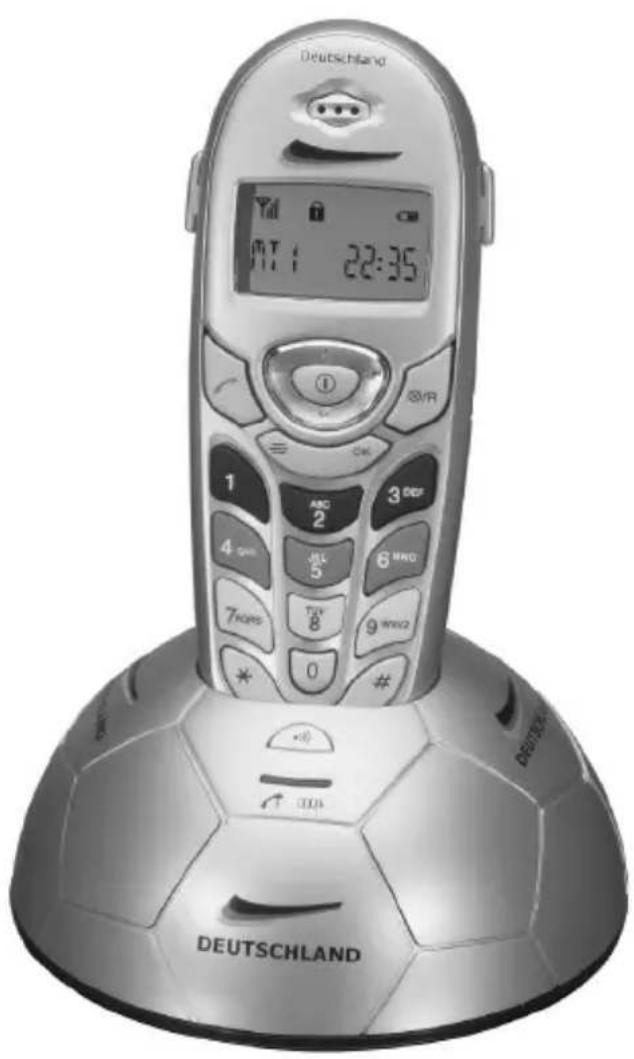
text_image
Deutschland MT 1 22:35 1 ABC 3 DEP 2 2 4 GM 5 6 MHD 7 GPS TUE 8 9 MNO2 0 # DEUTSCHLANDtext_image
Diagram showing a device with internal components and a directional arrow, likely illustrating a process or system.Akkusaufladen
text_image
Diagram of a mobile phone with numbered parts for identification and labelingKopfhöreranschluss
Pleasereadthisoperatinginstructionmanualthoroughly.
Intendeduse
Thetelephoneissuitablefortelephoningwithinapublictelephonenetworksystem.Any otheruseisconsideredunintendeduse.Unauthorisedmodificationorreconstructionis notpermitted.Undernocircumstancesopenthedeviceorcompleteanyrepairworkyourself.
Installationlocation
Preventexcessiveexposureosmoke,dust,vibration,chemicals,moisture,heatanddirectsunlight.
Donotusethehandsetinpotentiallyexplosiveareas.
Powersupply

Attention: Onlyusethepoweradapterplugsuppliedbecauseotherpowersuppliescoulddamagethetelephone.Ensureaccesstothepoweradapterplugis notobstructedbyfurnitureorsuch.
Rechargeablebatterypack

Attention: Donotthrowbatteriesintoafireorimmersetheminwater.
Powerfailure
Thetelephonecannotbeusedtomakecallsintheeventofapowerfailure.Alwayskeep acordconnectedtelephonewhichoperateswithoutanexternalpowersupplyavailablein caseofemergencysituations.
Medicalequipment

Attention: Neverusethetelephoneinthevicinityofmedicalequipment.Effects onsuchequipmentcannotbefullyruledout.
DECT ^1 telephonescancauseanunpleasanthummingsoundinhearingaids.
Disposal
If your device has cometo the end of its servicelife, bring it to a collection point provided by your local public waste authorities (e.g. recycling company). The adjacent symbol indicates that the old device must be disposed of separate from domestic waste. According to lawson the disposal of electronic and electrical devices, owners are obliged to dispose of old electronic and electrical devices in a separate waste container.
Batteries must be disposed of at the point of sale or appropriate collection points provided by the public waste authorities. Packaging materials must be disposed of according to local regulations.


2PuttingtheTelephoneintoOperation
Safetyinformation

Attention: It is essential to read the Safety Information in Chapter 1 before starting up.
Checkingthecontentsofthepackage
Thepackagecontains:
-abasestationwithpoweradapterplug-atelephoneconnectioncable
-ahandset-3standardbatteries
-anoperatingmanual
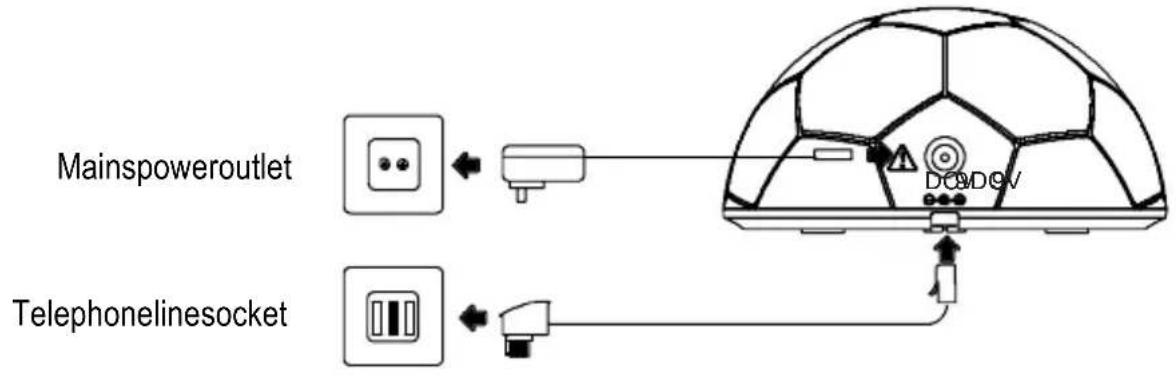
Connectingthebasestation

Attention: Positionthebasestationatleast1mawayfromotherelectronic devices, otherwisethereisariskofmutualdisturbance.
Connectthebasestationasillustratedinthediagram.Forreasonsofsafety,onlyusethe poweradapterplugsuppliedandtelephoneconnectionlineenclosed.
text_image
Mainspoweroutlet TelephonelinesocketPuttingtheTelephoneintoOperation
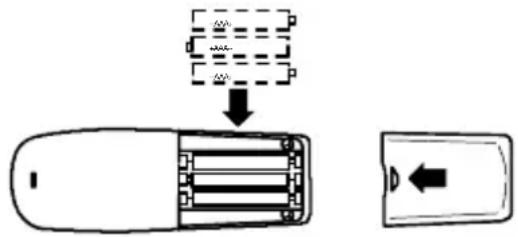
Insertingthebatteries
Insertthe3standardbatterysintheopenbatterycompartment.Whenreplacingthebatteries,onlyuseonesofthesametype.Close thebatterycompartment.
text_image
Diagram showing a device with internal components and a directional arrow, likely illustrating a process or system.Chargingthebatteries
Before the handset is used for the first time, insert it in the base station or charging station for at least 14 hours.
When the handset is inserted in the base station properly, you will hear a confirmation signal and the charge controllamplights up. The handset warmsup during the charging process. This is normal and does not represent a risk. Donot charge the handset with charging units from other manufacturers. The current battery charge status is indicated on the display:


FullHalfemptyLowEmpty
Settingthetimeonthehandset
TheinformationonPage38explainshowtosetthetimeonthehandset.
Privatebranchexchanges
TheinformationonPage35explainshowtoinstallyourtelephoneinaprivatebranchexchange.
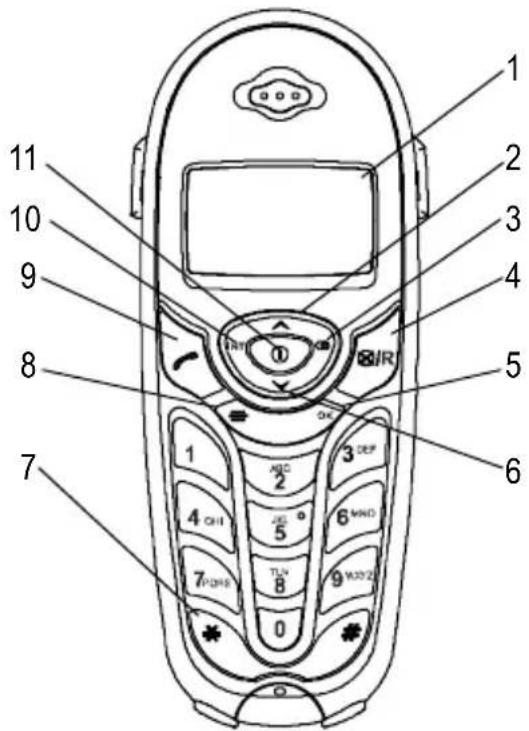
3OperatingElements
Handset
1Display
2Openphonumbermemory/Scrollupwards
3Redial/
Diallingpause
4R-button/Delete
50Kbutton
6Openphonenumber
memory/Scrolldownwards
7 Temporarytonedialling
8Menubutton
9Callbutton
10Internalcall/Muting
11 Keylock/Switchhandseton/off
text_image
1 2 3 4 5 6 7 8 9 10 11 AEC 2 3 DEP 4 OH 5 6 MWD 7 PDRS 8 9 WOY2 0Headsetconnectionport
Thehandsethasaconnectionportontheright-handsidewithwhichtoconnect earphones/headsets.Thereisnoguaranteetheheadsetwillfunctionproperly.
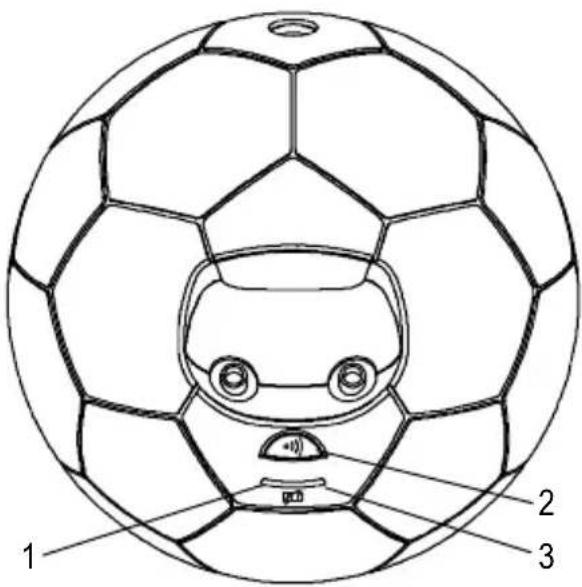
Basestation
1LED, callindicator
2 Pagingbutton(locatehandset)
3LED, batterychargecontrollamp
text_image
1 2 3GB
Thebuttonsinthisoperatingmanualaredepictedwithauniformcontour.Variationsin thesymbolsonthetelephonebuttonscomparedtothosedepictedherearepossible.
4HowtoOperatetheTelephone
Displayandnotationofoperationsequences
Enterdigits
* Pressthebuttondepictedbriefly
2 sec ✱ Pressthebuttondepictedfor2seconds
Pressandhold ✱ Pressandholdthebuttondepicted
Release * Releasethebuttondepicted
( ) Handsettrings
Removehandsetfromthebasestation
Placehandsetinthebasestation
SPEICHERNNR or Textoriconinthedisplay
Iconsinthedisplay
DisplayDescription
| On:Indicatesthebatterychargecapacity.Flashing:Thebatteriesneedtobecharged.Run-throughsegments:Thebatteriesarebeingcharged. Page28 | |
| MT1 | Internally assigned call number of the handset. Page 42 |
| 13:23 | Time display. Page 38 |
| On:Acalliscurrentlybeingmade.Flashing:Acallhasbeenreceived. Page33 | |
| Newcallshavebeenregisteredinthecallslog..Page40 | |
| Thekeylockisactivated. Page34 | |
| Themicrophoneisswitchedoff(muting). Page34 | |
| On:Theconnectiontothebasestationisgood.Flashing:Theconnectiontothebasestationispoor.Movetowardsthebasestation.Themorebarsintheicon,thebettertheconnectiontothebasestation. |
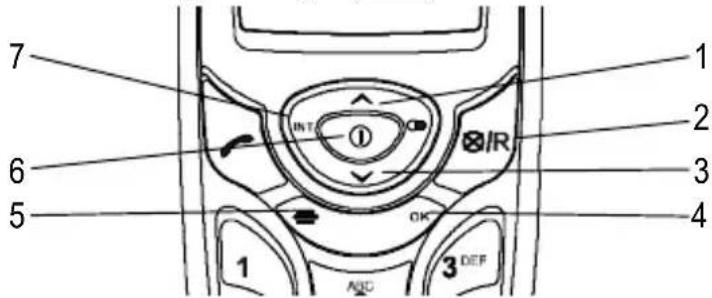
Navigationbuttons
AllthedescriptionsinthisoperatingmanualassumethatthehandsetisinStandbymode. Standbymodecanbeactivatedbypressingthe button.
text_image
1 2 3 4 5 6 7 INT IR OK ABC 3 DEF| ButtonIn | Standbymodelnamenu | |
| 1 | -Openthephonumbermemory | -Scrollupwardsinthemenu-Changesettings |
| 2-Moveonelevelback/Deletingdigits | ||
| 3 | -Openthephonumbermemory | -Scrolldownwardsinthemenu-Changesettings |
| 4-Openthecallbycallmemory | -Openthemenudisplayed-Confirmtheprogrammingandsaving processes | |
| 5-Openthemainmenu | -CancelprogrammingandsavingprocessesandreturntoStandbymode | |
| 6 | -Keylock/Switchhandseton/off | |
| 7-Internalcall | ||
GB
Navigatinginthemenu
Allthefunctionscanbeaccessedviathevariousmenus.Refertothemenustructureto findhowtoaccesstherespectivefunctions. Page36
| ≡ | Openthemainmenu |
| ▲ | or▼ Selectthesubmenurequired |
| OK | Openthesubmenu |
| ▲ | or▼ Selectthefunctionrequired |
| OK | Openthefunction |
| ▲ | or▼ Selectthesettingrequired |
| ← Enternumbersusingthedigitkeys | |
| OK | Confirmtheinput |
| ⊗ | Delete/Moveonelevelback |
| → Cancelprogrammingandsavingprocessesandreturn toStandbymode | |

Everyprocessisautomaticallycancelledifthereisnoinputwithin30seconds.
Creatingentriesinthephonenumbermemory-example
Thewayinwhichtonavigatethroughthemenusandenterdataisexplainedbymeansof the example Creating entries in the phone number memory. Proceed as in this exampleforallthesettings.

text_image
≡ Openthemainmenu ▲ or▼ SPEICHERNNR, OK Selectthefunctionandconfirm ▲ or▼ e.g.1 Selectthememorylocation, OK Enterthephonenumberandconfirm
5Telephoning
Takingacall

Take the call
Endingacall

Makingacall
Enterthephonenumber(max.24digits)



ItisalsopossibletopresstheCallbuttonfirsttoobtainthedialllingtone. Thedigits inthephonenumberthenenteredaredialledimmediately.Itisnotpossibletocorrectwrongdigitsindividuallyusingthisdiallingprocedure.
Redialling
Thetelephonestorestelast10phonenumbersdialledinarediallinglist.


Select an entry and dial the number
Callingbackmissedcalls
Thetelephonestorestenumbersofthelast10callsreceivedinacalllog.



Select an entry and dial the number
Diallingphonenumberfromthephonebook
You must have already stored some phone numbers. 📋 Pages 32 and 39

Openthephonenumbermemory

Select an entry and dial the number
Diallingthephonenumbersdirectly
Press and hold 0
The phone number selected is dialled directly

The 0 button dials the phone number stored in memory location "0", the 1 buttondialsthephonenumberinmemorylocation"1", etc.
InternalCalls
Makinginternalcalls
There must be two or more handsets (HS1, HS2, ...) registered on a base station in order to make internal calls free of charge.

Dial the internal call number of the handset required

Take the call on the other handset

End the internal call
GB
Telephoning
Transferringexternalcallsinternally
HS1: INT, e.g. 2
Dial the internal call number of the handset required duringtheexternalcall
HS2:
Takethecallontheotherhandset
HS1:
Forwardthecall

If the handset called does not answer, take the external callback by pressing the INT button.
Adjustingthereceivervolume
Thevolumecanbeadjustedtooneof3settingsduringacall.


Selecttherequiredvolume
Talktimedisplay
Thedurationofacallisdisplayedinhours,minutesandsecondsduringthecall.
Mutingthemicrophoneinthehandset
Themicrophoneinthehandsetcanbeactivatedanddeactivatedduringatelephone conversation.
INT Deactivatethemic microphone(muting)
INT Activatethemicrophone
Keylock
If you havemislaid your handset, you can locate it with the aid of a search tone.
●)) ((( ))))
Startthesearchtone
•), ▲ or ↗
End the search tone
Switchingthehandsetonandoff
Youcanswitchthehandsetofftosavethebatteries.
3sec ①
Switchthehandsetoff
① Switchthehandseton
6PrivateBranchExchanges/CLIP
Rbuttononprivatebranchexchanges
If the telephone is connected to a private branch exchange, function such a transferring calls and automatic call back can be used via the R button. The dealer where you purchased the exchange can provide information at whether the telephone will work properly with the exchange.
Numberforanoutsideline
In the case of private branch exchanges, it is necessary to dial anumber to get an outside linewidths corresponding diallingtone. Savethenumber for an outsideline in your handset, Page 37. It is automatically prefixed to a phone number dialled from the call log.
Diallingpause
When usingsomeolderprivatebranchexchanges, it takes a little time before the dialling tone becomes audible. Particularly in the case of such private branch exchanges, it is possible to insert adialling pause after then number for the outside lines that the number can be divided into continuous process without having to wait for the dialling tone.
2 sec Insertdiallingpause
After dialling then number for the outside, the telephone then waits 3 seconds before dialling the actual phonenumber.

Thediallingpausecanalsobeenteredwiththephonenumbersinthephone numbermemory.
Callernumberdisplay(CLIP 1)
If this function is available with your telephone, then number of the caller appears in the display when the phonerings. If the caller has suppressed transmission of his phone number, according message appears in the display. The phonenumber is not displayed and, as a result, is not stored in the calls list.

TheCLIP(callernumberdisplay)functionisanoptionalserviceofferedbytele-phonenetworkproviders.Contactyournetworkproviderforfurtherinformation.
7MenuStructure
Mainmenu
Access the Main menu by pressing the ≡ button. The way to navigate through the menusdescribedonPage32.
| SPEICHERNNR0-Phonenumber | ||
| ANRUFLISTE 1 | 1- | |
| ... | ||
| 0-OK LOESCHEN | ||
| CALLBYCALL1-Phonenumber | ||
| TASTENTOENETYP1 | ||
| RUFTONMELODIETYP1 | ||
| RUFTONLAUTLEVEL1 | ||
| VIPTONRUF 2 | TYP2 | |
| ... | ||
| LEVEL2 | ||
| LEVEL3 | ||
| AUS | ||
| VIPTONRUF1 NumberTYP1 | ||
| VIPTONRUF2 | TYP2 | |
| ... | ||
PINAENDERN 1 PIN [----] NEU [----] WDH [----]
WAHLHILFE ^2 EIN AUS
AMTSKENNZ ^3 Numberforanoutsideline
ANMELDEN ^4 PIN[----]BASIS1SUCHEN
| BASIS2 | ||
| BASIS3 | ||
| BASIS4 | ||
| “012345”OK | AC-0000 | WARTEN |
MTRESET PIN[----]BESTAETIGEN
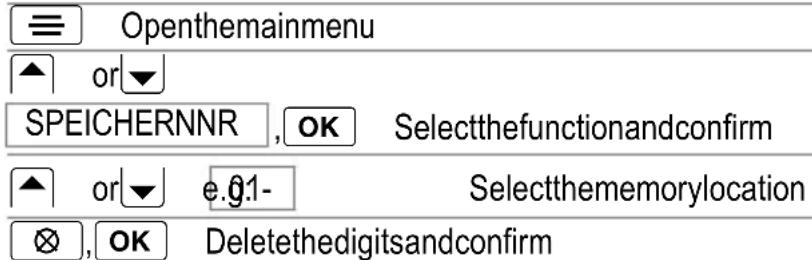
Deletinganentryfromthephonenumbermemory
text_image
≡ Openthemainmenu ▲ or▼ SPEICHERNNR ,OK Selectthefunctionandconfirm ▲ or▼ e.g.0.1- Selectthememorylocation ⊗ ,OK Deletethedigitsandconfirm9CallLog
Atotalof10phonenumbersarestoredinacalllog.Whenanewcallisregistered,the iconappearsinthedisplay.
MessagesintheDisplay:
| UNBEKANNT | The number has only been partially or incorrectly received. Theparticularsofthenumberarenotavailable.Thiscouldhavebeen aninternationalcall. |
| ANONYMThe | callerhassuppressedthetransmissionofhistelephonenumber oritwasnotpossibletotransmitthenumber. |
Displayingphonenumbersinthecalllog
| ≡ | Openthemainmenu | |
| ▲ | or▼ | |
| ANRUFLISTE,OK | Openthecalllog | |
| ▲ | or▼ | Selecttherequiredentry |
| The“ANRUF:”indicatorshowshowoftenthecallerhascalled.Afterdisplaying thephonenumber,thedateandtimethecallwasreceivedappearsinthedisplay. | ||
Deletingphonenumberfromthecalllog
Deletingindividualphonenumbers
| ≡ | Openthemainmenu | |
| ▲ | or▼ | |
| ANRUFLISTE, OK | Openthecallog | |
| ▲ | or▼ | Selecttherequiredentry |
| OK | Activatethedeletingprocess | |
| LOESCHEN | OK | Confirmthedeletingprocess or |
| LOESCHEN | ⊗ | Cancelthedeletingprocess |
Deleteallphonenumbers
| ≡ | Openthemainmenu | |
| ▲ | or▼ | |
| LISTELÖSCH | ,OK | |
| PIN [----] | Enter the current PIN code | |
| BESTAETIGEN | OK | Confirmthedeletingprocess or |
| BESTAETIGEN | ⊗ | Cancelthedeletingprocess |
10SpecialFunctions
Diallingmode
Thetelephonecanbeoperatedinnew,digitalexchanges(TONE)aswellasanalogue exchanges(PULSE).
Temporarytonedialling
If you only operate the telephone using the PULSE dialling mode, you can still make use of the advantages of TONE dialling mode (e.g.: remote access of the answering machine in the conventional telephone network). You can temporarily switch to Tonedialling when a connection has already been made.
* Pressthebuttonduringthecall
Whenthecallisended, theequipmentautomaticallyswitchesbacktoPulsedialling.
Callbycall
Thisfunctionenablesastoredcallbycallnumbertobedialledpriortotheactualphone number. Up to 3 different call by call numbers, each with 10 digits, can be stored; Page 36. Thecallbycallnumberselecteddisdisplayedprecedingthephonenumber.Ifyou presstheCallbuttonfirsttoobtainadiallingtoneandthenenterthephonenumber,no storedcallbycallnumbercanbepredialled.
Prediallingacallbycallnumber
OK Openthecallbycallmemory
or OK Select the call by call number and confirm
Enterthephonenumberanddialit
Callbarring
Thisfunctioncanbeusedtobarsequencesofupto4digits. Thenumbersdefinedforcall barringapplytoalltheregisteredhandsets.

Neverenteranemergencycallnumberorthefirstdigitofanemergencycallnumber. Theseemergencycallnumberscannotbedialledifyoudo.
E.g.: Barringdigit1 would barallemergency call numbers beginning with "1".
Callbarring-examples
0Alllong-distancecallsarebarred.
00Allinternationalcallsarebarred.
017 Allmobilephonenumbersbeginningwith"017"arebarred.
019Allphonenumbersbeginningwith"019"arebarred.
WAHLHILFE
If you activate WAHLHILFE in the handset, phone numbers are automatically completed.
Thehandsetcomparestheinitialdigitsofphonenumbersenteredwiththephonenumbersinthephonenumbermemoryandcompletesthemiftheymatch. Thephonenumber displayedisdialledafterpressingtheCallbutton.
11 Expanding the Telephone System
Youcan expand your telephones system by adding more FootballIDECT200 handsets and FootballIDECT200 basestations.
Multiplehandsets
Upto6handsetscanberegisteredonthebasestation.
Registeringhandsets
Beforestartingwiththeregistrationprocessforahandset,switchthebasestationtoRegistrationmode.
6 sec ● InitiateRegistrationmode
Complete the registration process for your handset, ☐ Page 37. The currently valid PIN codeisusedforregistrationpurposes, ☐ Page37.
Thehandsetisautomaticallyassignedaninternalcallnumberfollowingregistration.The internalcallnumberappearsinthedisplay.
Deregisteringhandsets

Eachhandsetcanderegisteritselforotherhandsetsregisteredonthebasestation.Afterderegistration,themessageABGEMELDETappearsinthedisplayofthederegisteredhandset.
Multiplebasestations
Yourhandsetscanbesimultaneouslyregisteredonupto5differentbasestations.Each basestationrequiresitsowntelephonecablesocket.Connectionscanbeusedwiththe samecallnumberorwithdifferentones.

Callsinprogress, however, cannot betransferred from one basestation to another.
Increasingtherange
Positionthebasestationssothattherangesoftheindividualbasestationsoverlap. Test therangeofyourhandsetsbecauseobstructionsinbuildingsrestricttherange.Register the handset on all the base stations. Activate the BESTE BASIS selection of base station, Page37.Thehandsetthenautomaticallysearchesforthenearestbasestationwith thebestconnection.
Mobilitythroughregistrationatvariouslocations
Registerthehandsetonbasestationsatvariouslocations.ActivatetheBESTEBASIS selection of base station, Page 37. Regardless of your current location, the handset automaticallysearchesforabasestationwithinrange.
12IntheCaseofProblems
Servicehotline
Shouldproblemsarisewith the telephone, pleasereferto the following information first. In the case of technical problems, you can contact our hot lines service, tel. 01805001388 (cost via Telekomattime of going to print: 12ct/min). In the case of claims under the term so guarantee, contact your sales outlet. There is a year period of guarantee.
Problemsandsolutions
| ProblemsSolutions | |
| Handsetappearsdead andwillnotswitchon | -Removebatteriesfromhandsetfor1minuteandreplace |
| Noconnectiontobase stationpossible | -Checkthatthehandsethasbeenregisteredonthebase stationwiththecorrectPINcode. Page37 |
| Notelephonecalls possible | -Thetelephonelineisnotconnectedproperlyorisdefective.Onlyusethetelephoneconnectioncablesupplied.-Testwhetherthetelephoneconnectionisinorderby usinganothertelephone.-Thepoweradaptorplugisnotpluggedinorthereisa completepowerfailure.-Therechargeablebatteriesareemptyordefective.-Thehandsetistoofarfromthebasestation.-Diallingmodeissetincorrectly. Page38 |
| Connectionisdisturbed orcutoff | -Thehandsetistoofarfromthebasestation.-Thebasestationisinanunsuitablelocation. |
| Thesystemnolonger responds | -Resetallthefunctionstotheirdefaultsettings. Page37-Disconnectthepoweradapterplugbrieflyfromthe powersocket. |
| Thebatteriesareempty in a short time | -Thebatteriesareemptyordefective.-Placethehandsetinthebasestationproperly.Clean thecontactsurfacesonthehandsetandbasestation withasoft,drycloth.-Placethehandsetinthebasestationfor14hours. |
| TheCLIP 1 functiondoes notwork | -TheCLIP(callernumberdisplay)functionisanoptional serviceofferedbytelephonenetworkproviders.Contact yournetworkproviderforfurtherinformation.-Thecallerhassuppressedthetransmissionoftheir phonenumber. |
GB
13TechnicalProperties
Technicaldata
| FeatureValue | |
| StandardDECT | 1 |
| PowersupplyInput:230V,50Hz | Output:9V,300mA |
| RangeOutdoors:Approx.300m | Indoors:Approx.50m |
| StandbyUpto170h | |
| Max.talktimeUpto13,5h | |
| 3standardbatteriesAAA1,2VNI-MH | |
| Diallingmode | TonediallingmodePulsediallingmode |
| Permissibleambienttemperature | 10^30^ |
| Permissiblerelativehumidity | 20%to75% |
| Flashfunction | 100ms |
Defaultsettings
Restorethedefaultsettings(MTRESET), Page37
Handset
| Language: German | Receiver volume: 2 | Base selection: Base 1 |
| Key lock: Off | Ringing melody: 1 | HS name: MT1 |
| Key beep: Off | Ringing volume: 2 | Smart Dial: Off |
Basestation
| Recall (Flash) time: 100 ms | Dialling mode: Tone | PIN code: 0000 |
| Accesscode:Empty |
DeclarationofConformity
This device fulfil the requirements stipulated in the EU directive:
1999/5/EU directiveonradioequipmentandtelecommunicationsterminal equipmentandthemutualrecognitionoftheirconformity.Conformitywiththe abovementioneddirectiveisconfirmedbytheCEsymbolonthedevice.
ToviewthecompleteDeclarationofConformity, pleaserefertothefreedownloadavailableonourwebsitewww.audioline.de.

14Maintenance/Guarantee
Maintenance
- Cleanthehousing surfaces with asoft, fluff-freecloth.
- Neverusecleaningagentsorsolvents.
Guarantee
AUDIOLINEequipmentisproducedandtestedaccordingtothelatestproductionmethods. The implementation of carefully chosen materials and highly developed technologies ensure trouble-free functioning and long service life. The term so guaranteed on apply where the cause of equipment malfunction is the fault of the telephone network operator any interposed private branch extension system. The term so guaranteed on apply to the batteries or power packs used in the products. The period of guarantee is 24 months from the date of purchase.
Alldeficienciesresultingfrommaterialorproductionfaultswhichoccurduringtheperiod ofguaranteewillbeeliminatedfreeofcharge.Rightstocaimsunderthetermsofguaranteeareannulledfollowinginterventionbythepurchaserorthirdparties.Damagecaused asaresultofimproperhandlingoroperation,incorrectpositioningorstoring,improper connectionorinstallation,ActsofGodorotherexternalinfluencearenotcoveredbythe termsofguarantee.Inthecaseofcomplaints,wereservetherighttorepairorreplacedefectpartsorprovideareplacementdevice.Replacementpartsordevicesbecomeour property.Rightstocompensationinthecaseofdamageareexcludedwherethereisno evidenceofintentorgrossnegligencebythemanufacturer.
If you equipment show sign of defect during the period of guarantee, pleaser return to the sales outlet in which you purchased the AUDIOLINE equipment together with the purchase receipt. All right to claims under the term so guarantee in accordance with this agreement must be asserted exclusively with regard to your sales outlet. Two years after the purchase and transfer of four products, claims under the term so guarantee can no longer be asserted.
15Index
A
Automaticdialling,37
Automaticselection,42
B
Barlist,38
Barringlist,41
Barringphonenumbers,41
Batterychargestatus,28
C
Callbarring,38
Calllog,40
Call-by-Call,36
Call-by-call,41
Callernumber display(CLIP),35
Callingbackmissedcalls,33
Chargingthebatteries,28
Connectingthebasestation,27
Creatingentriesinthephone numbermemory,32,39
D
DeclarationofConformity,44
Defaultsettings,44
Deletinganentryfromthe phonenumbermemory,39
Deletingphonenumbersfrom thecallog,40
Deregisteringhandsets,42
Diallingmode,41
Diallingpause,35
Diallingphonenumbersfrom thephonebook,33
Displayingphonenumbersin thecalllog,40
E
Endingacall,33
Expandingthetelephonesystem,42
Explanations,30
G
Guarantee,45
H
Howtooperate thetelephone,30
|
Iconsinthedisplay,30
Inthecaseofproblems,43
Increasingtherange,42
Insertingthebatteries,28
Internalcalls,33
K
Keylock,34
M
Mainmenu,36
Maintenance,45
Makingacall,33
Makinginternalcalls,33
MenuStructure,36
Messages,40
Mobility,42
Modifyingentriesinthephone numbermemory,39
Multiplebasestations,42
Multiplehandsets,42
Mutingthemicrophone,34
N
Navigationbuttons,31
Notation,30
Numberforanoutsideline,35
0
Operatingelements,29
P
Packagecontents,27
Paging,34
Phonenumbermemory,39
Privatebranchexchanges,35
Problemsandsolutions,43
Putting the telephone into operation, 27
R
Rbuttononprivatebranchex-changes,35
Receivervolume,34
Redialling,33
Registeringhandsets,42
S
Safetyinformation,26
Searchingforthehandset,34
Servicehotline,43
Settingthetime,28,38
Specialfunctions,41
Switchingthehandsetonand off, 34
T
Takingacall,33
Talktime,34
Technicaldata,44
Telephoning,33
Temporarytonedialling,41
Transferringexternalcallsinternally,34
Troubleshooting,43
W
Wahlhilfe,37,41
GB