Euro 800 - Phone AUDIOLINE - Free user manual and instructions
Find the device manual for free Euro 800 AUDIOLINE in PDF.


| Product Type | Cordless DECT/GAP Telephone |
| Brand | Audioline |
| Model | Euro 800 |
| Standard | DECT-GAP |
| Power Supply (Base Station) | Input: 220-230V~50Hz, Output: 6V DC 400mA |
| Outdoor Range | Approx. 300m |
| Indoor Range | Approx. 50m |
| Standby Time | Up to 100 hours |
| Talk Time | Up to 10 hours |
| Battery Type | 2 x AAA Ni-MH 1.2V (rechargeable) |
| Dialing Mode | Tone (DTMF) or Pulse |
| Display | LCD with icons, date/time, caller ID |
| Call Log Capacity | 30 entries |
| Redial List Capacity | 20 entries |
| SMS Functionality | Yes (requires network provider support) |
| Handsfree | Yes |
| Keylock | Yes |
| Paging (Find Handset) | Yes |
| Maximum Handsets per Base | 5 |
| Maximum Base Stations | 4 |
| Flash Time Settings | 80, 100, 120, 180, 250, 300, 600, 800 ms |
| Color Themes (Keypad Backlight) | Blue/Pink, Green/Yellow, Purple/Brown |
| Maintenance | Clean with soft dry cloth; do not use solvents |
| Safety | Use only supplied adapters; avoid medical equipment; dispose properly |
| Warranty | 24 months from purchase |
Frequently Asked Questions - Euro 800 AUDIOLINE
User questions about Euro 800 AUDIOLINE
0 question about this device. Answer the ones you know or ask your own.
Ask a new question about this device
Download the instructions for your Phone in PDF format for free! Find your manual Euro 800 - AUDIOLINE and take your electronic device back in hand. On this page are published all the documents necessary for the use of your device. Euro 800 by AUDIOLINE.
USER MANUAL Euro 800 AUDIOLINE
SchnurlosesDECT-GAPTelefon CordlessDECTGAPtelephone
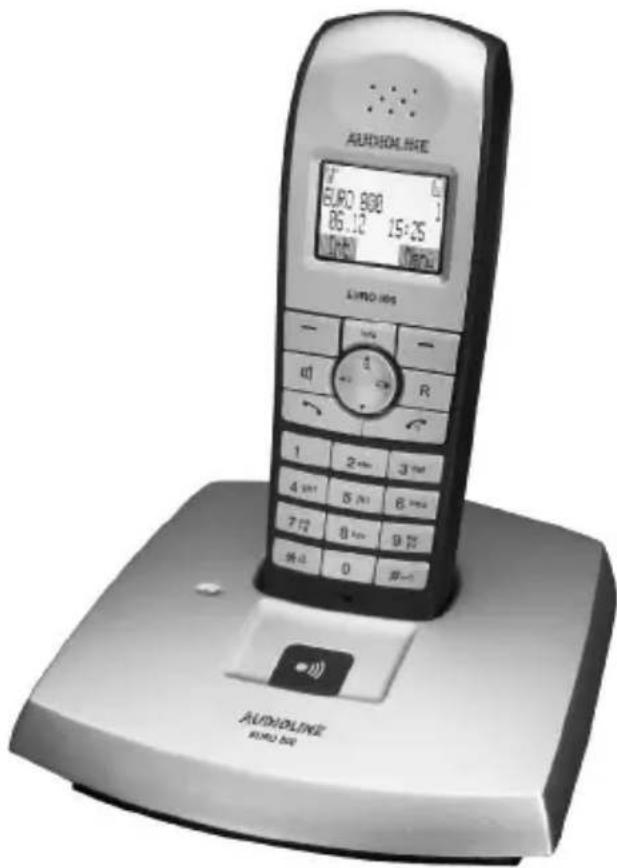
text_image
ALDHOLLINE EUR2 800 86.12 15:25 LINO 100 - 1 R 1 2+3 -3 4 5+1 6+2 7+3 8+4 9+5 9+6 0 8-1 ALDHOLINE EUR2 800natural_image
Diagram of a device with a labeled component (no text or symbols present)D
1 SMS: Short Message Service
^2 VMWI: Visual Message Waiting Indication
1 CLIP: Calling Line Identification Presentation
^2 SMS: Short Message Service
D
Texteingeben
Pleasereadthisoperatinginstructionmanualthoroughly.
Intendeduse
Thetelephoneissuitablefortelephoningwithinapublictelephonenetworksystem.Anyotheruseisconsideredunintendeduse.Unauthorisedmodificationor reconstructionisnotpermitted.Undernocircumstancesopenthedeviceorcompleteanyrepairworkyourself.
Installation location
Preventexcessiveexposureosmoke,dust,vibration,chemicals,moisture,heat anddirectsunlight.
Donotusethehandsetinpotentiallyexplosiveareas.
Powersupply

Attention: Only us the power adapter plugs supplied because other powersupplies could damage the telephone. Ensure access to the power adapter plug is not obstructed by furniture or such.
Rechargeablebatteries

Attention: Donotthrowbatteriesintoafireorimmersetheminwater.
Powerfailure
Thetelephonecannotbeusedtomakecallsintheeventofapowerfailure.
Alwayskeepacordconnectedtelephonewhichoperateswithoutanexternal powersupplyavailableincaseofemergencysituations.
Medicalequipment

Attention: Neverusethetelephoneinthevicinityofmedicalequipment.Effectsonsuchequipmentcannotbefullyruledout.
DECT ^1 DECTtelephonescancauseanunpleasantummingsoundinhearing aids.
^1 DECT: Digital Enhanced Cordless Telecommunication = Standard for cordlesstelephones.
Disposal
If your device has cometo the end of its servicelife, bring it to a collection point provided by your local public waste authorities (e.g. recycling center). The adjacent symbol indicates that the old device must be disposed of separate from domestic waste. According to lawson the disposal of electronic and electrical devices, owners are obliged to dispose of old electronic and electrical devices in a separate waste container.
Batteriesmustbedisposedofatthepointofsaleoratappropriatecollectionpointsprovidedbythepublicwasteauthorities.Packagingmaterialsmustbedisposedofaccordingtolocalregulations.


PuttingtheTelephoneintoOperation
2PuttingtheTelephoneintoOperation
Safetyinformation

Attention: It is essential to read the Safety Information in Chapter 1 before starting up.
Checkingthecontentsofthepackage
Thepackagecontains:
-abasestationwithpoweradapter plug -atelephoneconnectioncable
-ahandset-tworechargeablebatteries
-anoperatingmanual
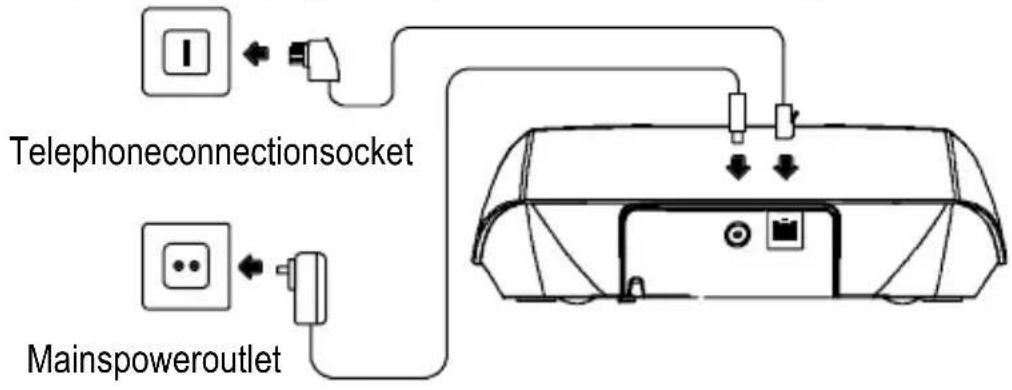
Connectingthebasestation

Attention: Positionthebasestationatleast1mawayfromother electronicdevices, otherwisethereisariskofmutualdisturbance.
Connectthebasestationasillustratedinthediagram.Forreasonsofsafety,only usethepoweradapterplugandtelephoneconnectioncablesupplied.
flowchart
graph TD
    A["Mainpower outlet"] --> B["Telephone connection socket"]
    B --> C["Switch"]
    D["Electrical outlet"] --> E["Switch"]
    E --> F["Mainpower outlet"]
    style A fill:#f9f,stroke:#333
    style D fill:#f9f,stroke:#333
    style B fill:#ccf,stroke:#333
    style C fill:#cfc,stroke:#333
    style E fill:#fcc,stroke:#333
PuttingtheTelephoneintoOperation
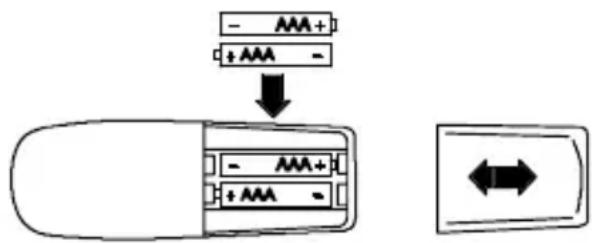
Insertingthebatteries
Insertthebatteriesintheopenbatterycompartment.OnlyusebatteriesofthetypeAAANi-MH1.2V.Payattentiontocorrectpolarity.Closethe batterycompartment.
text_image
- AAA+ + AAA - ↓ - AAA+ + AAA -Chargingthebatteries
Beforethehandsetisusedforthefirsttime,insertitinthebasestation/forat least16hours.Whenthehandsetisinsertedinthebasestationproperly,youwill hearaconfirmationsignal.Thehandsetwarmsupduringthechargingprocess. Thisisnormalanddoesnotrepresentarisk.Donotchargethehandsetwith chargingunitsfromothermanufacturers.
The current battery charge status is indicated in the display:


FullHalfemptyWeakEmpty
Settingthetimeanddateonthehandset
Thetimeanddatearesetviathemenu.RefertoPage54forthesequenceof optionselections.
Privatebranchexchanges
TheinformationonPage49explainshowtoinstallyourtelephoneinaprivate branchexchange.
OperatingElements
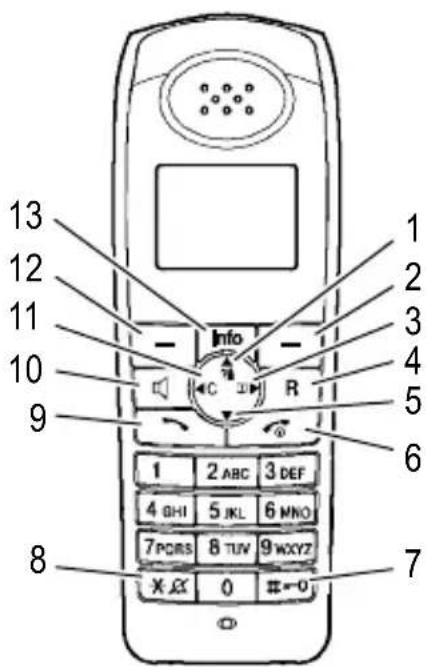
3OperatingElements
Handset
1 Scrollupwards/Calllog
2SoftkeyRightbutton
3Phonebook
4R-button(Flash)
5Scrolldownwards
6On-hook/Switchhandseton/off
7Hashbutton/Keylock
8Switchringingtoneoff/
Temporarytonedialling
9Off-hook(Call)
10Handsfreemode
11Moveback/Mutingfunction
12SoftkeyLeftbutton
13Menubutton"Info"
Basestation
1 Pagingbutton(locatehandset)
text_image
1 2 3 4 5 6 7 8 9 10 11 12 13 Info C R 1 2 ABC 3 DEF 4 GHI 5 JKL 6 MNO 7PCRS 8 TUV 9WXYZ X JX 0 0-0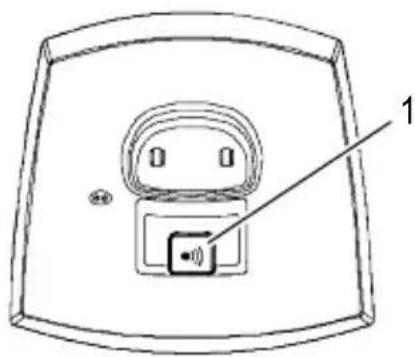
natural_image
Diagram of a device with a labeled component (no text or symbols present)Thebuttonsinthisoperatingmanualaredepictedwithauniformcontour. Variationsinthesymbolsonthetelephonebuttonscomparedtothosedepicted herearepossible.
4OperatingtheTelephone
Displayandnotationofoperationsequences
Enterdigitsorletters
* Pressthebuttondepictedbriefly
2 sec ✱ Pressthebuttondepictedfor2seconds
( ) Handsettrings
(( ) Basestationrings
Removethehandsetfromthebasestation
Placethehandsetinthebasestation
Deutschor

Textoriconinthedisplay
Ok
Pressthesoftkey, Page43
Iconsinthedisplay
| Display | Description |
| On:Theconnectiontothebasestationisgood.Warningtone:Theconnectionisbeinginterrupted.Off:Theconnectionhasbeeninterrupted.Movetowardsthebasestation. | |
| Handsfreemodeisactivated.Page48 | |
| On:Acalliscurrentlybeingmade.Flashing:Thetelephoneisringing.Page45 | |
| Theringingtonehasbeenswitchedoff.Page48 | |
| DisplayDescription | |
 | Themicrophoneisdeactivated(muted).Page48 |
 andKeyGuard andKeyGuard | Thekeylockfunctionisactivated.Page48 |
 | On:Batterychargecapacityindicator.Run-through:Thebatteriesarebeingcharged.Page39 |
| Euro800Nameofthetelephone. Page60 | |
| 1 | Internally assigned call number of the handset. Page 60 |
| 01.1213:26Displayofdateandtime. Page54 | |
 andNewCalls andNewCalls | NewcallshavebeenregisteredinthecalllogPages56and50.InadditionaredLEDbehindthe“Info”buttonflashes. |
 andNewSMS andNewSMS | AnewSMS 1messagehasbeenrecorded.Pages51and58 |
 | Answeringmachineprovidedbythetelephonenetwork.VMWI2-Optionalserviceofferedbythetelephonenetworkprovider.Page50 |
^1 SMS: Short Message Service
^2 VMWI: Visual Message Waiting Indication
Navigationbuttons
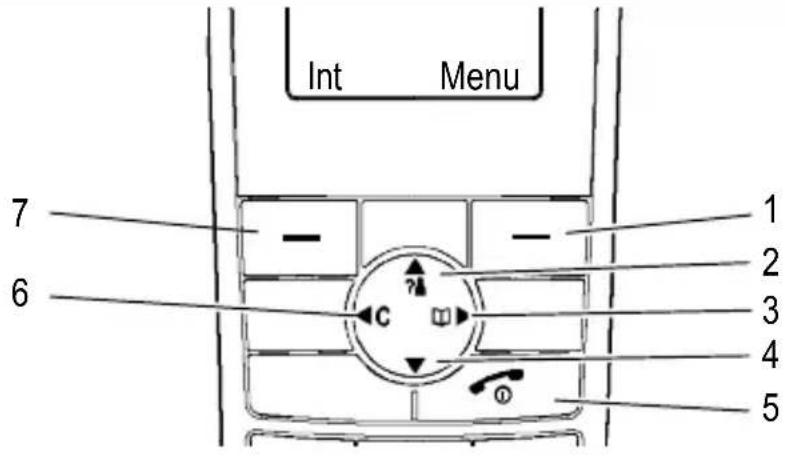
AlldescriptionsinthisoperatingmanualassumethatthehandsetisinStandby mode.ThehandsetisinStandbymodeafterpressingthe button.

Thesoftkeys(1)and(7)areassigneddifferentfunctionsinthedifferent menus. Thefunctionbuttonsarealwaysreferredtointhismanual accordingtothetextsdirectlyabovetheminthedisplay.
text_image
Int Menu 7 6 1 2 3 4 5ButtonInStandbymodelInMenu
| 1-Openthemainmenu-Opensthemenudisplayed | ||
| 2-Openthecallog | -Scrollupwards-Changethesettings | |
| 3-Openthephonebook-Scrolltotheright | ||
| 4 | -Scrolldownwards-Changethesettings | |
| 5-Switchhandseton/off | -Cancelprogrammingandsavingprocesses | |
| 6 | -Scrolltotheleft-Moveonelevelback | |
| 7-Internalcall-Moveonelevelback | ||
GB
OperatingtheTelephone
Navigatinginthemenu
Allthefunctionscanbeaccessedviathevariousmenus.Refertothemenu structure to find how to access the respective functions, Page 51
| Menu | Openthemainmenu | |
| or | , or | Move to and select the required submenu |
| Ok | Openthesubmenu | |
| or | Movetoandselecttherequiredfunction | |
| Ok | Openthefunction | |
| or | Movetoandselecttherequiredsetting | |
| Enterdigitsorlettersusingtherelevantdigit keys | ||
| Ok or Store | Confirmorstoretheentry | |
| C or << | Moveonelevelback | |
| Cancelprogrammingandsavingprocesses andreturntoStandbymode | ||
| Everyprocessisautomaticallycancelledifthereisnoinputwithin30 seconds. | ||
Creatingphonebookentries-example
Thewayinwhichtonavigatethroughthemenusandenterdataisexplainedby means of the example Creating phone book entries. Proceed as in this exampleforallthesettings.
| Openthephonebook | ||
| OptOpentheOptionsmenu | ||
| or | ||
| NewEntry | , Ok | Selectfunctionandconfirm |
| Number: | , Ok | Enterthenumber(max.24digits)andconfirm |
| Name: | Store | Enterthename(max.15characters)and |
5Telephoning
Takingacall

Take the call
Endingacall

Makingacall
Enterthephonenumber(max.24digits)
Del
Deletethelastdigitifincorrect

Dialthephonenumber

ItisalsopossibletopresstheOff-hook(Call)buttonfor2secondstoob-tainthediallingtone. Thephonenumberthenenteredisdialledimme-diately.Itisnotpossibletocorrectwrongdigitsindividuallyusingthis diallingprocedure.
Redialling
Thetelephonestoresthelast20numbersdialledinarediallinglist.
Opentherediallinglist

Select an entry and dial the number
Callslog
Thetelephonestorestnumbersofthelast30callsreceivedinacalllog.
? 📁 Openthecallslog

Select an entry and dial the number
Diallingphonenumberfromthephonebook
Phonenumbermusthavebeenstoredinthephonebookforthisfunction.
Pages44and56
Openthephonebook

Select an entry and dial the number
Telephoning
Chaindialling
Thechaindiallingfunctionisusedinmorecomplextelephoneservices,e.g. for telephonebanking, call-by-callorcallingcardprocedures. Several numbers stored in the phonebook can be transmitted. It is also possible to combine numbers for transfer from the phonebook with numbers entered manually. Numbers stored in the phonebook can be chained and transmitted as required.

Openthephonebook

or ▼, OkSelectthephonebookentryandtransferthe number
Internalcalls
Makinginternalcalls
Theremustbetwoormorehandsets(HS1,HS2,...)registeredonabasestation in order to make internal calls free of charge. Further information, Page 60
HS1: Int , ▲ or ▼
e.g. Handset2, OkDialtheinternalcallnumberofthehandset required
HS2:
Take the internal call on the other handset
HS1/HS2:
Endtheinternalcall
Transferringexternalcallsinternally
HS1: Int , ▲ or ▼
e.g. Handset2, OkDialtheinternalcallnumberduringthe
conversationwiththeexternalcaller

Take the internal call on the other handset
HS1: Transferthecall

If the hand set called does not answer, take the external callback by pressing the button.
Holdingacall/brokering
Whileacallisinprogress,itispossibletodialanotherhandsetinordertoconsultwithsomeone.Theexternalcallerisputonholdwhileyouconversewiththe second,internalpersoncalled.Youcanswitchbetweenthecallersasoftenas necessary.
HS1: Int , ▲ or ▼
e.g. Handset2, OkDialtheinternalcallnumberduringthe
conversationwiththeexternalcaller
HS2: Take the internal call on the other handset
HS1: Brok Changebackandforthbetweenthecallers
Conferencecalls
Anexternalcallcanbetransferredtoanotherinternalhandsetforaconference call.
HS1: Int , ▲ or ▼
e.g. Handset2, OkDialtheinternalcallnumberduringthe
conversationwiththeexternalcaller
HS2: ↗ Taketheinternalcallontheotherhandset
HS1: Conf Starttheconference

Atthispoint, youcanswitchbetweenthetwocallersasnecessary and thenbacktotheconference.
HS1/HS2: Theconferenceisterminatedbyoneofthe
internalhandsetusersendingthecall
Adjustingthereceivervolume
Thevolumecanbeadjustedtooneof5settingsduringacall.
or Selecttherequiredvolume
Talktimedisplay
Thedurationofareceivedcallisdisplayedinhours,minutesandsecondsduring thecall.
Telephoning
Handsfree
Thisfunctionisusedtolistentothecallerviatheloudspeaker.

Activatehandsfreemode

Deactivatehandsfreemode
Mutingthemicrophoneinthehandset
Themicrophoneinthehandsetcanbeactivatedanddeactivatedduringatele- phoneconversation.

Deactivatethemicrophone(mutingfunction activated)

Activatethemicrophone
Keylock


Theringingmelodyonthehandsetcanbeswitchedoff.


Deactivatetheringingmelody

Theringingtonesettingonthebasestationremainsunaffected.


Activatetheringingmelody
Searchingforthehandset(Paging)
If you havemislaid your handset, you can locate it again with the aid of search tone.


Activatethesearchtone


Endthesearchtone
Switchingthehandsetonandoff
Youcanswitchthehandsetoffinordertosavethebatteries.




Confirmorcancelthefunction


Switchthehandseton
6PABX/SupplementaryServices
Rbuttononprivatebranchexchanges
If the telephone is connected to a private branch exchange, all the functions associated with the R-button, such as transferring calls and automatic call back, can be used. Pleasereferto the information in the operating manual enclosed with your private branch exchange with regard to the Flashtimetosetinorderto usethesefunctions. The dealer where you purchased the exchange can provide information as whether the telephone will work properly with the exchange. Setting the Flashtime, Page 54.
Numberforanoutsideline
In the case of private branch exchanges, it is necessary to dial as specific number in order to obtain the dialling tone for an outsidine. This number for an outside line can be stored. When the telephonedetect this number preceding a phone number entered, a dialling pause is automatically inserted after the number. Setting then number for an outsidine, Page 54
Enteringadiallingpausemanually
It is possible to insert a dialling pause manually after the number for an outside linetobeabletocontinuediallingdirectlywithoutwaitingforthediallingtone.
2 sec 0 Insertdiallingpause
Afterdiallingthenumberfortheoutsideline, thetelephonewaits3seconds beforediallingtheactualphonenumber.

Thepausecanalsobeenteredwiththephonenumbersinthephone book.
R-buttonandsupplementaryservices
Yourtelephonesupportsthesupplementaryservicesofferedbyyourtelephone networkprovider,suchasbrokering,callwaitingandconferencefacilities. These supplementary services can be used via the R-button. Please ask your tele- phonenetworkproviderwhichFlashtimeyouneedtosetinordertousethesup- plementaryservices.Pleasecontactthetelephonenetworkproviderwithregard to enabling the supplementary services. Setting the Flash time, Page 54.
PABX/SupplementaryServices
Answeringmachineinthetelephonenetwork
If yourtelephonenetworkproviderhasanansweringmachineavailableforyou in thetelephonenetwork,the(VMWI ^1 )indicatesanewmessagehasbeenrecordedforyou.Theprovisionofanexternalansweringmachineandindicationof newmessagesviaanmailboxiconareoptionalservicesfromthetelephonenetworkprovider.Thesefunctionscanonlybeusedwhenyourtelephonenetwork provideractuallyofferstheservice.Contactyournetworkproviderforfurtherinformation.
Callernumberdisplay(CLIP 2)

Thecallernumberdisplayfunctionisanoptionalserviceofferedbytele- phonenetworkproviders.Contactyournetworkproviderforfurtherin- formation.
If this function is available, then number of the caller appears in the display when the phonerings. If callers suppress transmission of their phonenumbers, the numbers do not appear in the display and are not stored in the call log. A corresponding message indicating this appears in the display.
^1 VMWI: Visual Message Waiting Indication
^2 CLIP: Calling Line Identification Presentation
7MenuStructure
Mainmenu
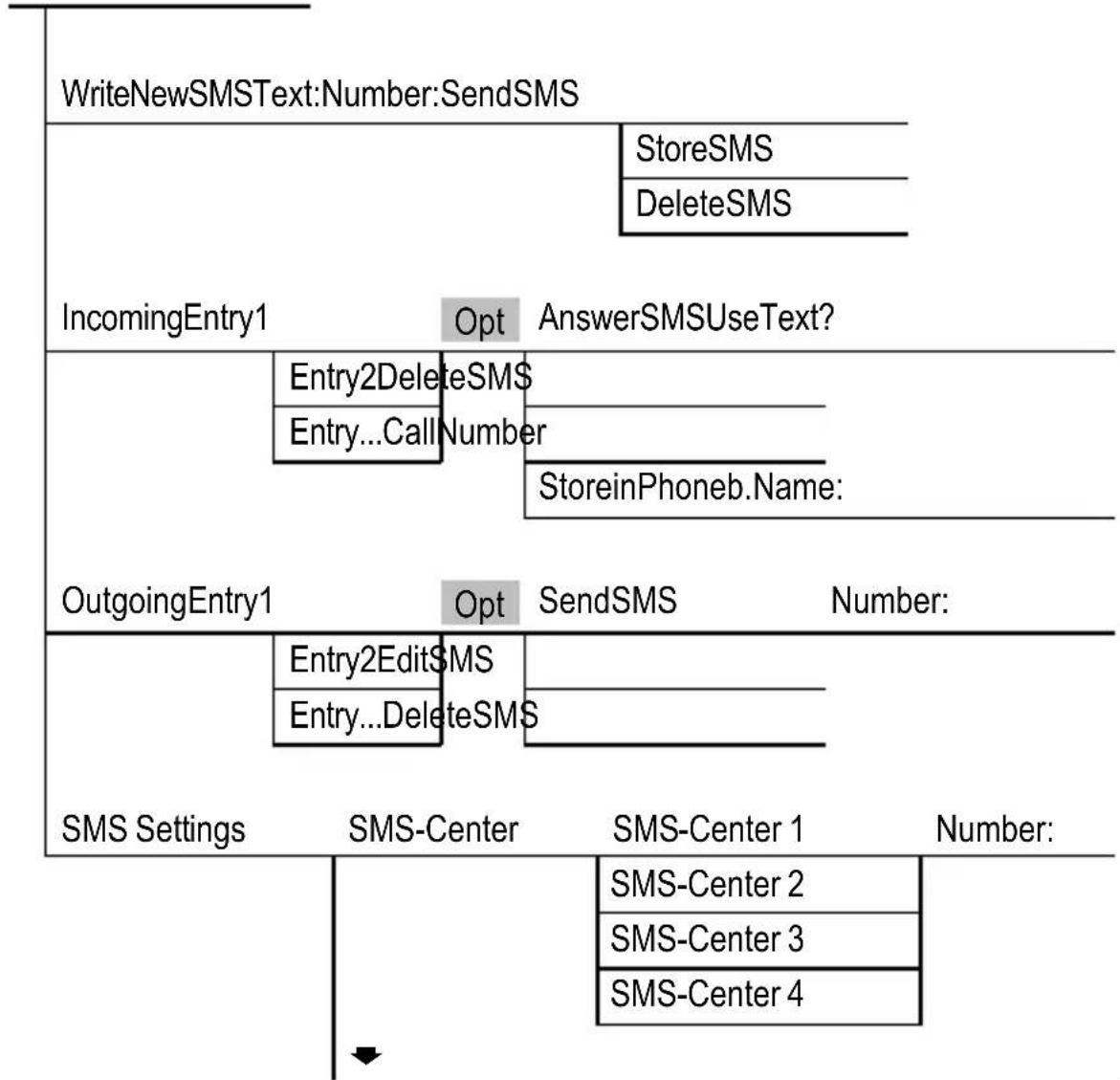
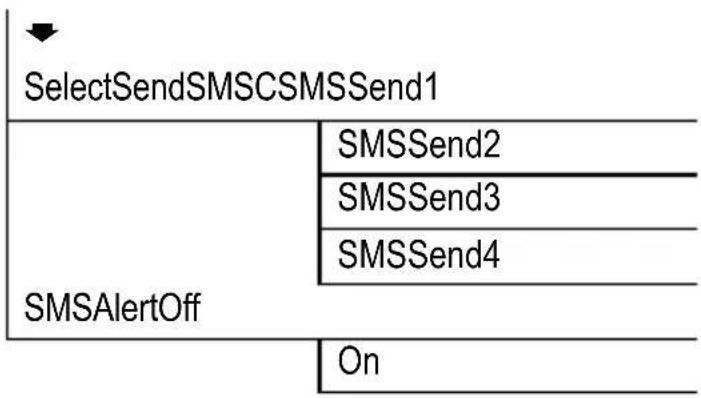
YoucanaccessthemainmenubypressingtheMenusoftkey. Thewaytonavigatethroughthemenusisdescribedinchapter4.
SMS 1
flowchart
graph TD
    A["WriteNewSMSText:Number:SendSMS"] --> B["IncomingEntry1"]
    B --> C["Opt"]
    C --> D["AnswerSMSUseText?"]
    D --> E["Entry2DeleteSMS"]
    E --> F["Entry...CallNumber"]
    F --> G["StoreinPhoneb.Name:"]
    H["OutgoingEntry1"] --> I["Opt"]
    I --> J["SendSMS"]
    J --> K["Number:"]
    L["SMS Settings"] --> M["SMS-Center"]
    M --> N["SMS-Center 1"]
    N --> O["Number:"]
    P["SMS-Center 2"] --> Q["SMS-Center 3"]
    Q --> R["SMS-Center 4"]
GB
^1 Further information on SMS text messages, Page 57.
flowchart
graph TD
    A["SelectSendSMSCSMSSend1"] --> B["SMSSend2"]
    A --> C["SMSSend3"]
    A --> D["SMSSend4"]
    B --> E["SMSAlertOff"]
    C --> E
    D --> E
    E --> F["On"]
Info ┌ UsetheInfobuttontoopenthismenudirectly.
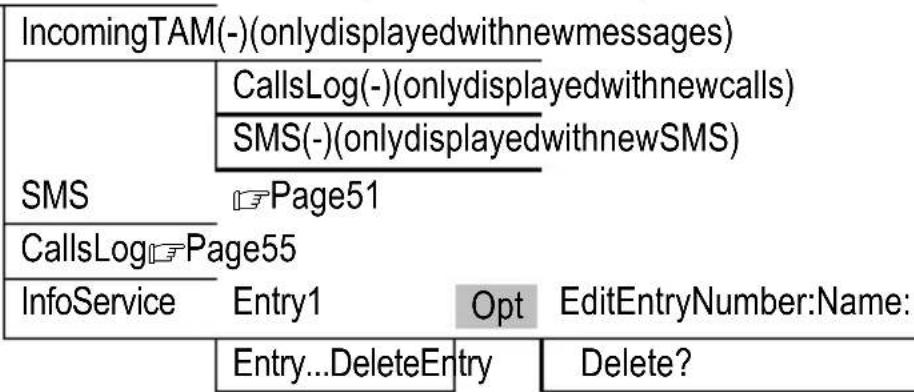
flowchart
graph TD
    A["IncomingTAM(-)(onlydisplayedwithnewmessages)"] --> B["CallsLog(-)(onlydisplayedwithnewcalls)"]
    B --> C["SMS(-)(onlydisplayedwithnewSMS)"]
    C --> D["Page51"]
    E["InfoService"] --> F["Entry1"]
    F --> G["Opt"]
    G --> H["EditEntryNumber:Name:"]
    H --> I["Entry...DeleteEntry"]
    I --> J["Delete?"]
Display
| Wallpaper | Wallpaper 1 | (Wallpaper in Standby mode) |
| Wallpaper2 | ||
| Wallpaper3 | ||
| Wallpaper4 | ||
| WallpaperOff | ||
| HandsetName | Name: | |
| DisplayContrast | Level1-8 | |
| ColorScheme | Blue/Pink | |
| Green/Yellow | (Backlighting for the keypad) | |
| Purple/Brown | ||
| Backlight On/Off | Off | |
| On |
Sound
| RingerRingVolumeOff | ||
| WarningTonesKeytoneOff | RingVolume1-5 | |
| RingVolume^ 1 | ||
| RingMelodyRingMelody1-15 | ||
| BatteryLowOff | On | |
| NoCoverageOff | On | |
| On | ||
Settings
| SetupHandsetDirectCallEnterPIN: 2 | |
| BabyCallOn Number: | |
| BabyCallOff | |
| BaseSelection BaseA | |
| Base ... | |
| Auto TalkOn/Off Off | |
| On | |
| EmergencyNo.► | |
| EmergencyNo.1Number: | |
| EmergencyNo.... | |
| DefaultReset DefaultReset? | |
| Language Deutsch | |
| English/Türkçe | |
GB
^1 Thissettingcausesthevolumetoincreasewitheachring.
^2 ThedefaultPINcodeis“0000”.
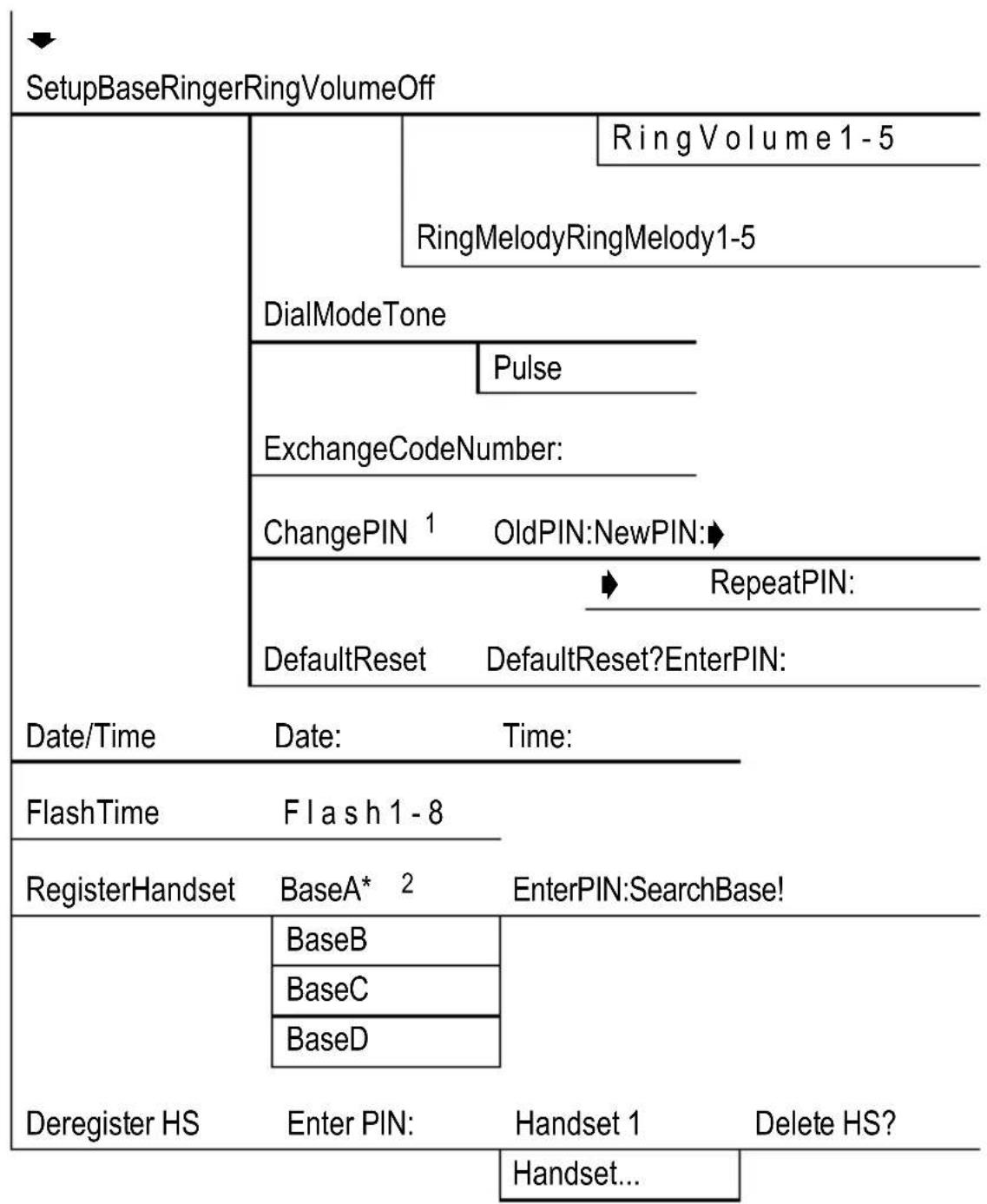
flowchart
graph TD
    A["SetupBaseRingerRingVolumeOff"] --> B["RingVolume1-5"]
    B --> C["RingMelodyRingMelody1-5"]
    C --> D["DialModeTone"]
    D --> E["Pulse"]
    E --> F["ExchangeCodeNumber:"]
    F --> G["ChangePIN 1 OldPIN:NewPIN:►"]
    G --> H["RepeatPIN:"]
    H --> I["DefaultReset DefaultReset?EnterPIN:"]
    I --> J["Date/Time Date: Time:"]
    J --> K["FlashTime Flash1-8"]
    K --> L["RegisterHandset BaseA* 2 EnterPIN:SearchBase!"]
    L --> M["BaseB"]
    L --> N["BaseC"]
    L --> O["BaseD"]
    M --> P["Deregister HS Enter PIN Handset 1 Delete HS?"]
    N --> P
    O --> P

^1 ThedefaultPINcodeis“0000”.
2 Thereare4memorylocationsavailableforregistrationofbasestations.Memory locations identified by a star are already assigned. If a memory location is selected which is already assigned, the old registration in this memory location isoverwritten.
PhoneBook
Accessthephonebookbypassing
PhoneBook
Entry1 Opt NewEntryNumber:Name: 1
Entry2EditEntryNumber:Name: 1
Entry...DeleteEntryDelete?
DeleteAllDelete?
Callslog
Pressthe ? ➕ buttontoaccessthecallog.
CallsLog 2
Entry1 Opt DeleteEntryDelete?
Entry2 DeleteAllListDelete?
Entry...Details
StoreinPhoneb.Name: 1
1 Lettersarealsoimprintedonthedigitkeys.Letters,digitsandspecialcharactersareenteredbypassingtherelevantkeytherespectivenumberoftimes.
Use the Star button to switch between entering upper and lowercase and digits.
^2 The(CLIP ^3 )featureisnecessarytodisplayandsavephonenumbersinvariouscalllogs.Thecallernumberdisplayfunctionisanoptionalserviceoffered bytelephonenetworkproviders.Contactyournetworkproviderforfurtherinformation.FurtherinformationontheCLIPfunction, Page50.
^3 CLIP: Calling Line Identification Presentation
8SpecialFunctions
Autotalkfunction(takingcallsdirectly)
If this function is activated, an incoming callistaken when the handset is removed from the base station. Setting the auto talk function, Page 53.
Diallingmode
Thetelephone can be operated in new, digitalexchanges (TONE) as well as analogue exchanges (PULSE). Setting the dialling mode, Page 54.
Temporarytonedialling
If you only operate the telephone using the PULSE dialling mode, you can still make use of the advantages of the TONE dialling mode (e.g.: remote access of the answering machine in the conventional telephone network). You can temporarily switch to Tonedialling when a connection has already been made.
2 sec ✱ Pressthebuttonwhenaconnectionhasbeen established
Whenthecallisended, the equipment automatically switches back to Pulse dialling.
Babycallfunction
Thisfunctionenablesyoutostoreanumberwhichisautomaticallydialledafter anybuttonispressed(exceptthe Opt softkey).Activatingthebabycallfunction, Page53.

text_image
Opt , or BabyCallOff , OkDeactivatethebabycallfunctionEmergencycallnumbers
Upto4emergencynumberscanbestoredinyourhandset.Thesenumberscan bedialledevenifthekeylockfunctionisactivated.Storingemergencycallnumbers,Page53.
9 SMS
ConditionsforusingSMS
TheCLIP ^1 featuremustbeavailableforyourtelephoneconnection.Contactyourtelephonenetworkprovidertoensurethisfeatureisenabledonyourtelephoneconnection.TousetheSMS ^2 service,yourtelephonenetworkprovidermustenableit.
- Atextcannotbesentfromeveryprivatebranchexchangeextension.

If you want to send SMS text messages from a private branch exchange extension, it is necessary to store the number for an outsideline for your PBX in the handset preceding the Service Center number.
- SendingSMSmessagesisnotavailableforCall-by-Callconnectionsat present.
- ChargesaremadeforsendingSMStexts.
- IftherecipientintheconventionaltelephonenetworkdoesnotuseanSMS serviceorhistelephoneisnotequippedtohandleSMSmessages,theSMS isautomaticallyconvertedtoavoicemessage.
•Costsarechargedbyyourtelephonenetworkprovider.
SMSServiceCenter
SMSmessagesaredistributedviaaServiceCenter.IfyouwanttosendSMStext messages,youmustprogramaservicecenternumberinyourhandsetPage 51.Pleasecontacttheproviderofyourchoiceforthenecessaryservicecenter callnumbersandtheprocedureforenablingtheSMSservice.

YourtelephonehasalreadybeenpreparedtosendSMStextmessages. ServiceCenternumbersarealreadyprogrammedinthehandset. ActivatetherequiredServiceCenterintheSMSmenu. Page52
ServiceCenter1ServiceCenter2
DeutscheTelekom:0193010Empty
ServiceCenter3ServiceCenter4
EmptyEmpty
GB
1 CLIP: Calling Line Identification Presentation
^2 SMS: Short Message Service
Enteringtext
Thedigitkeysarealsolabelledwithlettersfortheentryoftherespectiveletters. Letters,digitsandspecialcharactersareenteredbypassingtherelevantkey therespectivenumberoftimes.
| 0,1 or # Enterspecialcharacter | ||
| * Switchbetweenenteringupperandlower caseanddigits | ||
| Del | Deletethelastcharacterentered | |
| 2 sec | Del | Deletetheentiretext |
SMSAlertsignal(alarm)
AnacousticsignalisissuedwhenanewSMStextmessageisreceived.Youcan activateordeactivatethissignal.Activating/Deactivatingthealarmsignal, Page52.
10ExpandingtheTelephoneSystem
The internationalGAP ^1 standardregulatesthecompatibilityofhandsetsand basestationsfromdifferentmanufacturers.Asaresult,itispossibletointegrate AUDIOLINEdevicesanddevicesfromothermanufacturerstogetherinonetele-phone system. It is possible, however, that certain functions are not available.
Multiplehandsets
Upto5handsetscanberegisteredonthebasestation.
Registeringhandsets
Beforestartingwiththeregistrationprocessforahandset,switchtherespective basestationtoRegistrationmode.
10 sec □, (« 📞 »)
Activate Registration mode
Complete the registration process for your handset, ☐ Page 54. The currently validPINcodeisusedforregistrationpurposes, ☐ Page54.
Thehandsetisautomaticallyassignedaninternalcallnumberfollowingregistration.Theinternalcallnumberappearsinthedisplay.

Toregisterhandsetsfromothermanufacturers, pleaserefertothe operatingmanualsuppliedwiththem.
Deregisteringhandsets

Eachhandsetcanderegisteritselfandotherhandsetsregisteredonthe basestation. Themessage“NoBasefound!”appearsinthedisplayof thehandsetderegistered.
Deregisteringhandsets Page54.
Multiplebasestations
Yourhandsetscanbesimultaneouslyregisteredonupto4differentbasestations.Eachbasestationrequiresitsowntelephonecablesocket.Connections canbeusedwiththesamecallnumberorwithdifferentones.
SwitchtherespectivebasestationstoRegistrationmode.Registerthehandset Page54.Selectthebasestationyouwishtousefortelephoningusingthe "BaseSelection"menu, Page53.
11IntheCaseofProblems
Servicehotline
Shouldproblemsarisewiththetelephone, pleaserefertothefollowinginformationfirst. In the case of technical problems, you can contact our hotlines service, tel. 01805001388 (cost via Telekomattime of going to print: 12ct/min). In the case of claims under the term so guarantee, contact your sales outlet. There is a 2-year period of guarantee.
Problemsandsolutions
| ProblemsSolutions | |
| Noconnection to basestation possible | -Check that the handset has been registered on the basestation with the correct PIN code. Page 54 |
| Notelephone calls possible | -Thetelephone is not connected properly or is defective. Only use the telephone connection cables supplied.-Test whether the telephone connection is in order by using another telephone.-The power adaptor plug is not plugged in or there is a complete power failure.-There chargeable batteries are empty or defective.-The handset is too far from the base station.-Dialling mode is set incorrectly. Page 54 |
| Connectionis disturbed or cutoff | -The handset is too far from the base station.-The base station is in an unsuitable location. |
| Thesystem no longer responds | -Reset all the function sto their default settings. Page 62-Disconnect the power adapter plug briefly from the powersocket.-Removethe batteries briefly from the handset. |
IntheCaseofProblems
| ProblemsSolutions | |
| Thebatteriesare emptyinashort time | -Batteriesareemptyordefective.-Placethehandsetinthebasestationproperly.Clean thecontactsurfacesonthehandsetandbasestation withasoft,drycloth.-Placethehandsetinthebasestationfor16hours. |
| TheCLIP ^1 function doesnotwork | -Thecallernumberdisplayfunctionisanoptional serviceofferedbytelephonenetworkproviders.Contactyournetworkproviderforfurtherinformation.-Thecallerhassuppressedthetransmissionoftheir phonenumber. |
12TechnicalProperties
Technicaldata
| FeatureValue | |
| StandardDECT-GAP | 1 |
| PowersupplyInput:220/230V,50Hz | Output:6V,400mA |
| RangeOutdoors:Approx.300m | Indoors:Approx.50m |
| StandbyUpto100h | |
| Max.talktimeUpto10h | |
| Rechargeable batteries | 2 x 1.2 V, size: AAA |
| DiallingmodeTonediallingmode | Pulsediallingmode |
| Permissibleambienttemperature | 10°Cto30°C |
| Permissiblerelativehumidity | 20%to75% |
| Flashfunction | 80ms,100ms,120ms,180ms,250ms,300ms,600ms,800ms |
Defaultsettings
Handset
Restoringthedefaultsettings, Page53
| Language: | German | Emergency number 1: | 112 |
| Ringing melody: | 6 | Emergency number 2: | 110 |
^1 DECT: Digitally Enhanced Cordless Telecommunication = Standard for cordlesstelephones.
GAP: Generic Access Profile = Standard for the interoperation of handsets and basestations from other manufacturers.
TechnicalProperties
| Ringingtonevolume:3Emergencynumber3:Empty | |||
| Receivervolume:3Emergencynumber4:Empty | |||
| Handsfreemodevolume:3Keytone:On | |||
| Phonebook:EmptyHSname:Euro800 | |||
| Calllog:EmptySMS: | Empty | ||
| Redialling list: | Empty | SMS alarm signal: | On |
| Babycall: | Off/EmptyAutotalk: | On | |
| Number for outside line: | Empty | Display contrast: | 4 |
| Key lock: | Off | Menu colour: | Blue |
| Battery warning signal: | On | Keypad lighting: | On |
| Range warning signal: | On | Wallpaper: | Sky |
Base station
Restoringthedefaultsettings, Page54
| Ringingmelody: | 1Flashtime: | 100ms | |
| Ringing tone volume: | 3 | Dialling mode: | Tone dialling |
| VIP phone book: | Empty | PIN: | 0000 |
Declaration of Conformity
This device fulfil the requirements stipulated in the EU directive:
1999/5/EU directiveonradioequipmentandtelecommunicationsterminalequipmentandthemutualrecognitionoftheirconformity.ConformitywiththeabovementioneddirectiveisconfirmedbytheCE symbolonthedevice.

To view the complete Declaration of Conformity, please refer to the free download available on our website www.audioline.de.
13Maintenance/Guarantee
Maintenance
- Cleanthehousing surfaces with asoft, fluff-freecloth.
- Neverusecleaningagentsorsolvents.
Guarantee
AUDIOLINEequipmentisproducedandtestedaccordingtothelatestproduction methods. The implementation of carefully chosen materials and highly developed technologies ensure trouble-free functioning and long service life. The term sof guaranteed on not apply where the cause of equipment malfunction is the fault of the telephone network operator or any interposed private branch extension system. The term sof guaranteed on not apply to the batteries or power packs used in the products. The period of guarantee is 24 months from the date of purchase.
Alldeficienciesresultingfrommaterialorproductionfaultswhichoccurduringthe periodofguaranteewillbeeliminatedfreeofcharge.Rightstocaimsunderthe termsofguaranteeareannulledfollowinginterventionbythepurchaserorthird parties.Damagecausedasaresultofimproperhandlingoroperation,incorrect positioningorstoring,improperconnectionorinstallation,ActsofGodorother externalinfluencearenotcoveredbythetermsofguarantee.Inthecaseofcomplaints,wereservetherighttorepairorreplacedefectpartsorprovideareplacementdevice.Replacementpartsordevicesbecomeourproperty.Rightstocompensationinthecaseofdamageareexcludedwherethereisnoevidenceof intentorgrossnegligencebythemanufacturer.
If your devices show sign of defect during the period of guarantee, pleaser return it to the sales outlet in which you purchase the AUDIOLINE device together with the purchase receipt. All right to claims under the term so guarantee in accordance with this agreement must be asserted exclusively with regard to your sales outlet. Two years after the purchase and transfer of four products, claims under the term so guarantee can longer be asserted.
14Index
A
Answeringmachineinthete- lephonenetwork,50
Autotalkfunction,56
Automaticdiallingpause,49
B
Babycallfunction,56
Batterychargestatus,39
Brokering,47
C
Callnumberdisplay,50
Callslog,45
Chaindialling,46
Chargingthebatteries,39
Conferencecalls,47
Connectingthebase station,38
Creatingphone bookentries,44
D
DeclarationofConformity,63
Defaultsettings,62
Deregisteringhandsets,59
Diallingmode,54,56
Diallingphonenumbersfrom thephonebook,45
Directcallacceptance,56
Display,41
E
Emergencycallnumbers,56
Endingacall,45
Enteringadiallingpausemanually,49
Enteringtext,58
Expandingthetelephonesystem,59
Explanations,41
F
Flashtime,54
G
Guarantee,64
H
Handsfree,48
Holdingacall,47
|
Iconsinthedisplay,41
Inthecaseofproblems,60
Insertingbatteries,39
Internalcalls,46
K
Keylock,48
M
Mainmenu,51
Maintenance,64
Makingacall,45
Makinginternalcalls,46
Menustructure,51
Multiplebasestations,59
Multiplehandsets,59
Mutingthemicrophone,48
N
Navigationbuttons,43
Numberforanoutside line,49
0
Operatingelements,40
Operatingthetelephone,41
P
Packagecontents,38
Paging,48
Phonebook,55
Privatebranch exchanges,49
Problemsandsolutions,60
Pulsedialling,54
Putting the telephone into operation, 38
R
Rbuttononprivatebranch exchanges,49
R-buttonandsupplementary services,49
Receivervolume,47
Redialling,45
Registeringhandsets,59
Ringingmelody,48
Index
S
Safetyinformation,36
Searchingforthe handset,48
Servicehotline,60
SMSalarm,58
SMSalert,58
SMSconditions,57
SMSServiceCentre,57
Specialfunctions,56
Supplementary services, 49
Switchingthehandseton andoff,48
T
Takingacall,45
Talktime,47
Technicaldata,62
Telephoning,45
Temporarytonedialling,56
Tonedialling(DTMF),54
Transferringexternalcallsinternally,46
Troubleshooting,60
V
VMWI,50