Oslo 58-X - Phone AUDIOLINE - Free user manual and instructions
Find the device manual for free Oslo 58-X AUDIOLINE in PDF.


User questions about Oslo 58-X AUDIOLINE
0 question about this device. Answer the ones you know or ask your own.
Ask a new question about this device
Download the instructions for your Phone in PDF format for free! Find your manual Oslo 58-X - AUDIOLINE and take your electronic device back in hand. On this page are published all the documents necessary for the use of your device. Oslo 58-X by AUDIOLINE.
USER MANUAL Oslo 58-X AUDIOLINE
text_image
Diagram showing connections between two electrical outlets and a device with labeled ports and connectorstext_image
Diagram showing electrical connection with socket and plug, alongside a device with labeled componentsAkkuseinlegen
natural_image
Simple line drawing of a lamp or container with a handle and label '1' pointing to it (no text or symbols on the diagram itself)▲/▼,1=100ms,2=300ms,
text_image
▲/▼, 5678, 3 sec ⇔, ▼, ≥ 3 ≤, 3, →,^1 CLIP: Calling Line Identification Presentation
Pleasereadthisoperatinginstructionmanualthoroughly.
Intendeduse
Thetelephoneissuitablefortelephoningwithinapublictelephone networksystem.Anyotheruseisconsideredunintendeduse. Unauthorisedmodificationorreconstructionisnotpermitted.Under nocircumstancesopenthedeviceorcompleteanyrepairwork yourself.
Installationlocation
Preventexcessiveexposureosmoke,dust,vibration,chemicals, moisture,heatanddirectsunlight. Donotusethehandsetinpotentiallyexplosiveareas.
Powersupply

Caution: Only us the power adapter plugs supplied because other powers supplies could damage the telephone. Ensure access to the power adapter plug is not obstructed by furniture or such.
Rechargeablebatteries

Caution: Neverthrowbatteriesintoafire. Onlyusebatteriesofthesametype. Payattentiontocorrectpolarity. If the polarity of the batteries is incorrect, there is a risk of explosion of the charging station.
Powerfailure
Thetelephone cannot be used to make calls in the event of a power failure. Always keep acord connected telephone which operates without an external powers supply available in case of emergency situations.
Medicalequipment

Caution: Neverusethetelephoneinthevicinityofmedicalequipment. Effectsonsuchequipmentcannotbefully ruledout
DECT ^1 telephonescancauseanunpleasanthummingsoundin hearingaids.
Disposal
If your device has cometo the end of its service life, bring it to a collection point provided by your local public waste authorities (e.g. recycling centre). The adjacent symbol indicates that the device must not be disposed of in normal domestic waste! According to lawson the disposal of electronic and electrical devices, owners are obliged to dispose of old electronic and electrical devices in a separate waste container.
Batteriesmustbedisposedofatthepointofsaleorat theappropriatecollectionpointsprovidedbythepublic wasteauthorities.Packagingmaterialsmustbedisposed ofaccordingtolocalregulations.


GB
^1 DECT: Digital Enhanced Cordless Telecommunication = Standardforcordlesstelephones.
PuttingtheTelephoneintoOperation
2PuttingtheTelephoneintoOperation
Safetyinformation

Caution: It is essential to read the Safety Information in Chapter 1 before starting up.
Checkingthecontentsofthepackage
Thepackagecontains:
| Content | OSLO58-Xmodel | |||
| 5858-2 | 1 | 58-3 1 | 58-4 1 | |
| Basestationwithpower adapterplug | 1111 | |||
| Chargingstationwithpower adapterplug | -123 | |||
| Handset1234 | ||||
| Telephoneconnectioncable11 | 11 | |||
| Batteries2468 | ||||
| Operatingmanual1111 | ||||
Connectingthebasestation

Caution: Position the base station at least 1 m away from other electronic devices, otherwise there is a risk of mutual disturbance.
Connect thebasestationasillustratedinthediagram. For reasons of safety, only use the power adapter plug and telephone connection lines supplied.

1 Refer to the www.audioline.desitetoseeifthistelephonesetis already available.
PuttingtheTelephoneintoOperation
Mainspoweroutlet Telephonelinesocket
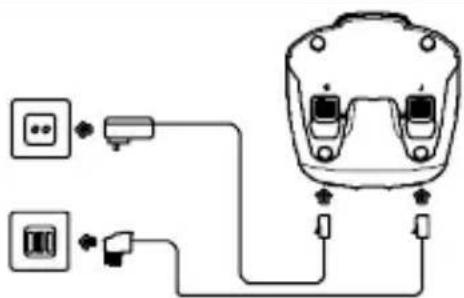
text_image
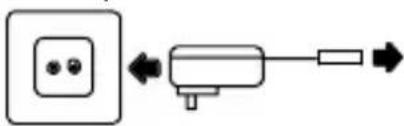
Diagram showing connections between two electrical outlets and a device with labeled ports and cablesConnectingthechargingstation 1
Connectthechargingstation asillustratedinthediagram. Forsafetyreasons,onlyusethe poweradapterplugsupplied.
Mainspoweroutlet
natural_image
Simple line diagram showing a power outlet connected to a motor with bidirectional arrow (no text or symbols)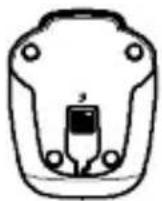
Insertingtherechargeablebatteries
Insertthebatteriesintheopenbattery compartment.Onlyusebatteriesof the type A A A N i M H 1 . 2 V . Payattentiontocorrectpolarity. Closethebatterycompartment.
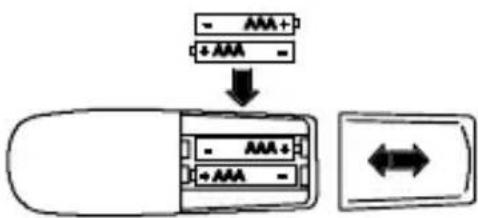
text_image
- AAA+ + AAA - ↓ AAA+ + AAA -Chargingthebatteries

Beforethehandsetisusedforthefirsttime,insertitinthe basestation/chargingstationforatleast14hours.
When the handset is inserted in the basestation / charging station properly, an acoustic confirmation signal is issued the charge control amplights up. The hand set warms up during the charging process. This is normal and does not represent a risk. Donot charge the hand set with charging units from other manufacturers.
The current battery charge status is indicated in the display:


FullHalfemptyLowEmpty
GB
1 Onlyappliestotelephonesetswithatleasttwohandsets "Checkingthepackagecontents" on Page24.
OperatingElements
3OperatingElements
Thebuttonsinthisoperatingmanualaresubsequentlydepicted withauniformcontour.Slightdeviationsintheappearanceofthe iconsonthebuttonscomparedtothosedepictedinthismanualare possible.
Handset
1Display
2Delete/Muting
3Pause/Redialling
4Callslog/Scrollupwards
5Endcall/on-off
6 K e y l o c k
7Answeringmachine
8Rbutton/Internalcall
9Callslog/Scrolldownwards
10Callbutton
11Programme/Phonenumbermemory
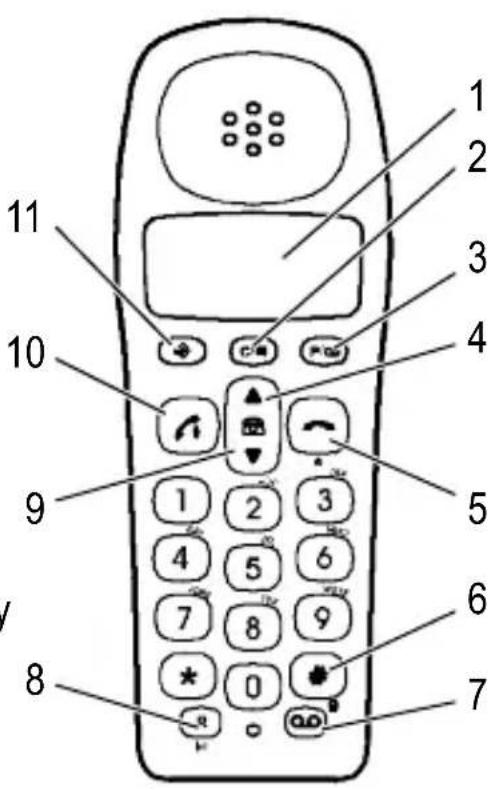
text_image
1 2 3 4 5 6 7 8 9 10 11Chargingstation 1
1LED, chargingcontrollamp
Basestation
2Pagingbutton
3LED,answeringmachine
4LED, callandpowerindicator
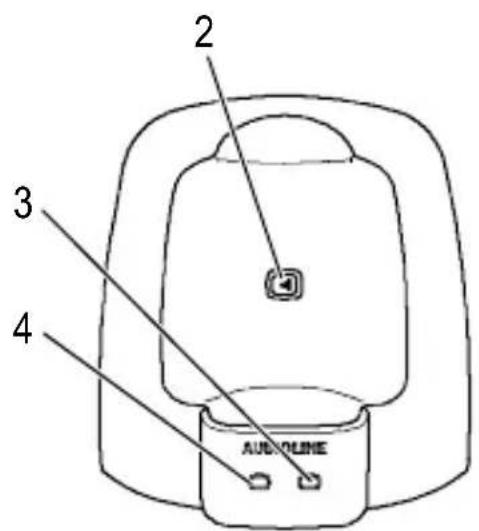
text_image
2 3 4 AUXOLINE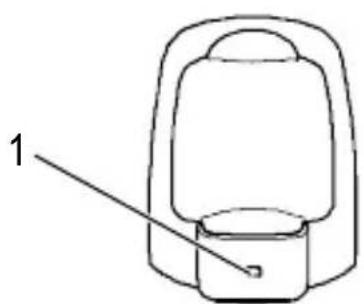
natural_image
Simple line drawing of a lamp or container with a handle and base, labeled with number 1 (no text or symbols on the diagram itself)1 Onlyappliestotelephonesetswithatleasttwohandsets "Checkingthepackagecontents"onPage24.
4OperatingtheTelephone
Displayandnotationofoperationsequences
Enterthenumber

Pressthebuttondepictedbriefly
3sec

Pressthebuttondepictedfor3
seconds
5678
or

Digitsoriconsinthedisplay
Iconsinthedisplay
IconDescription
| -- -- Internallyassignedcallnumberofthehandset | |
| 05: 8 Timedisplay | |
| EXTExternalcall | |
| INTInternalcall | |
| Flashing:Therearenewcallsinthecallslog. | |
| Thephonenumberdisplayedhasmoredigitstotheleftorright.Pressthe ➔ buttonodisplaythem. | |
| Thekeylockisactivated | |
| Themicrophoneisswitchedoff(muting) | |
| On:Theconnectiontothebasestationisgood.Flashing:Theconnectiontothebasestationispoor. | |
| On:Theansweringmachineisactivated.Flashing:Anewmessagehasbeenrecorded. | |
GB
OperatingtheTelephone
Programmingthebasicsettings
Byprogrammingthebasicsettings,youadaptthehandsetsettings tosuityourindividualneeds.Pressthe buttontocancelthe process.Ifnobuttonispressedoveraperiodof15sec.,theprocessisautomaticallyterminatedandnoneofthemodifications madearesaved.Proceedasfollows:
- Activatetheprogrammingprocess
3 sec [→], [→],
- Volume and ringing melody forexternal calls
▲/▼, OFF to 5, 1 to 5, ⇔,
- Volume and ringing melody for internal calls
▲/▼, OFF to 5, 1 to 5, ⇔,
- Dateandtime
Use the ▲/▼ buttons to select Day, Month and Time and change them as required using 0 to 9, ⇔,
5.Tonedialling/Pulsedialling
▲/▼, 1= Tone, 2= Pulse, ⇔,
6.Flashtime
▲/▼,1=100ms,2=300ms,
- Basestation volume and ringing melody
▲/▼, OFF to 5, 1 to 5,
Restoringthedefaultsettings
-
Removethebatteriesfromthehandset.
-
Reinsertthebatteriesinthehandsetthenimmediatelypress and hold the ✕ button until 8888888 appears in the display.
-
Pressthe ➔ buttonuntilyouhearanacousticconfirmation signal. Afteracertainty, the telephoneswitchesto Standby mode(\~60sec).
5Telephoning
Alldescriptionsinthisoperatingmanualassumethatthehandsetis inStandbymode.
| Takecall | |
| Endcall | |
| External call | , or, |
| Redialling | , / ▲, or, |
| Dial from calls log | , ▲/ ▼, |
| Dialfromphonenumber memory | , ▲/ ▼, |
| Quick dial | 3 sec 1, 2 or 3 |
| Internalcall(intercomfunc-tion) | 3 sec INT, |
Internalcalls(intercomfunction)
Makinginternalcalls
3 sec INT, e.g. 2.
Theremustbetwoormorehandsetsregisteredonthebasestation inordertomakeinternalcalls.
Transferringexternalcallsinternally/Conferencecalls
During an external call: 3 sec INT, e.g. 2.
Whenthepartycalledanswerstheinternalcall,transferthecallby pressingthe button.
Inordertoactivatetheconferencecallfacility, waitforthepartycalledtoanswertheinternalcallandthenpressthe # button.

If there is no answer from the handset called, take the external callback by pressing the INT button for 3 seconds.
Telephoning
Otherfunctions
| FunctionButtonsequence | |
| Playingmessage | |
| Switchthehandseton/off3 sec | |
| Keylockon 3sec | |
| Keylockoff anykey, | |
| Receivervolume(1-5) ↗, ▲/▼ | |
| RingingmelodyvolumeWhileringing: ▲/▼ | |
| Muting/Activatingmicro-phoneinhandset | Duringcall: ⊗I |
| PaginghandsetOnbasestation: ●)) |
FunctionButtonsequence
Mutingthemicrophone
Aftermutingthemicrophone, thecallercannolongerhearyou.
Talktimedisplay
Thedurationofacallisdisplayedinhours,minutesandseconds duringthecall.
Registeringahandset
If your handset is not registered on the base station, the INT, EXT, and icocsflashinthedisplay.
Toregisterthehandset, pressthe buttononthebasestation for3secondsandproceedasfollows:
5 sec. , -, P1-, 0000, .
Toregisterhandsetsfromanothermanufacturer, pleasereadthe operatingmanualsuppliedwithit. Thefour-digitPINforyourbase stationis0000.

Up to five handsets can be registered on your base station. Yourhandsetcanonlyberegisteredononebasestation atanyparticulartime.
6AnsweringMachine
Theansweringmachinecanstoreupto59messages. Themax- mumtotalrecordingtimeis11minutes.Whenthereisnomemory capacityavailabletorecordnewmessages,nofurthermessages arerecorded.
Mainmenu
Pressthe 🔒 buttonoopenthemainmenuoftheanswering machine.Newmessagesareplayed.Theansweringmachinecan thenbecontrolledusingthebuttonsonthehandset.Payattention tothevocaloperatingguidance.
ButtonFunctions
| 2 | Playallthemessages |
| 3 | Playthenewmessages |
| 4 | Playmessageagain |
| 2 x 4 | Playthepreviousmessage |
| 5 | Deletemessages/Deletethemessageduring playback |
| 6 | Playthenextmessage |
| 7 | Answeringmachineon/off |
| 8 | OpentheOutgoingMessagemenu(referto32) |
| 9 | ChangethePINcode(defaultsetting:000), newPIN *,confirm # |
| 0 | Settheweekday(referto32) |
| * | Settheanswerdelaybeforeacallisanswered (referto33) |
| # | R e c o r d a m e m o |
| 1 | Playthemainmenu |
| QO | Closethemenu |
Takingacallbeingrecorded
If the answering machine hastaken an incoming call, pressthe

buttontotakethecallpersonally.

AnsweringMachine
Outgoingmessagemenu
Press 8 in the main menu to open the Outgoing Message (OGM)menu.Youcanrecordyourownoutgoingmessages.After outgoingmessage1(OGM1)hasbeenplayed,thecallercanleave amessage.Outgoingmessage2(OGM2)ontheotherhandspurelyanannouncementstatingthatnomessagescanbeleft.
ButtonFunctions
| 2 | Playtheoutgoingmessagecurrentlyset |
| 3 | Recordoutgoingmessage1(OGM1) |
| 4 | Recordoutgoingmessage2(OGM2) |
| 5 | Selectoutgoingmessage1 |
| 6 | Selectoutgoingmessage2 |
| 8 | PlaytheOutgoingMessagemenu |
| 1 | Playthemainmenu |
Settingtheweekday
Press 0 in the main menu to open the Set Day menu.
ButtonFunctions
| * | Playtheweekdaycurrentlyset |
| # | Settheweekday |
| 1 | Sunday |
| 2 | Monday |
| 3 | Tuesday |
| 4 | Wednesday |
| 5 | Thursday |
| 6 | Friday |
| 7 | Saturday |
Settingtheanswerdelay
Youcanselectfrom2to9ringingtonesortheTimeSaversetting forpre-remoteaccessfreeofcharge.Pre-remoteaccessfreeof chargemeans:Ifnewmessagehavebeenrecordedonyouransweringmachine,yourcallistakenafter2rings.Ifnomessages havebeenrecorded,thecallistakenafter6rings.Replaceereceiverbeforethe6thring.Nochargesareaccrued.
Press ✱ in the main menu to open the Answer Delay menu.
ButtonFunctions
| * | Playtheanswerdelaycurrentlyset |
| # | Settheanswerdelay |
| 1 | TimeSaver |
| 2 | 2rings |
| 3 | 3rings |
| 4 | 4rings |
| 5 | 5rings |
| 6 | 6rings |
| 7 | 7rings |
| 8 | 8rings |
| 9 | 9rings |
Remoteaccess
Callyourownphonenumber.Pressthe ✗ buttonwhiletheout-goingmessageisbeingplayed.EnteryourPINcode(defaultsetting:000).Otherfunctionscannowbested. If theansweringmachineisnotswitchedon, ittakesthecallafterthe20thring.
GB
PhoneNumberMemory
7PhoneNumberMemory
Upto10phonenumberscanbestoredinthephonenumbermemory.

Whenthememorycapacityisfull,oneoftheexistingentriesmustbeoverwritten.
Deletenumber c
Movecursor ▲ / ▼
Storingphonenumber
, 3 sec , , e.g. ≥slant0≤slant , 0 , 阵 , , 一 .
Editingnumbersinthephonenumbermemory
, 3 sec , , e.g. ≥slant 3 ≤slant , 3, 隨, ,
Quickdial
Threeephonenumberscanbeassignedasquickdialnumbersto the buttons 1 to 3.
Storingphonenumbersasquickdialnumbers
, 3 sec , 3 sec 1, ≥slant 57 ≤slant , , - .
Editingphonenumberstoredasaquickdialnumber
, 3 sec , 3 sec 1 57 ≤, , - .
8CallLog
Atotalof10callscanbestoredinthecalllog.

Thecallernumberdisplayfunctionisanoptionalservice offeredbytelephonenetworkproviders.Ifthisserviceis notoffered,theincomingcallsarenotdisplayed.Contact yournetworkproviderforfurtherinformation.
Displayingphonenumbersinthecalllog

Storingacallogentryinthephonenumbermemory

text_image
▲/▼, 5678, 3 sec ⇔, ▼, ≥ 3 ≤, 3, →, -.Deletingphonenumberfromthecallslog

text_image
▲/▼, 5678, 3 sec ⊗, ≥---- ≤, ▼.InCaseofProblems
9InCaseofProblems
Servicehotline
Shouldproblemsarisewiththetelephone, pleaserefertothefollowinginformationfirst. In the case of technical problems, contact our Service Hotline, tel. 01805001388 (Telekom costs at time of going to print: 12ct/min). In the case of claims under the term so guarantee, contact your sales outlet. There is a year period of guarantee.
Problemsandsolutions
| ProblemsAnswers | |
| TheCLIP 1 functiondoesnotwork | -Thecallernumberdisplayisasupplementary serviceofferedbytelephonenetworkproviders.Contactyournetworkproviderforfurtherinformation.-Thecallerhassuppressedthetransmissionof theirphonenumber. |
| Thebatteriesare emptyinashort time | -Batteriesareemptyordefective.-Placethehandsetinthebasestationproperly.Cleanthecontactsurfacesonthehandsetandbasestationwithasoft,drycloth.-Placethehandsetinthebasestationfor14 hours. |

InCaseofProblems
| Connectionisdisturbedorcutoff | -Thehandsetistoofarfromthebase station.-Thebasestationisinanunsuitablelocation.-Thebatteriesareweak. |
| Notelephonecalls possible | -Thetelephoneisnotconnectedproperlyoris defective.Onlyusethetelephoneconnection cablesupplied.-Testwhetherthetelephoneconnectionisinorder byusinganothertelephone.-Thepoweradaptorplugisnotpluggedinorthere isacompletepowerfailure.-Therechargeablebatteriesareemptyordefective.-Thehandsetistoofarfromthebase station. |
GB
TechnicalProperties
10TechnicalProperties
Technicaldata
| FeatureValue | |
| StandardDECT | 1 |
| PowersupplyInput:220/230V,50Hz | Output:6,5VDC/150mA,9VAC/150mA |
| RangeOutdoors:Approx.300m | Indoors:Approx.50m |
| StandbyUpto100h | |
| Max.talktimeUpto8h | |
| Rechargeablebatteries | 2 x 1 . 2 V, size : AAA |
| DiallingmodeTonediallingmode | Pulsediallingmode |
| Permissibleambienttemperature | 10°Cto30°C |
| Permissiblerelativehumidity | 20%to75% |
| Recall(Flash)function | 100ms,300ms |
DeclarationofConformity
This device fulfilstherequirementsstipulatedintheEU directive:
1999/5/EU directiveonradioequipmentandtelecommunicationsterminalequipmentandthemutual recognitionoftheirconformity.ConformityisconfirmedbytheCEsymbolonthedevice.
ToviewthecompleteDeclarationofConformity,please refertothefreedownloadavailableonourwebsite www.audioline.de.


^1 DECT: Digital Enhanced Cordless Telecommunication = Standard for cordlesstelephones.
11 Maintenance/Guarantee
Maintenance
- Cleanthehousing surfaces with asoft, fluff-freecloth.
- Neverusecleaningagentsorsolvents.
Guarantee
AUDIOLINEequipmentisproducedandtestedaccordingtothela- testproductionmethods.Theimplementationofcarefullychosen materialsandhighlydevelopedtechnologiesensuretrouble-free functioningandalongservicelife.Thetermsofguaranteedonot applywherethecauseofequipmentmalfunctionisthefaultofthe telephonenetworkoperatororanyinterposedprivatebranchexten- sionsystem.Thetermsofguaranteedonotapplytothebatteriesor powerpacksusedintheproducts.Theperiodofguaranteeis24 monthsfromthedateofpurchase.
Alldeficienciesresultingfrommaterialorproductionfaultswhichoccurduringtheperiodofguaranteewillbeeliminatedfreeofcharge. Rightstocaimsunderthetermsofguaranteeareannulledfollowinginterventionbythepurchaserorthirdparties.Damagecaused asaresultofimproperhandlingoroperation,incorrectpositioning orstoring,improperconnectionorinstallation,ActsofGodorother externalinfluencearenotcoveredbythetermsofguarantee.Inthe caseofcomplaints,wereservetherighttorepairorreplacedefect partsorprovideareplacementdevice.Replacementpartsordevicesbecomeourproperty.Rightstocompensationinthecaseofdamageareexcludedwherethereisnoevidenceofintentorgross negligencebythemanufacturer.
If your devices show sign of defect during the period of guarantee, pleasereturnitto the sales outlet in which you purchased the AU-DIOLINE device together with the purchase receipt. All right to claims under the term so guarantee in accordance with this agreement must be asserted exclusively with regard to your sales outlet. Two years after the purchase and transfer of four products, claims under the term so guarantee can longer be asserted.