
FJ180WV2 FREEJET - Cordless vacuum HOOVER - Free user manual and instructions
Find the device manual for free FJ180WV2 FREEJET HOOVER in PDF.
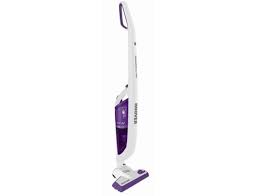


| Brand | HOOVER |
| Model | FJ180WV2 FREEJET |
| Device type | Cordless vacuum cleaner |
| Intended use | Household cleaning |
| Power supply | Rechargeable NiMH battery, mains charger 230 V (240 V UK) |
| Initial charging time | 24 hours |
| Floor types | Carpet (turbo on) and hard floor (turbo off) |
| Suction modes | Normal and Turbo |
| Push and Go function | Detaches the hand unit for portable vacuuming |
| Included accessories | Crevice tool and furniture brush (stored at back of charger) |
| Dust cup capacity | Not specified (quick empty with trigger) |
| Filtration | Sieve and filter washable with warm water |
| Filter maintenance | Clean regularly, wash with warm water, dry completely before reassembly |
| Agitator replacement | Possible with a coin to unlock |
| Safety instructions | Do not use outdoors, on wet surfaces, to vacuum liquids or hot objects |
| Spare parts available | Motor protection filter (S93 - 35600860), Agitator (Y24 - 35600861) |
| Warranty | According to country conditions, present purchase receipt |
| Disposal | Remove completely discharged batteries, dispose of the appliance at WEEE recycling centre |
Frequently Asked Questions - FJ180WV2 FREEJET HOOVER
User questions about FJ180WV2 FREEJET HOOVER
0 question about this device. Answer the ones you know or ask your own.
Ask a new question about this device
Download the instructions for your Cordless vacuum in PDF format for free! Find your manual FJ180WV2 FREEJET - HOOVER and take your electronic device back in hand. On this page are published all the documents necessary for the use of your device. FJ180WV2 FREEJET by HOOVER.
USER MANUAL FJ180WV2 FREEJET HOOVER
This cleaner should only be used for domestic cleaning, as described in this user guide. Please ensure that this guide is fully understood before operating the appliance. Use only attachments recommended or supplied by Hoover. The charger base is double insulated and must not be earthed.
Electrical Requirements
This Hoover appliance is supplied with a double insulated battery charger which is only suitable for insertion in a 230V (UK 240V) socket outlet. Ensure that the charger rating label matches your voltage supply.
SAFETY REMINDERS
DO NOT let children play with the appliance or its controls. Please supervise the use of the appliance by older children, the elderly or the infirm. DO NOT use your cleaner outdoors, on wet surfaces or for wet pickup. DO NOT pick up hard or sharp objects, matches, hot ashes, cigarette ends or other similar items. DO NOT spray with, or pick up flammable liquids such as cleaning fluids, petrol, etc, or their vapours, as they may cause an explosion or fire. DO NOT replace the NiMH batteries with non recharging batteries. DO frequently clean the dust cup and filter assembly. DO return the appliance to the charger base after use to recharge the batteries. Occasionally fully discharge the batteries to obtain the maximum battery life.
HOOVER SERVICE: To ensure the continued safe and efficient operation of this appliance we recommend that any servicing or repairs are only carried out by an authorised Hoover service engineer.
PRODUCT COMPONENTS
1 - Main Cleaner
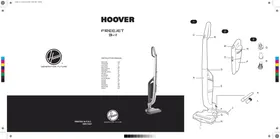
A. Main Body B. On/Off Switch C. On/Off Turbo Switch D. Push and Go Release button E. Handheld Cleaning Unit F. Nozzle release Button G. Carpet and Floor Nozzle H. Charger
I. Charger Indicator J. Power Cord K. Crevice Tool L. Dusting Brush
2 - Handheld cleaner
M. On/Off Switch N. Bin Empty Trigger O. Filter Access Button P. Dust Container
3- Filters
Q. Filter Screen R. Filter
PREPARING YOU CLEANER
- Line up the handle with the main body of the cleaner and push it in until it locks into place. [4]
- Align the nozzle with the main body and firmly push it in until the nozzle locks into place. [5]
- Attach the handheld unit [2] to the main body.
- Place the cleaner on the charger. For the first use, charge the cleaner for 24 hours.
- The indicator light will illuminate while charging.
Note: To remove the nozzle, press the nozzle release button and pull it away from the main body.
Note: Use only the charger supplied with your cleaner to recharge.
Important: When charging the cleaner, the On/Off switch must be in the OFF position.
Keep the charger plugged into the socket at all times. It is normal for the charger to become warm to the touch while charging.
If the operating time reduces after repeated use, let the cleaner run until it stops, then recharge for 24 hours. Repeat this monthly for best results.
USING YOUR CLEANER
Main cleaner
- Turn the cleaner on by pressing the On/Off button. [1B]
- Set the On/Off Turbo switch to the desired cleaning mode. [1C]
CARPET: Switch Turbo Nozzle ON (LED will be ON.)
HARD FLOOR: Switch Turbo Nozzle OFF (LED will be OFF.)
Handheld Cleaner
- Press the Push and Go button and lift the handheld unit from the cleaner main body. {6}
- Turn the handheld cleaner on by pressing the On/Off button. [2M]
ACCESSORIES
Crevice Tool and Dusting brush
Both accessories are stored at the rear of the charger. Both fit directly onto the handheld unit.
CLEANER MAINTENANCE
Emptying the Dust Container
Hold the unit over a bin and pull the bin empty trigger [2N] to instantly empty the dust container. [7]
Cleaning the Filters
- Release the handheld unit from the main body of the cleaner.
- Press the filter access button [20] and remove the handle section from the dust container. [8]
- Use the filter handle to remove the filter and filter screen from the dust container. [9]
- Wash the filter and screen in hand warm water. Once thoroughly dry return to the dust container.
- Reassemble the handheld unit and return to the cleaner main body.
Note: Do not use hot water or detergents when cleaning the filters. In the unlikely event of the filters becoming damaged, fit a genuine Hoover replacement. Do not try and use the product without a filter fitted.
Changing the Agitator
- Using a coin, turn the lock to the open position. [10]
- Remove the agitator retainer.
- Unloop the belt and lift the agitator out of the cleaner. [11]
- Loop the belt around the new agitator and return it to its original position. Replace the agitator retainer and lock it in place.
End of Product Life Battery Disposal
If the cleaner is to be disposed of, the batteries should be removed. Used batteries should be taken to a recycling station and not disposed of with household waste.
IMPORTANT: Always fully discharge the batteries before removal.
- Run the unit until the batteries run flat.
- Release the handheld unit from the main body of the cleaner.
- Press the filter access button and remove the handle section from the dust container.
- Remove 6 screws and open the unit. [12]
- Remove the motor/battery housing and disconnect the cables.
- Remove the batteries from the housing.
Note: Should you experience any difficulties in dismantling the unit or for more detailed information about treatment, recovery and recycling of this product, please contact your local city office, your household waste disposal service.
HOOVER SPARES AND CONSUMABLES
Always replace parts with genuine Hoover spares. These are available from your local Hoover dealer or direct from Hoover. When ordering parts always quote your model number.
- Pre motor Hepa Filter - S93 – 35600860 Agitator - Y24 - 35600861
The Environment:
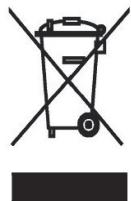
This appliance is marked according to the European directive 2002/96/EC on Waste Electrical and Electronic Equipment (WEEE). By ensuring this product is disposed of correctly, you will help prevent potential negative consequences for the environment and human health, which could otherwise be caused by inappropriate waste handling of this product. The symbol on the product indicates that this product may not be treated as household waste. Instead it shall be handed over to the applicable collection point for the recycling of electrical and electronic equipment. Disposal must be carried out in accordance with local environmental regulations for waste disposal. For more detailed information about treatment, recovery and recycling of this product, please contact your local city office, your household waste disposal service or the shop where you purchased the product.
YOUR GUARANTEE
The guarantee conditions for this appliance are as defined by our representative in the country in which it is sold. Details regarding these conditions can be obtained from the dealer from whom the appliance was purchased. The bill of sale or receipt must be produced when making any claim under the terms of this guarantee.
Subject to change without notice.
IMPORTANT INFORMATION
Filter cleaning
SAFETY INSTRUCTIONS
Do not allow children to play with the appliance or its controls. Supervise children to ensure they do not play with the appliance. Do not use the appliance outdoors or on wet surfaces. Do not allow it to pick up hard or sharp objects, matches, hot ashes, cigarette butts, etc. Do not use it to pick up flammable liquids such as cleaning fluids, petrol, or their vapors, as this may cause an explosion or fire. Do not replace the HEPA filter with non-original batteries. Regularly check the dust container and filters. - Before recharging the battery, always return the appliance to the base for charging. Charge the battery for the specified time to maximize its service life.
HOOVER SERVICE: To ensure long, safe, and efficient operation of this appliance, Hoover recommends that any servicing or repairs be carried out only by an authorized Hoover service agent.
COMPONENT PARTS
1-MAIN UNIT
A. Main body B. On/Off switch C. Tube release switch (On/Off) D. Push and Go release button E. Manual cleaning tool F. Crevice tool release button G. Carpet and floor nozzle H. Charging base I. Charging base indicator J. Mains cord K. Crevice tool L. Brush tool
2-HANDHELD VACUUM
M. On/Off switch N. Dust container release latch O. Filter access button P. Dust container
3-FILTERS
VACUUM CLEANER MAINTENANCE
Emptying the dust container
To instantly remove dust from the dust container, hold the device over a trash bin and press the dust container release latch. [7]
Cleaning the filters
- Detach the handheld unit from the main body of the vacuum cleaner.
- Press the filter access button and remove the filter unit from the dust container. [8]
- Remove the filter and filter mesh from the dust container. [9]
- Place the filter and mesh into the main body. After they are completely dry, install the filter in the dust container.
- Assemble the handheld vacuum and install it into the main body of the vacuum.
Note: It is not recommended to use the vacuum without the filter and mesh. The risk of damage to the filter is very low, but if this happens, install a new filter. Do not use the vacuum without the filter installed.
Replacing the brush roller
- Using a coin, turn the lock to the open position. [10]
- Remove the brush roller holder.
- Remove the belt and take out the brush roller from the vacuum. [11]
- Slide the belt onto the new brush roller and install it in its original position. Attach the brush roller holder and secure it in place.
Disposal of the battery at the end of its service life
If the vacuum is to be disposed of, the battery must be removed from it. The used battery should be sent to a recycling point and not thrown away with regular household waste.
WARNING: Before removing the battery, always fully discharge it.
- Turn on the vacuum and let it run until the battery is completely discharged.
- Detach the handheld unit from the main body of the vacuum.
- Press the dust release button and detach the handheld unit from the dust container.
- Open the 6 screws and open the device. [12]
- Remove the cover from the motor/battery and disconnect the cables.
- Remove the battery from the housing.
Note: If difficulties arise during disassembly, or if you need more detailed information about operation, restoration, and reuse of the product, contact our office in your city - the household waste recycling service.
SPARE PARTS AND CONSUMABLES OF HOOVER COMPANY
When replacing, use only genuine spare parts and consumables manufactured by Hoover. They can be purchased from a local Hoover dealer or directly from Hoover. When placing an order for spare parts, be sure to specify the model number of the vacuum cleaner.
*Specifications are subject to change depending on the model
IMPORTANT INFORMATION
PRODUCT COMPONENTS
SAFETY REMINDERS
- ELECTRICAL REQUIREMENTS
- SAFETY REMINDERS
- PRODUCT COMPONENTS
- MAIN CLEANER
- HANDHELD CLEANER
- FILTERS
- PREPARING YOU CLEANER
- USING YOUR CLEANER
- ACCESSORIES
- CREVICE TOOL AND DUSTING BRUSH
- CLEANER MAINTENANCE
- EMPTYING THE DUST CONTAINER
- CLEANING THE FILTERS
- CHANGING THE AGITATOR
- END OF PRODUCT LIFE BATTERY DISPOSAL
- HOOVER SPARES AND CONSUMABLES
- THE ENVIRONMENT
- YOUR GUARANTEE
- IMPORTANT INFORMATION
- FILTER CLEANING
- SAFETY INSTRUCTIONS
- COMPONENT PARTS
- MAIN UNIT
- HANDHELD VACUUM
- VACUUM CLEANER MAINTENANCE
- REPLACING THE BRUSH ROLLER
- DISPOSAL OF THE BATTERY AT THE END OF ITS SERVICE LIFE
- SPARE PARTS AND CONSUMABLES OF HOOVER COMPANY
Brand : HOOVER
Model : FJ180WV2 FREEJET
Category : Cordless vacuum