
NO-025 - Hi-Fi Karcher Audio - Free user manual and instructions
Find the device manual for free NO-025 Karcher Audio in PDF.


| Product Type | Hi-Fi AM/FM Radio |
| Dimensions (L x D x H) | 312 x 131 x 192 mm |
| Net Weight | 2.6 kg |
| Power Source | 230 V ~ 50 Hz |
| Power Consumption | Approx. 18 W during operation |
| Output Power | 4 W |
| FM Frequency Range | 88 - 108 MHz |
| AM Frequency Range | 540 - 1600 kHz |
| Band Selection | AM/FM switch knob |
| Tuning | Manual tuning knob with pointer dial |
| Antenna | FM telescopic antenna; built-in AM ferrite antenna |
| Electron Tube | Yes, with backlight indicator; warm-up time 10-20 seconds |
| Volume Control | Rotary knob with ON/OFF function |
| Power Cord | Detachable, plug into outlet |
| Safety Features | Do not expose to water, heat, or open flames; unplug during thunderstorms |
| Cleaning | Wipe with dry cloth; unplug before cleaning |
| Disposal | Do not dispose as household waste; recycle at designated collection points |
| Battery Disposal | Remove batteries before disposal; recycle separately |
| Mounting | Place on stable, flat surface; do not mount on wall/ceiling unless specified by manufacturer |
| Ventilation | Minimum 5 cm clearance around unit; do not cover ventilation openings |
Frequently Asked Questions - NO-025 Karcher Audio
User questions about NO-025 Karcher Audio
0 question about this device. Answer the ones you know or ask your own.
Ask a new question about this device
Download the instructions for your Hi-Fi in PDF format for free! Find your manual NO-025 - Karcher Audio and take your electronic device back in hand. On this page are published all the documents necessary for the use of your device. NO-025 by Karcher Audio.
USER MANUAL NO-025 Karcher Audio
- Read Instructions - All the safety and operating instructions should be read before the appliance is operated.
- Retain Instructions - The safety and operating instructions should be retained for future reference.
- Heed Warnings - All warnings on the appliance and in the operating instructions should be adhered to.
- Water and Moisture – Do not use the apparatus near water (e.g. bath tub, sink, swimming pool) or in wet places or tropical climates. Do not place objects filled with liquids, such as vases, on top of the apparatus. Do not expose the apparatus to dripping or splashing.
- Setup – The apparatus should only be placed on a stable, flat surface. Do not let the apparatus fall down or expose it to shock.
- Wall or Ceiling Mounting - The appliance should be mounted to a wall or ceiling only as recommended by the manufacturer.
- Ventilation - The appliance should be situated so that its location or position does not interfere with its proper ventilation. For example, the appliance should not be situated on a bed, sofa, rug, or similar surface that may block the ventilation openings; or, placed in a built-in installation, such as a bookcase or cabinet that may impede the flow of air through the ventilation openings. Ensure a minimum distance of 5 cm around the apparatus for sufficient ventilation. Ensure that the ventilation is not impeded by covering the ventilation openings with items such as newspapers, table-cloths, curtains, etc.
- Heat - The appliance should be situated away from heat sources such as radiators, heat registers, stoves, or other appliances (including amplifiers) that produce heat.
- Power Sources - The appliance should be connected to a power supply only of the type described in the operating instructions or as marked on the appliance.
- Cables and Plugs – The mains plug shall remain readily operable. All cables should be routed so that they are not likely to be walked on or pinched by items placed upon or against them, paying particular attention to cords at plugs, convenience receptacles, and the point where they exit from the appliance.
- Cleaning - The appliance should be cleaned only as recommended by the manufacturer. Clean by wiping with a dry and clean cloth. Do not use chemical cleaners or detergents. Always pull the mains plug before cleaning the unit.
- Non-use Periods - The power cord of the appliance should be unplugged from the outlet when left unused for a long period of time.
- Object and Liquid Entry - Care should be taken so that objects do not fall and liquids are not spilled into the enclosure through openings.
- Damage Requiring Service - The appliance should be serviced by qualified service personnel when:
a) The power-supply cord or the plug has been damaged; or
b) Objects have fallen, or liquid has been spilled into the appliance; or
c) The appliance has been exposed to rain; or
d) The appliance does not appear to operate normally or exhibits a marked change in performance; or
e) The appliance has been dropped, or the enclosure damaged. - Servicing - The user should not attempt to service the appliance beyond that described in the operating instructions. All other servicing should be referred to qualified service personnel.
- Open Fire – Keep the apparatus away from open fires. Do not place naked flame sources, such as lighted candles on the apparatus.
- Thunderstorms – During a thunderstorm the mains plug should be unplugged.
- Safety Check – After servicing the technician should conduct a safety check in order to ensure that the apparatus is working properly and safely.
-
Batteries – Always place batteries in the correct polarization into electrical components. Danger of explosion if battery is incorrectly replaced. Replace only with the same or equivalent type. Do not mix old and new batteries. Take attention to the environmental aspects of battery disposal. Batteries shall not be exposed to excessive heat such as sunshine, fire or the like. Remove batteries before disposing of the product.
-
Headphones (if applicable) – Excessive sound pressure from earphones and headphones can cause hearing loss.
EN
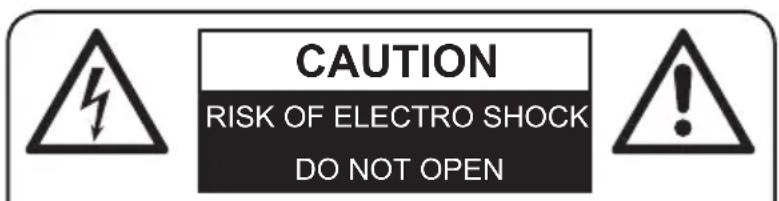
WARNING: To reduce the risk of fire or electric shock, do not expose this appliance to dripping or splashing.
WARNING: To reduce the risk of electric shock, do not remove cover (or back). No user serviceable parts inside. Refer servicing to qualified service personnel.
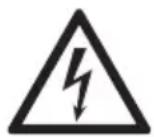
The lightning flash with arrowhead symbol within an equilateral triangle is intended to alert the user to the presence of uninsulated dangerous voltage within the product's enclosure that may be of sufficient magnitude to constitute a risk of electric shock to persons.

The exclamation point within an equilateral triangle is intended to alert the user to the presence of important operating and maintenance (servicing) instructions in the literature accompanying the appliance.
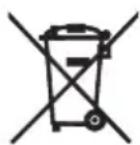
Batteries
Batteries may not be disposed of in regular house hold trash. Every consumer has the obligation to return batteries to special disposal locations.
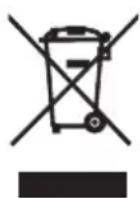
Disposal of Used Electrical & Electronic Equipment
The meaning of the symbol on the product, its accessory or packaging indicates that this product shall not be treated as household waste. Please, dispose of this equipment at your applicable collection point for the recycling of electrical & electronic equipments waste. By ensuring the correct disposal of this product, you will help prevent potential hazards to the environment and to human health, which could otherwise be caused by unsuitable waste handling of this product. The recycling of materials will help conserve natural resources. For more detailed information about recycling of this product, please contact your local city office, your household waste disposal service or the shop where you purchased the product.
LOCATION OF PARTS
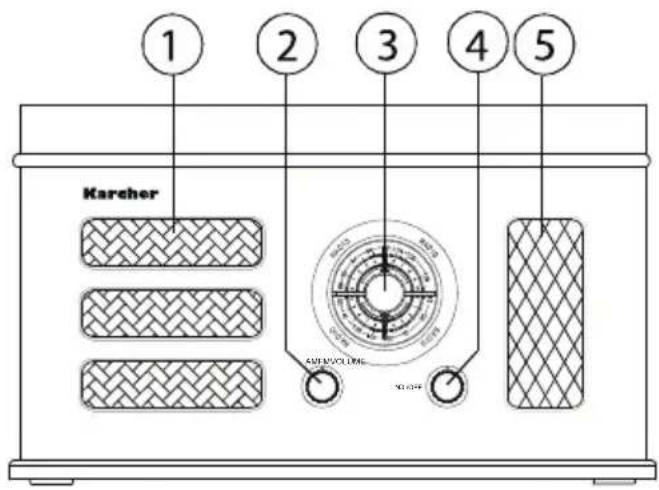
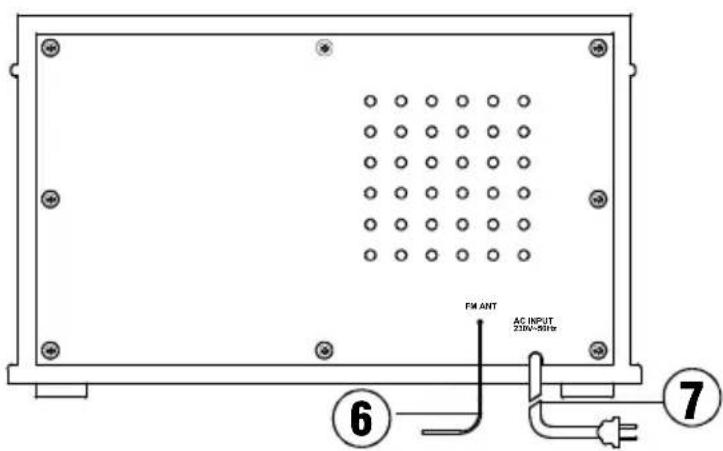
- Speaker
- Band Selector
- Tuning Knob
- Volume/On/Off Knob
- Tube Window
- FM Antenna
- Power Cord
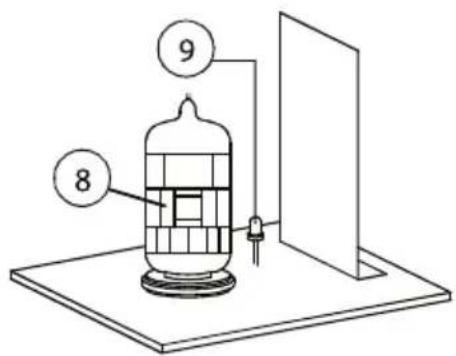
- Electron tube
- Backlight indicator
RADIO OPERATION
- POWER SOURCE - Plug the Power Cord (7) into a suitable outlet.
- POWER ON/OFF - Keep the power on and rotate the volume and ON/OFF knob (4) clockwise. The light of electron tube (8) will flicker ceaselessly when you listen to the radio.
- THE ELECTRON TUBE - When the unit is on, the backlight (9) indicator will flicker ceaselessly, then the electron tube (8) is warming up and the unit is starting up, it will take 10-20 seconds. You will see the situation of backlight (9) indicator from the viewfinder. When the backlight (9) indicator stops flickering and is bright smoothly, that means the electronic tube has finished warming up, then the unit has started up and it can start working.
- SELECTING BAND & STATION - Rotate the AM/FM switch knob (2) to AM or FM band. After the band has been selected, you can tune the switch knob (3) to choose the program through the pointer in the dial.
- VOLUME SETTING - When the radio is working, rotate the volume knob clockwise to increase the volume, while tune the volume knob counter-clockwise to decrease the volume. You can rotate to your desired volume.
-
THE USE OF ANTENNA - You can rotate the unit position to get the clearest sound effect through the built-in magnetism antenna when you listen to AM program; You can reposition the FM antenna (10) and change its length and position to get the clearest sound effect when you listen to FM program.
-
TO TURN THE RADIO OFF - Set the VOLUME (4) to Off.
TROUBLE SHOOTING GUIDE
EN
The unit does not operate:
- The Power Cord (7) is not properly connected to a power outlet.
- The unit is not turned on: Rotate the On/Off/VOLUME Knob (4) from the OFF position past the click to turn on the unit.
Cannot listen to any station or the FM station you selected will not come in clearly:
- Move the antenna until reception improves.
- Make a minor adjustment to the Frequency Tuning Knob (3).
SPECIFICATIONS
Power Source: 230V \~ 50Hz
Power Consumption (appr.): 18W (during operation)
Output Power: 4W
Radio Frequency Coverage: AM 540 - 1600 kHz
FM 88 - 108 MHz
Unit Dimensions (LxDxH): 312 x 131 x 192 mm
Net Weight: 2,6 kg
Technical specifications and design may change without notice.
Karcher
www.karcher-products.de
Brand : Karcher Audio
Model : NO-025
Category : Hi-Fi