
MCD-107C 10028090 - Hi-Fi System Auna - Free user manual and instructions
Find the device manual for free MCD-107C 10028090 Auna in PDF.


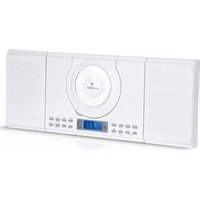
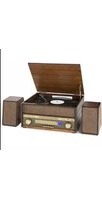
| Product Type | Hi-Fi System with CD, FM Radio, Bluetooth, USB/SD playback |
| Brand | Auna |
| Model | MCD-107C (10028090) |
| Power Supply | AC ~230V via mains cable |
| Connectivity | 2× Stereo speaker terminals, 2× LED power jacks (3.5mm), AUX in, USB, SD card slot, headphone jack, FM antenna |
| Playback Media | CD, USB drive, SD card (MP3/WAV), Bluetooth streaming, FM radio |
| Radio Bands | FM (with 20 presets) |
| Bluetooth | Yes, for wireless music streaming from mobile devices |
| Equalizer Presets | 5 presets: Flat, Classic, Rock, Pop, Jazz |
| Remote Control | Included, battery-powered (2× AAA, not included) |
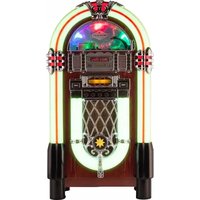
| Additional Features | Clock/Timer, Sleep timer, 8 lighting effects, Playlist programming (20 tracks), ID3 tag display, Mute |
| Safety | Read all instructions; do not immerse in water; do not open; use only qualified personnel for repairs |
| Cleaning | Use a soft, dry cloth; no solvents or chemical cleaners |
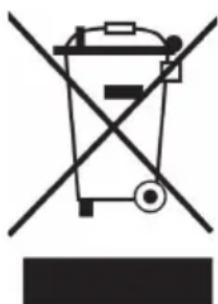
| Disposal | Do not dispose as household waste; recycle at appropriate collection point per WEEE directive |
Frequently Asked Questions - MCD-107C 10028090 Auna
User questions about MCD-107C 10028090 Auna
0 question about this device. Answer the ones you know or ask your own.
Ask a new question about this device
Download the instructions for your Hi-Fi System in PDF format for free! Find your manual MCD-107C 10028090 - Auna and take your electronic device back in hand. On this page are published all the documents necessary for the use of your device. MCD-107C 10028090 by Auna.
USER MANUAL MCD-107C 10028090 Auna
natural_image
Three black audio/video audio synthesizer units with digital display and speaker stands (no visible text or symbols)natural_image
Diagram of a car interior showing a valve mechanism with a black arrow indicating direction (no text or symbols present)natural_image
Diagram of a device interior showing three speakers with circular components and a central waveform (no text or symbols)natural_image
Symbol of a trash bin crossed out by a diagonal line, with no text or labels present.Elektroaltgeräte
Congratulations on purchasing this product. Please read and follow these instructions, in order to avoid damaging the item. We do not cover any damages that may arise from improper use of the item or the disregard of the safety instructions.
Important Safety Advice
- Read all instructions before using.
- To protect against a fire, electric shock or personal injury, do not immerse cord, electric plugs or device in water or other liquids.
- Do not expose the appliance to extreme temperatures. The appliance shall be used in moderate climates.
- The use of attachments that are not recommended by the appliance manufacturer may result in fire, electric shock or personal injury.
- Do not open the unit by removing any cover parts. Do not attempt to repair the unit. Any repairs or servicing should be done by qualified personell only.
- Only qualified persons may perform technical work on the product. The product may not be opened or changed. The components cannot be serviced by the user. The manufacturer is not responsible for any radio or TV interference caused by unauthorized modifications.
- The appliance is not a toy. Do not let children play with it. Never let children insert foreign objects into the appliance.
- Never clean the surface of the device with solvents, paint thinners, cleansers or other chemical products. Instead, use a soft, dry cloth or soft brush.
- Save these instructions.
Small objects
Keep small objects (i.e. screws, mounting material, memory cards etc.) and packaging out of the range of children. Do not let Children play with foil. Choking hazard!
Transporting the device
Please keep the original packaging. To gain sufficient protection of the device while shipment or transportation, make sure to put it back in its original packaging.
Cleaning the surface
Do not use any volatile liquids, detergents or the like. Use a clean dry cloth.
Technical Data
Article #
0028090
Connections
2 x Stereo speaker terminal
2x LED power jacks (3.5mm jacks);
1x Mains in
Power supply
Mains cable - AC \~230V
Scope of delivery
Controls
Front:


other
| Category | Value | |---|---| | Standby LED | 12 IR Sensor | | (On / Standby) | 2 13 FUNCTION | | Display | 3 14 | | VOL + / - 4 15 EQ | | | ■ / ST/MONO | 5 16 DISPLAY / ID3 | | MEM / CLK | 6 17 CD OPEN/CLOSE | | PLAY MODE | 7 18 Headphone jack | | FOLDER / PRE ↑ / ↓ | 8 19 AUX in jack | | LIGHT / TIMER | 9 20 USB port | | ▶▶/ ▶10-21 SD card slot | | | CD Tray | 11 |Rear:

| Antenna | 22 24 3.5mm-jacks | for LED light effects pwr supply |
| Speaker terminals | 23 25 Mains in |
Remote Control:
| I / ⏻ | On/Standby |
| MEM / CLK ADJ | Standby: Press and hold for setting the clock;CD/Radio: Preset function |
| FUNCTION | Choose function (CD/USB/SD/BT/Radio/AUX) |
| ▶▶ / Back/Next (title/station) | |
| ▶II | Play/Pause |
| ■ / ST/MONO | CD/USB/SD: StopRadio: Stereo/mono |
| FOLDER / PRE ↑ / ↓ | Radio: Next/previous station presetMP3: Next/previous folder |
| +10 / -10 Skip 10 tracks / go back 10 tracks | |
| OPEN Open CD tray | |
| VOL+/- Set volume | |
| PLAY MODE Random mode / repeat modes | |
| MUTE Mute (on/off) | |
| PRESET EQ Set preset EQ | |
| TIMER Activate timer / light effects | |
| SLEEP Activate sleep timer | |
| DISPLAY/ID3 Show ID3 information on display |

Setup / Initial Use
- Insert two AAA size batteries (not included) into the remote control battery compartment following the polarity markings inside the battery compartment.

natural_image
Diagram of a car interior showing a valve mechanism with a black arrow indicating direction (no text or symbols present)- Connect the AC cord to the wall outlet.
- When you first plug the unit into the mains, the unit will go into standby mode and the standby LED indicator (1) will light up.
- Connect the speaker wire to the speaker terminals (23) located on the back of the unit and connect the lighting wire with the 3.5mm plugs of the speaker box to the light wire jack (24) of main unit as well.


natural_image
Diagram of a device interior showing three speakers with circular components and a central waveform (no text or symbols)Funktionen
- Set the unit into standby mode ().

- Press MEM/CLK ADJ. „SET CLOCK“ and „24hr“ will be displayed. Use ▶▶ / ◀◀ to change the time format (12h/24h).
- Press MEM/CLK ADJ, To set the time. First, set the hour using ▶▶ / ◀◀. Then save with MEM/CLK ADJ and repeat for setting the minutes. Save changes with MEM/CLK.
Please note:
- The clock setting mode will automatically quit if no button is being pressed in a period of about 10 seconds after pressing the "Mem/Clk-adj" button.
- After disconnecting the unit from power supply, time has to be set again.
Radio
- Press FUNCTION repeatedly to choose FM mode.
- Use / to manually search for stations or (press and hold) for an automatic scan.
- Save the currently playing station to one of 20 available presets by pressing MEM and then choosing the desired position using ↑. Press MEM, again, to confirm.
You can use to directly go to preset menu.
Please note:
- All preset stations will be deleted, when the unit is disconnected from power supply.
- The unit changes back to play mode after 5 seconds without any changes.
- Pre-set stations will be overwritten without checkback.
Stereo/Mono
Press ST/MONO repeatedly. In particular when stereo signals are weak, it might be preferable to receive the program in mono.
CDs / MP3s (USB/SD)
- Choose the CD/USB/SD mode pressing FUNCTION repeatedly.
- Press OPEN to open the CD tray and put in a CD (with the printed side facing up) or
- Insert an SD card or a USB drive containing MP3 or WAV files.
- Navigate, conveniently using ▶II, ▶▶ / ◀◀ and ■. For MP3 CDs, USB drives and SD cards, use ↑/ ↓ to change folders.
ID3/Display
Press ID3/DISPLAY to show any available ID3 tags on the display. Press again to stop displaying ID3 tags. The display stays blank, when no ID3 tag is contained in the currently playing file. The display can only process latin characters / arabic numbers.
Play Mode
Press PLAY MODE repeatedly for:
(1): Repeat 1 (2): Repeat Folder (3): Repeat All (4): Random (5): Off
Playlist Programming
Up to 20 tracks can be programmed for disc play in any order.
- Insert a CD (or a USB drive / SD card) and press STOP ( ■).
- Press MEM and use / to choose the desired track for your playlist.
- Save pressing MEM.
- Repeat for further tracks.
- Press to listen to the programmed playlist. Delete with STOP ().
Please note:
- The playlist mode will be left after no input for 10 seconds.
- The USB port is not suitable for the connection with a computer USB port.
- Change FUNCTION before disconnecting SD cards or USB drives.
BT
- Press FUNCTION repeatedly to choose BT mode.
- Activate BT on your mobile device and connect with MCD-107C. The display shows „BT“ on successful connection attempt.
- Use ▶, ▶/ ▶ and ■. to navigate through your mobile music library, or use the external device, alternatively.
- Press and hold to disconnect, if you want to pair with another BT device.
Sleep Timer / Timer
- Press SLEEP (on the RC) repeatedly to set the desired sleep time (90 ... 80 ... 70 ... ... 10mins ... off). After the set time the device will switch to standby.
-
You can set the Timer to make the unit switch on and play music automatically at a chosen time (and, as well, switch to standby at another adjustable time).
-
Switch to standby.
- Press and hold TIMER (RC) to activate the timer function.
- Adjust the desired time for ON TIMER (procedure analogue to setting the clock; except: confirm pressing TIMER) and set the WAKE UP volume with the VOL+/- buttons.
- Choose the music source (USB/SD/Radio/CD) pressing FUNCTION repeatedly.
- Confirm and save changes by pressing TIMER.
- Repeat the procedure for OFF TIMER (time the device is meant to switch to standby).
• After the changes, the unit switches back to standby. - Press TIMER to activate / deactivate the timer function.
Please note:
- If there is no music source being detected (such as USB or CD) when the preset time is reached, system will default to tuner for wake up mode automatically. The system will tune in the latest radio frequency being listened to before being switched off
- For tuner wake up, the system will tune in the latest radio frequency being listened before being switched off.
- The system will return to standby mode automatically if no keys being pressed for 5 seconds.
Additional Functions
Light effects: This unit provides 8 differences lighting effects. You can select the desired effect by pressing the LIGHT button (RC) repeatedly.
EQ: Press EQ (RC) repeatedly to choose from five pre-set EQ settings (FLAT - CLASSIC - ROCK - POP - JAZZ).
Display: Press DISPLAY to show the current time on the display.
Mute: Press to mute / unmute sound output.
AUX-IN: Connect another audio device, e.g. (portable) CD player, MP3 player, (portable) cassette player, etc. to this system via a cord with 3.5mm dia jack plugs (not supplied). Connect one end of this cord to the 3.5mm dia. Headphone jack on the external device and the other end to the aux-in jack (19) on the front of the unit. When connected in this way it is possible to play back the music already on the connected device. Choose AUX mode pressing FUNCTION repeatedly.
Environment Concerns
natural_image
Symbol of a trash bin crossed with a diagonal line, no text or numbers presentAccording to the European waste regulation 2002/96/EG this symbol on the product or on its packaging indicates that this product may not be treated as household waste. Instead it should be taken to the appropriate collection point for the recycling of electrical and electronic equipment. By ensuring this product is disposed of correctly, you will hep prevent potential negative consequences for the environment and human health, which could otherwise be caused by inappropriate waste handling of this product. For more detailed information about recycling of this product, please contact your local council or your household waste disposal service.
Declaration of Conformity
Manufacturer: CHAL-TEC GmbH, Wallstraße 16, 10179 Berlin, Germany.
This product is conform to the following European directives:
1999/05/EC (R&TTE)
2011/65/EU (RoHS)
CE
- Elektroaltgeräte
- Important Safety Advice
- Small objects
- Transporting the device
- Cleaning the surface
- Technical Data
- Controls
- Setup / Initial Use
- Funktionen
- Please note:
- Radio
- Stereo/Mono
- CDs / MP3s (USB/SD)
- ID3/Display
- Play Mode
- Playlist Programming
- BT
- Sleep Timer / Timer
- Additional Functions
- Environment Concerns
- Declaration of Conformity
Brand : Auna
Model : MCD-107C 10028090
Category : Hi-Fi System