
BT4140 - Loudspeaker Karcher Audio - Free user manual and instructions
Find the device manual for free BT4140 Karcher Audio in PDF.


| Product Type | Bluetooth Portable Speaker |
| Model | BT4140 |
| Brand | Karcher Audio |
| Dimensions (W x D x H) | 60 x 60 x 50 mm |
| Built-in Battery | Li-Ion 3.7V, 400mAh |
| Input Voltage | DC 5V (USB) |
| Output Power | 2.5W (RMS) |
| Charging Time | Approximately 3 hours |
| Playback Time | Approximately 3 hours (depends on volume and audio source) |
| Bluetooth Connectivity | Yes, supports A2DP profile |
| Bluetooth Pairing Memory | Up to 6 devices |
| AUX Input | 3.5mm stereo audio cable (not included) |
| LED Status Indicator | Red: charging; Blue rapid blink: pairing; Blue blink every 2s: connected |
| Controls | Volume up/down, Next/Previous song, Play/Pause, Power ON/OFF switch |
| Safety Features | Overcharge protection, short-circuit protection, low battery indication |
| Cleaning Instructions | Wipe with dry cloth; do not use chemical cleaners |
| Usage Environment | Indoor use only; keep away from water, heat, and open flames |
| Included Accessories | USB charging cable |
Frequently Asked Questions - BT4140 Karcher Audio
User questions about BT4140 Karcher Audio
0 question about this device. Answer the ones you know or ask your own.
Ask a new question about this device
Download the instructions for your Loudspeaker in PDF format for free! Find your manual BT4140 - Karcher Audio and take your electronic device back in hand. On this page are published all the documents necessary for the use of your device. BT4140 by Karcher Audio.
USER MANUAL BT4140 Karcher Audio
natural_image
Two blue and black portable speakers with circular buttons, no visible text or symbolsBT 4140
natural_image
Line drawing of a portable electronic device with a cord and USB cable, no text or symbols presentHinweis:
- Read Instructions - All the safety and operating instructions should be read before the appliance is operated.
- Retain Instructions - The safety and operating instructions should be retained for future reference.
- Heed Warnings - All warnings on the appliance and in the operating instructions should be adhered to.
- Water and Moisture – Do not use the apparatus near water (e.g. bath tub, sink, swimming pool) or in wet places or tropical climates. Do not place objects filled with liquids, such as vases, on top of the apparatus. Do not expose the apparatus to dripping or splashing.
- Setup – The apparatus should only be placed on a stable, flat surface. Do not let the apparatus fall down or expose it to shock.
- Wall or Ceiling Mounting - The appliance should be mounted to a wall or ceiling only as recommended by the manufacturer.
- Ventilation - The appliance should be situated so that its location or position does not interfere with its proper ventilation. For example, the appliance should not be situated on a bed, sofa, rug, or similar surface that may block the ventilation openings; or, placed in a built-in installation, such as a bookcase or cabinet that may impede the flow of air through the ventilation openings. Ensure a minimum distance of 5 cm around the apparatus for sufficient ventilation. Ensure that the ventilation is not impeded by covering the ventilation openings with items such as newspapers, table-cloths, curtains, etc.
- Heat - The appliance should be situated away from heat sources such as radiators, heat registers, stoves, or other appliances (including amplifiers) that produce heat.
- Power Sources - The appliance should be connected to a power supply only of the type described in the operating instructions or as marked on the appliance.
- Cables and Plugs – The mains plug shall remain readily operable. All cables should be routed so that they are not likely to be walked on or pinched by items placed upon or against them, paying particular attention to cords at plugs, convenience receptacles, and the point where they exit from the appliance.
-
Cleaning - The appliance should be cleaned only as recommended by the manufacturer. Clean by wiping with a dry and clean cloth. Do not use chemical cleaners or detergents. Always pull the mains plug before cleaning the unit.
-
Non-use Periods - The power cord of the appliance should be unplugged from the outlet when left unused for a long period of time.
- Object and Liquid Entry - Care should be taken so that objects do not fall and liquids are not spilled into the enclosure through openings.
- Damage Requiring Service - The appliance should be serviced by qualified service personnel when:
a) The power-supply cord or the plug has been damaged; or
b) Objects have fallen, or liquid has been spilled into the appliance; or
c) The appliance has been exposed to rain; or
d) The appliance does not appear to operate normally or exhibits a marked change in performance; or
e) The appliance has been dropped, or the enclosure damaged.
- Servicing - The user should not attempt to service the appliance beyond that described in the operating instructions. All other servicing should be referred to qualified service personnel.
- Open Fire – Keep the apparatus away from open fires. Do not place naked flame sources, such as lighted candles on the apparatus.
- Thunderstorms – During a thunderstorm the mains plug should be unplugged.
- Safety Check – After servicing the technician should conduct a safety check in order to ensure that the apparatus is working properly and safely.
- Batteries – Always place batteries in the correct polarization into electrical components. Danger of explosion if battery is incorrectly replaced. Replace only with the same or equivalent type. Do not mix old and new batteries. Take attention to the environmental aspects of battery disposal. Batteries shall not be exposed to excessive heat such as sunshine, fire or the like. Remove batteries before disposing of the product.
- Headphones (if applicable) – Excessive sound pressure from earphones and headphones can cause hearing loss.
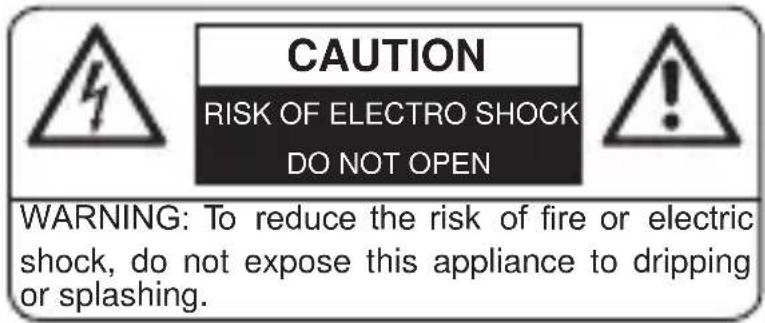
WARNING: To reduce the risk of electric shock, do not remove cover (or back). No user serviceable parts inside. Refer servicing to qualified service personnel.
EN

The lightning flash with arrowhead symbol within an equilateral triangle is intended to alert the user to the presence of uninsulated dangerous voltage within the product's enclosure that may be of sufficient magnitude to constitute a risk of electric shock to persons.

The exclamation point within an equilateral triangle is intended to alert the user to the presence of important operating and maintenance (servicing) instructions in the literature accompanying the appliance.
Additional Guidelines for Bluetooth® Devices
- The short wave radio signals of a Bluetooth ^ device may impair the operation of other electronic and medical devices.
- Switch off the device where it is prohibited.
Compatibility Disclaimer
Wireless performance is dependent on your device's Bluetooth® wireless technology. Refer to your device's user manual. The manufacturer cannot be held liable for any loss or leakage of or damage to data.
NOTES ABOUT THIS INSTRUCTION MANUAL
-
This instruction manual is published by the manufacturer without any warranty. Corrections and changes of this instruction manual for the removal of typographic mistakes and editorial inaccuracies as well as due to (technical) improvements (changes) of the devices can be done by the manufacturer at any time without announcement. Changes of this kind are considered in future versions of this user manual. All rights reserved.
-
All figures are only for illustration and do not always show the exact representation of the product.
- This unit is not intended for use by persons (including children) with reduced physical, sensory, or mental capacities, or lack of experience and knowledge, unless they have been given supervision or instruction concerning use of the appliance by a person responsible for their safety. Children should be supervised to ensure that they do not play with the unit.
FURTHER NOTES ON THE DEVICE
Setting a safe volume level
- If you continually listen to loud music, your hearing gradually adapts to it and gives you the impression that the volume is lower.
• What seems normal to you can be already for long time too loud and unhealthy.
• To protect yourself from this, set the volume to a low level. - Increase the volume slowly.
- Damage to your hearing can be extensive and cannot be reversed.
- If you notice a hearing problem, please consult a doctor.
Condensation
- Condensation may occur when moving the device from a cold to a warm environment. If there is moisture inside the player, it may not operate properly. Don't turn on the device and wait about one hour for the moisture to evaporate.
Unpacking
• Take out carefully the unit from the packing. Please keep the packing for further use.
- Carefully remove possible protection cardboards and slipcovers.
Overview
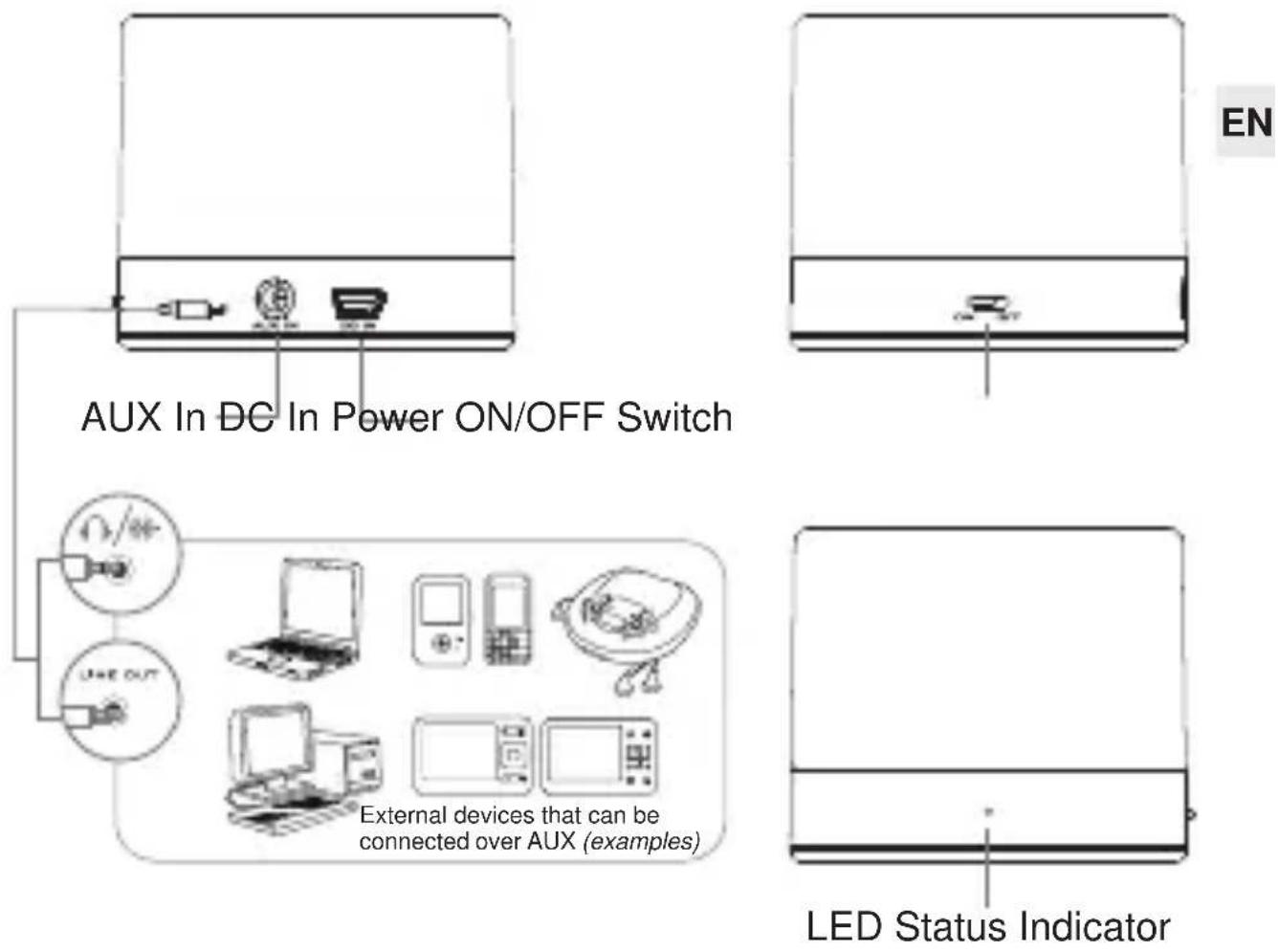
LED Status Indicator:
| LED Status Speaker Status | |
| LED lit red Charge mode | |
| LED red light goes off Charging finished | |
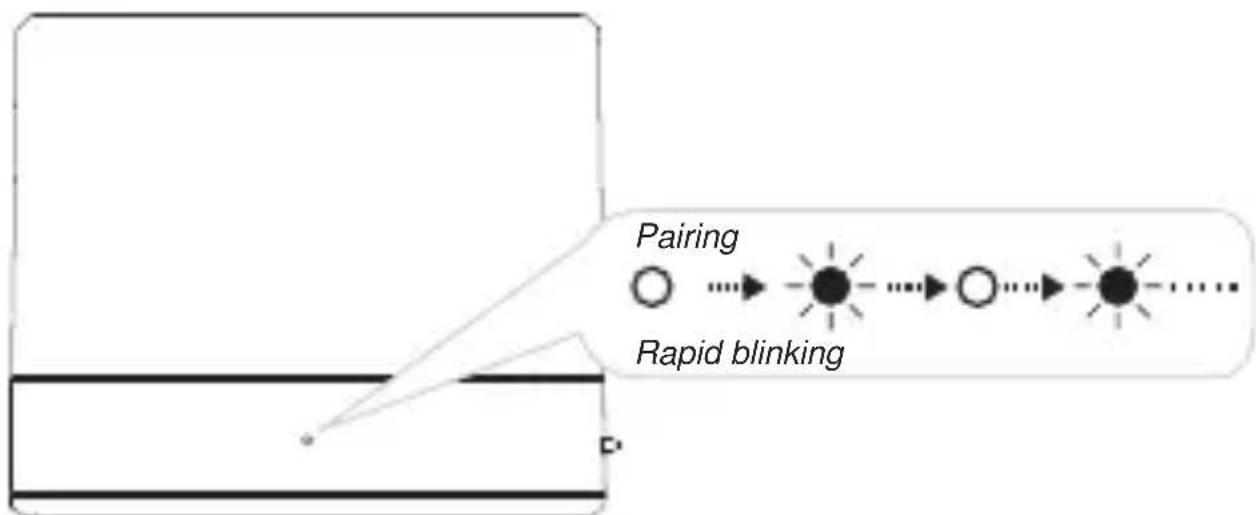
| LED blue light rapid blinking Pairing mode | |
| LED blinks every 2 seconds blue light | Connected to Bluetooth® device |
Power Supply
• The capacity of the built-in battery is 3.7V, 400mAh.
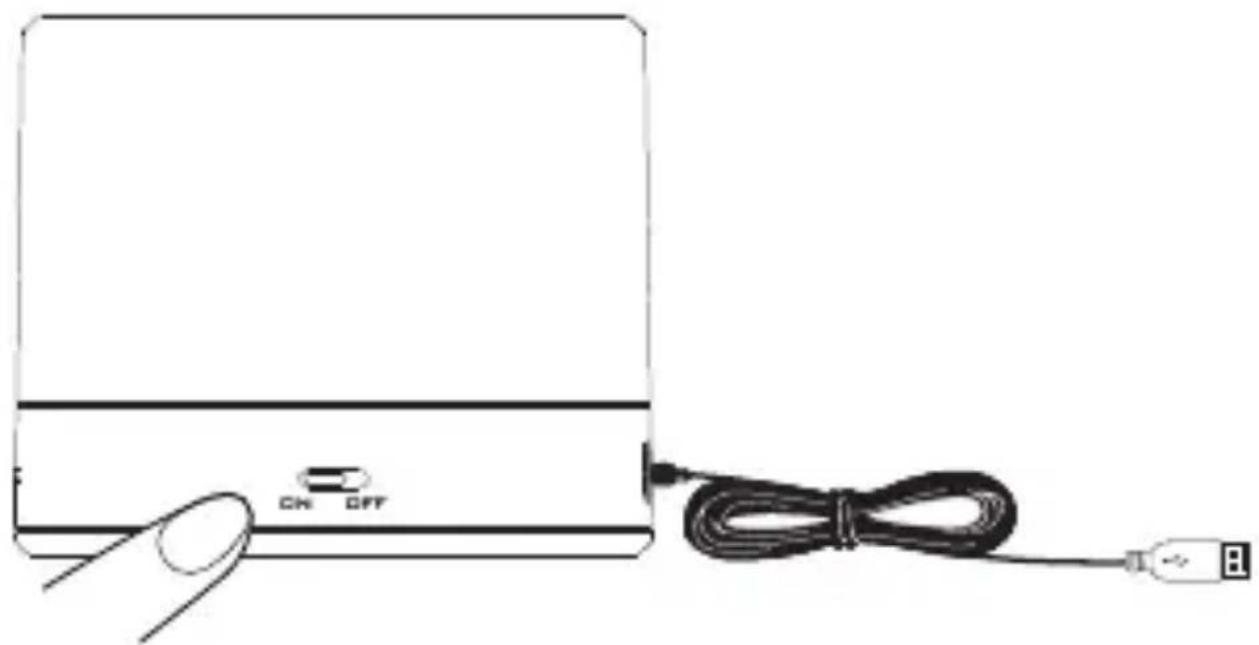
- To charge the battery, connect the speaker via the supplied USB cable to a computer (computer must be switched on). Under normal circumstances the charging takes about 3 hours. During charging the speaker can be either turned off or on (charging will take slightly longer, especially when music is being streamed).
- When charging, the charge indicator is lit red.
- Once the charging is finished, the charge indicator light will stop being lit red.
- To switch the speaker on, set the Power ON/OFF switch to "ON".
- Always switch the unit off after use by switching the Power ON/OFF switch to "OFF".
- Playback time of the battery is about 3 hours (depending on the volume and audio source).
natural_image
Line drawing of a portable electronic device with a cord and USB cable, no text or symbols presentNote:
The USB port on this speaker is only for charging. It cannot communicate with a computer and cannot be used for connecting other devices for playback.
Bluetooth® Connection
Settings on the Speaker
flowchart
graph LR
    A["Pairing"] --> B["Rapid blinking"]
    B --> C["End Point"]
    style A fill:#fff,stroke:#000
    style B fill:#000,stroke:#000
    style C fill:#fff,stroke:#000
- When beep tones are heard with the LED status indicator blinking blue light rapidly, it is Bluetooth® pairing mode.
Settings on Your Device
flowchart
graph LR
    A["Mobile Device"] --> B["Connectivity Connectivity"]
    B --> C["Bluetooth"]
    B --> D["Network"]
    B --> E["Connections"]
    B --> F["Operator"]
    B --> G["Internet"]
    B --> H["USB"]
    B --> I["Search results"]
    I --> J["BT 4140"]
    I --> K["PT-4140"]
    I --> L["PASSECODE"]
    L --> M["0000"]
    L --> N["CONNECTED"]
EN
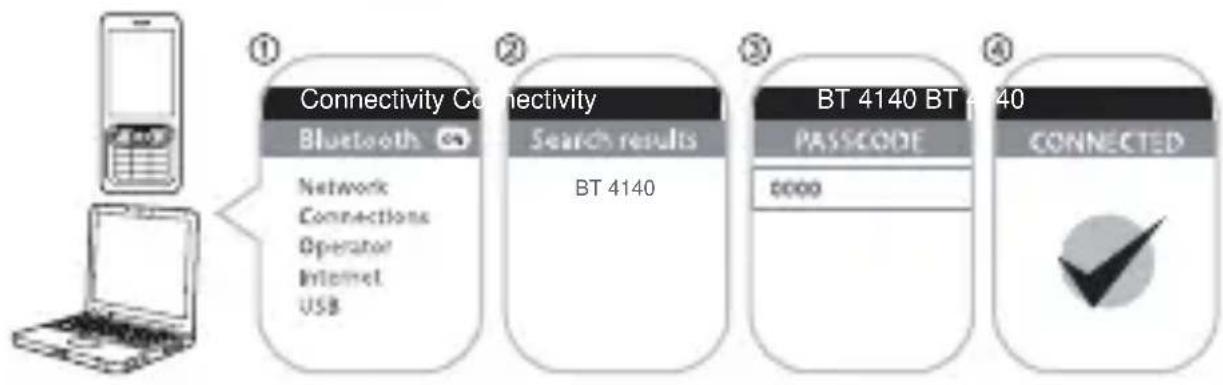
- Turn on the Bluetooth ^ feature on your device.
- Search for BT 4140.
- Pair and connect to BT 4140. If prompted for a password, enter "0000".
- Pairing successful, LED blinks blue every 2 seconds, ready to stream music.
Note:
- The above illustration is just an example of a device's menu. The menu of your device might look different.
Ready to Stream Music via Bluetooth®
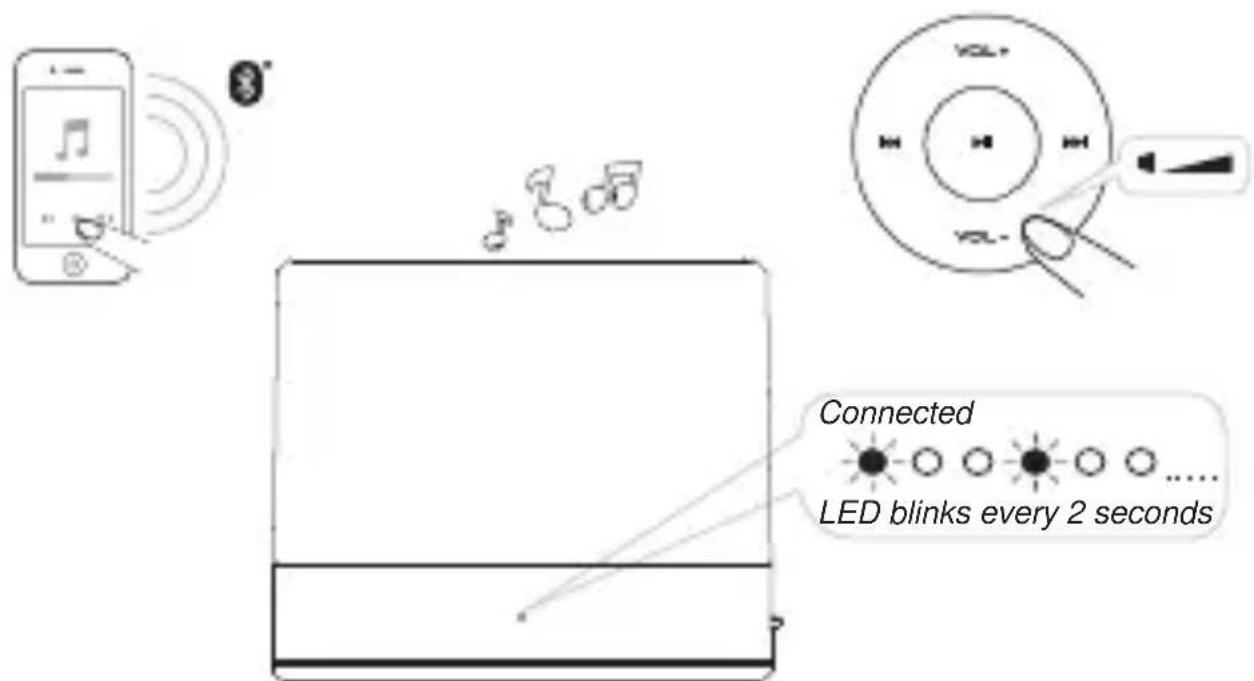
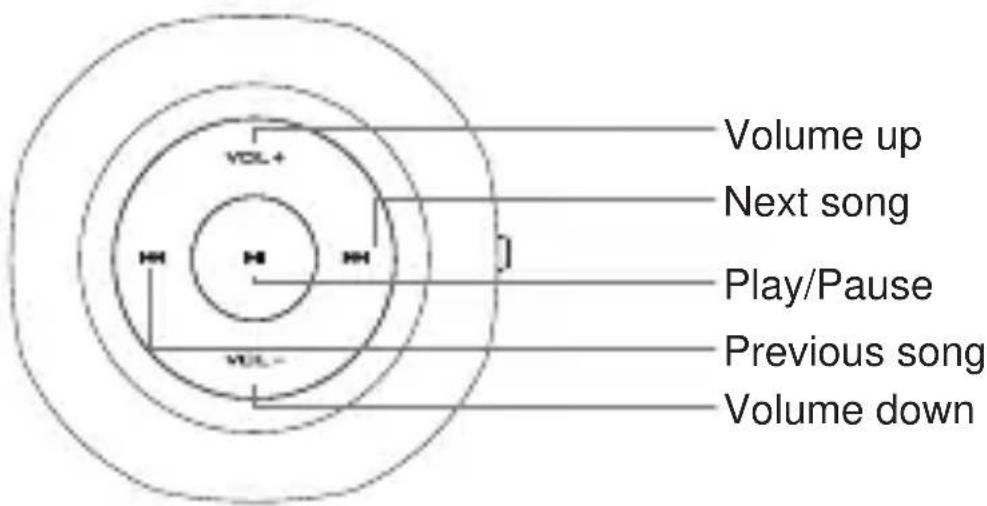
- Press the Volume +/- buttons to adjust the volume on the speaker. A beep tone will be heard when the maximum volume is reached.
• Additionally you can set the volume and equalizer on your device in order to reach the perfect sound.
Other Features
Reconnection Between Bluetooth® Device and BT 4160
You can reconnect your paired Bluetooth® device to your speaker easily:
- Select the BT 4140 entry on the Bluetooth® device to reconnect. Any of the 6 previously connected Bluetooth® devices would be able to reconnect to BT 4140 when it is powered on and not connected to any device.
Notes:
- BT 4140 is able to remember up to 6 paired devices in its memory bank, eliminating the need to re-pair again should any of these devices connect to it. Should a 7th device be paired to BT 4140, the first device will be erased from its memory. At any time a maximum memory of 6 devices are being retained.
- Press and hold for 8 seconds the Play/Pause button to disconnect BT 4140 from the paired device. The LED will be lit blue steadily. To reconnect to the paired device, again press and hold for 8 seconds the Play/Pause button.
AUX In for Playback of Other Audio Devices
You can connect the audio output of an external device such as an MP3 player to this unit to listen to the sound of that device through the amplifier of this music system.
- To connect the external device please use a standard stereo audio cable (3.5 mm to 3.5 mm plugs) (not included) to connect the headphone out or audio line out of the external device to the AUX input socket of BT 4140.
- Switch the external device (e.g. MP3 player) on.
- Start playback of the external device.
- To select songs and use Play/Pause functions you need to do this on the external device. The buttons on BT 4140 are without function in AUX mode.
- Remember to switch off the unit when you are finished using the external device.
Note:
The AUX In has a fixed volume. To adjust the volume when playing via AUX In, use the volume setting on your external device.
EN
Troubleshooting
If there should be any problem with this product, please try to solve it with the help of the following information before contacting service. Most problems can be solved easily.
• BT 4140 cannot be powered on
Make sure that the built-in battery is charged. Ensure that the Power ON/OFF switch is set to "On". When the speaker is powered on, the LED status indicator will light up.
- There is no Bluetooth ^® link between BT 4140 and the external device
Ensure that your Bluetooth® enabled device supports the A2DP profile. Refer to its user manual on how to turn on the Bluetooth® functions and capabilities.
You may also try the following:
- Delete the BT 4140 name entry from your Bluetooth® device paired memory list and perform the steps from “Bluetooth® Connection” to re-pair your device with BT 4140.
- Ensure that both BT 4140 and your Bluetooth® device are not connected to any other devices.
- On some Bluetooth ^ devices you may need to select BT 4140 as your default output device after pairing is completed.
- Bluetooth ^® link is established and paired between the devices but there is no music
Make sure that the volume of the speaker and the external device is not set to zero (muted).
With some built-in Bluetooth® enabled computers, 3rd party USB Bluetooth® dongles or other devices, you may be required to manually specify/set-up the audio output as BT 4140. Please refer to the documentation of the external device for further information.
Specifications
Built-In Battery: Li-Ion 3.7V, 400mAh
Input Voltage: DC 5V (USB)
Output Power: 2.5W (RMS)
Dimensions (WxDxH) ca.: 60 x 60 x 50 mm
Technical specifications and design may change without notice.
Batteries
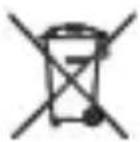
Batteries may not be disposed of in regular house hold trash. Every consumer has the obligation to return batteries to special disposal locations.
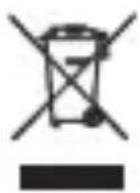
Disposal of Used Electrical & Electronic Equipment
The meaning of the symbol on the product, its accessory or packaging indicates that this product shall not be treated as household waste. Please, dispose of this equipment at your applicable collection point for the recycling of electrical & electronic equipments waste. By ensuring the correct disposal of this product, you will help prevent potential hazards to the environment and to human health, which could otherwise be caused by unsuitable waste handling of this product. The recycling of materials will help conserve natural resources. For more detailed information about recycling of this product, please contact your local city office, your household waste disposal service or the shop where you purchased the product.

Bluetooth
The Bluetooth® word mark and logos are registered trademarks owned by Bluetooth SIG, Inc. and any use of such marks by Karcher is under license. Other trademarks and trade names are those of their respective owners.
Bluetooth® QDID: B019164
Karcher
www.karcher-products.de

- BT 4140
- Hinweis:
- Additional Guidelines for Bluetooth® Devices
- Compatibility Disclaimer
- NOTES ABOUT THIS INSTRUCTION MANUAL
- FURTHER NOTES ON THE DEVICE
- Setting a safe volume level
- Condensation
- Unpacking
- Overview
- Power Supply
- Note:
- Bluetooth® Connection
- Settings on Your Device
- Ready to Stream Music via Bluetooth®
- Other Features
- Notes:
- AUX In for Playback of Other Audio Devices
- Troubleshooting
- • BT 4140 cannot be powered on
- - There is no Bluetooth ® link between BT 4140 and the external device
- You may also try the following:
- - Bluetooth ® link is established and paired between the devices but there is no music
- Specifications
- Batteries
- Disposal of Used Electrical & Electronic Equipment
- Bluetooth
- Karcher
Brand : Karcher Audio
Model : BT4140
Category : Loudspeaker