
CR0133 - Commande IFM - Free user manual and instructions
Find the device manual for free CR0133 IFM in PDF.


| Product Type | ExtendedController (freely programmable mobile controller) |
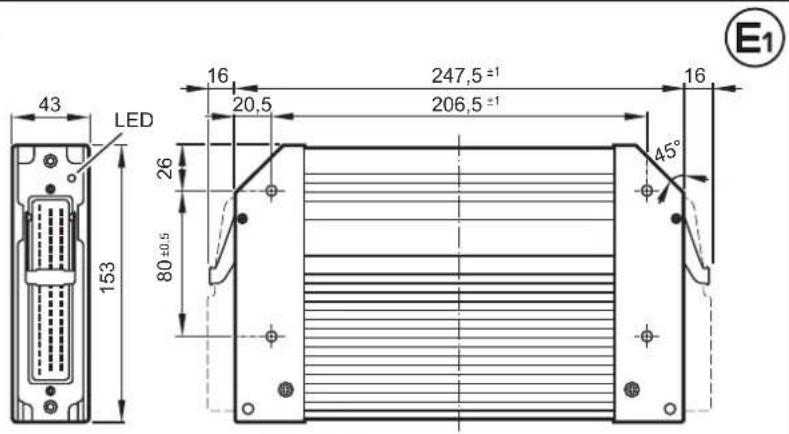
| Dimensions (H x W x D) | 153 x 247.5 x 43 mm |
| Weight | 1.6 kg |
| Operating Voltage | 8...32 V DC |
| Current Consumption | ≤ 210 mA (without external load at 24 V DC) |
| Processor | 32-bit CPU Infineon TriCore |
| Memory | Flash: 2 Mbytes, RAM: 2 Mbytes, Remanent: 64 Kbytes |
| Number of Inputs/Outputs | 32 inputs / 32 outputs (total 64 channels) |
| Input Types (St side) | Analogue (0...10 V, 0...32 V, 0...20 mA, ratiometric), Frequency (≤ 30 kHz), Digital (positive/negative), Resistor (3...690 Ω, 0.016...30 kΩ) |
| Output Types (St side) | Digital (high/low side), PWM (20...250 Hz), Current-controlled (0.02...4 A), Analogue (0.02...10 V) – some with H-bridge |
| CAN Interfaces | 5 CAN interfaces (CAN 2.0 A/B, ISO 11898, 50 kbit/s...1 Mbit/s) |
| Programming System | CODESYS 2.3 (IEC 61131-3) |
| Protection Rating | IP67 (with inserted connector and individually sealed cores) |
| Housing / Storage Temperature | -40...85 °C (depending on load) / -40...85 °C |
| Mounting | Screw connection using 4 M5 screws (torque 8 ±2 Nm) |
| Connection | 2 x 55-pin connectors (AMP or Framatome), latched, reverse polarity protected |
| USB Interface | Virtual COM port, USB 2.0 compatible, max. 1 MBaud |
| Serial Interface | RS-232 (9.6...115.2 kbit/s), point-to-point |
| Standards | CE, E1, EN 61000-6-2/4, ISO 7637-2, EN 60068-2, ISO 16750-3 |
| Maintenance | Maintenance-free; do not open housing; repair only by manufacturer |
| Safety | Not approved for safety tasks; user responsible for application programs; disconnect power before handling |
| Spare Parts / Accessories | Approved ifm accessories only (connectors, cables); fuses: 2 A T, 15 A (see manual) |
Frequently Asked Questions - CR0133 IFM
User questions about CR0133 IFM
0 question about this device. Answer the ones you know or ask your own.
Ask a new question about this device
Download the instructions for your Commande in PDF format for free! Find your manual CR0133 - IFM and take your electronic device back in hand. On this page are published all the documents necessary for the use of your device. CR0133 by IFM.
USER MANUAL CR0133 IFM
Installation instructions
ExtendedController
ecomotion
CR0133
UK
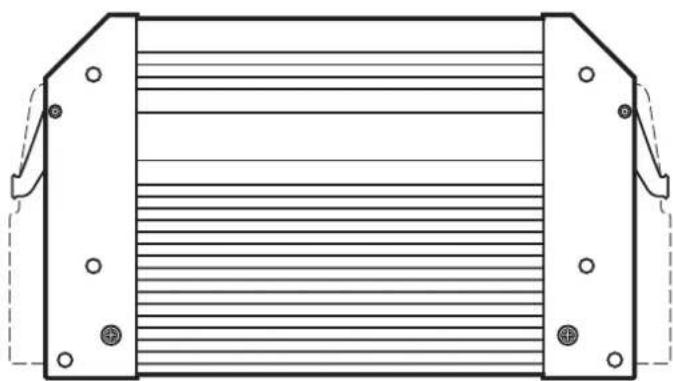
natural_image
Technical line drawing of a mechanical component with flanges and internal ribs (no text or symbols)Contents
1 Preliminary note 4
1.1 Symbols used.... 4
1.2 Warning signs used 4
2 Safety instructions 5
2.1 General....5
2.2 Target group 5
2.3 Electrical connection 5
2.4 Housing temperature 5
2.5 Tampering with the device 6
2.6 Electromagnetic compatibility.... 6
2.7 Electrical welding on vehicles and plants 6
3 Functions and features 6
4 Installation....7
4.1 Fixing 7
4.2 Installation position....7
4.3 Mounting surface 8
4.4 Heat dissipation 8
5 Electrical connection....9
5.1 Wiring 9
5.1.1 Assignment of the connectors 9
5.2 Ground connection 9
5.3 Fuses 10
5.4 Laying the supply and signal cables.... 10
5.4.1 GND connections of the Ex connection side .....11
5.5 Frequency and analogue inputs....11
5.6 Resistor inputs .....11
5.6.1 Unused input I15 12
5.7 Supply low-side digital outputs ( B_L ) 12
5.8 CAN wiring St/Ex side 13
5.8.1 Point-to-point wiring 13
5.8.2 Open CANopen network 13
5.9 Connection technology.... 13
5.10 USB interface 14
5.10.1 Hardware requirement 14
5.10.2 Short-circuit protection 14
6 Set-up.... 15
6.1 Required documentation 15
6.2 Interfaces and system requirements ..... 15
6.3 Programming via USB interface 15
6.3.1 Install the USB drivers 16
6.4 Uninstall the drivers 16
7 Technical data.... 17
7.1 Mechanical and electric data 17
7.2 Test standards and regulations 19
7.3 St side / Characteristics of the inputs 20
7.4 St side / Characteristics of the outputs. 23
7.5 Ex side / Characteristics of the inputs 25
7.6 Ex side / Characteristics of the outputs 27
7.7 St side / Wiring 29
7.8 Ex side / Wiring 30
8 Maintenance, repair and disposal. 31
9 Approvals / standards 31
1 Preliminary note
This document applies to devices of the type "ExtendedController" (art. no.: CR0133).
It is deemed as a part of the device.
This document is intended for specialists. These specialists are people who are qualified by their appropriate training and their experience to see risks and to avoid possible hazards that may be caused during operation or maintenance of the device. The document contains information about the correct handling of the device.
Read this document before use to familiarise yourself with operating conditions, installation and operation. Keep this document during the entire duration of use of the device.
Adhere to the safety instructions.
1.1 Symbols used
▶ Instruction
Reaction, result
[...] Designation of pushbuttons, buttons or indications
→ Cross-reference

Important note
Non-compliance can result in malfunction or interference.

Information
Supplementary note
1.2 Warning signs used
WARNING
Warning of serious personal injury.
Death or serious irreversible injuries may result.
CAUTION
Warning of personal injury.
Slight reversible injuries may result.
NOTE
Warning of damage to property.
2 Safety instructions
2.1 General
These instructions are part of the device. They contain information and illustrations about the correct handling of the device and must be read before installation or use.
Observe the operating instructions. Non-observance of the instructions, operation which is not in accordance with use as prescribed below, wrong installation or incorrect handling can seriously affect the safety of operators and machinery.
2.2 Target group
These instructions are intended for authorised persons according to the EMC and low-voltage directives. The device must only be installed, connected and put into operation by a qualified electrician.
2.3 Electrical connection
Disconnect the device externally before handling it. If necessary, also disconnect any independently supplied output load circuits.
If the device is not supplied by the mobile on-board system (12/24 V battery operation), it must be ensured that the external voltage is generated and supplied according to the criteria for safety extra-low voltage (SELV) as this voltage is supplied without further measures to the connected controller, the sensors and the actuators.
The wiring of all signals in connection with the SELV circuit of the device must also comply with the SELV criteria (safety extra-low voltage, safe electrical isolation from other electric circuits).
If the supplied SELV voltage is externally grounded (SELV becomes PELV), the responsibility lies with the user and the respective national installation regulations must be complied with. All statements in this document refer to the device the SELV voltage of which is not grounded.
The connection terminals may only be supplied with the signals indicated in the technical data and/or on the device label and only the approved accessories of ifm electronic may be connected.
2.4 Housing temperature
According to the technical specifications below the device can be operated in a wide ambient temperature range. Because of the additional internal heating the housing walls can have high perceptible temperatures when touched in hot environments.
2.5 Tampering with the device
In case of malfunctions or uncertainties please contact the manufacturer. Tampering with the device can seriously affect the safety of operators and machinery. It is not permitted and leads to the exclusion of any liability and warranty claims.
2.6 Electromagnetic compatibility
This is a class A product. It can cause radio interference in domestic areas. In this case the operator is requested to take appropriate measures.
2.7 Electrical welding on vehicles and plants
Welding work on the chassis frame must only be carried out by qualified persons.
Remove and cover the plus and minus terminals of the batteries.
Disconnect all contacts of the controller from the on-board system prior to welding on the vehicle or plant. Connect the earth terminal of the welding device directly to the part to be welded.
Do not touch the controller or electric cables with the welding electrode or the earth terminal of the welding device.
Protect the controller against weld slag.
3 Functions and features
The freely programmable controllers of the "ExtendedController" series are rated for use under difficult conditions (e.g. extended temperature range, strong vibration, intensive EMC interference).
They are suited for direct installation in machines in mobile and robust applications. Integrated hardware and software functions (operating system) offer high protection for the machine.
The controllers can be used as CANopen master.

WARNING
The "ExtendedController" series is not approved for safety tasks in the field of safety of persons.

WARNING
The user is responsible for the safe function of the application programs which he created himself. If necessary, he must additionally carry out an approval test by corresponding supervisory and test organisations according to the national regulations.
4 Installation
4.1 Fixing
▶ Fix the controller to a flat surface using 4 M5 screws.
Screw material: steel or stainless steel
Tightening torque: 8 ±2 Nm
▶ Connect the housing to GND ( 5.2 Ground connection)
NOTE
Use screws with a low head to avoid that the connector is damaged when placed and locked.
| Screws to be used (examples) Standard | |
| Button head hexagon socket screws (M5 x L) ISO 7380 | |
| Cylinder screws with hexagon socket and low head (M5 x L) DIN 7984 | |
| Cutting screws for metric ISO thread with low head DIN 7500 |
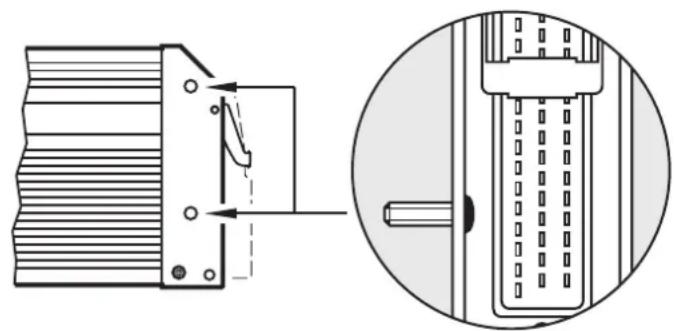
natural_image
Technical diagram showing a mechanical component with a close-up view of its internal structure (no text or symbols present)Example button head hexagon socket screw
4.2 Installation position
▶ Align the controller so that the cable entries of the connectors face downwards.
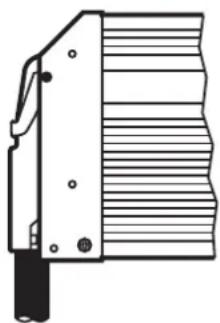
natural_image
Technical line drawing of a mechanical component with grooves and a handle (no text or symbols)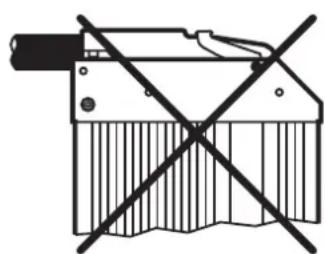
natural_image
Pure mechanical component diagram without any text, numbers, or symbols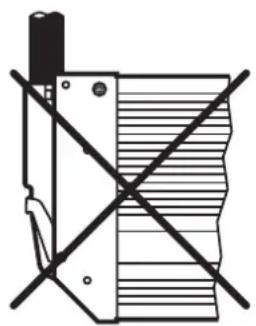
natural_image
Pure electrical circuit lines without any symbolsPreferred installation position
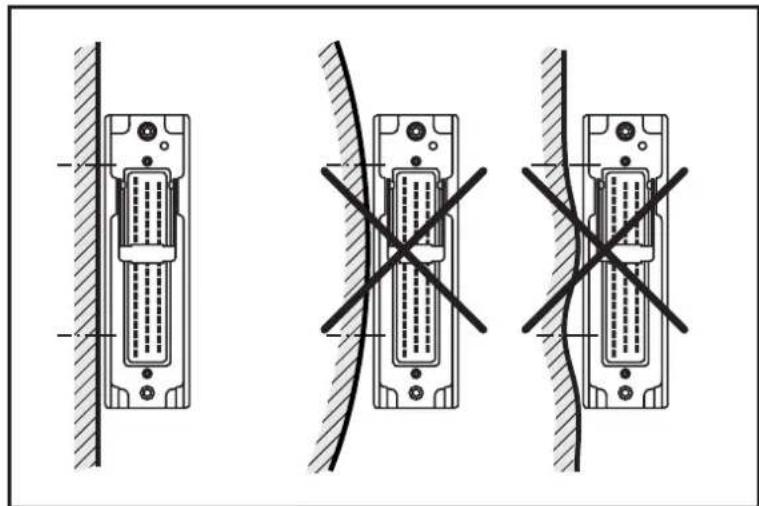
4.3 Mounting surface
NOTE
The housing must not be exposed to any torsional forces or mechanical stress.
▶ Use compensating elements if there is no flat mounting surface available.
natural_image
Three technical diagrams showing different connection configurations of a 24-pin D-sub connector, with no visible text or symbols.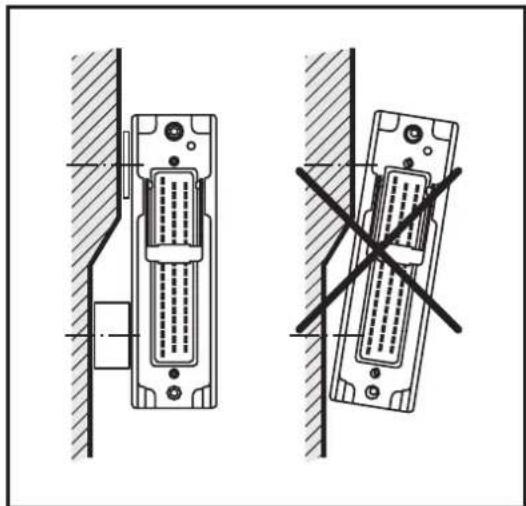
natural_image
Technical line drawing of two identical electronic connectors with a diagonal cross mark indicating a dislocation or repair (no text or symbols present)Mounting surface
4.4 Heat dissipation
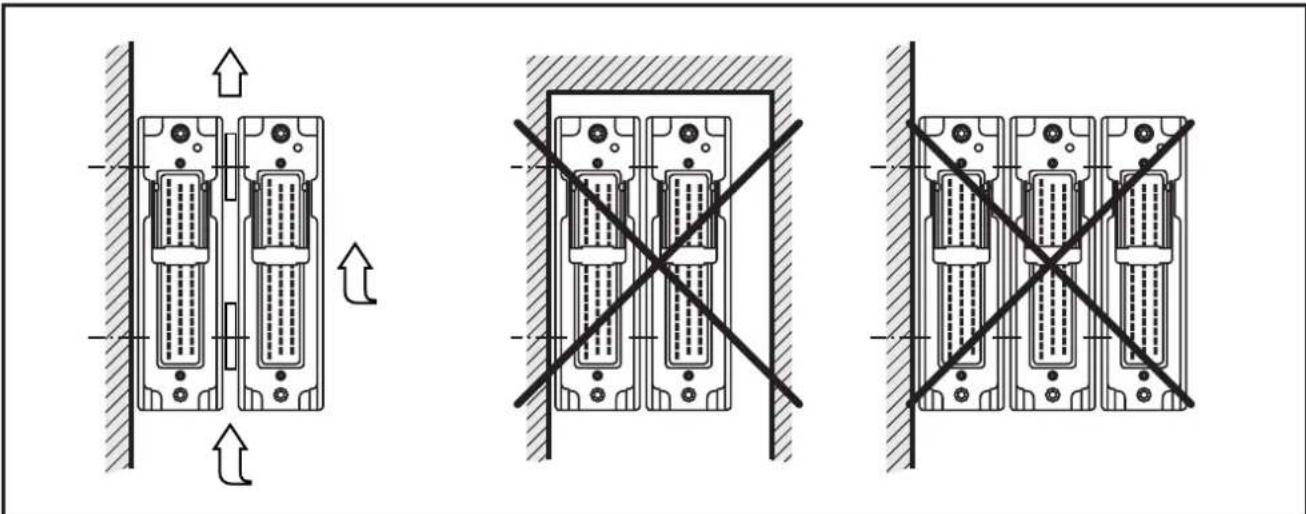
▶ Ensure sufficient heat dissipation as the internal heating of the electronics is conducted away via the housing.
In case of sandwich mounting of controllers use spacers.
natural_image
Three schematic diagrams of server rack components with directional arrows indicating movement, no text or symbols present.Heat dissipation and sandwich mounting
5 Electrical connection
5.1 Wiring
Wiring ( 7 Technical data)

Only connect the connector pins as shown in the pin layout.
Unspecified connector pins remain unconnected.
▶ Connect all indicated supply cables and GND terminals (St and Ex connection side).
5.1.1 Assignment of the connectors
▶ Note the device label.

Assignment of the connectors on the device label
NOTE
Inversion of the connectors can lead to damage to the reference voltage output (pin 51, controller side).
NOTE
Inversion of the connectors can lead to damage to a connected PC or notebook.
5.2 Ground connection

To ensure the protection of the device against electrical interference and the safe function of the device, the housing must be connected to the ground of the vehicle.
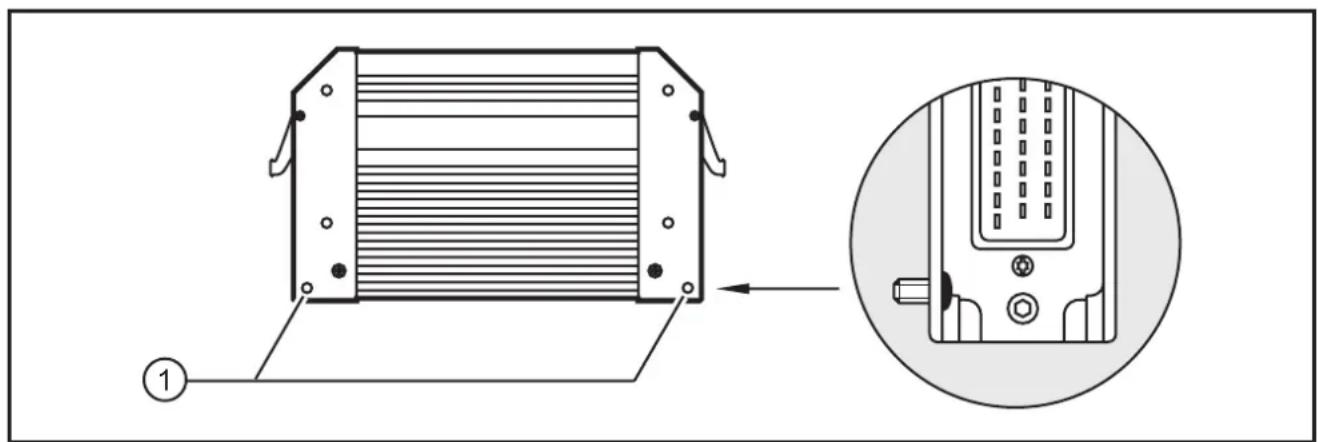
1: Drill holes for ground connection
▶ Establish a connection between the device and the ground of the vehicle using M5 screws.
Screws to be used ( 4.1 Fixing)
5.3 Fuses
The individual electric circuits must be protected in order to protect the whole system.
| Connection side Description Potential Pin no. Fuse | ||||
| St (Standard) Supply voltage | voltage sensors/module VBB | s | St-10 ≤ 2 | A T |
| Supply voltage outputs VBB | o | St-19 ≤ 15 | A | |
| Supply voltage via relay VBB | R | St-01 ≤ 15 | A | |
| Ex (Extended) Supply voltage | voltage sensors/module VBB | s | Ex-10 ≤ 2 | A T |
| Supply voltage output group 1 VBB | 1 | Ex-19 ≤ 15 | A | |
| Supply voltage output group 2 VBB | 2 | Ex-01 ≤ 15 | A | |
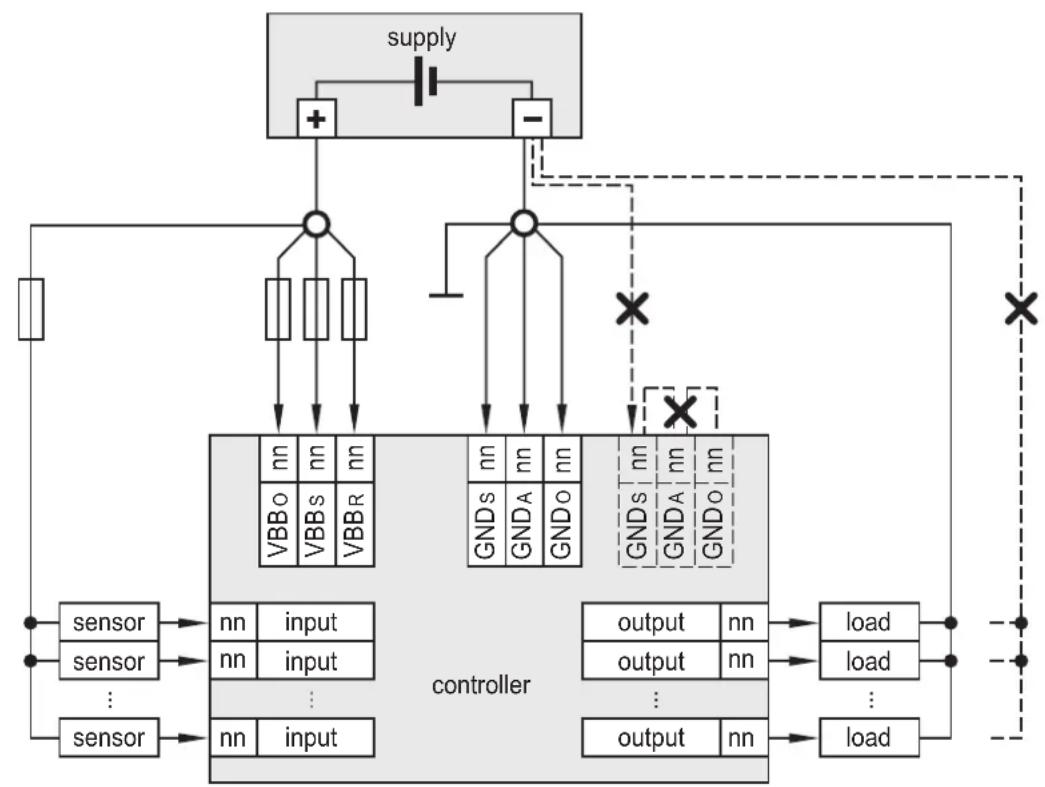
5.4 Laying the supply and signal cables
flowchart
graph TD
    A["supply"] --> B["+"]
    A --> C["-"]
    B --> D["controller"]
    C --> D
    D --> E["output"]
    D --> F["load"]
    E --> G["nn"]
    F --> H["nn"]
    I["sensor"] --> J["nn input"]
    K["sensor"] --> L["nn input"]
    M["sensor"] --> N["nn input"]
    O["VBBo"] --> P["nn"]
    Q["VBBs"] --> R["nn"]
    S["VBBR"] --> T["nn"]
    U["GNDs"] --> V["nn"]
    W["GNDA"] --> X["nn"]
    Y["GNDo"] --> Z["nn"]
    AA["X"] --> AB["×"]
    AC["X"] --> AD["×"]
    AE["+"] --> B
    AF["-"] --> C
    AG["+"] --> B
    AH["+"] --> C
    AI["+"] --> D
    AJ["+"] --> E
    AK["+"] --> F
    AL["+"] --> G
    AM["+"] --> H
    AN["+"] --> I
    AO["+"] --> Q
    AP["+"] --> R
    AQ["+"] --> S
    AR["+"] --> T
    AS["GNDs"] --> Y
    AT["GNDA"] --> Z
    AU["GNDo"] --> AA
    AV["GNDs"] --> AB
    AW["GNDA"] --> AC
    AX["GNDo"] --> AD
Example St connection side (X = not permissible)
WARNING
The linking of connections in the plug is not permitted and can affect the safety of operators and machinery.
▶ Basically all supply and signal cables must be laid separately.
▶ Screen signal cables in EMC critical applications.
▶ Connect supply and ground cables to the controller and the sensors/actuators via the respective common star point.

If a prewired connection cable is used, remove the cores with unused signal inputs and outputs.
Unused cores, in particular core loops, lead to interference coupling that can influence the connected controller.
5.4.1 GND connections of the Ex connection side
▶ Connect all GND connections of the Ex connection side to the common GND star point.
5.5 Frequency and analogue inputs
▶ Operate inputs with screened cables, so that useful signals are not affected by external interference.
▶ Connect screens to ground on one side.
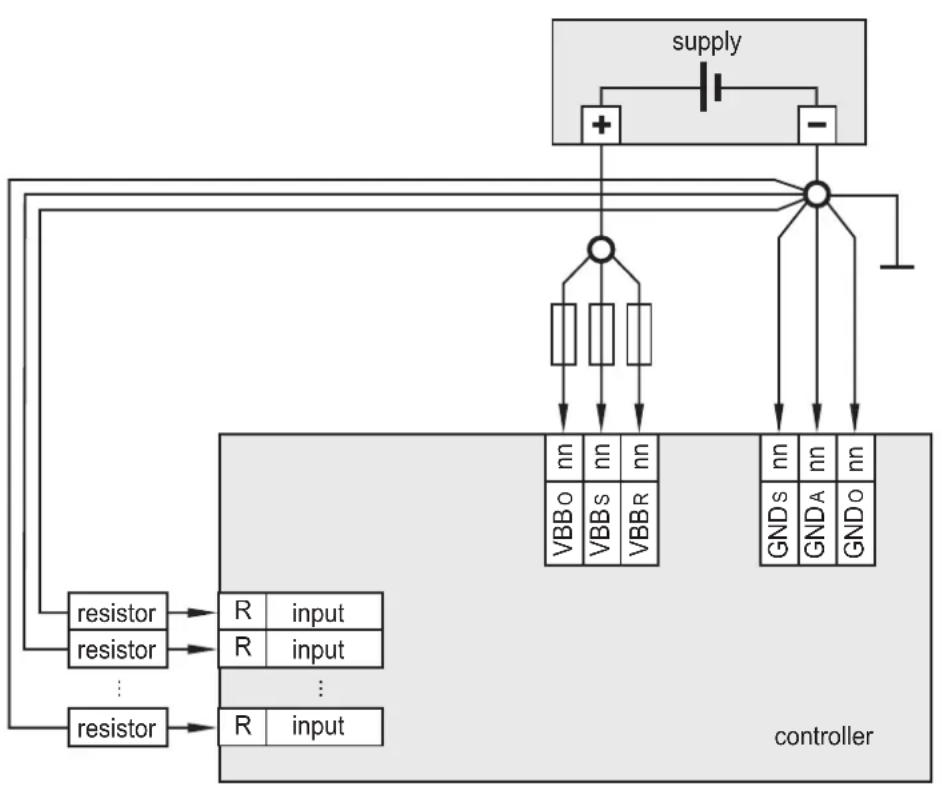
5.6 Resistor inputs
flowchart
graph TD
    A["supply"] --> B["+"]
    A --> C["-"]
    B --> D["Resistor R input"]
    C --> E["Resistor R input"]
    D --> F["controller VBBo nn"]
    D --> G["controller VBBs nn"]
    D --> H["controller VBBR nn"]
    E --> I["controller GNDs nn"]
    E --> J["controller GNDA nn"]
    E --> K["controller GNDo nn"]
    F --> L["controller"]
    G --> M["controller"]
    H --> N["controller"]
    I --> O["controller"]
    J --> P["controller"]
    K --> Q["controller"]
    L --> R["controller"]
    M --> S["controller"]
    N --> T["controller"]
    O --> U["controller"]
    P --> V["controller"]
    Q --> W["controller"]
Ground return resistor inputs
▶ Equip each resistor with an own, separated ground return to ensure measurement accuracy.
5.6.1 Unused input I15

If the input I15 is not used it must be configured as digital input.
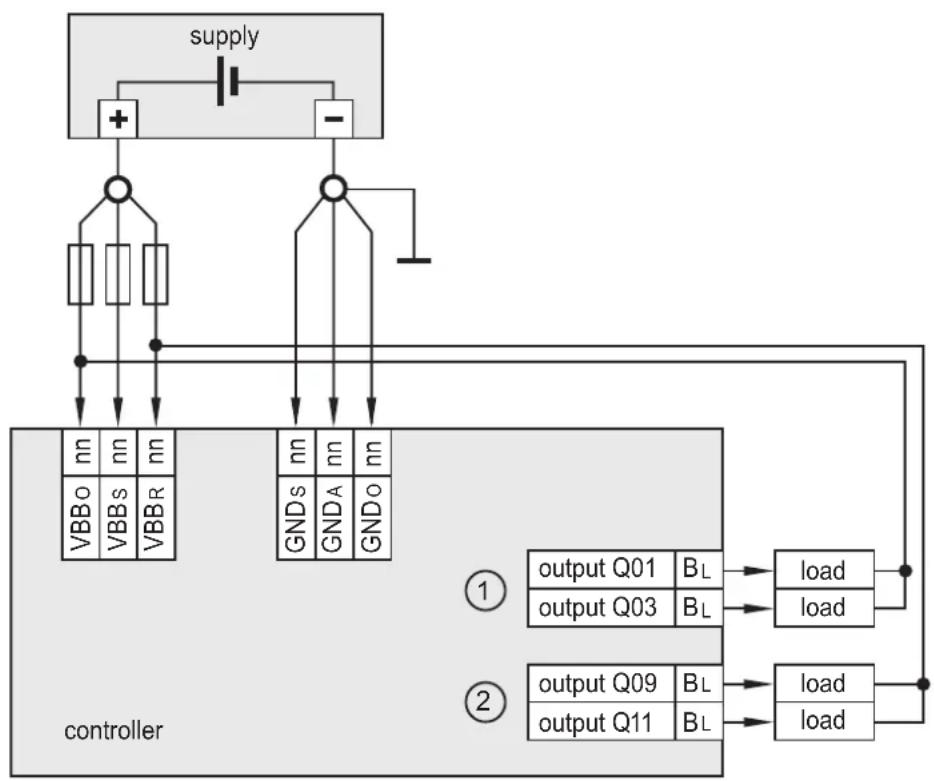
5.7 Supply low-side digital outputs ( B_L )
flowchart
graph TD
    A["supply"] --> B["+"]
    A --> C["-"]
    B --> D["VBBo"]
    B --> E["VBBs"]
    B --> F["VBBR"]
    C --> G["GNDs"]
    C --> H["GNDA"]
    C --> I["GNDO"]
    D --> J["controller"]
    E --> J
    F --> J
    G --> J
    H --> J
    I --> J
    J --> K["output Q01 BL"]
    J --> L["output Q03 BL"]
    K --> M["load"]
    L --> N["load"]
    O["①"] --> P["output Q09 BL"]
    O --> Q["output Q11 BL"]
    P --> R["load"]
    Q --> S["load"]
Supply low-side digital outputs ( B_L )
1: Outputs of the output group VBB 0
2: Outputs of the output group VBBR
▶ Note the potential allocation of the outputs.
The supply of an output within an output group must only be carried out via the corresponding, protected potential.
5.8 CAN wiring St/Ex side
5.8.1 Point-to-point wiring
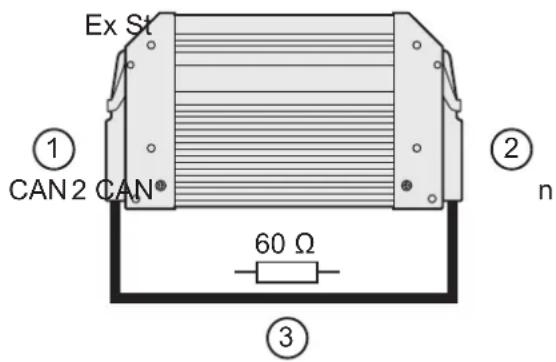
- Extended side: CAN2 (with factory pre-configuration)
- Standard side: CANn (interface selectable)
- Terminating CAN resistor in the cable
5.8.2 Open CANopen network
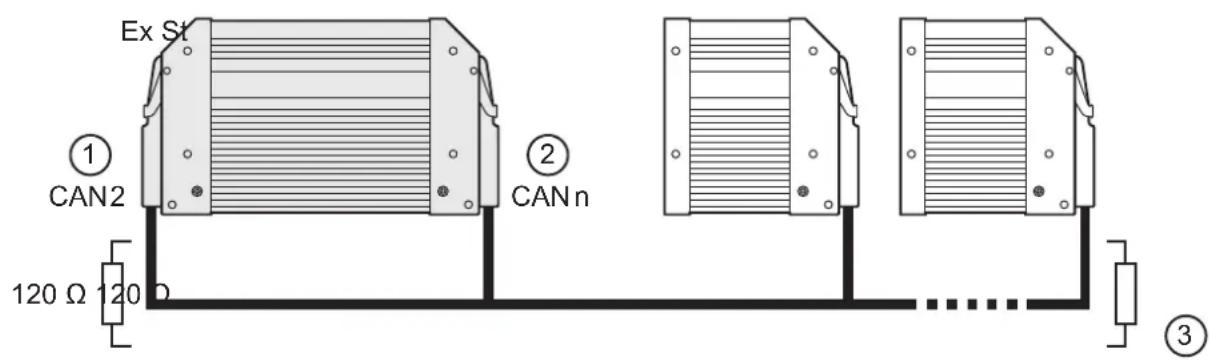
- Extended side: CAN2 (with factory pre-configuration)
- Standard side: CANn (interface selectable)
- Terminating CAN resistors
5.9 Connection technology
NOTE
Only connect the 55-pole connectors when the supply voltage is disconnected. No "hot plugging" is permitted.
5.10 USB interface
5.10.1 Hardware requirement
The USB controller used is USB 2.0 compatible. The USB interface is provided as a virtual COM port under Windows ( 6.3 Programming via USB interface).
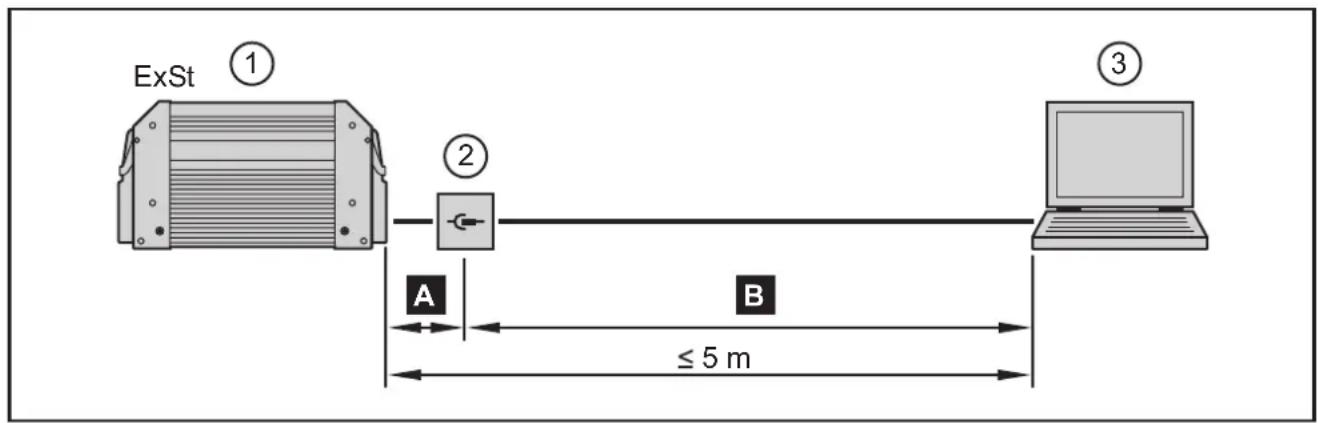
flowchart
graph LR
    ExSt["ExSt ①"] --> Switch["Switch ②"]
    Switch --> Laptop["Laptop ③"]
    Switch -->|≤ 5 m| A["A"]
    Switch -->|≤ 5 m| B["B"]
- Controller (2 x 55-pole connector; USB port on St side)
- USB connector for programming and service purposes
- Notebook/PC
A Connection controller to USB connector, permanent ( ≤ 3 m).
▶ Position the USB connector in immediate vicinity to the controller. The cable length "A" considerably influences the quality of the USB data transmission.
B Connection USB connector to notebook / PC, temporary
▶ Use a connection cable with the designation "Full Speed/High Speed" (= USB connection cable with twisted and screened cores).
▶ Do not make a connection using several USB connection cables.
▶ Remove the connection cable after the programming or service works.
5.10.2 Short-circuit protection
NOTE
The USB interface is not protected against short circuits with a live wire outside the following voltage ranges:
USB_P: -0.5...3.8 V DC
USB_N: -0.5...3.8 V DC
USB_5V: -0.5...10.0 V DC
A short circuit will destruct the USB interface.
6 Set-up

On delivery the extended side is pre-configured as CANopen slave.
However, the user can also program the extended side freely.
6.1 Required documentation
The user can easily create the application program by means of the IEC 61131-3 compliant programming system CODESYS 2.3. In addition to the programming system CODESYS, the following documents are required for programming and commissioning of the controller:
• System manual CR0133
(alternatively CODESYS 2.3 online help)
- Manual on PLC programming with CODESYS 2.3
(alternatively CODESYS 2.3 online help)
The system manual CR0133 is available for download on the internet: www.ifm.com → Data sheet search → CR0133 → Operating instructions
The manual on PLC programming with CODESYS 2.3 and the online help are automatically installed on the PC upon installation of the CODESYS package from the ecomatmobile DVD.
As an alternative, the CODESYS package can be downloaded from the internet: www.ifm.com → Service → Download → Systems for mobile machines*
*) Download area with registration
6.2 Interfaces and system requirements

System requirement for RS-232 and CAN:
Microsoft Windows XP SP1 or higher
System requirement for USB:
Microsoft Windows XP SP2, Windows 7
6.3 Programming via USB interface

Note in general:
- The controller can be connected to any USB interface. The number of the COM port does not change.
- Only connect one controller for programming to the PC.
- Special USB and COM port drivers are required.
6.3.1 Install the USB drivers
The driver provides a "virtual COM port", i.e. another artificial serial interface, on the PC.
The driver file "USB CR0032 setup vxxxx.exe" is made available on the ecomatmobile DVD.
As an alternative, the driver is also available on the internet.
www.ifm.com → Service → Download → Systems for mobile machines*
*) Download area with registration

Changes to the system settings of the PC require extended user rights. Contact your system administrator.

Installation under Windows 7 will be described in the following. In other Windows versions there may be different menu names or structures.
▶ Start the driver file "USB CR0032 setup vxxxx.exe" and follow the setup instructions.
The driver files and a documentation will be copied to the following directory: C:\Program Files (x86)\ifm electronic\USB_Driver_R360.
▶ Reboot the PC.
▶ Connect the controller to a free USB port
- Carry out the driver installation according to the "Installation_Guide".
The document "Installation_Guide.pdf" can be found in the following directory: C:\Program Files (x86)\ifm electronic\USB_Driver_R360\WHQL_Certified_Driver\Documentation\Installation_Guide.pdf
The driver to be installed can be found in the following directory:
C:\Program Files (x86)\ifm electronic\USB_Driver_R360\WHQL_Certified_Driver\
6.4 Uninstall the drivers

If a driver is to be updated, the installed drivers have to be uninstalled first.
▶ Uninstall the drivers according to the "Installation_Guide" (chapter 4). The document "Installation_Guide.pdf" can be found in the following directory: C:\Program Files (x86)\ifm electronic\USB_Driver_R360\WHQL_Certified_Driver\Documentation\Installation_Guide.pdf
7 Technical data
7.1 Mechanical and electric data
CR0133
Mobile controller ExtendedController
32-bit processor
32 inputs
32 outputs
5 CAN interfaces
CODESYS 2.3
8...32 V DC
C€
Technical data
Mechanical data
Housing
Dimensions (H x W x D)
Installation
Connection
Weight
Housing/storage temperature
Protection rating
Electrical data
Input / output channels (total)
Inputs
Outputs
Operating voltage
Switch-on voltage
Overvoltage
Undervoltage detection St
Undervoltage shutdown St
Undervoltage detection Ex
Undervoltage shutdown Ex
Reverse polarity protection
Current consumption
CAN interfaces 1...5
Baud rate
Communication profile
Note
Controller as black-box system to implement a central or decentralised system design
| closed, screened metal housing with flange fastening |
| 153 x 247.5 x 43 mm |
| screw connection by means of 4 M5 x L screws to DIN 7500 or DIN 7984 mounting position horizontal or vertical to the mounting wall |
| 2 55-pin connectors, latched, protected against reverse polarity, type AMP or Framatome AMP junior timer contacts, crimp connection 0.5/2.5 mm2 |
| 1.6 kg |
| - 40...85 °C (depending on the load) / - 40...85 °C |
| IP 67 (for inserted connector with individually sealed cores, e.g. EC2084) |
| 64 (32 inputs / 32 outputs) |
| configurabledigital for positive/negative sensor signals, positive with diagnostic capabilities analogue (0...10/32 V, 0...20 mA, ratiometric)frequency (≤ 30 kHz)resistance measurement (3... 690 Ω, 0.016...30 kΩ, ) |
| configurabledigital positive/negative switching (high/low side)analogue (0.02...10 V)PWM output (20...250 Hz), current-controlled |
| 8...32 V DC> 10 V DC≤ 36 V for t ≤ 10 s |
| for 7.5 V ≤ UB ≤ 8 Vfor 7.1 V ≤ UB < 7.5 V for t ≥ 100 ms (depending on the software) |
| for UB ≤ 7.8Vfor 6.8 V ≤ UB ≤ 7.5 V |
| yes |
| ≤ 210 mA (without external load at 24 V DC) |
| CAN interface 2.0 A/B, ISO 1189850 Kbits/s...1 Mbit/s (default 125 Kbits/s)CANopen, CiA DS 301 V4.01, CiA DS 306 V1.3or SAE J 1939 or free protocol |
| If not otherwise specified, the data apply to the St and Ex side. |
CR0133 Technical data
| Serial interfaceBaud rateTopologyProtocol |
| Virtual COM port USB, max. 1 MBaud |
| Processor 32-bit CPU Infi neon TriCore 1 |
| Device monitoring undervoltage monitorin |
| Process monitoring concept St Second s |
| Physical memory flash: 2 Mbytes |
Software/programming
| Programming system CODESYS version |
Indicators
| Status LED | St |
| Ex |
| Operating states | St |
No longer valid if the colours and/or fl ashing modes are changed by the application program.
| RS-232 C9.6...115.2 kBit/s (default 115.2 kbits/s)point-to-point (max. 2 participants); master-slave connectionpredefined ifm protocol (INTELHEX) |
| 796 |
| ngwatchdog functionchecksum test for program and systemexcess temperature monitoring |
| witch-off mode for 8 outputs each via a relay |
| RAM: 2 Mbytesremanent memory: 64 Kbytes |
| 2.3 (IEC 61131-3) |
| three-colour LED (R/G/B) |
| LED red / LED green |
| LED colour | Status | Description |
| - | off | no operating voltage or fatal error |
| yellow | 1 x on | initialisation or reset checks |
| orange | on | error in the start-up phase |
| green | 5 Hz | no operating system loaded |
| 2 Hz | run | |
| on | stop | |
| red | 2 Hz | run with error |
| on | fatal error or stop with error |
| LED colour | Status | Description |
| - | off | no operating voltage or fatal error |
| red/green | 1 x on | initialisation or reset checks |
| green | 5 Hz | no operating system loaded |
| 2 Hz | CANopen Operational | |
| on | CANopen Preoperational | |
| on/off 200 / 1000 ms | CANopen Stop | |
| red | 5 Hz | undervoltage, application stopped |
| on | fatal error or CANopen bus off |
Note The status LEDs have different levels of brightness
7.2 Test standards and regulations
| CR0133 Technical data | |
| Test standards and regulations | |
| CE marking EN 61000-6-2: 2005 Electromagnetic compatibility (EMC) | Noise immunity |
| EN 61000-6-4: 2007 Electromagnetic compatibility (EMC)Emission standard | |
| E1 marking UN/ECE-R10 Emission standard | Immunity with 100 V/m |
| Electrical tests ISO 7637-2: 2004 Pulse 1, severity level: IV; function state C | Pulse 2a, severity level: IV; function state APulse 2b, severity level: IV; function state CPulse 3a, severity level: IV; function state APulse 3b, severity level: IV; function state APulse 4, severity level: IV; function state APulse 5, severity level: III; function state C(data valid for the 24 V system)Pulse 4, severity level: III; function state C(data valid for the 12 V system) |
| Climatic tests EN 60068-2-30: 2006 Damp heat, cyclic | upper temperature 55°C, number of cycles: 6 |
| EN 60068-2-78: 2002 Damp heat, steady statetest temperature 40°C / 93% RH,Test duration: 21 days | |
| EN 60068-2-52: 1996 Salt spray testseverity level 3 (motor vehicle) | |
| Mechanical tests | ISO 16750-3: 2007 Test VII; Vibration, randommounting location: vehicle body |
| EN 60068-2-6: 2008 Vibration, sinusoidal10...500 Hz; 0.72 mm/10 g; 10 cycles/axis | |
| ISO 16750-3: 2007 Bumps30 g/6 ms; 24,000 shocks | |
| Tests for railway applications | EN 50155-12-2: 2007 Electronic equipment used on rolling stock |
7.3 St side / Characteristics of the inputs
| CR0133 St side / Characteristics of the |
| I00...07Multifunction inputs with supply vol-tage independent levels for frequen-cy measurement |
| Current input 0...20 mA (A) |
| Voltage input 0...10 V (A) |
| Voltage input 0...32 V (A) |
| Voltage input ratiometric (A) |
| Frequency input (FRQ) |
| Digital input ( B_LH ) |
| I08...11Multifunction inputs with fi xed levelsfor frequency measurement |
| Current input 0...20 mA (A) |
| Voltage input 0...10 V (A) |
| Voltage input 0...32 V (A) |
| Resolution 12 bits | |
| Accuracy ± 1 % FS | (in the measuring range 0...20 mA: ± 2 % FS) |
| Measuring ranges 0...10 V, 0...32 V, 0...20 mA, ratiometric | |
| Input resistance 390 Ω | |
| Input frequency ≤ 1 kHz (default) | 35 Hz) |
| Input resistance 65.6 kΩ | |
| Input frequency ≤ 1 kHz (default) | 35 Hz) |
| Input resistance 50.7 kΩ | |
| Input frequency ≤ 1 kHz (default) | 35 Hz) |
| Input resistance 50.7 kΩ | |
| Input frequency ≤ 1 kHz (default) | 35 Hz) |
| Input resistance 3.2 kΩ | |
| Input frequency ≤ 30 kHz | |
| Switch-on level > 0.35...0.55 U | 8 |
| Switch-off level < 0.29 U | B |
| Input resistance 3.2 kΩ | |
| Input frequency ≤ 1 kHz (default) | 35 Hz) |
| Switch-on level > 0.7 U | 8 |
| Switch-off level < 0.3 U | 8 |
| Diagnostics Short circuit to VBB | > 0.95 UB |
| Diagnostics Short circuit to GND / wire break | < 1 V |
| Resolution 12 bits | |
| Accuracy ± 1 % FS | (in the measuring range 0...20 mA: ± 2 % FS) |
| Measuring ranges 0...10 V, 0...32 V, 0...20 mA, ratiometric | |
| Input resistance 390 Ω | |
| Input frequency ≤ 1 kHz (default) | 35 Hz) |
| Input resistance65.6 kΩ | |
| Input frequency ≤ 1 kHz (default) | 35 Hz) |
| Input resistance 50.7 kΩ | |
| Input frequency ≤ 1 kHz (default) | 35 Hz) |
CR0133 St side / Characteristics of the inputs
| Voltage input ratiometric (A) |
| Frequency input (FRQ*) |
| Digital input (BL) |
| I12...14Digital / resistor inputs |
| Digital input (BI) |
| Resistor input (R) |
| Input resistance 50.7 kΩ | |
| Input frequency ≤ 1 kHz (default | 35 Hz) |
| Input resistance 3.2 kΩ / 50.7 kΩ in case of corresponding parameter setting | |
| Input frequency ≤ 30 kHz | |
| Switch-on level >4 V | |
| Switch-off level < 2 V | |
| Input resistance 3.2 kΩ | |
| Input frequency ≤ 1 kHz (default | 35 Hz) |
| Switch-on level >0.7 U | B |
| Switch-off level < 0.3 U | B |
| DiagnosticsShort circuit to VBB | >0.95 UB |
| DiagnosticsShort circuit to GND / wire break | < 1 V |
| CR0133 St side / Characteristics of the inputs | ||
| I15Digital / resistor input | Resolution 12 bits | |
| Digital input (BL) | Input resistance 3.2 kΩ | |
| Input frequency ≤ 1 kHz (default) | 35 Hz) | |
| Switch-on level >0.7 U | s | |
| Switch-off level < 0.3 U | s | |
| DiagnosticsShort circuit to VBB | >0.95 Us | |
| DiagnosticsShort circuit to GND / wire break | < 1 V | |
| Voltage on the pin when not connected | ≤ 0.2 V | |
| Resistor input (R) | Measuring current < 5.0 mA | |
| Input frequency 50 Hz | ||
| Measuring range 3...680 Ω | ||
| Accuracy ± 4 % FS | ||
| DiagnosticsShort circuit to VBB / wire break | >700 Ω | |
| Note | ||
| Test input (pin 50) During the test mode (e.g. programming) the connector pin must be connected to VBB (8...32 V DC).During the "RUN" mode the test input must not be connected. | ||
| Abbreviations A | AnalogueBH Binary high sideBL Binary low sideFRQ Frequency / pulse inputs with levels depending on the supply voltageFRQ* Frequency / pulse inputs with fixed levelsH H-bridge functionPWM Pulse width modulationR Resistor inputVBBo Supply outputsVBBs Supply sensors/moduleVBBR Supply via relay | |
ifm electronic gmbh • Friedrichstraße 1 • 45128 Essen
We reserve the right to make technical alterations without prior notice!
CR0133 / page 6 25.07.2014
7.4 St side / Characteristics of the outputs
CR0133 St side / Characteristics of the outputs
| Q00...03Q08...11Digital/ PWM outputs |
| Digital output (BH and BHI) |
| PWM output (PWM) |
| Current-controlled output (PWMi) |
| Q04...07Q12...15Digital/ PWM outputs |
| Digital output (BH) |
| PWM output (PWM) |
| Current-controlled output (PWMi) |
| Protective circuit for inductive loads | integrated |
| Diagnosis wire break via current | feedback |
| Diagnosis short circuit via current | feedback |
| Switching voltage 8...32 V DC | |
| Switching current 0.02...2 A / 0.02...4 A(of which 4 with H-bridge function) | |
| Output frequency 20...250 Hz (per channel) | |
| Pulse/pause ratio 1...1000 %o (adjustable via software) | |
| Resolution 1 %o | |
| Switching current 0.02...2 A / 0.02...4 A(of which 4 with H-bridge function) | |
| Output frequency 20...250 Hz (per channel) | |
| Control range 0.02...2 A / 0.04...4 A | |
| Setting resolution 1 mA | |
| Control resolution 1 mA / 2 mA | |
| Load resistance | ≥6 Ω / ≥3 Ω (at 12 V DC)≥12 Ω / ≥6 Ω (at 24 V DC) |
| Accuracy | ±1.5 % FS |
| Protective circuit for inductive loads | integrated |
| Diagnosis wire break via current | feedback |
| Diagnosis short circuit via current | feedback |
| Switching voltage | 8...32 V DC |
| Switching current 0.02...3 A |
| Output frequency 20...250 Hz (per channel) | |
| Pulse/pause ratio 1...1000 ‰ (adjustable via software) | |
| Resolution 1 ‰ | |
| Switching current 0.02...3 A | |
| Output frequency 20...250 Hz (per channel) | |
| Control range 0.03...3 A | |
| Setting resolution 1 mA | |
| Control resolution 2 mA | |
| Load resistance ≥4 Ω / (at 12 V DC)≥8 Ω / (at 24 V DC) | |
| Accuracy | ±1.5 % FS |
| CR0133 St side / Characteristics of the outputs | |
| Reference voltage V_REF OUT (sensor supply) | for sensors and joysticks5/10 V, 400 mA, accuracy ± 7 %short-circuit proof and overload protected(10 V reference only from a supply voltage U_s ≥ 13 V) |
| Internal relays NO contacts for the second switch-off way of the outputs.In series to 2 groups of 8 semiconductor outputs.Forced control via the hardwareand additional control via the user program. | |
| The relays must always be switched without load! | |
| Load current per output group( VBB_R , VBB_o ) | ≤12 A(for continuous operation ≤6 A; i.e. operation ≥10 min) |
| Overload protection(valid for all outputs) | max. 5 minutes (at 100% overload) |
| Short-circuit strength to GND Switch-off of the outputs is carried out via the output driver | |
We reserve the right to make technical alterations without prior notice!
CR0133 / page 8 25.07.2014
7.5 Ex side / Characteristics of the inputs
CR0133 Ex side / Characteristics of the inputs
| IN00...03Analogue / digital inputs |
| Current input 0...20 mA (A) |
| Voltage input 0...10 V (A) |
| Voltage input 0...32 V (A) |
| Voltage input ratiometric (A) |
| Digital input ( B_LH ) |
| IN04...05Digital / resistor inputs |
| Digital input ( B_L ) |
| Resolution 12 bits | |
| Accuracy ± 1 % FS | (in the measuring range 0...20 mA: ± 2 % FS) |
| Measuring ranges 0...10 V, 0...3 | 2 V, 0...20 mA, ratiometric |
| Input resistance 390 Ω | |
| Input frequency ≤ 1 kHz (default) | 35 Hz) |
| Input resistance 65.6 kΩ | |
| Input frequency ≤ 1 kHz (default) | 35 Hz) |
| Input resistance 50.7 kΩ | |
| Input frequency ≤ 1 kHz (default) | 35 Hz) |
| Input resistance 50.7 kΩ | |
| Input frequency ≤ 1 kHz (default) | 35 Hz) |
| Input resistance 3.2 kΩ | |
| Input frequency ≤ 1 kHz (default) | 35 Hz) |
| Switch-on level > 0.7 U | B |
| Switch-off level < 0.3 U | B |
| Diagnostics*Short circuit to VBB | > 0.95 UB |
| Diagnostics*Short circuit to GND / wire break | < 1 V |
| *) only binary low-side (BI) | |
| Resolution 12 bits | |
| Input resistance 3.2 kΩ | |
| Input frequency ≤ 1 kHz (default) | 35 Hz) |
| Switch-on level > 0.7 U | B |
| Switch-off level < 0.3 U | B |
| DiagnosticsShort circuit to VBB | > 0.95 UB |
| DiagnosticsShort circuit to GND / wire break | < 1 V |
| Voltage on the pin when not connected | ≤ 0.2 V |
CR0133 Ex side / Characteristics of the inputs
| Resistor input (R) |
| IN06...11Digital inputs |
| Digital input ( B_LH ) |
| IN12...15Digital / frequency inputs |
| Digital input ( B_LH ) |
| Frequency input (FRQ) |
| Measuring current < 2.0 mA | |
| Input frequency 50 Hz | |
| Measuring range 16 Ω...30 kΩ | |
| Accuracy ± 2% FS: 16 Ω...3 kΩ | ± 5% FS: 3...15 kΩ± 10% FS: 15...30 kΩ |
| DiagnosticsShort circuit to VBB | >31 kΩ |
| Resolution 12 bits |
| Input resistance 3.2 kΩ | |
| Input frequency ≤ 1 kHz (default | 35 Hz) |
| Switch-on level >0.7 U | B |
| Switch-off level < 0.3 U | B |
| Diagnostics*Short circuit to VBB | >0.95 UB |
| Diagnostics*Short circuit to GND / wire break | < 1 V |
*) only binary low-side (B _L )
| Resolution 12 bits |
| Input resistance 3.2 kΩ | |
| Input frequency ≤ 30 kHz | |
| Switch-on level > 0.35...0.48 U | s |
| Switch-off level < 0.29 U | B |
| Diagnostics*Short circuit to VBB | none |
| Diagnostics*Short circuit to GND / wire break | none |
*) only binary low-side (B _L )
| Input resistance 3.2 kΩ | |
| Input frequency ≤ 30 kHz | |
| Switch-on level > 0.35...0.48 U | 8 |
| Switch-off level < 0.29 U | 6 |
7.6 Ex side / Characteristics of the outputs
CR0133 Ex side / Characteristics of th
| OUT00...01Digital/ PWM outputs |
| Digital output (B1) |
| PWM output (PWM) |
| Current-controlled output (PWM) |
| OUT02...07Digital/ PWM outputs |
| Digital output (B4) |
| PWM output (PWM) |
| OUT08...09Digital/ PWM outputs |
| Digital output (B4) |
outputs
| Protective circuit for inductive loads | integrated |
| Diagnosis wire break via voltage | feedback |
| Diagnosis short circuit via voltage | feedback |
| Diagnosis excessive current integrated | |
| Switching voltage 8...32 V DC | |
| Switching current 0.02...2 A |
| Output frequency 20...250 Hz (per channel) | |
| Pulse/pause ratio 1...1000 ‰ (adjustable via software) | |
| Resolution 1 ‰ | |
| Switching current 0.02...2 A | |
| Output frequency 20...250 Hz (per channel) | |
| Control range 0.02...2 A | |
| Setting resolution 1 mA | |
| Control resolution 2 mA | |
| Load resistance | ≥6 Ω (at 12 V DC)≥12 Ω (at 24 V DC) |
| Accuracy | ±1.5 % FS |
CR0133 Ex side / Characteristics of the outputs
| PWM output (PWM) |
| OUT08_A...09_AAnalogue outputs |
| OUT10...11Digital/ PWM outputs |
| Digital output ( B_H ) |
| PWM output (PWM) |
| OUT12...15Digital outputs |
| Digital output ( B_H ) |
| Load current per output group( VBB_1 , VBB_2 ) |
| Overload protection(valid for all outputs) |
| Short-circuit strength to GND |
| Output frequency 20...250 Hz (per channel) | |
| Pulse/pause ratio 1...1000 ‰ (adjustable via software) | |
| Resolution 1 ‰ | |
| Switching current 0.02...2 A | |
| Voltage range 8...32 V | |
| Current rating < 5 mA | |
| Output voltage 0.2...10 V | |
| Accuracy ± 6 % FS | |
| Residual ripple at 120 Hz 80 mV |
| Protective circuit for inductive loads | integrated |
| Diagnosis wire break none | |
| Diagnosis short circuit none |
| Switching voltage | 8...32 V DC |
| Switching current 0.02...4 A |
| Output frequency 20...250 Hz (per channel) | |
| Pulse/pause ratio 1...1000 ‰ (adjustable via software) | |
| Resolution 1 ‰ | |
| Switching current 0.02...4 A | |
| Protective circuit for inductive loads | integrated |
| Diagnosis wire break none | |
| Diagnosis short circuit none |
| Switching voltage | 8...32 V DC |
| Switching current 0.02...2 A |
≤ 12 A
(for continuous operation ≤ 9 A; i.e. operation ≥ 10 min)
max. 5 minutes (at 100% overload)
Switch-off of the outputs is carried out via the output driver
7.7 St side / Wiring
CR0133 Technical data
Wiring St side
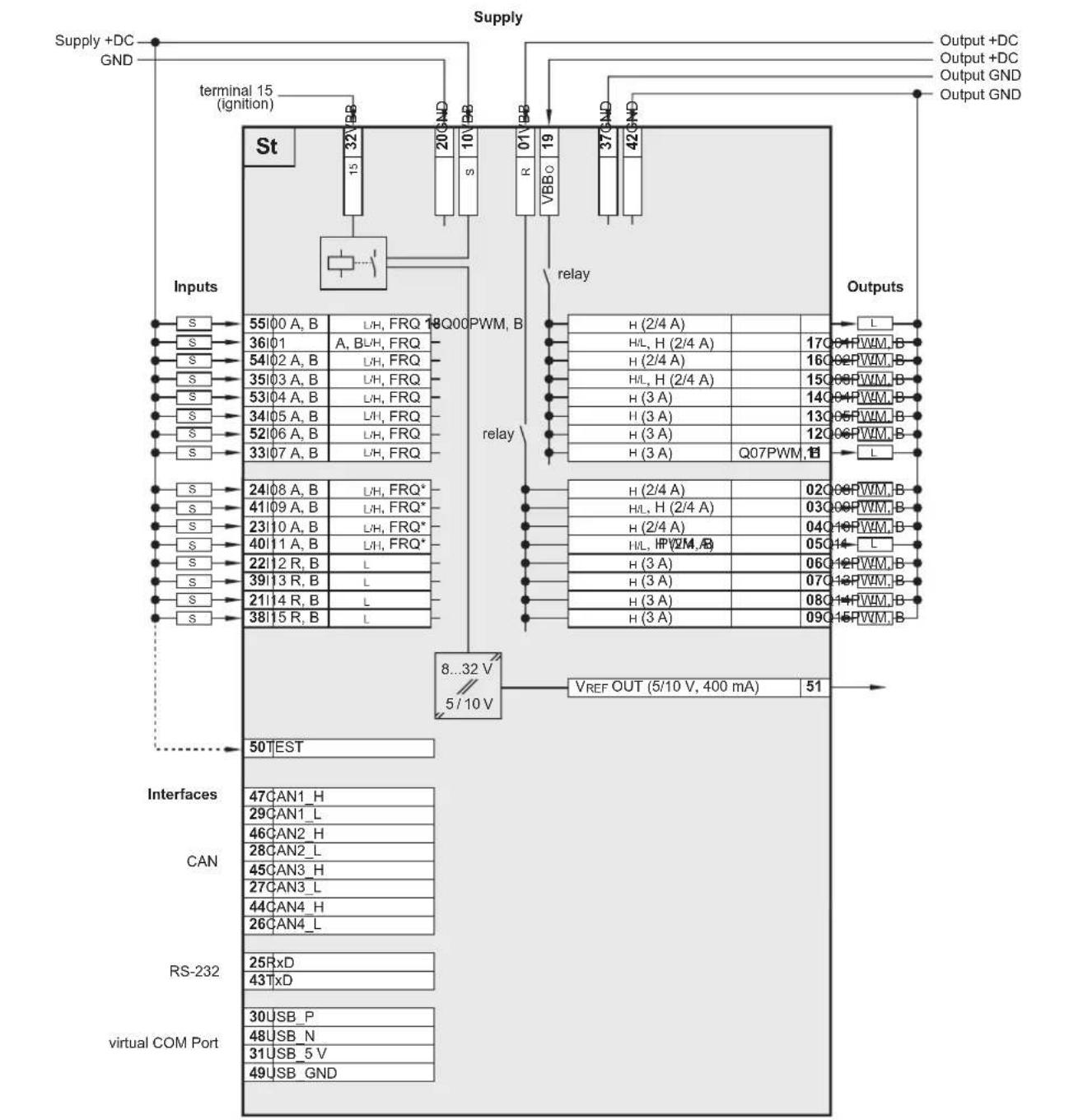
flowchart
graph TD
    A["Supply +DC GND"] --> B["terminal 15 (ignition)"]
    B --> C["St"]
    C --> D["Inputs"]
    D --> E["8...32 V / 5/10 V"]
    E --> F["VREF OUT (5/10 V, 400 mA)"]
    F --> G["Outputs"]
    G --> H["Output +DC GND"]
    H --> I["Output +DC GND"]
    I --> J["Output +DC GND"]
    K["Interfaces"] --> L["CAN"]
    L --> M["RS-232"]
    M --> N["virtual COM Port"]
    O["Input S"] --> P["55100 A, B"]
    P --> Q["L/H, FRQ 18Q00 PWM, B"]
    R["Input S"] --> S["36101"]
    S --> T["A, BUH, FRQ"]
    U["Input S"] --> V["54102 A, B"]
    V --> W["L/H, FRQ"]
    X["Input S"] --> Y["35103 A, B"]
    Y --> Z["L/H, FRQ"]
    AA["Input S"] --> AB["53104 A, B"]
    AB --> AC["L/H, FRQ"]
    AD["Input S"] --> AE["34105 A, B"]
    AE --> AF["L/H, FRQ"]
    AG["Input S"] --> AH["52106 A, B"]
    AH --> AI["L/H, FRQ"]
    AJ["Input S"] --> AK["33107 A, B"]
    AK --> AL["L/H, FRQ"]
    AM["Input S"] --> AN["24108 A, B"]
    AN --> AO["L/H, FRQ*"]
    AP["Input S"] --> AQ["41109 A, B"]
    AQ --> AR["L/H, FRQ*"]
    AS["Input S"] --> AT["23110 A, B"]
    AT --> AU["L/H, FRQ*"]
    AV["Input S"] --> AW["40111 A, B"]
    AW --> AX["L/H, FRQ*"]
    AY["Input S"] --> AZ["22112 R, B"]
    AZ --> BA["L"]
    BB["Input S"] --> BC["39113 R, B"]
    BC --> BD["L"]
    BE["Input S"] --> BF["21114 R, B"]
    BF --> BG["L"]
    BH["Input S"] --> BI["38115 R, B"]
    BI --> BJ["L"]

    subgraph Inputs
        B
        AK
        AL
        AM
        AN
        AO
        AP
        AQ
        AR
        AS
        BT
        BU
        AV
        BW
        BX
        BY
        CA
        DB
        DV
        DW
        DX
        DXD
        DXD
        DXD
        DXD
        DXD
        DXD
    end

    subgraph Outputs
        E
        AF
        AG
        AH
        AI
        AJ
        AK
        AL
        AM
        AN
        AO
        AP
        AQ
        AR
        AS
        BT
        BU
        AV
        BW
        DX
        DXD
        DXD
    end

    subgraph Interfaces
        M
        N
        O
        P
        Q
        R
        S
        T
        U
        V
        W
        X
        Y
        Z
        AA
        AB
        AC
        AD
        AE
        AF
        AG
        AH
        AI
        AJ
        AK
        AL
        AM
        AN
        AO
        AP
        AQ
        AR
        AS
        AT
        BU
        AV
        BW
        DX
        DXD
    end

    subgraph CAN
        M
        N
        O
        P
        Q
        R
        S
        T
        U
        V
        W
        X
        Y
        Z
        AA
        AB
        AC
        AD
        AE
        AF
        AG
        AH
        AI
        AJ
        AK
        AL
        AM
        AN
        AO
        AP
        AQ
        AR
        AS
Abbreviations
A analogue
B_H binary high side
B_L binary low side
FRQ frequency / pulse inputs with levels depending on the supply voltage
FRQ* frequency / pulse inputs with fixed levels
H H-bridge function
PWM pulse width modulation
PWM, pulse width modulation, current-controlled
R resistor input
VBB_s supply sensors/module
VBB supply output group
7.8 Ex side / Wiring
CR0133 Technical data
Wiring Ex side
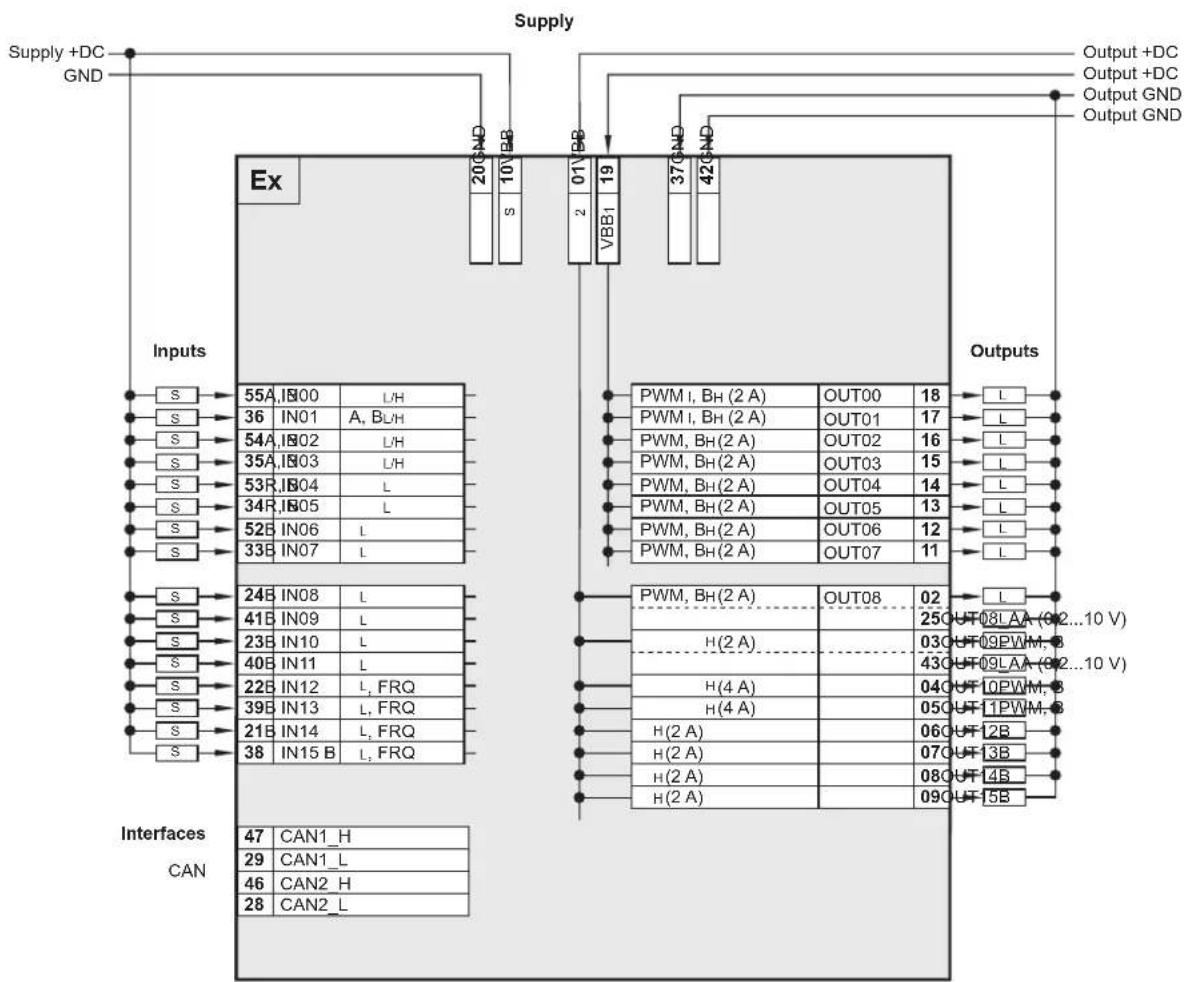
flowchart
graph TD
    A["Supply"] --> B["Ex"]
    B --> C["Inputs"]
    C --> D["Processes CAN"]
    D --> E["Outputs"]

    subgraph Inputs
        F["S"] --> G["55A, I800 L/H"]
        H["S"] --> I["36 IN01 A, BLH"]
        J["S"] --> K["54A, I802 L/H"]
        L["S"] --> M["35A, I803 L/H"]
        N["S"] --> O["53R, I804 L"]
        P["S"] --> Q["34R, I805 L"]
        R["S"] --> S["52B IN06 L"]
        T["S"] --> U["33B IN07 L"]
        V["S"] --> W["24B IN08 L"]
        X["S"] --> Y["41B IN09 L"]
        Z["S"] --> AA["23B IN10 L"]
        AB["S"] --> AC["40B IN11 L"]
        AD["S"] --> AE["22B IN12 L, FRQ"]
        AF["S"] --> AG["39B IN13 L, FRQ"]
        AH["S"] --> AI["21B IN14 L, FRQ"]
        AJ["S"] --> AK["38 IN15 B L, FRQ"]
    end

    subgraph Interfaces
        AL["CAN1_H"]
        AM["CAN1_L"]
        AN["CAN2_H"]
        AO["CAN2_L"]
    end

    style Inputs fill:#f9f,stroke:#333
    style Interfaces fill:#ccf,stroke:#333
    style Outputs fill:#cfc,stroke:#333
Abbreviations
A analogue B_H binary high side B_L binary low side
FRQ frequency / pulse inputs with levels depending on the supply voltage
FRQ* frequency / pulse inputs with fixed levels
H H-bridge function
PWM pulse width modulation
PWM pulse width modulation, current-controlled
R resistor input
VBBs supply sensors/module
VBB supply output group
St standard side
Ex extended side
If not otherwise specified, the data apply to the St and Ex side.
8 Maintenance, repair and disposal
The device is maintenance-free.
▶ Do not open the housing as the device does not contain any components which must be maintained by the user. The device must only be repaired by the manufacturer.
▶ Dispose of the device in accordance with the national environmental regulations.
9 Approvals / standards
Test standards and regulations ( 7 Technical data)
The EC Declaration of Conformity and approvals can be found at: www.ifm.com → Data sheet search → CR0133 → More information