
Watch KIDS Patrol - Smartwatch Niceboy - Free user manual and instructions
Find the device manual for free Watch KIDS Patrol Niceboy in PDF.


| Type de produit | Kids Smartwatch |
| Dimensions | 45 x 40 x 15 mm |
| Poids | 50 g |
| Alimentation | Lithium-ion rechargeable, 600 mAh |
| Autonomie | Up to 72 hours standby |
| Écran | 1.4 inch TFT color touchscreen |
| Connectivité | Bluetooth 5.0 |
| GPS | Built-in GPS with real-time tracking |
| Appel vocal | Two-way voice calls via SIM card |
| SOS d'urgence | Programmable SOS button with notifications to guardians |
| Capteurs | Accelerometer, heart rate monitor |
| Activités | Step counter, sleep tracking, multiple sports modes |
| Résistance à l'eau | IP67 (dust and water resistant) |
| Matériau du boîtier | Soft silicone with plastic casing |
| Système d'exploitation | Proprietary OS |
| Compatibilité | iOS and Android via app |
| Fonctions principales | GPS tracking, SOS alert, two-way calls, activity monitoring, remote camera control |
| Entretien et nettoyage | Wipe with a soft damp cloth; avoid harsh chemicals |
| Sécurité | Safe zone alerts, low battery notifications |
| Pièces détachées et réparabilité | Battery replacement by authorized service center |
| Informations générales | For children aged 4-12; includes charging cable and SIM slot tool |
Frequently Asked Questions - Watch KIDS Patrol Niceboy
User questions about Watch KIDS Patrol Niceboy
0 question about this device. Answer the ones you know or ask your own.
Ask a new question about this device
Download the instructions for your Smartwatch in PDF format for free! Find your manual Watch KIDS Patrol - Niceboy and take your electronic device back in hand. On this page are published all the documents necessary for the use of your device. Watch KIDS Patrol by Niceboy.
USER MANUAL Watch KIDS Patrol Niceboy
natural_image
Three abstract diagrams with grid patterns and checkmark indicators, no text or symbols presentREGISTRACE HODINEK DO APLIKACE
FUNKCE V APLIKACI
Domovská obrazovka:
natural_image
Three icons showing a grid layout with selection handles, no text or symbols presentREGISTRÁCIA HODINIEK DO APLIKÁCIE
FUNKCIE V APLIKÁCII
Domovská obrazovka:
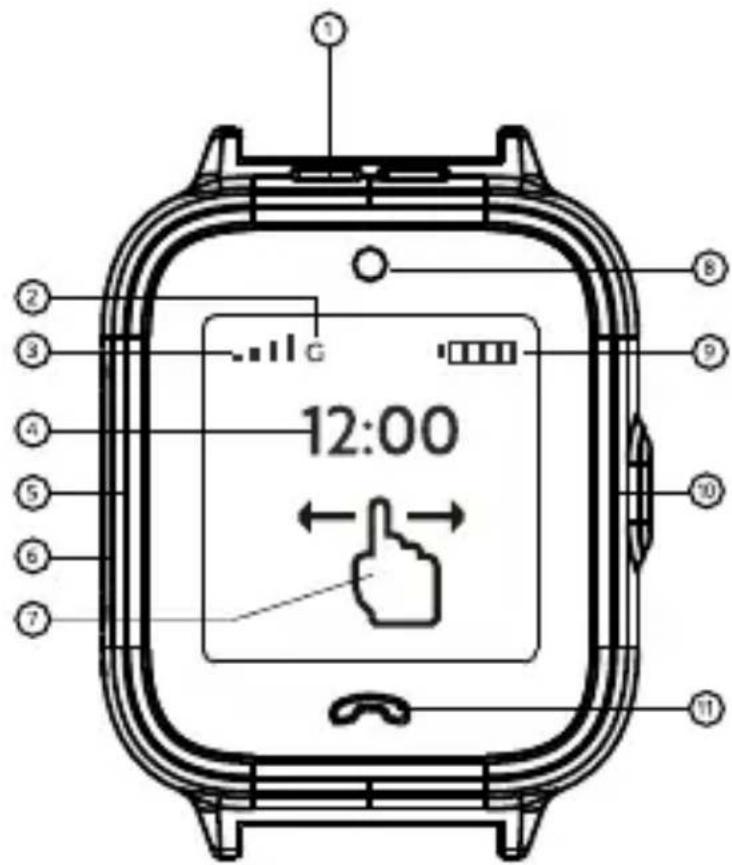
- Speaker
- Mobile data signal
- Signal for voice calls
- Time
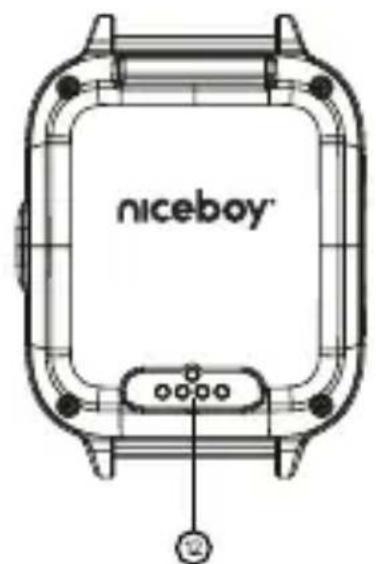
- SIM card slot
- Microphone
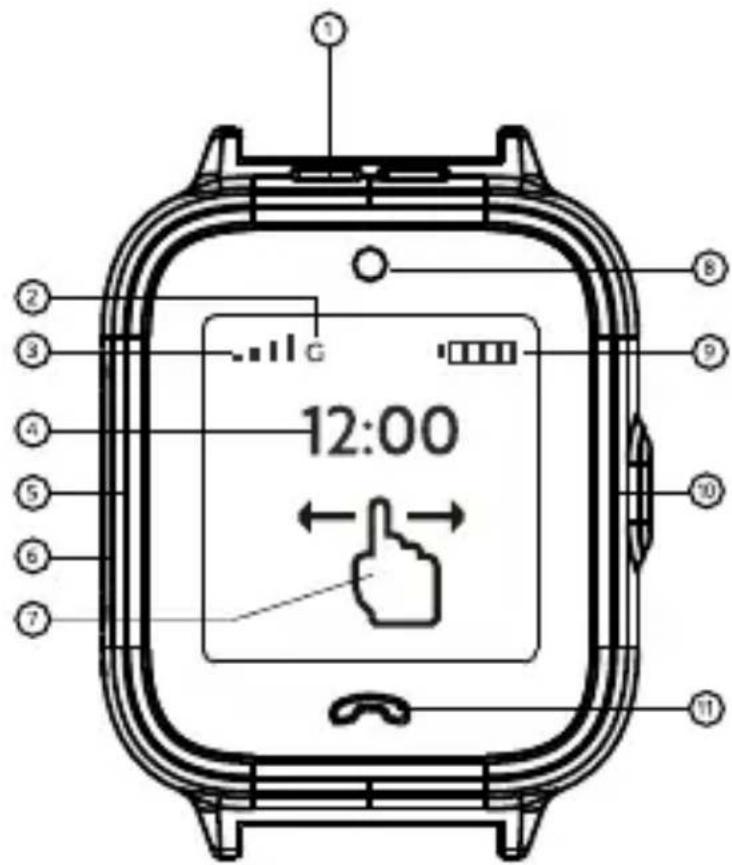
- Touch directions for controlling the watch
- Camera
- Battery level indicator
- On/SOS button
- Home/Back button
- Charging port
FEATURES
The watch is controlled via touch screen. The screen is turned on and off by a short press of button (10). The watch is turned on by a long press of button (10).
SOS function – if the child is in danger, 2 presses of the button will send an SOS signal: the watch will record 30 seconds of sound using the microphone and send the recording along with information about position to the parents' application.
Making a call from the watch: click a name in the Contacts menu. If you select the contact of an administrator of the application (parent), you can choose between a voice call and a video call.
Messages: can be sent to contacts that have the Leefine app.
Friends: you can add friends that have the same watch. To add a friend, put both watches close to each other and select the Friends function on both.
SIM CARD
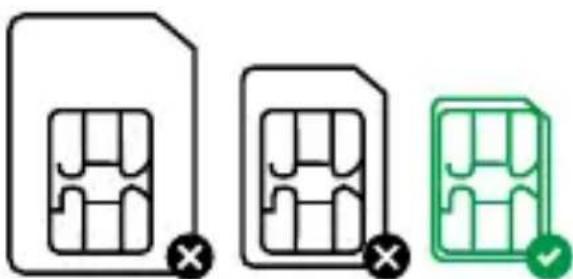
The watch comes with an enclosed SIM card. However, you can use any other SIM card as well, as long as it is a Nano SIM. The SIM card used in the watch must support 4G networks and the watch must be used in an area with access to 4G signal.
natural_image
Three abstract diagrams showing a grid-like structure with X marks, no text or symbols present.Recommendation: Before using a SIM card in the watch, activate the card in a mobile phone and, if the SIM card is PIN protected, deactivate the PIN.
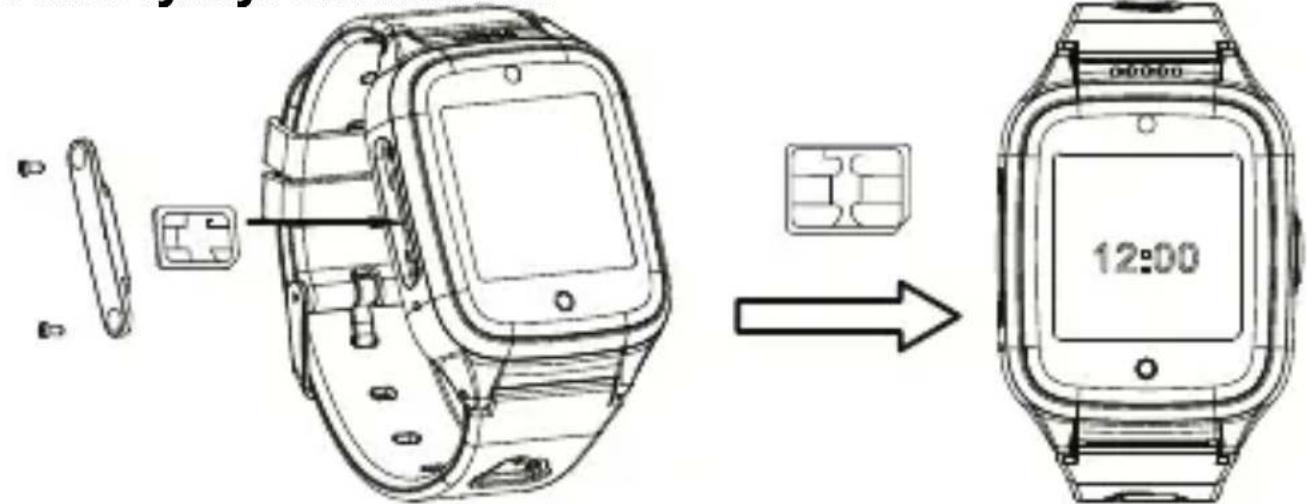
INSTALLING A SIM CARD
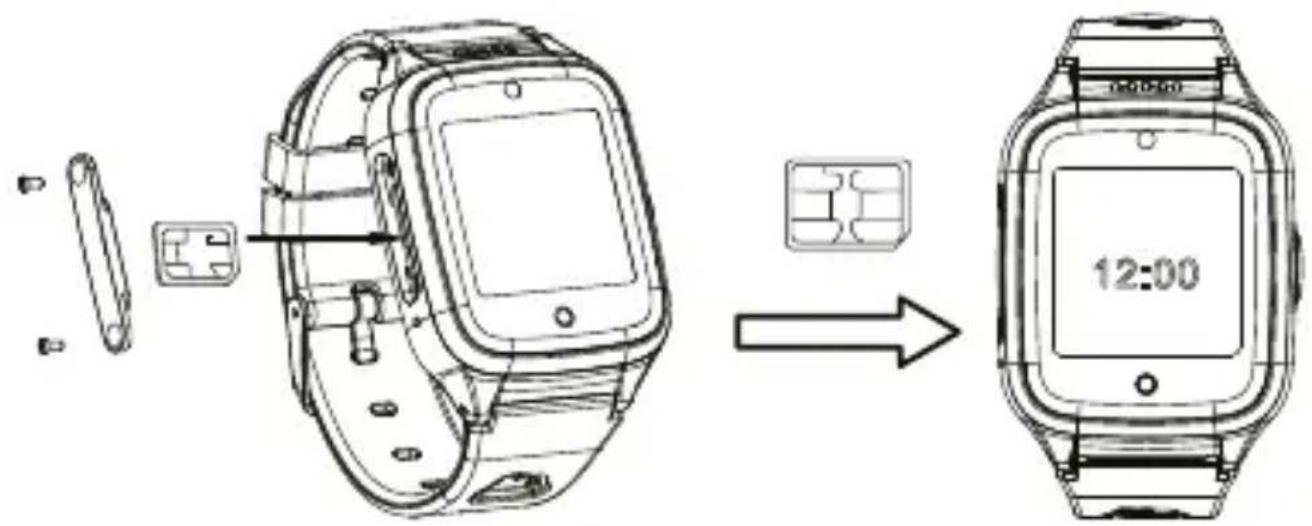
- Make sure you are using the right SIM card (Nano SIM)
- The watch must be turned off before inserting the SIM card. If the watch is on, turn it off using the On button (10)
- Use a screwdriver to remove the screws on the side of the watch and remove the SIM card cover.
- Insert the SIM into the slot on the side of the watch and push it in until it clicks in place.
Make sure to insert the SIM card facing the right way, see figure.
- Replace the SIM card cover and retighten the screws.
APP
Download Leefine to your mobile phone (free for iOS and Android). Register in the app. The registered account will be the administrator of the app and the watch.
- Name of the parent/administrator
- Phone number of the parent/administrator
- E-mail of the parent/administrator
- Write down the code you see in the app
- Read and agree to the terms
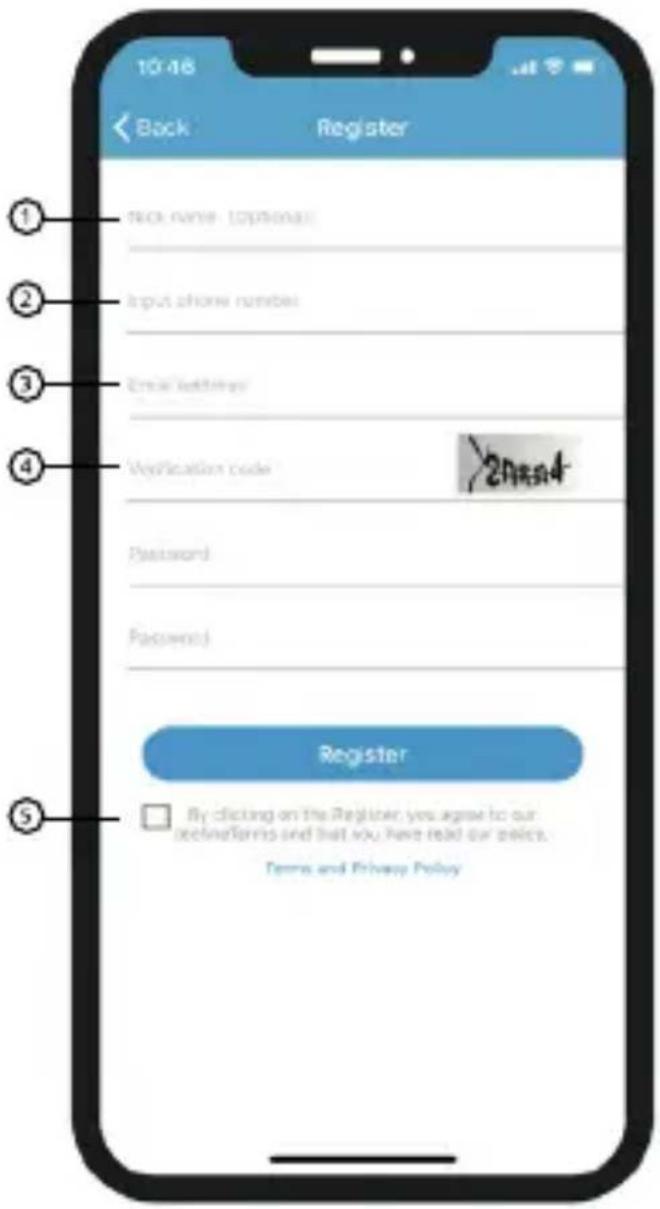
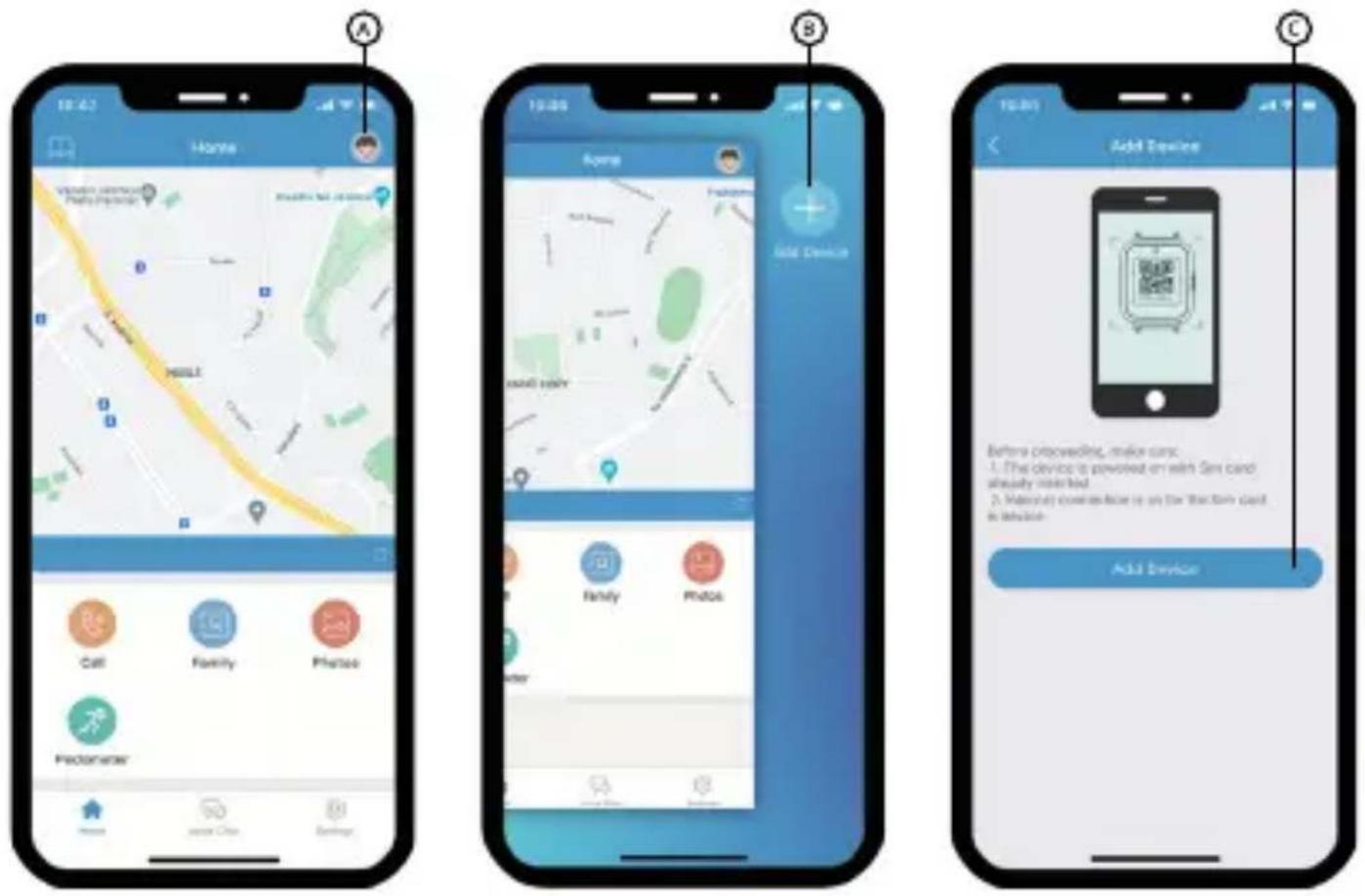
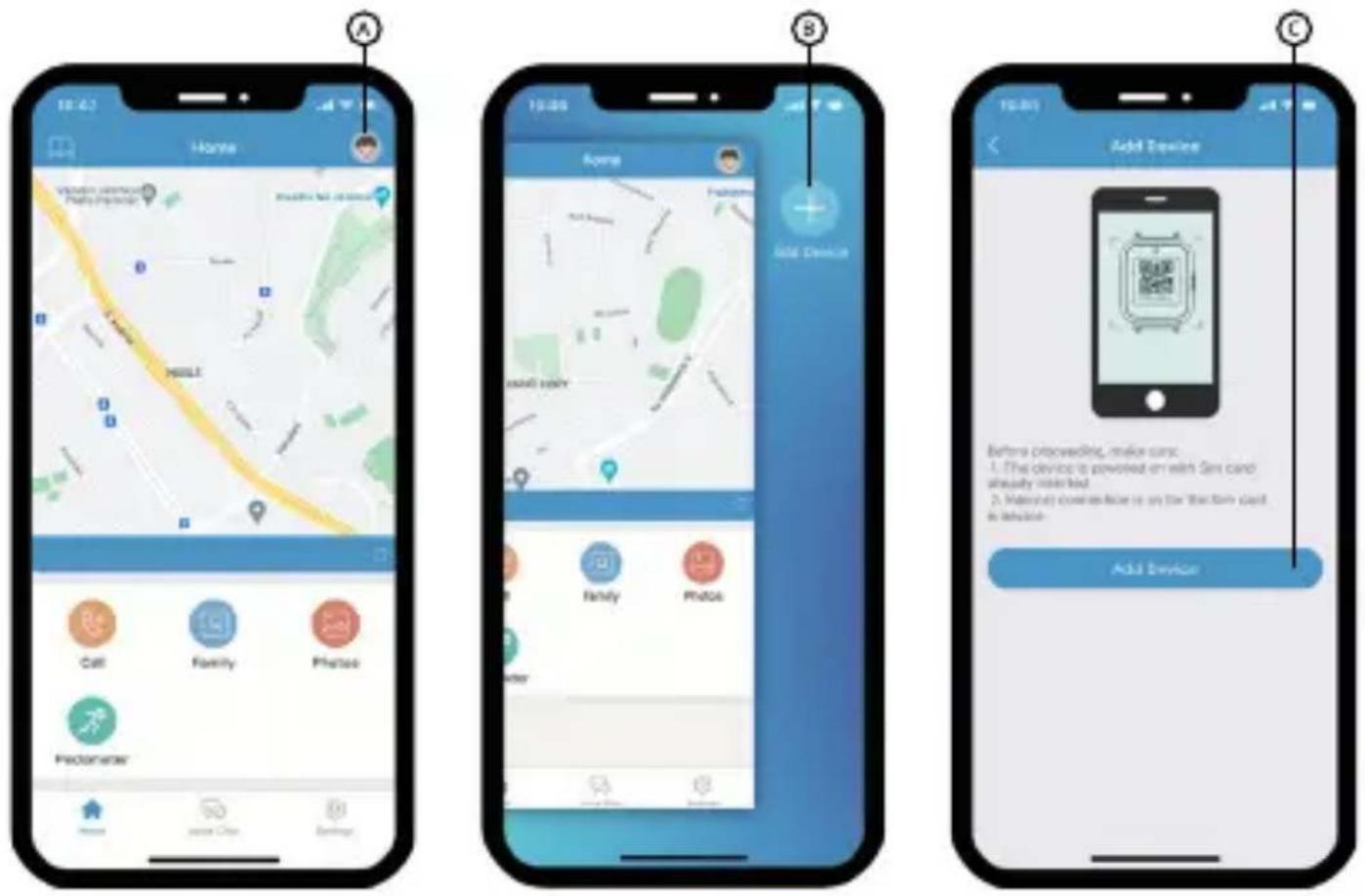
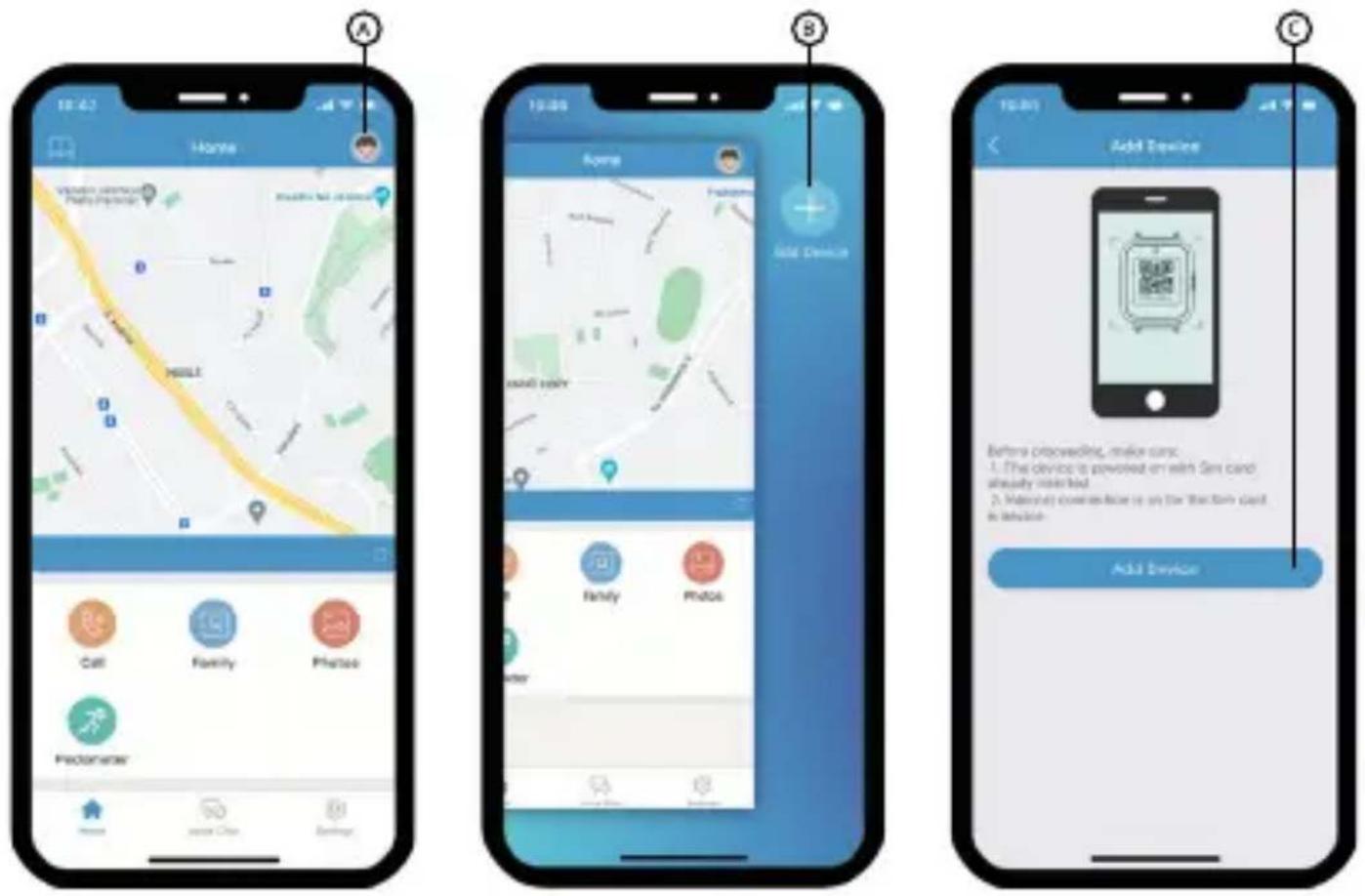
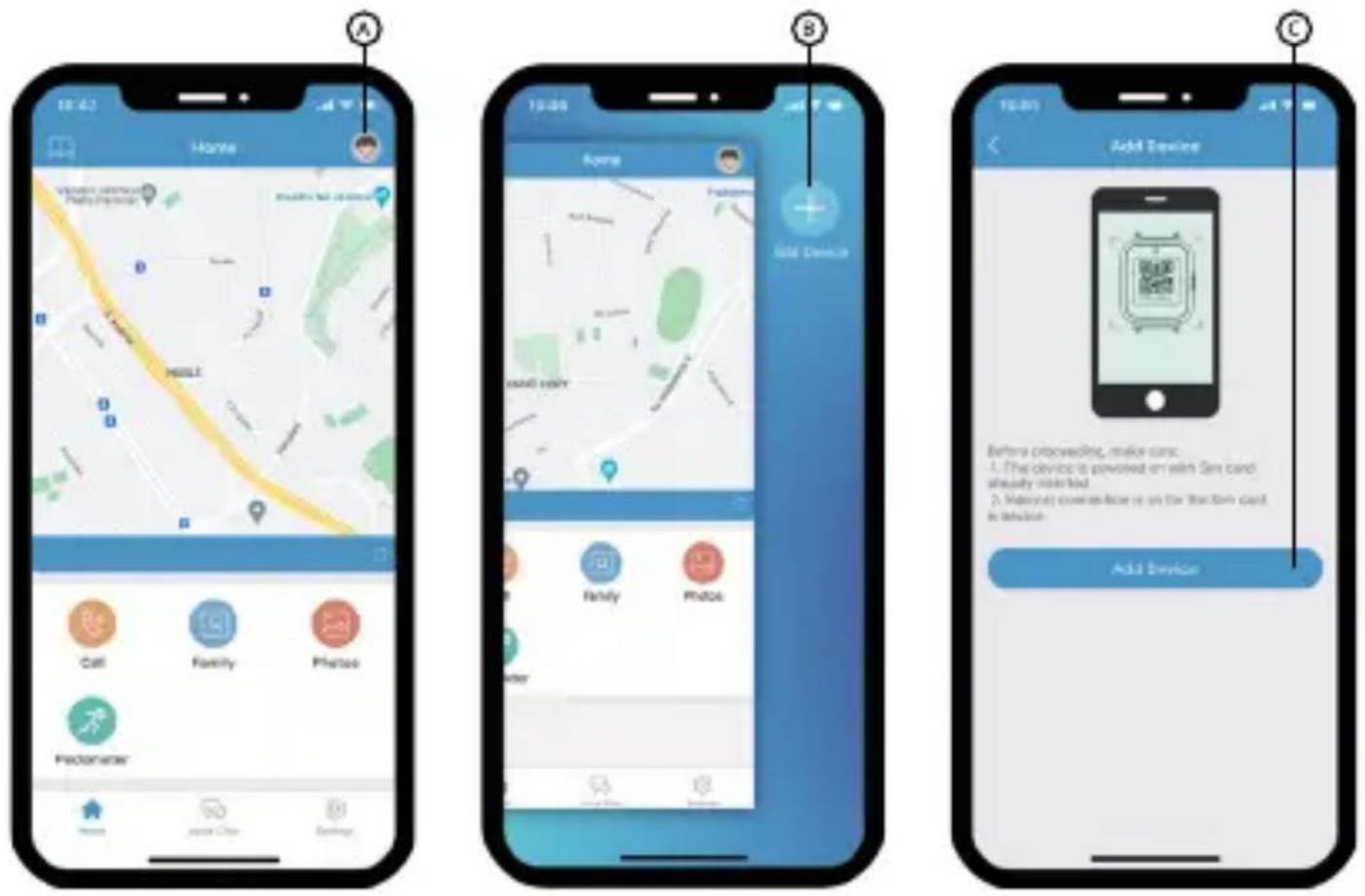
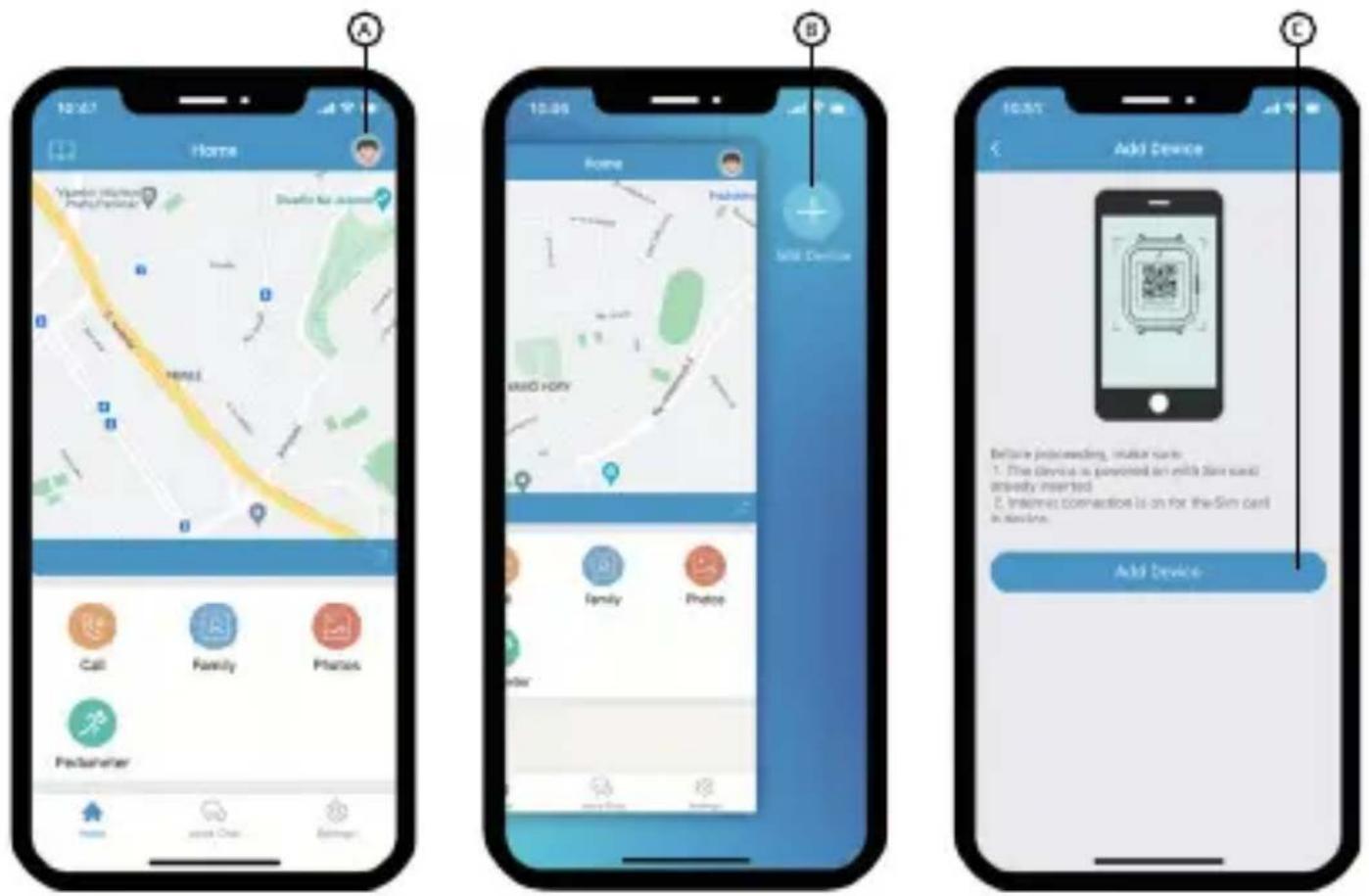
REGISTERING THE WATCH INTO THE APP
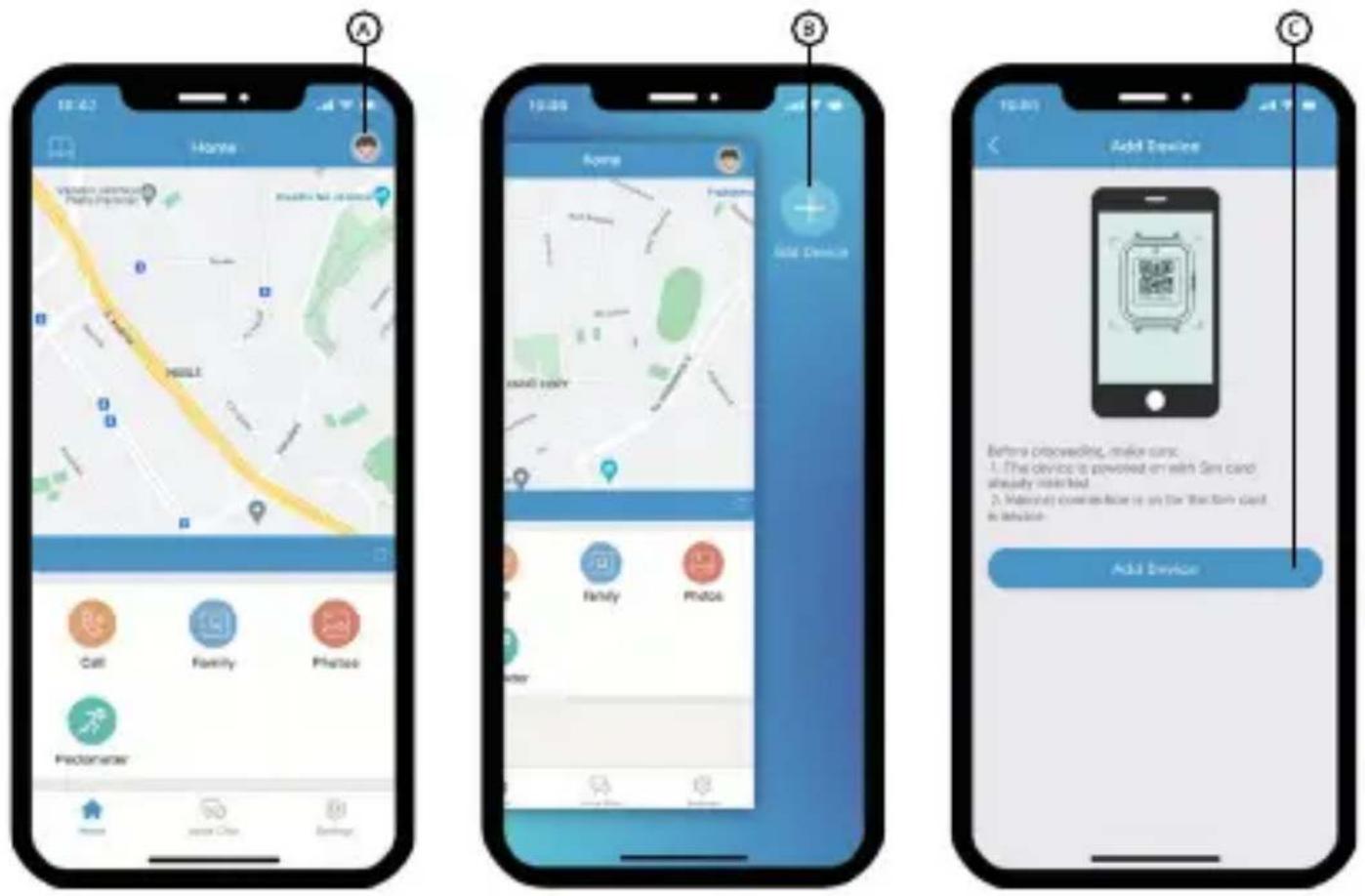
Turn on the watch and proceed as follows:
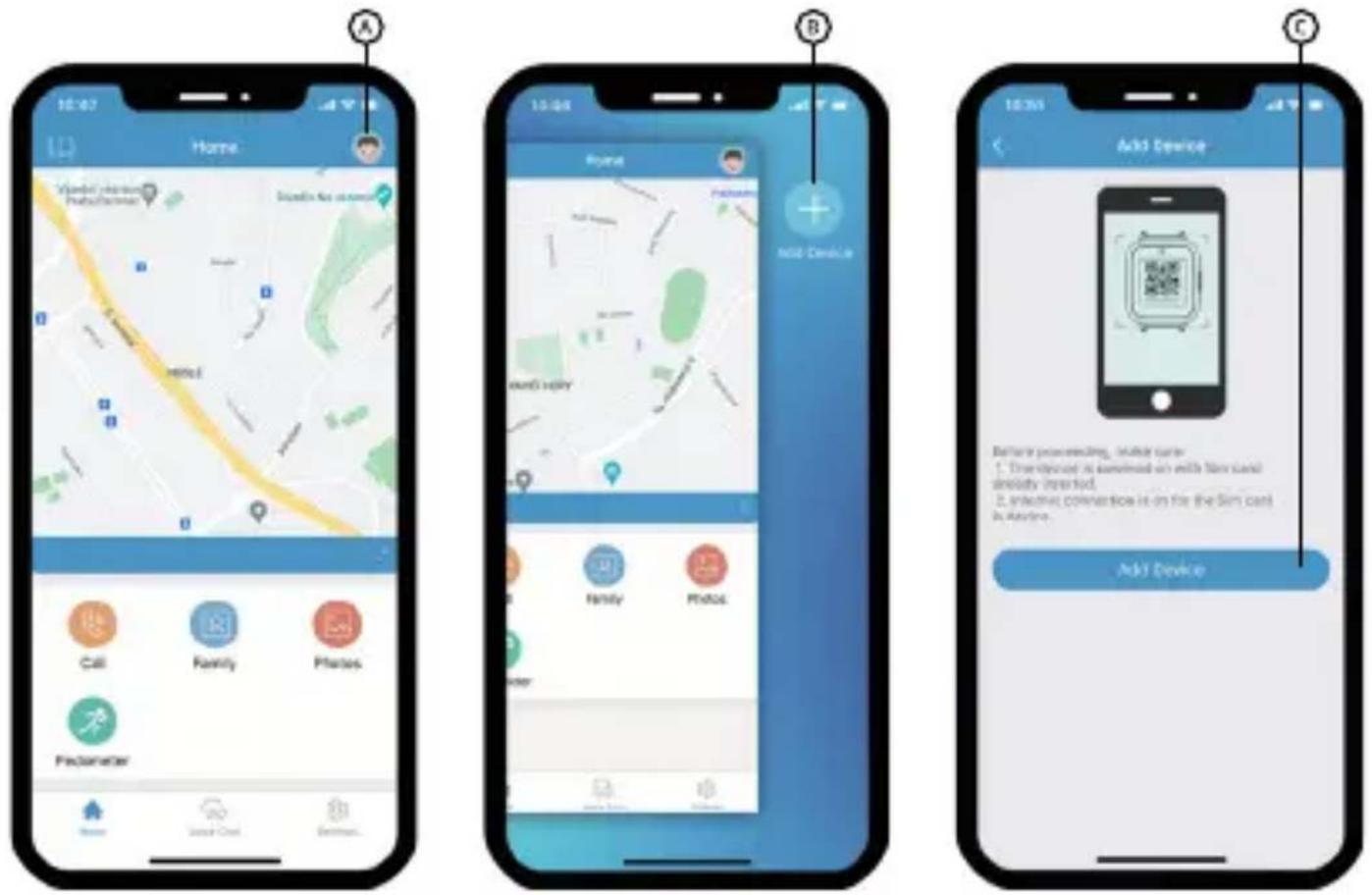
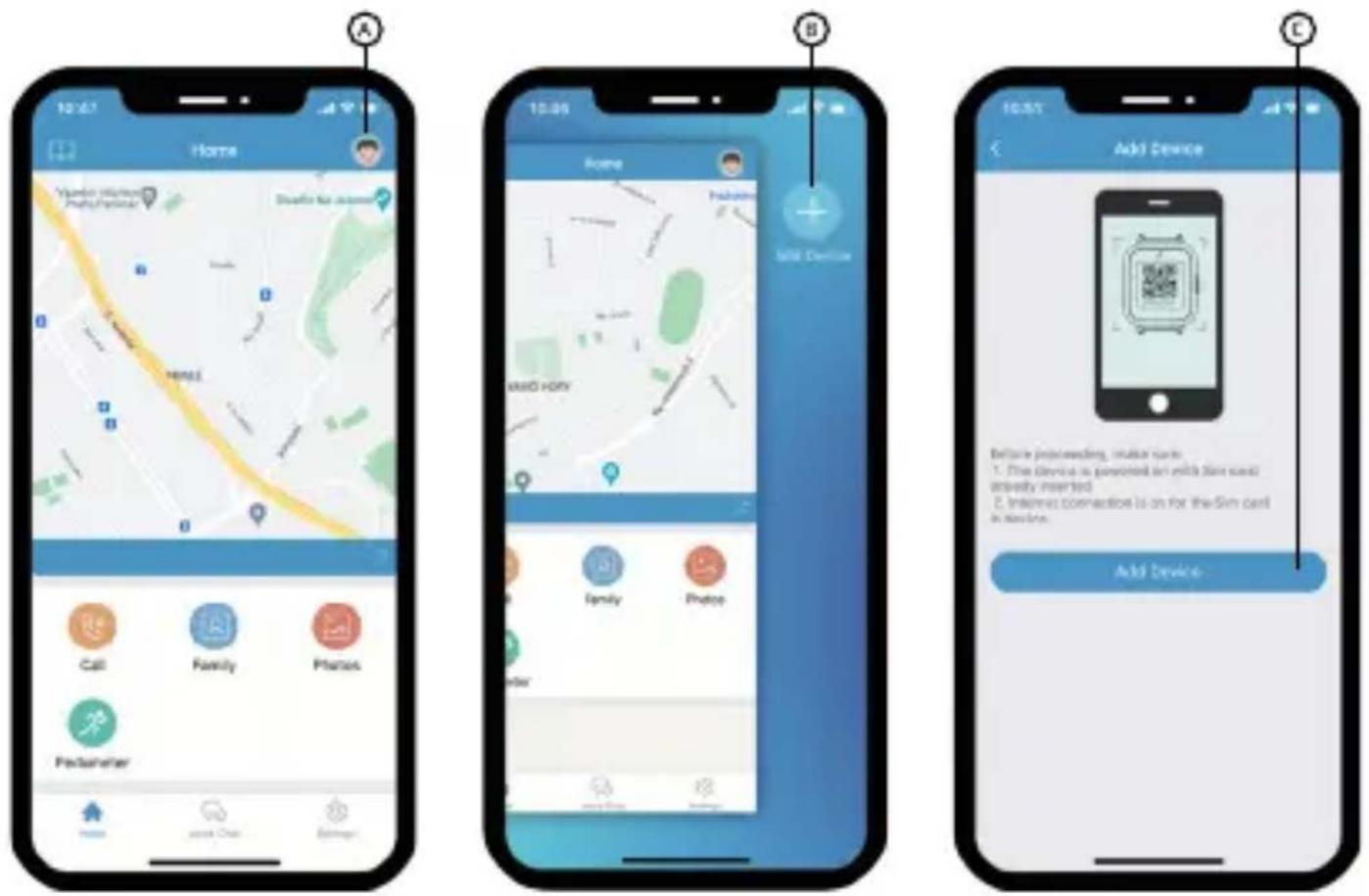
A) Click the icon on the main screen of the app
B) Click the add device icon
C) The app will ask you to scan a QR code.
You can find the code on the watch or directly in the menu of the watch under QR code
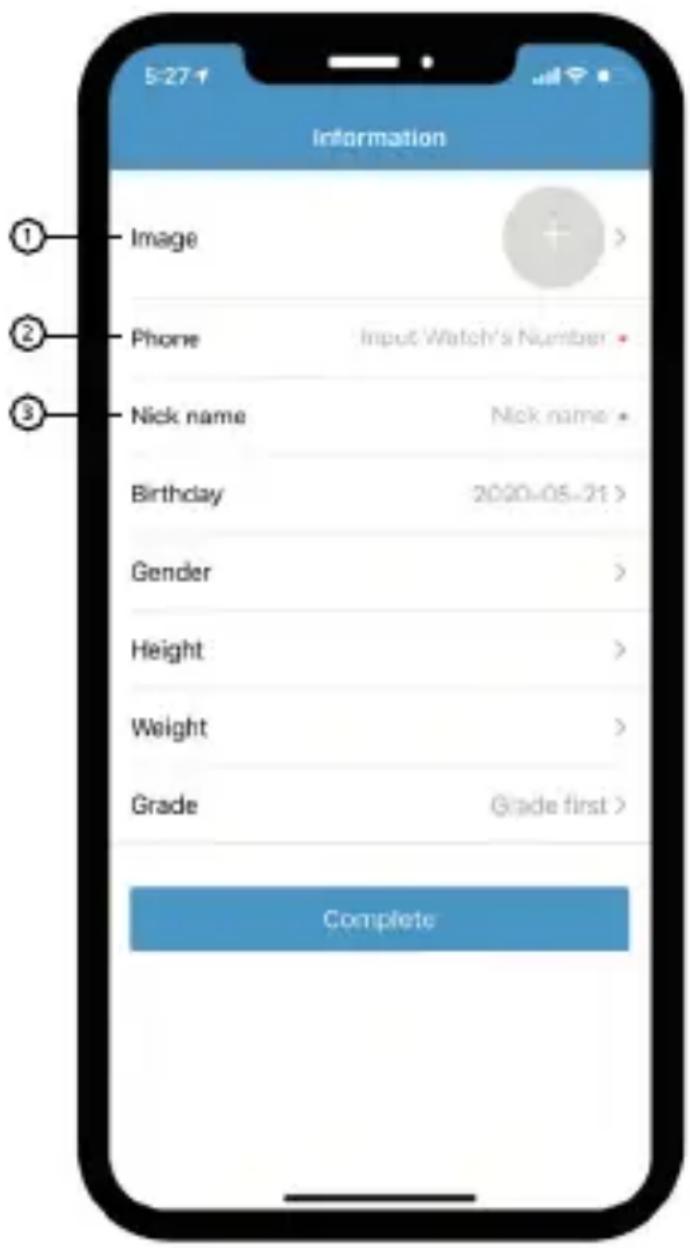
Fill in the required information about the child:
- You can upload a photo
- Fill in the phone number of the SIM card in the watch
- Fill in the name of the child You can also fill in additional information about the child, but that is not required to connect the watch to the app
FUNCTIONS IN THE APP
Home screen:
Calls – makes a call to the child's watch.
Family – allows adding contacts that can be called from the watch and contacts that can make a call to the watch.
Photos – access to photos taken with the watch.
Step counter – information about distance walked, calories and steps.
Alarm – allows setting alarm clocks for the watch.
Video call – allows making a video call to the watch. The video call length is limited to 3 minutes due to
high power consumption. The call is automatically ended after 3 minutes and another call can only be made 5 minutes later.
Do not disturb mode – allows setting time periods where the watch will not play ringtones or receive calls. Ideal for school hours. The SOS feature will still be available.
Remote call – connects a call to the watch without playing a ringtone on the watch.
Video off – allows turning off the option to make video calls.
Messages: this screen allows sending messages to the watch and also displays information in case the SOS button has been pressed or the wearer of the watch has left the safe zone.
Settings:
Safe zone – allows setting a safe zone (position, distance) such as home, school etc. If the watch leaves the safe zone, the user of the application is notified. The same notification also arrives when the watch returns to the safe zone.
History – shows the position history of the watch
Position setting – allows setting time for tracking position.
Friends – manages friends that were added using the Friends function in the watch.
Wi-Fi – allows connecting to Wi-Fi. The watch then does not use up data from the SIM card.
Restrict switch-off – when active, the watch cannot be turned off with a long press of button (10).
Restrict calls – blocks phone numbers that have not been given permission in the app from making calls to the watch.
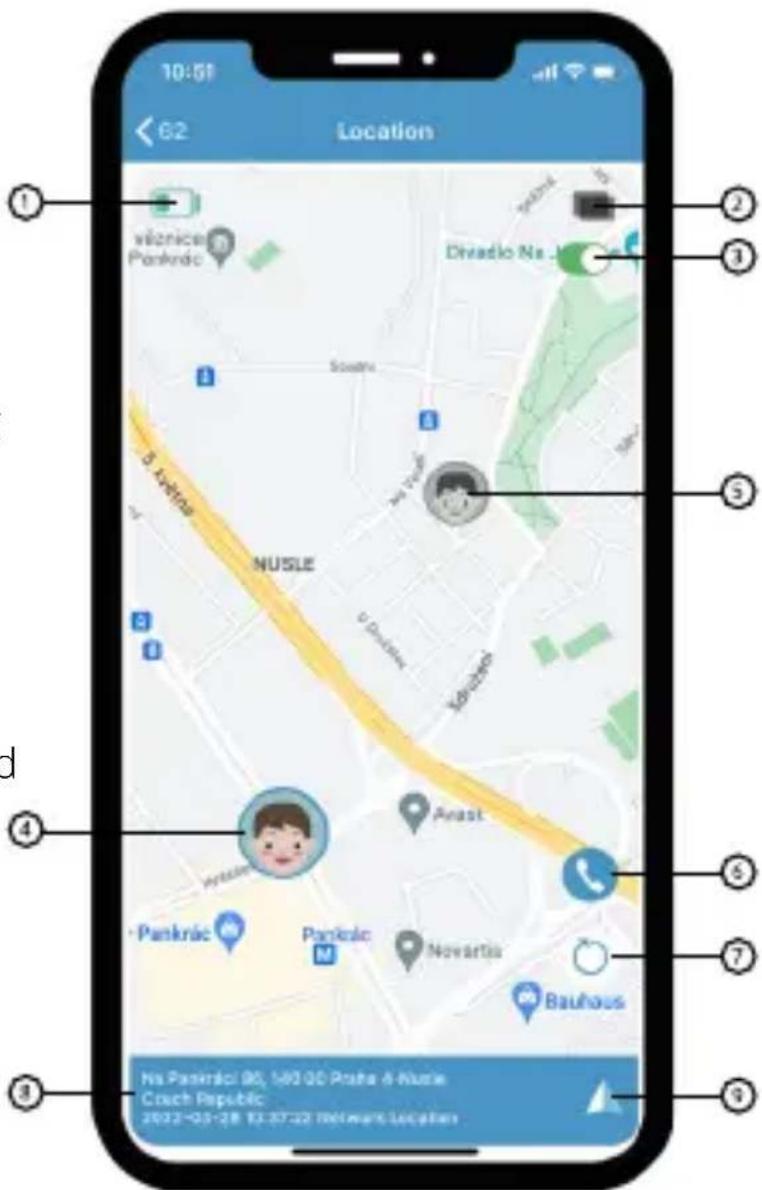
Clicking the map on the app home page accesses the following functions:
- Monitoring the battery level of the watch
- Switching between a classic map and satellite view
- If you have multiple watches added, you can turn on viewing them all on one screen
- Most recent position of the currently selected watch
- Most recent position of the next watch (if multiple have been paired)
- Allows calling currently selected watch
- Update watch position
- Address of watch position
- Allows starting navigation to watch position
WATERPROOFNESS
Niceboy WATCH KIDSPATROL is waterproof as long as the following conditions are met: the SIM card cover must be properly closed and secured by two screws. IP67 certification means protection against submersion, not against movement underwater. The watch is not designed for swimming.
IMPORTANT WARNINGS
The SIM card in the watch must be a Nano SIM with support for 4G networks. Before using the card in the watch, activate it in another device, e.g. a mobile phone. The SIM card must not have an active PIN lock.
Position tracking is done primarily using a GPS integrated in the watch. The accuracy of positioning is dependent on the strength of the GPS satellite signal. If there is a direct line of sight to GPS satellites, accuracy is between 5 to 50 metres. Signal may be weak or completely blocked inside buildings. If GPS signal is unavailable, the watch may track position using Wi-Fi. In that case, accuracy of positioning is approximately 200 metres. If neither GPS or Wi-Fi positioning is available, position is determined using mobile network transmitters. In that case, accuracy of positioning is approximately 2 kilometres.
The life of the watch battery is dependent primarily on the position tracking interval. To extend how long the battery lasts per charging, we recommend setting the position update interval to 60 minutes.
Charge the watch using the enclosed charger connected to a charging adapter with a current of at least 1 A and voltage of 5 V. Do not leave the watch unattended during charging.
The watch cannot receive SMS for reasons of child safety. Instead, send messages using the app.
In order for the app to function properly (report watch position and send other warnings to the phone on time), it is necessary to enable notifications for the app in your phone's settings. It is also necessary to enable the app in the phone's RAM manager so that the phone does not terminate the app or block notifications. More information on phone settings can be found in the manual for your mobile phone.
The T-Mobile SIM card included with the watch is charged with CZK 10 of credit and 200 MB of data. Additional information on call prices and more can be found in the packaging of the SIM card or on T-Mobile's website.
PACKAGE CONTENTS
Niceboy Watch KidsPatrol
Screwdriver
Charging adapter
T-Mobile SIM card
Manual
SPECIFICATIONS
Screen: 1.44" IPS 240 x 240
Camera: 0.3 MPx
SIM card: Nano SIM
Position tracking: GPS + Wi-Fi + LBS
Wi-Fi: 2.4 - 2.5 GHz
Bluetooth: 2.4 GHz, Radio frequency power: ≤ 2.5 mW
Battery: 600 mAh lithium polymer battery
Battery life: 1 to 3 days
(based on position reporting interval)
Certification: IP67
Dimensions: 43 x 55 x 15.6 mm
Weight: 50 g
The battery or accumulator that may be included with the product has a life of six months because it is a consumable item. Improper handling (prolonged charging, short circuit, breakage by another object, etc.) can lead to fires, overheating or battery leakage, for example.
RTB Media s.r.o. hereby declares that the type of radio equipment X-FIT KIDSPATROL complies with Directives 2014/53 / EU, 2014/30 / EU, 2014/35 / EU, and 2011/65 / EU. The full content of EU Declaration of Conformity is available on the following websites: https://niceboy.eu/cs/podpora/prohlaseni-o-shode-mM38CtmYvX693IHvvu4CWpk3vjGrvnC
USER INFORMATION FOR DISPOSING ELECTRICAL AND ELECTRONIC DEVICES (HOME USE)
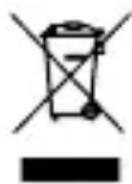
This symbol located on a product or in the product's original documentation means that the used electrical or electronic products may not be disposed together with the communal waste. In order to dispose of these products correctly, take them to a designated collection site, where they will be accepted for free. By disposing of a product in this way, you are helping to protect precious natural resources and helping to prevent any potential negative impacts on the environment and human health, which could be the result of incorrect waste disposal. You may receive more detailed information from your local authority or nearest collection site. According to national regulations, fines may also be given out to anyone who disposes of this type of waste incorrectly. User information for disposing electrical and electronic devices.
(Business and corporate use)
In order to correctly dispose of electrical and electronic devices for business and corporate use, refer to the product's manufacturer or importer. They will provide you with information regarding all disposal methods and, according to the date stated on the electrical or electronic device on the market, they will tell you who is responsible for financing the disposal of this electrical or electronic device. Information regarding disposal processes in other countries outside the EU. The symbol displayed above is only valid for countries within the European Union. For the correct disposal of electrical and electronic devices, request the relevant information from your local authorities or the device seller.

BESCHREIBUNG
natural_image
Three abstract diagrams showing a grid-like structure with cross marks, no text or symbols present.FUNKTIONEN IN DER APP
Startbildschirm:
natural_image
Three abstract diagrams with grid patterns and checkmark indicators, no text or symbols presentAZ ÓRA REGISZTRÁLÁSA AZ ALKALMAZÁSBAN
AZ ALKALMAZÁSBAN ELÉRHETŐ FUNKCIÓK
Kezdőképernyő:
natural_image
Three abstract diagrams showing a grid layout with checkmarks, no text or symbols presentPreporuka: Prije upotrebe SIM kartice u satu, aktivirajte karticu u mobilnom telefonu i, ako je SIM kartica zaštićena PIN-om, deaktivirajte PIN.
POSTAVLJANJE SIM KARTICE
REGISTRIRANJE SATA U APLIKACIJI
Uključite sat i postupite ovako:
FUNKCIJE U APLIKACIJI
Početni zaslon:
natural_image
Three abstract diagrams with grid patterns and checkmarks, no text or symbols presentREJESTRACJA ZEGARKA W APLIKACJI
FUNKCJE APLIKACJI
Ekran główny:
natural_image
Three abstract diagrams showing a grid layout with checkmarks, no text or symbols presentREGISTRACIJA ROČNE URE V APLIKACIJO
FUNKCIJE V APLIKACIJI
Domači zaslon:
ÎNREGISTRAREA CEASULUI ÎN APLICATIE
FUNCTII ÎN APLICATIE
Ecranul de pornire:

- FUNKCE V APLIKACI
- Domovská obrazovka:
- FUNKCIE V APLIKÁCII
- FEATURES
- SIM CARD
- INSTALLING A SIM CARD
- APP
- FUNCTIONS IN THE APP
- Home screen:
- Settings:
- WATERPROOFNESS
- IMPORTANT WARNINGS
- PACKAGE CONTENTS
- SPECIFICATIONS
- USER INFORMATION FOR DISPOSING ELECTRICAL AND ELECTRONIC DEVICES (HOME USE)
- (Business and corporate use)
- FUNKTIONEN IN DER APP
- Startbildschirm:
- AZ ALKALMAZÁSBAN ELÉRHETŐ FUNKCIÓK
- FUNKCIJE U APLIKACIJI
- Početni zaslon:
- FUNKCJE APLIKACJI
- Ekran główny:
- FUNKCIJE V APLIKACIJI
- Domači zaslon:
- FUNCTII ÎN APLICATIE
- Ecranul de pornire:
Brand : Niceboy
Model : Watch KIDS Patrol
Category : Smartwatch