
DFT-700D - Portable DVD Player DENVER - Free user manual and instructions
Find the device manual for free DFT-700D DENVER in PDF.


Pick your language and provide your email: we'll send you a specifically translated version.
User questions about DFT-700D DENVER
0 question about this device. Answer the ones you know or ask your own.
Ask a new question about this device
No questions yet. Be the first to ask one.
Download the instructions for your Portable DVD Player in PDF format for free! Find your manual DFT-700D - DENVER and take your electronic device back in hand. On this page are published all the documents necessary for the use of your device. DFT-700D by DENVER.
USER MANUAL DFT-700D DENVER
natural_image
Front view line drawing of a portable electronic device with control buttons and display screen (no text or symbols)natural_image
Technical line drawing of a mechanical assembly with no visible text or symbols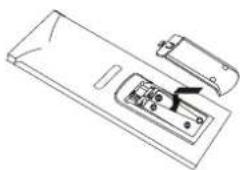
natural_image
Line drawing of a device casing with internal components and a handle (no text or symbols)text_image
First Time Installation Do you want to start first time Installation Wizard ? YES NOtext_image
Main Menu Program List Program Search System Settings Game Personal Styletext_image
Program List TV Program List Music Program List Sort System Setting Display Type Antenna Power Regular setting Language Time setting System schedule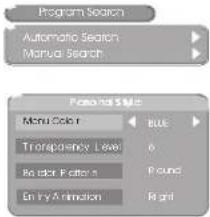
text_image
Program Search Automatic Search Manual Search Personal Size Menu Color Transparency Level Be edit Pattern Entry Animation
A. Programlista(Program List)
flowchart
graph TD
    A["Main Menu"] --> B["Program List"]
    B --> C["Sort"]
    C --> D["By Name\nBy Service ID\nBy Channel No."]
text_image
Message Do you want to erase your previous channel list? YES NOtext_image
Manual Search Channel No 28 Frequency 557.0 MHz Bandwidth 6 MHz OK Strength 64% Quality 55%text_image
System Setting Display Type Antenna Power Regional setting Language Time setting System schedule Main Menu System Setting Disk by Type 4.02 P95.91 4.3 L 6 18.16.97a. 4:3 Pan Scan
text_image
System Setting Display Type Antenna Power Repack and setting Language Time setting System schedule Main Menu System Setting Antenna Power OFF ONtext_image
System Setting Display Type Antenna Tower Television Meeting Language Times setting System schedule Main Menu System Setting Enter Parental PIN Enter PIN OK Factory Default System InformationE-2 Transparensnivå (Transparency Level)
E-4 Startanimation (Entry Animation)
Programlista (PR List)
Digital text-tv (Digital Teletext)
Please fill the blank with the model number of this player for future reference
Model no.: