Dormakaba

ARCOS Studio - Uncategorized Dormakaba - Free user manual and instructions

Find the device manual for free ARCOS Studio Dormakaba in PDF.

📄 6 pages English EN Download 💬 AI Question 10 questions ⚙️ Specs
Notice Dormakaba ARCOS Studio - page 1
Pick your language and provide your email: we'll send you a specifically translated version.
Product Name Dormakaba ARCOS Studio
Category Automatic Door Operator
Application Interior doors, medium usage
Suitable Door Weight Up to 80 kg
Suitable Door Width Up to 1000 mm
Mounting Type Surface mounted
Dimensions (H x W x D) 600 x 100 x 150 mm
Weight 6 kg
Power Supply 24V DC, 2A
Power Consumption 48W max
Door Opening Angle Up to 120°
Closing Speed Adjustment Yes, via hydraulic valve
Hold-Open Function Optional, electromechanical
Backcheck Function Yes
Latch Action Yes
Fire Rated Yes, tested to EN 1154
Noise Level Low noise operation
Material Aluminum alloy, steel
Color Silver, white (optional)
Temperature Range -15°C to +40°C
Warranty 2 years
Compliance EN 1154, EN 1634, CE marking
Accessories Included Cover, arm, mounting accessories
Maintenance Clean with damp cloth; check every 6 months
Reparability Spare parts available from Dormakaba service

Frequently Asked Questions - ARCOS Studio Dormakaba

How do I adjust the closing speed on the Dormakaba ARCOS Studio?
Locate the hydraulic valve on the operator body. Turn it clockwise to decrease speed or counterclockwise to increase speed. Small adjustments are recommended.
What power supply is required for the ARCOS Studio?
The unit requires a 24V DC power supply with a minimum of 2A. Ensure proper wiring and polarity.
Can the ARCOS Studio be used on fire doors?
Yes, it complies with EN 1154 for fire doors. Ensure the door assembly is also fire-rated and the operator is installed correctly.
How do I install the hold-open function?
The hold-open is an optional accessory. Connect the electromechanical hold-open device as per the wiring diagram. Adjust the hold-open angle using the stop screw.
What is the maximum door weight for the ARCOS Studio?
It supports doors up to 80 kg. For heavier doors, consider the ARCOS series with higher capacity.
How often should I maintain the door operator?
Perform basic inspection every 6 months. Clean the unit with a damp cloth and check for loose screws or leaks. Lubricate moving parts if specified in the manual.
What should I do if the door operator is noisy?
Noise may indicate air in the hydraulic system or misalignment. Bleed the system by opening the valve slightly. Check that the arm and door are properly aligned.
Can I replace the cover or arm myself?
Yes, spare covers and arms are available as accessory parts. Follow the installation instructions: remove the old part and attach the new one with the provided screws.
What is the warranty period for the ARCOS Studio?
Dormakaba offers a 2-year warranty from the date of purchase. It covers manufacturing defects but not damage from improper use or installation.
Does the ARCOS Studio comply with accessibility standards?
Yes, it meets EN 1154 and EN 1634 standards for barrier-free access and fire safety. Suitable for public buildings.

User questions about ARCOS Studio Dormakaba

0 question about this device. Answer the ones you know or ask your own.

Ask a new question about this device

The email remains private: it is only used to notify you if someone responds to your question.

No questions yet. Be the first to ask one.

Download the instructions for your Uncategorized in PDF format for free! Find your manual ARCOS Studio - Dormakaba and take your electronic device back in hand. On this page are published all the documents necessary for the use of your device. ARCOS Studio by Dormakaba.

USER MANUAL ARCOS Studio Dormakaba

Installation instructions

DORMA strike-box

Studio Rondo

Studio Classic

ARCOS Studio

All glass clamping areas have to be cleaned with standard glass cleaning products prior to installation.

Dormakaba ARCOS Studio - ARCOS Studio - 1

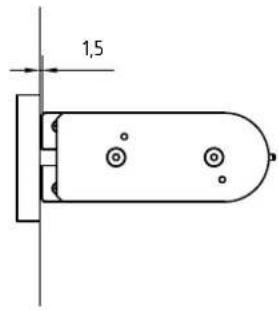
natural_image Technical line drawing of a mechanical component with mounting holes (no text or symbols)

Dormakaba ARCOS Studio - ARCOS Studio - 2

natural_image Isometric line drawing of a rectangular metal bracket with mounting holes (no text or symbols)

Dormakaba ARCOS Studio - ARCOS Studio - 3

Lieferumfang:

Scope of delivery:

Studio Rondo/Classic

ARCOS Studio

Dormakaba ARCOS Studio - ARCOS Studio - 4

1.5 mm

Dormakaba ARCOS Studio - ARCOS Studio - 5

4 mm

Dormakaba ARCOS Studio - ARCOS Studio - 6

4 mm

Dormakaba ARCOS Studio - ARCOS Studio - 7

natural_image Technical line drawing of a mechanical component with a separate view showing internal structure (no text or symbols)
Dormakaba ARCOS Studio - ARCOS Studio - 8

Dormakaba ARCOS Studio - ARCOS Studio - 9

  1. Schritt:
  2. Step:

1.1 1.1 1.4 1.5 1.3 1.2 1.2 4 mm 4 mm

  1. Schritt:
  2. Step:

Doppelseitiges Klebeband: Folienstreifen abziehen Double-sided adhesive tape: Pull-off backing tape 2.1 2.4 2.3 2.2 2.4 2.5 2.5 4 mm 4 mm

1,5

4 mm 5 Nm 4 mm 5 Nm

Dormakaba ARCOS Studio - ARCOS Studio - 14

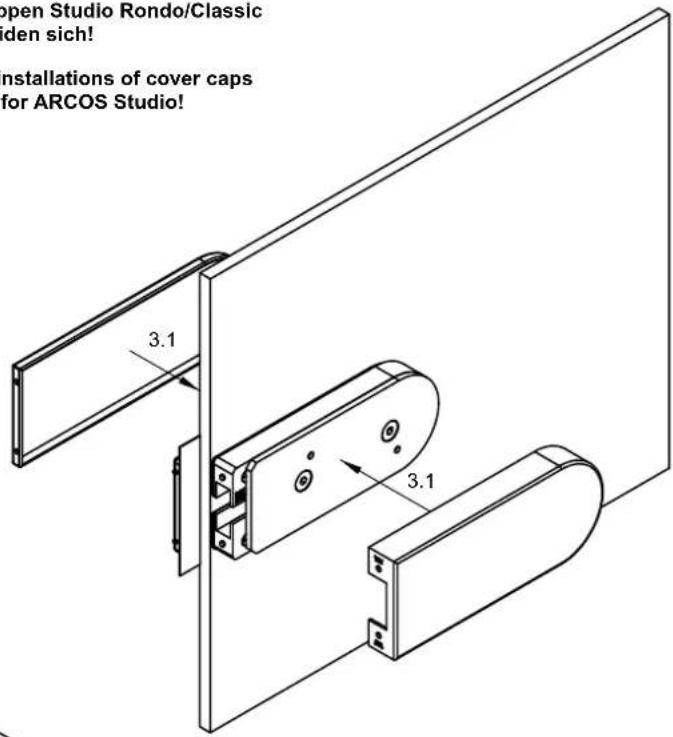
Attention: There are different installations of cover caps for Studio Rondo/Classic and for ARCOS Studio!

  1. Schritt:

  2. Step:

Pictured: Studio Rondo/Classic

3.2 1.5 mm

open Studio Rondo/Classic den sich! installations of cover caps for ARCOS Studio!

DETAIL X 3.3

DETAIL X 1.5 mm 3.2

Dormakaba ARCOS Studio - ARCOS Studio - 19

Attention: There are different installations of cover caps for Studio Rondo/Classic and for ARCOS Studio!

  1. Schritt:

  2. Step:

Pictured: ARCOS Studio

ARCOS Studio ARCOS Studio 3.1 Doppelseitiges Klebeband: Folienstreifen abziehen! 3.1 Double-sided adhesive tape: pull off backing paper!

Table of contents Click a title to access it
Manual assistant
Powered by Anthropic
Waiting for your message
Product information

Brand : Dormakaba

Model : ARCOS Studio

Category : Uncategorized