
LA7383DS - Fridge Concept - Free user manual and instructions
Find the device manual for free LA7383DS Concept in PDF.


User questions about LA7383DS Concept
0 question about this device. Answer the ones you know or ask your own.
Ask a new question about this device
Download the instructions for your Fridge in PDF format for free! Find your manual LA7383DS - Concept and take your electronic device back in hand. On this page are published all the documents necessary for the use of your device. LA7383DS by Concept.
USER MANUAL LA7383DS Concept
natural_image
Exterior view of a modern refrigerator cabinet (no visible text or symbols)LA7383ds
concept
CZ
PODĚKOVÁNÍ
text_image
Diagram of a refrigerator interior with numbered compartments for identification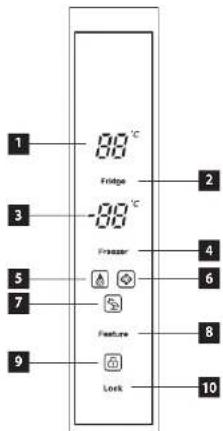
text_image
1 88°C Fridge 3 -88°C 4 2 5 Fraser 6 7 Feature 8 9 Lock 10POPIS OVLÁDACÍHO PANELU
text_image
Diagram of a refrigerator interior with numbered compartments for identification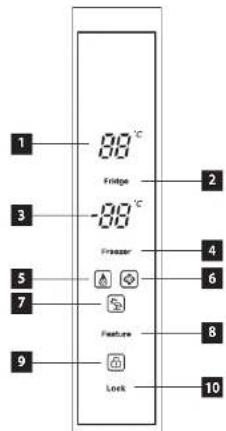
text_image
1 88°C Fridge 3 -88°C 4 5 7 Feature 9 Lock 2 6 8 10POPIS OVLÄDACIEHO PANELU
1 Displej – zobrazenie teploty v chladničke
2 Senzorové tlačidlo na nastavenie teploty v chladničke
3 Displej – zobrazenie teploty v mrazničke
4 Senzorové tlačidlo na nastavenie teploty v mrazničke
5 Ikona funkcie Super chladenie
6 Ikona funkcie super mrazenie
7 Ikona funkcie dovolenka
8 Senzorové tlačidlo voliteľných funkcií
9 Ikona odomknutia ovládacieho panela
10 Senzorové tlačidlo odomknutla ovládacleho panela
Displej
Po zapojení spotrebiča do zásuvky sa celý displej na určitý čas rozsvieti. Počas tejto doby bude displej zobrazený v normálnom (prevádzkovom) režime. V bežnom prevádzkovom režime je na displeji zobrazená aktuálna teplota v chladničke i v mrazničke. Po prvom spustení z továrne je teplota v chladničke nastavená na 5 °C a v mrazničke na -18 °C.
text_image
Diagram of a refrigerator interior with numbered compartments for identification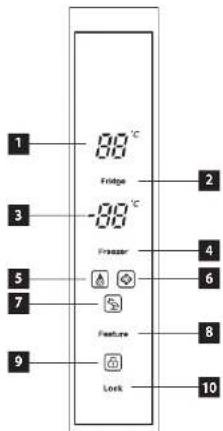
text_image
1 88°C Fridge 3 -88°C 4 2 5 Fraser 6 7 Feature 8 9 Lock 10OPIS PANELU STEROWANIA
text_image
Diagram of a refrigerator interior with numbered compartments for identification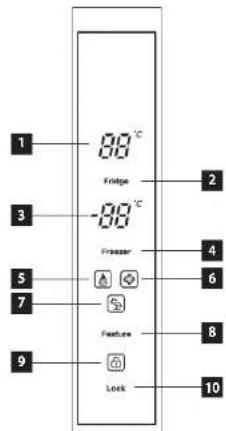
text_image
1 88°C Fridge 3 -88°C 4 5 Fraser 6 7 Feature 8 9 Lock 10VADIBAS PANELA APRAKSTS
Thank you for purchasing the Concept product. We want you to be satisfied with everything we make every day you use it.
Please read the instructions carefully before initial use. You should retain them for future reference. Ensure that anyone using this product is familiar with the instructions.
TABLE OF CONTENTS
Technical specifications
Important safety information
Product description Control panel description
Control panel description Tips for use
User manual
Additional functions
Regular operating noise
Connection to the mains
Cleaning and maintenance
Installation of the appliance
Troubleshooting
Appliance dimensions
Service centre
Environmental protection
| TECHNICAL SPECIFICATIONS | |
| Energy class F | |
| EEI 119% | |
| Voltage 220–240 V – 50 Hz | |
| Input 210 W | |
| Annual power consumption 345 kWh | |
| Daily power consumption 0,97 kWh | |
| Rated total storage volume 445 l | |
| Usable volume (refrigerator/freezer) 272 l / 173 l | |
| Freezing capacity 12 kg / 24 hours | |
| Freezer accumulation time 8 hours | |
| Climate class SN / ST | |
| Noise level 41 dB (A) | |
| Acoustic noise class C | |
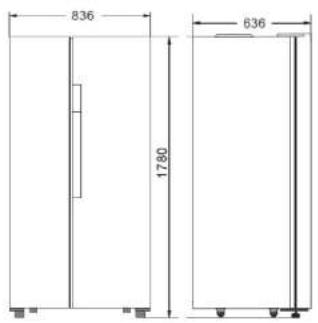
| Height | 1780 mm |
| Width | 836 mm |
| Depth | 636 mm |
| Weight | 78 kg |
The manufacturer reserves the right to make potential technical changes, typographical errors and any differences in the representation without prior notice.
EN
concept
concept
EN
IMPORTANT SAFETY INFORMATION
Upon a delivery of a freestanding refrigerator freezer
- Immediately after delivery, check the package for any damage during shipping.
- Caution! Caution! Some edges of this appliance that are hidden after installation are sharp! Be careful not to injure yourself!
- Do not use the appliance if it has been damaged. Contact the store where you purchased it immediately.
- Remove all the packaging and marketing materials before first use.
- Keep the packaging materials away from children or dispose of them properly.
During installation
- Do not use the appliance in any other way than as described in this manual.
- Make sure the mains voltage and current protection correspond to the values on the rating plate of the appliance.
- This appliance can be used in households and similar places like:
- kitchen cabinets in shops, offices and other workplaces
- appliances used in agriculture
- appliances used by guests in hotels and other areas in a hotel environment
- appliances used in a Bed and Breakfast environment
- Do not use the appliance if you are barefoot.
- Do not touch the appliance with wet hands.
- Do not touch the cooling parts of the freezer with wet hands. Risk of injury!
- Do not stand or sit on the open door of the appliance.
- Do not allow children or unauthorized people to handle the appliance, use it out of their reach.
• Children should not play with the appliance.
- Pay extra attention if the appliance is used near children.
- Do not allow the appliance to be used as a toy.
- This appliance can be used by children aged 8 years and over. Persons with reduced physical, sensory or mental capabilities, or lack of experience and knowledge, should be supervised or familiarized with the instructions for use of the appliance in a safe way and have been made aware of the risks involved.
• Children 3 to 8 years old are only allowed to insert and remove food from the refrigerator.
- If a malfunction occurs, turn off the appliance and unplug it from the wall outlet.
- When disconnecting the unit from the wall outlet, never pull the power cord, grasp the plug end and disconnect it by removing it from the receptacle.
EN
concept
concept
EN
- Do not immerse the power cord or the plug in water or any other liquid.
- Check the appliance and the power cord for damage regularly.
- Do not switch on the appliance if it has been damaged.
- Do not use the appliance if the door or the door seals are damaged. Call the authorised service centre.
- Do not use any accessories other than those recommended by the manufacturer.
- Do not use accessories with damaged surface treatment or if it has been worn out or has other defects.
- IMPORTANT! Before switching on, let the appliance stand still for at least 4–6 hours to settle the refrigerant gases in the compressor after shipping.
- Use the appliance in a room with temperatures between +10^ C and +38^ C .
- Do not place the appliance near heat sources, it may increase its consumption and shorten the service life.
- Do not place any objects on the top of the appliance, as it could damage the appliance.
- Do not place any electrical devices such as mixers and others in the appliance.
- Do not store explosive substances such as aerosol cans with a flammable substance in the appliance,
- Before use, it is necessary to wipe the inside of the appliance with a solution of baking soda dissolved in tepid water. After cleaning, dry all parts thoroughly.
- Cleaning and user maintenance shall not be made by children unless they are older than 8 years and supervised.
- NOTICE! Do not use mechanical devices or other means to speed up the defrosting process other than those recommended by the manufacturer.
- Place the appliance on a flat place in a well-ventilated are.
- Do not place the appliance under the direct sun shine.
- Make sure there is enough free space around the appliance for free circulation of air.
- The rear and side walls of the appliance should be at least 10 cm away from the wall. There should be a free space of approximately 30 cm above the appliance as it needs to ventilate freely.
Caution!
To avoid injury, open the door only for a short period of time to insert or remove food. Children may lock themselves inside the appliance (risk of suffocation) or be exposed to other dangers.
Possible defects
- Only qualified service technicians should repair or perform maintenance to this appliance.
- During the repairs the appliance must be disconnected from the power. Switch off the circuit breaker or remove the plug from the wall outlet.
- When disconnecting the unit from the wall outlet, never pull the power cord, grasp the plug end and disconnect it by removing it from the receptacle.

Caution! The risk of fire / Flammable materials.
If you fail to follow these instructions, any possible repair cannot be recognized as a warranty repair.
EN
concept
concept
EN
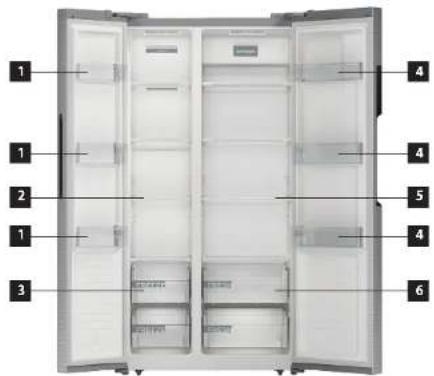
PRODUCT DESCRIPTION
1 Freezer door tray
2 Freezer glass shelves
3 Freezer drawers
4 Refrigerator door tray
5 Refrigerator glass shelves
6 Refrigerator drawers
text_image
Diagram of a refrigerator interior with numbered compartments for identification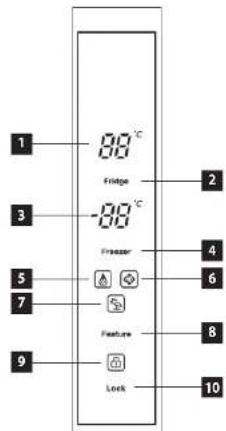
text_image
1 88°C Fridge 3 -88°C 4 5 7 Feature 9 Lock 2 6 8 10CONTROL PANEL DESCRIPTION
1 Display - temperature inside the refrigerator
2 Sensor button - refrigerator temperature setting
3 Display - temperature inside the freezer
4 Sensor button - freezer temperature setting
5 Super Cool icon
6 Super Freeze icon
7 Vacation function Icon
8 Sensor button for selectable functions
9 Control Panel Unlock icon
10 Sensor button to unlock the control panel
Display
The display lights for some time, when the appliance is connected to the mains. After that the display will witch to the operating mode. In normal operating mode, the current temperature inside the refrigerator and the freezer are displayed. A temperature of 5 °C inside the refrigerator and of -18 °C inside the freezer are set as default.
If the door does not get open opened and any other activity is not done within 20 seconds, the control panel gets locked and goes out. The display lights up again when any of the buttons on the control panel is pressed or the door is opened.
TIPS FOR USE
• We do not recommend putting hot food or fluids that are still evaporating inside the refrigerator. It will increase the humidity inside the refrigerator.
- Food intended for refrigerating should be wrapped or covered. It is recommended to use plastic bags, kitchen foil or food paper to wrap food. Liquids should be stored in closed containers or bottles.
- It is also not recommended to put beverages in glass bottles in the freezer, glass can easily rupture due to low temperatures inside the freezer.
Please follow the instructions below to avoid degrading of stored food.
- Do not open the refrigerator door for longer than necessary, as the supply of warm air significantly increases the temperature inside the appliance.
- Clean surfaces that may be in contact with food and drainage channels regularly.
- Fresh meat and fish should be stored in a suitable place to avoid contact with other foods.
USER MANUAL
Before first use
Before first use you should wipe the outside and inside of the appliance with a damp cloth for hygiene reasons. Wash all removable parts with warm soapy water.
After installing the refrigerator, leave the appliance standstill for at least 4–6 hours before connecting to the mains. It is necessary to allow the cooling gases to set down. Then you can connect the refrigerator to the mains and let it run for 2-3 hours to stabilize a normal operating temperature. Then put fresh or frozen food inside the appliance.
Note: If a power failure occurs during the first run, wait for at least 5 minutes before switching on again or connecting to the mains.
Setting the Temperature of Refrigerator Zone
- Press and hold the sensor button (10) for 3 seconds to unlock the control panel.
- Use the sensor button (2) to adjust the temperature inside the refrigerator by 1 °C steps.
• The temperature of the refrigerator zone can be set between 0 and 6 °C. - Press and hold the sensor button (2) for 5 seconds to switch off the cooling chamber. When the tone sounds, the cooling chamber is switched off. The refrigerator temperature display shows “--”.
- Press and hold the sensor button (2) for 5 seconds to switch on the cooling chamber. When the tone sounds, the cooling chamber is switched on. The refrigerator temperature display shows the temperature set before switching off (the default value is 5 °C).
Setting the Temperature of Freezer Zone
- Press and hold the sensor button (10) for 3 seconds to unlock the control panel.
- Use the sensor button (4) to adjust the temperature inside the freezer by 1 °C steps.
• The temperature of the freezer zone can be set between -15 and -23 °C.
EN
concept
concept
EN
Unlocking the Control Panel
- Press and hold the sensor button (10) for 3 seconds to unlock the control panel.
- The control panel gets locked automatically after a short period of inactivity to prevent accidental resetting of the temperatures.
Door Open Alarm
• The refrigerator is equipped with a sound alarm which is triggered every time the door gets opened.
- If the door does not get closed within 1 minute from opening, a beep sounds will occur every 10 second until the door is completely closed.
ADDITIONAL FUNCTIONS
Super fridge mode function (Super Cool)
- Press and hold the sensor button (10) for 3 seconds to unlock the control panel.
- Press the sensor button (8) to select the Super fridge mode (Super Cool), which will be indicated by the icon (5) on the display.
- The Super fridge mode function automatically sets the temperature inside the refrigerator to 0 °C for 150 minutes.
- After 150 minutes, the Super fridge mode will turn off and the refrigerator temperature will turn back to the value set before the Super fridge mode was turned on.
Super freezer mode (Super Freeze)
- Press and hold the sensor button (10) for 3 seconds to unlock the control panel.
- Press the sensor button (8) to select the Super freezer mode (Super Freeze), which will be indicated by the icon (6) on the display.
- After 24 hours of operation or when the freezer temperature reaches -28°C, the Super freezer mode will turn off and the temperature will turn back to the value set before the Super freezer mode was turned on.
Holiday mode (Vacation)
- Press and hold the sensor button (10) for 3 seconds to unlock the control panel.
- Press the sensor button (8) to select the Holiday mode (Vacation), which will be indicated by the icon (7) on the display.
- The Holiday mode sets the temperature inside the refrigerator to 6 °C and inside the freezer to -15 °C.
It can be caused by expanding and shrinking of the air inside the refrigerator and freezer.
Short cracking
It can be heard when the thermostat turns on and off the compressor.
Noise of the compressor
Running compressor produces noise. After the installation of the appliance, the compressor may be a little louder for a short time.
Bubbling and flowing
This sound is generated when the refrigerant is flowing through the appliance pipes.
Sound of running water
Water flows into the evaporator groove during the defrosting process and it is audible throughout the defrosting process.
CONNECTION TO THE MAINS
- Make sure the mains voltage and current protection correspond to the values on the rating plate of the appliance. We recommend using a separate outlet with a 10 A circuit breaker.
- Only use grounded sockets.
- Do not use multiple sockets, plugs and extension cords. There is a risk of overheating.
- The plug of the power cord on the appliance must be freely accessible even after the installation.
• Changes in a connection may only be performed by a qualified professional. - Electrical safety of the appliance can be guaranteed only if the protective terminal of the appliance is connected to the protective conductor of the mains.
- The manufacturer bears no responsibility for damage to persons or property as a result of missing or bad protective connection.
- The power cord must be positioned in a way that it is not deformed or excessively bent.
CLEANING AND MAINTENANCE
- Disconnect the power cord from the wall outlet or switch off the circuit breaker of the appliance before cleaning and maintenance.
- Dust and dirt on the appliance on the wall and on the ground should be regularly cleaned for trouble-free operation and energy savings.
• The inside of the refrigerator should be cleaned according to the frequency of use to avoid unpleasant odours.
• One source of odour can also be dirt deposits around the sealing. Regular cleaning with a damp cloth prevents these unpleasant odours. - For cleaning, we recommend using non-aggressive products, preferably clear lukewarm water along with a soft sponge or paper towel.
- When the cleaning is done, let the appliance open to dry out naturally.
- For cleaning, we do not recommend cleaning agents such as alcohol, acetone, oil, toothpaste or any other abrasive products.
• We do not recommend rough brushes, hard wipes or steel brushes.
• We do not recommend using boiling water as it may cause damage to the appliance. - We do not recommend cleaning the appliance with a stream of water that could interfere with the insulation or cause a short circuit of some electronic components of the appliance.
Note: The magnetic door strip is electrically heated to prevent water condensing on it. Water condensing is a normal phenomenon that does not affect the refrigeration functionality.
INSTALLATION OF THE APPLIANCE
- Defects caused by improper installation are not covered by the warranty.
• Installation is the responsibility of the customer not the manufacturer. - The manufacturer bears no responsibility for damage caused to people, animals or property due to incorrect installation.
- Place the appliance on a flat place in a well-ventilated are.
- Do not place the appliance under the direct sun shine.
- The appliance should be placed at least 10 cm from the wall at the back and both sides. There should be a free space of approximately 30 cm above the appliance as it needs to ventilate freely.
- If necessary, use the adjustable feet at the bottom of the appliance to align the appliance in a horizontally stable position.
EN
concept
concept
EN
TROUBLESHOOTING
| Defect description | Possible cause Solution | |
| The appliance does not work; non-functioning display | The power cord plug is not plugged in the wall outlet. | Check the connection of the cord. |
| Damaged power cord | Do not connect the appliance into the mains. Contact a qualified expert or an authorised service. | |
| Faulty main electronics or control electronics | Contact an authorized service centre. | |
| The appliance cannot lower the temperature | Cooling fluids leakage Contact an authorized service centre. | |
| Clogged refrigerator or freezer piping Contact an authorized service centre. | ||
| The compressor is still running | Room temperature is high | Ensure that there is enough space around the appliance for free air circulation. |
| Too many items stored in the refrigerator and freezer | Remove some of the items that do not have to be stored in the appliance. | |
| Hot meals or liquids are placed inside the refrigerator | Remove all hot meals and liquids from the appliance and let it cool down. | |
| Door gets opened too frequently Do not open the door so often. | ||
| Faulty main electronics or control electronics | Contact an authorized service centre. | |
| Too much noise | The appliance is not levelled properly | Use the adjustable feet to align the appliance to a horizontal and stable position. |
| Loose screws securing the compressor Tighten the screws. | ||
| The light inside the refrigerator does not light up | The power cord plug is not plugged in the wall outlet. | Check the connection of the cord. |
| The light in the refrigerator is damaged Contact an authorized service centre. | ||
APPLIANCE DIMENSIONS
text_image
836 1780 836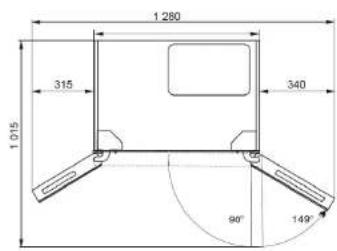
text_image
1 280 315 340 1 015 90° 149°SERVICE CENTRE
CAUTION!
Extensive maintenance or repair, which requires access to internal parts of the product, has to be performed by a qualified service centre.
ENVIRONMENTAL PROTECTION
- Prefer recycling of packaging materials and old appliances.
- Packaging materials may be disposed of as sorted waste.
- Dispose the plastic bags made of polyethylene (PE) of as sorted waste.
Recycling of the appliance at the end of its lifespan:

This appliance is labelled in accordance with European Directive 2012/19/EU concerning used electrical and electronic appliances (waste electrical and electronic equipment - WEEE). The symbol on the product or its packaging indicates that this product may not be treated as household waste. It is necessary to take it to a container park for the recycling of electrical and electronic equipment. By ensuring the correct disposal of this appliance you will help prevent potential negative consequences to the environment and human health, which could otherwise result from inappropriate disposal of this product. Disposal must be performed in accordance to the regulations for waste disposal. For more detailed information about recycling of this appliance see the authorized local office or service for household waste disposal or the shop, where you purchased the appliance.