
Powershred SB-99Ci - Shredder FELLOWES - Free user manual and instructions
Find the device manual for free Powershred SB-99Ci FELLOWES in PDF.


| Product Type | Paper Shredder |
| Brand | Fellowes |
| Model | Powershred SB-99Ci |
| Cut Type | Cross-Cut (Micro-Cut) |
| Sheet Capacity | 10-12 sheets per pass (70 gsm) |
| Bin Capacity | 6 gallons (22.7 liters) |
| Shred Speed | 9 ft/min (2.7 m/min) |
| Shred Size | 4 x 38 mm (P-4 security level) |
| Input Width | 9 inches (229 mm) |
| Dimensions (HxWxD) | 23.1 x 14.6 x 12.3 inches (587 x 371 x 312 mm) |
| Weight | 19.8 lbs (9.0 kg) |
| Power | 120V, 60Hz, 5A |
| Noise Level | 58 dB (A) |
| Safety Features | SafeSense® Technology (stops when hands touch feed opening), Auto-Start/Stop, Thermal Overload Protection |
| Run Time / Cool Down | 20 minutes continuous run / 30 minutes cool down |
| Accepts | Paper, staples, paper clips, credit cards, CDs/DVDs |
| Warranty | 2 years machine warranty / 1 year on cutters |
| Maintenance | Oil cutters every 2 months with Fellowes Shredder Oil |
| Compatible Accessories | Fellowes Shredder Oil (35250), Replacement Bin Bags (36061) |
| Country of Origin | China |
Frequently Asked Questions - Powershred SB-99Ci FELLOWES
User questions about Powershred SB-99Ci FELLOWES
0 question about this device. Answer the ones you know or ask your own.
Ask a new question about this device
Download the instructions for your Shredder in PDF format for free! Find your manual Powershred SB-99Ci - FELLOWES and take your electronic device back in hand. On this page are published all the documents necessary for the use of your device. Powershred SB-99Ci by FELLOWES.
USER MANUAL Powershred SB-99Ci FELLOWES
natural_image
Exterior view of a modern office building (no signage)Please read these instructions before use. Do not discard: keep for future reference.
A. SafeSense® Technology
B. Paper entry
C. See safety instructions
D. CD/Card flap
E. Pullout bin
F. Casters
G. Disconnect power switch
H. Paper tray
I. SafeSense® override switch
J. Power controls
K. Overheat (red)
L. Bin open (red)
M. Bin full (red)
N. Remove Paper (red)
0. SafeSense® indicator (yellow)
P. Sheet capacity indicator
Q. Auto correcting button (blue)
R. Reverse
S. On/off (blue)
T. Forward
CAPABILITIES
Will shred: Paper, credit cards, CD/DVD's, staples and small paper clips
Will not shred: Adhesive labels, continuous form paper, transparencies, newspaper, cardboard, large paper clips, laminates, file folders, X-rays or plastic other than noted above
Paper shred size:
Cross-Cut 3.9 x 38mm
Maximum:
Sheets per pass 17*
CDs/Cards per pass ....1*
Paper entry width.... 230mm
A4, (70g) paper at 220-240V, 50 Hz, 2.5 Amps; heavier paper, humidity or other than rated voltage may reduce capacity. Recommended daily usage rates: 50–100 shredding passes per day, 50 credit cards; 10 CDs. 17 sheets per pass.
Fellowes SafeSensé ^® shredders are designed to be operated in home and office environments ranging between 50 – 80 degrees Fahrenheit (10 – 26 degrees Celsius) and 40 – 80% relative humidity.
ADVANCED PRODUCT FEATURES
Jam Proof System
Eliminates frustrating jams by preventing overloads and powering through misfed paper.
TECHNICAL EXPLANATION
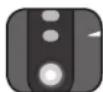
Sheet capacity indicator tells you when you have too many sheets or too few to maximize productivity
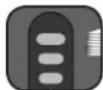
Shredder will not operate when too many sheets are fed into paper entry (red light). Reduce sheet quantity and refeed

If misfed, shredder will automatically adjust to power through or reverse out paper

Patented SafeSense® Technology
Stops shredder immediately when hands are too close to the paper entry.
TECHNICAL EXPLANATION TECHNICAL EXPLANATION
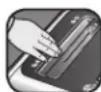
Shredder will stop automatically and indicator will light up when hands are too close to the paper entry
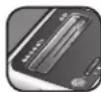
Shredder will resume normal operation when hands are no longer near the paper entry

Flashing indicator warns when SafeSense® technology has been shut off

SilentShred™ Technology
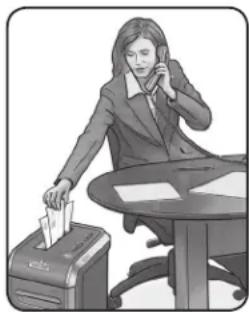
SilentShred™ noise quality shreds without noisy disruptions.
natural_image
Illustration of a person at a desk with a printer and phone, no visible text or symbolsSilentShred™ motor features whisper-quiet, efficient shredding performance without the noisy disruptions
WARNING: IMPORTANT SAFETY INSTRUCTIONS — Read Before Using!


- Keep away from children and pets. Keep hands away from paper entry. Always set to off or unplug when not in use.
- Keep foreign objects — gloves, jewelry, clothing, hair, etc. — away from shredder openings. If object enters top opening, switch to Reverse (◀◀) to back out object.
- Never use aerosol products, petroleum based lubricants or other flammable products on or near shredder. Do not use canned air on shredder.
-
Do not use if damaged or defective. Do not disassemble shredder. Do not place near or over heat source or water.
-
This shredder has a Disconnect Power Switch (G) that must be in the ON (I) position to operate shredder. In case of emergency, move switch to OFF (O) position. This action will stop shredder immediately.
- Avoid touching exposed cutting blades under shredder head.
- Rotate CD flap entry for shredding CDs/cards. Keep finger away from CD hole. Jam Proof System is disabled when flap is in CD position.
- Do not put foreign objects in paper entry.
- The grounded socket-outlet shall be installed near the equipment and shall be easily accessible.
BASIC SET UP AND SHREDDING OPERATION
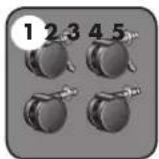
CASTER INSTALLATION
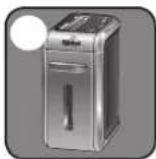
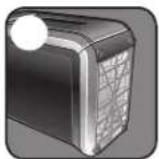
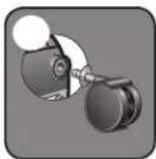
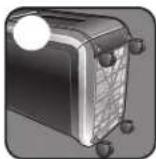

Continuous operation:
20-minute maximum
NOTE: Shredder runs briefly after each pass to clear entry. Continuous operation beyond 20-minutes will trigger 40-minute cool down period.
PAPER OR CD/CARD
Plug in and put disconnect power switch in ON (I) position
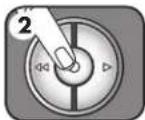
Press (○) ON to activate (blue)
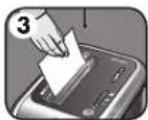
Feed into paper entry and release
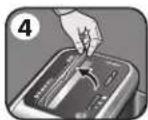
To shred CDs rotate CD flap into place
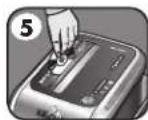
Hold CD/card at edge, feed into CD/Card flap entry and release
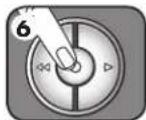
When finished shredding set to OFF (○)
100%
JAM PROOF
Eliminates frustrating jams by preventing overloads and powering through misfed paper.
SET-UP AND TESTING MISFED PAPER
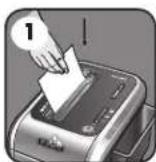
Feed into paper entry and release
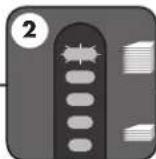
If too many sheets, indicator will light up to red and shredder will not take paper
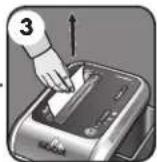
Remove several sheets until the indicator is below red and the shredder will take the paper
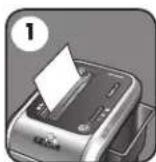
Shredder will take fewer sheets, but if indicator is below yellow, you can add more sheets without fear of jamming
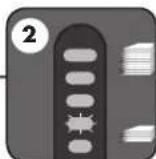
Increase the number of sheets being fed up to the top yellow light to maximize your productivity
*100% Jam Proof when used in accordance with user manual
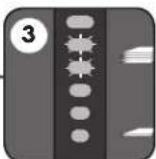
If paper is misfed and stops shredding, all indicator lights will illuminate and shredder will pause for 3-6 seconds
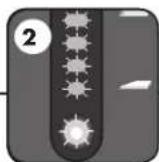
Automatic correcting action will power through the misfed paper, so shredding can continue (do not add more paper during flashing)
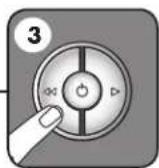
If Remove Paper icon ( ▲ ) is illuminated, press reverse and remove paper
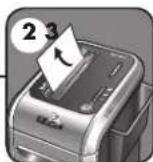
If there is too much paper for the shredder to power through, it will reverse the paper out for easy removal
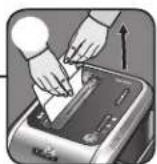
Reduce paper quantity to an acceptable amount and refeed into paper entry

SAFESENSE® TECHNOLOGY OPERATION
Stops shredder immediately when hands are too close to the paper entry.
SET-UP AND TESTING
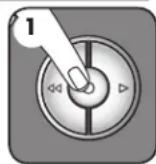
Turn the shredder ON (_) to activate SafeSense®
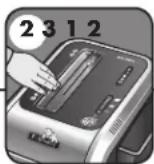
Touch test area and look for the SafeSense® indicator to illuminate
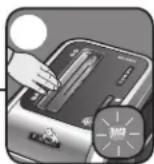
SafeSense® is active and working properly
FLASHING INDICATOR

SafeSense® is deactivated when indicator is flashing
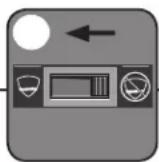
Shift override switch to the "active" position, reactivating SafeSense®
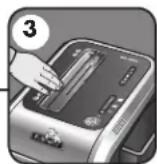
Confirm the indicator is no longer flashing and retest by putting your hand on the test area
ADVANCED PRODUCT FEATURE MAINTENANCE AND TROUBLESHOOTING
JAM PROOF SYSTEM\*
Eliminates frustrating jams by preventing overloads and powering through misfed paper.
DISABLING THE FEATURE
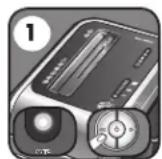
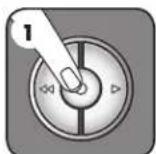
Should you choose to disable the system, press and hold the auto button (blue) and reverse (◀◀) key at the same time
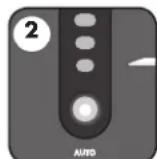
Once disabled, the blue Auto light is no longer illuminated (To re-engage, repeat step 1)
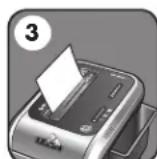
Shredding can continue with the system disabled, however a paper jam may occur with too many sheets and Remove Paper icon ( [icon] ) will illuminate
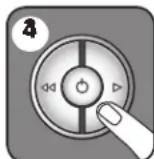
If jam occurs, press and hold forward ( ▶) key until the document is completely through the shredder
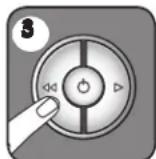
If not cleared, press reverse (◀◀) briefly (repeat steps 4 and 5 until shredded)
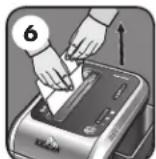
If steps 4 and 5 do not clear jam, reverse paper all the way out, remove several sheets and refeed
*100% Jam Proof when used in accordance with user manual

SAFESENSE® TECHNOLOGY
Stops shredder immediately when hands are too close to the opening.
DISABLING THE FEATURE
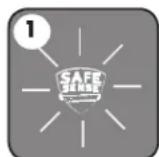
Should the SafeSense® indicator stay lit without touching the opening
The shredder will stop and SafeSense® will need to be deactivated
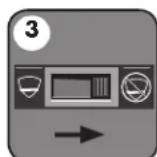
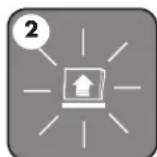
To deactivate, shift override switch to the "not active" position
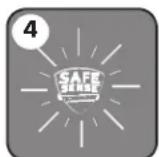
Once deactivated, the indicator will flash and the SafeSense® feature will not function
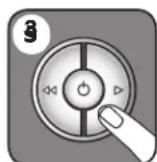
To clear paper, press and hold forward (▶) key until paper is shredded
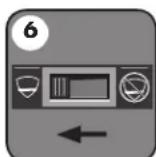
Once the paper is cleared, reactivate the SafeSense® feature (To re-engage, see Operations)
BASIC PRODUCT MAINTENANCE AND TROUBLESHOOTING
OILING SHREddER

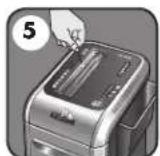
FOLLOW OILING PROCEDURE BELOW AND REPEAT TWICE
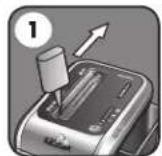
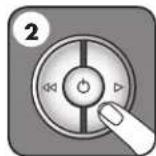
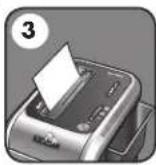
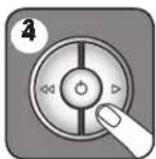
*Apply oil across entry Press forward Shred one sheet
Press and hold forward (▷)
2-3 seconds
CAUTION \*Only use a non-aerosol vegetable oil in long nozzle container such as Fellowes 35250

- All cross-cut shredders require oil for peak performance. If not oiled, a machine may experience diminished sheet capacity, intrusive noise when shredding and could ultimately stop running. To avoid these problems, we recommend you oil your shredder each time you empty your waste bin.
CLEANING AUTO-START INFRARED SENSORS
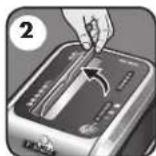
Paper detection sensors are designed for maintenance free operation. However, on rare occasions the sensors may become blocked by paper dust causing the motor to run even if there is no paper present (Note: two paper detection sensors are located in the center of the paper entry).
TO CLEAN THE SENSORS
Turn off and unplug shredder.
Lift CD flap. Locate Auto-start
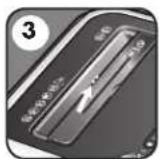
infared sensor.
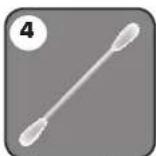
Dip cotton swab in rubbing alcohol.
Using cotton swab, wipe away any contamination from the paper sensors.
PREVENTIVE MAINTENANCE AND MISCELLANEOUS TROUBLESHOOTING
- Run shredder once a day in reverse for 15 seconds to clear cutters
- Empty wastebasket when bin full indicator light is illuminated using bag # 36053
- Shredder will not function if the pull-out bin is not pushed all the way in, or if bin needs to be emptied.
- When shredding for a prolonged period of time, the motor can become warm and require a cool down period. When this occurs the overheat indicator will alert you to the problem, this model will require 40 minutes to cool down.
ACCESSORIES
Maintenance is an important part of protecting your investment. Don't forget oil and shredder bags.
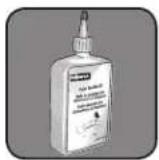
Shredder oil - #35250
SB-99Ci Shredder
plastic bag - #36053
PROBLEM STILL NOT SOLvEd?
Fellowes is committed to giving our customers the support and service they deserve. That is why we offer several options for you to find technical information, step-by-step assistance and personal attention.
- www.fellowes.com features an extensive on-line support section with a number of self-service options
- Our customer service professionals are dedicated to resolve any of your issues
Go to Support Section at www.fellowes.com or see back page of manual for useful telephone numbers.
WARRANTY
LIMITED WARRANTY Fellowes, Inc. ("Fellowes") warrants the cutting blades of the machine to be free from defects in material and workmanship for 7 years from the date of purchase by the original consumer. Fellowes warrants all other parts of the machine to be free of defects in material and workmanship for 2 years from the date of purchase by the original consumer. If any part is found to be defective during the warranty period, your sole and exclusive remedy will be repair or replacement, at Fellowes' option and expense, of the defective part.
This warranty does not apply in cases of abuse, mishandling, or unauthorized repair. ANY IMPLIED WARRANTY, INCLUDING THAT OF MERCHANTABILITY OR FITNESS FOR A PARTICULAR PURPOSE, IS HEREBY LIMITED IN DURATION TO THE APPROPRIATE WARRANTY PERIOD SET FORTH ABOVE. In no event shall Fellowes be liable for any consequential or incidental damages attributable to this product. This warranty gives you specific legal rights. The duration, terms, and conditions of this warranty are valid worldwide, except where different limitations, restrictions, or conditions may be required by local law. For more details or to obtain service under this warranty, please contact us or your dealer.
W.E.E.E.
English
This product is classified as Electrical and Electronic Equipment. Should the time come for you to dispose of this product please ensure that you do so in accordance with the European Waste of Electrical and Electronic Equipment (WEEE) Directive and in compliance with local laws relating to this directive.
For more information on the WEEE Directive please visit www.fellowesinternational.com/WEEE
French
Declaration of Conformity
Fellowes Manufacturing Company
Yorkshire Way, West Moor Park
Doncaster, South Yorkshire, DN3 3FB, England
declares that the product
Model SB-99Ci
conform with the requirements of the Restriction of Hazardous Substances Directive (2002/95/EC), Low Voltage Directive (2006/95/EC) and the Electromagnetic Compatibility Directive (2004/108/EC) and the following harmonized European Names (EN Standards) and IEC Standards.
Safety: EN 60950-1:2006
EN 294:1992
IEC 60950-1 Second Edition 2005
EMC: Standard
EN 55014-2:1997/A1:2001
IEC 61000-4-2:2001
IEC 61000-4-4/A2:2001
IEC 61000-4-5:2001
IEC 61000-4-6:2001
IEC 61000-4-11:2001
EN 55014-1:2000/A2:2002
EN 61000-3-2:2000/A2:2005
EN 61000-3-3:1995/A2:2005
Itasca, Illinois, USA
July 30, 2006
James Kellowes
James Fellowes
DATE OF PURCHASE/dATE d'ACHAT/FECHA DE COMPRA/KAUFdATUM/data dl ACQUISTO/AANKOOPdATUM/INKOPSdATUM/K∅BSdato/OSTOPÄlvÄ/KJ∅PSdato/data ZAKUPU/ ДАТА ПРИОБРЕТЕНИЯ/HMEPOMHNIA AΓΟΡΑΣ/SATIN ALMA TARİHİ/DATUM NÁKUPU/DÁTUM NÁKUPU/VÁSÁRLÁS DÁTUMA/dATA DE COMPRA
SERIAL NUMBER/NUMÉRO DE SÉRIE/NÚMERO DE SERIE/SERIENUMMER/NUMERO DI SERIE/SERIENUMMER/SERIENUMMER/SARJANUMERO/SERIENUMMER/NUMER SERII/СЕРИЙНЫЙ HOMEP/APÍOMOŠ ΣΕΙΡΑΣ/SERÍ NUMARASI/SÉRIOVÉ ČÍSLO/SÉRIOVÉ ČÍSLO/GYÁRTÁSI SZÁM/NÚMERO DE SÉRIE
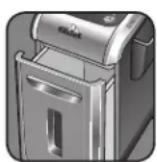
Serial Number is located on inside of cabinet/Numéro de série à l'intérieur de l'armoire/El número de serie se encuentra en el interior del armario/Die Seriennummer befindet sich auf der Innenseite des Schranks/Il numero di serie è situato all'interno dell'involucro/Het serienummer bevindt zich aan de binnenkant van de kast/Serienumret sitter på insidan av skåpet/Serienummeret findes på indersiden af kabinettet/Sarjanumero löytyy kotelon sisäpuolelta/Serienummeret finner du på innsiden av kabinettet/Numer serii umieszczony jest wewnątrz obudowy/Cerийный номер расположен внутри корпуса/Ο αριθμός σειράς βρίσκεται μέσα στο περίβλημα/Seri Numarası kabinin içindedir/Sériové číslo se nachází uvnitř skřínky/Sériové číslo sa nachádza na vnútornej strane skrinky/A gyártási szám a szekrény belsejében található/O número de série está localizado no interior da estrutura.

Fellowes
Useful Phone Numbers
Help Line
| Australia | +1-800-33-11-77 |
| Canada +1-800-665-4339 |
| Europe | 00-800-1810-1810 |
| Mexico | +1-800-234-1185 |
| United States | +1-800-955-0959 |
Fellowes
| Australia | +61-3-8336-9700 |
| Benelux | +31-(0)-76-523-2090 |
| Canada +1-905-475-6320 | |
| Deutschland | +49-(0)-5131-49770 |
| Espana | +34-91-748-05-01 |
| France | +33-(0)-1-30-06-86-80 |
| Italia | +39-071-730041 |
| Japan | +81-(0)-3-5496-2401 |
| Korea | +82-(0)-2-3462-2844 |
| Malaysia | +60-(0)-35122-1231 |
| Polska | +48-(22)-771-47-40 |
| Singapore | +65-6221-3811 |
| United Kingdom | +44-(0)-1302-836836 |
| United States | +1-630-893-1600 |
Fellowes
1789 Norwood Avenue, Itasca, Illinois 60143-1095 • USA • 630-893-1600
fellowes.com
Australia Canada Canada and France Depots/Rukland United Kirfrorence
Benelux China España Italia Korea Singa Spain United States Italia
Japan
Korea
Polska
Singapore
United Kingdom
United States

- CAPABILITIES
- Maximum:
- ADVANCED PRODUCT FEATURES
- Jam Proof System
- TECHNICAL EXPLANATION
- Patented SafeSense® Technology
- TECHNICAL EXPLANATION TECHNICAL EXPLANATION
- SilentShred™ Technology
- WARNING: IMPORTANT SAFETY INSTRUCTIONS — Read Before Using!
- BASIC SET UP AND SHREDDING OPERATION
- Continuous operation:
- 100%
- JAM PROOF
- SAFESENSE® TECHNOLOGY OPERATION
- ADVANCED PRODUCT FEATURE MAINTENANCE AND TROUBLESHOOTING
- JAM PROOF SYSTEM\*
- SAFESENSE® TECHNOLOGY
- BASIC PRODUCT MAINTENANCE AND TROUBLESHOOTING
- OILING SHREddER
- CAUTION \*Only use a non-aerosol vegetable oil in long nozzle container such as Fellowes 35250
- CLEANING AUTO-START INFRARED SENSORS
- PREVENTIVE MAINTENANCE AND MISCELLANEOUS TROUBLESHOOTING
- ACCESSORIES
- PROBLEM STILL NOT SOLvEd?
- WARRANTY
- W.E.E.E.
- English
- French
- Declaration of Conformity
- Fellowes Manufacturing Company
- EMC: Standard
- Fellowes
- Useful Phone Numbers
Brand : FELLOWES
Model : Powershred SB-99Ci
Category : Shredder