
Xemio-154 - Mp3 player LENCO - Free user manual and instructions
Find the device manual for free Xemio-154 LENCO in PDF.


| Product Type | MP3 Player |
| Brand | Lenco |
| Model | Xemio-154 |
| Dimensions (H x W x D) | 50 mm x 33 mm x 17 mm |
| Weight | 14.5 g |
| Power Source | DC 5V 500mA via USB |
| Battery Type | Rechargeable Lithium-Polymer 3.7V 110mAh |
| Battery Life | 5-6 hours of playback |
| Charging Time | Approx. 2-3 hours |
| Music Formats Supported | MP3 (32-320 kbps), WMA (32-320 kbps) |
| Memory Card Slot | Micro SD (up to 32GB, 64GB possible) |
| PC Connection | USB 2.0 High Speed |
| Earphone Output | 2mW x 2 (32 Ohm) |
| Frequency Response | 20 Hz – 20,000 Hz |
| Signal-to-Noise Ratio | 80 dB |
| Playback Controls | Play/Pause, Next/Previous, Volume, Shuffle, Fast Forward/Rewind |
| LED Indicators | Blue (play/pause/PC), Red (charging/battery low) |
| Reset Mechanism | Built-in tact switch via reset hole |
| Operating Temperature | 0°C – 40°C |
| Compatible Operating Systems | Windows 2000/XP/Vista/7/8/10, Mac OS 9.2 or above |
| Safety Features | Volume warning at 85dB, auto power-off when idle |
| Included Accessories | USB cable, earphones, clip |
Frequently Asked Questions - Xemio-154 LENCO
User questions about Xemio-154 LENCO
0 question about this device. Answer the ones you know or ask your own.
Ask a new question about this device
Download the instructions for your Mp3 player in PDF format for free! Find your manual Xemio-154 - LENCO and take your electronic device back in hand. On this page are published all the documents necessary for the use of your device. Xemio-154 by LENCO.
USER MANUAL Xemio-154 LENCO
natural_image
Two modern handheld devices with blue and silver buttons, one open and one closed, against a white background (no text or symbols visible)User manual Sport MP3 Player with Micro SD Card of 4GB
IMPORTANT:
Read all instrucons carefully before using this product. Retain this owner's manual for future reference.
Cauons
- Do not place on or near naked ames, such as lit candles.
- Do not place objects lled with liquids such as vases on or near the product.
- Do not use or store this product in a place where it is subject to direct sunlight, heat, excessive dust or vibraon.
- Do not use this product with wet hands.
- Do not clean this product with water or other liquids.
- Do not block or cover the slots and holes in the product.
- Do not push foreign objects into the slots or holes in the product.
- Do not aempt to open this product yourself. There are no user serviceable parts inside.
- Do not allow children access to the packaging including plasc bags.
Safety Warnings
- Before using this product, read and follow all warnings and instrucons.
- This product is not intended for use by young children. Young children should be properly supervised.
- This product is intended for household use only and not for commercial or industrial use.
- Do not expose to dripping or splashing liquid.
- No naked ame sources, such as lit candles, should be placed near the product.
- Venlaon should not be impeded by covering venlaon openings with items such as newspapers, table cloths, curtains and the like.
- Damage caused by using this product by failure to follow any other warning or precaution contained within this user manual will not be covered by warranty.
Note: Dispose of this product responsibly.
| WARNING: When Driving in the trac listening to a personal music player can make the listener less aware of potenal dangers such as approaching cars and emergency vehicles. | |
| WARNING: To prevent possible hearing damage, do not listen at high volume levels for long periods. |
A. Key Navigaon and Connecon
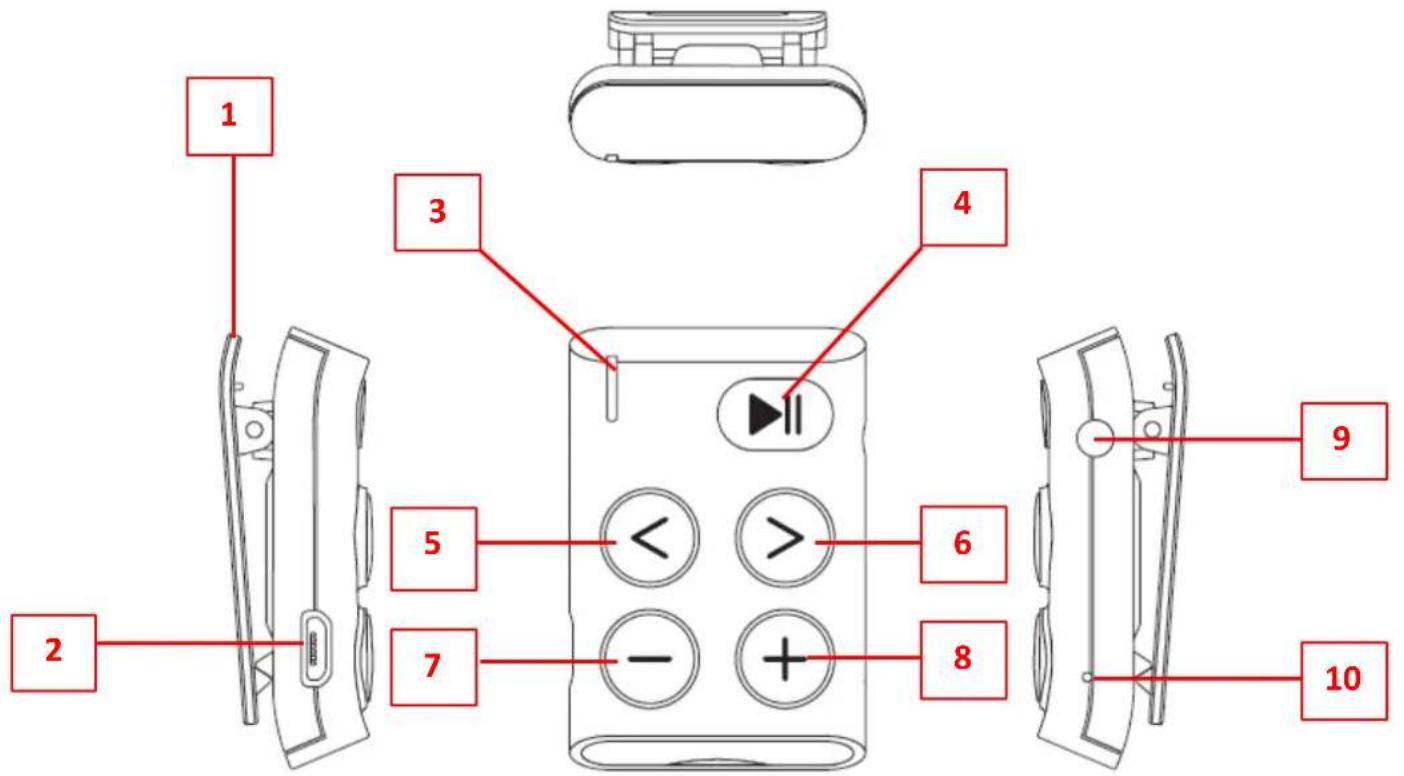
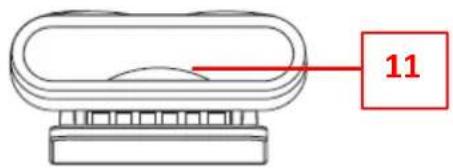
| No. | Descripon | Funcon |
| Clip | ||
| Micro USB Port | For PC conncon/Charge | |
| Status LED Indicator (Red and Blue) | For charging and play status | |
| ▶ Buon | On/O, Play/Pause, | |
| < Buon | Back Track/Fast-Backward | |
| > Buon | Next Track/Fast-Forward | |
| — Buon | Volume down | |
| + Buon | Volume up | |
| Earphone Output Jack | 3.5mm earphone conncon | |
| Reset (Bulit-in tact switch) | For hardware reset | |
| Memory Card Slot | Under the Silicon Cover |
B. Insert Micro SD Memory Card (not included)
This device is design without an internal memory; before you use it, insert a Micro SD memory card into player.
- Turn "O" the play;
- Open the silicon cover and then insert the memory card into the player's memory card slot; make sure the memory card is rmly and correctly inserted. Then close the silicon cover back to posion.
- Now you can use the player for upload/download the desired media les with your PC computer.
- Or, Upload the desired media les direct to the Micro SD memory card direct with your computer before insert it into player.
- However, the device will turn to OFF automacally in few seconds if Micro SD card not in place or not in proper posion.
Note: Make sure the player power is in "O" status when insert/remove the Micro SD memory card from memory card slot. Otherwise, the player functional may result dead halt or the internal data/les will be lost/damaged.
C. About player's baery
The Player has an internal, non-user-replaceable rechargeable lithium baery. For best results, the rst me you use the player, let it charge for about 2 \~ 3 hours or unl the charging LED shows a constant red light.
Important: The player may connue to use baery power aer it's been turned to standby o mode, if the unit isn't used for a while it will need to be recharged. For longevity of the lithium baery life, we recommended to recharge the baery at least once per month.
D. Charging Mode
You can recharge the Player's baery in two ways:
-
Connect the player to your computer. Or,
-
Use a USB power wall charger. (not included)
-
The Status LED will blink red when the USB power source is connected.
-
When the battery is fully charged, the Status LED will switch to a constant red light.
E. PC Connecon Mode
1. Connect the player to a computer
1.1 Connect the player to a Windows OS computer with the USB cable, then “USB Mass Storage Device” is detected and the related driver is installed by your computer. A removable disk drive will display in the “My computer” folder where the user can operate Read and Write funcons. And the baery will charge in
the background. (for Windows 2000/XP System or above)
1.2 Or, connect the player with a MAC OS computer, then an "Untled" icon will display on the desktop indicang the player is a removable disk, the user can operate Read and Write funcons. And the baery is charging in the background. (For Mac System 9.2 or above)
Note: In USB power charger or PC conncon mode, the player can go to eject mode, press the ▶buon to eject from PC conncon mode for start the music playback if you wish.
2. Remove the player from a computer:
2.1 If you're using a Windows OS PC, you can disconnect the player in My Computer or by clicking the "Safely Remove Hardware" icon in the Windows system tray.
2.2 If you're using a Mac OS PC, you can also disconnect player by dragging the player icon on the desktop to the Trash.
2.3 Once it is safe to disconnect the player with your computer, unplug the USB connector from player and then your computer.
2.4 If you accidentally disconnect the player without disconnect correctly, reconnect it to your computer.
Note: Please safely remove the player when connected to the computer, otherwise, the transferring data stored in the Player might be lost.
F. Geng Started
1. Power On/O
1.1 Plug-in the earphone set into the player's earphone output jack;
1.2 Press and hold the ▶duon, unl the Status LED lights up in blue, to power On the player.
1.3 The blue light will switch to blinking and then the music will play automacally.
1.4 To turn O the Player; press and hold the ▶buon unl the status LED light blinks fast and then the Player will switch O in seconds later.
Note: If any unsupported music les are added to the player's memory; the status indicator light will ash fast and then will go O, and the player will turn O automacally a few seconds aer.
2. Play/Pause Music
2.1 Press the ▶|| button to pause the playing music.
2.2 Press it again to resume playback.
2.3 If player is in a pause state for 3 minutes, it will turn to standby O mode automacally.
3. Adjusng the Volume
3.1 Pressing the +/- buon will increase or decrease the volume level one step at a me.
3.2 Press and hold the buon to increase or decrease volume level connuously.
3.3 For hearing protecon; a beep warning will be heard from the earphones every me you increase the volume level and reach the default seng level which may exceed 85dB. Press the buon to accept the warning and the user can connue to increase the volume level until the maximum level is reached.
4. Play Next/Previous Music
4.1 In music playing mode;
4.2 Press the >buon to play next track.
4.3 Press the < buon to play previous track.
5. Play Fast-Forward/Fast-Backward
5.1 Press and hold the > buon to enter fast-forward mode.
5.2 Press and hold the < buon to enter fast-backward mode.
6. Shue
6.1 During playback, press the ▶duon twice to acvate the shue and hear two beeps signal to conrm.
6.2 Press the ▶buon twice again to deacvate the shue and hear tone beep signal to conrm.
G. LED Light Funcon
- Playing mode : Blue light blinking once per second.
- Pause mode : Blue light constant bright.
- PC connecng mode : Blue light blinking fast when data is transferring.
- In charging Mode : Red light blinking once per second. (In charging)
- Charging completed : Red light constant bright.
- Low baery < 20% : Red light blinking.
H. Reset the Player
In some circumstances, the device may encounter technical issues during use. This device has been designed with a built-in a mini tact switch through a hole which located on the right side of the device.
To Reset:
- Use a 0.8 \~ 1 mm sck or similar object (like a toothpick), and carefully insert into the reset hole.
- Apply a small bit of force and you will get a click sound and feeling from the switch. The device is reset and will restart.
Important: Do not reset the device if it is proper working.
I. Troubleshoong
| Player cannot turn ON | Check whether the baery has enough energy.Charge the baery. |
| No sound is heard | Check whether the Volume is set to “minimum” and connect the headphone plug rmly.Check whether the headphone plug is dirty.Corrupted WMA/MP3 les may make a stac noise and the sound may cut o. Make sure that the music les are not corrupted.Check whether music le formats are supported. |
| Upload/Download of music les fail. | Check whether the player’s USB connector is connected with the computer properly.Check whether the driver is installed correctly.Check whether the player’s memory is full. |
J. Technical Specicaons
| Dimension | 50 mm (H) x 33 mm (W) x 17 mm (D) | |
| Weight | 14.5g (approximate) | |
| PC Connecon | USB 2.0 (High Speed) | |
| Earphone Impedance | 32 Ohm | |
| Memory Card Slot | For Micro SD Memory Card(Support up to 32GB and 64GB possible) | |
| Power Source | DC Input: DC 5V 500mA | |
| Rechargeable Baery | Lithium-Polymer: 3.7V 110mAh | |
| Playing Time: 5 ~ 6 hours | ||
| Supports Music Format | MP3 | 32kbps - 320kbps |
| WMA | 32kbps - 320kbps | |
| Audio | Earphone Output | 2mW x 2 channels (at 32 Ohm) |
| Freq. Response | 20Hz - 20,000Hz | |
| SNR | 80dB | |
| Operaon Temperature | 0°C - 40°C | |
| Operaon Systems | Windows 2000/XP/Vista/Win7/Win8/Win10 MAC 9.2 or above | |
K. Disclaimer
Updates to Firmware and/or hardware components are made regularly. Therefore some of the instrucon, specicaons and pictures in this documentaon may dier slightly from your parcular situaon. All items
described in this guide for illustraon purposes only and may not apply to parcular situaon. No legal right or entlements may be obtained from the descripon made in this manual.
L. Recycling
natural_image
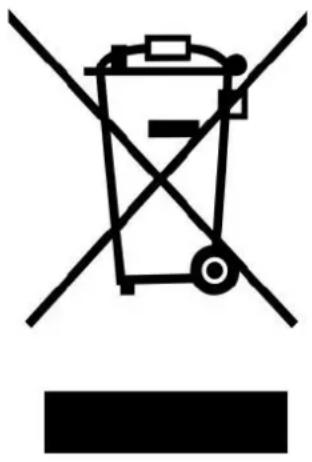
Symbol of a trash bin with crossed lines indicating no waste or discharge, and a solid black rectangle below (no text or labels)This symbol indicates that the relevant electrical product or baery should not be disposed of as general household waste in Europe. To ensure the correct waste treatment of the product and baery, please dispose them in accordance to any applicable local laws of requirement for disposal of electrical equipment or baeries. In so doing, you will help to conserve natural resources and improve standards of environmental protecon in treatment and disposal of electrical waste (Waste Electrical and Electronic Equipment Directive).
M. CE Marking
Products with the CE marking comply with the EMC Directive (2014/30/EU) and the Low Voltage Directive (2014/35/EU) issued by the Commission of the European Community.
N. Service
For more informaon and helpdesk support, please visit www.lenco.com Lenco Benelux BV, Thermiekstraat 1a, 6361 HB Nuth, The Netherlands.
Lenco
natural_image
Two handheld electronic devices with blue buttons and white leads, one open and one closed (no text or symbols visible)natural_image
Symbol of a trash bin crossed with two diagonal lines, no text or numbers presentnatural_image
Two modern handheld devices with blue buttons and black connectors, one open and one closed (no text or symbols visible)natural_image
Symbol of a trash bin with crossed lines indicating no waste or discharge (no text or labels)natural_image
Two modern handheld devices with blue buttons and black connectors, one open and one closed (no text or symbols visible)natural_image
Symbol of a trash bin crossed with two diagonal lines, no text or numbers presentnatural_image
Two modern handheld devices with blue buttons and white leads, one open and one closed (no text or symbols visible)natural_image
Symbol of a trash bin crossed with diagonal lines, no text or numbers present
- IMPORTANT:
- Cauons
- Safety Warnings
- Insert Micro SD Memory Card (not included)
- About player's baery
- Charging Mode
- PC Connecon Mode
- Connect the player to a computer
- Remove the player from a computer:
- Geng Started
- Power On/O
- Play/Pause Music
- Adjusng the Volume
- Play Next/Previous Music
- Play Fast-Forward/Fast-Backward
- Shue
- LED Light Funcon
- Reset the Player
- To Reset:
- Disclaimer
- Service
- Lenco
Brand : LENCO
Model : Xemio-154
Category : Mp3 player