
Xenon 220 - Mouse Genesis - Free user manual and instructions
Find the device manual for free Xenon 220 Genesis in PDF.


| Product Type | Wired Optical Gaming Mouse |
| Model | Xenon 220 G2 |
| Brand | Genesis |
| Connection Interface | USB |
| Number of Buttons | 7 programmable buttons |
| Switch Type | Silent button switches |
| Sensor Type | Optical sensor |
| Maximum DPI | 12800 DPI |
| Backlight | RGB backlight with PRISMO effect |
| Onboard Memory | Built-in memory for profiles |
| Software Support | Advanced software with macro/profile editor |
| Operating System Support | Windows XP/Vista/7/8/10, Linux, Android |
| Dimensions (Approx.) | 125 x 65 x 40 mm |
| Weight (Approx.) | 150 g |
| Power Supply | USB powered (5V, 100 mA typical) |
| Warranty | 2 years limited manufacturer warranty |
| Safety Compliance | CE, RoHS, WEEE compliant |
| Cleaning Instructions | Wipe with a dry soft cloth; avoid liquids |
| Spare Parts Availability | Contact manufacturer or authorized service |
Frequently Asked Questions - Xenon 220 Genesis
User questions about Xenon 220 Genesis
0 question about this device. Answer the ones you know or ask your own.
Ask a new question about this device
Download the instructions for your Mouse in PDF format for free! Find your manual Xenon 220 - Genesis and take your electronic device back in hand. On this page are published all the documents necessary for the use of your device. Xenon 220 by Genesis.
USER MANUAL Xenon 220 Genesis
natural_image
Abstract spiral pattern with concentric circles and a central swirl (no text or symbols)WWW.GENESIS-ZONE.COM

GENESIS
XENON 220 G2
QUICK INSTALLATION GUIDE
PRODUCT & SUPPORT
INFORMATION | PLEASE SCAN QRCODE |
20 GENESIS. All rights reserved. GENESIS name and logo, and all related product and service names, design marks and slogans are the trademarks or registered trademarks of GENESIS. All other product and service marks contained herein are the trademarks of their respective owners. | V.2212

WWW.GENESIS-ZONE.COM
WELCOME TO #GENESISGAMING

natural_image
Gray cloud icon with a downward arrow, symbolizing download or download (no text or symbols)DOWNLOAD SOFTWARE
ON OUR WEBSITE
www.genesis-zone.com/support

GENESIS. All rights reserved. GENESIS name and logo, and all related product and service names, design marks and slogans are the trademarks or registered trademarks of GENESIS. All other product and service marks contained herein are the trademarks of their respective owners.

GENESIS
TABLE OF CONTENTS
Product information....3
EN - User manual 4
FR - Manuel de l'Utilisateur....4
ES - Manual de usuario....4
PT - Manual do usuário....5
DE - Benutzerhandbuch....5
SE - Användarmanual....6
IT - Manuale d'uso....6
PL - Instrukcja obsługi....7
CZ - Návod k použití 7
SK - Návod na použitie 8
RO - Manual de utilizare....8
BG - Ръководство за употреба....9
HU - Használati utasítás....9
RS - Упутство за коришћење....10
RU - Руководство пользователя....10
GR - Εγχειρίδιο χρήστη....11
Regulatory....12
PRODUCT INFORMATION
PACKAGE CONTENT / CONTENU/ CONTENIDO DEL EMBALAJE / CONTEÚDO / PAKET-INHALT / INNEHÁLL / SODDISFARE / ZAWARTOŚĆ / OBSAH BALENÍ / OBSAH BALENIA / CONTINUT PACHET / СЪДЪРЖАНИЕ НА КУТИЯТА / CSOMAG TARTALMA / САДРЖАЙ / КОМПЛЕКТАЦИЯ / ПЕРИЕХОМENO
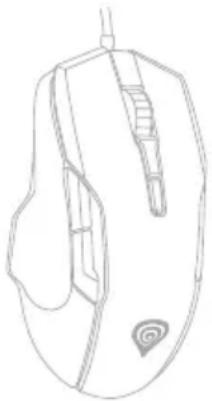
natural_image
Line drawing of a computer mouse with scroll wheel (no text or symbols)a)
The image is too blurry to recognize any text content.
REQUIREMENTS / EXIGENCES REQUISES / REQUISITOS / REQUISITOS / SYSTEMANFORDERUNGEN / KRAV / REQUISITI / WYMAGANIA / POŽADAVKY / POŽIADAVKY / CERINTE DE SISTEM / ИЗИСКВАНИЯ / KÖVETELMÉNYEK / ЗАХТЕВЕ / СИСТЕМНЫЕ ТРЕБОВАНИЯ / АПАІТНЄІЕІ
PC or compatible device with a USB port / PC ou périphérique compatible avec un port USB / PC u otro dispositivo compatible con un puerto USB / PC ou dispositivo compatível com porta USB / PC oder PC-kompatibles Gerät mit einem USB-Anschluss / PC eller USB-kompatibel enhet / Dispositivo compatibile con PC o USB / PC lub urządzenie kompatybilne z portem USB / Počítač, nebo jiné zařizení s portem USB / Počítač, alebo iné zariadenie s portom USB / PC sau echipament compatibil PC cu un port USB liber / PC или съвместимо устройство с USB port / PC vagy kompatibilis eszköz USB porttal / PC или уређаї компатибилни са портом USB / ПК или устройство с портом USB / Проошпікός υπολογιστής ή συσκευή συμβατή με θύρα USB
Windows® XP/Vista/7/8/10, Linux, Android
EN - USER MANUAL
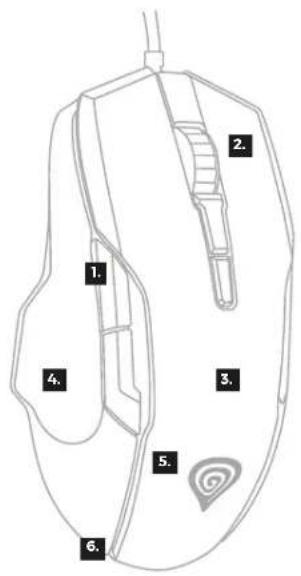
- 7 programmable buttons
- Silent button switches
- Precise optical sensor with up to 12800 DPI
- Advanced software with macro/profile editor
- Built-in memory
- RGB backlight with PRISMO effect
INSTALLATION
- Connect your device to the USB port of your computer, it is necessary to wait about 15 seconds for the first connection until the drivers are fully installed.
- The mouse includes software that allows you to set up advanced features, if you want to use these features, you need to download and install the software from our website www.genesis-zone.com
- Open the installation folder and then double-click the setup.exe file.
- Follow the instruction to install the program.
- After a successful installation, the software icon appears on the main bottom panel. Double-clicking the icon opens the settings interface.
FR - MANUEL DE L'UTILISATEUR
EU Declaration of Conformity - Hereby, IMPAKT S.A. declares that the equipment type NMG-1572 is in compliance with Directives 2014/30/EU, 2011/65/EU and 2015/863/EU. The full text of the EU
declaration of conformity is available via the product tab at www.impakt.com.pl.

The WEEE symbol (the crossed-out wheeled bin) usage indicates that this product is not a household waste. Appropriate waste management aids in avoiding consequences, which are harmful for people and environment and result from dangerous materials used in the device, as well as, improper storage and processing of such equipment. Segregated household waste
collection allows recycling of materials and components of which the device was made of. In order to get detailed information about recycling of this particular product, please contact your retailer or a local authority.
SAFETY INFORMATION
- Use as intended, improper usage may break the device.
- Non-authorized repairs or disassembly voids the warranty and may damage the product.
- Dropping or hitting the device may lead to device being damaged, scratched or flawed in other way.
- Do not use the product in low and high temperatures, strong magnetic fields and damp or dusty surroundings.
GENERAL
• The safe product, conforming to the EU requirements.
• The product is made in accordance with RoHS European standard.
• 2 years limited manufacturer warranty
FR



Brand : Genesis
Model : Xenon 220
Category : Mouse