
Concert 88x - Receiver SAMSON - Free user manual and instructions
Find the device manual for free Concert 88x SAMSON in PDF.


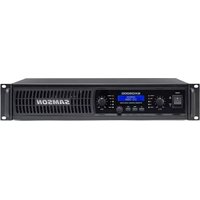
| Product type | UHF receiver for wireless microphones |
| Brand | Samson |
| Model | Concert 88x |
| Frequency band | UHF 470-542 MHz |
| Number of channels | 100 selectable channels |
| Modulation type | Stereo FM |
| Antennas | 2 detachable antennas (BNC) |
| Audio outputs | 1 x balanced XLR, 1 x unbalanced 6.35 mm jack |
| Headphone output | 3.5 mm jack with volume control |
| Display | Backlit LCD screen |
| Controls | Channel selector, volume, squelch, auto scan |
| Power supply | 12 V DC power adapter (included) |
| Dimensions (W x D x H) | 210 x 160 x 45 mm |
| Weight | 1.2 kg |
| Rack mounting | 1U, mounting kit included |
| Dynamic range | >100 dB |
| Frequency response | 40 Hz - 18 kHz |
| Maintenance and cleaning | Clean with a soft, dry cloth. Do not use solvents. |
| Safety | Do not expose to moisture. Use the included adapter. |
| Spare parts and repairability | Contact Samson customer service or an authorized dealer. |
Frequently Asked Questions - Concert 88x SAMSON
User questions about Concert 88x SAMSON
0 question about this device. Answer the ones you know or ask your own.
Ask a new question about this device
Download the instructions for your Receiver in PDF format for free! Find your manual Concert 88x - SAMSON and take your electronic device back in hand. On this page are published all the documents necessary for the use of your device. Concert 88x by SAMSON.
USER MANUAL Concert 88x SAMSON
SAMSON®
OWNER'S MANUAL
Copyright 2015, Samson Technologies Corp.
v3
Samson Technologies Corp.
45 Gilpin Ave
Hauppauge, NY 11788
www.samsontech.com
Important Safety Information

ATTENTION RISQUE D'ÉLECTROCUTION ! NE PAS OUVRIR !
CAUTION: TO REDUCE THE RISK OF ELECTRIC SHOCK, DO NOT REMOVE COVER (OR BACK). NO USER-SERVICEABLE PARTS INSIDE. REFER SERVICING TO QUALIFIED SERVICE PERSONNEL.

This lightning flash with arrowhead symbol within an equilateral triangle is intended to alert the user to the presence of non-insulated “dangerous voltage” within the product’s enclosure that may be of sufficient magnitude to constitute a risk of electric shock.

The exclamation point within an equilateral triangle is intended to alert the user to the presence of important operating and maintenance instructions in the literature accompanying the appliance.
WARNING
TO PREVENT FIRE OR SHOCK HAZARD. DO NOT USE THIS PLUG WITH AN EXTENSION CORD, RECEPTACLE OR OTHER OUTLET UNLESS THE BLADES CAN BE FULLY INSERTED TO PREVENT BLADE EXPOSURE. TO PREVENT FIRE OR SHOCK HAZARD. DO NOT EXPOSE THIS APPLIANCE TO RAIN OR MOISTURE. TO PREVENT ELECTRICAL SHOCK, MATCH WIDE BLADE PLUG TO WIDE SLOT AND FULLY INSERT.
THIS DEVICE COMPLIES WITH PART 15 OF THE FCC RULES CLASS B. OPERATION IS SUBJECT TO THE FOLLOWING TWO CONDITIONS:
(1) THIS DEVICE MUST NOT CAUSE HARMFUL INTERFERENCE, AND
(2) THIS DEVICE MUST ACCEPT ANY INTERFERENCE RECEIVED INCLUDING INTERFERENCE THAT MAY CAUSE UNDESIRED OPERATION. SUITABLE FOR HOME OR OFFICE USE.

If you want to dispose this product, do not mix it with general household waste. There is a separate collection system for used electronic products in accordance with legislation that requires proper treatment, recovery and recycling.
Private household in the 28 member states of the EU, in Switzerland and Norway may return their used electronic products free of charge to designated collection facilities or to a retailer (if you purchase a similar new one).
For Countries not mentioned above, please contact your local authorities for a correct method of disposal. By doing so you will ensure that your disposed product undergoes the necessary treatment, recovery and recycling and thus prevent potential negative effects on the environment and human health
Important Safety Information
- Read these instructions.
- Keep these instructions.
- Heed all warnings.
- Follow all instructions.
- Do not use this apparatus near water.
- Clean only with dry cloth.
- Do not block any ventilation openings. Install in accordance with the manufacturer's instructions.
- Do not install near any heat sources such as radiators, heat registers, stoves, or other apparatus (including amplifiers) that produce heat.
- Do not defeat the safety purpose of the polarized or grounding type plug. A polarized plug has two blades with one wider than the other. A grounding type plug has two blades and a third grounding prong. The wide blade or the third prong are provided for your safety. If the provided plug does not fit into your outlet, consult an electrician for replacement of the obsolete outlet.
- Protect the power cord from being walked on or pinched particularly at the plugs, convenience receptacles, and at the point where they exit from the apparatus.
- Only use attachments/accessories specified by the manufacturer.
- Use only with the cart, stand, tripod, bracket, or table specified by the
manufacturer, or sold with the apparatus. When a cart is used, use caution when moving the cart/apparatus combination to avoid injury from tip-over.
-
Unplug the apparatus during lightening storms, or when unused for long periods of time.
-
Refer all servicing to qualified personnel. Service is required when the apparatus has been damaged in any way, such as power supply cord or plug is damaged, liquid has been spilled or objects have fallen into the apparatus has been exposed to rain or moisture, does not operate normally, or has been dropped.
-
This appliance shall not be exposed to dripping or splashing water and that no object filled with liquid such as vases shall be placed on the apparatus.
-
Caution-to prevent electrical shock, match wide blade plug wide slot fully insert.
-
Please keep a good ventilation environment around the entire unit.
-
The direct plug-in adapter is used as disconnect device, the disconnect device shall remain readily operable.
-
Batteries (battery pack or batteries installed) shall not be exposed to excessive heat such as sunshine, fire or the like.

natural_image
Symbolic illustration of a person climbing a ladder inside a circle (no text or symbols)Table of Contents
Introduction. 7
System Features. 8
System Components 8
CR288 Receiver Callouts 9
CB288 Belt Pack Transmitter .....11
CH288 Handheld Transmitter .....13
Quick Start . . . . . . . . . . . . . . . . . . . . . . . . . . . . . . . . . . . . . . . . . . 14
Rack Mounting .....18
Concert 288 Channel Plans . . . . . . . . . . . . . . . . . . . . . . . . . . . . . . . . . . . . . . . . . . . . . . . . . . . . . . . . . . 19
Troubleshooting . . . . . . . . . . . . . . . . . . . . . . . . . . . . . . . . . . . . . . . . . . . . . . . . . . . . . . . . . 21
Specifications. 22
Introduction
Congratulations on purchasing the Samson Concert 288 dual channel wireless system. The Concert 288 is the ideal solution for the any application requiring two wireless microphones. Featuring simple operation, with 16 available channels per receiver and infrared set for the transmitter channel, the Concert 288 can quickly be up and running out of the box. The Concert 288 system ensures clear, interruption-free performance by combining tone-key with auto-mute. This configuration allows only the transmitter's audio to pass through the receiver, and mutes the output if there is any interference.
The Concert 288 comes in four configurations. The dual handheld system includes two CH288 handheld transmitters with Q6 dynamic microphone capsule. The Pro Combo system has one CH288 handheld transmitter plus a CB288 belt pack transmitter and the Samson SE10 earset microphone. The All-In-One Combo system includes one CH288 handheld transmitter, one CB288 beltpack transmitter, one HS5 headset microphone and one LM5 lavalier microphone. The Presentation System includes two CB288 belt pack transmitters, two HS5 headset microphones and two LM5 lavelier microphones. For travel or permanent installation, the Concert 288 includes a standard 19" rackmount kit.
In these pages, you'll find a detailed description of the features of the Concert 288 wireless system, as well as a guided tour through its control panel, step-by-step instructions for its setup and use, and full specifications. If your wireless system was purchased in the United States, you'll also find a warranty card enclosed—don't forget to fill it out and mail it in so that you can receive online technical support and so that we can send you updated information about this and other Samson products in the future. Also, be sure to check out our website (www.samsontech.com) for complete information about our full product line.
We recommend you keep the following records for reference, as well as a copy of your sales receipt.
Receiver Serial number: ____
Transmitter Serial number: ____
Date of purchase: ____
Dealer name: ____
With proper care and maintenance, your Concert 288 wireless system will operate trouble-free for many years. Should your wireless system ever require servicing, a Return Authorization (RA) number must be obtained before shipping your unit to Samson. Without this number, the unit will not be accepted. Please call Samson at 1-800-3SAMSON (1-800-372-6766) for an RA number prior to shipping your unit. Please retain the original packing materials and, if possible, return the unit in its original carton. If your Concert 288 system was purchased outside of the United States, contact your local distributor for warranty details and service information.
System Features
- Professional wireless system for use in both live sound and sound contracting applications
- True diversity technology maximizes active range (up to 300 feet) and reduces potential interference
- 16 available channels per receiver operating in the UHF band designed for maximum system compatibility in the same location without interference
- The CR288 receiver is a half-rack unit that can be used freestanding or can be mounted in any standard 19" rack using the included rack kit, making it easy to integrate into any traveling or fixed installation audio system
- Tone-key and auto-mute ensures clear, interruption-free performance allowing only the transmitter's audio to pass through the receiver, and mutes the output if there is any interference
- Up to 300-foot range (line-of-sight)
- Up to eight hours of battery life, using two standard AA batteries
System Components
All systems
CR288 receiver
Power Supply
14 " to 14 " audio cable
Rack mount accessories
Owner's Manual
Dual Handheld system
CH288 handheld transmitter with Q6 dynamic microphone capsule
Pro Combo System system
CH288 handheld transmitter with Q6 dynamic microphone capsule
CB288 belt pack transmitter
SE10 earset microphone with mini-XLR connector
All-In-One Combo System system
CH288 handheld transmitter with Q6 dynamic microphone capsule
CB288 belt pack transmitter
Two LM5 lavalier microphone with mini-XLR connector
Two HS5 headset microphone with mini-XLR connector
Presentation System
Two CB288 belt pack transmitters
Two LM5 lavalier microphone with mini-XLR connector
Two HS5 headset microphone with mini-XLR connector
CR288 Receiver Callouts

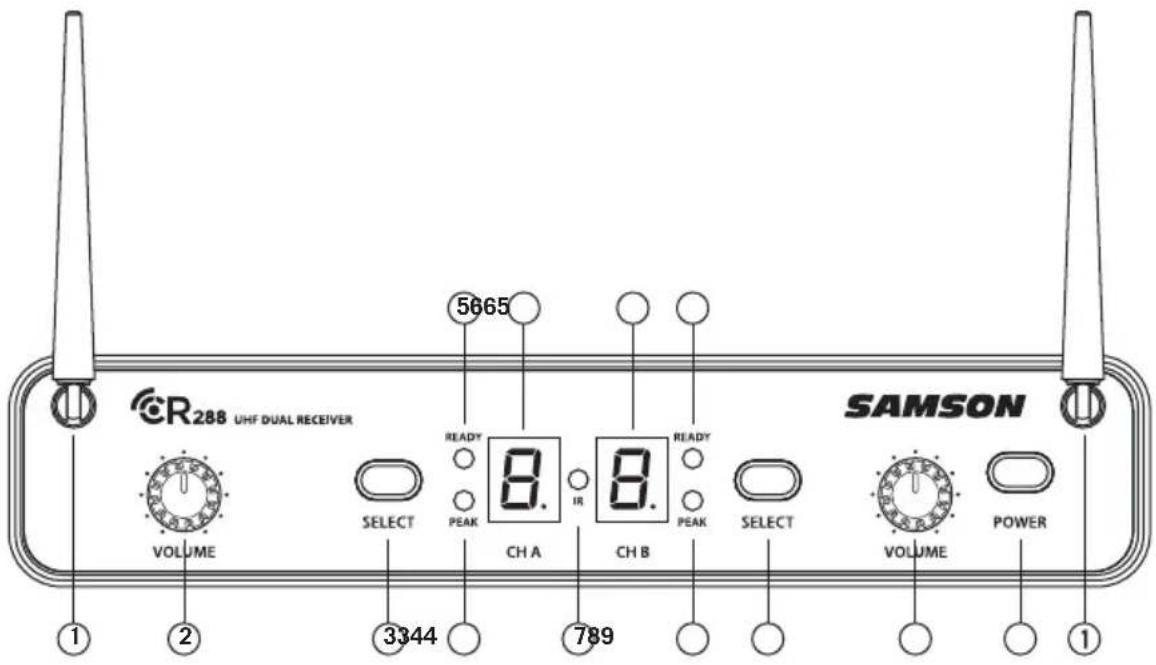
- Antennas - The antenna mountings allow full rotation for optimum placement. In normal operation, both antennas should be placed in a vertical position. Both antennas can be folded inward for convenience when transporting the CR288.
- VOLUME Control (CH A) - This knob sets the level of the audio signal being output through the CH A output jacks on the rear panel. Reference level is obtained when the knob is turned fully clockwise (to its “10” setting).
- SELECT Button - Press this button to cycle through the each receiver's operating channels. Press and hold this button to send the channel information to the transmitter via infrared transmission.
- PEAK Indicator - This indicator lights red when the corresponding transmitted audio signal is overloaded.
- READY Indicator - This indicator lights green when the corresponding receiver channel is receiving RF signal and the system is ready to use.
- LED Display - The 7-segment LED display shows each receiver's current operating channel. The channels are indicated by 0-9 and A-F.
- IR Transmitter - During "IR SET" an infrared light is used to set the transmitter channel.
- VOLUME Control (CH B) - This knob sets the level of the audio signal being output through the CH B output jacks on the rear panel. Reference level is obtained when the knob is turned fully clockwise (to its "10" setting).
- POWER Switch - Use this to turn the CR288 power on and off.
CR288 Receiver Callouts

-
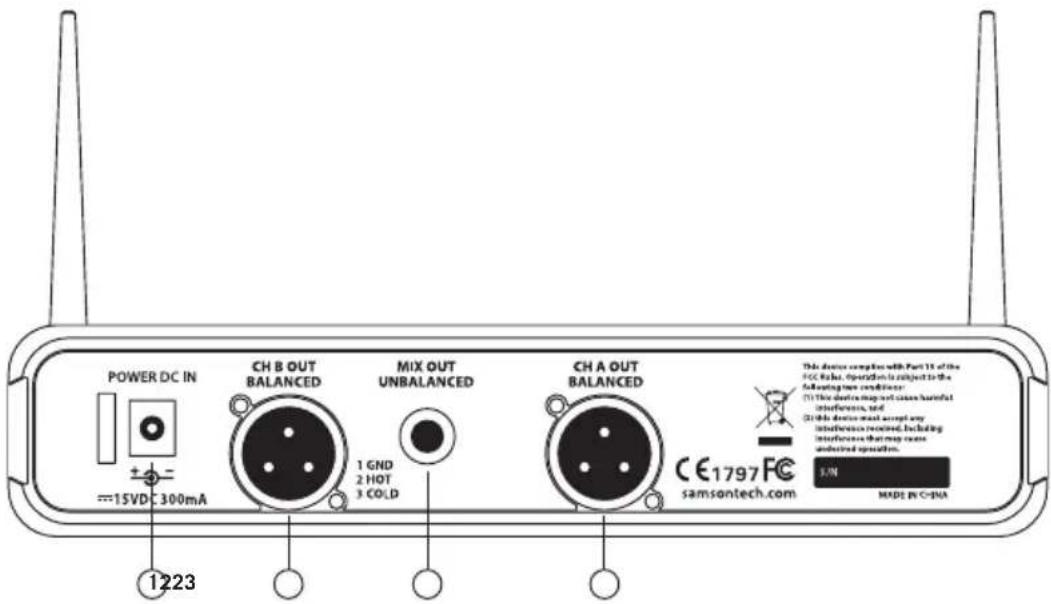
DC Input - Connect the supplied power adapter here, using the strain relief as shown in the illustration below. WARNING: Do not substitute any other kind of power adapter. Doing so can cause severe damage to the CR288 and will void your warranty.
-
BALANCED OUTPUT - Use this electronically balanced low impedance (600 Ohm) XLR jack when connecting the CR288 to professional (+4dBu) audio equipment. Pin wiring is as follows: Pin 1 ground, Pin 2 high (hot), and Pin 3 low (cold).
-
MIX OUT UNBALANCED - Use this unbalanced high impedance (5K Ohm) 14 " jack when connecting the CR288 to consumer (-10dBV) audio equipment. The jack will carry the combined signal from receiver CH A and B. Wiring is as follows: tip hot, sleeve ground.
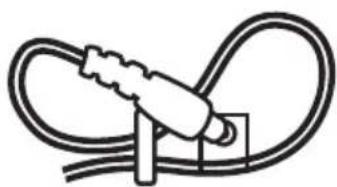
natural_image
Simple line drawing of a cable with a plug inserted, no text or symbols presentUsing the strain relief: Gather up a loop of wire and pass it through the strain relief, then pass the adapter plug through the loop in order to create a knot.
CB288 Belt Pack Transmitter
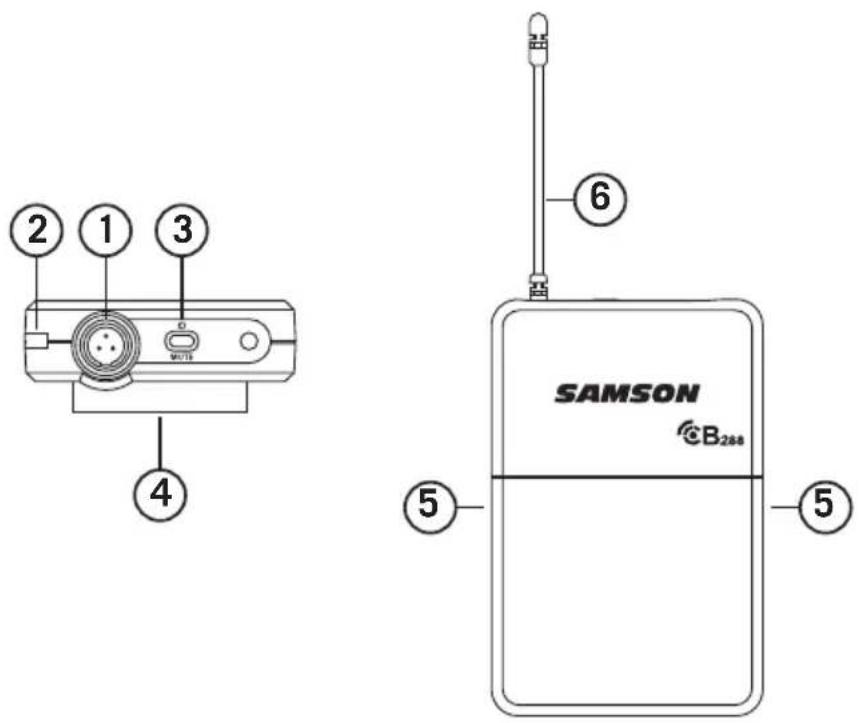
-
Input Connector - Connect the input device via the mini-XLR connector. The CB288 is supplied with either a lavalier, headset microphone or 14 " instrument cable.
-
Status Indicator - This LED displays the operation mode:
| GREEN Normal Operation | |
| RED Mute | |
| Flashing GREEN Low Battery | |
- Power/Mute Switch - Press and hold to turn the unit on or off. Press and release to mute or unmute the transmitter.
- Belt Clip - Use this clip to fasten the CB288 transmitter to a belt or guitar strap.
- Battery Cover Release - Push in both sides and pull back to open the CB288 battery cover.
- Antenna - This permanently attached transmitter antenna should be fully extended during normal operation.
CB288 Belt Pack Transmitter

- Input GAIN Control - This control adjusts the transmitter input sensitivity to work with microphone and instruments inputs. For optimal performance, using the included screwdriver, set the input GAIN control to where you see the CR288 PEAK indicator start to light under high levels, then turn down slowly until the PEAK light stops lighting.
- Battery Holder - Insert two standard AA (LR6) batteries here, being sure to observe the plus and minus polarity markings shown. Although rechargeable Ni-Cad batteries can be used, they do not supply adequate current for more than four hours. WARNING: Do not insert the batteries backwards; doing so can cause severe damage to the CB288 and will void your warranty.
- IR Lens - This window is used to capture the infrared signal sent from the CR288 during the IR SET to channelize the transmitter.
- Screwdriver - Designed for use in adjusting the CB288 input GAIN control (See #7 Input GAIN Control).
- Channel Designation - Identifies the receiver channel that the belt pack syncs and transmits with.
CH288 Handheld Transmitter
- Status Indicator - This LED displays the operation mode:
| GREEN Normal Operation | |
| RED Mute | |
| Flashing GREEN Low Battery | |
-
Power/Mute Switch - Press and hold to turn the unit on or off. Press and release to mute or unmute the transmitter.
-
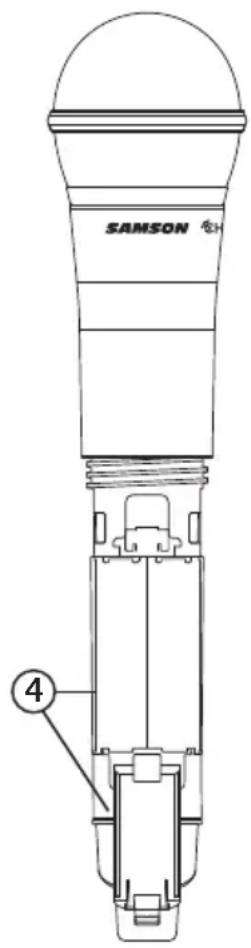
Battery Cover - Unscrew the battery cover and slide down to open the CH288 battery compartment.
-
Battery Holder - Open the battery holder by pressing the tab and lifting the cover. Insert two standard AA (LR6) batteries here, being sure to observe the plus and minus polarity markings shown. Although rechargeable Ni-Cad batteries can be used, they do not supply adequate current for more than four hours. WARNING: Do not insert the batteries backwards; doing so can cause severe damage to the CH288 and will void your warranty.
-
Input GAIN Control - This control adjusts the transmitter input sensitivity. For optimal performance, using the included screwdriver, set the input GAIN control to where you see the CR288 PEAK indicator start to light under high levels, then turn down until the PEAK light stops lighting.
-
IR Lens - This window is used to capture the infrared signal sent from the CR288 during the IR SET to channelize the transmitter. The battery cover must be open and the IR Lens facing towards the receiver to load the selected channel.
-
Plastic Screwdriver - Designed for use in adjusting the CB288 input GAIN control (See #5 Input GAIN Control HH).
Note: The CH288 antenna cover and grill band have been color coded to easily identify its corresponding receiver channel:
CH A - Black antenna cover and black grill band
CH B - Silver antenna cover and silver grill band

Quick Start
In order for your wireless system to work correctly, both the receiver and transmitter must be set to the same channel.
Follow this basic procedure for setting up and using your Concert 288 wireless system:
Physically place the CR288 receiver where it will be used, and extend the antennas vertically. The general rule of thumb is to maintain “line of sight” between the receiver and transmitter so that the person using or wearing the transmitter can see the receiver.
With the CR288 powered off, connect the included power adapter. Turn the CR288 on momentarily to confirm that the unit is receiving power. You'll see the LED display light up. Then turn the CR288 power off.

With your amplifier or mixer off and volume control all the way down, connect the CR288 receiver mix output jack to the line level input of a mixer or amplifier. Turn the Level knob on the CR288 completely counterclockwise, then turn its power on.

Quick Start
With the transmitter powered off, install two fresh AA batteries into the CB288 belt pack or CH288 handheld transmitter. Leave the battery compartment open.

Turn on the power to the transmitter by pressing and holding Power switch; the indicator LED will light green.

natural_image
Line drawing of two hands operating a device with a bulb and a control panel (no text or symbols)Quick Start
Press the CH A SELECT button on the front of the CR288 to choose an available channel for the CH A reciver. The channel number will increase by one digit, from 0-9 then A-F. Once the last channel has been reached, the count will cycle back to 0.

Position the transmitter about 6-12" (15-30 cm) from the front of the CR288 with the transmitter's IR window facing the IR transmitter on the front panel of the CR288 receiver.

Press and hold the CR288 CH A SELECT button to set the transmitter to the same channel as the receiver via infrared transmission
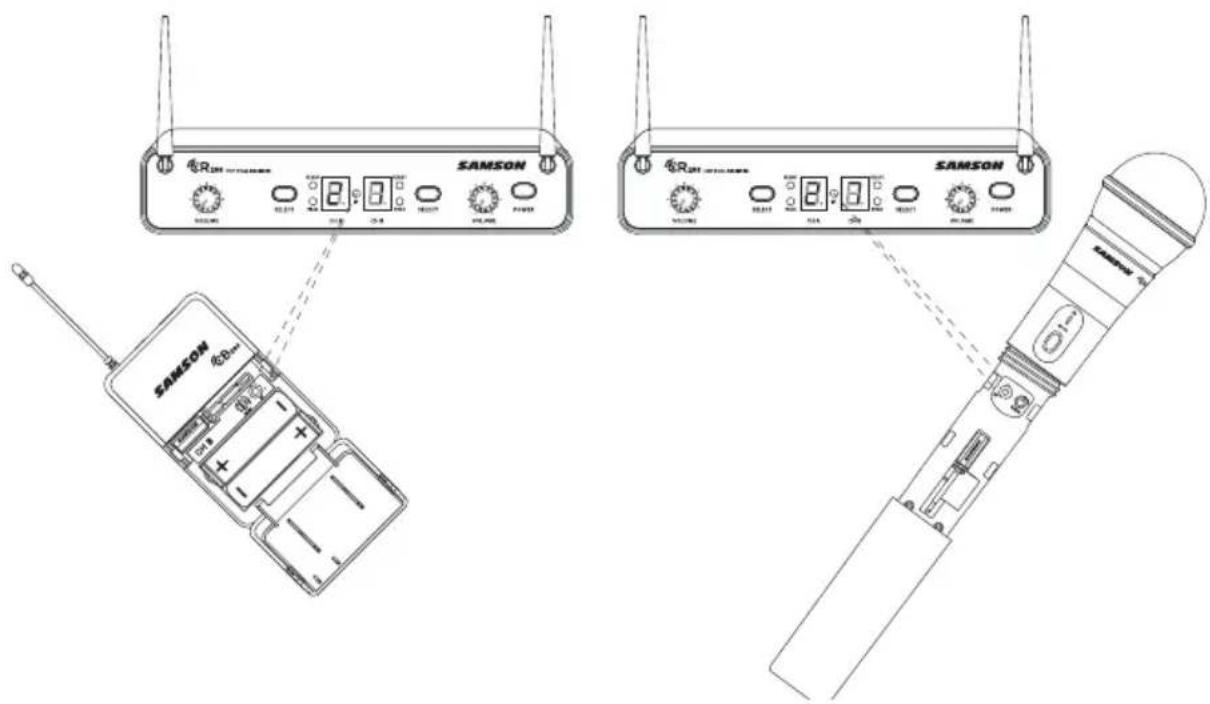
Quick Start
When the transmission is complete, the CR288 will receive RF signal and the tone key from the transmitter. The CH A READY indicator will light on the front panel of the CR288 receiver. Repeat these steps for the CH B transmitter and receiver. CH A and CH B available frequency channels do not overlap, so you can set the two receivers to the same channel number or letter.

Turn on your connected amplifier or mixer, but keep the volume all the way down. Set the Volume knob on the CR288 fully clockwise (to its “10” setting). This is unity gain.
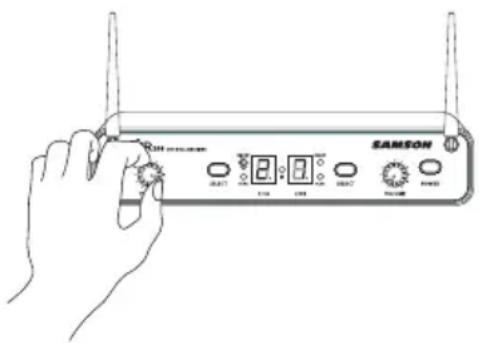
Speak or sing into the microphone. Slowly raise the volume of your amplifier or mixer until the desired level is reached.
If you find the system has noticeable dropouts, reduced overall working range, or unexpected noise bursts, change the operating channel of the system using the steps above.
When using multiple systems in the same frequency band, each system must be set to a different operating channel. (See "Concert 288 Channel Plans" on page 18).
Rack Mounting
The CR288 receiver can be installed into a standard 19" rack for transport or permanent installation using the included rack ears. Follow the simple steps below to mount the CR288:
Attach the included rack ears by sliding each rack ear into the groove on either side of the CR288 until they lock into place, and the receiver flush with the front panel.

natural_image
Technical line drawing of a mechanical component with a bracket and mounting bracket (no text or symbols)Position the CR288 receiver into an available rack space and slide in until the rack ears are touching the rails of the rack case and are aligned with the rack rail holes.

natural_image
Line drawing of a SAMSON wireless device enclosure with two antennas and a central switch (no text or symbols on the device itself)Mount the receiver into the rack using the appropriate size rack screws (not included). To ensure equal tension and balance when installing the receiver, you should secure screws in a crisscross pattern of opposite corners: top left -> bottom right -> top right -> bottom left.
In order to mount two CR288 receivers in one rack space, the system includes a center connection piece. Slide the center connection piece into the groove of each receiver, secure using the included screws, and attach the short rack ears to each receiver. Mount the receivers into the rack using the crisscross pattern described above.

natural_image
Technical line drawing of two electronic devices enclosed in a rectangular enclosure, showing front and side views with no visible text or symbols.Concert 288 Channel Plans
| Group H470-518 MHz | Group I518 -566 MHz | ||||||
| CH A | Freq CH B | Freq CH | A Freq CH | B Freq | |||
| 0 47 | 0.125 0 4 | 94.125 | 0 518.125 | 0 54 | 2.125 | ||
| 1 47 | 1.625 1 4 | 95.625 | 1 519.625 | 1 54 | 3.625 | ||
| 2 47 | 3.050 2 4 | 97.050 | 2 521.050 | 2 54 | 5.050 | ||
| 3 47 | 4.425 3 4 | 98.425 | 3 522.425 | 3 54 | 6.425 | ||
| 4 47 | 4.900 4 4 | 98.900 | 4 522.900 | 4 54 | 6.900 | ||
| 5 47 | 7.525 5 5 | 501.525 | 5 525.525 | 5 54 | 9.525 | ||
| 6 47 | 9.100 6 5 | 503.100 | 6 527.100 | 6 55 | 1.100 | ||
| 7 48 | 0.475 7 5 | 504.475 | 7 528.475 | 7 55 | 2.475 | ||
| 8 48 | 2.000 8 5 | 506.000 | 8 530.000 | 8 55 | 4.000 | ||
| 9 48 | 4.075 9 5 | 508.075 | 9 532.075 | 9 55 | 6.075 | ||
| A 48 | 6.975 A 5 | 510.975 | A 534.975 | A 55 | 8.975 | ||
| B 48 | 7.975 B 5 | 511.975 | B 535.975 | B 55 | 9.975 | ||
| C 48 | 9.050 C 5 | 513.050 | C 537.050 | C 56 | 1.050 | ||
| D 49 | 0.975 D 5 | 514.975 | D 538.975 | D 56 | 2.975 | ||
| E 49 | 2.425 E 5 | 516.425 | E 540.425 | E 56 | 4.425 | ||
| F 49 | 3.975 F 5 | 517.975 | F 541.975 | F 56 | 5.975 | ||
Concert 288 Channel Plans
| Group J*606-654 MHz | |||
| CH A | Freq CH B | Freq | |
| 0 60 | 6.125 0 | 630.125 | |
| 1 60 | 7.625 1 | 631.625 | |
| 2 60 | 9.050 2 | 633.050 | |
| 3 61 | 0.425 3 | 634.425 | |
| 4 61 | 0.900 4 | 634.900 | |
| 5 61 | 3.525 5 | 637.525 | |
| 6 61 | 5.100 6 | 639.100 | |
| 7 61 | 6.475 7 | 640.475 | |
| 8 61 | 8.000 8 | 642.000 | |
| 9 62 | 0.075 9 | 644.075 | |
| A 62 | 2.975 A | 646.975 | |
| B 62 | 3.975 B | 647.975 | |
| C 62 | 5.050 C | 649.050 | |
| D 62 | 6.975 D | 650.975 | |
| E 62 | 8.425 E | 652.425 | |
| F 62 | 9.975 F | 653.975 | |
* Not for use in the USA and Canada. For questions regarding available channels in your area contact your local Samson distributor.
Troubleshooting
| Issue Solutions | |
| No Audio | Make sure that the transmitter and receiver are both powered on. |
| Ensure the transmitter's batteries are installed correctly. | |
| Check that the transmitter is not muted. | |
| Confirm that the CR288 adaptor is correctly connected and plugged into an electrical outlet. | |
| Make sure the CR288 is powered on. | |
| Make sure the CR288 audio output connections are securely connected. | |
| Ensure that the receiver and transmitter are in line of sight with one another. | |
| Check the receiver and audio input device level controls. | |
| Ensure that the transmitter and receiver are set to the same operating channel. If unsure, reset the channel by performing an IR set. | |
| Distorted Audio | The receiver output level or audio input device level may be too high. |
| Check the transmitters batteries, and replace if low. | |
| The input gain on the transmitter (CB288) or audio source level may be too high. | |
| Audio Dropout | The transmitter may be too far away from the receiver. Move it closer to the receiver, or reposition the antennas. |
| Remove any sources that may cause RF interference such as cell phones, cordless phones, lighting equipment, computers, metal structures, etc. | |
| Receiver will not power on | Check the adaptor to ensure it is properly connected and plugged into an outlet providing power. |
| Transmitter will not power on (LED lights RED) | Replace the transmitter batteries. |
| Unwanted noise or interference | If using multiple systems, make sure none of the systems are operating on the same channel. If the problem persists, change one or all of the systems channels. |
Specifications
System
Working Range 300' (100m) line of sight
Audio Frequency Response 50 Hz - 15 kHz
T.H.D. (Overall) <1% (@AF 1 kHz, RF 46 dBu)
Dynamic Range >100 dB A-weighted
Signal to Noise >85 dB
Operating Temperature -10^ (14°F) to +60^ (+140°F)
Tone Key Frequency 32.768 kHz
CB288 Belt pack Transmitter
Input Connector Mini-XLR (P3)
Input Impedance 1MΩ
Input Gain Range 38 dB
RF Power 10 mW EIRP
Power Requirements Two AA (LR6) alkaline batteries
Battery Life 8 hours
Dimensions (HxLxD) 3.75" x 2.44" x 0.75"
96mm x 62mm x 18.5mm Weight 0.2 lb / 93 g
CH288 Handheld Transmitter
Microphone Element Q6 Dynamic
Input Gain Range 28 dB
RF Power 10 mW EIRP
Power Requirements Two AA (LR6) alkaline batteries
Battery Life 8 hours
Dimensions (Hx∅) 10.23" x 2.1"
260mm x 54mm
Weight 0.48 lb / 218 g
CR288 Receiver
Audio Output Level - Mix Unbalanced +14 dBu
Audio Output Level - Balanced +14 dBu
Audio Output Impedance - Unbalanced 1k Ohms
Audio Output Impedance - Balanced 470 Ohms
Sensitivity -100 dBm / 20 dB sinad
Image Rejection >50 dB
Operating Voltage 15 VDC 300mA
Dimensions (LxWxH) 8.25" x 4.9" x 1.75"
210mm x 125mm x 44mm
Weight 0.99 lb / 450 g
At Samson, we are continually improving our products, therefore specifications and images are subject to change without notice.
FCC Rules and Regulations
Samson wireless receivers are certified under FCC Rules part 15 and transmitters are certified under FCC Rules part 74.
Licensing of Samson equipment is the user's responsibility and licensability depends on the user's classification, application and frequency selected.
NOTE: This equipment has been tested and found to comply with the limits for a Class B digital device, pursuant to Part 15 of the FCC Rules. These limits are designed to provide reasonable protection against harmful interference in a residential installation. This equipment generates, uses and can radiate radio frequency energy and, if not installed and used in accordance with the instructions, may cause harmful interference to radio communications. However, there is no guarantee that interference will not occur in a particular installation. If this equipment does cause harmful interference to radio or television reception, which can be determined by turning the equipment off and on, the user is encouraged to try to correct the interference by one or more of the following measures:
- Reorient or relocate the receiving antenna.
- Increase the separation between the equipment and receiver.
- Connect the equipment into an outlet on a circuit different from that to which the receiver is connected.
- Consult the dealer or an experienced Radio/TV technician for help.
WARNING: Changes or modifications not expressly approved by the party responsible for compliance could void the user's authority to operate the equipment.
This device complies with RSS-210 of Industry & Science Canada.
Operation is subject to the following two conditions:
(1) this device may not cause harmful interference and (2) this device must accept any interference received, including interference that may cause undesired operation.
Hereby, Samson Technologies Corp., declares that this CR288, CH288, CB288 is in compliance with the essential requirements and other relevant provisions of Directive 1999/5/EC. The declaration of conformity may be consulted at http://www.samsontech.com/site_media/support/manuals/Concert_288_DOC.pdf
natural_image
Silhouette of a person climbing a ladder inside a circular frame (no text or symbols)Sommaire
Introduction. 27
natural_image
Simple line drawing of a cable with a plug inserted, no text or symbols present
natural_image
Line drawing of two hands operating a handheld device, one pointing at the button and the other holding a circular component (no text or symbols present)natural_image
Technical line drawing of a mechanical component with a bracket and hook (no text or symbols)natural_image
Line drawing of a SAMSON wireless device enclosure with two antennas and a central switch (no text or symbols on the device itself)natural_image
Diagram of two electronic devices enclosed in a transparent enclosure, showing front and rear ports with no visible text or symbols.T.H.D. (global) <1% (@AF 1 kHz, RF 46 dBu)
Puissance RF 10 mW EIRP
Alim. deux piles alcalines AA (LR6)
Puissance RF 10 mW EIRP
Alim. deux piles alcalines AA (LR6)
natural_image
Symbolic illustration of a person climbing a ladder inside a circle (no text or symbols)All-In-One Combo System
CR288 Receiver Angaben
CR288 Receiver Angaben
natural_image
Simple line drawing of a cable with a plug inserted, no text or symbols present
natural_image
Line drawing of two hands operating a device with a bulb and a control panel (no text or symbols)natural_image
Technical line drawing of a mechanical component with a bracket and hook (no text or symbols)natural_image
Line drawing of a SAMSON wireless router enclosure with two ports and a central indicator (no text or symbols on the device itself)natural_image
Diagram of two wireless network devices enclosed in a rectangular enclosure, showing ports and signal lines (no text or labels)210mm x 125mm x 44mm
natural_image
Symbolic illustration of a person climbing a ladder inside a circle (no text or symbols)Índice
natural_image
Simple line drawing of a cable with a plug inserted, no text or symbols present
Inicio Rápido
Inicio Rápido
natural_image
Line drawing of two hands operating a handheld device, one pointing at the button and the other holding a circular device (no text or symbols present)Inicio Rápido
natural_image
Pure technical line drawing of a mechanical component with no text or symbolsnatural_image
Line drawing of a SAMSON wireless router enclosure with two antennas and a central control unit (no text or symbols on the device itself)natural_image
Technical line drawing of a two-port network device enclosed in a rectangular enclosure, showing front and rear ports with no text or symbols.Planes de Canales del Concert 288
| Grupo H470-518 MHz | Grupo I518 -566 MHz | ||||||
| CH A | Frec. CH B | Frec. CH | A Frec. CH | B Frec. | |||
| 0 47 | 0,125 0 4 | 94,125 | 0 518,125 | 0 54 | 2,125 | ||
| 1 47 | 1,625 1 4 | 95,625 | 1 519,625 | 1 54 | 3,625 | ||
| 2 47 | 3,050 2 4 | 97,050 | 2 521,050 | 2 54 | 5,050 | ||
| 3 47 | 4,425 3 4 | 98,425 | 3 522,425 | 3 54 | 6,425 | ||
| 4 47 | 4,900 4 4 | 98,900 | 4 522,900 | 4 54 | 6,900 | ||
| 5 47 | 7,525 5 5 | 01,525 | 5 525,525 | 5 54 | 9,525 | ||
| 6 47 | 9,100 6 5 | 03,100 | 6 527,100 | 6 55 | 1,100 | ||
| 7 48 | 0,475 7 5 | 04,475 | 7 528,475 | 7 55 | 2,475 | ||
| 8 48 | 2,000 8 5 | 06,000 | 8 530,000 | 8 55 | 4,000 | ||
| 9 48 | 4,075 9 5 | 08,075 | 9 532,075 | 9 55 | 6,075 | ||
| La | 486,975 | La | 510,975 | La | 534,975 | La | 558,975 |
| Si | 487,975 | Si | 511,975 | Si | 535,975 | Si | 559,975 |
| Do | 489,050 | Do | 513,050 | Do | 537,050 | Do | 561,050 |
| Re | 490,975 | Re | 514,975 | Re | 538,975 | Re | 562,975 |
| Mi | 492,425 | Mi | 516,425 | Mi | 540,425 | Mi | 564,425 |
| Fa | 493,975 | Fa | 517,975 | Fa | 541,975 | Fa | 565,975 |
Planes de Canales del Concert 288
| Grupo J*606-654 MHz | |||
| CH A | Frec. CH B | Frec. | |
| 0 60 | 6,125 0 | 630,125 | |
| 1 60 | 7,625 1 | 631,625 | |
| 2 60 | 9,050 2 | 633,050 | |
| 3 61 | 0,425 3 | 634,425 | |
| 4 61 | 0,900 4 | 634,900 | |
| 5 61 | 3,525 5 | 637,525 | |
| 6 61 | 5,100 6 | 639,100 | |
| 7 61 | 6,475 7 | 640,475 | |
| 8 61 | 8,000 8 | 642,000 | |
| 9 62 | 0,075 9 | 644,075 | |
| La 6 | 22,975 La | 646,975 | |
| Si 6 | 23,975 Si | 647,975 | |
| Do 6 | 25,050 Do | 649,050 | |
| Re 6 | 26,975 Re | 650,975 | |
| Mi 6 | 28,425 Mi | 652,425 | |
| Fa 6 | 29,975 Fa | 653,975 | |
T.H.D. (Global) <1% (@AF 1 kHz, RF 46 dBu)
natural_image
Symbolic illustration of a person climbing a ladder inside a circle (no text or symbols)Indice
Introduzione .87
natural_image
Simple line drawing of a cable with a plug inserted, no text or symbols present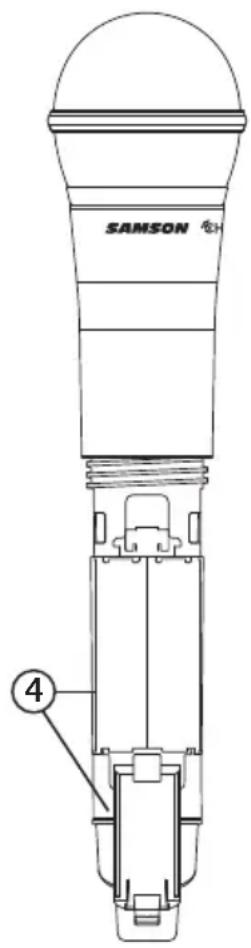
Avvio rapido
Avvio rapido
natural_image
Line drawings of a hand using a handheld device to interact with a control panel (no text or symbols present)Avvio rapido
natural_image
Technical line drawing of a mechanical component with a bracket and hook (no text or symbols)natural_image
Line drawing of a SAMSON wireless device enclosure with two antennas and a central switch (no text or symbols on the device itself)natural_image
Diagram of two wireless network devices enclosed in a rectangular enclosure, showing ports and signal lights (no text or labels)Piani Canale Concert 288
| Gruppo H470-518 MHz | Gruppo I518 -566 MHz | ||||||
| CH A | Freq CH B | Freq CH | A Freq CH | B Freq | |||
| 0 47 | 0.125 0 4 | 94.125 | 0 518.125 | 0 54 | 2.125 | ||
| 1 47 | 1.625 1 4 | 95.625 | 1 519.625 | 1 54 | 3.625 | ||
| 2 47 | 3.050 2 4 | 97.050 | 2 521.050 | 2 54 | 5.050 | ||
| 3 47 | 4.425 3 4 | 98.425 | 3 522.425 | 3 54 | 6.425 | ||
| 4 47 | 4.900 4 4 | 98.900 | 4 522.900 | 4 54 | 6.900 | ||
| 5 47 | 7.525 5 5 | 501.525 | 5 525.525 | 5 54 | 9.525 | ||
| 6 47 | 9.100 6 5 | 503.100 | 6 527.100 | 6 55 | 1.100 | ||
| 7 48 | 0.475 7 5 | 504.475 | 7 528.475 | 7 55 | 2.475 | ||
| 8 48 | 2.000 8 5 | 506.000 | 8 530.000 | 8 55 | 4.000 | ||
| 9 48 | 4.075 9 5 | 508.075 | 9 532.075 | 9 55 | 6.075 | ||
| A 48 | 6.975 A 5 | 510.975 | A 534.975 | A 55 | 8.975 | ||
| B 48 | 7.975 B 5 | 511.975 | B 535.975 | B 55 | 9.975 | ||
| C 48 | 9.050 C 5 | 513.050 | C 537.050 | C 56 | 1.050 | ||
| D 49 | 0.975 D 5 | 514.975 | D 538.975 | D 56 | 2.975 | ||
| E 49 | 2.425 E 5 | 516.425 | E 540.425 | E 56 | 4.425 | ||
| F 49 | 3.975 | F 517.975 | F 541.975 | F 56 | 5.975 | ||
Piani Canale Concert 288
| Gruppo J*606-654 MHz | |||
| CH A | Freq CH B | Freq | |
| 0 60 | 6.125 0 | 630.125 | |
| 1 60 | 7.625 1 | 631.625 | |
| 2 60 | 9.050 2 | 633.050 | |
| 3 61 | 0.425 3 | 634.425 | |
| 4 61 | 0.900 4 | 634.900 | |
| 5 61 | 3.525 5 | 637.525 | |
| 6 61 | 5.100 6 | 639.100 | |
| 7 61 | 6.475 7 | 640.475 | |
| 8 61 | 8.000 8 | 642.000 | |
| 9 62 | 0.075 9 | 644.075 | |
| A 62 | 2.975 A | 646.975 | |
| B 62 | 3.975 B | 647.975 | |
| C 62 | 5.050 C | 649.050 | |
| D 62 | 6.975 D | 650.975 | |
| E 62 | 8.425 E | 652.425 | |
| F 62 | 9.975 F | 653.975 | |
96mm × 62mm × 18.5mm
Peso
0.2 lb / 93 g
10.23" × 2.1" 260mm × 54mm
Peso
0.48 lb / 218 g
Ricevitore CR288
Livello output audio - Mix sbilanciato
+14 dBu
Livello output audio - bilanciato
+14 dBu
Impedenza output audio - sbilanciato
1k Ohm
210mm × 125mm × 44mm
Peso
0.99 lb / 450 g




- SAMSON®
- Important Safety Information
- ATTENTION RISQUE D'ÉLECTROCUTION ! NE PAS OUVRIR !
- WARNING
- Table of Contents
- Introduction
- System Features
- System Components
- All systems
- Dual Handheld system
- Pro Combo System system
- All-In-One Combo System system
- Presentation System
- CR288 Receiver Callouts
- CB288 Belt Pack Transmitter
- CH288 Handheld Transmitter
- Quick Start
- Rack Mounting
- Concert 288 Channel Plans
- Specifications
- System
- CR288 Receiver
- FCC Rules and Regulations
- Sommaire
- All-In-One Combo System
- CR288 Receiver Angaben
- Índice
- Inicio Rápido
- Planes de Canales del Concert 288
- Indice
- Avvio rapido
- Piani Canale Concert 288
- Ricevitore CR288
Brand : SAMSON
Model : Concert 88x
Category : Receiver