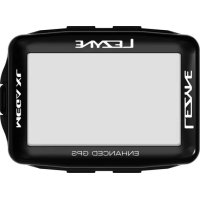
Mega Drive 1800i - Bike light Lezyne - Free user manual and instructions
Find the device manual for free Mega Drive 1800i Lezyne in PDF.


| Product Type | Bike Light |
| Brand | Lezyne |
| Model | Mega Drive 1800i |
| Light Output | 1800 lumens |
| Battery Type | Lithium-Ion (rechargeable) |
| Battery Capacity | 5000 mAh |
| Runtime (Max Mode) | 1.5 hours |
| Runtime (Low Mode) | 12 hours |
| Recharge Time | 3-4 hours |
| Charging Port | USB-C |
| Modes | High, Medium, Low, Pulse, Flash |
| Weight | 220 g (with mount) |
| Dimensions | 120 x 50 x 40 mm |
| Water Resistance | IPX7 |
| Mount Type | Universal handlebar mount (included) |
| Compatibility | Handlebar diameters 31.8-35 mm |
| Lens Material | Optically enhanced polycarbonate |
| Housing Material | CNC machined aluminum |
| Daytime Running Light | Yes (pulse mode) |
| Low Battery Indicator | Red LED on switch |
| Spare Parts Available | Replacement batteries and mounts |
| Repairability | Battery replaceable by user (with tools) |
Frequently Asked Questions - Mega Drive 1800i Lezyne
User questions about Mega Drive 1800i Lezyne
0 question about this device. Answer the ones you know or ask your own.
Ask a new question about this device
Download the instructions for your Bike light in PDF format for free! Find your manual Mega Drive 1800i - Lezyne and take your electronic device back in hand. On this page are published all the documents necessary for the use of your device. Mega Drive 1800i by Lezyne.
USER MANUAL Mega Drive 1800i Lezyne
to pair lights & customize modes
English User Manual
READ ENTIRE MANUAL BEFORE OPERATION to ensure proper use and care of your new Lezyne LED light. Traffic laws mandating lighting vary from country to country. Inform yourself about lighting laws and regulations in the country of use. Lezyne LED lights do not conform to the German road traffic regulation StVZO.
Warnings
DO NOT LOOK DIRECTLY INTO LIGHT BEAM or shine into eyes of another. Lezyme LED Lights have a water resistance rating of IPX7 under IEC standard 60529. Submerging the device is not recommended. If moisture does enter the casing, air out until completely dry. DO NOT ATTEMPT TO REMOVE ELECTRONICS. Doing so will void warranty. Lezyme USA, Inc. does not accept any liability for injuries or other damages resulting from the use of this product in any circumstances.
Warranty
In U.S. and U.K., Lezyne LED Lights carry a two (2) year warranty from the original purchase date to the original owner (proof of purchase required). Lezyne Batteries carry a six (6) month warranty from the original purchase date. Lezyne warranties cover any manufacturing defects in materials or workmanship. Issues not covered by warranty include normal wear & tear, improper installation, attempting to access or modify electronics, damage or failure due to accident, misuse, abuse and/or neglect.
For all warranty issues worldwide, please contact the retailer that sold the product. For any warranty questions contact: warranty@lezyne.com
Mounting / Montaje
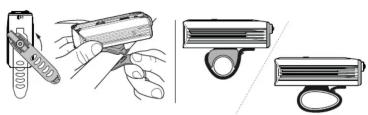
natural_image
Illustration of three different tools: a pen-like tool, a handheld device, and a handheld device with a ring (no text or symbols present)Operation
-
On/Off: hold button two (2) sec.
-
Mode cycle: click button
RACE MODE: With the light OFF, hold button for five (5) seconds, until light flashes. The light is now in Race Mode where only Overdrive and Economy outputs are selectable. The light will remain in Overdrive Race Mode even when switched OFF. Repeat the step above to return to the normal mode set. MODE MEMORY: The light remains in the output setting it is switched OFF in. THERMAL PROTECTION: If the operating temperature of the light is too high, the light automatically lowers the lumen output.
Run Times and Modes
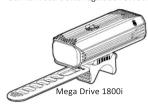
MEGA DRIVE 1800i
| FLATI | ENSO NO | ECONOMY | FANTO | SAT FLAJA | FLUSHI | FLAYI | PULB | CHINESE BURG | |
| 1000 | 600 | 250 | 15 | 600 | 150 | 150 | 150 | 1800 | |
| LUMINO | LUMINO | LUMINO | LUMINO | LUMINO | LUMINO | LUMINO | LUMINO | LUMINO | |
| 2:30 | 3:45 | 10:00 | 148:00 | 21:00 | 33:00 | 36:00 | 38:00 | 1:40 | |
| h. crédus | h. crédus | h. crédus | h. crédus | h. crédus | h. crédus | h. crédus | h. crédus | h. crédus | |
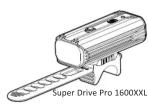
| SUPER DRIVE 1600XXIL | |||||||||
| TOTAL | TOTAL | TOTAL | TOTAL | TOTAL | TOTAL | TOTAL | TOTAL | TOTAL | |
| 1000 | 600 | 250 | 15 | 600 | 150 | 150 | 150 | 1600 | |
| LUMINO | LUMINO | LUMINO | LUMINO | LUMINO | LUMINO | LUMINO | LUMINO | LUMINO | |
| 2:30 | 3:45 | 10:00 | 148:00 | 20:10 | 33:00 | 36:00 | 38:00 | 1:45 | |
| h. crédus | h. crédus | h. crédus | h. crédus | h. crédus | h. crédus | h. crédus | h. crédus | h. crédus | |
Packaging include
| MOUNTING STRAP | USB CABLE | KTV PRO SMART REAR | HANDLE BAR MOUNT | POWER PACK | REMOTE SWITCH | |
| MEGA DRIVE 1800I | ● | ● | ||||
| MEGA DRIVE 1800I LOADED PRO | ● | ● | ● | ● (AL) | ● | ● |
| SUPER DRIVE 1600XXL | ● | ● | ||||
| SUPER DRIVE 1600XXXL LOADED | ● | ● | ● | ● (CM) |
Power Pack Operation (Mega Drive 1800i loaded ONLY)
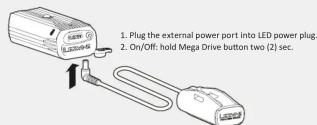
text_image
1. Plug the external power port into LED power plug. 2. On/Off: hold Mega Drive button two (2) sec.Remote Switch (Mega Drive 1800i loaded ONLY)
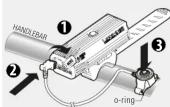
The rubber pad must be in contact with handlebar, mount Lezyne Remote Switch with an o-ring.
Plug the cable into the LED light external charge port, now Remote Switch button is able to function the same as LED light button.
KTV Pro Smart Rear Instruction (Mega / Super loaded ONLY)

text_image
BATTERY 100-75% 75-25% 2-50% CHARGING on/off: hold 2 sec charging charged 3hr USB charge RUN TIMES AND MODE MOUNTING 20 3 75 25 10 4:00 h/min 18:00 h/min 10:00 h/min 8:45 h/min 19:30 h/minHandlebar mount Instruction (Mega / Super loaded ONLY)
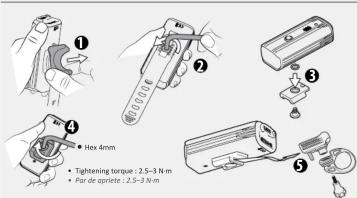
text_image
① ② ③ ④ ● Hex 4mm ● Tightening torque : 2.5~3 N·m ● Par de aptrète : 2.5~3 N·mBattery Indicator
An LED, located in the button, displays current battery status while light is ON. When light is OFF, click button once to momentarily display battery status.
100% 50% 10% 5%
[Non-Text]
Illuminates green
©
Illuminates yellow
[Non-Text]
Illuminates red
©
Flashes red
Charging
Before using your Lezyne LED Light for the first time, fully charge the battery.
charge your light:
-
Switch light OFF
-
Remove USB protective cover
-
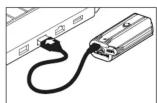
Connect micro USB cable and light to powered USB port
-
Once charging, button will flash green; if USB port is capable, light will use High Efficiency (HE) charging and button will flash blue
If button does not flash when plugged in, selected USB port may not be powered—try another USB port.
Light will be charged after 8–9 hours (4–6 with HE charging) or when button illuminates solid green or blue.
- Remove light from charger and reinstall USB protective cover—ensure USB protective cover is fully installed for water resistance
Charging
•
•
Fully Charged
©
-
Illuminates
green or blue
More Information
For more information on Lezyne products, visit: www.lezyne.com
The rubber pad must be in contact with handlebar, mount Lezyne Remote Switch with an o-ring.
Plug the cable into the LED light external charge port, now Remote Switch button is able to function the same as LED light button.
KTV PRO SMART REAR Instruction (Mega / Super loaded ONLY)
BATTERY
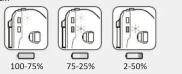
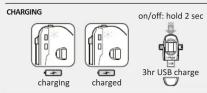
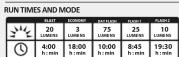


Handlebar mount Instruction (Mega / Super loaded ONLY)
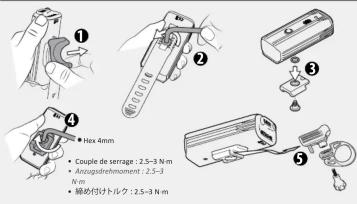
text_image
① ② ③ ④ ●Hex 4mm ● Couple de serrage : 2.5-3 N m ● Anzugdrehmment : 2.5-3 N m ● 締め付けトルク : 2.5-3 N m73291-Y13-LED-MEGA-SUPER-MANUAL-R081