Super Drive 1600XXL - Bike light Lezyne - Free user manual and instructions
Find the device manual for free Super Drive 1600XXL Lezyne in PDF.


| Product Type | Bike light |
| Brand | Lezyne |
| Model | Super Drive 1600XXL |
| Maximum Brightness | 1600 lumens |
| Battery Type | Internal rechargeable Li-ion |
| Battery Capacity | 5000 mAh |
| Run Time (High) | 3 hours |
| Run Time (Low) | 20 hours |
| Run Time (Flash) | 48 hours |
| Charging Port | USB-C |
| Charging Time | 5 hours |
| Light Modes | High, Medium, Low, Pulse, Flash |
| Water Resistance | IPX7 |
| Material | CNC machined aluminum |
| Mount Type | Universal handlebar mount |
| Dimensions | 110 x 35 x 45 mm |
| Weight | 200 g |
| Low Battery Indicator | Yes |
| Overheat Protection | Yes |
| Compliance | StVZO (German road regulation) |
Frequently Asked Questions - Super Drive 1600XXL Lezyne
User questions about Super Drive 1600XXL Lezyne
0 question about this device. Answer the ones you know or ask your own.
Ask a new question about this device
Download the instructions for your Bike light in PDF format for free! Find your manual Super Drive 1600XXL - Lezyne and take your electronic device back in hand. On this page are published all the documents necessary for the use of your device. Super Drive 1600XXL by Lezyne.
USER MANUAL Super Drive 1600XXL Lezyne
GPS + SMART CONNECT - QUICK START GUIDE
Follow these instructions to pair a Lezyne Smart Connect LED to a compatible Lezyne GPS computer.
To customize your Smart Connect lights beforehand, click here to view the LED Ally app video tutorial >

text_image
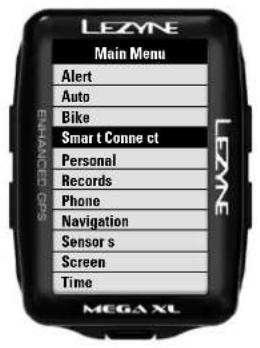
LEZYNE Main Menu Alert Auto Bike Smart Conne ct Personal Records Phone Navigation Sensor s Screen Time MEGA XLSTEP 1
Select "Smart Connect" from the Main Menu.
text_image
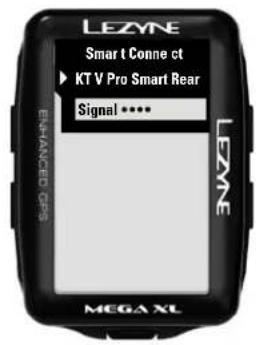
LEZNE Smart Conne ct ► KT V Pro Smart Rear Signal •••• LEZNE MEGA XLSTEP 4
Select the light you want to pair with.

text_image
LEZYNE Smart t Conne ct ► Comb o Signal ••••• Front Rear MEGA XLSTEP 2
Choose Combo, Front or Rear (Note: If the Front and Rear are linked, they will only show up under "Combo"). To link a combo, use the Lezyne LED Ally app.
text_image
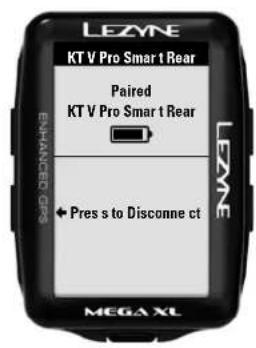
LEZYNE KT V Pro Smar 1 Rear Paired KT V Pro Smar 1 Rear LEZNE ENHANCED Pres s to Disconne ct MEGA XLSTEP 5
Your light(s) are now paired. To connect a different light, go back to this page and click the "Press to Disconnect" option first and start the pairing process over again.
text_image
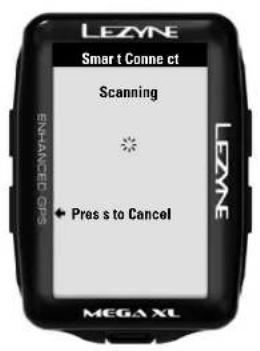
LEZYNE Smart t Conne ct Scanning Pres s to Cancel MEGA XLSTEP 3
Let the GPS scan. (Note: If the light(s) are currently paired with another GPS Device or the LED Ally phone app, they will not show up. Disconnect or move away from signal range first.)
text_image
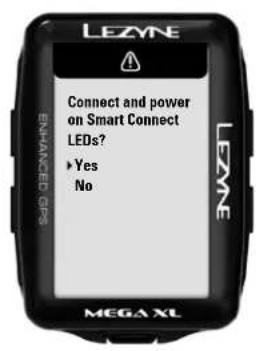
LEZNE Connect and power on Smart Connect LEDs? ▶ Yes No MEGA XLNOTE
When turning your GPS device back on you will be asked to reconnect to your lights. This is necessary so the device does not unknowingly power on your Smart Connect lights.
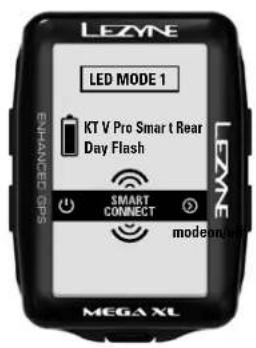
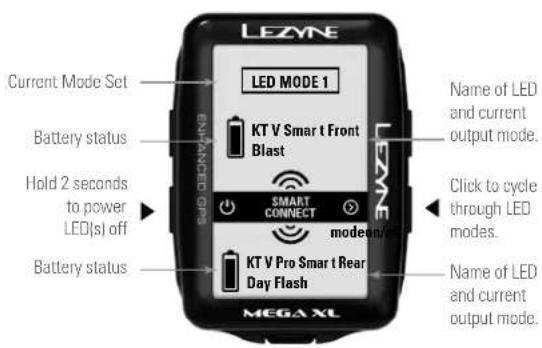
Once connected, a Smart Connect page will now be available in the GPS's main page carousel.
Note: In some cases only 4 sensors can be connected to a Lezyne GPS device at once. If you have too many sensors connected, please switch one to Ant+ or disconnect another sensor to use Smart Connect.
Example A: Connected Combo
text_image
LEZYNE Current Mode Set LED MODE 1 BATTERY STATUS ENTAINED GPS KT V Smart Front Blast SMART CONNECT MODEON/RESET Hold 2 seconds to power LED(s) off Battery status MTGAX XL Name of LED and current output mode. Click to cycle through LED modes. Name of LED and current output mode.Example B: Connected Front or Rear