Mega XL GPS - Counter Lezyne - Free user manual and instructions
Find the device manual for free Mega XL GPS Lezyne in PDF.
User questions about Mega XL GPS Lezyne
0 question about this device. Answer the ones you know or ask your own.
Ask a new question about this device
Download the instructions for your Counter in PDF format for free! Find your manual Mega XL GPS - Lezyne and take your electronic device back in hand. On this page are published all the documents necessary for the use of your device. Mega XL GPS by Lezyne.
USER MANUAL Mega XL GPS Lezyne
text_image
YE AR W LE YE LEZYNE LEZYNE MEGA XL GPS MEGA C GPS USER MANUAL ENHANCED GPS ⑫ LEZYNE LEZYNE MEGA XL GPS MEGA C GPS USER MANUAL ENHANCED GPSInformaons
- Distance
- Temps
- Calories
• Fichiers page 50
natural_image
Simple line drawing of a mechanical component with a downward arrow indicating motion (no text or symbols)
natural_image
Top-down view of a black mechanical component with mounting holes and internal features (no text or symbols)Languees de xaon
natural_image
Line drawing of a handheld electronic device with a cable (no text or symbols)Cache du port USB
text_image
MINI GPS MINI GPS MINI GPStext_image
Device Start Not Devices No rules are visible because no Latyne GPS device is connected.
text_image
Device Stop Scanning LEZYNE SUPER GPS
text_image
LEZME Mmea priac. Alerte Auto Vélo Personnel Fichiers Teléfono Navigation Captors Écran Temps Infos MEGA XL
text_image
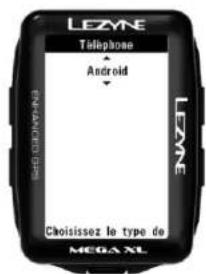
LEZYNE Telephone Android LEZYNE Choisissez le type de MEGA XL
text_image
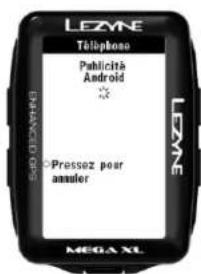
LEZME Téléphones Publicità Android * Pressez pour annuler MEGA XL
text_image
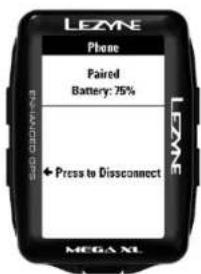
LEZME Phone Paired Battery: 75% + Press to Disconnect MEGA XL
text_image
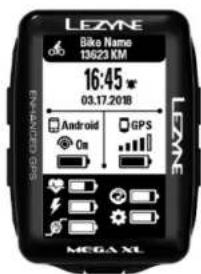
LEZNE Bike Name 13623 KM 16:45 03.17.20'18" Android On GPS LEME MEGA XL
text_image
Lezyne GPS Ally v2 Lezyne For more with Lopez VIEGPS Division GSB7 Model Head Design your business to the story, in every case, in a new year's table. Navigation SELECTED DESTINATION Lopez Lake, California Uni... Cancel 50 Mega Grind Distance from Distance in Time Total Discount 0.088mm 0.0140 0.0680 mm Acceleration Ascend Discount 8243 ft 8224 ft Average 9.27 mph Maximum 38.70 mphtext_image
Back GPS Settings General setup Edit GPS settings that are not specific to bike and screen layout Appuyez ici pour commencer Bike and Screen setup Configure the details of your bikes and how you want the data fields displayed. General setup Alert Auto Personal Navigation Screen TimeBike and Screen Setup
text_image
Back GPS Settings General setup Edit GPS settings that are not specific to bike and screen layout Bike and Screen setup Configure the details of your bikes and how you want the data fields displayed. Appuyez ici pour commencer Bikes Bike Bike Name Road Disc Sport Type Road Biking Wheel Circumference 216.8 cm Bike Weight 10 kg Odometer 0.00 km Field Setup Data Page 1 3 4 5A 5B 6A Speed Distance Cadence Time Clock Select the number of fields on this screen, then tap on the field above to set which data fields are displayedtext_image
MESSAGE James Smith Okay phew! No rush, see ya when you get back! E-MAIL Micki Kozuscheck Buy more!!!! PHONE CALL Micki Kozuschektext_image
FAVORITES 581 E Clay Rd 7342 28th Ave SW All Favorites RECENT DESTINATIONS The Westy, 7908 35th Ave SW, Seattle... The William Baity Company, 7524 35t...
text_image
Navigation SELECTED DESTINATION 581 E Clay Rd Cancel 46.28 mi 12.0 114.7 57.3 0.0 Canopy Rides Navigation Moretext_image
LEZYNE Synthetic Design Settings Long Out Upload Delete Account Not Connected Se connecter à Strava Connect with STRAVA Profile Image Drag and drag an image to change avatar Or updated Choose File No file change Lezyne GPSROOT Lezyne GPSROOT will be able to: • Accept your profile and activity info • Upload activities for you and will your profile Lezyne GPSROOT will be able to: • Accept your profile and activity info • Upload activities for you and will your profile Lezyne GPSROOT will be able to: • Accept your profile and activity info • Upload activities for you and will your profile Lezyne GPSROOT will be able to: • Accept your profile and activity info • Upload activities for you and will your profile Lezyne GPSROOT will be able to: • Accept your profile, and activity info • Upload activities for you and will your profile Lezyne GPSROOT will be able to: • Accept your profile, and activity info • Upload activities for you and will your profile Lezyne GPSROOT will be able to: • Accept your profile, and activity info • Upload activities for you and will your profile Lezyne GPSROOT will be able to: • Accept your profile, and activity info • Upload activities for you and will your profiles Lezyne GPSROOT will be able to: • Accept your profile, and activity info • Upload activities for you and will your profiles Lezyne GPSROOT will be able to: • Accept your profile, and activity info • Upload activities for you and will your profiles Lezyne GPSROOT will be able to: • Accept your profile, and activity info • Upload activities for you and will your profiles Lezyne GPSROOT will be able to: •Accept your profile, and activity info • Upload activities for you and will your profiles Lezyne GPSROOT will be able to: •Accept your profile, and activity info • Upload activities for you and will your profiles Lezyne GPSROOT will be able to: •Accept your profile, and activity info • Upload activities for you and will your profiles Lezyne GPSROOT will be able to: •Accept your profile, and activity info • Upload activities for you, and will your profiles Lezyne GPSROOT will be able to: •Accept your profile, and activity info • Upload activities for you, and will your profiles Lezyne GPSROOT will be able to: •Accept your profile, and activity info • Upload activities for you, and will your profiles Lezyne GPSROOT will be able to: •Accept your profile, and activity info • Upload activities for you, and will your profiles Lezyne GPSROUT will be able to: •Accept your profile, and activity info • Upload activities for you, and will your profiles Lezyne GPSROUT will be able to: •Accept your profile, and activity info • Upload activities for you, and will your profiles Lezyne GPSROUT will be able to: •Accept your profile, and activity info • Upload activities for you, and will your profiles Lezyne GPSROUT will be able to: •Accept your profile, and activity info • Upload activities for you, and will your profiles Lezyne GPSROUT will be able to: •Accept your profile, and activity info • Upload activities for you, and will your profiles Lezyne GPSROUT will be able to: •Accept your profile, and activity info • Upload activities for you, and will your profiles Lezyne GPSROUT will be able to: •Accept your profile, and activity info • Upload activities for you, but not under the main Senses of ServiceLezyne Track
Conguraon de Lezyne Track
Training Program Set up
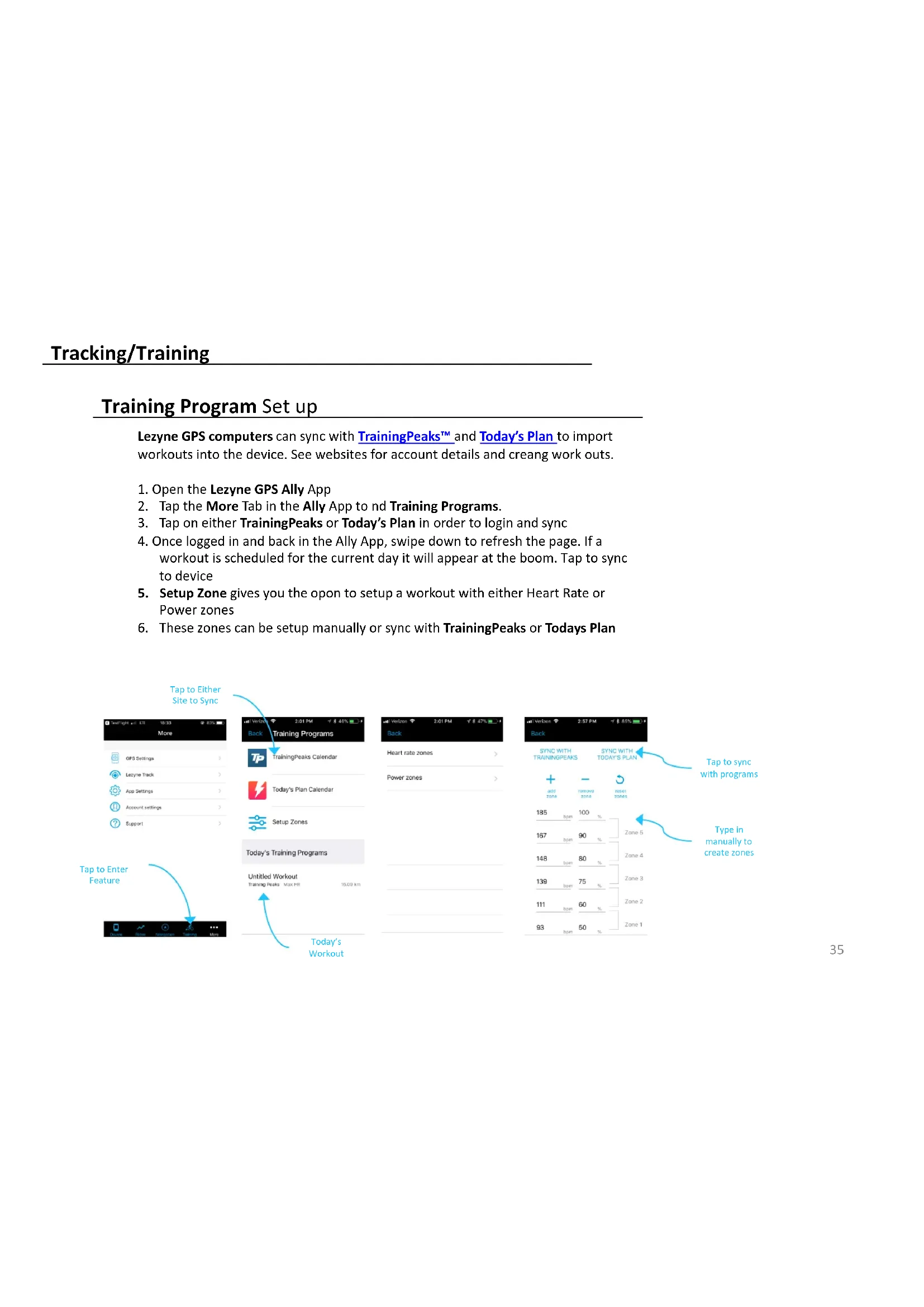
Lezyne GPS computers can sync with TrainingPeaks™ and Today's Plan to import workouts into the device. See websites for account details and creang work outs.
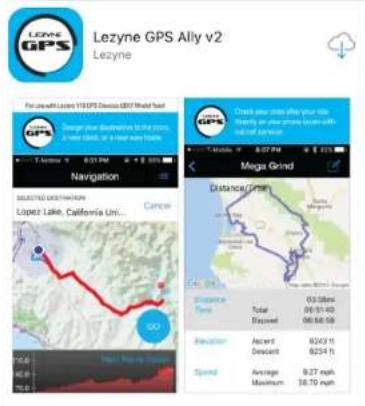
- Open the Lezyne GPS Ally App
- Tap the More Tab in the Ally App to nd Training Programs.
- Tap on either TrainingPeaks or Today's Plan in order to login and sync
- Once logged in and back in the Ally App, swipe down to refresh the page. If a workout is scheduled for the current day it will appear at the boom. Tap to sync to device
- Setup Zone gives you the opon to setup a workout with either Heart Rate or Power zones
- These zones can be setup manually or sync with TrainingPeaks or Todays Plan

flowchart
graph TD
A["Tap to Enter Feature"] --> B["Back Training Programs"]
B --> C["Training Peaks Calendar"]
C --> D["Today's Plan Calendar"]
D --> E["Setup Zones"]
E --> F["Today's Training Programs"]
F --> G["Untitled Workout"]
G --> H["Training Peaks Max. PB 10.03 hrs"]
H --> I["Today's Workout"]
J["Tap to Either Site to Sync"] --> K["Back Training Programs"]
K --> L["Heart rate zones"]
L --> M["Power zones"]
N["Tap to sync with programs"] --> O["Back Training Programs"]
O --> P["SYNC WITH TRAININGPEAKS"]
P --> Q["SYNC WITH TODAY'S PLAN"]
R["Type in manually to create zones"] --> S["185 Zone 100% Zone 5"]
S --> T["167 Zone 90% Zone 4"]
T --> U["148 Zone 60% Zone 3"]
U --> V["139 Zone 75% Zone 2"]
V --> W["111 Zone 60% Zone 1"]
W --> X["93 Zone 50% Zone 1"]
Training Program Set up
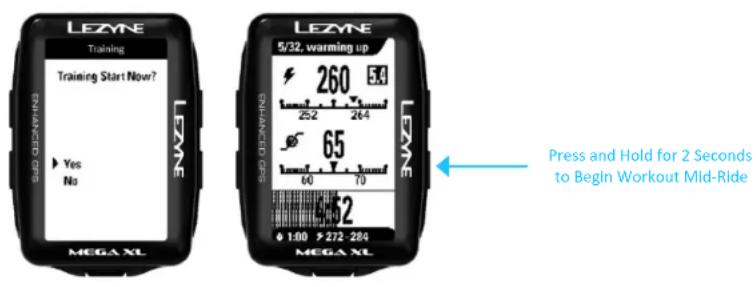
- Once the scheduled workout is sync to a GPS device, a command prompt will appear on the device screen.
- Training Start Now? Will appear on the screen. Select Yes to begin or No to begin workout later during your ride
- If No was selected, to start the workout mid-ride, Hold the LAP ▶ buon for 2 seconds to begin

text_image
LEZYNE Training Training Start Now? Yes No LEZYNE 5/32, warming up 260 54 25-2 26-4 65 60 70 LEZYNE LEZYNE WHENDED GPS PRESS AND HOLD for 2 Seconds to Begin Workout Mid-Ride 1:00 >272-284 MEGA XL MEGA XLTraining Program Set up
Recorded rides and rides with workouts can sync with the training programs if the Auto Sync features are turned on.
GPS Root/Ally App Sync
- Click on Sengs to Sync with a selected program.
- If you click on a program that is not setup, a login screen will appear for that site
- Once logged in you'll need to Authorize to complete the setup.
- Now when a ride is uploaded to the GPS Root/Ally App it will automatically sync with the selected programs
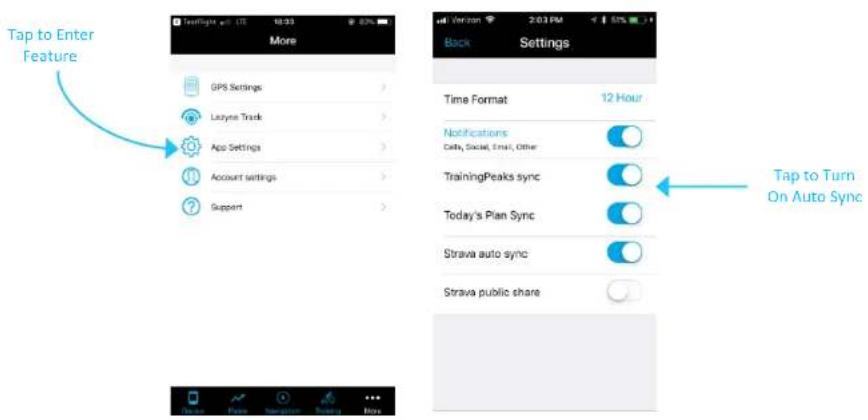
text_image
Tap to Enter Feature More GPS Settings > Laynsy Track > App Settings > Account settings > Support > Back Settings Time Format 12 Hour Notifications Daily, Social, Email, Other TrainingPeaks sync Today's Plan Sync Strava auto sync Strava public share Tap to Turn On Auto SyncRéglage du capteur
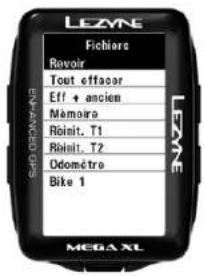
Review lets you see the details of stored rides on the device.
Press ENTER and use the right buons to select the ride you want to see by date and me. Press ENTER to make the selecon.

EasyManual