
R300 - Receiver ELECTRO-VOICE - Free user manual and instructions
Find the device manual for free R300 ELECTRO-VOICE in PDF.


| Product Type | Wireless Receiver |
| Brand | Electro-Voice |
| Model | R300 |
| Frequency Bands | A (618-634 MHz), B (678-694 MHz), C (516-532 MHz), E (850-865 MHz) |
| Number of Channels | 32 |
| Modulation | ±40 kHz |
| Diversity | Antenna Diversity |
| RF Sensitivity | <1.0 μV for 12 dB SINAD |
| Image Rejection | >55 dB |
| Squelch | Tone Code plus Amplitude |
| Power Requirements | 12-16 VDC, 500 mA max |
| Operating Temperature | 5° to 45°C (41° to 113°F) |
| Dimensions (H x W x D) | 1.72 in x 7.8 in x 8.0 in (43 mm x 206 mm x 210 mm) |
| Audio Frequency Response | 80 – 18 kHz ±2 dB |
| Balanced Output | 20 dBV max @ 40 kHz deviation |
| Unbalanced Output Level | Adjustable: -10 dB or 0 dB; 8 mV to 0.755 V RMS |
| Distortion | <1.0%, 0.4% typical @ 1 kHz, 40 kHz deviation |
| Signal-to-Noise Ratio | >100 dB A-weighted |
| Dynamic Range | >95 dB |
| Output Connectors | XLR Balanced, 1/4-inch Unbalanced Line Level |
| Antenna Connectors | TNC (2) |
| Display | Graphical LCD with channel/frequency, RF and audio meters, lock indicator, squelch level |
| Special Functions | ClearScan, EZsync infrared sync, Lock-Out, Squelch Adjustment |
| Included Accessories | Two antennas, power supply with blades, user manual |
| Certifications | FCC Part 15, CE, ETSI EN 300 422-2 |
Frequently Asked Questions - R300 ELECTRO-VOICE
User questions about R300 ELECTRO-VOICE
0 question about this device. Answer the ones you know or ask your own.
Ask a new question about this device
Download the instructions for your Receiver in PDF format for free! Find your manual R300 - ELECTRO-VOICE and take your electronic device back in hand. On this page are published all the documents necessary for the use of your device. R300 by ELECTRO-VOICE.
USER MANUAL R300 ELECTRO-VOICE
- Receiver 4
- Transmitter 5
- Systems Operation....6
2. Detailed Component Descriptions
- Receiver 7-14
- Handheld Transmitter 15-16
- Bodypack Transmitter....17-19
3. Guidelines and Recommendations For Best Performance 20-21
- Troubleshooting Guide 22-23
- Frequently Asked Questions....24-26
- Components and Accessories.... 27
- Compatible Channel Frequency Groups....28-31
- Specifications 32-33
- Certifications....34
- Factory Service 35

QUICK SET-UP: RECEIVER
- Do not connect the receiver to any other equipment yet!
- Connect the two Antennas to the receiver.
- Install the blades into the power supply, plug it into the back of the receiver, and into an outlet.
- Press the POWER switch. Display will light up.
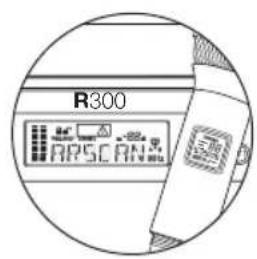
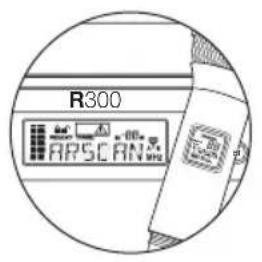
- Press and hold the button until CLEARSCAN scrolls across the screen.
- When CLEARSCAN stops, the receiver will be set to the clearest channel.
- Mute the Audio Mixer channel where the receiver will be plugged in, or set it to minimum.
- Leave the receiver ON and connect it to the audio system using either the XLR connector or 14 -inch line level jack.
Receiver "Quick Set-up" is complete.
QUICK SET-UP: TRANSMITTER
-
With the Power switch on the transmitter OFF, install two fresh AA batteries into the transmitter.
-
Press the transmitter Power Switch until the display comes on.
-
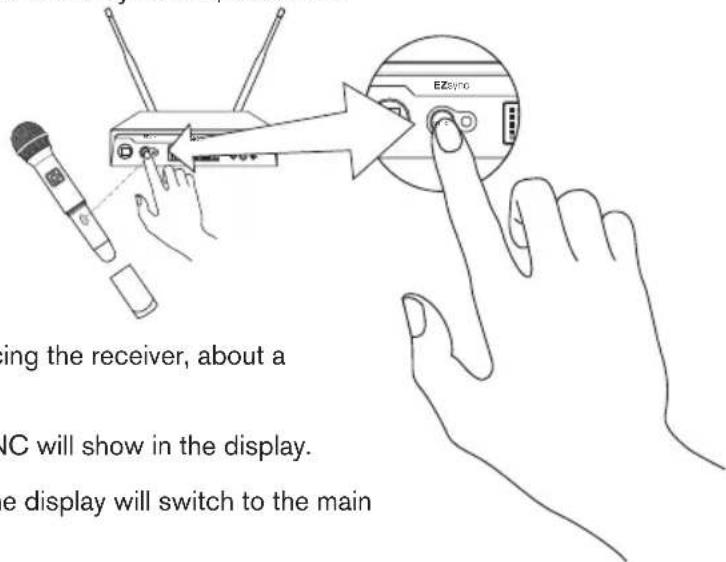
Loosen the transmitter battery cover to expose the EZsync Port, as shown.
-
Hold the transmitter with the EZsync Port facing the receiver, about a foot (30 cm) away.*
-
Press the SYNC Button on the receiver, SYNC will show in the display.
-
Once the channel is set in the transmitter, the display will switch to the main display and show RF and Audio Levels.
*Note: When performing EZsync, make sure lighting conditions are not too bright. Extremely bright lighting can interfere with EZsync.
Transmitter "Quick Set-up" is complete.

- Set the mixer/amp gain.
- Talk or sing into the microphone or play the guitar at a normal volume. You should hear audio coming out of the system.
- You may have to adjust the gain (via the control next to the connector on the receiver back panel) to provide the best input volume for your mixer/amp.
Notes:
- See page 10 of this manual for more information.
- See Image 11 of the Quick Start Guide for gain control location.
"Quick Set-up" is now complete. Please enjoy your R300 system.
2.1 | R300 Receiver
RECEIVER CONTROLS, CONNECTORS
- Power ON/OFF
- SYNC Data Transfer Button
- Infrared EZsync Window
- Graphical Display
a. Channel or Frequency Display
b. Diversity Indicator
c. RF Strength Meter
d. Audio Level Meter
e. Lock Indicator
f. Squelch Level Indicator
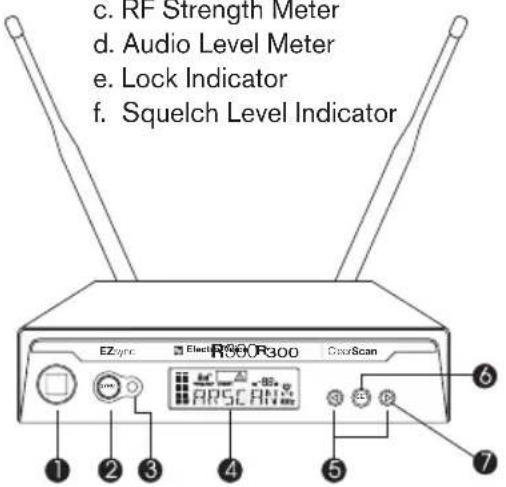
- Scroll Down and Up ( and ) Control Buttons
- SET Control Button
- ClearScan Control (press and hold button)
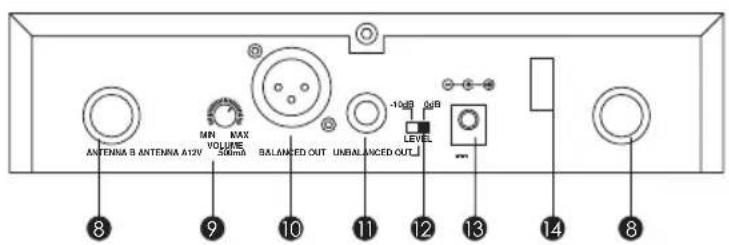
- TNC Antenna Input Connectors (2)
- Audio Output Volume Control
- XLR Balanced Output Connector
- ¼ Inch Unbalanced Line Level Audio Output Connector
- Unbalanced Output Level Switch (-10dB or 0dB)
- DC Power Connector (12V DC, 500mA)
- Power Cord Retainer
DETAILED COMPONENT DESCRIPTIONS
2.1 | Receiver Setup & Operation
-
Place the receiver and antennas where there is a clear line of sight to the area where the transmitter will be used. Rotate the antennas to separate them by 90 degrees.
-
Install the appropriate power connection blades into the power supply and connect the power supply cord to the receiver. Plug the power supply into an AC outlet. Push the power button to turn the receiver on and confirm that it is on by checking the main display screen.

3. Manual Channel Change
a. The and buttons allow you to scroll through the Channels. When the Channel you desire is displayed, stop scrolling.
b. After 2 seconds the displayed channel number will start to flash.
c. The number will stop flashing and the new channel is installed.
d. Turn on the transmitter and hold the EZsync port facing the receiver EZSync port, about a foot (30 cm) away, as described on page 5.
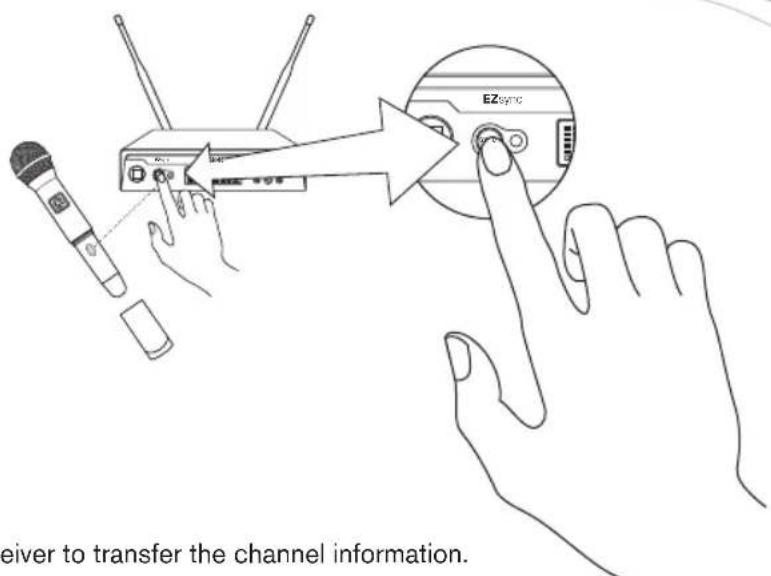
e. Press the SYNC button on the receiver to transfer the channel information.
f. The receiver will display SYNC until the data is transferred, then return to the main screen.
g. The transmitter display screen will now show the new channel and frequency.
NOTE:
-
If the channel data was not transferred to the transmitter after 5 seconds, the receiver will display ERROR. Be certain that the transmitter is On and the EZsync port is facing the receiver and try again.
-
If the data still does not transfer, try new batteries, or move the unit to a shaded area away from direct sunlight or bright lights before trying again.
continued on next page
DETAILED COMPONENT DESCRIPTIONS
- ClearScan: This feature automates the process of finding a clear channel.
a. To scan for the clearest channel in a group, press and hold until CLEARSCAN appears in the display, then release the button.
b. When the scan is complete, the display will show the clearest available channel.
c. Use the SYNC button to transfer the new channel as in step 3.
- During set up make sure the mixer or amplifier input used for the R300 is muted or turned down to a minimum level.
- Plug an audio cable (not supplied) into the 3 pin XLR or 1/4-inch TRS output of the R300.
Note: The XLR connector is the preferred connection since the output is balanced and will be more immune to noise for longer runs of cable although either can be used with good results. Set the balanced output level on the back panel to 12 o'clock (midway in the range) to start and adjust later if necessary. If the 14 -inch unbalanced output is used, start with adjustment switch in the -10dB setting.
- With the transmitter on, speak into the microphone or play the guitar. Turn up the level on the mixer or amplifier until you are able to hear the desired signal. If no audio is present, repeat setup and refer to the troubleshooting section.
Note: It may be necessary to adjust the receiver output until the volume level from the wireless system approximates the level of an equivalent wired microphone/instrument.
- DISPLAY The main display can be adjusted to display the Channel number or the Frequency.
Note: At any time the item not selected for the main display can be shown for 5 seconds by pushing the SET button once.
a. Press and hold the SET button until DISPLAY shows in the display.
b. Press SET and FREQUENCY or CHANNEL will flash in the display.
c. Press for FREQUENCY or for CHANNEL and press SET.
d. Display will return to the main screen and the selected item will be displayed.
e. At any time the item not selected for the main display can be shown for 5 seconds by pushing the SET button once.
DETAILED COMPONENT DESCRIPTIONS
- Change Lock-Out This feature can be useful when the receiver is in a location where unauthorized personnel have access to the receiver. With the LOCK ON, the channel cannot be changed and the word LOCK is displayed when the <or button is pushed.
a. Press and hold the SET button until DISPLY shows in the display.
b. Press ▶ to display LOCK.
c. Press SET and ON or OFF will be displayed to show the status of the lock-out.
d. Press ◀ to turn the LOCK ON or to turn the LOCK OFF and press SET.
e. Display will return to the main screen and padlock symbol in the upper left of the display will show the lock status.
- Squelch Adjustment – The squelch setting can be used to maximize range or immunity to noise.
a. Turn the transmitter off.
b. On the receiver, press and hold the SET button until DISPLAY shows in the display.
c. On the receiver, press two times to display SQELCH.
d. On the receiver, press SET and the squelch setting in the middle right of the screen (SQ 10dB) will flash.
e. On the receiver, press to decrease the squelch setting or to increase it.
f. On the receiver, press SET to enter the new setting and return to the main screen.
g. Turn on the transmitter and walk test the unit. Maximum squelch (50dB) maximizes noise immunity but limits the range. Minimum squelch (5dB) will maximize the range but allow more noise to break through the squelch. Never leave the squelch set to 0dB except for testing, white noise will be constantly present on the audio outputs.
h. Repeat to fine tune receiver squelch to the desired setting.
DETAILED COMPONENT DESCRIPTIONS
2.1.2 | Receiver Main Operating Screen
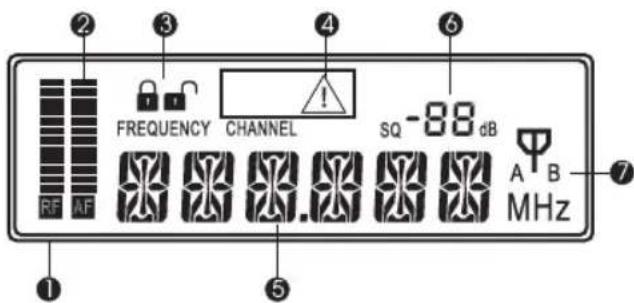
Display:
- RF Signal Meter
- Audio Meter
- Lock Indicator
- No Signal Indicator
- Channel Number (01 to 32) or Frequency
- Squelch Setting
- Antenna Diversity Status A or B antenna
Controls:
- Press or to change channels
- Press and hold for 3 seconds starts ClearScan, CLEARSCAN scrolls across the display
- Press SET once to display FREQUENCY or CHANNEL, whichever is not showing
- Press and hold SET for 3 seconds to access settings menu
2.2 | Handheld Transmitter
natural_image
Line drawing of a microphone with mesh head and internal components (no text or symbols)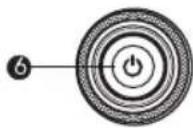
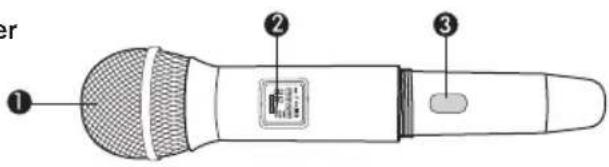
HT-300 CONTROLS, CONNECTORS AND INDICATORS
- Microphone Element
- Backlit LCD Display
a. Channel
b. Frequency
c. Battery Level
d. Mute Indicator
- EZSync Infrared Port
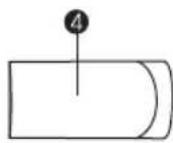
- Battery Cover - Screw type
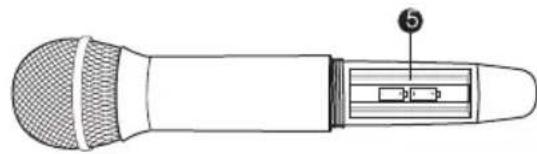
- Battery Compartment - Two AA Batteries
- On/Off/Mute button
DETAILED COMPONENT DESCRIPTIONS
2.2 | Handheld Transmitter Setup & Operation
1. Insert Batteries.
a. Remove the battery compartment cover by unscrewing it completely.
b. Insert two AA batteries as shown, sliding one up into the housing to make room for the other making sure to follow polarity, as marked.
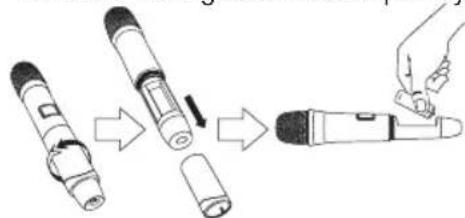
- Turn the unit on by pressing and holding the on/off button for 3 seconds, and the display will light up.
- If a new channel is desired, use EZsync as in Section 2.1 and close battery compartment.
4. Verify reception.
a. With the transmitter and receiver on a matching Channel, the main receiver display should be indicating a RF signal on the bar graph.
b. Speak into the microphone and the Audio Meter bar graph should indicate audio signal presence.
c. If the level meters do not show reception, make sure the channels are matching and refer to the troubleshooting section.
- Mute Function – press and hold on/off button for 2 seconds until MUTE appears in the LCD display and sound mutes. Repeat to turn mute off.
2.3 | Bodypack Transmitter
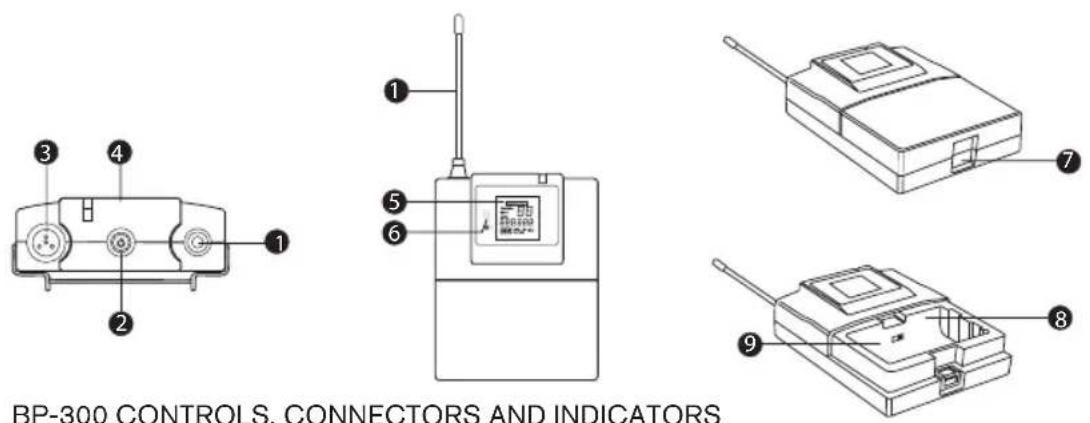
- Antenna - Flexible 14 wave antenna
- Power On/Off/Mute Button
- TA4 Microphone Connector
- On/Mute LED - Green when transmitter is on, Red when muted
continued on next page
DETAILED COMPONENT DESCRIPTIONS
2.3 | Bodypack Transmitter continued
- LCD Display
a. Channel
b. Frequency
c. Battery Level
d. Mute Indicator
- EZsync infrared window
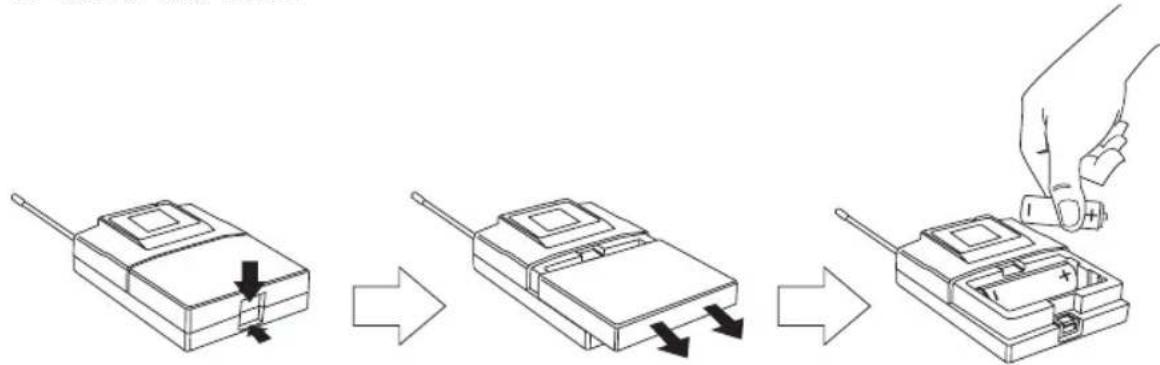
- Battery Compartment Latch – push down latch and slide cover as shown
- Two AA Battery Compartment – follow polarity as marked
- LAV/INS Gain Switch
flowchart
graph LR
    A["Device with left arm"] --> B["Step 1: Positioning down"]
    B --> C["Step 2: Inserted or removed"]
    C --> D["Step 3: Tool applied to right arm"]
2.3.1 | Bodypack Transmitter Setup & Operation
1. Insert Batteries
a. Open the battery compartment by pressing in on the latch and sliding the door down.
b. Insert two AA batteries with + and - as indicated.
c. Close the battery door by pushing up.
- Turn the unit on by pressing and holding the on/off button for 3 seconds, and the LCD display will light up. If channel has not been set, set channel according to 2.1.
3. Microphone/Guitar Operation.
a. For Lapel the gain switch should be in the LAV position.
b. For Headworn Microphones the gain switch should be in the INS position.
c. If lapel microphones are too sensitive and the audio meter on the receiver is reaching the peak, put the gain switch in INS to lower the gain.
d. For guitar operation using the optional R300GTRCBL cable, the gain switch should be in the LAV position for passive pickups, and in the INS position for active pickups. Should the output of the passive pickups be too high in the LAV position, switch to the INS position for reduced transmitter input gain.
- Mute Function – press and hold on/off button for 2 seconds until MUTE appears in the LCD display, On LED turns red, and sound mutes. Repeat to turn mute off.
GUIDELINES AND RECOMMENDATIONS For Best Performance
Compatibility
The transmitter and receiver must be of the same frequency band and set to the same channel in order to work together. The R300 is available in four frequency bands, A, B, C and E (Europe only). The band information is available in the serial number label on the receiver, the serial number label on the handheld transmitter, and on the back panel label on the bodypack.
Using Multiple Wireless Systems
If three or more R300 systems and/or other UHF/VHF wireless systems are being used in the same location, proper frequency coordination is necessary to avoid interference. Some channels in the R300 are designed to work together, see the channel groups in the back of this guide for more information. Contact your dealer or Electro-Voice for assistance if you are planning more systems or using the R300 with other wireless equipment.
Multiple Systems and R300
The ClearScan function can be used to set up any two R300 systems. Just scan with the first unit receiver, set the transmitter to that clear channel and leave it on. Then scan the second unit receiver for another clear channel. If 3 or more systems in the same frequency band are used in the same room, put all of the channels in the same group as indicated by the channel groups on page 28-31.
Potential Sources of Interference
There are many potential sources of interference for your wireless system. Any electronic product that contains digital circuitry including digital signal processors (reverb/multi-effects units), electronic keyboards, digital lighting controllers, CD and DVD players, and computers, all emit RF energy that can
adversely affect the performance of your wireless system. It is always best to place the receiver as far away as possible from these devices to minimize potential problems.
Analog and Digital Television stations can also interfere with your wireless system. The R300 is designed to operate over 16MHz of RF bandwidth, which covers 3 US TV stations. If two of the three stations are used in your area, it will severely limit the number of systems that will operate together and you should be using a different band.
Battery Recommendations
Fresh AA alkaline batteries from a quality manufacturer will yield the best performance from your R300 transmitters. If sound quality degrades during use, it may be the result of a weakening battery.
Receiver and Antenna Placement
Do not place the receiver near a large metal object or surface. Locate the receiver as close as possible to the area where the transmitter will be used. Ideally, position the receiver/antennas within sight of the transmitter. When using multiple systems, do not allow antennas to cross or touch each other.
Transmitter and Antenna Distance
Keep all transmitters at least 3 meters (10ft) away from the receivers and antennas for best operation. If possible, mount the receiver antennas 3 meters (10ft) above the stage so transmitters can not come too close.
| Problem Possible Causes Solutions | ||
| No audio and no display on the receiver | Receiver is off | Make sure that the power supply is properly connected and the on/off button is in the on position. |
| No audio and no RF signal indicator on the receiver display | Transmitter is off Turn on transmitter power switch. | |
| Transmitter is on a different channel or is a different band | Check band information on serial number label and match to receiver, reset channel (see section 2.1). | |
| No (or dead) battery in transmitter Insert fresh batteries in transmitter. | ||
| Faulty battery contacts Clean and or bend contacts to improve connection. | ||
| No Audio with good RF signal indicator | Microphone not connected | Check the TA4F connector on the bodypack or the detachable microphone element connection on the handheld. If possible, try another microphone. |
| Transmitter Mute On Press and hold On/Off button to stop Mute. | ||
| No (or low) Audio with good RF signal and Audio indicators on receiver display | Receiver audio output cable is damaged or disconnected | Connect, repair or replace audio output cable. |
| Gain not sufficient on mixer/preamp/amp input or it is muted | Increase gain on mixer or un-mute the input. | |
| Receiver output too low Increase the audio output setting. | ||
| Distorted audio signal | Receiver output too high Decrease the receiver output setting. | |
| Loud instrument or audio source Change the bodypack gain switch to INS. | ||
| Battery level low in transmitter Insert fresh batteries in transmitter. | ||
| Interference | Another R300 system in the installation is on the same channel or signals are mixing. | Make certain all units are on different channels. See Frequently Asked Questions section for more helpful information. |
| Interference | Another wireless product in the area is on the same frequency or the signals are mixing | Use ClearScan to change the operating frequency. |
| Receiver is too close to digital signal processor or similar device | Move the receiver to a different location. | |
| Strong electromagnetic field from stage lighting or other source near the transmitter or receiver, which may be producing RF noise at or near the operating frequency | Use ClearScan to change the operating frequency. Repair or remove the source of interference. Move the receiver to a different location. | |
| Short range or drop-outs | RF reflective metal obstacles between the transmitter and receiver | Move the obstacles, or reposition the receiver/antennas. |
| Poorly oriented beltpack antenna | Check the antenna connection and reorient the bodypack so the antenna is vertical (up and down) and facing the receiver, if possible. | |
| Squelch set too high | Check squelch setting, higher numerical settings mean shorter range (see page 13). | |
| Faulty receiving antenna system | Check all antenna connections and reposition to be in line-of-sight with the transmitter. | |
| Can't change settings on receiver | Lockout feature is enabled | Disable lockout by pressing SET for 3 seconds, press ▶ to display LOCK, press SET, press ▶ to turn lock off, press SET. |
| Transmitter will not sync with receiver | Battery cover on handheld | Remove battery cover, see page 15 for location of EZsync window. |
| Lighting in environment is too bright Shadow | infrared ports from light. | |
| Frequently Asked Questions |
| Q: How can I make sure my R300 system's frequency band will work in my location? |
| A: If you will be using your system in the USA, you can check R300 compatibility in your location by using the frequency band selector located at http://www.electrovoice.com/frequencyselector. If you are outside of the USA, please contact your local Electro-Voice dealer or technical support center. |
| Q: Are there any web-based materials or how-to's available which will help me understand my R300 system? |
| A: R300 how-to videos are posted at http://www.electrovoice.com/evtv.php?category=knowledge |
| Q: How many R300 systems can I operate at the same time? |
| A: The number of R300 systems you can operate simultaneously is completely dependent on your local RF (radio frequency) conditions. Under ideal RF conditions (meaning there are no other sources of RF operating within or near your system's bandwidth), the maximum number of simultaneous R300 system within one tuning bandwidth is limited to 8 channels within ONE channel group. However, local television broadcasts or other wireless systems operating within your system's tuning bandwidth will reduce that number. |
| Q: Can I mix frequencies from different groups? |
| A: No. Multi-channel R300 systems in the same bandwidth (A, B, C, or E) must operate within the same channel group. Only frequencies within the same group are inter-modulation free. Frequencies from different groups may interfere with one another. |
| Q: Can I use R300 systems from different bands at the same time? |
| A: Yes. Mixing systems from different bands is possible as long as you follow the group coordination guidelines of each band. |
| Q: Why did I suddenly begin getting interference? During sound check, everything was fine – but after the show began, I started getting interference. |
| A: Another radio system that wasn't on during sound check began transmitting on, or near your system's frequency. If this happens, ClearScan you system again to find a new, clear frequency. |
| Q: I've hear the term line-or-sight. What does that mean? |
| A: In a wireless microphone system, line-of-sight means that optimal performance occurs within one room, with no walls or structural barriers between the transmitter and receiver antennas. Any wall or enclosure the transmitted signal must pass through will diminish the transmitted signal strength at the receiver. Your receiver antennas should be in the room your transmitter is operating within and out in the open, unobstructed by walls or enclosures. |
| Q: Can I move the receiver antennas that came with my R300 system to another location? |
| A: Only with the appropriate hardware. And only to the appropriate location. The flexible 1/2-wave dipole antennas which came with your system only function when connected directly to your receiver's antenna jacks, or when front-mounted in a 19-inch audio rack with the R300 antenna mounting hardware listed in the system accessories table in this guide. Moving these antennas anywhere outside of the rack (such as on a stand or mounted to a wall) will not work. If your needs include the remote mounting of receiver antennas, you must use antennas designed for that application, such as the LPA500 log periodic antenna. |
| Q: Where is the EZsync port on the R300 handheld transmitter? |
| A: The EZsync port is located under the handheld transmitter's removable battery cover. Just as you would do in order to change the batteries, you must loosen the battery cover to expose the EZsync port and aim the port directly at the receiver's EZsync port during the syncing operation. |
| Q: Sometimes I can't get EZsync to work properly. Am I doing something wrong? |
| A: EZsync uses an infrared beam of light to sync transmitter to receiver. Extremely bright or fluorescent light can interfere with the sync signal. If you experience difficulties with EZsync, shade the ports from extremely bright light sources during the syncing operation. |
COMPONENTS AND ACCESSORIES

| Accessories and Parts Model # Order # | ||
| R300-L System Uni Lapel ULM18 F.01U.168.803 | ||
| R300-E System Headworn Microphone HM3 F.01U.168.804 | ||
| Windscreen for ULM18 WS-18 F.01U.168.802 | ||
| Windscreen for HM3 WS-H3 F.01U.170.778 | ||
| Beltclip for BP-300 BC-300 F.01U.168.797 | ||
| Guitar Cord R300GTRCBL F.01U.289.662 | ||
| PL22 Dyanmic Mic Head | RCC-PL22 | F.01U.170.777 |
| Foam Windscreen for Handheld | 379-1 | F.01U.117.911 |
| 12 Wave Receiver Antenna A Band | CRA-A | F.01U.168.794 |
| 12 Wave Receiver Antenna B Band | CRA-B | F.01U.168.795 |
| 12 Wave Receiver Antenna C Band | CRA-C | F.01U.310.181 |
| 12 Wave Receiver Antenna E Band | CRA-E | F.01U.168.796 |
| Single Receiver Rack Mount Kit | RM-300 | F.01U.168.792 |
| Double Rack Mount Kit | RMD-300 | F.01U.168.793 |
| Front Mount Antenna Cables (4) | SFMC-300 | F.01U251.469 |
| ANTENNA/PWR DISTRIBUTION (600-760 MHz) (A and B only, not for C) | APD4+ | F.01U.117.678 |
| ANTENNA/PWR DISTRIBUTION (760-865 MHz) (E Band) | APD4+Euro | F.01U.117.679 |
| TERMINATION PLUG FOR APD4+ | TP-2 | F.01U.086.103 |
COMPATIBLE CHANNEL FREQUENCY GROUPS
(Use only channels within the same group when using more than two R300 units in one room. If you need additional help call 1-800-392-3497 (US and Canada only).
| US/EURO Band A 618-634 MHz | |||||||
| Group 1 Group 2 G | Group 3 Group 4 | ||||||
| Channel | Freq | Channel | Freq | Channel | Freq | Channel | Freq |
| 1 | 618.500 | 9 | 618.900 | 17 | 619.300 | 25 | 619.700 |
| 2 622.700 | 10 620.100 | 18 620.500 26 | 620.900 | ||||
| 3 | 624.400 | 11 | 621.500 | 19 | 621.900 | 27 | 622.300 |
| 4 | 628.300 | 12 | 623.100 | 20 | 623.500 | 28 | 623.900 |
| 5 | 628.800 | 13 | 624.900 | 21 | 625.300 | 29 | 625.700 |
| 6 | 630.700 | 14 | 626.925 | 22 | 627.325 | 30 | 627.725 |
| 7 631.400 | 15 | 629.325 23 62 | 9.725 31 630.125 | ||||
| 8 633.500 | 16 | 632.075 24 63 | 2.475 32 632.875 | ||||
| US/EURO Band B 678-694 MHz | |||||||
| Group 1 Group 2 Group 3 Group 4 | |||||||
| Channel | Freq | Channel | Freq | Channel | Freq | Channel | Freq |
| 1 678.500 9 678.900 17 679.300 25 679.700 | |||||||
| 2 682.700 10 680.100 18 680.500 26 680.900 | |||||||
| 3 | 684.400 | 11 | 681.500 | 19 | 681.900 | 27 | 682.300 |
| 4 | 688.300 | 12 | 683.100 | 20 | 683.500 | 28 | 683.900 |
| 5 | 688.800 | 13 | 684.900 | 21 | 685.300 | 29 | 685.700 |
| 6 | 690.700 | 14 | 686.925 | 22 | 687.325 | 30 | 687.725 |
| 7 | 691.400 15 689.325 | 23 689.725 | 31 690.125 | ||||
| 8 | 693.500 16 692.075 24 692.475 | 32 692.875 | |||||
COMPATIBLE CHANNEL FREQUENCY GROUPS
| US/EURO Band C 516-532 MHz | |||||||
| Group 1 Group 2 Group 3 Group 4 | |||||||
| Channel | Freq | Channel | Freq | Channel | Freq | Channel | Freq |
| 1 516.500 9 516.900 17 517.300 25 517.700 | |||||||
| 2 | 520.700 | 10 | 518.100 | 18 | 518.500 | 26 | 518.900 |
| 3 | 522.400 | 11 | 519.500 | 19 | 519.900 | 27 | 520.300 |
| 4 | 526.300 | 12 | 521.100 | 20 | 521.500 | 28 | 521.900 |
| 5 | 526.800 | 13 | 522.900 | 21 | 523.300 | 29 | 523.700 |
| 6 | 528.700 | 14 | 524.925 | 22 | 525.325 | 30 | 525.725 |
| 7 | 529.400 | 15 | 527.325 | 23 | 527.725 | 31 | 528.125 |
| 8 | 531.500 | 16 | 530.075 | 24 | 530.475 | 32 | 530.875 |
COMPATIBLE CHANNEL FREQUENCY GROUPS
| EURO Band E 850-865 MHz | |||||||
| Group 1 Group 2 Group 3 Group 4 | |||||||
| Channel | Freq | Channel | Freq | Channel | Freq | Channel | Freq |
| 1 850.4 | 00 9 850.800 1 | 7 851.200 25 | 850.000 | ||||
| 2 851.6 | 00 10 | 852.000 18 85 | 2.400 26 854.200 | ||||
| 3 853.0 | 00 11 | 853.400 19 85 | 3.800 27 855.900 | ||||
| 4 854.6 | 00 12 855.000 | 20 855.400 28 | 859.800 | ||||
| 5 856.4 | 00 13 856.800 | 21 85 | 7.200 | 29 860.300 | |||
| 6 858.4 | 25 14 | 858.825 22 85 | 9.225 30 863.100 | ||||
| 7 860.8 | 25 15 861.225 | 23 861.625 31* | 865.000 | ||||
| 8* 863.5 | 75 16* 863.9 | 75 24 864.375 | 32 | - | |||
*Channels 8, 16 and 31 can be used as a group alone in the deregulated band.
SPECIFICATIONS
| R300 Receiver | |
| Receiver Type Synthesized PLL | |
| Frequency Range (RF) | A Band 618 – 634 MHzB Band 678 – 694 MHzC Band 516 – 532 MHzE Band 850 – 865 MHz |
| Number of Channels 32 | |
| Modulation +/- 40 kHz | |
| Diversity Antenna | |
| RF Sensitivity < 1.0 μV for 12 dB SINAD | |
| Image Rejection > 55dB | |
| Squelch Tone Code plus Amplitude | |
| FCC Certification Approved under Part 15 | |
| Power Requirements 12 - 16 VDC, 500mA max | |
| Operating Temperature 5° to 45°C (41° to 113°F) | |
| Dimensions | 1.72 in H x 7.8 in W x 8.0 in D(43 mm H x 206 mm W x 210 mm D) |
| Audio Parameters | |
| Frequency Response 80 – 18kHz +/- 2dB | |
| Balanced Output 20 dBV (max @ 40 kHz deviation) | |
| Unbalanced Output Adjustable 8 mV to 0.755V RMS | |
| Distortion < 1.0%, 0.4% typical (ref 1 kHz, 40kHz deviation) | |
| Signal-to-Noise Ratio > 100dB A Weighted | |
| Dynamic Range > 95dB | |
| Transmitters BP-300 and HT-300 | |
| Radiated Output 8 mW typical | |
| Microphone Head ElectroVoice PL22 Dynamic | |
| Power Requirements Two AA Batteries | |
| Standard Lavalier Microphone | EV ULM18Uni-Directional Condenser |
| TA4F Connector Wiring Pin 1: Ground; Pin 2 Mic Input; Pin 3: +5V bias; Pin 4: N/C | |
| Power Requirements Two AA Batteries | |
| Battery Life (Typical) > 14 hours with AA Alkaline Typical | |
| Bodypack Antenna Flexible external 1/4 wave | |
| Handheld Antenna | Internal |
| Dimensions (Handheld) | 10.57 in (26.7 cm) Long |
| Dimensions (Bodypack) | 3.3 in H x 2.6 in W x 0.89 in D(84 mm H x 66 mm W x 23 mm D) |

CERTIFICATIONS
(Depending on frequency selected and country of operation)
R300 receiver, HT-300 and BP-300 transmitters: Certified to ETSI EN 300 422-2 and ETSI EN 301 489-9, Conforms to European Union directives, eligible to bear CE marking as per the R&TTE directive.
R300 receiver: Certified for use in Canada under RSS 210 Issue 5. HT-300 and BP-300 transmitters: Certified for use in Canada under RSS 123 Issue 1.
R300 receiver: Authorized under U.S. Federal communications Commission Part 15.
HT-300 and BP-300 transmitters: Certified under U.S. Federal Communications Commission Part 74.
These devices comply with Part 15 of the FCC Rules. Operation is subject to the following two conditions: (1) this device may not cause harmful interference, and (2) This device must accept any interference received, including interference that may cause undesired operation.
Licensing of this equipment is the user's responsibility and is determined by the user's classification, the user's application, and frequency selected. The user should contact the appropriate telecommunications authority for any desired clarification. Any changes or modifications made to the aforementioned equipment, by the user, could void the user's authority to operate the equipment.
This equipment is intended for use in wireless microphone applications. Equipment intended for sale in (ISO 3166-1, 2 letter country code): AT, BE, BG, CY, CZ, DK, EE, FI, FR, DE, GR, HU, IS, IE, IT, LV, LT, LU, MT, NL, NO, PL, PT, RO, SK, SI, ES, SE, CH, GB.
This equipment is in compliance with the following directives: 2002/95/EC RoHS Directive and 2002/96/EC WEEE Directive
Please dispose of the base station and transmitters at the end of its operational life, by taking it to you closest collection point or recycling center

FACTORY SERVICE

Factory Service (North America)
If factory service is required, call service center for RMA# and shipping instructions:
EV Audio Service
c/o Bosch Security Systems, Inc.
8601 East Cornhusker Highway
Lincoln, NE 68507-9702 U.S.A.
Tel: 402-467-5321 or 800-553-5992
Fax: 402-467-3279
Enclose a note describing the problem along with any other pertinent information and how to contact you.
Factory Service (Europe)
If factory service is required, ship the unit prepaid in its original carton to:
Enclose a note describing the problem along with any other pertinent information and how to contact you.
For more information about service in your local area go to www.electrovoice.com.
Warranty (Limited)
Please go to www.electrovoice.com for all current warranty information.
Bosch Communications Systems
Americas:
Headquarter Americas
Bosch Security Systems, Inc.
12000 Portland Ave South,
Burnsville, MN 55337, USA
USA-Ph: 1-800-392-3497
Fax: 1-800-955-6831
Canada:
Ph: 1-866-505-5551
Fax: 1-866-336-8467
Latin America:
Ph: 1-952-887-5532
Fax: 1-952-736-4212
Europe, Africa & Middle-East:
Headquarters EMEA
EVI Audio GmbH
Hirschberger Ring 45,
94315 Straubing, Germany
Phone: +49 9421 706-0,
Fax: +49 9421 706-265
France:
EVI Audio France S.A.,
Parc de Courcerin,
Allée Lech Walesa,
F 77185 Lognes, France
Phone: +33 1-6480-0090
Fax: +33 1-6006-5103
UK:
Shuttlesound,
4 The Willows Centre,
Willow Lane, Mitcham,
Surrey CR4 4NX, UK
Phone: +44 208 646 7114
Fax: +44 208 254 5666
Asia & Pacific Rim:
Headquarter Asia
Telex Communications (SEA) Pte Ltd
38C Jalan Pemimpin
Singapore 577180
Tel: (65) 6319 0616
Fax: (65) 6319 0620
Japan:
EVI Audio Japan, Ltd
5-3-8 Funabashi, Setagaya-ku,
Tokyo 156-0055
Tel: +81 (3) 5316-5021
Fax: +81 (3) 5316-5031
Hong Kong:
Telex EVI Audio (Hong Kong) Ltd.
Room 508-509, 5/F,
Topsail Plaza
11 On Shum Street
Shek Mun, Shatin HK
Phone: +852 2351-3628,
Fax: +852 2351-3329
Shanghai:
Telex EVI Audio (Shanghai) Co., Ltd.
Room 3105-3109,
Tower 1 Office Building,
218 Tian Mu Xi Rd.,
Shanghai, China
Postal Code: 200070
Tel: +86 21-6317-2155
Fax : +86 21-6317-3025
©2016 Bosch Security System, Inc.
05/2016 F.01U.311.591 Rev 04