
QooCam 8K - Camera KanDao - Free user manual and instructions
Find the device manual for free QooCam 8K KanDao in PDF.


| Product Type | 360° Camera |
| Model | QooCam 8K (QCM1212) |
| Manufacturer | Kandao Technology Co., Ltd. |
| Dimensions | 145 mm × 57 mm × 33 mm |
| Weight | 245 g |
| Color | Black |
| Lens | Dual F2.0, 200° FOV, glass |
| Sensor | 1/1.7" CMOS, 20 MP |
| Video Resolution | Up to 7680 × 3840 @ 30 fps (8/10-bit) |
| Photo Resolution | 7680 × 3840, 12-bit RAW |
| Storage | Built-in 64 GB eMMC + microSD up to 256 GB (U3 recommended) |
| Battery | 3000 mAh lithium-ion, USB-PD fast charge (3A or above) |
| Recording Time | Approx. 90 minutes (8K30 or 4K120) |
| Wi-Fi | 2.4 GHz / 5 GHz |
| Interface | USB-C (charging/data), 3.5 mm audio input |
| Display | 2.4-inch color touchscreen |
| Operating Temperature | -20°C to 40°C |
| Included Accessories | Pouch, hand strap, protective case, USB-C cables, user guide |
| Main Functions | 360° photo/video, time-lapse, DNG 8, slow motion, sports mode, live streaming, SmartClip editing, 8K Express Edit |
| Safety | Use only approved accessories; avoid heat/moisture; lens scratch not covered by warranty |
| Maintenance | Clean lenses gently; store in protective case; avoid extreme temperatures; battery not user-replaceable |
| Repairability | Service by qualified personnel only; no user-serviceable parts |
Frequently Asked Questions - QooCam 8K KanDao
User questions about QooCam 8K KanDao
0 question about this device. Answer the ones you know or ask your own.
Ask a new question about this device
Download the instructions for your Camera in PDF format for free! Find your manual QooCam 8K - KanDao and take your electronic device back in hand. On this page are published all the documents necessary for the use of your device. QooCam 8K by KanDao.
USER MANUAL QooCam 8K KanDao
pouch

Hand strap
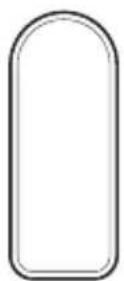
Protective case
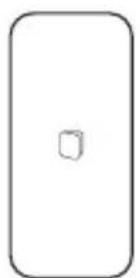
User guide
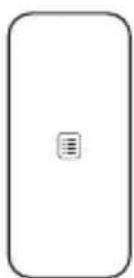
Warranty card

USB-C
To USB-A
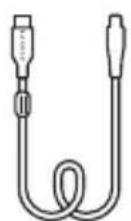
USB-C
To MICRO USB
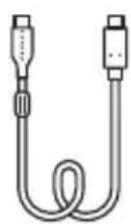
USB-C
To USB-C
Overview
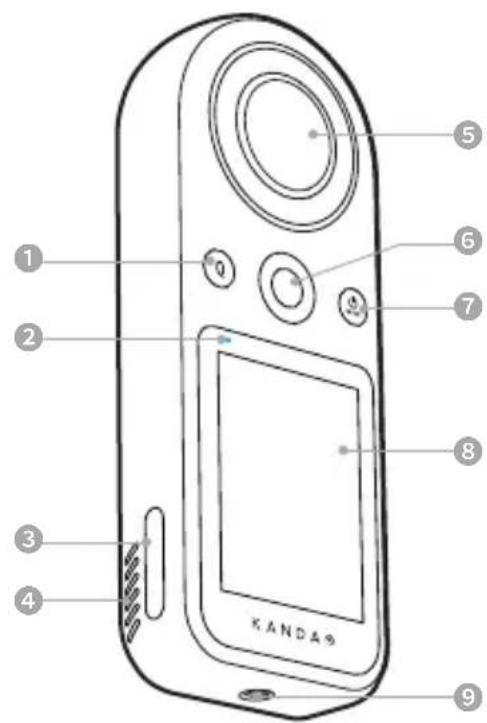
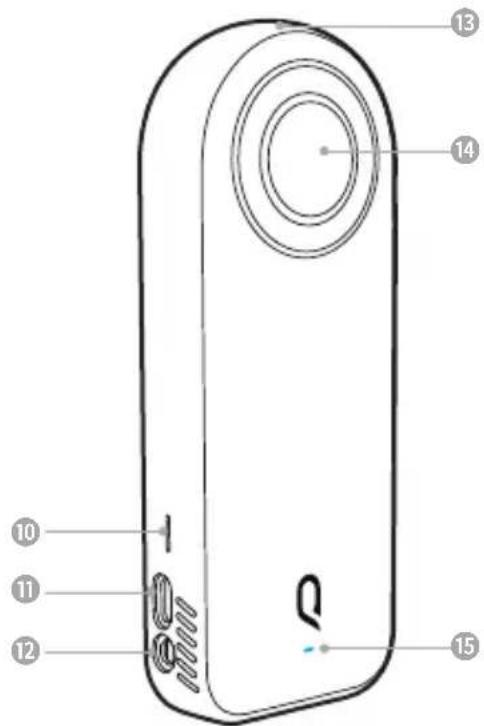
① Q button
② Status IndicatorII
③ microSD card slot
4 Vents
⑤ Lens II
6 Shutter button
7 Power button
8 Touch screen
9 1/4Threaded hole
10 Speaker
11 USB-C connector
12 3.5mm Audio port
13 Mic
14 Lens
15 Status Indicator I
EN
Button Features
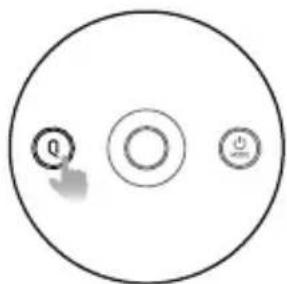
Q Button
When QooCam 8K is idle while powered on, press the button to quickly switch between custom settings.
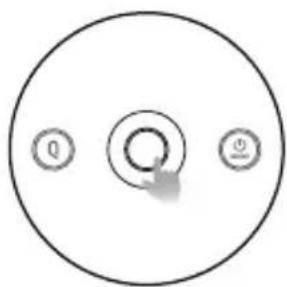
Shutter Button
- When QooCam 8K is powered on, press the shutter button to take photos or start or stop recording.
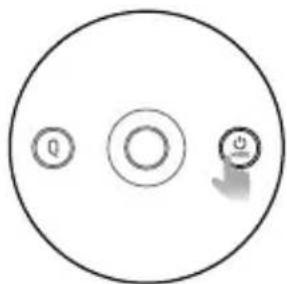
Power Button
- When QooCam 8K is powered off, press and hold the power button for 2s to power on; - When QooCam 8K is powered on, press and hold the power button for 2s to power off;
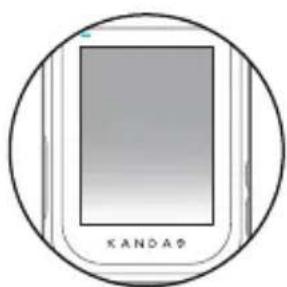
Touch screen
General Setting: Date/Time
The camera date and time information is recorded on the file along with the image, so be sure to set it correctly before use.
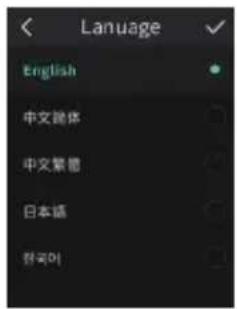
Select language, then click“√”
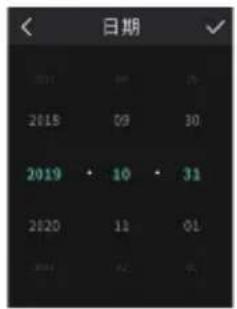
Set current date, then click“√”
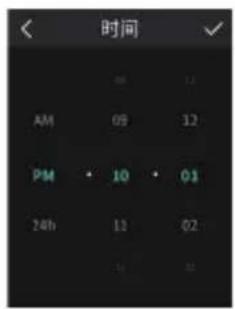
Set current time, then click“√”
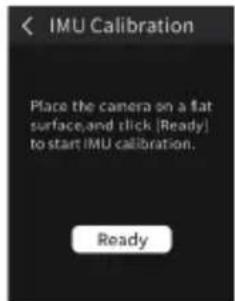
Download QooCam APP Make the picture horizontal. Place the camera on a flat surface, and click [Ready] to start IMU calibration.
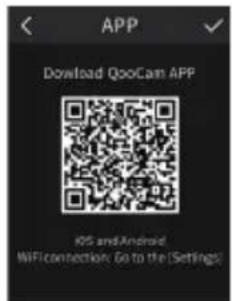
Download QooCam APP, then click "save setting and exit
EN
Operating the Touchscreen
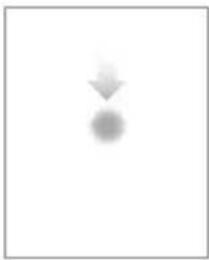
Swipe down to enter the [Camera
Settings] menu
Include Custom Template Management, WiFi Switch, Brightness Adjustments, and more.
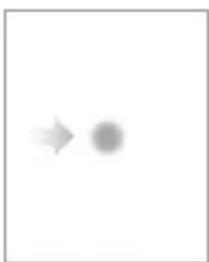
Swipe right to enter [Playback]
- Swipe left or right to scroll through photos and videos. Preview page will display shooting parameters, and you can delete files or view photos/videos by category.
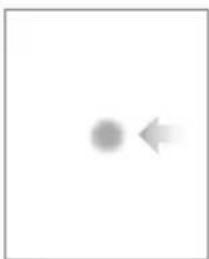
Swipe left to enter [Switch Shooting Mode]
- Quickly switch between the following shooting modes: Photo/Video/Time Lapse/DNG 8/Custom 1/2/3/4 Shooting Template.

Swipe up to enter the [Parameter Setting] of the current shooting mode
- Set Exposure mode, Resolution/frame rate, File format, White balance, self-time/interval time, and more.

- Swipe left/right/up/down to drag and preview 360° panorama.
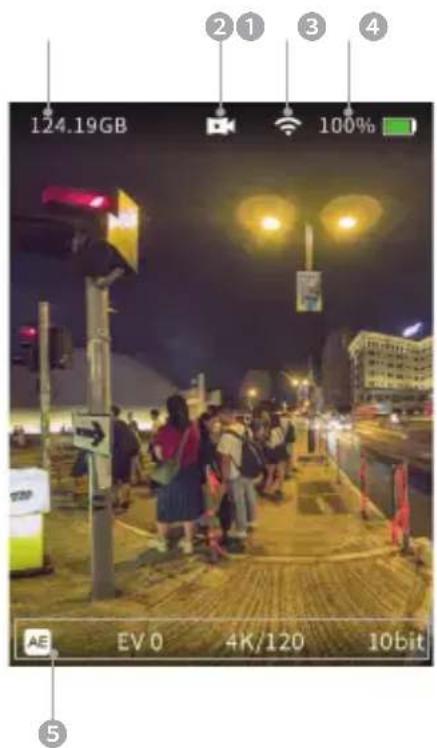
1 Memory remaining capacity
2 Current shooting mode
3 Connected WI-Fl
4 100% Remaining battery
⑤ Camera parameters of the current shooting mode
Camera Settings
Swipe down to enter the [Camera Settings] menu
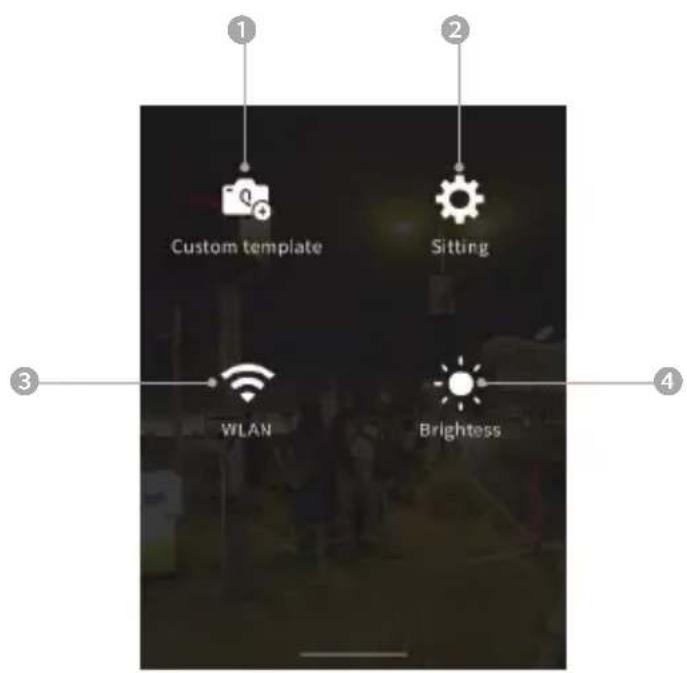
① Custom Template Management
Click again to save the current shooting parameters as a custom mode and save up to 4 custom modes. Short press the Q button to switch between the custom modes.
② More settings
Language, date, etc.
3 Brightness
After clicking the icon, move the slider to adjust the brightness.
4 Wi-Fi Switch
Off by default, short press the icon to light, turn on Wi-Fi.
Long press the icon to jump to WI-FI management, display the QR code generated by SSID and password, and use QooCam APP scan code to quickly connect to WI-FI.
More Settings
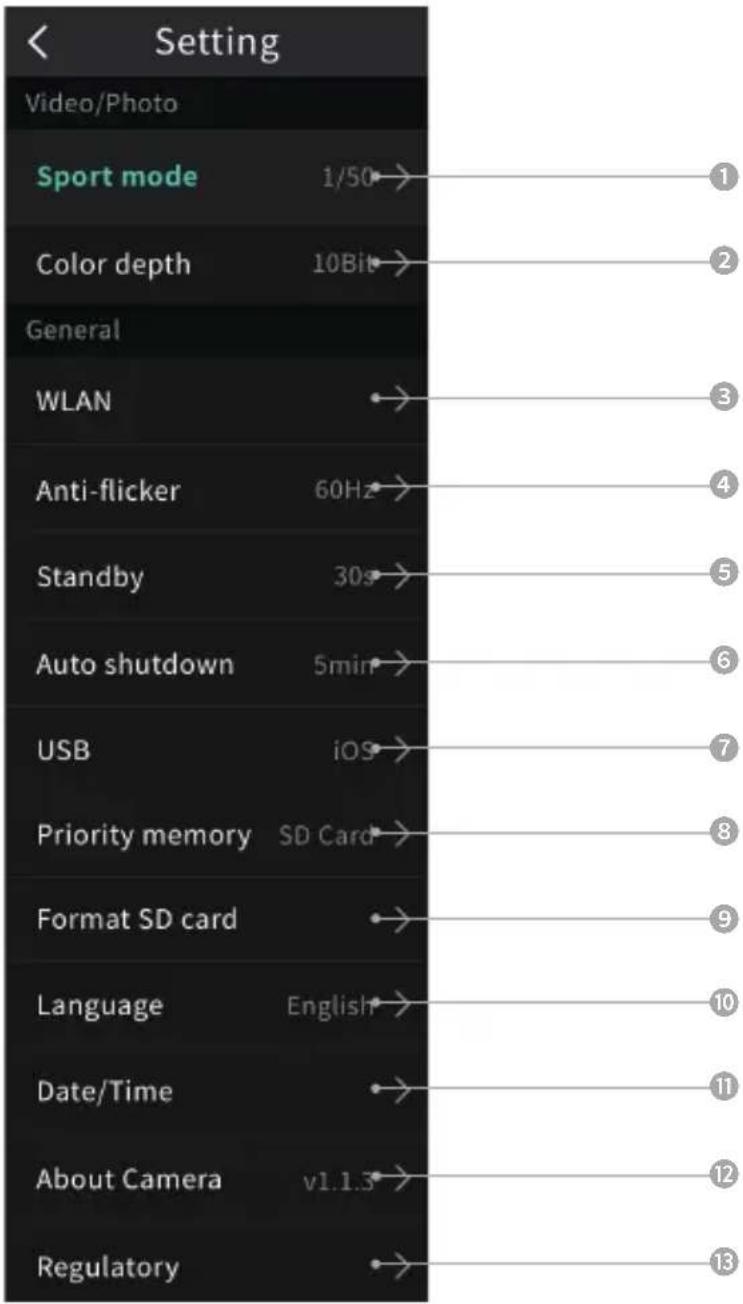
① Sports mode: Reduce motion blur.
② Color depth: 8bit by default, 10bit is also provided.
③ Wireless connection: View device name and password, set Wi-Fi band, reset connection and SSID and WI-FI password.
4 Anti-flicker: Prevent the flickering of lights by selecting the frequency according to the local regulations.
5 Stand by: Set the automatic standby time when there is no operation.
6 Auto power off time: set the time before Qoocam 8K automatically powers off.
⑦ USB drive mode: When the camera is wired, depending on the system (Android / iOS / PC); iOS by default
8 Preferred Memory: Set the storage location of the current photo/video.
⑨ Format: Tap to format SD card.
⑩ Language: Set the language to English, Simplified Chinese, Traditional Chinese, Japanese.
⑪ Date/time: Set the date and time.
⑫ About: Tap to view device name, firmware version, SN code.
13 Regulatory info: The camera's authentication information.
Shooting and Parameters Adjustment
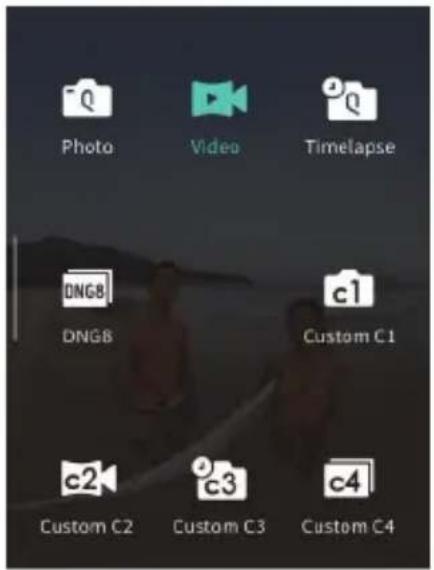
- Swipe left and tap the icon to select the shooting mode.
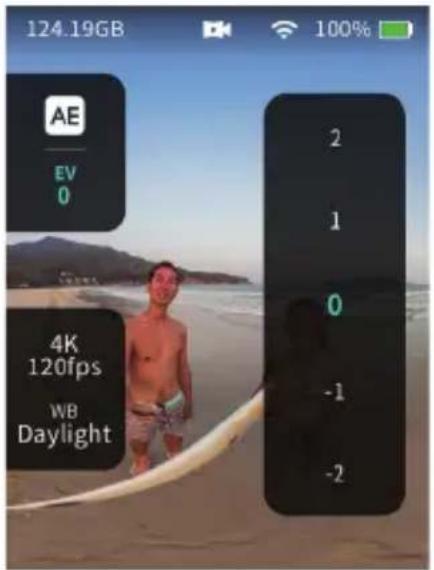
- Then, swipe up to set the shooting parameters in the current shooting mode.
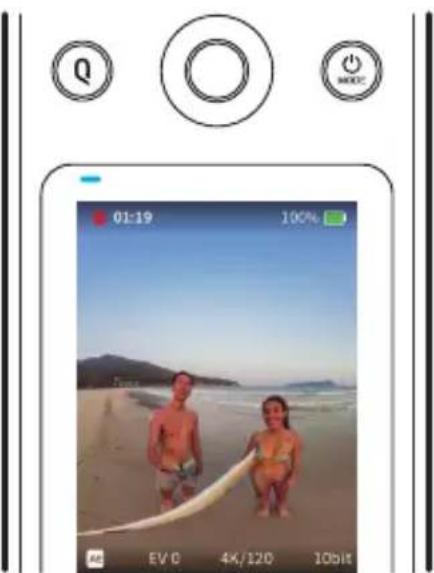
- Then, press the shutter button to start shooting.
- When recording, the blue indicator light flashes slowly / the touch screen displays the current recording time.
- When taking a picture, the blue indicator flashes
- During shooting, touch screen and Q button are not supported.
| Shooting Mode | Parameter setting range |
| Video | Resolution / frame rate, exposure mode, white balance |
| Photo | Exposure mode (auto EV, manual ISO/shutter speed,sports EV), white balance, countdown, file format (JPG, JPG+DNG) |
| Time-lapse (photo) | Exposure mode (auto EV, manual ISO/shutter speed, sports EV), white balance, interval time, file format (JPG, JPG+DNG) |
| DNG 8 | Exposure mode (auto EV, manual ISO/shutter speed, sports EV), white balance, self-time, file format |
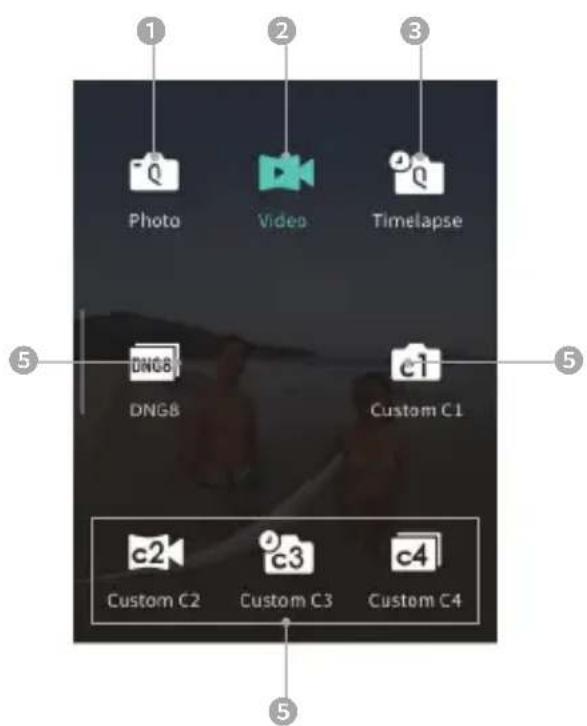
1 Photo
② Video
3 Timelapse-Photo
4 DNG 8
⑤ Customized mode
Playback
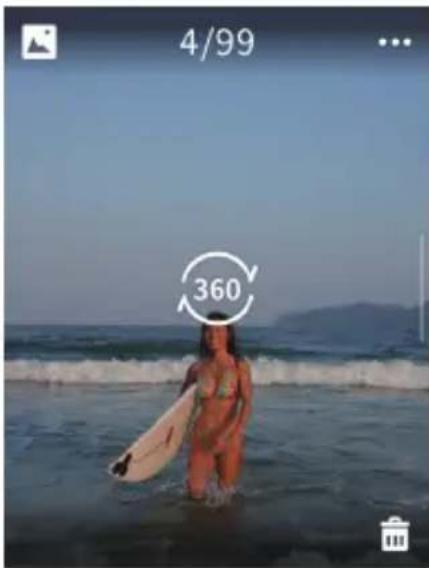
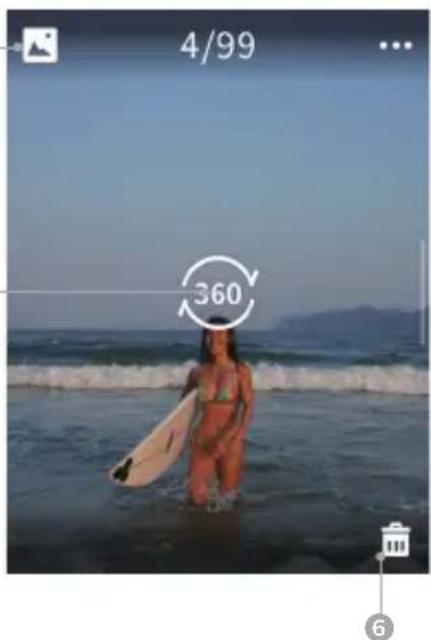
- Swipe right to enter [Playback], click to view photos/videos by category.
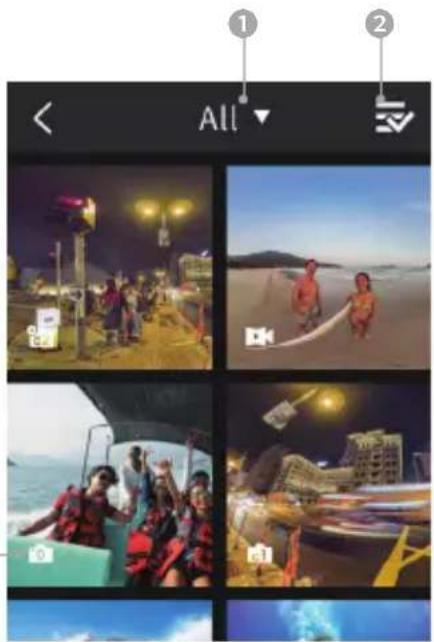
3
4
① ▼ View Photo / Video / All
2 Multiple choice
3 Shooting mode
4 Enter the playback list
5 Click to view the panorama
⑥ Delete
Connect QooCam APP
Method 1: Wi-Fi connection

- In the touch screen drop-down list, click the Wi-Fi button in the lower left corner to turn on Wi-Fi, and the button is highlighted as open.
Method 2: Scan code connection
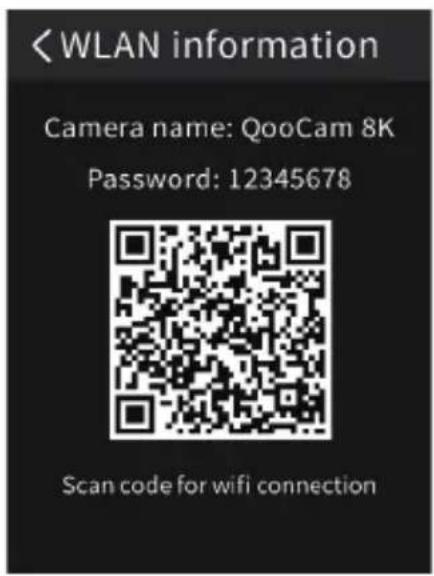
QooCam APP Shooting and playback
 \- Click the Settings button set the shooting parameters in the current shooting mode. - Slide left and right to switch shooting mode(Photo, video, Time lapse).  \- Camera settings includes: stabilization, firmware version, and APP settings.  \- Go to the camera album and click on the thumbnail to play back (preview resolution). Download the clip from the camera album to the APP album for full resolution playback.Edit:QooCam APP
 \- Enter the APP Album list, select a photo/video and start editing  \- Photo editing: add filters, change photo to panoramic video, etc. - Video editing: add key points, video shifting, video clipping, etc. - Refer to APP-Tutorial for details.  \- Export flat video, which is edited with key points/speed/filters/clip. - Export 360 panoramic video - Note: The panoramic video is unedited video. The features of key frames, filters, shifting, etc. are not effective. SmartClip
\- Go Shooting: shoot footage with the camera, and then download and export edited footage automatically. - Create Now: choose the footage from the APP album, import to the SmartClip template for editing, and export edited footage automatically.8K Express Edit
• After shooting video in 8K resolution, select to download the footage to the APP album, it will automatically generate a 4K proxy video in the app for editing. - Edit the proxy video in the QooCam APP and click - It will pop up the "Share Super High Quality Video" button, click this button, turn on the camera, and connect it to phone. - The edit of the 4K proxy video will be applied to the corresponding 8K source footage of the camera, and then the app will export a super high quality video.   \- Note: In this process, please make sure the camera is turned on and connected to the phone.    ENCharging and Expanding Storage
Charging
① Connect the camera to a USB adapter via USB-C to USB-A cable; a PD charger with a charging current of 3A or above is recommended.. ② During charging, the status LEDs are solid red. The battery is fully charged when the statues LEDs turn off.Note:
- Recommended to turn off the camera during charging • Support shooting during charging Expand storage
QooCam 8K has build-in 64G highspeed storage, and it also supports external SD card up to 256G (U3 card is recommended).Note:
You can format SD card through the touchscreen [Camera Menu - More Settings - Format] Status LED Description
There are two statues LEDs on QooCam 8K.| Instructions LED status | LED灯状态 |
| QooCam 8K is powered on | Solid blue |
| Charging | When QooCam 8K is powered off, solid red |
| When QooCam 8K is powered on, solid pink | |
| Charging complete | Off |
| Ready to use | Solid blue |
| While taking photo | Blue light is temporarily off |
| While recording a video | Blue light blinks slowly |
| Time-lapse photo/ countdown photo | After triggering the shooting. blue light blinks slowly |
| Shooting complet | Solid blue |
| Firmware upgrade | Blue light blinks quickly |
| Full memory | Blue light blinks quickly |
| Low battery level warning | Red light blinks quickly |
| SD card is abnormal | |
| Storage error | |
| High temperature warning |
Camera Firmware Update
Using QooCam APP
There will be a updating reminds in App when cellphone is Wi-Fi or wired connected to QooCam 8K and find a FW updates. Please follow the steps to update.Note:
- Ensure the battery level of QooCam 8K is over 30% when upgrading - Do not operate the camera during the upgrading process. Screen status
The interface turns black and there's a progress bar to show updating status. QooCam 8K will automatically restart after FW upgrading is completed.Status LEDs
The blue light flashes quickly during the upgrade process, and the camera will automatically restart after the upgrade is completed. For More information Scan and get QooCam APP, QooCam Studio, firmware update guide https://www.kandaovr.com/download/  Scan and get tutorials https://www.kandaovr.com/user-guide/ Camera Specification
Basic Specification| Lens | F2.0, FOV: 200° |
| Sensor | 1/1.7"CMOS,20MP |
| Video resolution | 7680*3840@30fps 8/10bit ,3840*1920@120fps 8/10bit |
| Photo resolution | 7680*3840, 12bitRAW |
| Video Format | MP4 |
| Photo Format | JPG、DNG |
| Audio Format | PCM |
| Video Encode | H.264, H.265 |
| Max.Bitrate (video output) | 200Mbps |
| IMU | 6-axis IMU |
| Touchscreen | 2.4 inch colorful touch screen |
| Photo | Still image, Timed photos, DNG 8, Time lapse photo |
| Video | Video,Slow motion, Sports mode |
| Live streaming | 4K 360° Live |
| EV | -2EV ~ +2EV |
| Exposure mode | EV (auto): -2EV ~ +2EVPhoto: 1/6400s-1sDNG 8: 1/6400s-1s30fps: 1/6400s-1/30s120fps: 1/6400s-1/120sISO: 100-6400 |
| Sports Mode:There are two choices to control the maximum shutter time:Mode 1, Mode 2For 50Hz, Mode 1 is 1/50s, Mode 2 is 1/100sFor 60Hz, Mode 1 is 1/60s, Mode 2 is 1/120sMotion EV: -2EV ~ +2EV | |
| White balance | AWB, Fluorescent, Incandescent, Cloudy, Daylight |
Specifications
| Design | |
| Color | Black |
| Weight | 245g |
| Dimension | 145mm*57mm*33mm |
| Storage and Connection | |
| Wi-Fi | 2.4G/5G |
| External interface | USB-C |
| Sotorage | Built-in EMMC64GB |
| External SD Card | Micro SD card(max.256GB), suggest U3 speed |
| Mic | Build-in Mic |
| Line-in | 3.5mm |
| Battery | |
| Battery Capacity | 3000mAh |
| Charging method | USB-PD 2.0 Fast Charge with 3A or above is commended |
| Duration | When recording 8K@30FPS or 4K@120fps video, Approx. 90mins |
| Operation Temperature | -20°C~40°C |
Disclaimer
Statement
1. Please read these instructions. 2. Please pay attention to all warnings. 3. Please follow all instructions. 4. Never operate the device near heat sources such as radiators, heaters, stoves, or other heat generating equipment. 5. Only use accessories and parts specified and provided by the manufacturer for QooCam 8K. 6. All maintenance should be conducted by the qualified personnel. Repairs are required in case of any types of damage to the device, for example, power cord or plug damage, liquid or object falling into the device, or getting wet in the rain or dampness, or failure to work or falling.Camera Security
Warning: If you fail to take the following precautions, you may be seriously injured or killed by the electric shock or fire disaster, or your QooCam may be damaged: Please check before using the camera and accessories to make sure they are intact. For security, only QooCam accessories that are provided with the device or genuine ones purchased can be used. Using any other parts, accessories, or chargers not recommended by Kandao may result in fire, electric shock, or causalities. Damage caused by the use of unauthorized accessories or parts is not covered by the warranty. To learn about approved accessories, please visit the Kandao website: www.kandaovr.com 1. Never touch the plug or charger with wet hands while the camera is being charged. If you do not follow this warning message, electric shock may occur. 2. Do not place or fix this product onto an unstable surface. Failure to observe this precaution can result in the product loosening or falling off, thus causing an accident or damaging the camera. 3. If you use an external power connection, please follow all safety guidelines for third-party powered devices. 4. The QooCam 8K camera lens is made of glass. If the lens is damaged, please be careful to avoid scratching by broken glass. Keep it away from children. 5. The temperature of the camera will rise during operation, which is a normal phenomenon. Please be careful not to use the running camera to contact children or any other temperature sensitive objects, so as to avoid injury. If you think the temperature is too high, turn off the camera and let it cool down before using. 6. This product is not a toy and you are solely responsible for complying with all local laws, regulations and restrictions. 7. Do not use QooCam 8K for unauthorized monitoring, secret photography, or in any other way that violates personal privacy laws. Under normal circumstances, it is strictly forbidden to use the camera for such purposes; otherwise the operator may have to assume major responsibilities and suffer from criminal lawsuits. 8. Cautions: Do not place the camera in extremely cold or extremely hot environments. Extremely cold or extremely hot conditions may shorten the battery life or cause the camera to temporarily malfunction. 9. Warning: There is no protection for the 2 lenses of QooCam 8K, which may be easily scratched. It is recommended to always store the QooCam 8K in the attached lens protective cover and avoid placing the lens on any surface. The lens scratch is not covered by the warranty.标准配件
 相机 便携袋   手绳  保护壳  说明书 保修卡   USB-C To USB-A  USB-C To MICRO USB  USB-C To USB-C机身零件标识
  ① Q键 ② 状态指示灯 ③ microSD卡槽 4 散热孔 5 镜头I 6 拍摄键 ⑦ 电源键 8 触摸屏 9 1/4螺纹孔 10 扬声器 11 USB-C接口 12 3.5mm音频口 13 麦克风 14 镜头II 15 状态指示灯II CN按键功能
Q键
\- 开机状态下,相机无任务进行,短按快速切换自定义拍摄模版。 拍摄按键
\- 开机状态下,短按拍照或开始/停止录像。 Mode/电源键
- 关机状态下,长按2s开机; - 开机状态下,长按2s关机;  触控屏 CN引导设定:日期/时间
相机日期和时间信息与图像一起记录在文件上,使用前请务必在相机上正确设置。  选择语种, 然后按“√”  设置当前日期, 然后按“√”  设置当前时间, 然后按“√”  下载QooCam APP, 然后按“√”保存设置并退出  下载QooCam APP, 然后按“√”保存设置并退出 CN使用触控屏
从屏幕的边缘向下轻扫
\- 含自定义模版管理、Wi-Fi 开关、亮度调节、更多设置。 从屏幕的边缘向右轻扫,进入【回放】
\- 可按分类查看照片 / 视频。 从屏幕的边缘向左轻扫,进入【切换拍摄模式】
\- 快速切换至以下拍摄模式:普通照片 / 普通视频 / 延时摄影 / DNG8 / 自定义 1/2/3/4 拍摄模版。 从屏幕的边缘向上轻扫,进入当前拍摄模式的【参数设置】
\- 设置曝光模式、分辨率 / 帧率、文件格式、白平衡、倒计时 / 间隔时间等。  \- 从屏幕的边缘向左/向右/向上/向下滑动,预览 360° 全景画面。  ① 存储器剩余容量 ② 当前拍摄模式 ③ 已连接WI-FI 4 100% 剩余电量值 ⑤ 当前拍摄模式的相机参数 CN相机设置
从触控屏的边缘向下轻扫,进入【相机设置】菜单 1 自定义模板
再次点击可保存当前拍摄参数至自定义模版,最多可保存4组。短按Q键可切换自定义拍摄模版;② 更多设置
语言、日期等;③ 屏幕亮度
点击图标后,拖拽滑动条调整屏幕亮度;4 Wi-Fi开关
默认打开,短按图标置灰后,关闭 Wi-Fi。长按图标,跳转 WI-FI 管理,显示 SSID 和密码生成的二维码,可使用 QooCam APP 扫码快速连 WI-Fi。 CN更多设置
 CN ① 运动模式:减少画面中的运动模糊; ② 色深:默认8bit,可选10bit; ③ 无线连接:可查看设备名称和密码,设置Wi-Fi频段,重置连接以及SSID和WI-FI密码; ④ 抗闪烁:根据所在地区的电网频率来选择抗闪烁的频率; ⑤ 自动休眠时间:设置无操作时自动休眠时间; ⑥ 自动关机时间:设置无操作时自动关机时间; ⑦ USB驱动模式:有线连接手机时,根据手机系统(Android/iOS)设置相应驱动;默认iOS; ⑧ 优先存储器:设置当前照片/视频的存储位置; ⑨ 格式化:点击进入格式化当前存储器; ⑩ 语言:目前支持英语、简体中文、繁体中文、日语四种语言; ⑪ 日期时间:设置日期时间; ⑫ 关于:显示设备名称、固件版本、SN码。 ⑬ 监管:相机的认证信息拍摄与调参
 ·从触控屏的边缘向左轻扫,点按图标选择拍摄模式。  \- 然后,从触控屏的边缘向上轻扫,设置当前拍摄模式下的拍摄参数。  - 然后,短按拍摄键开始拍摄。 - 录制时,蓝色指示灯间隔慢闪 / 触控屏显示当前已录制时间; - 拍照时,蓝色指示灯闪一下; - 拍摄时,相机触控屏手势与 Q 键失效。 CN| 拍摄模式 参数设置范围 | |
| 视频 | 分辨率/帧率、曝光模式、白平衡 |
| 照片 | 曝光模式(自动EV、手动ISO/快门速度)、白平衡、倒计时、文件格式(JPG、JPG+DNG) |
| 延時摄影/延时照片 | 曝光模式(自动EV、手动ISO/快门、运动EV)、白平衡、间隔时间、文件格式(JPG、JPG+DNG) |
| DNG 8 | 曝光模式(自动EV、手动ISO/快门速度、运动EV、白平衡、倒数计时 |
回放
 \- 从触控屏的边缘向右轻扫,进入【回放】,点击进入全景预览模式后可在屏幕浏览相机拍摄的照片/视频。 - 左右滑动可切换前/后一张照片/视频。 CN  3 4 5  ① ▼ 分类查看照片/视频/全部 ② 多选 3 拍摄模式 4 进入回放列表 5 点击查看全景 6 删除 CN连接QooCam APP
方式一:Wi-Fi连接  \- 在触控屏下拉列表中点击左下角Wi-Fi按钮,打Wi-Fi,按钮高亮为打开状态; 方式二:扫码连接  \- 在触控屏下拉列表中长按 WI-FI 按钮,出现下方相机二维码,打开 QooCam APP 并保证手机 Wi-Fi 打开,扫相机触控屏的二维码,快速连接相机。 方式三:有线连接  \- 使用官方配线将相机和手机相连,手机端将会自动跳转至QooCam APP预览页面。 CNQooCam APP拍摄与回放
 - 点击按钮,设置当前拍摄模式下的拍摄参数; - APP预览页,左右滑动切换拍摄模式;  \- 防抖开关、固件管理等相机设置以及APP设置项;  \- 进入相机相册,点击缩略图即可回放该素材(预览分辨率)。将素材从相机相册下载至APP相册,即可全分辨率回放。 CNQooCam APP编辑
 \- 进入APP相册列表,选中某素材缩略图,进入素材编辑;  \- 照片编辑添加滤镜、变为全景视频等; - 视频编辑:添加关键帧、视频变速、视频剪切等,详见APP-教程;  \- 导出截屏视频,即,关键帧、变速、滤镜、剪辑后的平面视频; - 导出360全景视频 注意:全景视频为未编辑的视频,关键帧、滤镜、变速等均不生效 官方预设的编辑模板SmartClip
\- 去拍摄:立即使用相机拍一段素材后,进行编辑,一键生成优质内容; - 立即体验:挑选APP相册的素材,导入模板进行编辑,一键生成优质内容。 CN8K快编
- 在拍摄 8K 分辨率素材之后,选择将该素材下载到 APP 相册,此时 APP 相册即有该素材的 4K 代理文件; - 利用 QooCam APP 对该代理文件进行编辑,然后点击 ↻; - APP 将弹出“体验超高质量视频分享”按钮,点击该按钮,并在相机开机状态下,将相机和手机相连; - 手机就会从相机获取 8K 分辨率的源素材,按照 4K 代理文件的编辑进行处理,形成超高质量视频;  \- 注意:在此过程,请确保相机开机且连接手机。  CN充电与拓展储存
充电
① 使用 USB-C TO USB-A 电缆将相机连接至电源适配器;建议使用 PD 充电器,充电电流 3A 或以上。 ② 充电过程中,相机充电指示灯呈红色亮起,充电完成时指示灯熄灭。注意:
- 建议关机充电; - 支持边充边拍。 拓展储存
- QooCam 8K自带64G的内置存储,同时有microSD卡槽,支持Micro SD卡存储拓展(最高支持256GB,建议使用U3卡)。 - 插入Micro SD卡后,可选择将拍摄内容存储至机身内置存储或SD卡,但不支持同时存储。注意:
· 可以在相机内进行格式化的操作【相机菜单-更多设置-格式化存储器】  CN状态灯说明
机身前后各有一个LED提示灯,支持红/蓝双色。可在App或相机菜单设置灯的开关状态。| 指示信息 LED灯状态 | LED灯状态 |
| 开机完成 | 蓝灯常亮 |
| 关机 | 蓝灯快闪3下,灭 |
| 充电中 | 关机状态下,红灯常亮开机状态下,粉灯常亮 |
| 充电完成 | 红灯/粉灯灭 |
| 拍摄准备中 | 蓝灯常亮 |
| 拍照 | 蓝灯灭一下 |
| 录像中 | 蓝灯慢闪 |
| 延时拍照/倒计时拍照 | 触发拍摄后,拍一张蓝灯闪一次 |
| 拍摄完成 | 蓝灯恢复常亮 |
| 固件升级 | 蓝灯快闪 |
| 存储器已满 | 蓝灯快闪 |
| 低电量 | 红灯快闪 |
| SD卡异常 | |
| 文件存储异常 | |
| 高温警告 |
固件升级
通过QooCam APP升级
\- 当有固件更新时,且Wi-Fi或有线连接QooCam 8K后将有相应提示,请按界面提示操作。注意:
- 升级时确保相机电量大于50%; - 升级过程中请勿操作相机。 屏幕状态
\- 界面黑屏并显示固件升级进度,升级完成后,相机会自动关机。指示灯状态
\- 升级过程中LED蓝灯快闪,升级完成后,相机会自动关机。获取更多信息
获取QooCam APP、QooCam Studio、固件安装文件 https://www.kandaovr.com/zh/download/  获取相机教程 https://www.kandaovr.com/zh/user-guide/  CN 相机参数| 指示信息 | |
| 镜头 | F2.0, FOV: 200° |
| 传感器 | 1/1.7" CMOS,2000万像素 |
| 视频分辨率 | 7680*3840@30fps 8/10bit,3840*1920@120fps 8/10bit |
| 图片分辨率 | 7680*3840, 12bitRAW,SuperHDR (16bit输出) |
| 视频格式 | MP4 |
| 图片格式 | JPG, DNG |
| 音频格式 | PCM |
| 视频编码 | H.264, H.265 |
| 视频存储最大码流 | 200Mbps |
| 陀螺仪 | 6轴陀螺仪 |
| 触摸屏 | 2.4英寸彩色触摸屏 |
| 拍照、视频录制 | |
| 照片 | 普通模式、定时拍照、DNG8模式、延时模式 |
| 视频 | 普通模式、延时模式、慢动作模式、运动模式 |
| 直播 | 4K 360°全景直播 |
| 曝光补偿 | 2.0EV到+2.0 EV |
| 曝光模式 | 自动EV:{-2.0到+2.0 EV}手动:照片快门1/6400s-1s,DNG8快门1/6400s-1s,视频快门30fps:1/6400s-1/30s120fps:1/6400s-1/120s,ISO 100-6400; |
| 运动模式:分为“模式一,模式二”二档,限制最长快门时间,用户可选择;在50Hz下,模式一为1/50s,模式二为1/100s;在60Hz下,模式一为1/60s,模式二为1/120s;运动EV:{-2.0到+2.0 EV}4个预设模板及自动档, | |
| 白平衡 | 分别为:AWB、日光灯、白炽灯、日光、阴天 |
| 外观设计 | |
| 机身颜色 | 黑色 |
| 重量 | 245g |
| 尺寸 | 145mm*57mm*33mm |
| 外观设计 | |
| Wi-Fi | 2.4G/5G |
| 接口 | USB-C |
| 存储 | 内置EMMC64GB |
| 支持存储卡类型 | Micro SD卡,最高支持256GB,建议使用U3卡 |
| 麦克风 | 有 |
| 音频口(Line-in) | 3.5mm |
| 电池 | |
| 电池容量 | 3000mAh |
| 充电器 | 建议使用PD充电器,输出电流3A以上 |
| 续航时间 | 拍摄8K@30FPS或4K@120fps视频,可持续约90分钟 |
| 使用环境 | -20°C~40°C |
免责声明
声明
机身前后各有一个LED提示灯,支持红/蓝双色。可在App或相机菜单设置灯的开关状态。 1. 请阅读这些说明; 2.请注意所有警告; 3.请遵循所有说明; 4. 切勿在散热器、电热器、炉子、或其它产热设备等热源附近进行工作; 5.仅使用制造商为QooCam 8K指定和提供的附件与配件; 6.请将所有维修工作交由符合资质的人员处理。不论设备受到何种形式的损坏,例如电源线或插头损坏,液体渐入或物体落入此设备淋雨或受潮,无法正常工作或坠落,均需进行维修。摄影机安全
警告: 如果你未能采取下列预防措施, 则可能会因电击或火灾造成严重伤害或死亡, 或者造成你的 QooCam 8K 受损, 使用摄像机和配件前请进行检查, 确保其完好无损。处于安全原因, QooCam8K 只能使用随附的或另行购买的正品 QooCam 8K 配件。如使用并非由 Kandao 推荐的任何其它部件、配件或充电器,可能导致火灾、触电或人身伤亡。因使用未授权的附件而造成的损坏不属于担保范围。要了解获得批准的配件, 请访问 Kandao 官网 www.kandaovr.com。 1. 摄像机充电时,切勿用湿手碰触插头或充电器。如果您不遵守本警告信息,则可能发生触电。 2. 切勿将本产品置于或固定在不稳定的表面上。不遵守此预防措施可能会导致产品松开或者脱落,从而引发事故或损坏相机。 3. 如果使用外部电源连接,请遵守第三方供电设备的所有安全准则。 4.QooCam 8K 摄像机镜头采用玻璃制成。如果镜头破坏,请务必小心处理,避免被破碎的玻璃划伤,切勿让儿童接触。 5. 摄像机在运行时温度会升高,这是正常现象。请注意不要用运行中的摄像机去接触小孩或其他任何对温度敏感的物体,以免造成伤害。如果你觉得温度过高,可关闭摄像机并静放至冷却后再使用。 6. 本产品并非玩具,您应全权负责遵守当地的所有法律、法规和限制。 7. 请勿将 QooCam 8K 用于未经授权的监控、偷拍或以侵犯个人隐私法规的任何方式使用。通常情况下,严禁将摄像机用于此类用途,并且可能会致使操作者承担重大责任和面临刑事诉讼。 8. 注意事项:请勿将摄像机置于极冷或极热的环境中,极冷或极热条件可能会缩短电池的使用时间,或者导致相机暂时不能正常工作。 9. 警告: QooCam 8K 的 2 个镜头没有任何保护, 如果不注意则很容易形成划痕。始终将 QooCam 8K 存放在随附的镜头保护盖中, 避免将镜头放置在任何表面上, 镜头划痕不在保修范围内。標準配件
 相機 便攜袋   手繩  保護殼  說明書 保固卡   USB-C To USB-A  USB-C To MICRO USB  USB-C To USB-C CN機身外觀說明
  ① Q鍵 ② 狀態指示燈Ⅱ ③ microSD卡槽 4 散熱孔 5 |號鏡頭 6 拍攝鍵 ⑦ 電源鍵 8 觸控螢幕 9 1/4螺孔 10 喇叭 11 USB-C接口 12 3.5mm接口 13 麥克風 14 II號鏡頭 15 狀態指示燈 CN按鍵功能
Q鍵
\- 開機狀態下且相機無任務待機中,短按按鍵可以快速切換自定義拍攝模版。 拍攝按鍵
\- 開機狀態下,短按拍照或開始/停止錄影。 Mode/電源鍵
\- 關機狀態下,長按2s開機; - 開機狀態下,長按2s關機。 觸控螢幕
CN引導設定:日期/時間
相機日期和時間資訊與拍攝檔案同步,使用前請務必在相機上正確設定。  選擇語言, 然後按“√”  設定日期, 然後按“√”  設定時, 然後按“√”  IMU校準 使畫面水平。請將相機垂直放置在 桌面上,穩定放置後,點擊【開始】 開始IMU校準  下載QooCam APP, 然後按“√”儲存設定後退出 CN使用觸控螢幕
 從螢幕的邊緣向下輕掃,進入【相機設定】選單 \- 含自定義模版管理、Wi-Fi 開關、亮度調節、更多設定。  從螢幕的邊緣向右輕掃,進入【回放】 \- 可按分類查看照片 / 影片。  從螢幕的邊緣向左輕掃,進入【切換拍攝模式】 \- 快速切換至以下拍攝模式:照片 / 影片 / 延時攝影 / DNG 8 / 自定義 1/2/3/4 拍攝模板。  從螢幕的邊緣向上輕掃,進入目前拍攝模式的 【參數設定】 \- 設定曝光模式、解析度 / 偎率、文件格式、白平衡、倒數計時 / 間隔時間等。  • 從螢幕的邊緣向左/向右/向上/向下滑動,預覽360°全景畫面。 CN  ① 儲存器剩餘容量 ② 目前拍攝模式 ③ 已连接WI-FI 4 100% 剩餘電量值 ⑤ 目前拍攝模式的相機參數 CN相機設定
從螢幕的邊緣向下輕掃,進入【相機設定】選單 ① 自定義模板管理
再次點擊可儲存目前拍攝參數至自定義模版,最多可儲存4組。短按Q鍵可快速切換自定義拍攝模版;② 更多設定
語言、日期、等;③ 螢幕亮度
點擊圖示後,拖拽滑動條調整熒幕亮度,共4段;4 Wi-Fi開關
默認關閉,短按圖示後,打開 Wi-Fi; 長按圖示,進入 WI-FI 管理,顯示 SSID 和密碼產生的二維碼,可使用 QooCam APP 掃描二維碼快速連 WI-FI。 CN更多設定
 CN ① 運動模式選擇:減少畫面中的運動模糊; ② 色彩深度:預設8bit,可選10bit; ③ 無線連接:可查詢設備名稱和密碼,設定Wi-Fi頻段,重置連接以及SSID和WI-FI密碼; ④ 抗閃爍:根據所在地的燈光燈頻率來選擇設定頻率; ⑤ 自動休眠時間:設定無操作時自動休眠時間; ⑥ 自動關機時間:設定無操作時自動關機時間; ⑦ USB驅動模式:有線連接相機時,根據手機系統 (Android/iOS/PC),設定對應的驅動;預設iOS; 8 優先存儲器:設定目前照片/影片的存儲位置; ⑨ 格式化記憶體:點選進入格式化目前的儲存記憶體; 10 語言:目前支援英語、簡體中文、繁體中文、日語四種語言; ⑪ 日期/時間:設定日期時間; ⑫ 關於:顯示設備名稱、韌體版本、SN號碼; 13 監管:相機的認證信息。拍攝與參數設定
 ·從螢幕的邊緣向左輕掃, 點圖示選擇拍攝模式。  • 然後,從螢幕的邊緣向上輕掃,設定目前拍攝模式下的參數。  • 然後,短按拍攝鍵開始拍攝; - 錄製時,藍色指示燈間隔慢閃 / 螢幕顯示目前已錄製時間; - 拍照時,藍色指示燈閃一下; • 拍攝時,相機螢幕手勢操作與 Q 鍵失效。| 拍攝模式 參數設定範圍 | |
| 影片 | 解析度/幀率、曝光模式、白平衡 |
| 照片 | 曝光模式(自動EV、手動ISO/快門速度)、 白平衡、倒數計時、文件格式(JPG、JPG+DNG) |
| 延時攝影/ 延时照片 | 曝光模式(自動EV、手動ISO/快門速度、運動EV、 白平衡、間隔時間、文件格式(JPG、JPG+DNG) |
| DNG 8 | 曝光模式(自動EV、手動ISO/快門速度、運動EV、 白平衡、倒數計時 |
回放
 ·從螢幕的邊緣向右輕掃, 進入【回放】,點擊 進入全景預覽模式,可在 螢幕瀏覽相機拍攝的照片 /影片。 CN  ③  4 分類查看照片/影片/全部 1▼  多選  拍攝模式  進入回放列表  點選查看全景  删除 CN連接QooCam APP
方式一:Wi-Fi連接  \- 在螢幕下拉列表中,點選左下角Wi-Fi按鈕,打開Wi-Fi,按鈕高亮為開啟狀態; 方式二:掃碼連接  \- 在螢幕下拉列表中長按WI-FI 按鈕,或在設置中查看無線信息出現下方相機二維碼; - 打開 QooCam APP 並確保手機 Wi-Fi 打開,掃描相機螢幕中的二維碼,快速連接相機。 方式三:有線連接  \- 使用官方原廠配線將相機和手機相連,手機端將會自動跳轉至QooCam APP預覽頁面。QooCam APP拍攝與回放
 • 點擊 設定目前拍攝模式下的參數; - APP預覽,左右滑動切換拍攝模式;  \- 防抖開關、韌體管理等相機設定以及APP設定;  ·進入相機相簿,點擊縮圖即可回放該素材(預覽解析度)。將素材從相機相簿下載至APP相簿,即可全解析度回放。 CNQooCam APP編輯
 \- 進入APP相相簿列表,點選某素材縮圖,進入編輯;  · 照片編輯:新增濾鏡、變為全景影片等; ·影片編輯:新增關鍵幀、影片變速、剪切等; - 詳請請參閱APP-教程;  - 導出螢幕截圖影片; · 即,關鍵幀、變速、濾鏡、剪輯後的平面影片; - 導出360全景影片; - 注意:全景影片為未編輯的檔案,關鍵幀、濾鏡、變速等均不生效。 官方預設的編輯模板SmartClip
- 去拍攝:立即使用相機拍一段素材後,進行編輯,一鍵生成優質內容; - 立即體驗: 挑選APP相簿的素材,導入模板進行編輯,一鍵生成優質內容。 N8K快速編輯
- 在拍攝 8K 解析度素材之後,選擇將該素材下載到 APP 相簿,此時 APP 相機即有該素材的 4K 代理文件; - 利用 QooCam APP 對該代理文件進行編輯,然後點擊; - APP 將彈出 “體驗超高畫質影片分享” 按鈕,點擊該按鈕,並在相機開機狀態下,將相機和手機相連; - 手機就會從相機獲取8K解析度的源素材,按照4K代理文件的編輯進行處理,形成超高畫質影片;  · 注意:在此過程,請確保相機開機且連接手機。  CN充電與儲存
充電
① 使用 USB-C to USB-A 線將相機連接至充電器;建議使用 PD 充電器,充電電流 3A 以上; ② 充電過程中,相機充電指示燈呈紅色亮起,充電完成時指示燈熄滅。注意:
- 建議關機後進行充電; · 支援邊充邊拍 檔案存儲
- QooCam 8K內建64G記憶體,同時有microSD卡槽,支持Micro SD卡存擴充(最高支援256GB,建議使用U3卡); - 插入Micro SD卡後,可選擇將拍攝內容存儲至機身內建記憶體或SD卡,但不支持同時存儲。注意:
· 可以在相機內進行格式化的操作【相機選單-設定-格式化記憶體】。  CN指示燈狀態
機身前後各有一個LED指示燈,支持紅/藍雙色。| 指示信息 指示燈狀態 | LED灯状态 |
| 開機完成 | 藍燈長亮 |
| 關機 | 藍燈快閃3下,熄滅 |
| 充電中 | 關機狀態下,紅燈長亮 |
| 開機狀態下,粉燈長亮 | |
| 充電完成 | 指示燈熄滅 |
| 拍攝準備中 | 藍燈長亮 |
| 拍照 | 藍燈熄滅一下 |
| 錄影中 | 藍燈慢閃 |
| 延時拍照/倒數計時拍照 | 開始拍攝後,拍一張藍燈閃一次 |
| 拍攝完成 | 藍燈長亮 |
| 韌體升级 | 藍燈快閃 |
| 儲存位置已滿 | 藍燈快閃 |
| 低電量 | 紅燈快閃 |
| SD卡異常 | |
| 文件儲存異常 | |
| 高溫警告 |
相機韌體升級
透過QooCam APP升級
\- 當有韌體更新時,且Wi-Fi或有線連接QooCam 8K後將有提示,請按畫面提示操作即可。注意:
- 升級時確保相機電量大於30%; · 升級過程中請勿操作相機。 螢幕狀態
\- 螢幕熄滅並顯示韌體升級進度,升級完成後,相機會自動重啟。指示燈狀態
\- 升級過程中LED藍燈快閃,升級完成後,相機會自動重啟。更多資訊
獲得QooCam APP、QooCam Studio、韌體安裝文件 https://www.kandaovr.com/user-guide/  獲得相機教學 https://www.kandaovr.com/user-guide/  CN 相機參數| 基本規格 | |
| 鏡頭 | F2.0, FOV: 200° |
| 傳感器 | 1/1.7" CMOS,2000萬像素 |
| 影片解析度 | 7680*3840@30fps 8/10bit,3840*1920@120fps 8/10bit |
| 圖片解析度 | 7680*3840, 12bitRAW, |
| 影片格式 | MP4 |
| 圖片格式 | JPG, DNG |
| 音頻格式 | PCM |
| 錄影格式 | H.264, H.265 |
| 影片流量 | 200Mbps |
| 陀螺儀 | 6軸陀螺儀 |
| 螢幕 | 2.4英吋彩色觸控螢幕 |
| 拍照、影片錄製 | |
| 照片 | 普通模式、定時拍照、DNG 8模式、延時模式 |
| 影片 | 普通模式、慢動作模式、運動模式 |
| 直播 | 4K 360°全景直播 |
| 曝光補償 | 2.0EV~+2.0 EV |
| 曝光補償 | 自動EV:{-2.0到+2.0 EV}手動:照片快門1/6400s-1s,DNG 8快門1/6400s-1s,影片快門30fps:1/6400s-1/30s120fps:1/6400s-1/120s,ISO 100-6400; |
| 運動模式:分為“模式一,模式二”二段,限制最長快門時間,用戶可選擇;在50Hz下,模式一為1/50s,模式二為1/100s;在60Hz下,模式一為1/60s,模式二為1/120s;運動EV:{-2.0到+2.0 EV}。 | |
| 白平衡 | 4個預設模板及自動枱,分別為AWB、日光燈、白熾燈、日光、陰天 |
| 機身外觀說明 | |
| 機身顏色 | 黑色 |
| 重量 | 245g |
| 尺寸 | 145mm*57mm*33mm |
| 儲存與連接 | |
| Wi-Fi | 2.4G/5G |
| 接口 | USB-C |
| 儲存 | 內建EMMC64GB |
| 記憶卡 | Micro SD卡,最高支援256GB,建議使用U3卡 |
| 麥克風 | 有 |
| 音頻接頭(Line-in) | 3.5mm |
| 電池 | |
| 電池容量 | 3000mAh |
| 充電器 | 建議使用輸出電流3A以上PD充電器 |
| 續航時間 | 拍攝8K@30FPS或4K@120fps影片,最長可連續拍攝約為90分鐘 |
| 使用環境 | -20°C~40°C |
免責聲明
聲明
機身前後各有一個LED提示燈,支持紅/藍雙色。可在App或相機選單設定燈的開關狀態。 1. 請閱讀這些說明; 2.請注意所有警告; 3.請遵循所有說明; 4. 切勿在散熱器、電熱器、爐子、或其它產熱設備等熱源附近進行工作; 5.僅使用製造商為QooCam 8K指定和提供的附件與配件; 6. 請將所有維修工作交由符合資質的人員處理。不論設備受到何種形式的損壞,例如電源線或插頭損壞,液體漸入或物體落入此設備淋雨或受潮,無法正常工作或墜落,均需進行維修。產品使用安全
警告: 如果你未能採取下列預防措施,則可能會因電擊或火災造成嚴重傷害或死亡,或者造成你的 QooCam 8K 受損,使用攝像機和配件前請進行檢查,確保其完好無損。處於安全原因,QooCam 8K 只能使用隨附的或另行購買的正品 QooCam 8K 配件。如使用並非由 Kandao 推廣的任何其它部件、配件或充電器,可能導致火災、觸電或人身傷亡。因使用未授權的附件而造成的損壞不屬於擔保範圍。要了解獲得認證的配件,請進入 Kandao 官網 www.kandaovr.com。 1. 播像機充電時,切勿用濕手碰觸插頭或充電器。如果您不遵守本警告資訊,則可能發生觸電。 2. 切勿將本產品置於或固定在不穩定的表面上。不遵守此預防措施可能會導致產品鬆弱或者脫落,從而引發事故或損壞相機。 3. 如果使用外部電源連接,請遵守協力廠商供電設備的所有安全準則。 4.QooCam 8K 摄像機鏡頭採用玻璃製成。如果鏡頭破壞,請務必小心處理,避免被破碎的玻璃割傷,切勿讓兒童接觸。 5. 摄像機在運行時溫度會升高,這是正常現象。請注意不要用運行中的攝像機去接觸小孩或其他任何對溫度敏感的物體,以免造成傷害。如果你覺得溫度過高,可關閉攝像機並靜放至冷卻後再使用。 6. 本產品並非玩具,您應全權負責遵守當地的所有法律、法規和限制。 7. 請勿將 QooCam 8K 用於未經授權的監控、偷拍或以侵犯個人隱私法規的任何管道使用。通常情況下,嚴禁將攝像機用於此類用途,並且可能會致使操作者承擔重大責任和面臨刑事訴訟。 8. 注意事項:請勿將攝像機置於極冷或極熱的環境中,極冷或極熱條件可能會縮短電池的使用時間,或者導致相機暫時不能正常工作。 9. 警告:QooCam 8K 的 2 個鏡頭沒有任何保護,如果不注意則很容易形成劃痕。始終將 QooCam 8K 存放在隨附的鏡頭保護蓋中,避免將鏡頭放盲在任何表面上,鏡頭劃痕不在保修範圍內。標準付属品
 カメラ 収納力バー   ストラップ  保護ケース  説明書  保証書  USB-C To USB-A  USB-C To MICRO USB  USB-C To USB-Cカメラ各部の名称
  ① Qボタン ② ステータスインジケータ | ③ microSDカードスロット ④ 放熱口 ⑤ レンズ ⑥ シャッターボタン ⑦ 電源ボタン ⑧ タッチパネル 9 1/4インチネジ穴 10 スピーカー 11 USB-C端子 12 3.5mmマイク入力端子 13 マイク 14 レンズⅡ ⑮ ステータスインジケータII JP電源オン/オフ/本体ボタン
Qボタン
撮影待機状態で、Qボタンを押せばカスタム撮影モードを瞬時に切り替えることができます。 シャッター ボタン
電源を入れて、中央のシャッターボタンを押せば撮影スタートします。 モード/電源ボタン
- ボタンを2秒間長押しすると電源が入り、撮影待機状態になります; - 電源を入れている状態で、ボタンをもう一度2秒間長押しすると電源が切れます;  タッチパネル日付と時刻の設定
カメラの日付と時刻の情報は画像とともにファイルに記録されるため、ご使用前に必ず本体のタッチパネルで正しく設定してください。  本体で言語を選択し、 「√」をクリックしてください。  現在の日付を設定し、 「✓」をクリックしてください。  現在の時刻を設定し、 「√」をクリックしてください。  IMU校正 カメラを水平にします。カメラを平らな所に置きます。「準備完了」をクリックしてIMUキャリブレーションを開始します。  QooCam APPをダウンロードし、 「✓」をクリックして設定を保存します。 JPタッチパネルでの基本的な操作方法
 画面の上から下にスワイプすると、「カメラの設定」メニューが表示されます ・カスタムモードの管理、Wi-Fi スイッチ、と明るさの調節、他の設定。  画面の左から右にスワイプすると、撮影した 静止画 / 動画を再生することができます \- カテゴリに分類されている静止画/動画が表示できます。  画面の右から左にスワイプすると、「撮影モードの切り替え」ができます \- 次の撮影モードを素早く呼び出すことができます。静止画/動画/タイムラプス/DNG8/カスタム1・2・3・4撮影モード。  画面の下から上にスワイプすると、現在の撮影モードの「パラメータの調整」画面が表示されます \- 露出モード、解像度 / フレームレート、ファイル形式、ホワイトバランス、セルフタイマー / 摄影間隔などを設定することができます。  ・タッチパネルの端側からスワイプすると、360度パノラマ視聴モードに入り、上下左右に360°回転してデータを確認できます。  ① 空き容量 ② 現在の撮影モード 3 WI-FIに接続中 ④ 100% バッテリー残量 ⑤ 現在撮影モードでのパラメータ設定値 JPカメラ設定
タッチパネルの上端から下にスワイプすると、「カメラ設定」メニューが表示されます。 ① カスタムモード
現在の撮影設定を保存することができます。カスタムモードでは、最大4つのパターンを保存することができます。本体のQボタンを短く押すと、カスタムモードの切り替えができます;② その他の設定
言語、日付、など;③ 画面の明るさ
スライダーを左右に動かして画面の明るさを調整することができます;④ Wi-Fiスイッチ
Wi-Fi 接続がデフォルトで「オフ」になっています。アイコンを短く タクス このアイコンを長押しすると、WI-FI 管理画面を開き、SSID とパスワードによって生成された QR コードが表示されます。QooCam APP でスキャンすると WI-Fi が繋がります。 JPその他の設定
 JP ① スポーツモードの選択:画像のモーションブラーを減らす; ② 色深度:デフォルトで8ビット、10ビットを選択可能; ③ 無線LAN接続:デバイス名とパスワードの表示、Wi-Fi周波数帯の選択、接続済のデバイスを解除; ④ アンチフリッカー:地元の電源周波数に対して、アンチフリッカーの周波数を選択可能; ⑤ 自動休止機能:無操作状態で画面が消灯する時間を設定可能; ⑥ 自動シャットダウン:無操作状態で自動電源オフ時間を設定可能; ⑦ USB: カメラが有線接続されている場合、システムに応じて (Android / iOS / PC) に従うドライバーを設定可能; ⑧ 優先的な保存先:ファイルの保存先の優先順位を設定できます; ⑨ 初期化:使用中のメモリ(内蔵/SDカード)のデータを全て削除します; ⑩ 言語:英語、簡体字中国語、繁体字中国語、日本語に対応します; ⑪ 日付/時刻:日付や時刻を設定可能; ⑫ カメラについて:カメラの型番、ファームウェアのバージョン、SN番号。 ⑬ 規制情報:カメラ認証情報。撮影とパラメーター調整
 \- タッチパネルの右から左にスワイプして、アイコンをタップすると撮影モードの選択ができます。  ・次に、下から上にスワイプすれば、現在の撮影モードのパラメーターを調整することができます。  ・シャッターボタンを短押しすると、撮影が開始します; ・録画時、インジケータが青色でゆっくり点滅し、タッチパネルには録画時間が表示されます; - 写真を撮る時に、インジケータが青色で一回点滅します; - 撮影中、指でのタッチパネル操作とQボタンの操作が無効化されます。 JP| 撮影モード パラメーター 調整 | |
| ビデオ | 解像度 / フレームレート、露出モード、ホワイトバランス |
| 静止画 | 露出モード(自動露出補正EV、マニュアルによるISO/シャッタースピード設定、スポーツEV)、ホワイトバランス、セルフタイマー、ファイルフォーマット(JPG, JPG+DNG) |
| タイムラブス(静止画) | 露出モード(自動露出補正EV、マニュアルによるISO/シャッタースピード設定、スポーツEV)、ホワイトバランス、撮影間隔、ファイルフォーマット(JPG, JPG- DNG) |
| DNG 8 | 露出モード(自動露出補正EV、マニュアルによるISO/シャッタースピード設定、スポーツEV)、ホワイトバランス、セルフタイマー |
再生
 ・タッチパネルの左から右 [Unreadable] ビュー」画面になります。  をタップすると、360 度ソラマに入り撮影し た写真と動画を再生できます; JP 再生  3 4 5  ① ▼ カテゴリー別で静止画/動画/すべてを見る ② 選択した複数の映像をまとめて削除 ③ 撮影モード ④ 再生リストに入る ⑤ クリックで360度映像を見る 6 削除 JPQooCam APPに接続
方法1: Wi-Fiで接続  ・画面の上から下にスワイプして、「カメラ設定」メニューを開きます。左下隅の [Wi-Fi] アイコンをタップして Wi-Fi をオンにします。設定が有効になる場合、アイコンがハイライトされます; 方法2: QRコードをスキャンして接続  \- カメラのタッチスクリーンの上から下にスワイプして、WI-FI アイコンを長担しするかまたは設定のところからWLAN情報をタップすると、下記のようなQRコードが表示されます。スマートフォンのWI-FIがオンになっていることを確認してから。 QooCam App を開いて QR コードをスキャンすれば、カメラを素早く接続できます。 方法3:有線接続  ・付属ケーブルでカメラをスマホと接続すると、スマホは自動的に QooCam APP プレビュー画面を表示します。QooCam APPの撮影と再生
撮影
1、三をタップすると、現在の撮影モードのパラメーターが設定できます; 2、APP プレビュー画面で、左右にスライドして撮影モードを切り替えることができます; 設定
手ブレ補正スイッチ、ファームウェア管理、そしてAPPの設定ができます; 再生
カメラのアルバムに移動し、サムネイルをタップしてを再生します(プレビュー解像度で再生)。カメラアルバムから APP アルバムにダウンロードしたら、フル解像度で再生できます。編集:QooCam APP
 ・APPアルバムから編集したい素材のサムネイルを選択し、編集に進みます;  ・写真の編集:フィルターをかけたり、パノラマビデオに変換したりすることができます; ・ビデオの編集:キーフレーム、スピード変更、トリミング等; ・詳しくは、APPチュートリアルをご覧ください;  ・切り出された通常映像を書き出すことができます。 ・つまり キーフレーム スピード変更 フィル ター、トリミングで編集された後の通常動画。 ・360パノラマビデオを書き出す ・注:パノラマビデオは編集されていないため、キーフレーム フィルター、スピード変更など の効果はありません。 公式編集テンプレート
撮影:テンプレートの指示に従って撮影したら、高品質なコンテンツを簡単に生成できます。 体験:APPアルバムから素材を選び、テンプレートに入れたら、ワンクリックで高品質なコンテンツを生成します。 JP8K急速編集
- 8K解像度で撮られた映像をAPPアルバムにダウンロードしたら、編集用に最適化された4KのプロキシファイルがAPPアルバムに生成されます; - QooCam APPでプロキシファイルを編集して、をクリックします; - APPでは「最高品質の動画を共有しよう」ボタンが表示されます。のボタンをクリックして、カメラの電源を入れたまま、でスマホと接続してください。 ・スマホはカメラから8K解像度のデーターを取得し、4Kプロキシファイルの編集に従って処理して、超高品質のビデオを生成します。  ・注:操作中、カメラの電源を必ずオンにして、スマホと接続していることをご確認ください。  (1) 充電とストレージの拡張
充電
① 付属の USB-C to USB-A をカメラ本体の USB-C ポートに接続し、電源アダプタに接続します。3A 以上の充電電流に対応できる PD 充電器を推奨します; ② 充電中、カメラの充電インジケータが赤く点灯し、充電が完了するとインジケーターが消灯します。ご注意:
・電源がオフの状態で充電することを推奨 ・充電しながら、撮影も可能です。 ストレージの拡張
- QooCam 8Kには64Gのストレージが内蔵された上に、Micro SDカードでストレージを拡張することもできます。(最大256GBまで拡張可能、U3カードを推奨)。 - Micro SDカードを挿入した後、撮影されたコンテンツの保存先(内部ストレージ/SDカード)を指定することができますが、両方に同時に保存することはできません。ご注意:
\- 本体でメモリをフォーマットすることができます。「カメラの設定→初期化→内蔵もしくはSDカード」  JPステータスインジケータの説明
本体の前後にLEDインジケータがあり、赤と青の2色表示ができます。| 説明 点滅パターン | LED灯状态 |
| 電源を入れる | 青色で点灯 |
| 電源を切る | 青色で点灯してから消灯 |
| 充電 | 電源が切れた状態で、赤色で点灯 |
| 電源が入った状態で、ピンク色で点灯 | |
| 充電完了 | 赤色/ピンク色が消灯 |
| 撮影待機状態 | 青色で点灯 |
| 静止画撮影 | 青色で一回点滅 |
| 顔向中 | 青色でゆっくり点滅 |
| タイムラブス写真・セルフタイマー | 撮影を開始した後、青色でゆっくり点滅 |
| 撮影完了 | 青色で点灯 |
| ファームウェア更新 | 青色ですばやく点滅 |
| ストレージ容量不足 | 青色ですばやく点滅 |
| 電池残量不足 | 赤色ですばやく点滅 |
| SDカードエラー | |
| ファイル保存エラー | |
| 高温注意 |
カメラのアップデート・バージョンアップ
QooCam APPでアップデート
\- スマートフォンとQooCam 8KをWi-Fiまたはケーブルで接続したら、新しいファームウェアがある場合、通知が届きます。画面の指示に従って操作してください。注意:
1、アップデートは、本体の電池残量が50%以上の状態で実施してください。 2、更新中、カメラを操作しないでください。 タッチパネルの状態
\- 黒い画面にアップデートの進行状況を示すステータスバーが表示されます。アップデートが完了すると、カメラが自動的に再起動します;インジケータの状態
\- アップデート中、インジケータが青色ですばやく点滅します。アップデート完了すると、カメラが自動的に再起動します。詳細情報を入手
QooCam APP、QooCam Studio、ファームウェアインストールファイを入手 https://www.kandaovr.com/ja/download/  カメラのチュートリアルを入手 https://www.kandaovr.com/ja/user-guide/  JPカメラの仕様
基本仕様| レンズ | F2.0、FOV: 200" |
| センサー | 1/1.7型CMOS、2000万画素 |
| ビデオ解像度 | 7680*3840@30fps 8/10bit、3840*1920@120fps 8/10bit |
| 静止画解像度 | 7680*3840、12bitRAW |
| ビデオフォーマット | MP4 |
| 静止画フォーマット | JPG、DNG |
| 録音フォーマット | PCM |
| 動画コーデック | H.264、H.265 |
| ビットレート | 200Mbps |
| ジャイロスコープ | 6軸ジャイコスコープ |
| タッチパネル | 2.4インテタッチスクリーン |
| 静止画モード | スタンダードモード、セルフタイマーモード、タイムラブスモード、DNG8 |
| ビデオモード | 動画 スローモーションスポーツ |
| ライブモード | 4K 360度ライブストリーミング |
| 露出補正 | -2EV~+2EV |
| 露出モード | 自動露出FV:[-2.0~+2.0 FV];予動:(静止画シャッタースピード:1/6400s~1s、DNG 8シャッタースピード:1/6400s~1sビデオシャッタースピード:30fps:1/6400s~1/30s120fps:1/6400s~1/120s、ISO100~6400); |
| スポーツモード:モード1とモード2の二つモードがあり、最も遅いシャッタースピードを制御50Hzの場合、モード1のシャッタースピードは、1/50sであり、モード2のシャッタースピードは1/100sです。60Hzの場合、モード1のシャッタースピードは、1/60sであり、モード2のシャッタースピードは1/120sです。スポーツモードのEV:2.0EV~+2.0EV | |
| ホワイトバランス | AWB、蛍光灯、白熱電球、日光、曇り。 |
カメラの仕様
| カラー | |
| カラー | ブラック |
| 車番 | 245g |
| サイズ | 145mm*57mm*33mm |
| 保存と接続 | |
| Wi-Fi | 2.4G/5G |
| インターフェース | USB-C |
| 内蔵ストレージ | EMMC64GB |
| 対応SDカード | 最大256GBまで拡張可能、UHS-3 microSD排奨 |
| 内蔵マイク | あり |
| 外部マイク(ライン入力) | 3.5mm |
| バッテリー | |
| 容量 | 3000mAh |
| 充電器 | 3A以上の出力に対応できるPD充電器が推奨 |
| 連続撮影時間 | 8K@30fps又は4K@120fps動画撮影の場合は約90分 |
| 動作環境温度 | -20°C~40°C |
免責事項
声明
1これらの説明を読んでください。 2.すべての警告を注意してください。 3.すべての説明に従ってください。 4. ラジエーター、ヒーター、ストーブなどの熱源の近くでは使用しないでください。 5.QooCam 8Kの製造元が指定し提供する付属品及びアクセサリのみを使用してください。 6.すべてのメンテナンス作業は有資格者に手渡してください。電源コードやプラグが破損したり、液体が徐々に入り込むか物体が本装置に落ちたり、装置が雨や湿気に晒されて正常に動作せず又は落ちたりするといった破損形態のどちらかの場合でも、いずれもメンテナンスする必要がある。カメラの セキュリティ
カメラとアクセサリを使用する前に、それらが元の状態であることを確認してください。セキュリティ上の理由から、QooCam8Kは付属又は別に購買する純正のQooCam 8Kアクセサリしか使用できない。Kandaoで推奨されていない他の部品、アクセサリ、又は充電器を使用すると、火災、感電、人身傷害の原因になることがある。不正な付属品の使用による損害は、保証の対象とならない。認可されたアクセサリについては、Kandaoのウェブサイトwww.kandaovr.comにアクセスしてください。 1. カメラの充電中に、濡れた手でプラグや充電器に触れないでください。この警告メッセージに従わないと、感電することがある。2. 本製品を不安定な場所に配置又は固定しないでください。この注意事項を守らないと、製品がゆるんだり落下したりして、事故やカメラの故障の原因となる。3. 外部電源接続を使用する場合、サードパーティ製の電源に関するすべての安全ガイドラインを守ってください。 4. QooCam 8K カメラレンズはガラス製である。レンズが破損している場合、破損したガラスに傷つけられないように注意して取り扱い、子供が触れないようにしてください。 5. カメラが動いている間に温度が上がります。これは正常現象です。運転中のカメラで子供や他の温度に敏感なものに触れないように注意してください。温度が高すぎるとカメラを閉めて、冷やしてから挟います。 6. 本製品はおもちゃではなく、地元の法律、法規及び規制を遵守することは、お客様自身の責任である。 7. QooCam 8K を無許可の監視、こっそり撮影又は個人情報保護法に違反するあらゆる方法で使用しないでください。通常、このような目的でカメラを使用することは厳重に禁止されており、操作者に大きな責任を負わせ、刑事訴訟を起こす可能性がある。8. 注意事項: 極端に寒い場所や極端に高温の場所に置かないでください。極端に寒い場所や極端に高温な場所では、電池の寿命が短くなったり、カメラが一時的に故障したりすることがある。 9. 警告: QooCam 8K の二つのレンズは保護されておらず、気付かれなければ簡単に傷つけられる。常に付属のレンズ保護カバー内に QooCam 8K を保管して、レンズを任意の表面上に置くことを回避してください。レンズの傷は保証対象外である。 [How to view the camera's regulatory information]: Swipe down to enter the [Camera Settings] menu, click [icon for more information, click [About Camera]> [Regulatory] Attention should be drawn to the environmental aspects of battery disposal. The internal battery can not be replaced by user. The battery shall not be exposed to excessive heat such as sunshine, fire or the like.  This symbol indicates that your product should be handled separately from household waste according to local laws and regulations. When the product life ends, please take it to the collection site designated by the local authority. The separate collection and recycling of discarded products are helpful to the protection of natural resources. Besides, please make sure that they are recycled in ways that are beneficial to the human health and environmental protection.  WIFI: 2412-2472MHz max transmitting power 18.1dBm or <20dBm 5150-5250MHz max transmitting power 17.33dBm or <23dBm 1. Simplified Decoration of Conformity: "Hereby, [Kandao Technology Co., Ltd.], declares that this [QCM1212] is in compliance with the essential requirements and other relevant provisions of 2014/53/EU. The full text of the EU declaration of conformity is available at the following internet address: www.kandaovr.com" The device complies with RF specifications when the device used at 0mm from your body (SAR limit 2.0 W/Kg). The device is in compliance with the requirements. the holder must not be of metal composition.  FCC ID : 2ATPV-KDUC Warning: Changes or modifications to this unit not expressly approved by the party responsible for compliance could void the user's authority to operate the equipment. NOTE: This equipment has been tested and found to comply with the limits for a Class B digital device, pursuant to Part 15 of the FCC Rules. These limits are designed to provide reasonable protection against harmful interference in a residential installation. This equipment generates, uses and can radiate radio frequency energy and, if not installed and used in accordance with the instructions, may cause harmful interference to radio communications. However, there is no guarantee that interference will not occur in a particular installation. If this equipment does cause harmful interference to radio or television reception, which can be determined by turning the equipment off and on, the user is encouraged to try to correct the interference by one or more of the following measures: ☐Reorient or relocate the receiving antenna. □Increase the separation between the equipment and receiver. ☐Connect the equipment into an outlet on a circuit different from that to which the receiver is connected. □Consult the dealer or an experienced radio/TV technician for help. This device complies with Part 15 of the FCC Rules. Operation is subject to the following two conditions: (1) this device may not cause harmful interference, and (2) this device must accept any interference received, including interference that may cause undesired operation. Specific Absorption Rate (SAR) information The SAR limit of USA (FCC) is 1.6 W/kg averaged over one gram of tissue. This model (FCC ID: 2ATPV-KDUC) has also been tested against this SAR limited. The highest SAR value reported under this standard during product certification for use at body is 0.766W/kg(1g). Working temperature and voltage shall be specified in the user manual. Example: Working temperature: 0°C to 35°C Working voltage: 5V ± 10% The device for operation in the band 5150–5250 MHz is only for indoor use to reduce the potential for harmful interference to cochannel mobile satellite systems. The device may use an microphone, microphone cable with ferrier must be used with this unit to ensure compliance with the Class B FCC limits. 經型式認證合格之低功率射頻電機,非經許可,公司、商號或使用者均不得擅自變更頻率、加大切率或變电壓設計之特性及功能。 低功率射频電機之使用不得影響飛航安全及干接合法通信;經發現有干接現象時,應立即停用,並改善全阻干擾动方得繼續使用。 前項合法通信,指依電信法規定作業之無線電通信。低功率射頻電機須忍受合法通信或工業、科學及醫療用電波辐射性電機設備之下擾。      CCAP20LP0360T0  R-C-kdA-QCM1212   廢電池請回收  018-200027 indoor use only  D32424 RoHS CMIIT ID:2020AP0881 產品名稱:QooCam 8K 全景相機 / 型號:QCM1212 製造商:深圳看到科技有限公司 地址:深圳市南山區粵海街道科技中二道中鋼大廈M7棟5樓5D KANDAO www.kandaovr.com Product Name: QooCam 8K 360 Camera Model: QCM1212 Manufacturer: KanDao Technology Co., Ltd 产品名称:QooCam 8K 全景相机 型号:QCM1212 制造商:深圳看到科技有限公司 +86-400-832-1900 service@kandaovr.com Unit 5D, Block M7, SinoSteel Building, Nanshan, Shenzhen, China 深圳市南山区粤海街道科技中二道中钢大厦M7栋5楼5Da


- OVERVIEW
- BUTTON FEATURES
- Q BUTTON
- SHUTTER BUTTON
- POWER BUTTON
- TOUCH SCREEN
- GENERAL SETTING: DATE/TIME
- OPERATING THE TOUCHSCREEN
- SWIPE DOWN TO ENTER THE [CAMERA
- SETTINGS] MENU
- SWIPE RIGHT TO ENTER [PLAYBACK]
- SWIPE LEFT TO ENTER [SWITCH SHOOTING MODE]
- SWIPE UP TO ENTER THE [PARAMETER SETTING] OF THE CURRENT SHOOTING MODE
- CAMERA SETTINGS
- ① CUSTOM TEMPLATE MANAGEMENT
- ② MORE SETTINGS
- 3 BRIGHTNESS
- 4 WI-FI SWITCH
- MORE SETTINGS
- SHOOTING AND PARAMETERS ADJUSTMENT
- PLAYBACK
- CONNECT QOOCAM APP
- QOOCAM APP SHOOTING AND PLAYBACK
- EDIT:QOOCAM APP
- SMARTCLIP
- 8K EXPRESS EDIT
- CHARGING AND EXPANDING STORAGE
- CHARGING
- NOTE
- EXPAND STORAGE
- STATUS LED DESCRIPTION
- CAMERA FIRMWARE UPDATE
- USING QOOCAM APP
- SCREEN STATUS
- STATUS LEDS
- CAMERA SPECIFICATION
- SPECIFICATIONS
- DISCLAIMER
- STATEMENT
- CAMERA SECURITY
- 标准配件
- 机身零件标识
- 按键功能
- Q键
- 拍摄按键
- MODE/电源键
- 引导设定:日期/时间
- 使用触控屏
- 从屏幕的边缘向下轻扫
- 从屏幕的边缘向右轻扫,进入【回放】
- 从屏幕的边缘向左轻扫,进入【切换拍摄模式】
- 从屏幕的边缘向上轻扫,进入当前拍摄模式的【参数设置】
- 相机设置
- 1 自定义模板
- ② 更多设置
- ③ 屏幕亮度
- 4 WI-FI开关
- 更多设置
- 拍摄与调参
- 回放
- 连接QOOCAM APP
- QOOCAM APP拍摄与回放
- QOOCAM APP编辑
- 官方预设的编辑模板SMARTCLIP
- 8K快编
- 充电与拓展储存
- 充电
- 注意:
- 拓展储存
- 状态灯说明
- 固件升级
- 通过QOOCAM APP升级
- 屏幕状态
- 指示灯状态
- 获取更多信息
- 免责声明
- 声明
- 摄影机安全
- 標準配件
- 機身外觀說明
- 按鍵功能
- Q鍵
- 拍攝按鍵
- MODE/電源鍵
- 觸控螢幕
- 引導設定:日期/時間
- 使用觸控螢幕
- 相機設定
- ① 自定義模板管理
- ② 更多設定
- ③ 螢幕亮度
- 4 WI-FI開關
- 更多設定
- 拍攝與參數設定
- 連接QOOCAM APP
- QOOCAM APP拍攝與回放
- QOOCAM APP編輯
- 官方預設的編輯模板SMARTCLIP
- 8K快速編輯
- 充電與儲存
- 充電
- 檔案存儲
- 指示燈狀態
- 相機韌體升級
- 透過QOOCAM APP升級
- 螢幕狀態
- 更多資訊
- 免責聲明
- 聲明
- 產品使用安全
- 標準付属品
- カメラ各部の名称
- 電源オン/オフ/本体ボタン
- Qボタン
- シャッター ボタン
- モード/電源ボタン
- 日付と時刻の設定
- タッチパネルでの基本的な操作方法
- カメラ設定
- ① カスタムモード
- ② その他の設定
- ③ 画面の明るさ
- ④ WI-FIスイッチ
- その他の設定
- 撮影とパラメーター調整
- 再生
- QOOCAM APPに接続
- QOOCAM APPの撮影と再生
- 撮影
- 設定
- 編集:QOOCAM APP
- 公式編集テンプレート
- 8K急速編集
- 充電とストレージの拡張
- ご注意:
- ストレージの拡張
- ステータスインジケータの説明
- カメラのアップデート・バージョンアップ
- QOOCAM APPでアップデート
- タッチパネルの状態
- インジケータの状態
- 詳細情報を入手
- カメラの仕様
- 免責事項
- カメラの セキュリティ
Brand : KanDao
Model : QooCam 8K
Category : Camera