
G27F - Screen GIGABYTE - Free user manual and instructions
Find the device manual for free G27F GIGABYTE in PDF.


| Product Type | LCD Monitor |
| Brand | GIGABYTE |
| Model | G27F |
| Screen Size | 27 inches |
| Resolution | 1920 x 1080 (Full HD) |
| Refresh Rate | 144 Hz |
| Response Time | 1 ms (MPRT) |
| Panel Type | IPS |
| Connectivity | HDMI 2.0, DisplayPort 1.2, USB 3.0 |
| Power Supply | 100-240V AC, 50/60Hz, 0.8A |
| Power Consumption (Typical) | 30 W |
| Weight (with stand) | 5.5 kg |
| Dimensions (WxHxD with stand) | 615 x 455 x 200 mm |
| VESA Mount | 100 x 100 mm |
| Key Features | Black Equalizer, Game Assist, OSD Sidekick, Flicker-Free, Low Blue Light |
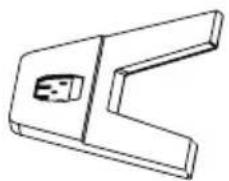
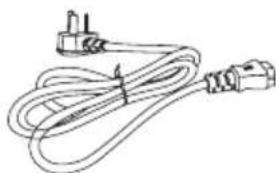
| Package Contents | Monitor, Stand, Base, Power Cable, HDMI Cable, DisplayPort Cable, USB Cable, Quick Guide |
| Cleaning | Use a soft, dry cloth. Do not use chemicals. |
| Safety Standards | FCC, CE, VCCI, BSMI, RoHS |
| Spare Parts / Repairability | Contact official GIGABYTE service center for spare parts. Repairability score: 7/10 (disassembly possible). |
| Warranty | 3 years limited warranty |
Frequently Asked Questions - G27F GIGABYTE
User questions about G27F GIGABYTE
0 question about this device. Answer the ones you know or ask your own.
Ask a new question about this device
Download the instructions for your Screen in PDF format for free! Find your manual G27F - GIGABYTE and take your electronic device back in hand. On this page are published all the documents necessary for the use of your device. G27F by GIGABYTE.
USER MANUAL G27F GIGABYTE
natural_image
Line drawing of a computer monitor with a labeled 'GIGABYTE' on the screen (no other text or symbols)G27F
H HERNÍ MMONITOROR
UŽIVATELSKÁ PŘÍRUČKA
Autorská práva
© 2020 GIGA-BYTE TECHNOLOGY CO., LTD. Všechna práva vyhrazena.
United States of America, Federal Communications Commission Statement
Supplier's Declaration of Conformity 47 CFR § 2.1077 Compliance Information
Product Name: LCD monitor
Trade Name: GIGABYTE
Model Number: G27F
Responsible Party – U.S. Contact Information: G.B.T. Inc.
Address: 17358 Railroad street, City Of Industry, CA91748
Tel.: 1-626-854-9338
Internet contact information: https://www.gigabyte.com
FCC Compliance Statement:
This device complies with Part 15 of the FCC Rules, Subpart B, Unintentional Radiators.
Operation is subject to the following two conditions: (1) This device may not cause harmful interference, and (2) this device must accept any interference received, including interference that may cause undesired operation.
This equipment has been tested and found to comply with the limits for a Class B digital device, pursuant to Part 15 of the FCC Rules. These limits are designed to provide reasonable protection against harmful interference in a residential installation. This equipment generates, uses and can radiate radio frequency energy and, if not installed and used in accordance with manufacturer's instructions, may cause harmful interference to radio communications. However, there is no guarantee that interference will not occur in a particular installation. If this equipment does cause harmful interference to radio or television reception, which can be determined by turning the equipment o and on, the user is encouraged to try to correct the interference by one or more of the following measures:
- Reorient or relocate the receiving antenna.
-
Increase the separation between the equipment and receiver.
-
Connect the equipment to an outlet on a circuit different from that to which the receiver is connected.
- Consult the dealer or an experienced radio/TV technician for help.
Canadian Department of Communications Statement
This digital apparatus does not exceed the Class B limits for radio noise emissions from digital apparatus set out in the Radio Interference Regulations of the Canadian Department of Communications. This class B digital apparatus complies with Canadian ICES-003.
European Union (EU) CE Declaration of Conformity
This device complies with the following directives: Electromagnetic Compatibility Directive 2014/30/EU, Low-voltage Directive 2014/35/EU, ErP Directive 2009/125/EC, RoHS directive (recast) 2011/65/EU & the 2015/863 Statement. This product has been tested and found to comply with all essential requirements of the Directives.
European Union (EU) RoHS (recast) Directive 2011/65/EU & the European Commission Delegated Directive (EU) 2015/863 Statement
GIGABYTE products have not intended to add and safe from hazardous substances (Cd, Pb, Hg, Cr+6, PBDE, PBB, DEHP, BBP, DBP and DIBP). The parts and components have been carefully selected to meet RoHS requirement. Moreover, we at GIGABYTE are continuing our efforts to develop products that do not use internationally banned toxic chemicals.
European Union (EU) Community Waste Electrical & Electronic Equipment (WEEE) Directive Statement
GIGABYTE will fulfill the national laws as interpreted from the 2012/19/EU WEEE (Waste Electrical and Electronic Equipment) (recast) directive. The WEEE Directive specifies the treatment, collection, recycling and disposal of electric and electronic devices and their components. Under the Directive, used equipment must be marked, collected separately, and disposed of properly.
WEEE Symbol Statement

natural_image
Symbol of a trash bin crossed with a diagonal line, representing no waste or discharge (no text or labels)The symbol shown below is on the product or on its packaging, which indicates that this product must not be disposed of with other waste. Instead, the device should be taken to the waste collection centers for activation of the treatment, collection, recycling and disposal procedure.
For more information about where you can drop off your waste equipment for recycling, please contact your local government office, your household waste disposal service or where you purchased the product for details of environmentally safe recycling.
End of Life Directives-Recycling

The symbol shown below is on the product or on its packaging, which indicates that this product must not be disposed of with other waste. Instead, the device should be taken to the waste collection centers for activation of the treatment, collection, recycling and disposal procedure.
Japan Class 01 Equipment Statement
安全にご使用いただくために
Japan VCCI Class B Statement
クラス B VCCI 基準について
China RoHS Compliance Statement
Environment-friendly Use Period

Declaration of the Presence Condition of the Restricted Substances Marking
| 設備名稱:液晶顯示器型號(型式):G27FEquipment name:Typedesignation (Tape): | ||||||
| 單元Unit | 限用物質及其化學符號Restricted substances and its chemical symbols | |||||
| 铅Lead(Pb) | 汞Mercury(Hg) | 镉Cadmium(Cd) | 六价铬Hexavalent chromium( Cr^+6 ) | 多溴联苯Poly-brominated biphenyls (PBB) | 多溴二苯醚Poly-brominated diphenylethers (PBDE) | |
| 塑料外框○ | ○○ | ○○ | ○ | |||
| 後殼○○ | ○○ | ○○ | ||||
| 液晶面板- | ○○ | ○○ | ○ | |||
| 電路板組件 | -○ | ○○ | ○○ | |||
| 底座○○ | ○○ | ○○ | ||||
| 電源線-○ | ○○ | ○○ | ○ | |||
| 其他線材- | ○○ | ○○ | ○ | |||
| 備考1.“超出0.1wt%”及“超出0.01wt%”係指限用物質之百分比含量超出百分比含量基準值。Note 1:“Exceeding 0.1 wt %” and “exceeding 0.01 wt %” indicate that the percentage content of the restricted substance exceeds the reference percentage value of presence condition.備考2.“○”係指該項限用物質之百分比含量未超出百分比含量基準值。Note 2:“○”indicates that the percentage content of the restricted substance does not exceed the percentage of reference value of presence.備考3.“-”係指該項限用物質為排除項目。Note 3:“-”indicates that the restricted substance corresponds to the exemption | ||||||
natural_image
Diagram of a mechanical device interior with orange arrows indicating movement or force directions (no text or symbols present)natural_image
Technical line drawing of an electronic component with an orange upward arrow indicating growth or direction (no text or symbols present)Obsah balení
natural_image
Blank white rectangle with a thin border and no visible text, symbols, or markings.Monitor
natural_image
Technical line drawing of a mechanical bracket or bracket (no text or symbols)Základna monitoru
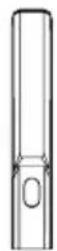
Stojan
natural_image
Line drawing of a cord with two connectors and a terminal plug (no text or symbols)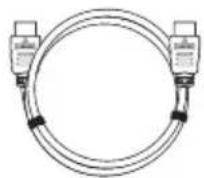
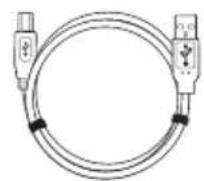
Napájecí kabel Kabel HDMI Kabel USB
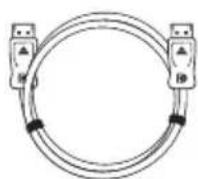
Kabel DP Adaptér
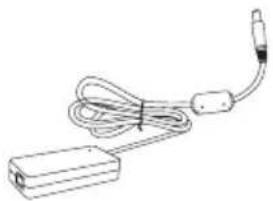
natural_image
Line drawing of a handheld electronic device with cable and connector (no text or symbols)
Stručná příručka
Záruční list
natural_image
Technical line drawing of a mechanical assembly with an inset showing a close-up of a component (no text or symbols present)natural_image
Technical line drawing of a mechanical device with internal components and mounting bracket (no text or symbols)

- G27F
- Autorská práva
- Supplier's Declaration of Conformity 47 CFR § 2.1077 Compliance Information
- FCC Compliance Statement:
- Canadian Department of Communications Statement
- European Union (EU) CE Declaration of Conformity
- European Union (EU) RoHS (recast) Directive 2011/65/EU & the European Commission Delegated Directive (EU) 2015/863 Statement
- European Union (EU) Community Waste Electrical & Electronic Equipment (WEEE) Directive Statement
- WEEE Symbol Statement
- End of Life Directives-Recycling
- Japan Class 01 Equipment Statement
- Japan VCCI Class B Statement
- China RoHS Compliance Statement
- Declaration of the Presence Condition of the Restricted Substances Marking
- Obsah balení
Brand : GIGABYTE
Model : G27F
Category : Screen