
CD-808MP/FM - Car radio ROADSTAR - Free user manual and instructions
Find the device manual for free CD-808MP/FM ROADSTAR in PDF.


| Product Type | Car Stereo with CD/MP3 Player and FM Radio |
| Brand | Roadstar |
| Model | CD-808MP/FM |
| Power Supply | 13.8V DC (10.8-15.6V allowable) |
| Maximum Current Consumption | 15A |
| Speaker Impedance | 4 ohms |
| Output Power | 40W x 4 channels |
| Tuner Frequency Range | 87.5-108 MHz |
| Tuner Sensitivity | 3 dBμ |
| CD/MP3 Playback | CD, CD-R, CD-RW, MP3 |
| Signal-to-Noise Ratio (CD) | >50dB |
| Frequency Response (CD) | 20Hz - 20kHz |
| Line Output | 1200mV MAX |
| Detachable Front Panel | Yes |
| RDS Functions | PI, PS, AF, TP, TA, PTY |
| Preset Memory | 18 stations (6 each for FM1/FM2/FM3) |
| Anti-Shock Protection | 40 seconds (CD), 120 seconds (MP3) |
Frequently Asked Questions - CD-808MP/FM ROADSTAR
User questions about CD-808MP/FM ROADSTAR
0 question about this device. Answer the ones you know or ask your own.
Ask a new question about this device
Download the instructions for your Car radio in PDF format for free! Find your manual CD-808MP/FM - ROADSTAR and take your electronic device back in hand. On this page are published all the documents necessary for the use of your device. CD-808MP/FM by ROADSTAR.
USER MANUAL CD-808MP/FM ROADSTAR
This product meets the essential requirements laid down by EEC Directive 89/336 and has been built in accordance with European standards EN50013, EN50020.
Português
English

The exclamation point within the triangle is a warning sign alerting the user of important instructions accompanying the product.

The lightening flash with arrowhead symbol within the triangle is a warning sign alerting the user of "dangerous voltage" inside the unit.

To reduce the risk of electric shock, do not remove the cover. No user serviceable parts inside the unit. Refer all servicing to qualified personnel.

Invisible laser radiation when the unit is opened or interlocks defeated. Avoid exposure to laser beam. Use of controls, adjustments or procedures other than those specified herein may result in hazardous radiation exposure.

This unit must not be exposed to moisture or rain.

This unit should be positioned so that it is properly ventilated.

Do not expose this unit to direct sunlight or heat radiating sources.
English
CD-808MP/FM
Car Stereo Compact Disc CD/CD-R/CD-RW/MP3 Player with PLL FM Stereo Radio Radio Data System with PTY. Detachable Front Panel System
INSTRUCTION MANUAL
Please read this instruction manual carefully and familiarize yourself with your new Radio CD before using it for the first time. Please retain this manual for future reference.
TABLE OF CONTENTS
- Location of Controls
- Features
- Installation
• Precautions and Maintenance - Operating Instructions
- Specifications
LOCATIONS OF CONTROLS
- FUNCTION SELECT BUTTON: BASS/TREBLE/BALANCE/FADER (MASK DPI/MASK ALL, DSP OFF/POP M/ROCK M/CLASS M/FLAT M, LOUD ON /LOUD OFF, BEEP ON/BEEP OFF, SEEK1/SEEK2, STEREO/MONO, LOCAL/DX, VOL LAST/VOLADJ) (SEL) VOLUME CONTROL (+BASS/TREBLE/BALANCE/FADER)
- PANEL FLIP DOWN BUTTON (OPEN)
- VFD DISPLAY
- AUTOMATIC OR MANUAL TUNING (FREQ UP/ OR FREQ DOWN / CD TRACK/SEARCH BUTTONS)
- A.P. AUTO-STORAGE/PRESET MEMORY SCAN/MP3 TRACK SEARCH MODE
- BAND BUTTON (BND)
- 'TA' function (TRAFFIC ANNOUNCEMENT)
- 'PTY' function (PROGRAM TYPE)
- POWER ON/OFF BUTTON
- 'AF' function (ALTERNATIVE FREQUENCIES)
- MUTE BUTTON (MU)
- PRESET STATIONS/CD Functions (M1/TOP, M2/INTRO, M3/RPT, M4/RDM)
- MODE BUTTON (MOD)
- PANEL RELEASE BUTTON (REL)
- DISC EJECT PANEL (ON REAR SIDE OF FRONT PANEL - WITH PANEL DOWN)
- RESET BUTTON (ON MAIN UNIT-FRONT PANEL OFF)
Português
ESPECIFICAÇÕES
SECCÃOLEITORCD/MP3
The unit features a detachable front control panel, FM/FM stereo, CD/MP3 player the following features:
- The best stations memory automatically memorizes the best (strongest) station in the order of their strength (AS).
• Double LCD Display
• Electronic Volume, Bass, Treble, Fader and Balance control.
• Precision electronic tuning with phase-lock loop (P.L.L.) circuitry.
• Programmable 18 preset memory tuning (6 each for FM1/ FM2 / FM3) - Loudness control
• Manual / Auto (Seek) / up and down tuning control
• Band selector for FM1/ FM2 / FM3
• Display control (Frequency, Station Name, Program Type, Clock)
• Clock Function in RDS
• CD Repeat Function
• CD and MP3 files on CD/CD-R/CD-RW player function - Preamplified Line-out
- Detachable front panel protects against theft
- Lighting system
• RDS Function: PI (Program Identification)
PS (Program Service Name)
AF (List of Alternative Frequencies)
TP (Traffic Program)
TA (Traffic Announcement)
PTY (Program Type)
INSTALLATION
PRECAUTIONS
- Choose the mounting location carefully so that the unit will not interfere with the normal driving functions of the driver.
- Avoid installing the unit where it would be subject to high temperatures, such as from direct sunlight or hot air from the heater, or where it would be subject to dust, dirt or excessive vibration.
• Use only the supplied mounting hardware for a safe and secure installation. - Be sure to remove the front panel before installing the unit.
4
English
Mounting angle adjustment
Adjust the mounting angle to less than 20°.
MOUNTING EXAMPLE
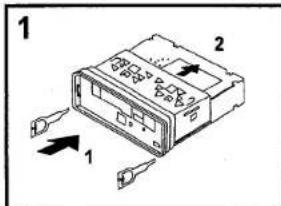
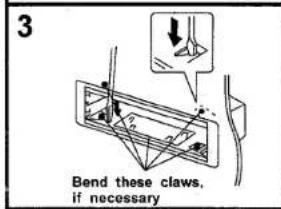
Installation in the dashboard


natural_image
Diagram of an electronic device showing a connector with ports and wiring (no text or symbols)Note: Keep the release key in the safe place as you may need it in future to remove the unit from the car.
Português
81
BOTÃO MUTE(11)
Detaching and attaching the front panel
The front panel of this unit can be detached in order to prevent the unit from being stolen.
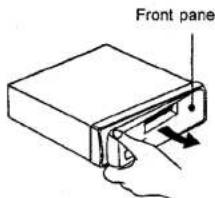
DETACHING THE FRONT PANEL
Before detaching the front panel, be sure to press the PWR button (9) OFF first.
Then press the REL button (14).
Pull out the panel towards you in order to detach completely the panel from the main unit.
Refer to below instruction.
ATTACHING THE FRONT PANEL
Make sure the front panel is the right way up when attaching it to the unit as it cannot be attached upside down. Bring side B of panel to side A of main unit.
Insert the panel in and push until it clicks.
Panel is attached.


Notes:
- Do not press the front panel hard against the unit when attaching it. It can be easily attached by pressing it lightly against the unit.
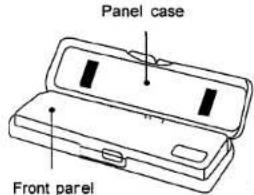
- When you carry the front panel with you, put it in the supplied front panel case.
- Do not press hard or give excessive pressure to the display window of the front panel when attaching it to the unit.
6 English
ISO CONNECTOR
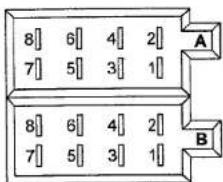
RCA Jack Line Out (Rear) -
Gray : Red (right)
White (left)
CONNECTORA
- YELLOW: MEMORY +12V
- BLUE: AUTO ANTENNA OUTPUT
- RED: +12V (TO IGNITION KEY)
- BLACK : GROUND
Note: RED wire (connector A no. 7) must be connected by car ignition key in order to avoid that car battery becomes weak when the car will be not used for long period.
CONNECTOR B
- VIOLET: REAR RIGHT SPEAKER (+)
- VIOLET/BLACK: REAR RIGHT SPEAKER (-)
- GRAY: FRONT RIGHT SPEAKER (+)
- GRAY/BLACK: FRONT RIGHT SPEAKER (-)
- WHITE: FRONT LEFT SPEAKER (+)
- WHITE /BLACK: FRONT LEFT SPEAKER (-)
- GREEN: REAR LEFT SPEAKER (+)
- GREEN/BLACK: REAR LEFT SPEAKER (-)
Maintenance
FUSE REPLACEMENT
If the fuse blows, check the power connection and replace the fuse. If the fuse blows again after the replacement, there may be an internal malfunction. In this case, consult your nearest repairing centre.
Português
Use the specified amperage fuse for each lead. Use of a higher amperage fuse may cause serious damage.
OPERATING INSTRUCTIONS
POWER ON/OFF (9)
Insert the front panel in the unit and push Power button (9) in order to switch on the unit. Push PWR button newly in order to switch off the unit and push REL button (14) to release the front panel.
Note: Never release the front panel when the unit is on. Power remains on even when car radio is off.
Press any button except the OPEN and REL button to turn on the unit, press PWR button (9) again to turn off the unit.
SELECT BUTTON/VOLUME CONTROL (1)
Rotate the VOLUME Knob to control the VOLUME. To select other functions, press the SELECT (1) button shortly until the desired functions is shown on the display. Figure 1 shows how control functions are selected using the SELECT button.

flowchart
graph LR
    1 --> 2 --> 3 --> 2 --> 4 --> 2 --> 5 --> 2 --> 6 --> 2
    3 --> 4 --> 5 --> 6
Fig. 1 Selection of sound control functions
- VOLUME (rotate knob)
- SELECT (push down)
- BASS
- TREBLE
- BALANCE
- FADER
VOLUME CONTROL
Rotate the VOLUME knob to increase or decrease the volume. This knob can be used to adjust the BASS, TREBLE, BALANCE and FADER.
This knob also selects the possible options in RDS function.
8
English
Press SEL button hold for more than 2 seconds to turn on the TA SEEK/TA ALARM, then press SEL button shortly and repeatedly to select PI SOUND/PI MUTE, RETUNE L/RETUNE S, MASK DPI/MASK ALL, BEEP 2ND/BEEP ALL/BEEP OFF, SEEK1/SEEK2(in RADIO mode), DSP OFF/FLAT/POP M/CLASSICS/ROCK, LOUD OFF/LOUD ON, STEREO/MONO(in RADIO mode), DX/LOCAL (in RADIO mode), VOL LAST/VOL ADJ. (When it is in VOL ADJUST mode, the next mode will be A-VOL after VOL ADJUST mode, then you can adjust the volume level) in the sequence and circulation. After selecting the desired mode, rotate the VOL knob to select one setup item of the desired mode.
1) TA SEEK/TA ALARM:
TA SEEK mode: when newly tuned station does not receive TP information for 5 seconds, the radio retunes to next station which has not the same station(PI) as the last station, but has the TP information.
When TP information gets lost at the current station for retune time which is set by RETUNE SHORT(60 seconds) or RETUNE LONG(90 seconds), the radio start to return to next same PI station. When same PI station does not catch in 1 cyclic search, the radio returns to next station with TP information.
TA ALARM mode: when this mode is selected, any automatic return mode is not activated. Only double beep sound(ALARM) is out-put.
When newly tuned station does not have TP information for 5 seconds, beeps come out. When TP information gets lost at the current station for return time, the beep sound is out-putted.
When newly tuned station has not RDS signal, PI SEEK is suppressed somewhat.
2) PISOUND/PI MUTE:
PI SOUND mode: if a car travels in a critical area, an oscillation phenomenon can occur, because the different PI code can be received from a same AF. When the different PI sound (DIP) is heard once in a while, the different PI sound will be heard for less than 1 second.
PI MUTE mode: under above same situation, a mute sound will be heard for less than 1 second.
The initial time of automatic TA search or PI SEARCH mode is selected.
When PI information is not caught for return time, the radio start to return to next same PI station.
When same PI station does not catch 1 cyclic search, the radio goes to last station and waits for 4-5 minute until PI code is received.
RETUNE L mode: selected as 90 seconds.
RETUNE S mode: selected as 60 seconds.
Português
Advertência
MASK DPI mode: masked only the AF which has different PI.
MASK ALL mode: masked the AF which has different PI and NO RDS signal with high field strength.
5) BEEP 2ND/BEEP ALL/BEEP OFF:
BEEP 2ND mode: the beep is only generated when an allotted double key is pressed long(1second). BEEP ALL mode: the beep is generated when every key is pressed(except power and release buttons). BEEP OFF mode: the beep is disabled.
6) SEEK1/SEEK2:
SEEK1: press TUNE 🎥 / 🎥 buttons to seek up or down for the strong signal station. And then stop seek when received the strong signal station. SEEK2: press TUNE 🎥 / 🎥 buttons to seek up or down for the strong signal station. And do not stop seek when received the strong signal station. After release it and then received the strong signal station, the seek will stop.
7) IN MP3 DISC MODE, press A.P button repeatedly to select TRACK SEARCH, FIRST CHARACTER SEARCH or DIRECTORY SEARCH mode.
In TRACK SEARCH mode of Mp3 disc, the VFD will display Mp3 T 000 and flash the biggest digit 0 that the Mp3 disc contain. Then rotate the VOL knob to select the number of the flashing digit from 0 \~ 9. Then rotate the VOL knob to confirm the number and flash next smaller digit 0. With the same means, select the number of the flashing digit. After finishing selecting the number of all flashing digit, press SEL button to play the track of the selected serial number.
In FIRST CHARACTER SEARCH mode of Mp3 disc, the VFD will display A—......, If there are files names its first character are A, the ......is the first file name its first character is A by the order of A\~Z and 0\~9; otherwise, the ......is NONE. Rotate the VOL knob to select files first character by the order of A\~Z and 0\~9. Then press 🎨 / 🎨 button to select one file its first characters is the selected one. Finally press SEL button to play the selected file.
In DIRECTORY SEARCH mode of Mp3 disc, the VFD will display the root folder (if there is not the root folder, it will found a root folder named ROOT). Then Rotate the VOL knob to select your desired folder and then press 🎥 / 🎥 button to select your desired track in the folder. Finally press SEL button to play the selected track.
PRESET STATIONS (1,2,3,4,5,6) (12)
(A) RADIO MODE:
When pressed short, these keys select a preset station directly. When pressed longer than 1 sec., current station is stored in preset memory bank. When PTY mode is selected, the PTY switch is shared as follows:
PTY music group ---- PTY speech group --- OFF
MUSIC
SPEECH
-
POP M, ROCK M
-
NEWS, AFFAIRS, INFO
-
M.O.R. M, LIGHT M
-
SPORT, EDUCATE, DRAMA
-
CLASSICS, OTHER M
-
CULTURE, SCIENCE, VARIED
-
JAZZ, COUNTRY
-
WEATHER, FINANCE, CHILDREN
-
NATION M. OLDIES
-
SOCIAL, RELIGION, PHONE IN
-
FOLKM
-
TRAVEL, HOBBIES, DOCUMENT
In CDP mode, press TOP button (Preset 1) to pause CD playback, press it again to resume CDP playback. Press it hold for more than about 0.5 seconds to play the first track of the disc.
In CDP mode, press INT button (Preset 2) to play the first 10 seconds part of each track, press it again to stop INT mode and retain playing the track currently selected. In CDP mode, press RPT button (Preset 3) to play the current track repeatedly.
Press it again to cancel this mode.
In CDP mode, press RDM button (Preset 4) to play the tracks in random order.
Press it again to cancel this mode.
USING THE RDS FUNCTION
What is RDS?
The RDS (Radio Data System) is a digital information system developed by the EBU (European Broadcast Union). Piggy-backed on normal FM broadcasts, RDS offers a variety of information services and automatic retuning functions for RDS-compatible car stereos. In 1988, RDS became available in the United Kingdom, France, West Germany, Ireland and Sweden. Test transmissions are being conducted in many other european countries. It is expected that RDS will be available in most western european countries in the near future.
'AF' function (ALTERNATIVE FREQUENCIES) (10)
When pressed short, AF switching mode is selected and the state of AF switching mode is displayed by AF indication in display.
Indication off: AF mode off.
Indication on: AF mode on, and has RDS information.
AF indication flashing: AF switching mode on, but RDS information is not received yet.
When AF switching mode is selected, the radio checks the signal strength of AF all the time.
Como retirar e colocar o painel frontal
The interval of checking time of each AFs depends on the signal strength of current station, from a few minutes for strong station to a few seconds for weak station. Every time that new AF is stronger than current station, it switches over to that frequency for very short time, and NEW FREQUENCY is displayed for 1-2 second. Because the mute time of AF switching Or checking time is very short, it is almost inaudible in case of normal program.
During FM mode, when AF is on, SEEK, (SCAN), AUTO-MEMORY function can only receive and save RDS program.
When pressed long, AF mode is converted to REGION ON/OFF mode.
- Regional mode ON:
AF switching or PI SEEK is implemented to the station which have all PI codes same as current station. REG segment is turned on, in LCD display.
- Regional mode OFF
The regional code in the format of PI code is ignored when AF switching or PI SEEK is implemented.
'TA' function (TRAFFIC ANNOUNCEMENT) (7)
When press the button, it is activated as TA mode on or off.
When TA mode is on (TA is displayed on LCD), it will begin to seek TA station and TA SEEK will be displayed on LCD for a while.
When traffic announcement is transmitted:
1) If the unit is in CD mode, it will switch to radio mode temporarily.
2) If volume level is below 20, volume level is raised to 20, and returns to its previous mode and volume level when the traffic announcement is over. If volume is adjusted during traffic announcement, only the previous volume is valid.
TA interruption function:
The current traffic announcement is canceled by pressing this key. But the TA mode will not be off.
When TA is on, SEEK, (SCAN), AUTO MEMORY function can be received or saved only when traffic program identification code has been received.
'PTY' function (PROGRAM TYPE) (8)
PTY MUSIC --- PTY SPEECH --- PTY OFF
While selecting PTY type, its selection is implemented by preset buttons as described in preset key. When PTY is selected, the radio starts to search corresponding PTY information, and stops if the corresponding PTY information, is detected.
MUTE BUTTON (11)
Press the button to eliminate or resume the sound immediately.
To resume the sound immediately, can also press MODE, BAND,SEL buttons or rotate the Volume control.
English
MODE BUTTON (MOD) (13)
By pressing this key, user can select RADIO mode or CD/MP3 PLAYER mode.
BAND BUTTON (BND) (6)
In Radio mode, each band is toggled cyclically by pressing this key FM1—FM2—FM3. In Mp3 disc mode, if you press BAND button repeatedly, the file name, folder name, songs title, artist and album information will be scrolling on the display.
RADIO TUNING UP AND DN BUTTONS (▶/◀) (4)
FORWARD AND REVERSE TRACK SEARCH (or changing songs)
1) In RADIO mode, press 📋/⌘ buttons shortly and repeatedly to manually tune up or down for the desired radio station with step by step. Press ⌘/⌘ button and hold for more than 0.5 seconds to automatically tune up or down for the radio station of strong signal.
2) In CD mode, press 🎥 button to play next track. Press 🎥 button once to play the current track from the beginning of the current track, press 🎥 button twice continuously to play the last track. Press 🎥/⌘ button and hold to skip forward or backward.
AUTO-STORAGE/PRESET MEMORY SCAN BUTTON (5)
1) In radio mode, press it to perform all stations memory for 5 seconds each time, while memory digital and frequency will flash on LCD. If the button is pressed for more than 2 seconds, it will seek station on current band, then write to the preset memories. When the auto-storage operation is completed, it will automatically perform for 5 seconds each time. During the memory station performing, press 1-6 digital buttons to select and stop scanning function.
2) In MP3 mode, press A.P button repeatedly to select TRACK SEARCH, FIRST CHARACTER SEARCH or DIRECTORY SEARCH mode.
VFD DISPLAY (3)
The Vacuum Fluorescent Display will display the current state of the unit.
OPEN BUTTON (2)
Press OPEN (2) to flip down the front panel and you can insert the disc into the CD compartment.
RELEASE BUTTON (14)
Press REL (14) to release the front panel.
CDEJECT BUTTON (15)
Press the EJ button (15) to eject the disc from the disc compartment.
Português
CARACTERÍSTICAS
MANUAL DE INSTRUÇÕES
Reset button (16) is placed on the housing.
The reset button is to be activated for the following reason:
- Initial installation of the unit when all wiring is completed.
• All the function buttons do not operate properly. - Error symbol on the display.
ANTI-SHOCK FUNCTION
- If in use, the player is likely to receive shocks or vibrations, The ANTI-SHOCK function is active to provide uninterrupted playback when power on.
- Should the player receive shocks for more than 40 seconds continuously in CD playback or 120 seconds in MP3 playback, the sound can mute for a very short while and will resume once the player has stabilised from the shock.
Notes:
- The Anti-shock function will not correct the errors arising from the use of defective scratched or dirty discs.
• IMPORTANT! During CD/MP3 playback, the ANTI-SHOCK function is always ON.
SPECIFICATIONS
CD/MP3 PLAYER SECTION
| Signal to Noise Ratio | >50dB |
| Frequency Response | 20Hz - 20 kHz |
TUNER
| Sensitivity | 3 dBμ |
| Frequency range | 87.5-108 MHz |
| Channel step | 50 kHz |
| Intermediate frequency | 10.7 MHz |
LINE-OUT
| Output | 1200mV MAX |
GENERAL
| Power Supply | 13.8V DC(10.8-15.6V allowable) |
| Consumption | 15AMAX |
| Speaker impedance | 4 ohm |
| Output power | 40W x 4CH |
Note: Specifications and the design are subject to possible modification without notice due to improvement.

Correct Disposal of This Product
(Waste Electrical & Electronic Equipment)
This marking shown on the product or its literature, indicates that it should not be disposed with other household wastes at the end of its working life. To prevent possible harm to the environment or human health from uncontrolled waste disposal, please separate this from other types of wastes and recycle it responsibly to promote the sustainable reuse of material resources.
Household users should contact either the retailer where they purchased this product, or their local government office, for details of where and how they can take this item for environmentally safe recycling. Business users should contact their supplier and check the terms and conditions of the purchase contract. This product should not be mixed with other commercial wastes for disposal.
Português


ATENÇÃO
TECLA BANDA (BAND) (6)
natural_image
Diagram of a device with an attached cable or connector, showing internal components and wiring (no text or symbols)TECLA MODE (MOD) (13)
1) TA SEEK/TA ALARM:
Notas:
natural_image
Diagram of a device with an attached cable or connector, showing ports and wiring (no text or symbols present)PTY MUSICA --- PTY PARLATO --- PTY SPENTO
TASTO MODE (MOD) (13)
natural_image
Diagram of an electronic device showing a connector with ports and a close-up view (no text or symbols)REPLACEMENT DES FUSIBLES
1) TA SEEK/TA ALARM:
Modalité TA SEEK:
2.SPORT, EDUCATION, PIECES
-
CLASSIQUE, AUTRE Musique
-
CULTURE, SCIENCES, DIVERS
4.JAZZ, COUNTRY
-
PREVISIONS DU TEMPS, FINANCES, ENFANTS
-
NATION M, OLDIES
5.SOCIAL, RELIGION, TELEPHONE
6.Musique FOLK
- VOYAGES, DIVERTISSEMENT, DOCUMENTAIRES
(B) MODALITE LECTEUR CD/MP3 :
natural_image
Diagram showing two electronic device ports with connectors and a close-up view of the internal structure (no text or symbols)
- English
- CD-808MP/FM
- INSTRUCTION MANUAL
- TABLE OF CONTENTS
- LOCATIONS OF CONTROLS
- Português
- INSTALLATION
- PRECAUTIONS
- Detaching and attaching the front panel
- DETACHING THE FRONT PANEL
- ATTACHING THE FRONT PANEL
- Notes:
- English
- ISO CONNECTOR
- CONNECTORA
- CONNECTOR B
- Maintenance
- FUSE REPLACEMENT
- OPERATING INSTRUCTIONS
- POWER ON/OFF (9)
- SELECT BUTTON/VOLUME CONTROL (1)
- VOLUME CONTROL
- 1) TA SEEK/TA ALARM:
- 2) PISOUND/PI MUTE:
- Advertência
- 5) BEEP 2ND/BEEP ALL/BEEP OFF:
- 6) SEEK1/SEEK2:
- 7) IN MP3 DISC MODE, press A.P button repeatedly to select TRACK SEARCH, FIRST CHARACTER SEARCH or DIRECTORY SEARCH mode.
- PRESET STATIONS (1,2,3,4,5,6) (12)
- RADIO MODE:
- MUSIC
- SPEECH
- USING THE RDS FUNCTION
- What is RDS?
- 'AF' function (ALTERNATIVE FREQUENCIES) (10)
- MODE BUTTON (MOD) (13)
- BAND BUTTON (BND) (6)
- RADIO TUNING UP AND DN BUTTONS (▶/◀) (4)
- FORWARD AND REVERSE TRACK SEARCH (or changing songs)
- AUTO-STORAGE/PRESET MEMORY SCAN BUTTON (5)
- VFD DISPLAY (3)
- OPEN BUTTON (2)
- RELEASE BUTTON (14)
- CDEJECT BUTTON (15)
- CARACTERÍSTICAS
- MANUAL DE INSTRUÇÕES
- ANTI-SHOCK FUNCTION
- Correct Disposal of This Product
- (Waste Electrical & Electronic Equipment)
- ATENÇÃO
- TECLA BANDA (BAND) (6)
- TECLA MODE (MOD) (13)
- Notas:
- TASTO MODE (MOD) (13)
- REPLACEMENT DES FUSIBLES
- Modalité TA SEEK:
- MODALITE LECTEUR CD/MP3 :
Brand : ROADSTAR
Model : CD-808MP/FM
Category : Car radio