
Predator XK 100 - Remote control TRUST - Free user manual and instructions
Find the device manual for free Predator XK 100 TRUST in PDF.


| Product Type | Joystick / Game Controller |
| Brand | Trust |
| Model | Predator XK 100 |
| Connectivity | 15-pin D-connector (game port) |
| Number of Axes | 2 |
| Number of Fire Buttons | 4 |
| Rapid Fire Function | Yes, switchable via switch A |
| Compatible Operating Systems | Windows 95 / 98 / 2000, Windows 3.1x, DOS |
| Required Software | DirectX 5.0 or higher |
| Calibration | Via Windows Game Controllers or in-game setup |
| Dimensions (Approximate) | 15 x 15 x 10 cm |
| Weight (Approximate) | 300 g |
| Power Source | Powered via game port (no external power required) |
| Cleaning Instructions | Disconnect before cleaning; wipe with damp cloth; do not use cleaning fluids or sprays |
| Operating Environment | Avoid damp or wet environments (bathrooms, damp cellars, swimming pools) |
| Maintenance | Keep dry; handle with care |
| Spare Parts Availability | Not specified |
| Repairability | Not specified; consult manufacturer |
Frequently Asked Questions - Predator XK 100 TRUST
User questions about Predator XK 100 TRUST
0 question about this device. Answer the ones you know or ask your own.
Ask a new question about this device
Download the instructions for your Remote control in PDF format for free! Find your manual Predator XK 100 - TRUST and take your electronic device back in hand. On this page are published all the documents necessary for the use of your device. Predator XK 100 by TRUST.
USER MANUAL Predator XK 100 TRUST
- Turn off your computer.
- Connect the plug of the joystick to the 15-pin D-connector of the game port.
Note: The game port of your PC is usually located on the sound card, with the connector at the back of your computer. Consult the manual of your sound card to activate the game port on your sound card. - Turn on your computer.
GB
2. Installation
Note: In order for you to be able to make optimum use of your joystick and game, DirectX 5.0 (or higher) must be installed before you install the joystick.
Note: Calibration of Trust Predator XK 100 can be different for each game. Consult the manual of the software package being used.
2.1 Windows 95 / 98 / 2000
- Start up Windows.
- Click on 'Start' on your task bar and choose 'Control Panel'.
- Double-click the icon 'Game Controllers'. See Figure 1.

Game
Controllers
Figure 1: Game-Controllers icon
- Click on 'Add' to add a joystick.
- Select '2 axis, 4-button joystick'.
- Click the 'Properties' button.
- Click the 'Calibrate' button. Follow the instructions on the screen.
- To test your joystick, select the tab 'Test'. Follow the instructions on your screen.
- Trust Predator XK 100 is ready for use.
2.2 Windows 3.1x/DOS
The joystick does not have to be installed in Windows 3.1x and DOS. Calibration must then often be carried out in the game. If necessary, Consult the game's manual to do this.
Note: Some games support only two fire buttons instead of four.
3. Fire buttons
Buttons 1 to 4 are fire buttons that work independently of each other. Switch A is used to activate and deactivate the rapid-fire function of fire buttons 1 and 2.
Trust Predator XK 100
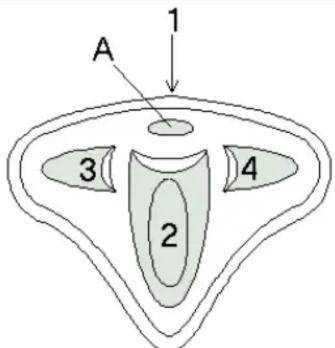
Figure 2: Helicopter view of Trust Predator XK 100
- Troubleshooting
| Problem | Cause | Possible |
| The joystick does not respond. | The plug is not connected properly. | Connect the plug to the game port properly. |
| The game port of the game card is not active. | Set the game port of the sound card to active. Consult the manual of the sound card and of the software being used. | |
| The sound card is not installed properly. | Re-install the sound card. Consult the manual of the sound card. | |
| No joystick is defined in Windows 95 / 98. | Add the joystick. Consult Chapter 2.1. | |
| The joystick does not function properly. | The joystick is not calibrated. | Calibrate the joystick. Consult the manual of your software. Consult Chapter 2.1 for Windows 95/98. |
Solutions
5. Maintenance and Use
Read the following instructions thoroughly:
- Remove the plugs from the outlet before cleaning the joystick. Do not use any cleaning fluids or spray cans. Wipe off the joystick with a damp cloth.
- Do not use this joystick in damp or wet environments; e.g., bathrooms, damp cellars, swimming pools etc.
Brand : TRUST
Model : Predator XK 100
Category : Remote control