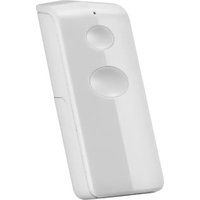
ALKCT-2000 - Remote control TRUST - Free user manual and instructions
Find the device manual for free ALKCT-2000 TRUST in PDF.


| Product Type | Remote Control |
| Brand | Trust |
| Model | ALKCT-2000 |
| Dimensions (L x W x H) | Approx. 20 x 5 x 2 cm |
| Weight | Approx. 100 g (including batteries) |
| Power Supply | 2 x AAA batteries (not included) |
| Operating Range | Up to 10 meters |
| Transmission Technology | Infrared (IR) |
| Compatible Devices | TV, Audio, and other IR-controlled devices |
| Number of Keys | Approx. 40 |
| Key Features | Universal compatibility, ergonomic design, dedicated volume and channel keys |
| Battery Life | Approx. 6 months with typical use |
| Material | ABS plastic |
| Color | Black |
| Indicators | LED indicator for transmission |
| Maintenance | Clean with a soft, dry cloth; avoid liquids |
| Safety Precautions | Keep away from water and heat sources; replace batteries promptly when low |
| Repair and Spare Parts | Not user-serviceable; contact Trust support for repairs |
| Certifications | CE, RoHS |
Frequently Asked Questions - ALKCT-2000 TRUST
User questions about ALKCT-2000 TRUST
0 question about this device. Answer the ones you know or ask your own.
Ask a new question about this device
Download the instructions for your Remote control in PDF format for free! Find your manual ALKCT-2000 - TRUST and take your electronic device back in hand. On this page are published all the documents necessary for the use of your device. ALKCT-2000 by TRUST.
USER MANUAL ALKCT-2000 TRUST
natural_image
White rectangular device with two circular cutouts, no visible text or symbolsUSER MANUAL MULTI LANGUAGE
Item 71115 Version 1.0
Visit www.trust.com
for the latest instructions
ALKCT-2000 ARM/DISARM REMOTE CONTROL
1

natural_image
Illustration showing a hand holding a device with a downward arrow, next to a close-up of a circular component with plus signs (no text or symbols)2
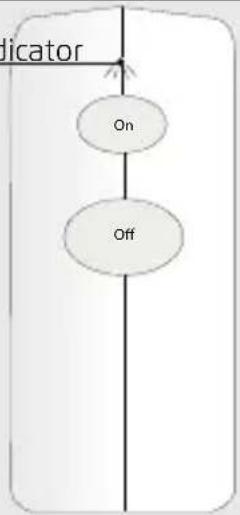
Red LED indicator
flowchart
graph TD
    A["Indicator"] --> B["On"]
    B --> C["Off"]
3

4
5


flowchart
graph TD
    A["On"] --> B["Off"]
    style A fill:#fff,stroke:#000
    style B fill:#fff,stroke:#000
    note right of A "1.5 sec"
    bottom-right checkmark
flowchart
graph TD
    A["3 light blinks"] --> B["On"]
    A --> C["Off"]
    B --> D
    C --> D
    D --> E["X"]
6


flowchart
graph TD
    A["On"] --> B["Off"]
    style A fill:#fff,stroke:#000
    style B fill:#fff,stroke:#000
    note right of A "1.5 sec"
    bottom-right arrow labeled "✓"

flowchart
graph TD
    A["3 light blinks"] --> B["On"]
    B --> C["Off"]
    C --> D["X"]
7

8

9

flowchart
graph LR
    A["ON button ON button\nOn 4 sec 4 sec"] --> B["OFF button OFF button\nOff"]
    B --> C["OFF button\nShort press\nOn"]
    C --> D["Off button\nOff"]

EN
1. Place battery
Open the battery slot at the back of the ALKCT by sliding it down. Place the included 3V CR2477 battery and close the battery slot. For more information on replacing and purchasing new batteries visit trust.com/71115
2. LED indicator
Low battery: LED will blink 2x when a button is pushed
Confirm pair/unpair: LED will blink 5x
Successful arm/disarm: LED will light for 1.5 sec
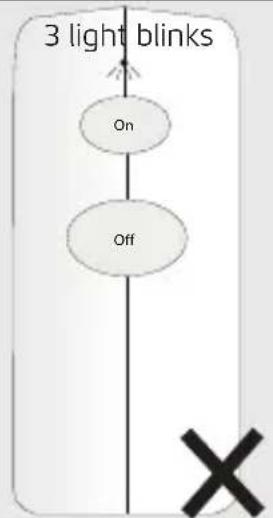
Unsuccessful arm/disarm: LED will blink shortly 3x
3. Activate the pairing mode
Consult the manual of the Siren to activate the pairing mode. Put the ALKCT in pairing mode by first pressing the ON and OFF button simultaneously for 4 sec (until the LED of the ALKCT starts blinking).
4. Confirm pairing
After entering pairing mode press the ON button shortly to pair with the Siren. The LED indicator of the Siren and ALKCT will be flashing 5 times to confirm that the pairing has been done successfully.
5. Arm the siren
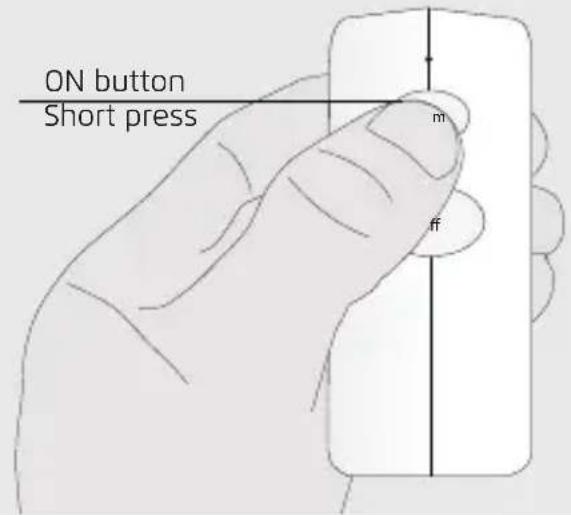
To arm the siren press the ON button for 3 seconds on the ALKCT.
If the siren is armed successfully the LED of the ALKCT will light up for 1.5 sec.
If the siren is armed unsuccessfully the LED of the ALKCT will give 3 short light blinks.
Check the following points if the siren is armed unsuccessfully:
- Is the siren within range
- Are siren batteries low
- Are the remote batteries low
- Is another wireless device nearby
6. Disarm the siren
To disarm the siren press the OFF button for 3 seconds on the ALKCT.
If the siren is disarmed successfully the LED of the ALKCT will light up for 1.5 sec.
If the siren is disarmed unsuccessfully the LED of the ALKCT will give 3 short light blinks.
Check the following points if the siren is disarmed unsuccessfully:
- Is the siren within range
- Are siren batteries low
- Are the remote batteries low
- Is another wireless device nearby
7. Activating the unpairing mode
Consult the manual of the Siren to activate the pairing mode. Put the ALKCT in pairing mode by first pressing the ON and OFF button simultaneously for 4 sec (until the LED of the ALKCT starts blinking).
8. Confirm unpairing
After entering pairing mode press the OFF button shortly to unpair with the Siren. The LED indicator of the Siren and ALKCT will be flashing 5 times to confirm that the unpairing has been done successfully.
9. Delete ALKCT memory
To delete the memory of the ALKCT press the ON and OFF button simultaneously for 4 seconds (until the LED starts to blink) Release the buttons and press the ON and OFF buttons simultaneously again for 4 seconds. (until the LED starts to blink fast). Press the OFF button shortly to delete the memory of the ALKCT. The LED will blink 5x to confirm the memory has been deleted.
10. Opening ALKCT casing (Optional, available on trust.com)
Open the casing by untightening the screws on the bottom of the case. The backplate can be pulled off by lifting the screws.
EN
11. Mounting the casing
Mount the casing of the ALKCT on a flat surface and secure it with screws. (Mounting screws not included)
12. Place ALKCT in casing
When the casing has been mounted and secured with screws place the ALKCT in the casing. To place the ALKCT slide it in from top to bottom.
13. Close the casing
To close the casing put the frontplate on the backplate and push down till you hear a click. This means the front plate has been locked on the backplate. Secure it with screwing the previously untightened screws back on the bottom of the casing.
EN
NL
NL


PT

NO

DA
DA


- USER MANUAL MULTI LANGUAGE
- EN
- Place battery
- LED indicator
- Activate the pairing mode
- Confirm pairing
- Arm the siren
- Disarm the siren
- Activating the unpairing mode
- Confirm unpairing
- Delete ALKCT memory
- Opening ALKCT casing (Optional, available on trust.com)
- Mounting the casing
- Place ALKCT in casing
- Close the casing
Brand : TRUST
Model : ALKCT-2000
Category : Remote control