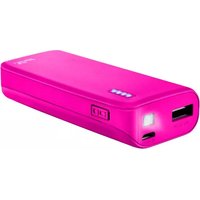
Leon Powerbank 10400 - Power bank TRUST - Free user manual and instructions
Find the device manual for free Leon Powerbank 10400 TRUST in PDF.


Pick your language and provide your email: we'll send you a specifically translated version.
| Product Type | Power bank |
| Brand | Trust |
| Model | Leon Powerbank 10400 |
| Battery Capacity | 10400 mAh / 38.48 Wh |
| Input Interface | Micro USB |
| Input Rating | 5V / 2A |
| Output Interface | 2x USB-A |
| Output Rating | 5V / 2.1A (shared) |
| Battery Type | Lithium-ion |
| Charging Time | Approx. 6-8 hours |
| Dimensions | 100 x 70 x 22 mm |
| Weight | 250 g |
| LED Indicators | 4 LEDs showing charge status |
| Safety Features | Overcharge, over-discharge, overcurrent, short-circuit protection |
| Compatibility | Smartphones, tablets, and USB devices |
| Included Accessories | Micro USB cable |
| Maintenance | Wipe with a soft dry cloth; avoid harsh chemicals |
| Repairability | Not user-serviceable; contact Trust support |
| General Information | Portable external battery for on-the-go charging |
Frequently Asked Questions - Leon Powerbank 10400 TRUST
How long does it take to fully charge the Trust Leon Powerbank 10400?
Charging time is approximately 6-8 hours using a 2A charger. For faster charging, use a compatible wall adapter.
How many devices can I charge simultaneously?
The power bank features two USB-A ports, allowing you to charge two devices at the same time. The total output is rated at 5V/2.1A shared between both ports.
Can I charge my tablet with this power bank?
Yes, the 2.1A output is sufficient to charge most tablets, as well as smartphones and other USB-powered devices.
How do I check the remaining battery level?
The power bank has 4 LED indicators that show the remaining charge. Each LED represents roughly 25% of capacity.
Is the Trust Leon Powerbank 10400 safe to use overnight?
Yes, it includes protection against overcharging, over-discharging, overcurrent, and short circuits, making it safe for overnight charging.
What do the LED lights mean during charging?
While charging the power bank, the LEDs will blink to show progress. When all 4 lights are solid, it is fully charged.
Can I charge the power bank and my phone at the same time?
Yes, you can connect a charger to the Micro USB input and simultaneously charge your phone via one of the output ports.
How should I clean and maintain the power bank?
Wipe the exterior with a soft dry cloth. Avoid using harsh chemicals or submerging it in water. Store in a cool, dry place.
What devices are compatible with this power bank?
It is compatible with any device that charges via USB, including smartphones, tablets, earbuds, and portable game consoles.
What should I do if the power bank stops working?
If the device malfunctions, contact Trust support. The power bank is not user-serviceable; do not attempt to open it.
User questions about Leon Powerbank 10400 TRUST
0 question about this device. Answer the ones you know or ask your own.
Ask a new question about this device
No questions yet. Be the first to ask one.
Download the instructions for your Power bank in PDF format for free! Find your manual Leon Powerbank 10400 - TRUST and take your electronic device back in hand. On this page are published all the documents necessary for the use of your device. Leon Powerbank 10400 by TRUST.
USER MANUAL Leon Powerbank 10400 TRUST



Manual assistant
Powered by Anthropic
Waiting for your message
Product information
Brand : TRUST
Model : Leon Powerbank 10400
Category : Power bank