
Leon Powerbank 5200 - Power bank TRUST - Free user manual and instructions
Find the device manual for free Leon Powerbank 5200 TRUST in PDF.


| Product Type | External Battery Pack |
| Brand | Trust |
| Model | Leon Powerbank 5200 |
| Battery Capacity | 5200 mAh |
| Input Interface | Micro USB |
| Input Rating | 5V/1A |
| Output Interface | USB-A |
| Output Rating | 5V/2.1A (max) |
| Number of USB Ports | 1 |
| LED Indicator | Yes (4-level battery status) |
| Dimensions (L x W x H) | 100 x 62 x 20 mm |
| Weight | 130 g |
| Material | Plastic |
| Color | White/Black (depending on variant) |
| Charging Time | Approximately 4-5 hours (via 1A charger) |
| Safety Features | Overcharge, overdischarge, short-circuit, and overcurrent protection |
| Operating Temperature | 0°C to 45°C |
| Storage Temperature | -10°C to 50°C |
| Compatible Devices | Smartphones, tablets, MP3 players, and other USB-charged devices |
| Accessories Included | Micro USB charging cable, user manual |
| Cleaning Instructions | Wipe with a soft, dry cloth. Do not use liquids or abrasive cleaners. |
| Repair / Servicing | Not user-serviceable. Contact Trust support for issues. |
| Warranty | 2 years (check local regulations) |
Frequently Asked Questions - Leon Powerbank 5200 TRUST
User questions about Leon Powerbank 5200 TRUST
0 question about this device. Answer the ones you know or ask your own.
Ask a new question about this device
Download the instructions for your Power bank in PDF format for free! Find your manual Leon Powerbank 5200 - TRUST and take your electronic device back in hand. On this page are published all the documents necessary for the use of your device. Leon Powerbank 5200 by TRUST.
USER MANUAL Leon Powerbank 5200 TRUST
Safety Instructions 1. Do not prevent in
- Do not expose to excessive heat such as sunshine or fire.
-
Do not expose in dimm, sun, and rain conditions.
-
Do not use the unit near explosive gases or flammable materials.
-
Do not burn or incinerate the unit.
-
Avoid contact with battery chemical
©
SL Varnovtna navodila
∴ m = 3/11
BEZPEČNOSTNÍ INSTRUKCE
∴ m = 3/11
FAQ
Frequently asked questions
http://www.trust.com/support/charging
© 11-11-2014 Trust International B.V. All rights reserved.


Quick installation guide
LEON | Powerbank 5200



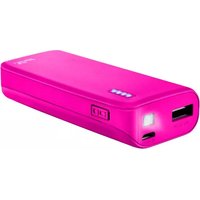
Brand : TRUST
Model : Leon Powerbank 5200
Category : Power bank