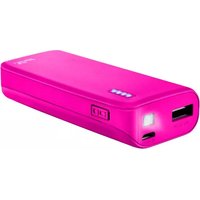
20615 - Power bank TRUST - Free user manual and instructions
Find the device manual for free 20615 TRUST in PDF.


Pick your language and provide your email: we'll send you a specifically translated version.
| Product Type | Portable Power Bank |
| Brand | Trust |
| Model | 20615 |
| Battery Capacity | 10000 mAh |
| Input | 5V / 2A (Micro USB) |
| Output | 5V / 2.1A (USB-A) |
| Charging Time | 5-6 hours |
| Number of USB Ports | 1 |
| LED Indicators | 4 LED charge level indicators |
| Dimensions | 90 x 60 x 22 mm |
| Weight | 220 g |
| Color | Black |
| Cable Included | Micro USB charging cable |
| Compatible Devices | Smartphones, tablets, and other USB devices |
| Protection Features | Overcharge, overcurrent, and short circuit protection |
| Operating Temperature | 0°C to 45°C |
| Storage Temperature | -20°C to 60°C |
| Maintenance | Store in a cool, dry place |
| Cleaning | Wipe with a soft, dry cloth |
| Safety | Do not expose to water or high temperatures |
| Repairability | No user-serviceable parts; contact Trust support |
| Warranty | 2 years |
Frequently Asked Questions - 20615 TRUST
What is the battery capacity of the Trust 20615 power bank?
The Trust 20615 power bank has a 10000 mAh battery capacity, allowing you to charge your smartphone multiple times.
How do I charge the power bank itself?
Connect the included Micro USB cable to the input port and a USB power adapter. The LED indicators show the charging status.
How long does it take to fully charge the power bank?
With a 5V/2A adapter, it takes approximately 5-6 hours to fully charge.
Can I charge my phone and the power bank at the same time?
No, the Trust 20615 has only one USB output port and one input port, so simultaneous charging is not supported.
What devices are compatible with this power bank?
It is compatible with most USB devices, including smartphones, tablets, and Bluetooth earphones.
How do I know the remaining battery level?
The power bank has 4 LED indicators that show the current charge level. Each LED represents approximately 25% capacity.
Is it safe to leave the power bank charging overnight?
Yes, the built-in overcharge protection automatically stops charging once the device is full, preventing damage.
What does the protection system include?
It includes overcharge, overcurrent, and short circuit protection to ensure safe usage.
How should I clean the power bank?
Use a soft, dry cloth to wipe the exterior. Do not use liquids or solvents.
What should I do if the power bank is not working?
Ensure it is charged and check the cable. If issues persist, contact Trust customer support as there are no user-serviceable parts.
User questions about 20615 TRUST
0 question about this device. Answer the ones you know or ask your own.
Ask a new question about this device
No questions yet. Be the first to ask one.
Download the instructions for your Power bank in PDF format for free! Find your manual 20615 - TRUST and take your electronic device back in hand. On this page are published all the documents necessary for the use of your device. 20615 by TRUST.
USER MANUAL 20615 TRUST



Manual assistant
Powered by Anthropic
Waiting for your message
Product information
Brand : TRUST
Model : 20615
Category : Power bank