DKS 7580 X - Oven DE DIETRICH - Free user manual and instructions
Find the device manual for free DKS 7580 X DE DIETRICH in PDF.


User questions about DKS 7580 X DE DIETRICH
0 question about this device. Answer the ones you know or ask your own.
Ask a new question about this device
Download the instructions for your Oven in PDF format for free! Find your manual DKS 7580 X - DE DIETRICH and take your electronic device back in hand. On this page are published all the documents necessary for the use of your device. DKS 7580 X by DE DIETRICH.
USER MANUAL DKS 7580 X DE DIETRICH
FRGUIDE D'UTILISATION
Interventions France 29
natural_image
Line drawing of a kitchen appliance with a mesh grater and an arrow indicating direction (no text or symbols)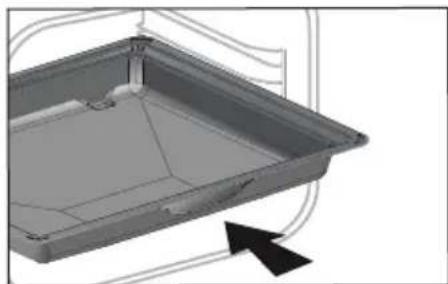
natural_image
3D CAD model of a rectangular tray or enclosure with internal structure and an arrow indicator (no text or symbols)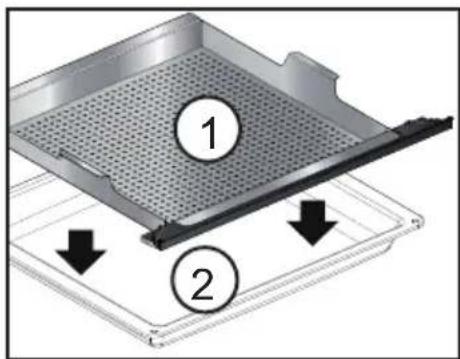
• 1 PRESENTATION DU FOUR
LE TIROIR DE REMPLISSAGE
natural_image
3D rendering of a stainless steel cabinet or drawer mechanism inside a building (no text or symbols visible)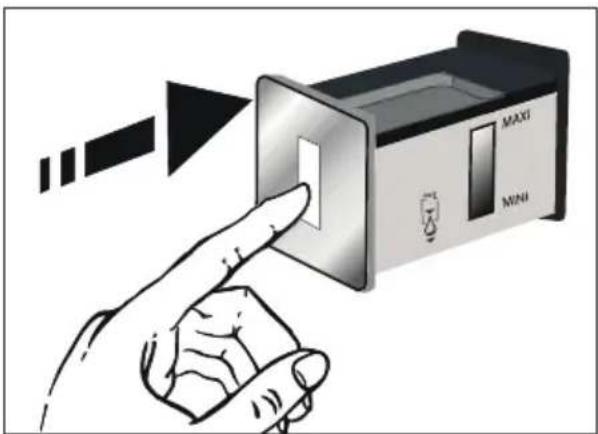
• 1 PRESENTATION DU FOUR
PREMIERS REGLAGES - MISE EN SERVICE
natural_image
Two black rectangular icons with white stylized shapes, no text or symbols presentnatural_image
Two black square icons with white stylized shapes and circular symbols (no text or numbers)100% VAPEUR (GUIDE VAPEUR)

LE PRIMEUR
Chou-fleur
Brocolis
Haricots verts
Carottes en rondelles
Pommes de terre
Petits pois
Poireaux
Courgettes
Potiron
Artichaux
Asperges
Céleris
Courge
Blettes
Epinards
Choux de Bruxelles

LE BOUCHER
Blanc de poulet
Escalopes de dinde
Porc - filet

LE POISSONNIER
Poissons entiers frais
Filets de poisson frais
Moules
Coques
Crevettes
Langoustines

natural_image
Two-panel illustration showing hands performing a netting or meshing process, with arrows indicating direction (no text or symbols)natural_image
Illustration of a hand using a tool to adjust or install a mechanical component, with no visible text or symbols.natural_image
Technical line drawing of a structural joint or bracket with a magnified circular detail (no text or symbols)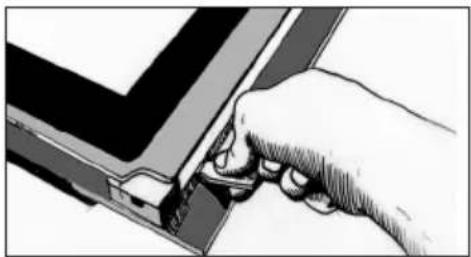
natural_image
Hand holding a tool interacting with a mechanical component (no visible text or symbols)natural_image
Illustration of a hand pressing down on a device panel with a dashed line indicating a folding or alignment (no text or symbols present)• 5 ENTRETIEN
natural_image
Illustration of a hand using a tool to press or install a mechanical component (no text or symbols visible)natural_image
Diagram of a mechanical assembly with hands and structural components (no text or symbols)natural_image
Three abstract geometric shapes with no text or symbols, including a cross and arrow, rendered in grayscale without any readable text or symbols.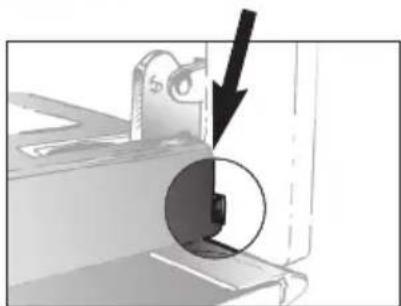
natural_image
Mechanical component with a black arrow pointing to a circular feature, no visible text or symbolsREPLACEMENT DE LA LAMPE
RELATIONS CONSOMMATEURS FRANCE
natural_image
Diagram of a kitchen appliance with a grid and directional arrow (no text or symbols)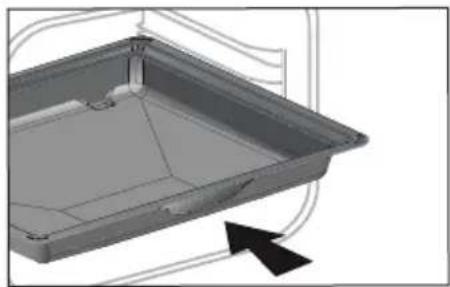
natural_image
3D CAD model of a rectangular tray or container with internal structure and an arrow indicator (no text or symbols)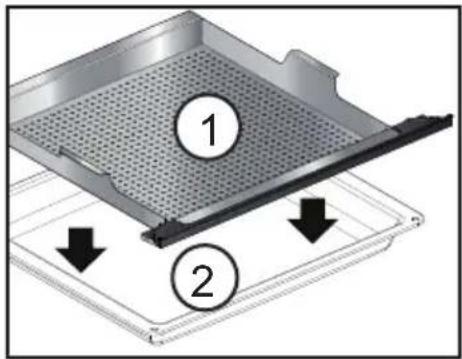
natural_image
3D architectural rendering of a stainless steel cabinet or drawer with a circular inset highlighting the interior space (no text or symbols)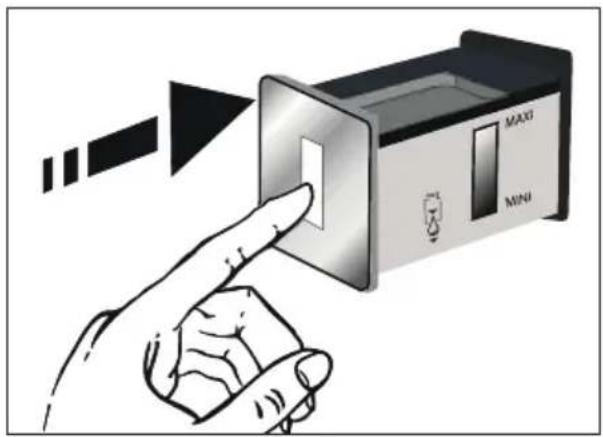
natural_image
Two black rectangular icons with white stylized shapes, no text or symbols presentnatural_image
Two black rectangular icons with white stylized shapes and circular symbols, no text or numbers present.natural_image
Illustration of a hand holding a string with arrows indicating motion (no text or symbols)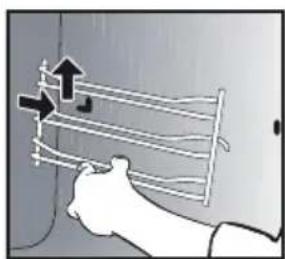
natural_image
Illustration of a hand holding a coiled wire or cable with arrows indicating direction (no text or symbols)natural_image
Illustration of a hand using a tool to adjust or install a component, with no visible text or symbols.natural_image
Technical line drawing of a structural joint or bracket with a circular annotation highlighting a specific section (no text or symbols present)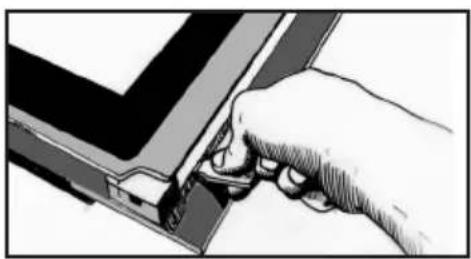
natural_image
Hand inserting a component into a device (no text or symbols visible)natural_image
Illustration of hands cleaning a tray with plastic sheet (no text or symbols)• 5 PFLEGE
natural_image
Illustration of a hand pressing down on a piece of paper or document (no text or symbols visible)natural_image
Illustration of hands holding a device with a partially open lid (no text or symbols visible)natural_image
Mechanical component with a black arrow pointing to a circular feature, no visible text or symbolsDEAR CUSTOMER, CUSTOMER,
Discovering a De Dietrich product means experiencing the range of unique emotions.
The attraction is immediate, from the moment you set eyes on the product.
The sheer quality of the design shines through, thanks to the timeless style and outstanding finishes which make each component an elegant and refined masterpiece in its own right, each one in perfect harmony with the others. Next, comes the irresistible urge to touch it.
De Dietrich's design makes extensive use of robust and prestigious materials. The accent is placed firmly upon authenticity. By combining state-of-the-art technology with top quality materials, De Dietrich produces beautifully crafted products to help you get the most from the culinary arts, a passion shared by all lovers of cooking and fine food. We hope that you enjoy using this new appliance.
Thank you for choosing a De Dietrich product.
1 / Description of the oven ....4
The controls and display 5
The accessories....6
The refill tray 7
Initial settings - using the oven for the first time....8
2 / The cooking modes ......9
"Expert" mode ....10
"Expert steam" mode 10
° Favourites (saved cooking programmes) .....12
° Cooking functions....13
° Drying 15
"Cooking guide" mode 16
"Combined steam" mode 16
° List of dishes .....17
3 / Settings 20
Locking the controls 21
4 / Minute Minder ......21
5 / Maintenance - Cleaning 22
External surface....22
Removing the shelf runners....22
Cleaning the inner glass 22
Removing and putting back the door....22
Replacing the light bulb 24
Cleaning function....24
° Pyrolysis 24
° Emptying the water tank....26
• Descaling the boiler 27
6 / Anomalies and solutions ......28
7 / After-Sales Service ......29
Suitability for the function....30
• 1 DESCRIPTION OF THE OVEN
DESCRIPTION OF THE OVEN
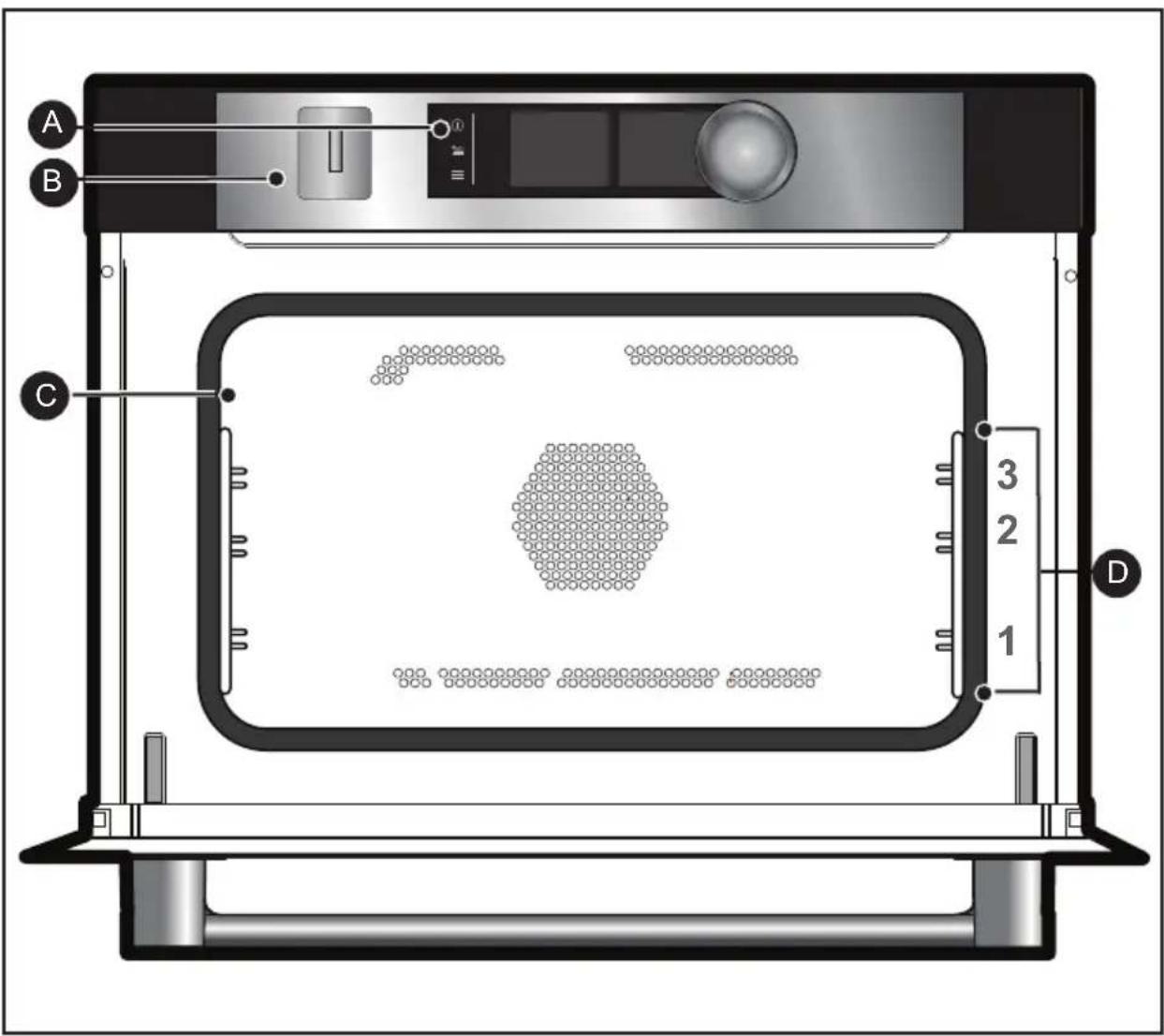
A Control panel
B Water tank refill tray
C Lamp
D Shelf runners (3 heights available)
• 1 DESCRIPTION OF THE OVEN
THE CONTROLS AND DISPLAY
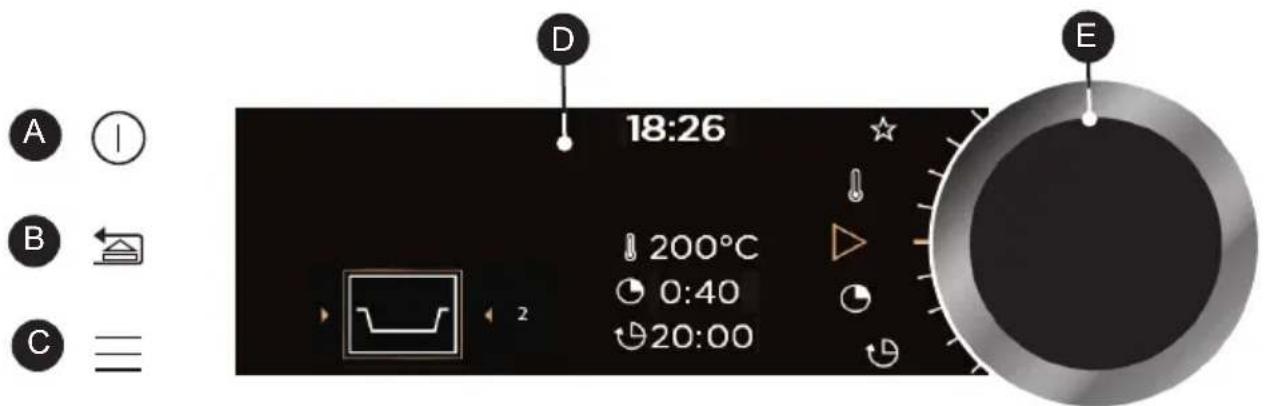
A Oven off touch control (press and hold)
B Go back touch control (press and release) and / or Tray open key (press and hold)
C MENU access touch control (cooking, settings, minute minder, cleaning)
D Displays
E Rotating knob with central button (cannot be removed):
- Choose programmes, increase or reduce values by turning it.
- Validate each action by pressing the centre.
DISPLAY SYMBOLS
Start a cooking programme
Stop a cooking programme
Temperature degrees
Cooking time
Cooking end time (delayed start function)
Steam
Saved cooking programmes
Keypad locked indicator
Door locked indicator during pyrolysis
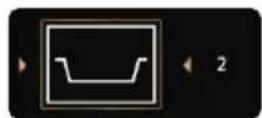
Recommended shelf height indicator for placing dishes
• 1 DESCRIPTION OF THE OVEN
ACCESSORIES (depending on model)
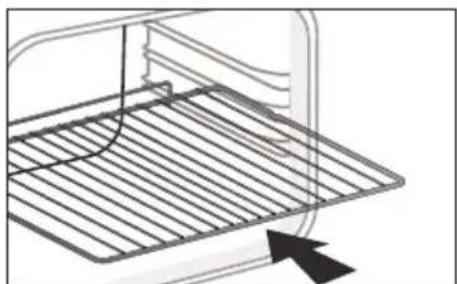
- Anti-tip safety rack
The rack can be used to support all dishes and moulds containing food for cooking or browning. It can be used for grilling (placed directly on top).
Position the anti-tip stop towards the back of the oven.
- Multi-purpose tray, drip tray 45 mm
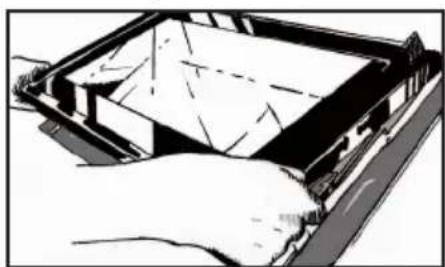
When inserted in the shelf runners under the grill with the handle towards the oven door, it collects juice and fat from grilling, and can be used half-filled with water as a double-boiler.
- Special food dish 100% STEAM
1 - Perforated stainless steel cooking dish to prevent contact between food and condensation water.
2 - Multi-purpose tray, drip tray 45 mm for the recovery of condensation water.
Position the perforated stainless steel dish over the multi-purpose tray and insert them on the level 1 shelf runner at the bottom.
natural_image
Line drawing of a kitchen appliance with a mesh grater and an arrow indicating direction (no text or symbols)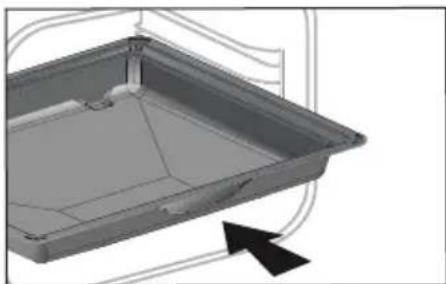
natural_image
3D CAD model of a rectangular tray or enclosure with internal structure and an arrow indicator (no text or symbols)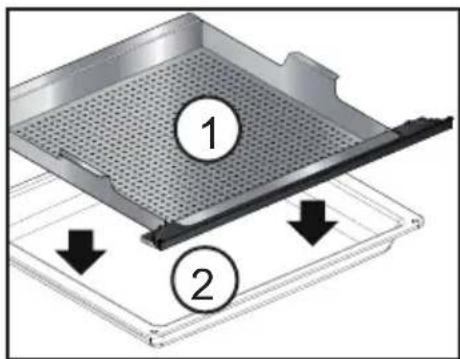
• 1 DESCRIPTION OF THE OVEN
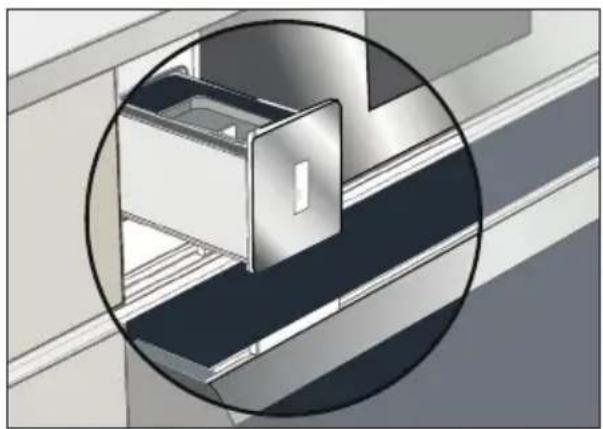
The refill tray
- Refilling the water tank
Before steam cooking at any time, empty the tank.
The tank volume is 1 litre.
At the start of combined steam cooking, the refill tray opens automatically.
Fill the tank.
Ensure that the tank is filled to its maximum level.
To do this, use the maximum level marker visible on one of the sides of the tray.
After doing this, manually push the tray shut.
Your oven is now ready for combination steam cooking.

Tip
When filling the tank, it takes a few seconds for the water level to settle. Readjust the level if necessary.

Caution
Do not use softened or demineralised water.

Caution:
Empty the tank every time before cooking. The automatic emptying cycle lasts approximately 3 min. Refer to the “Care - Emptying function” chapter.
natural_image
3D architectural rendering of a stainless steel cabinet or drawer with a circular inset showing the interior detail (no text or symbols)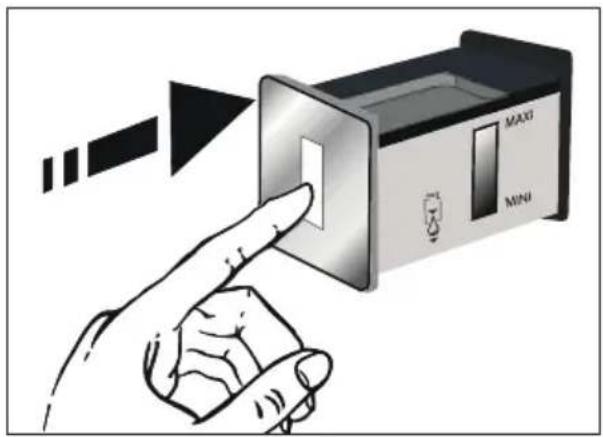
• 1 DESCRIPTION OF THE OVEN
INITIAL SETTINGS - USING THE OVEN FOR THE FIRST TIME
- Select the language
The first time you use your oven or after a power cut, turn the knob to select your language and press to confirm your choice.
\_ Set the time
The displays flashes 12:00.
Adjust the hours and minutes by turning the knob, then press to confirm.
Your oven displays the time.
Note: To modify the time again, refer to the "Settings" chapter.

Before using your oven for the first time, heat it at maximum temperature while empty for approximately 30 minutes. Make sure that the room is sufficiently ventilated.
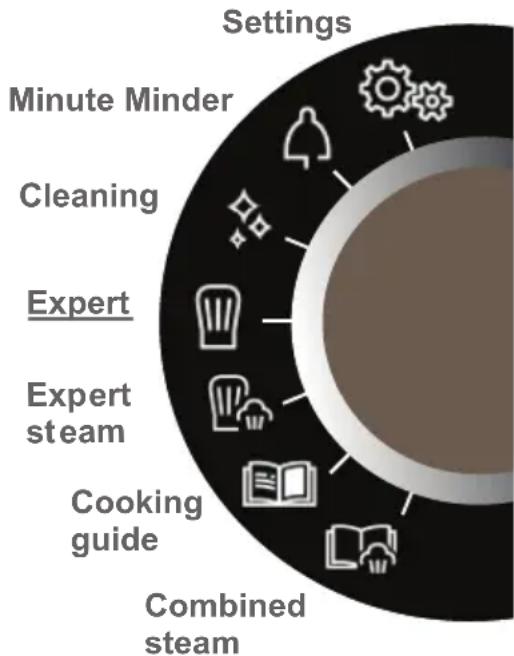
- Starting - General menu
Press the MENU key to access the general menu when the oven only displays the time.
You will access the first cooking mode: Expert mode.
Turn the knob to scroll through the different programmes:
flowchart
graph TD
    A["Combined steam"] --> B["Cooking guide"]
    B --> C["Expert steam"]
    C --> D["Cleaning"]
    D --> E["Minute Minder"]
    E --> F["Settings"]
To enter the selected mode, validate by pressing the knob.
To go back (except during cooking), press the back key and to stop the oven, press the stop key for a few seconds.
• 2COOKING
THE COOKING MODES
Select one of the following modes according to your experience in cooking your recipe:

Select "EXPERT" mode for a recipe for which you will select the type of cooking, the temperature and the cooking time yourself.

Select the "EXPERT STEAM" mode for a recipe for which you will select the type of cooking, the temperature, the percentage of steam and the cooking time.

Select the "COOKING GUIDE"mode for a recipe for which you need assistance from the oven. Simply choose the type of food, enter its weight, and the oven will select the most suitable parameters.

Select the "COOKING GUIDE + STEAM" mode for a traditional recipe associated
with steam or a 100% steam dish for which you need assistance from the oven. Simply select the type of food proposed and its weight and the oven will select the most suitable parameters.
• 2COOKING

"EXPERT" MODE
This mode lets you set the cooking parameters yourself: temperature, cooking type, cooking time.
When the oven is only displaying the time, press the MENU key to access the general menu then confirm the "Expert" mode.
- Turn the control knob until you get to the cooking function of your choose, then confirm:

Fan cooking

Combined heat

Traditional

Eco cooking

Grill ventilated

Bottom heat ventilated

Variable grill

Keep warm

Defrost

Bread

Drying
****************************************************************************************

Favourites (enables 3 cooking programmes to be saved)

"EXPERT STEAM" MODE
This cooking mode enables you to obtain more tender and gentler cooking that preserves the flavours. It prevents food from drying up and preserves crispiness (in combined mode).
This function lets you set all the cooking parameters including the percentage of steam.
- Select the "EXPERT STEAM" mode in the general menu and confirm.
Select one of the cooking functions offered among the list below and confirm.
- To cook with steam only:

Steam 100%
**********************************************************************
- To combine normal cooking with steam (combined mode):

Traditional steam

Grill ventilated + steam

Circulating heat + steam
• 2COOKING

natural_image
Two black rectangular icons with white stylized shapes resembling food containers or bushes, each marked with a number 1 and a second with a number 2 (no text or symbols beyond these numbers)(Expert and Expert Steam)
IMMEDIATE COOKING
Once you have selected and validated your cooking function, the oven will recommend one or two shelf heights.
- Place your dish in the oven at the recommended level.
- Press the control knob again to start cooking. The temperature starts to increase at once.
Note: Certain parameters may be modified (depending on the mode selected) before cooking starts (temperature, cooking time, percentage of steam and delayed start); see the following chapters.
CHANGING THE TEMPERATURE
Based on the type of cooking you already selected, the oven will recommend the ideal cooking temperature.
This can be adjusted as follows:
- Select the temperature symbol when confirm.
- Turn the control knob to change the temperature then confirm your choice.
COOKING TIME
You can enter the cooking time for your dish by selecting the cooking time symbol and confirming.
Enter the cooking time by turning the control knob then confirm.
Your oven has the "SMART ASSIST" function which, when programming a cooking time, will suggest a cooking time which can be modified depending on the selected cooking mode.
The time starts to count down as soon as the cooking temperature is reached.

STEAM PERCENTAGE
(Expert Steam only)
The oven suggests an ideal steam percentage.
To modify this, select the steam symbol and confirm.
Enter the new steam percentage by turning the knob (between 50 and 100% in steam mode and between 20 and 80% in combined mode) and confirm your selection.
• 2COOKING

natural_image
Two black square icons with white stylized shapes and gear symbols, no text or numbers present.(Expert and Expert Steam)
DELAYED START
When you set the cooking time, the end of cooking time automatically adjusts. You can change the end of cooking time if you want to delay the programme start.
-Select the cooking end symbol and confirm.
Once you have set the cooking end time, confirm twice.
Note: You may start cooking without selecting a duration or end time. In this case, when you feel that you have cooked your dish for long enough, stop cooking (see the "Stopping cooking in progress" chapter).
STOPPING COOKING IN PROGRESS
To stop a cooking programme in progress, press the control knob.
The oven displays a message: "Do you want to stop the cooking in progress?".
Confirm by selecting "I agree" then validate or select "I refuse" and validate to continue cooking.

FAVOURITES (Expert mode only)
- Memorise a cooking
The "Favourites" function lets you save 3 recipes in "Expert" mode that you make frequently.
In Expert mode, first of all select a cooking, its temperature and its time.
Then select the symbol by turning the control knob to memorise this cooking, then confirm.
The screen then suggests saving these parameters in a memory 1☆ 2☆ 3☆
. Choose one then confirm. Your cooking is then memorised.
Confirm again to start cooking.
NB: If the 3 memories are already used, any new memorisation will replace the previous one.
A delayed start cannot be programmed for memorisations.
- Use a memory that is already saved in the “Favourites” function
Go to the "Expert" menu and confirm. Scroll through the functions to the "Favourites" function by turning the control knob. Confirm.
- Select one of the memories already saved 1☆ 2☆ or 3☆ and press to confirm.
The oven starts.
• 2COOKING

EXPERT COOKING FUNCTIONS (depending on model)
Pre-heat your oven empty before cooking.
| Position | T°C recommended mini - maxi | Use | |
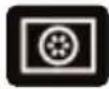 | Fan oven* | 190°C35°C - 250°C | Recommended for keeping white meat, fish and vegetables moist. |
 | Combined heat | 180°C35°C - 230°C | Recommended for meat, fish and vegetables. |
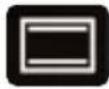 | Traditional | 200°C35°C - 275°C | Recommended for meat, fish and vegetables. |
 | ECO* | 190°C35°C - 275°C | This set ting saves energy whillemaintaining the quality of the cooking. In this setting, pre-heating is not required. |
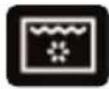 | Grill ventilated | 190°C100°C - 250°C | Roasts and poultry are juicy and crisp all over.Slide the drip tray on to the bottom shelf support.Recommended for all spit-roasted poultry or meat, for sealing and thoroughly cooking a leg or a rib of beef. To retain th moist texture of fish steaks. |
 | Bottom heat ventilated | 180°C75°C - 250°C | Recommended for meat, fish and vegetables. |
*Cooking mode as per standard EN 60350-1: 2016 to demonstrate compliance with requirements of the energy label of European regulation UE/65/2014.

Never place tin foil directly in contact with the oven floor as the build up of heat may damage the enamel.
• 2COOKING
| Position | T°C recommended mini - maxi | Use | |
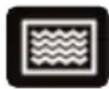 | Variable grill | 41 - 4 | Recommended f or grilling c utlets, sausages, toasting bread and prawns placed on the grill. Cooking is done by the upper element. The grill covers the entire shelf surface. |
 | Keep warm | 60°C35°C - 100°C | Recommended to keep dishes warm or warm plates; to raise dough for bread, brioche, kügelhopf, etc. (with mould on the bottom, not exceeding 40°C). |
 | Defrost | 35°C35°C - 75°C | Ideal for delicate dishes (fruit tarts, custard pies, etc.). Meat, rolls, etc. are defrosted at 50°C (meat should be placed under the grill with a dish underneath to catch the drips). |
 | Bread | 205°C35°C - 220°C | Recommended cooking sequence for bread making. Pre-heat, then place the ball of dough on a baking sheet on the 2nd shelf support. Do not forget to place a dish of water in the bottom to obtain a crisp, golden crust.A BREAD setting also exists in the STEAM cooking guide. |
 | Drying | 80°C35°C - 80°C | Sequence to dehydrate certain food such as fruits, vegetables, seeds, roots, seasoning plants and herbs. Refer to the specific drying table below. |

Advice on how to save energy
Avoid opening the door during cooking to avoid heat escaping from the oven.
• 2COOKING

DRYING FUNCTION (Expert mode only)
Drying is one of the oldest methods of preserving food. The aim is to remove all or some of the water in the food to preserve foodstuffs and prevent the development of microbes. Drying preserves the nutritional qualities of food (minerals, proteins and other vitamins). It allows food to be stored in optimal conditions thanks to their reduced size and makes food easy to use once rehydrated.
Cover the grill in parchment paper and distribute the cut food evenly on top. Use shelf level 1 (if you have several grill pans, put them on levels 1 and 3). Turn the food over several times during drying. The values provided in the table may vary depending on the type of food to dehydrate, its maturity, its thickness and its humidity rate.
Only use fresh food. Wash the food carefully, drain and wipe.
Guide table to dehydrate your food
| Fruits, vegetables and herbs | Temperature | Time in hours | Accessories |
| Fruits with seeds (in 3 mm slices, 200 g per grill pan) | 80°C | 5-9 | 1 or 2 grill pans |
| Fruits with stones (plums) | 80°C | 8-10 | 1 or 2 grill pans |
| Edible roots (carrots, parsnips), grated and blanched | 80°C | 5-8 | 1 or 2 grill pans |
| Sliced mushrooms | 60°C | 8 | 1 or 2 grill pans |
| Tomato, mango, orange, banana | 60°C | 8 | 1 or 2 grill pans |
| Sliced red beetroot | 60°C | 6 | 1 or 2 grill pans |
| Herbs | 60°C | 6 | 1 or 2 grill pans |
• 2COOKING

"COOKING GUIDE" MODE

"COOKING GUIDE + STEAM" MODE

COMBINED STEAM

STEAM 100% GUIDE
These two modes select for you the appropriate cooking parameters based on the food to be prepared. These are recipes with or without any st eam associated or with 100% steam.
IMMEDIATE COOKING
- Select the "COOKING GUIDE" or "COMBINED STEAM" modes when you are in the general menu then confirm.
The oven suggests several categories which contain a wide range of dishes (see detailed list below):
- Select the category, example "The poulterer", then confirm.
- Choose the specific dish to be prepared, for example "chicken", and confirm.
The weight (or size) must be entered for certain food.
- A weight is then suggested. Enter the weight and confirm; the oven will automatically calculate and display the cooking time and the shelf height.
- Place your dish in the oven and confirm.
For certain recipes the oven must be warmed up before you place your disk in it.
You may open your oven to baste your dish at any time during cooking.
- The oven beeps and turns off when the cooking time is finished; your screen then indicates that the dish is ready.
DELAYED START COOKING
If you wish, you can change the cooking end time by selecting the cooking end symbol and confirming.
Once you have set the cooking end time, confirm twice.
For recipes which require pre-heating, it is not possible to use the delayed start function.
• 2COOKING

LIST OF DISHES WITHOUT STEAM (COOKING GUIDE)

THE POULTERER
Chicken
Duck
Duck breast *

THE BUTCHER
Rare shoulder of lamb
Roast beef.
Roast pork
Veal rib *

THE PASTRY COOK
Fruit pie
Sponge cake
Cupcakes
Crème caramel
Cake
Yoghurt cake
Meringues
Yoghurt
Fruit crumble
Biscuits/cookies

THE FISHMONGER
Salmon
Trout
Bass
Fish terrine

THE CATERER
Lasagne
Pizza
Quiche

THE GREENGROCER
Potato gratin
Stuffed tomatoes
Jacket potatoes
* For these dishes, the oven must be warmed up before you place your disk in it.

The screen tells you not to insert your dish until the oven reached its temperature.
A beep sounds to let you know that warm-up is complete; the time starts counting down from this point.
Place your dish in the oven at the shelf level indicated.

THE BAKER
Brioche
Bread
Baguettes
• 2COOKING

LIST OF DISHES WITH STEAM ASSOCIATED (COMBINED STEAM)

THE POULTERER
Chicken
Duck breast *
Duck

THE BUTCHER
Lamb
Roast pork
Roast veal
Pork fillet
Veal fillet

THE FISHMONGER
Cooked fish
Fish terrine
Whole fish
Salmon casserole

THE GREENGROCER
Potatoes au gratin
Stuffed vegetables
Jacket potatoes

THE PASTRY COOK
Sponge cake
Flans / creams
Cake
Cupcakes
Pound cake
Apple cake
Nut cake
Coco flan

THE BAKER
Bread
Baguettes
Pre-cooked bread
Frozen dough
Regenerate yesterday's bread

THE CATERER
Lasagne
Clafoutis
Vegetable confit
Potatoes
Risotto
Fresh meals
Frozen meals

DEFROSTING
Meat
Fish
Bread-Cakes
* For these dishes, the oven must be warmed up before you place your disk in it.

The screen tells you not to insert your dish until the oven reached its temperature.
A beep sounds to let you know that warm-up is complete; the time starts counting down from this point.
Place your dish in the oven at the shelf level indicated.
• 2COOKING

LIST OF DISHES

indicates at which time you must
insert the special 100% steam
accessory. Inset it on the 1st level
shelf runnet at the bottom.
• 3 SETTINGS

SETTINGS FUNCTIONS
In the general menu, select the "SETTINGS" function by turning the control knob and confirm.
Different settings are proposed:
- time, language, sound, demo mode and lamp management.
Select the function you want by turning the control knob and then confirm.
Then set your parameters and confirm them.

Time
Modify the time; validate then modify the minutes and validate again.

Language
Choose your language and confirm.

Sound
Your oven emits sounds when you use the keys. To keep these sounds, select ON, otherwise select OFF to deactivate them and confirm.

DEMO mode
By default, the oven is configured in normal heating mode.
If it is activated in DEMO mode (ON position), the mode for presenting products in stores, your oven will not warm up.
To return it to normal mode, set it to OFF and confirm.

Lamp management
Two setting options are proposed:
Position ON, the light stays on throughout cooking (except in ECO mode).
Position AUTO, the oven light turns off after 90 seconds when cooking.
Choose your position and confirm.

Press the back ↻ menu

keys once to reactivate the light during cooking.
- 3 SETTINGS

LOCKING THE CONTROLS Child safety lock
Press the back and menu keys at the same time until the padlock symbol displays on the screen.
Control locking is accessible during cooking or when the oven has stopped.
NOTE: only the stop key remains active.
To unlock the keypad, press the back and menu keys at the same time until the padlock symbol disappears from the screen.
• 4 MINUTE MINDER

MINUTE MINDER FUNCTION
This function can only be used when the oven is off.
In the general menu, select the "MINUTE MINDER" function by turning the control knob and confirm.
00:00 is displayed on the screen.
Set the minute minder by turning the knob and then press to confirm. The timer starts.
Once the time has lapsed, there is a sound signal. To stop it, press any key.
Note: You can modify or cancel the minute minder at any time.
To cancel, return to the minute minder menu and set to 00:00.
If you press the control knob during the countdown you will stop the minute minder.
• 5 CARE
CLEANING AND MAINTENANCE:
EXTERNAL SURFACE
Use a window washing product applied to a soft cloth. Do not use abrasive creams or scouring sponges.
REMOVING THE SHELF RUNNERS
Side liners with shelf runners:
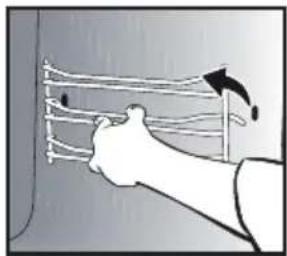
Lift the front part of the shelf runner upwards. Press the entire shelf runner and release the front hook from its housing. Then, gently pull the whole of the shelf runner towards you to release the rear hooks from their housing. Pull out the two shelf supports.
natural_image
Illustration of a hand holding a curved object with arrows indicating direction (no text or symbols)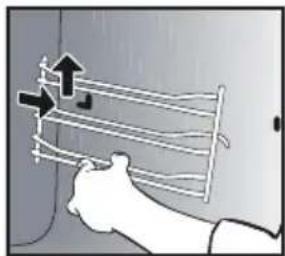
natural_image
Illustration of a hand holding a coiled cable or wire, with arrows indicating direction (no text or symbols)CLEANING THE INNER GLASS
To clean the inner glass, remove the door. Before disassembling the glass, remove any excess grease on the insdie glass with a soft cloth and washing up liquid.
Warning
Do not use scouring products, abrasive sponges or metal scrapers to clean the glass oven door as this could scratch the surface and cause the glass to shatter.
REMOVING AND PUTTING BACK THE DOOR
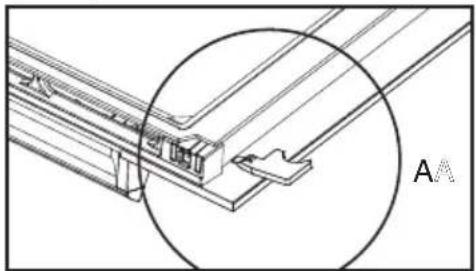
Open the door fully and block it with one of the plastic wedges provided in your appliance's plastic pouch.
natural_image
Illustration of a hand using a tool to cut or install a component, with a close-up view of a smartphone (no text or symbols visible)To remove the frame and glass assembly, proceed as follows: Insert the two other red stops in the slots designed for this.

natural_image
Technical line drawing of a structural joint or bracket with a magnified circular detail (no text or symbols)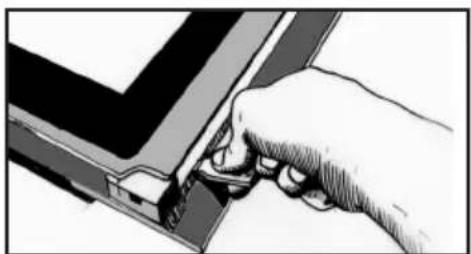
natural_image
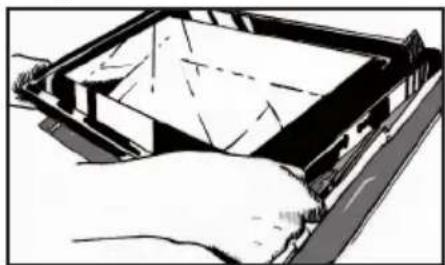
Hand inserting a component into a mechanical component (no text or symbols visible)Lever the assembly to detach the frame and the glass.
natural_image
Diagram of a hand holding a device with a partially open panel, showing internal components and wiring (no text or symbols)• 5 CARE
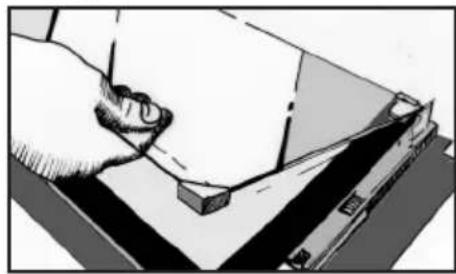
Remove the frame and the glass.
Remove all the door's interior windows by rotating them.
natural_image
Illustration of a hand pressing down on a flat surface with a ruler, no text or symbols presentThis assembly comprises 2 glass windows, the 1st of which has 2 rubber stops on the 2 front corners.
Clean the glass using a soft sponge and washing-up liquid.
Do not soak the glass panel in water.
Do not use abrasive creams or scouring sponges. Rinse with clean water and dry off with a lint-free cloth.
After cleaning, replace the 1st glass pane in the door.
Reposition the 2 black rubber stops on the front corners of the 2nd pane, making sure the following is indicated on the glass:
Top left: L
Top right: R
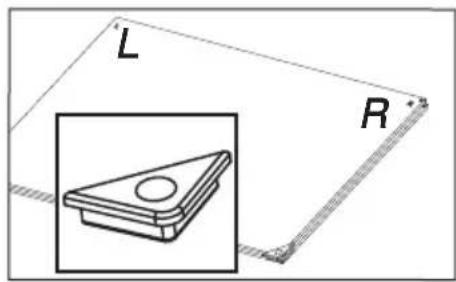
Then replace the door and the 2nd pane, positioning it onto the first.
Place the external glass frame assembly back in the door.
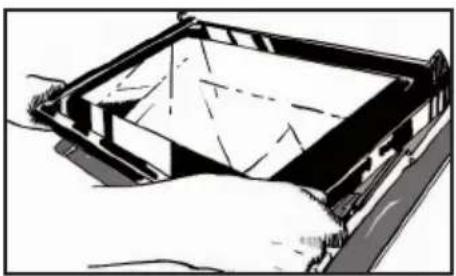
natural_image
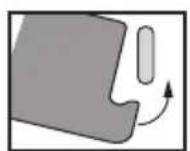
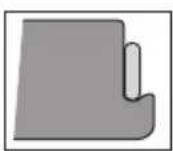
Illustration of a hand holding a rectangular device with internal components (no text or symbols visible)Make sure you correctly slot the frame under the spigot next to the hinge.

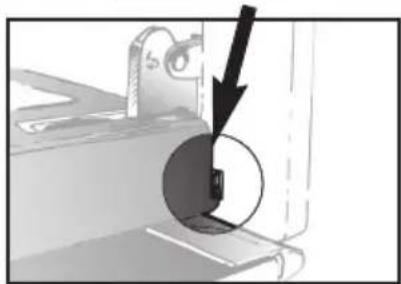
natural_image
Mechanical assembly diagram showing a component with a highlighted section and arrow (no text or symbols)Attach the frame by tightening it with the door. Do not press on the frame alone.
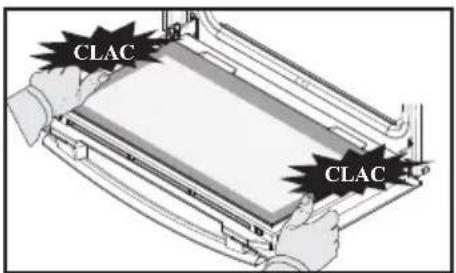
Your appliance is now ready for use again.
• 5 _CARE

REPLACING THE LIGHT BULB

Warning
Make sure the appliance is disconnected from the power before replacing the bulb in order to avoid the risk of electric shock. Carry out the operation when the appliance has cooled.
Bulb specification:
25 W, 220-240 V\~, 300°C, G9.
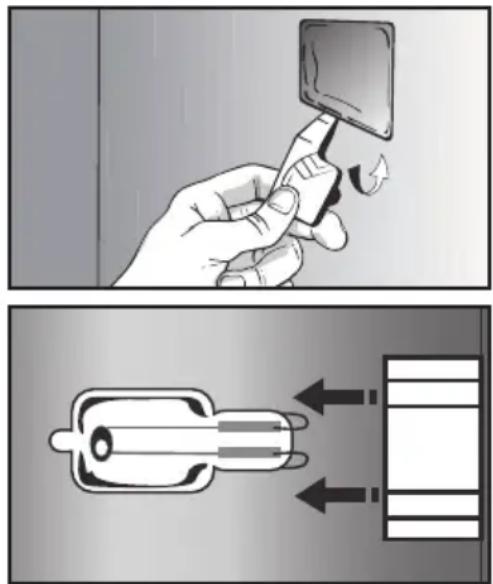
You can replace the bulb yourself. First disassemble the left-hand side shelf support.
The bulb is accessible inside the oven.
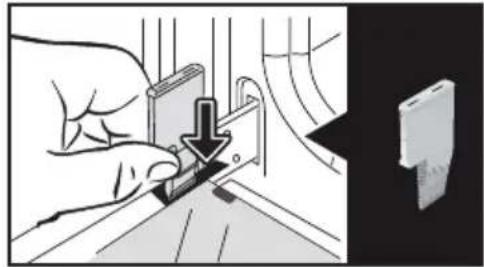
Use the plastic stop as a lever to remove the glass.
Change the bulb (use a rubber glove to facilitate its removal) then reattach the glass.
Plug your oven back in.

"CLEANING" FUNCTION (the cavity)
Remove the accessories and supports from the oven before beginning pyrolysis cleaning. Before starting a pyrolysis cleaning cycle, make sure that any accessories that are not pyrolysis safe have been removed from the oven (sliding rails, baking trays, chrome-plated grills, and so on) as well as any cookware.
PYROLYSIS CLEANING
This oven is equipped with a pyrolysis cleaning function:
Pyrolysis is a cycle during which the oven cavity is heated to a very high temperature in order to eliminate soiling from splattering and spills.
Before starting pyrolysis cleaning, remove any large overspills, if any.
Remove the excess grease on the door using a damp sponge.
As a safety measure, cleaning only occurs after the door locks automatically; it is impossible to unlock the door.
• 5 _CARE
PROGRAMMING A PYROLYSIS CLEANING CYCLE
Two pyrolysis cycles are available. The durations are pre-selected and cannot be modified:

Pyro ECO: in 1h30
for cleaning to save energy.

Turbo Pyro: in 2:00
for more in-depth cleaning of the inside of the oven.
SELF CLEANING WITH DELAYED START
Follow the instructions described in the previous section.
- Select the end time symbol (delayed start) and confirm.
- Set the pyrolysis end time you want with the control knob and confirm twice.
After these steps, the oven switches to standby and the start of pyrolysis is delayed so that it finishes at the programmed time.
When the pyrolysis is complete, switch your oven off by pressing the ⓚkey.
IMMEDIATE CLEANING
- Select the "CLEANING" function when you are in the general menu then confirm.
- Select the most suitable self cleaning cycle, for example Turbo Pyro, and confirm.
The pyrolysis cycle begins. The time starts to count down immediately it is set.
During pyrolysis, the symbol overlays in the programmer to indicate that the door is locked.
At the end of the pyrolysis cycle, 0:00 flashes.
A cooling phase occurs after each pyrolysis and your oven remains unavailable during this time.

When the oven is cool, use a lamp cloth to remove the white ashes. The oven is clean again and ready for further cooking operations.
• 5 _CARE
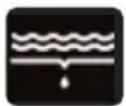
EMPTYING FUNCTION (water tank)

Empty the tank every time before cooking.
Emptying may also be carried out when not cooking.
- To do so, select the "CLEANING" function when you are in the general menu then confirm.
- Select the "Emptying" cycle and confirm. The tray opens.
- Select one of the 2 emptying modes, SPEED or AUTO (see detail below) and proceed in the same way as an automatic emptying cycle once finished cooking.
Automatic emptying after cooking:
Every time you finish cooking with your combination steam oven, you will be asked if you wish to empty the tank.
You may choose not to empty the tank by selected “I refuse”, otherwise select “I accept” and confirm.
Select a SPEED or AUTO emptying cycle and confirm.
The tray will open automatically to be emptied.

SPEED emptying:
Only if the user wants to use the combination steam oven again immediately.
Emptying time: approximately 20 seconds.

AUTO emptying:
This fully empties the boiler and the tank to avoid stagnant water.
Emptying time: approximately 2 to 3 minutes.
Place a sufficiently large container (minimum 1 litre) under the tray in order to receive the water.
Confirm by pressing the knob to start emptying.
The emptying time displays on the screen.
Once the emptying finished, the screen will indicate 0 m 0 s. Close the tray manually.
• 5 _CARE
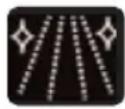
DESCALING FUNCTION (steam boiler)
Descaling is a cleaning cycle which eliminates limescale from the boiler.
You must regularly descale the boiler. When the oven suggests “descaling recommended” you may decide not to do it by selecting “I refuse” and confirm. You will be able to cook 5 more times before the “combination steam” functions are no longer effective. However, if the message “descaling compulsory” appears, you must descale the boiler and select “I accept” and confirm.

Caution:
When the display indicates
"Descaling compulsory", you must imperatively descale the boiler.
To do so, select the "CLEANING" function when you are in the general menu then confirm.
- Select the “Descale” cycle and confirm.
The tray opens automatically.
Proceed step by step.
PHASE 1: EMPTYING
Place a sufficiently large container (minimum 1 litre) under the tray in order to receive the water and confirm.
- The “Emptying” cycle starts and lasts for 3 min 30 s.
PHASE 2: CLEANING
- Pour 110 ml of pure white vinegar in the tank.
- Close the tray manually. The “Cleaning” cycle starts and lasts for 30 min. at the end of the cycle the tray opens automatically.
PHASE 3: RINSING
Fill the tank with water to the MAX level.
- Place a container underneath the tray and confirm.
- The “Rinsing” cycle starts and lasts for 3 min 30 s.
PHASE 4: EMPTYING
A second rinsing cycle is required; refill the water tank up to the MAX level.
- Place a container underneath the tray and confirm.
- The “Emptying” cycle starts and lasts for 3 min 30 s.
At the end of the cycle, the descaling is complete.
A beep sounds. Close the tray manually. Your oven is now ready for use again.
• 6 ANOMALIES AND SOLUTIONS
- "Auto Stop" displays. This function stops heating the oven if you forget to switch it off. Turn your oven to STOP.
- Default code starting with "F". Your oven has detected a problem. Stop the oven for 30 minutes. If the fault is still there, cut off the power supply for at least one minute. If the fault persists, contact the Customer Service Department.
- The oven is not heating. Check that the oven is correctly connected and that your installation's fuse is not out of service. Check that the oven is not set to "DEMO" mode (see settings menu).
- The oven light is not working. Replace your installation's bulb or fuse. Check that the oven is correctly connected.
- The cooling fan continues to operate after the oven stops. This is normal. It can work for up to one hour after cooking to cool down the oven. If it continues beyond this, contact the Customer Service Department.
- The pyrolysis cleaning cycle does not begin. Verify that the door is locked. Call the Customer Services Department if the problem persists.
- The “door locking” symbol flashes in the display. Door locking fault. Contact the Customer Services Department.
- There is water on the floor of the oven. - The boiler is scaled. Follow the DESCALING procedure. If the fault persists, call the After-Sales Service.
• 7 AFTER-SALES SERVICE
INTERVENTIONS
Any repairs to your appliance must be made by a qualified professional accredited to work on the brand. When calling, please provide the full references of your appliance (commercial reference, service reference, serial number), so that we can handle your call better. This information appears on the manufacturer's nameplate on the equipment.
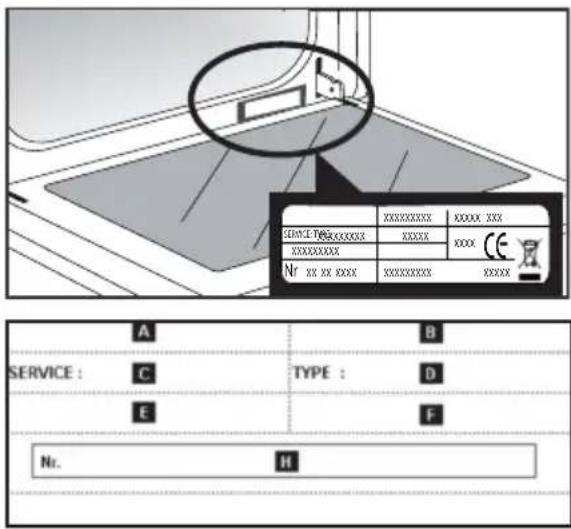
B: Commercial reference
C: Service reference
H: Serial number
NOTE:
- With a view to constantly improving our products, we reserve the right to make changes to their technical, functional or aesthetic characteristics in line with technological progress.
• Make a note here of the references on your appliance, so that you can readily find them in future.
natural_image
Empty white rectangle with a thin gray border (no text or symbols)FUNCTIONAL SUITABILITY TESTS IN ACCORDANCE
WITH EN 60350:
| Test | Cooking sequence | T°C | Shelf position | TimeObservations | |
| Cookies (8.4.1) | Convection | 165°C | 2nd | 18/20 min | Pastry tray |
| Tradition | 200°C | 2nd | 20/23 min | Lissium pastry tray | |
| Convection | 165°C | 3rd /1st | 22/25 min | Preheated oven: -Pastry tray -Enamel plate | |
| Small Pastries (8.4.2) | Convection | 165°C | 2nd | 22/25 min | Pastry tray |
| Convection | 160°C | 3rd /1st | 22 min | Preheated oven: -Pastry tray -Enamel plate | |
| Savoy sponge (8.5.1) | Convection | 170°C | 1st | 35/40 min | Preheated oven, mould on the grid + 5 min in switched off oven without preheating |
| Tradition | 175°C | 1st | 45 min | 2 levels N.A | |
| Apple tart (8.5.2) | Combined | 180°C | 1st | 50/55 min | 20 cm mould on the grid |
| Convection | 180°C | 3rd /1st | 50/55 min | Preheated oven: -Enamel plate on 1st level | |
| Surface grill (9.1) | High grill P4 2nd | 2/3 min | Preheat 5 minutes Bread on grid with the door closed | ||
ES
ESTIMADO/A
CLIENTE/A:
natural_image
Diagram of a kitchen appliance with a mesh grater and an arrow indicating direction (no text or symbols)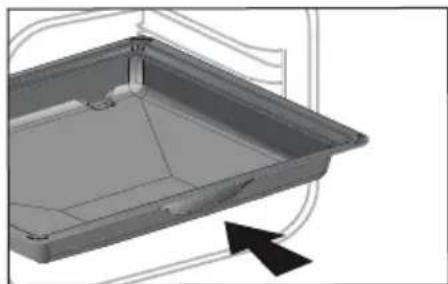
natural_image
3D CAD model of a rectangular tray or container with internal structure and an arrow indicator (no text or symbols)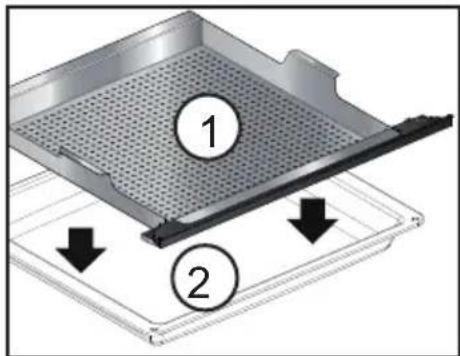
natural_image
3D illustration of a stainless steel door opening into a storage cabinet (no text or symbols)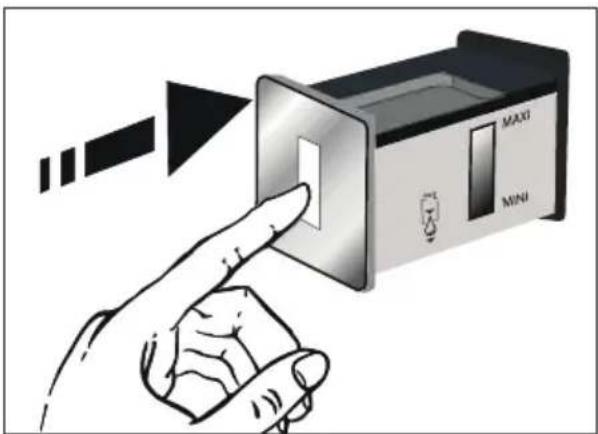
natural_image
Two black rectangular icons with white stylized shapes, no text or symbols presentnatural_image
Two black square icons with white stylized shapes and circular symbols (no text or numbers)natural_image
Illustration of a hand holding a wire with arrows indicating motion (no text or symbols)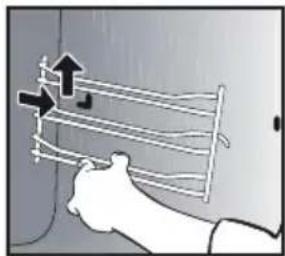
natural_image
Illustration of a hand holding a flexible hose with arrows indicating direction (no text or symbols)natural_image
Illustration of a hand using a tool to adjust or install a component, with no visible text or symbols.natural_image
Technical line drawing of a structural joint or bracket assembly, showing internal components and a circular annotation labeled 'A' (no text or symbols beyond label)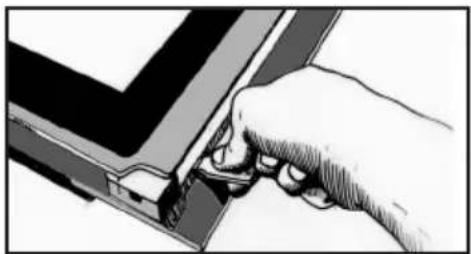
natural_image
Hand holding a tool interacting with a mechanical component (no visible text or symbols)natural_image
Illustration of hands installing or adjusting a device panel (no text or symbols visible)• 5 MANTENIMIENTO
natural_image
Illustration of a hand pressing down on a mechanical component (no text or symbols visible)natural_image
Illustration of a hand holding a rectangular device with internal components (no text or symbols visible)natural_image
Mechanical assembly diagram showing a component with a black arrow pointing to a circular feature (no text or symbols)natural_image
Diagram of a kitchen appliance with a mesh grater and an arrow indicating direction (no text or symbols)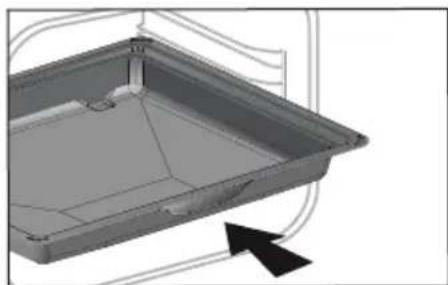
natural_image
3D CAD model of a rectangular tray or container with internal structure and an arrow indicator (no text or symbols)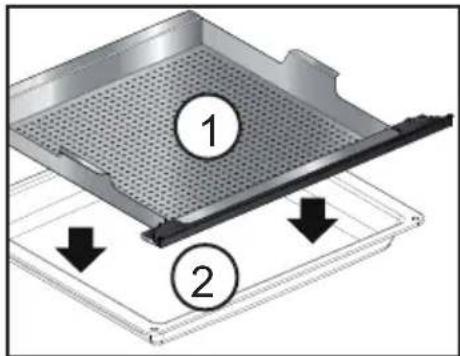
• 1 VOORSTELLING VAN DE OVEN
DE VULLADE
De reservoirinhoud is 1 liter.
natural_image
3D illustration of a stainless steel door opening into a storage cabinet (no text or symbols)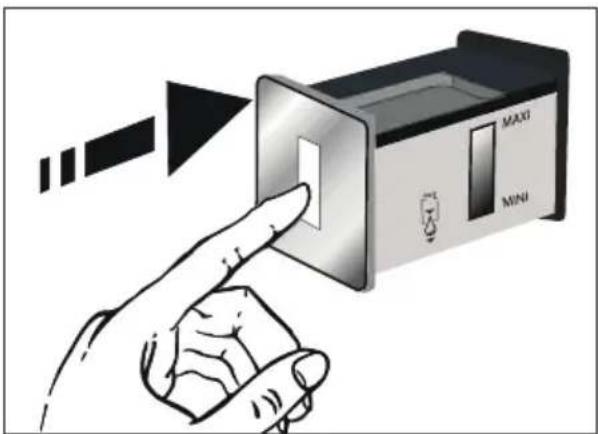

Opgelet
"STOOM EXPERT" MODUS
natural_image
Two black rectangular icons with white stylized shapes and circular symbols, no text or numbers present.(Expert en Stoomexpert)
ONMIDDELLIJK BAKKEN
natural_image
Two black square icons with white stylized shapes and gear symbols, no text or numbers present.(Expert en Stoomexpert)
BAKKEN MET UITGESTELDE START
De oven schakelt in.
• 2BAKKEN

MODUS "KOOKGIDS + STOOM"

GECOMBINEERD STOOM

GIDS STOOM 100%
natural_image
Two-panel illustration showing a person using a tool to lift or lift a curved surface, with arrows indicating motion direction (no text or symbols)BINNENKANT VAN DE RUITEN
natural_image
Illustration of a hand using a tool to cut or mark a component, with a magnified view of a device (no text or symbols present)natural_image
Technical line drawing of a structural joint or bracket with a circular annotation labeled 'A' (no text or symbols beyond label)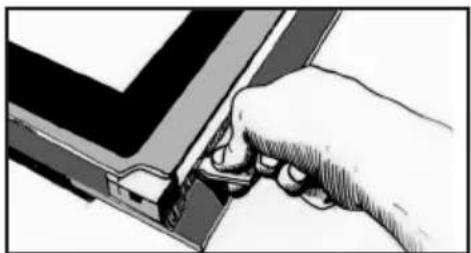
natural_image
Hand inserting a component into a device (no text or symbols visible)natural_image
Diagram of a hand holding a device with a partially open panel, showing internal components and wiring (no text or symbols)• 5 ONDERHOUD
natural_image
Illustration of a hand pressing down on a flat surface with a ruler, no text or symbols presentnatural_image
Illustration of a hand holding a tray with a lid, showing internal components (no text or symbols)natural_image
Mechanical assembly diagram showing a component with a black arrow pointing to a circular feature (no text or symbols present)natural_image
Line drawing of a kitchen appliance with a mesh grater and an arrow indicating direction (no text or symbols)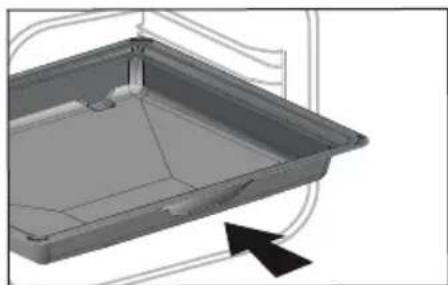
natural_image
3D CAD model of a rectangular tray or container with internal structure, shown without any text or symbols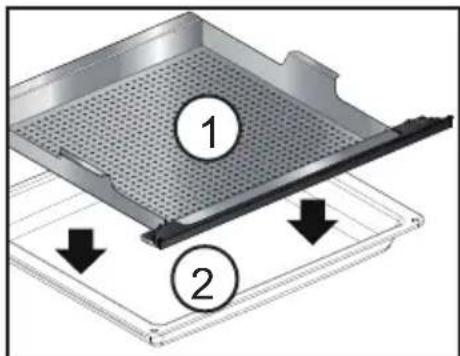
natural_image
3D architectural rendering of a double door opening into a window (no text or symbols visible)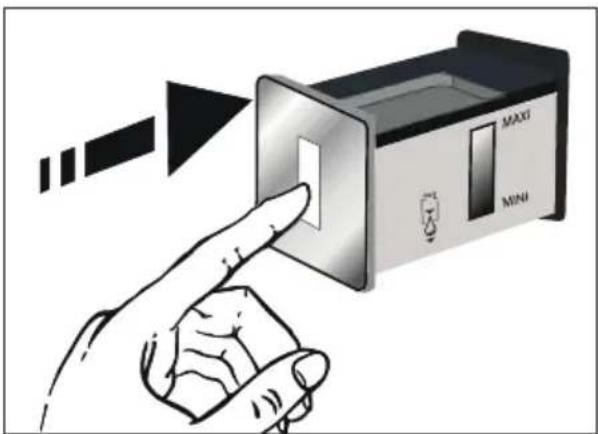
natural_image
Two black rectangular icons with white stylized shapes, no text or symbols present(Expert e Expert Vapor)
COZEDURA IMEDIATA
natural_image
Two black square icons with white stylized shapes and circular symbols (no text or numbers)(Expert e Expert Vapor)
COZEDURA COM INÍCIO DIFERIDO
natural_image
Illustration of a hand using a tool to adjust or install a component, with no visible text or symbols.natural_image
Technical line drawing of a structural joint or bracket with a circular annotation highlighting a specific section (no text or symbols present)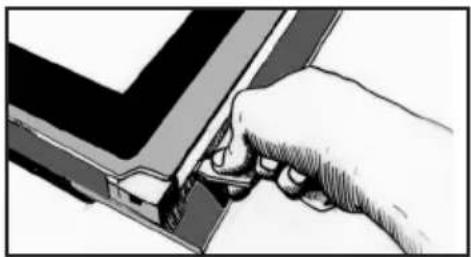
natural_image
Hand holding a tool interacting with a mechanical component (no visible text or symbols)Alavanque o conjunto antes de desencaixar o painel e o vidro.