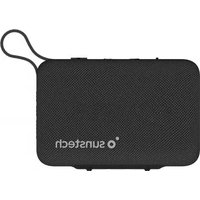
Go Beat - Loudspeaker Sunstech - Free user manual and instructions
Find the device manual for free Go Beat Sunstech in PDF.


| Product Type | Portable Bluetooth Speaker |
| Brand | Sunstech |
| Model | Go Beat (GoBeat) |
| Dimensions | 14 x 77 x 55 mm |
| Weight | 0.29 kg |
| Battery | Li-ion 2200 mAh, 3.7 V |
| Battery Life | Up to 7 h (100% volume), up to 20 h (70% volume) |
| Charging Time | 3 to 4 hours |
| Charging Port | USB Type-C (5 V / 1 A) |
| Output Power | 3 W RMS (8 W peak) |
| Loudspeaker | 53 x 53 mm |
| Frequency Response | 20 Hz - 20 kHz |
| Bluetooth Version | 5.0 |
| Bluetooth Range | ≤ 10 m |
| Playback Modes | Bluetooth, USB, AUX, hands-free calls |
| Supported Audio Formats | MP3, WAV, WMA |
| Water Resistance | IPX5 (splash-proof) |
| Material | ABS and fabric with rubber coating |
| TWS Function | Yes, wireless stereo pairing of two speakers |
| Microphone | Built-in omnidirectional |
| Voice Assistant | Compatible (via Bluetooth) |
| Cleaning | Soft, slightly damp cloth, no abrasive products |
| Safety | Do not immerse, avoid temperatures > 40 °C, do not block ventilation |
| Spare Parts and Repairability | Battery not replaceable by user, repair by certified technician |
Frequently Asked Questions - Go Beat Sunstech
User questions about Go Beat Sunstech
0 question about this device. Answer the ones you know or ask your own.
Ask a new question about this device
Download the instructions for your Loudspeaker in PDF format for free! Find your manual Go Beat - Sunstech and take your electronic device back in hand. On this page are published all the documents necessary for the use of your device. Go Beat by Sunstech.
USER MANUAL Go Beat Sunstech
General Functions 1
Technical Specifications 2
Bluetooth Pairing Instructions 3
TWS (True Wireless Stereo) Mode 3
Troubleshooting 3
WARNING 4
ENGLISH
UserGuide
GOBEAT
Warning: If the battery is undervoltage, please fully charge it within 48 hours.
Ifthespeakerhastobebeftunusedforalongtime,pleaseletthebattery
chargecompletely,otherwiseitwillcausedamagetothebattery!
In the process of playing, keep the unit out of light temperature environments.
high magnetic fields and high frequencies. If the system fails to work, turn off the power source or pullout the USB/SDcard/MMCcard, then reinsert it and it will resume play.
Product Information
- ProductName:BluetoothSpeaker
Model:GoBeat
BluetoothPairingName:GoBeat

General Functions
Power Button/Multifunction
PowerOn/Off: Pressandholdfor5seconds.
- ForcedRestantPressandholdfor8seconds(inanysituation).
ModeSwitchPressbrieflytoswitchbetweenBluetoth(BAux) AUX\~ USB.
TWS(TueWirelessStereo)Mode:Doublepressstoenterorexitstereowirelessmode.
Music&VolumeControls
RightPanel(Volume+Next)xt)
- IncreaseVolume Pressbriefly.
NextSong: Pressandholdfor1.5seconds.
LeftPanel(Mobjme/Previous)
DecreaseVolume:Pressbriefly.
PreviousSongPressandholdfor1.5seconds.
CallandVoiceAssistantFunctions
Play/PhaseMusic:Pressbriefly.
AnswerCallPressbrieflyduringanincomingcall.
EndCallPressbrieflyduringacall.
ENGLISH
UserGuide
GOBEAT
RejectCallPressandholdfor1.5secondsduringanincom ingcall.
- ActivateVoiceAssistant:UnderBluetoothmode,pressandholdfor1.5 seconds.
- RedialLastNumber.UnderBluetoothmode,presstwice.
- ClearBluetoothPairingInformationUnderBluetoothmode,pressfive times.
- DisconnectBluetoothUnderBluetoothmode,pressfourtimes.
Technical Specifications
| Specification | Details |
| Supported MODES | Bluetooth,USB,AUX,Calls |
| Chipset | JL6965E |
| BluetoothVersion | 6.0 |
| BluetoothProtocols | HSP,HFP,A2DP,AVRCP |
| Supported Music Formats | MP3,WAV,WMA |
| BluetoothRange | ≤10meters |
| TWS(TueWirelessStereo) | ≤10meters |
| Battery | 3.7V,2200mAh |
| OutputPower | 8W*1(8W,4Ω) |
| ChargingTime | 3-4hours |
| PlaybackTime | Upto7hours(100%volume)/20hours(70%) |
| DriverSize | 53mmx53mm |
| Frequency Response | 20Hz-20kHz |
| Microphone | Omnidirectional |
| WaterResistance | IPX5(Splash-proof) |
| Material | ABS+Fabric |
| ExteriorFinish | RubberPaint |
| ProductSize | 114x77x55mm |
| ProductWeight | 0.29kg |
| ChargingPort | USBVTypeC |
| ChargingVoltage(Current) | 5V/1A |
| Channels | DualChannel,StereoSound |
ENGLISH
UserGuide
GOBEAT

BluetoothPainingInstructions
1.Poweronthespeaker(pressandholdthepowerbuttonfor5seconds).
2.Onyourmobiledevice,enableBluetoothandsearchfor"

- Selectittopair.
4.Onceconnected,thespeakerwillemitaconfirmationsound.

TWS(TrueWirelessStereo)Mode
TopairtwoGoBeatspeakers:
1.Poweronbothspeakers.
2. Onespeaker, doublepress the power button to activate TWS.
3.Waitforthetwospeakerstopairwitheachother.
4. Then, pair with your mobile device as usual.
Usage Tips
- Donotsubmergethespeaker,althoughissplash-proof(IPX5).
Alwaysusea5V/1Achargertoavoiddamagingthebattery.
- Foroptimalsoundexperience,keepthedevicewithin10meters withoutobstacles.

Troubleshooting
| Problem | Suggested Solution |
| Doesnotpoweron | Chargethedeviceforatleast30minutes. |
| Cannotconnectvia Bluetooth | CleartheBluetoothhistory(press5times)andre-pair. |
| Soundcutsout | Checkthedistanceorinterferencefromothere devices. |
| TWSmodedoesn’t work | Ensurebothspeakersarepoweredandnoactive Bluetoothconnections. |
WARNING
| Pb | Correctdisposal of this Product (Waste Electrical & Electronic Equipment)(WEEE) Yourproductisdesigned and manufactured with high quality materials and components which can be recycled and reused. This symbol means that electrical and electronic equipment, at theirendof-lifeshould be disposed separately from yourhousehold waste. Please dispose of this equipment at your local communitywaste collection/recyclingcentre. Inthe European Union there are parate collection systems for used electrical and electronic products. Please help to conserve the environment well live in! |
| X | DONOTplace objectsontopof the device, as objects may scratch the device. |
| X | DONOTexposedevicetodirtydustyenvironments. |
| X | DONOTplacethedevicemonunevenorunstable surface. |
| X | DONOTinsertanyforeignobjectsintothed device. |
| X | DONOTexposedevicetostrongmagneticorelectrical field. |
| X | DONOTexposedevicetodirectsunlightasitcan damagethe device. Keep it away from heatsources. |
| X | DONOTstoreyourdeviceintemperatureshighherthan 40°C(104°F). The internaloperatingtemperatureforthis device is from 20°C(68°F) to 60°C(140°F). |
UserGuide
GOBEAT
| DONOTusethedevicewiththerain. | |
| PleasecheckwithyourLocalAuthorityorretailerforproper disposalofelectronicproducts. | |
| Thedeviceandadaptormayproductsomeheatdunng normaloperationofcharging.Toppreventdiscomfort for injuryfromheatexposure,DO NOTleavethedevicemon yourlap. | |
| POWERINPUTRATING:Refertotheratinglabelonthe deviceandbesurethatthepoweradaptorcomplieswith therating.Onlyuseaccessoriespecifiedbythe manufacturer. | |
| Cleanthedevicewithasoftcloth.Ifneeded,dampenthe clothslightlybeforecleaning.Neveruseabrasivesor cleaningsolutions. | |
| Alwayspoweroffthedeviceinstallorremoveexternal deviceshatdonotsupporthotplug. | |
| Disconnectthedevicefromanelectricaloutletandpower offbeforecleaningthedevice. | |
| DONOTdisassemblethedevice.Onlycertifiedservice techniciansshouldperformrepair. | |
| Thedevicehasaperturestodisperseheat.DONOTblock thedeviceventilation,thedevicemaybecomehotand malfunctionasaresult. | |
| Riskofexplosionifbatteryreplacedbyanincorrecttype. Disposeofusedbatteriesaccordinglytheinstruction. | |
| PLUGGABLEEQUIPMENT:thesocket-outletshallbe installednearthequipmentandshallbeasilyaccessible. |
UserGuide
GOBEAT
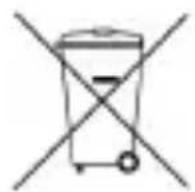
EuropeanUnion:DisposallInformation.
Thissymbolmeansthataccordngtolocallawsand regulationsyourproductand/oritsbatteryshallbe disposedofseparatelyfromhouseholdwaste.Whenthis productreachesitsendoflife,takeittoacollectionpoint designatedbylocalauthorities.Theseparatecollectionand recyclingofyourproductand/oritsbatteryatthetimeof disposalwillhelpconservenaturalresourcesandensure thatitisrecycledinamannerthatp roctshumanhealth andtheenvironment.
MADEINCHINA

GOBEAT
AltavozPortátil
GUIADELUSUARIO
GUIADELUSUARIO GOBEAT
CONTENIDO
For you. For everyone.
Brand : Sunstech
Model : Go Beat
Category : Loudspeaker