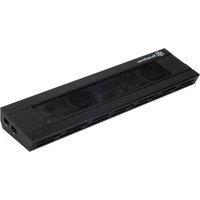
SILVERSTONE Noble Breeze NB02 - Computer cooling system

Noble Breeze NB02 - Computer cooling system SILVERSTONE - Free user manual and instructions

Find the device manual for free Noble Breeze NB02 SILVERSTONE in PDF.

📄 24 pages English EN Download 💬 AI Question
Notice SILVERSTONE Noble Breeze NB02 - page 1
View the manual : Français FR English EN 中文 ZH
Pick your language and provide your email: we'll send you a specifically translated version.

User questions about Noble Breeze NB02 SILVERSTONE

0 question about this device. Answer the ones you know or ask your own.

Ask a new question about this device

The email remains private: it is only used to notify you if someone responds to your question.

No questions yet. Be the first to ask one.

Download the instructions for your Computer cooling system in PDF format for free! Find your manual Noble Breeze NB02 - SILVERSTONE and take your electronic device back in hand. On this page are published all the documents necessary for the use of your device. Noble Breeze NB02 by SILVERSTONE.

USER MANUAL Noble Breeze NB02 SILVERSTONE

natural_image Exterior view of a Sunza Sports device with visible fan grille and ventilation slots (no text or symbols)

NOBLE BREEZE SERIES

NBO2B

THE SYNONYM OF STYLE, COOLING AND CONNECTIVITY

This is a multifunctional product so please familiarize with the content of this manual before usage. If you have questions or comments at any time during the use of this product, please feel free to contact us at : support@silverstonetek.com

Product exterior guide

SILVERSTONE Noble Breeze NB02 - Product exterior guide - 1

text_image 1 2 3 4 5 6 7 8 9

SILVERSTONE Noble Breeze NB02 - Product exterior guide - 2

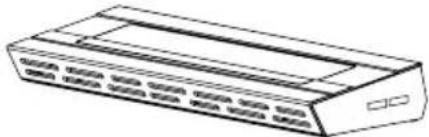
natural_image Technical line drawing of a rectangular frame with internal compartments and a labeled component (no text or symbols)
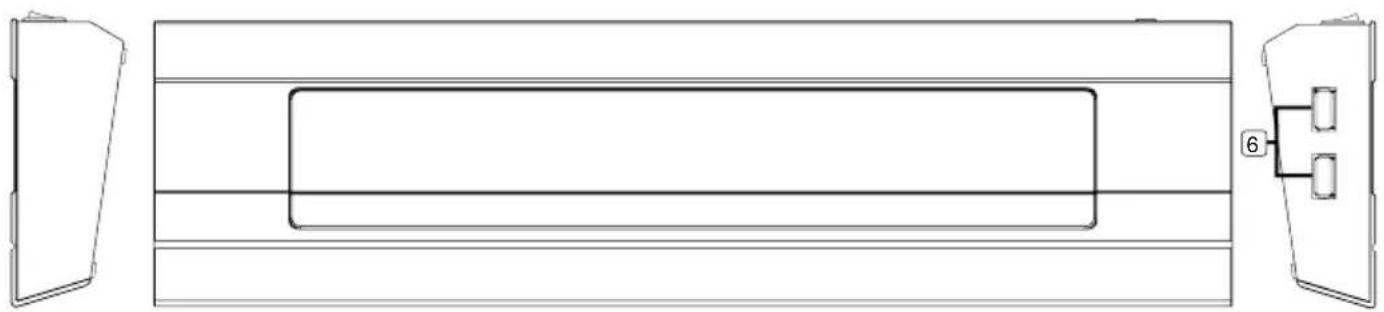
  1. Fan power switch
  2. USB connector (Type A)
  3. Power indicator light 7. Microphone connector
  4. Power cord connector 8. Sound input connector
  5. USB connector (Type B) 9. sound output connector
  6. Ethernet connector (RJ-45)

Installation steps

  1. Remove the NB02 from the packaging and place it on a flat surface of your choice
  2. Please refer to the diagram and connect to all cables you wish to utilize
  3. Connect the power adapter to an available power socket
  4. Connect the included USB cable from the NB02 to your notebook computer

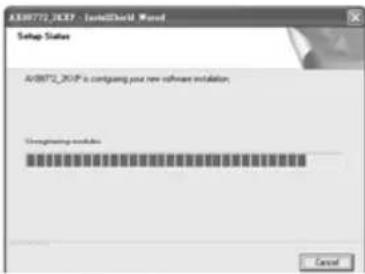
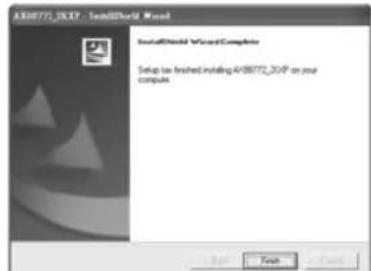
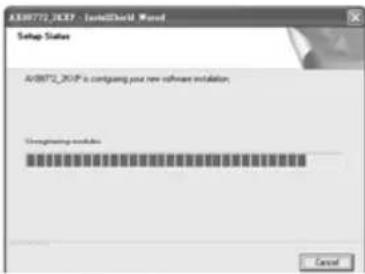
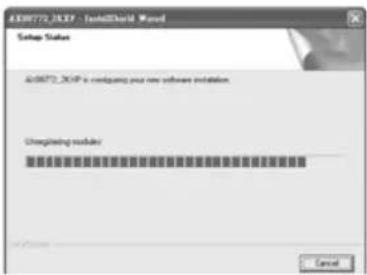
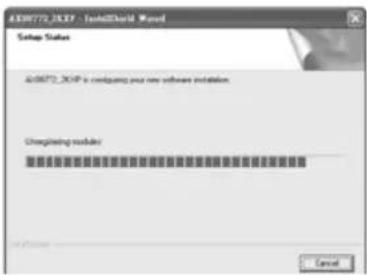
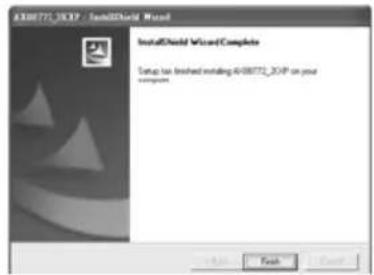
5.1 Connecting to Windows PC

A]. Windows will automatically detect a new hardware (please close all other applications at this time)

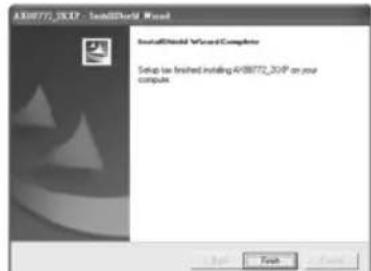
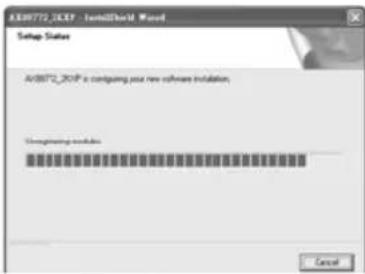
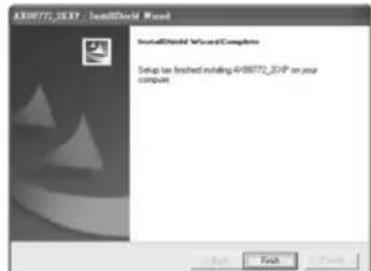
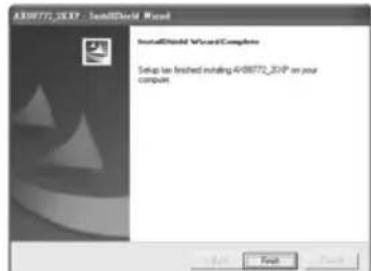
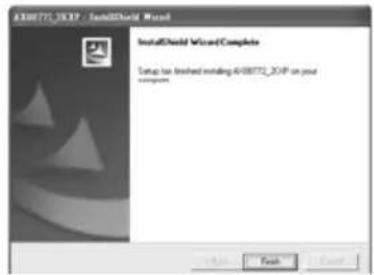
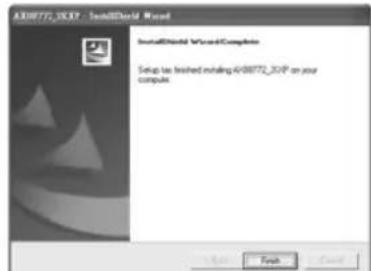
B]. When your computer's operating system has found new hardware, insert the included driver CD to start installation. When installation completes, click finish.
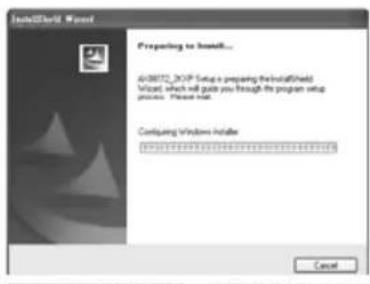
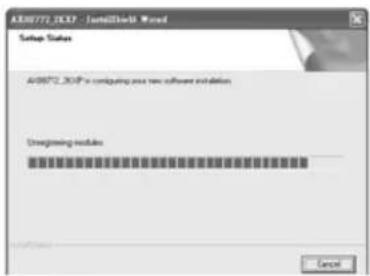
SILVERSTONE Noble Breeze NB02 - Connecting to Windows PC - 1

text_image Start/Start Wizard Preparing to install... A08072_XOP Setup a preparing the installed Wizard, which will guide you through the program setup process. Please mail Configing Windows Installer ****** Cancel

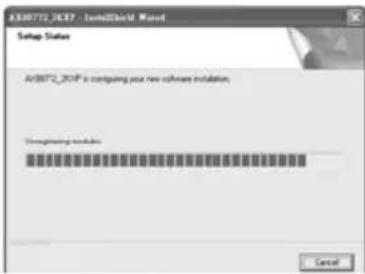
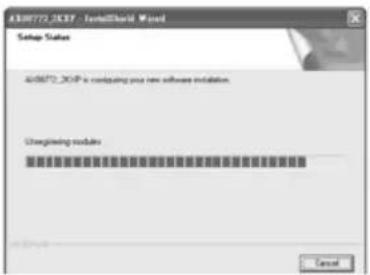
SILVERSTONE Noble Breeze NB02 - Connecting to Windows PC - 2

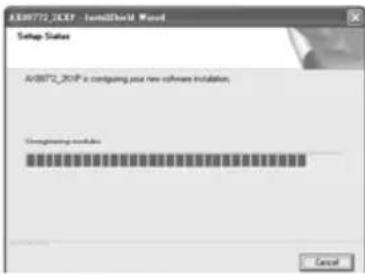
text_image AX80772.XCP - InstallShield Wizard Setup Status AX80772.XCP is configuring your new software installation Unconfigining modules Cancel

SILVERSTONE Noble Breeze NB02 - Connecting to Windows PC - 3

text_image A#88772_DXP - InstallShield Wizard InstallShield Wizard Complete Setup has installed installing A#88772_DXP on your component.

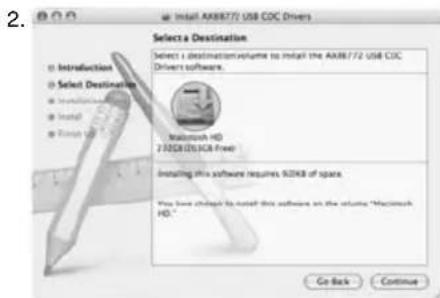
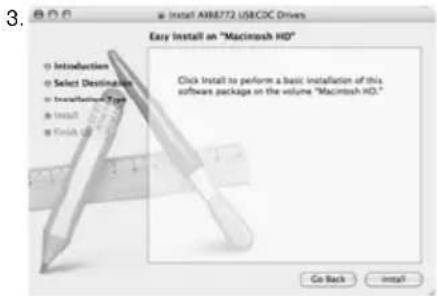
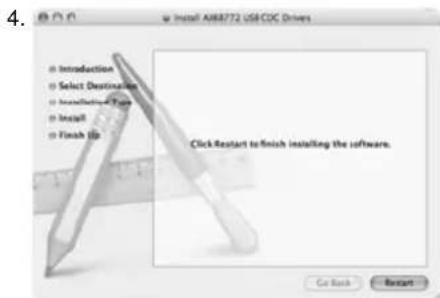
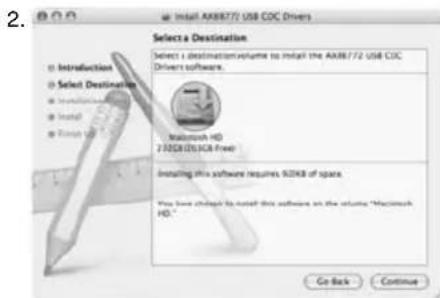
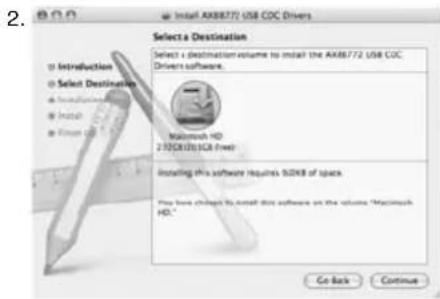
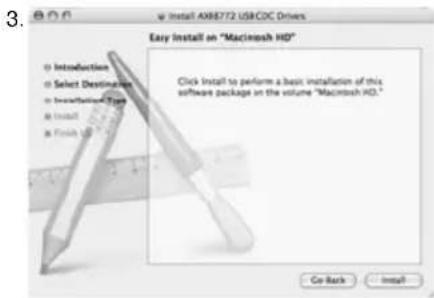
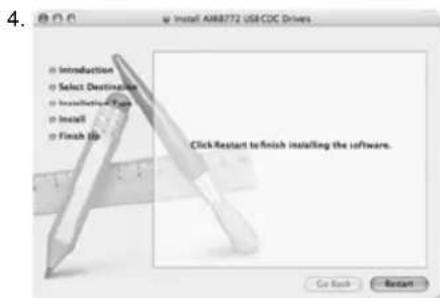
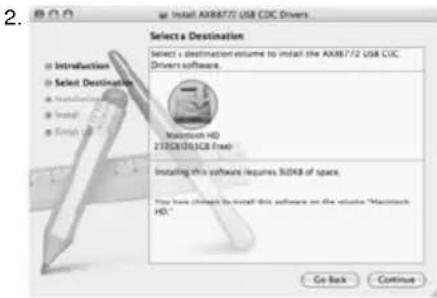
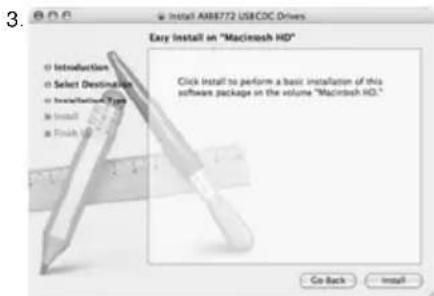
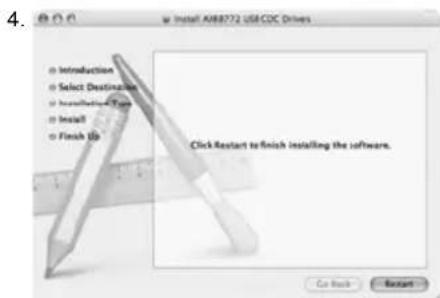
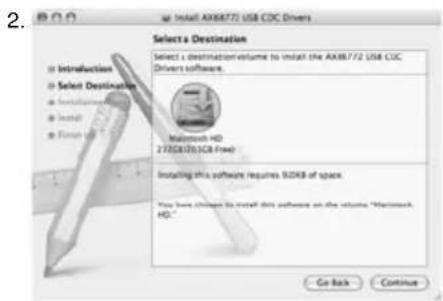
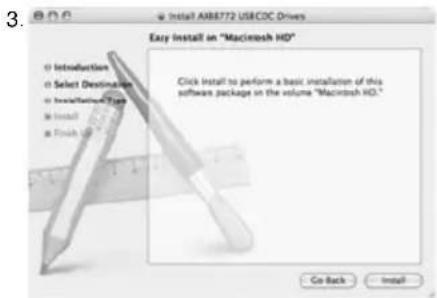
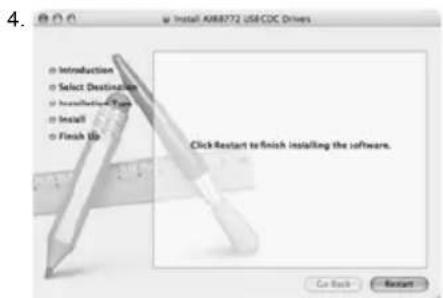
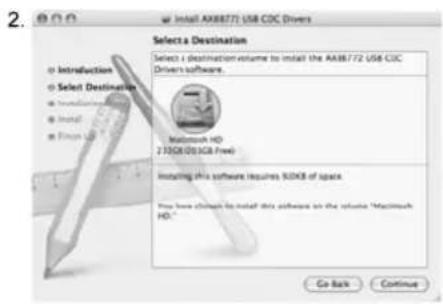
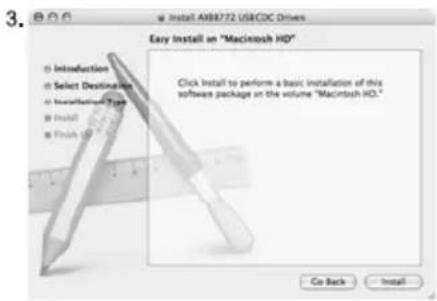
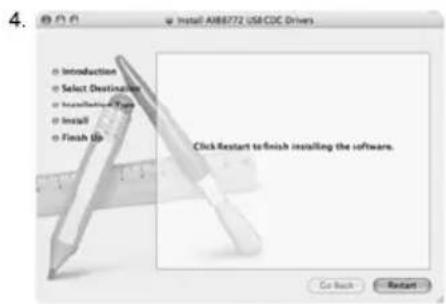
5.2 Connecting to Macintosh computers (for Mac OS X v10.3 and v10.4 only)

A]. Insert the included driver CD into the optical drive, wait until the CD icon appears on the desktop, then double click on it to browse the content on the CD.
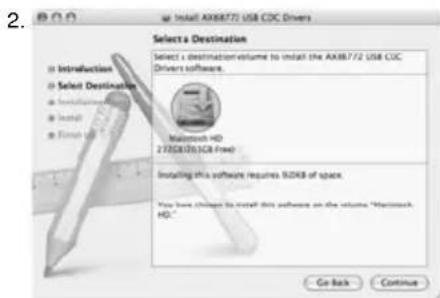
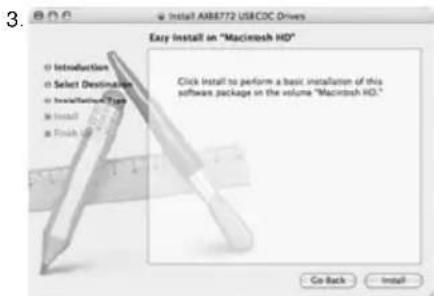
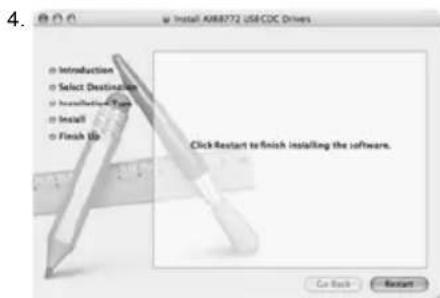
B]. Open the folder appropriate for the OS X version that you have to execute driver installation. Mac OS X 10.3 users need to install driver manually, please refer to the Readme.txt file found in the file folder for more info. Mac OS X 10.4 users only need to double click on the installer file to initiate driver installation.
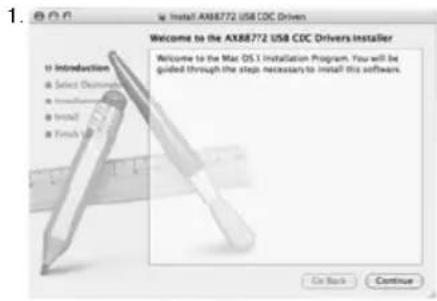
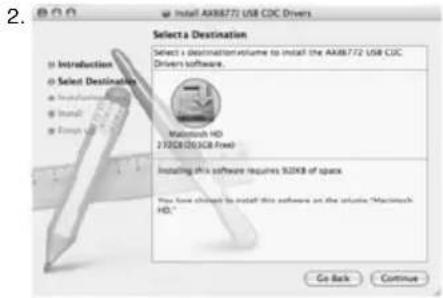
SILVERSTONE Noble Breeze NB02 - Connecting to Macintosh computers (for Mac OS X v10.3 and v10.4 only) - 1

text_image 1. 600 Install AX88772 USB CDC Driven Welcome to the AX88772 USB CDC Drivers Installer Welcome to the Mac OS.1 Installation Program. You will be guided through the step necessary to install this software. To Introduction Select Options Install Install Finish On Back Continue

SILVERSTONE Noble Breeze NB02 - Connecting to Macintosh computers (for Mac OS X v10.3 and v10.4 only) - 2

text_image 2. Select a Destination Select a destination volume to install the AX88772 USB CJC Drivers software. Macintosh HD 2703GB(DC) (3GB free) Installing this software requires 52KB of space. You have chosen to install this software on the website "Macintosh HD." Go Back Continue

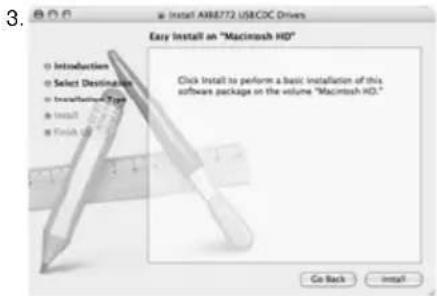
SILVERSTONE Noble Breeze NB02 - Connecting to Macintosh computers (for Mac OS X v10.3 and v10.4 only) - 3

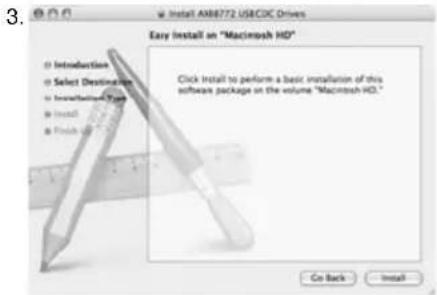
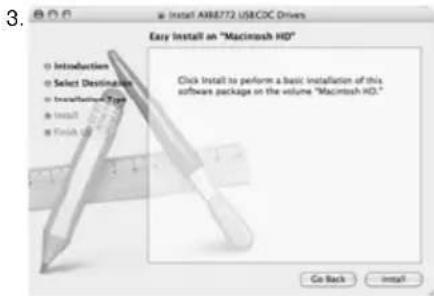
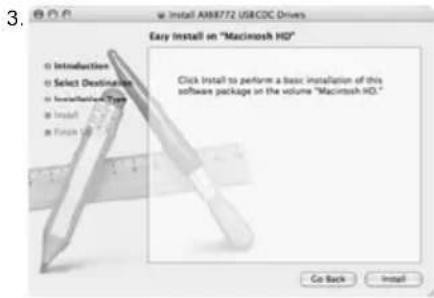
text_image 3. Easy Install on "Macintosh HD" Click Install to perform a basic installation of this software package on the volume "Macintosh HD." Co Back Install...

SILVERSTONE Noble Breeze NB02 - Connecting to Macintosh computers (for Mac OS X v10.3 and v10.4 only) - 4

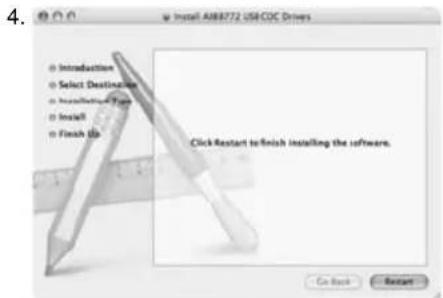
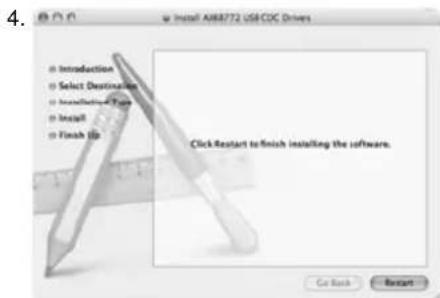
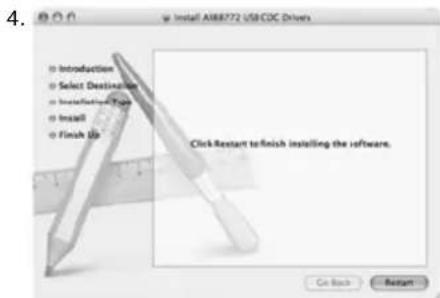
text_image Install ABB8772 USB CDC Drivers ● Introduction ● Select Destination ● Install ● Finish Up Click Restart to finish installing the software. Go Back Reset
natural_image Technical line drawing of a rectangular frame with internal compartments and a labeled component (no text or symbols)
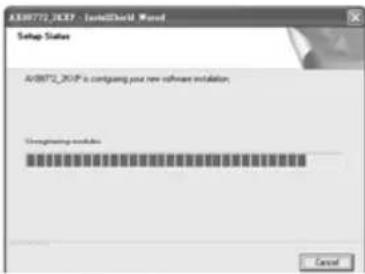
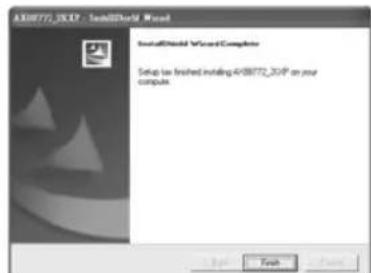
text_image InitialCloud Wizard Preparing to install... 40872_2GP Setup is preparing the initialCloud Wizard, which will guide you through the program setup process. Please mail. Configing Windows Installer ****** Cancel

SILVERSTONE Noble Breeze NB02 - Connecting to Macintosh computers (for Mac OS X v10.3 and v10.4 only) - 5

text_image AV8072_V30P is requiring your new software installation. Overprinting module Cancel

SILVERSTONE Noble Breeze NB02 - Connecting to Macintosh computers (for Mac OS X v10.3 and v10.4 only) - 6

text_image ATTGTTT-30VP - InstallShield Wizard InstallShield Wizard Complete Setup is finished installing ATTGTTT-30VP on your compute.
text_image 1. 606 Install AX88772 USB CDC Driven Welcome to the AX88772 USB CDC Drivers Installer Welcome to the Mac OS I Installation Program. You will be guided through the step necessary to install this software Introduction Select Downloads Install Install Finish Us On Back Continue

SILVERSTONE Noble Breeze NB02 - Connecting to Macintosh computers (for Mac OS X v10.3 and v10.4 only) - 7

text_image 2. Select a Destination Select a destination volume to install the Microsoft/72 USB COC Drivers software. Microsoft HD 27028 (25.3GB Free) Installing this software requires 92KB of space. You have changed to install this software on the volume "Microsoft HD." Go Back Continue

SILVERSTONE Noble Breeze NB02 - Connecting to Macintosh computers (for Mac OS X v10.3 and v10.4 only) - 8

text_image 3. Install AIR8772 USBCDC Drivers Easy Install an "Macintosh HD" ○ Introduction ○ Select Destination ○ Installable Type ● Install ● Finish Up Click Install to perform a basic installation of this software package on the volume "Macintosh HD." Go Back Install...

SILVERSTONE Noble Breeze NB02 - Connecting to Macintosh computers (for Mac OS X v10.3 and v10.4 only) - 9

text_image 4. • Introduction • Select Destination • Install • Finish Up Click Restart to finish installing the software. Go Back Reset
natural_image Technical line drawing of a rectangular frame with internal compartments and a labeled component (no text or symbols)
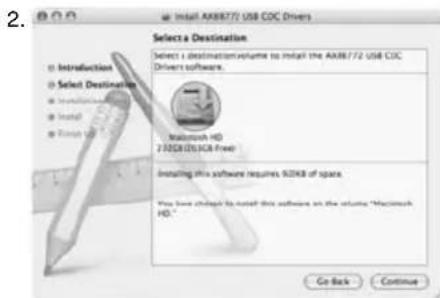
text_image InitialCloud Wizard Preparing to install... 40872_2GP Setup is preparing the initialCloud Wizard, which will guide you through the program setup process. Please mail. Configing Windows Installer ****** Cancel

SILVERSTONE Noble Breeze NB02 - Connecting to Macintosh computers (for Mac OS X v10.3 and v10.4 only) - 10

text_image AV8072_V30P is requiring your new software installation. Overprinting module Cancel

SILVERSTONE Noble Breeze NB02 - Connecting to Macintosh computers (for Mac OS X v10.3 and v10.4 only) - 11

text_image AFB772_30P - InstallWord World InstallWord World Complete Setup is installed installing AFB772_30P on your comput
text_image 1. 606 Install AX88772 USB CDC Driven Welcome to the AX88772 USB CDC Drivers Installer Welcome to the Mac OS I Installation Program. You will be guided through the step necessary to install this software Introduction Select Downloads Install Install Finish Us On Back Continue

SILVERSTONE Noble Breeze NB02 - Connecting to Macintosh computers (for Mac OS X v10.3 and v10.4 only) - 12

text_image 2. Select a Destination Select a destination volume to install the Microsoft/72 USB COC Drivers software. Microsoft HD 27028 (25.3GB Free) Installing this software requires 92KB of space. You have changed to install this software on the volume "Microsoft HD." Go Back Continue

SILVERSTONE Noble Breeze NB02 - Connecting to Macintosh computers (for Mac OS X v10.3 and v10.4 only) - 13

text_image 3. Install AIR8772 USBCDC Drivers Easy Install an "Macintosh HD" ○ Introduction ○ Select Destination ○ Installable Type ● Install ● Finish Up Click Install to perform a basic installation of this software package on the volume "Macintosh HD." Go Back Install...

SILVERSTONE Noble Breeze NB02 - Connecting to Macintosh computers (for Mac OS X v10.3 and v10.4 only) - 14

text_image 4. ● Introduction ● Select Destination ● Install ● Finish Up Click Restart to finish installing the software. Go Back Restart
natural_image Technical line drawing of a rectangular frame with internal rectangular cutout and a small inset diagram labeled '6' (no text or symbols beyond basic lines)
text_image InitialCloud Wizard Preparing to install... 40872_2GP Setup is preparing the initialCloud Wizard, which will guide you through the program setup process. Please mail. Configing Windows Installer ****** Cancel

SILVERSTONE Noble Breeze NB02 - Connecting to Macintosh computers (for Mac OS X v10.3 and v10.4 only) - 15

text_image AV8072_V30P - ZoetCloud Wizard Setup Status AV8072_V30P is continuing your new software installation. Overprinting module: Cancel

SILVERSTONE Noble Breeze NB02 - Connecting to Macintosh computers (for Mac OS X v10.3 and v10.4 only) - 16

text_image AFB772_30P - InstallWord World InstallWord World Complete Setup is installed installing AFB772_30P on your comput
text_image 1. 606 Install AX88772 USB CDC Driven Welcome to the AX88772 USB CDC Drivers Installer Welcome to the Mac OS I Installation Program. You will be guided through the step necessary to install this software Introduction Select Document Install Install Finish Use On Back Continue

SILVERSTONE Noble Breeze NB02 - Connecting to Macintosh computers (for Mac OS X v10.3 and v10.4 only) - 17

text_image 2. Select a Destination Select a destination volume to install the Microsoft/72 USB COC Drivers software. Microsoft HD 27028 (25.3GB Free) Installing this software requires 92KB of space. You have changed to install this software on the volume "Microsoft HD." Go Back Continue

SILVERSTONE Noble Breeze NB02 - Connecting to Macintosh computers (for Mac OS X v10.3 and v10.4 only) - 18

text_image 3. Easy Install on "Macintosh HD" Click Install to perform a basic installation of this software package on the volume "Macintosh HD." Go Back Install...

SILVERSTONE Noble Breeze NB02 - Connecting to Macintosh computers (for Mac OS X v10.3 and v10.4 only) - 19

text_image 4. ● Introduction ● Select Destination ● Install ● Finish Up Click Restart to finish installing the software. Go Back Restart
natural_image Technical line drawing of a rectangular frame with internal rectangular cutout and a small inset diagram labeled '6' (no text or symbols)
text_image Intel/Intel Wizard Preparing to install... 400072.3GP Setup is preparing the Intel/Intel Wizard, which will guide you through the program setup process. Please visit. Configing Windows Installer ****** Cancel

SILVERSTONE Noble Breeze NB02 - Connecting to Macintosh computers (for Mac OS X v10.3 and v10.4 only) - 20

text_image AV8072_JCP9 is requiring your new software installation. Configuring module: Cancel

SILVERSTONE Noble Breeze NB02 - Connecting to Macintosh computers (for Mac OS X v10.3 and v10.4 only) - 21

text_image AutoCAD Visual Complete Setup is installed installing A3DIP_3DIP on your computer
text_image 1. BOP Install AX88772 USB CDC Driver Welcome to the AX88772 USB CDC Drivers Installer Introduction Select Dissemination Install Install Finish Use Welcome to the Mac OS I Installation Program. You will be guided through the step necessary to install this software. On Back Continue

SILVERSTONE Noble Breeze NB02 - Connecting to Macintosh computers (for Mac OS X v10.3 and v10.4 only) - 22

text_image 2. Install AX88772 USB COC Drivers Select a Destination Select a destination volume to install the AX88772 USB COC Drivers software. Macintosh HD 2.02KB/35 (GB free) Installing this software requires 50KB of space Play here changed to install this software on the volume "Macintosh HD." Go Back Continue

SILVERSTONE Noble Breeze NB02 - Connecting to Macintosh computers (for Mac OS X v10.3 and v10.4 only) - 23

text_image 3. Easy Install on "Macintosh HD" Click Install to perform a basic installation of this software package at the volume "Macintosh HD." Co-Back Install...

SILVERSTONE Noble Breeze NB02 - Connecting to Macintosh computers (for Mac OS X v10.3 and v10.4 only) - 24

text_image Install AIR8772 USB CDC Drivers Introduction Select Destination Inselectrical Type Install Finish Up Click Restart to finish installing the software. Go Back Restart
natural_image Technical line drawing of a rectangular frame with internal rectangular cutout and a separate side view showing a labeled component (no text or symbols present)
text_image InitialCloud Wizard Preparing to install... 400072.2GP Setup is preparing the initialCloud Wizard, which will guide you through the program setup process. Please mail. Configing Windows Installer ****** Cancel

SILVERSTONE Noble Breeze NB02 - Connecting to Macintosh computers (for Mac OS X v10.3 and v10.4 only) - 25

text_image AV8072_JCP7 - InstallDirect Wizard Setup Status AV8072_JCP7 is requiring your new software installation. Controlling module: Cancel

SILVERSTONE Noble Breeze NB02 - Connecting to Macintosh computers (for Mac OS X v10.3 and v10.4 only) - 26

text_image Add/Remove Visual Complet Setup is limited noting Add/Remove_SGP on your comput.
text_image 1. 8.0.6 Install AX88772 USB CDC Driven Welcome to the AX88772 USB CDC Drivers Installer Welcome to the Mac OS X Installation Program. You will be guided through the steps necessary to install this software. Introduction Select Devices Install Install Finish Use Go Back Continue

SILVERSTONE Noble Breeze NB02 - Connecting to Macintosh computers (for Mac OS X v10.3 and v10.4 only) - 27

text_image 2. Install AX8R772 USB C3C Drivers Select a Destination Select a destination volume to install the AX8R772 USB C3C Drivers software. Maximush HD 250KB (261GB Free) Installing this software requires 90KB of spcs You have changes to install this software on the volume "Microsoft HD." Go Back Continue

SILVERSTONE Noble Breeze NB02 - Connecting to Macintosh computers (for Mac OS X v10.3 and v10.4 only) - 28

text_image 3. Install A988772 USBCDC Drivers Easy Install on "Macintosh HD" Click Install to perform a basic installation of this software package on the volume "Macintosh HD." Go Back Install

SILVERSTONE Noble Breeze NB02 - Connecting to Macintosh computers (for Mac OS X v10.3 and v10.4 only) - 29

text_image Install A888772 USB CDC Drivers Introduction Select Destination Installable Type Install Finish Up Click-Restart to finish installing the software. Go Back Return

日本語

natural_image Technical line drawing of a rectangular frame with internal rectangular cutout and a separate side view labeled '6' (no text or symbols beyond label)
text_image InitialChild Wizard Preparing to Install... 400072.2OP Setup is preparing the initialChild Wizard, which will guide you through the program setup process. Please install. Configing Windows Installer ****** Cancel

SILVERSTONE Noble Breeze NB02 - 日本語 - 1

text_image AV8072_JCP9 is requiring your new software installation. Configuring module: Cancel

SILVERSTONE Noble Breeze NB02 - 日本語 - 2

text_image A30872-JCTE - InstallVirtual World InstallVirtual World Complete Setup is installed installing A30872-JCTP on your computer
text_image 1. BON Install AX88772 USB CDC Drivers Welcome to the AX88772 USB CDC Drivers Installer Welcome to the Max OS I Installation Program. You will be guided through the step necessary to install this software. Introduction Select Options Install Install Finish Tools Go Back Continue

SILVERSTONE Noble Breeze NB02 - 日本語 - 3

text_image 2. Select a Destination Select a destination-volume to install the AX88772 USB C/C Drivers software. Microsoft HD 273GB/061CB free Installing this software requires 50KB of space. This will change it to install this software on the website "Microsoft HD." Go Back Continue

SILVERSTONE Noble Breeze NB02 - 日本語 - 4

text_image 3. Install AR88772 USBOC drives Easy install in "Macintosh HD" ● Introduction ● Select Destination ● Installation Type ● Install ● Finish Click install to perform a basic installation of this software package on the volume "Macintosh HD." Go Back Install

SILVERSTONE Noble Breeze NB02 - 日本語 - 5

text_image Install ABB772 USB CDC Drivers Introduction Select Destination Installation Type Install Finish Up Click Restart to finish installing the software. Get Back Reset...

한 국 어

natural_image Technical line drawing of a rectangular frame with internal compartments and a labeled component (no text or symbols)
text_image Preparing to install... 4018072.263P Setup to preparing the InstallShield VR headset, which will guide you through the program setup process. Please select. Configuring Windows Installer ****** Cancel

SILVERSTONE Noble Breeze NB02 - 한 국 어 - 1

text_image ADRB72.2017 - AdobeBook Word Setup Status ADRB72.2017 is configuring your new software installation. Overloading module: Adobe 2017 Studio Server 2018 Studio Server 2019 Studio Server 2020 Studio Server 2021 Studio Server 2022 Studio Server 2023 Studio Server 2024 Studio Server 2025 Studio Server 2026 Studio Server 2027 Studio Server 2028 Studio Server 2029 Studio Server 2030 Studio Server 2031 Studio Server 2032 Studio Server 2033 Studio Server 2034 Studio Server 2035 Studio Server 2036 Studio Server 2037 Studio Server 2038 Studio Server 2039 Studio Server 2040 Studio Server 2041 Studio Server 2042 Studio Server 2043 Studio Server 2044 Studio Server 2045 Studio Server 2046 Studio Server 2047 Studio Server 2048 Studio Server 2049 Studio Server 2050 Studio Server 2051 Studio Server 2052 Studio Server 2053 Studio Server 2054 Studio Server 2055 Studio Server 2056 Studio Server 2057 Studio Server 2058 Studio Server 2059 Studio Server 2060 Studio Server 2061 Studio Server 2062 Studio Server 2063 Studio Server 2064 Studio Server 2065 Studio Server 2066 Studio Server 2067 Studio Server 2068 Studio Server 2069 Studio Server 2070 Studio Server 2071 Studio Server 2072 Studio Server 2073 Studio Server 2074 Studio Server 2075 Studio Server 2076 Studio Server 2077 Studio Server 2078 Studio Server 2079 Studio Server 2080 Studio Server 2081 Studio Server 2082 Studio Server 2083 Studio Server 2084 Studio Server 2085 Studio Server 2086 Studio Server 2087 Studio Server 2088 Studio Server 2089 Studio Server 2090 Studio Server 2091 Studio Server 2092 Studio Server 2093 Studio Server 2094 Studio Server 2095 Studio Server 2096 Studio Server 2097 Studio Server 2098 Studio Server 2099 Studio Server 2100 Studio Server

SILVERSTONE Noble Breeze NB02 - 한 국 어 - 2

text_image AT08772-xv3P / installed Wizard InstallShield Wizard Complete Setup to install existing AT08772-xv3P on your component Finish Cancel

5.2매킨토시 컴퓨터에 연결

text_image 1. 600 Install AX88772 USB CDC Drivers Welcome to the AX88772 USB CDC Drivers Installer Welcome to the Mac OS I Installation Program. You will be guided through the step necessary to install this software Introduction Select Options Install Install Finish Us On Back Continue

SILVERSTONE Noble Breeze NB02 - 5.2매킨토시 컴퓨터에 연결 - 1

text_image Select a Destination Select a destination volume to install the AX88772 USB CDC Drivers software. Mainstream HD 273GB/061GB Free Installing this software requires 52KB of space. You have chosen to install this software on the volume "Mainstream HD." Go Back Continue

SILVERSTONE Noble Breeze NB02 - 5.2매킨토시 컴퓨터에 연결 - 2

text_image 3. Easy Install in "Macintosh HD" Click Install to perform a basic installation of this software package in the volume "Macintosh HD." Go Back Install

SILVERSTONE Noble Breeze NB02 - 5.2매킨토시 컴퓨터에 연결 - 3

text_image Install ABB772 USB CDC Drivers Introduction Select Destination Installation Type Install Finish Up Click Restart to finish installing the software. Go Back Reset
natural_image Technical line drawing of a rectangular frame with internal rectangular cutout and a separate inset showing a labeled component (no text or symbols present)
text_image Preparing to install... 4018072.263P Setup to preparing the InstallShield VR headset, which will guide you through the program setup process. Please select. Configuring Windows Installer ****** Cancel

SILVERSTONE Noble Breeze NB02 - 5.2매킨토시 컴퓨터에 연결 - 4

text_image Add/Remove Module - InstallShield Wizard Setup Status Add/Remove Module is configuring your new software installation. Unconfiging module Cancel

SILVERSTONE Noble Breeze NB02 - 5.2매킨토시 컴퓨터에 연결 - 5

text_image AT08772-xv3P / installed Wizard InstallShield Wizard Complete Setup to install existing AT08772-xv3P on your component Finish Cancel
text_image 1. 600 Install AX88772 USB CDC Drivers Welcome to the AX88772 USB CDC Drivers Installer Welcome to the Mac OS I Installation Program. You will be guided through the step necessary to install this software Introduction Select Options Install Install Finish Us On Back Continue

SILVERSTONE Noble Breeze NB02 - 5.2매킨토시 컴퓨터에 연결 - 6

text_image 2. Select a Destination Select a destination volume to install the AX88772 USB C/C Drivers software. Mainstream HD 27038765(CB Free) Installing this software requires 52KB of space. You have chosen to install this software on the volume "Mainstream HD." Go Back Continue

SILVERSTONE Noble Breeze NB02 - 5.2매킨토시 컴퓨터에 연결 - 7

text_image 3. Easy Install in "Macintosh HD" Click Install to perform a basic installation of this software package on the volume "Macintosh HD." Co Back Install...

SILVERSTONE Noble Breeze NB02 - 5.2매킨토시 컴퓨터에 연결 - 8

text_image Install ABB772 USB CDC Drivers Introduction Select Destination Installation Type Install Finish Up Click Restart to finish installing the software. Go Back Reset

簡体中文

natural_image Technical line drawing of a rectangular frame with internal compartments and a labeled component '6' (no text or symbols beyond the label)
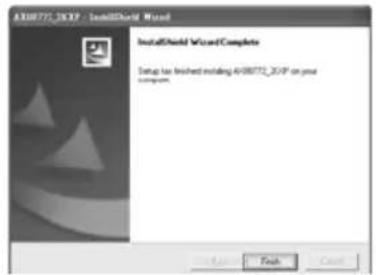
text_image Preparing to install... 400072.20XP Setup is preparing the installed Wizard, which will guide you through the program setup process. Please wait. Configuring Windows Installer Cancel

SILVERSTONE Noble Breeze NB02 - 簡体中文 - 1

text_image ADR072.2OP is configuring your new software installation. Use replacing modules Cancel

SILVERSTONE Noble Breeze NB02 - 簡体中文 - 2

text_image AT08772.3GXP - InstallWorld Wizard InstallWorld Wizard Complete Setup has finished installing AT08772.3GXP on your computer.
text_image 1.800 Install AX88772 USB CDC Drivers Welcome to the AX88772 USB CDC Drivers Installer Introduction Select Options Install Install Finish Use Welcome to the Mac OS I Installation Program. You will be guided through the step necessary to install this software. Go Back Continue

SILVERSTONE Noble Breeze NB02 - 簡体中文 - 3

text_image 2. Install AX88772 USB C3C Drivers Select a Destination Select a destination volume to install the AX88772 USB C3C Drivers software. Macintosh HD 270GB(003GB Free) Installing this software requires SDK8 of space. Play home phones to install this software on the website "Macintosh HD." Go Back Continue

SILVERSTONE Noble Breeze NB02 - 簡体中文 - 4

text_image 3. Install AR88772 USBCDC Drivers Easy Install on "Macintosh HD" Click Install to perform a basic installation of this software package on the volume "Macintosh HD." Co Back Install...

SILVERSTONE Noble Breeze NB02 - 簡体中文 - 5

text_image Install A886772 USB/CDG Drivers Introduction Select Destination Installation Type Install Finish Up Click Restart to finish installing the software. Go Back Restart...

Introduction

The Noble Breeze NB02 is a multifunctional notebook computer cooler that combines networking, stereo input/output, and USB connectivity into one device. Its design helps to reduce desktop cable clutter, increase expansion capability, and create a cooler environment for a notebook computer. This is accomplished with an all aluminum constructed base positioned at 8 degrees for the best ergonomics and viewing angle. The NB02's included dual silent fans can be remounted easily so that they can blow either into or away from the base of the notebook computer. There is also a fan switch for turning off the fan during light usage situations. The NB02 can provide power for charging mobile handset or MP3 battery even without a computer connected. For those with lots of mobile devices in addition to a notebook computer, the NB02 is a must-have product.

Specifications

Model NO. SST-NB02B
Enclosure MaterialAluminum and SPCC mesh grille
Color Black
Tilt angle
1x10/100 Base-T Ethernet(RJ-45) Jack
Cable USB 2.0 Cable(800mm)
Drive Support Windows(2000,XP,Vista), Mac OS X(10.3,10.4)
Cooling System 2 x 50mm Silent Fans
Power Requirement DC5V,4A AC To DC Adapter (included)
Compatibility All notebook computers
Net Weight 1.17KG
Dimension W360mm x D99.2mm x H39.5mm

Warranty Information

During the warranty period, assistance for replacement or exchange of defective components is available at the place of purchase. Please bring your receipt and warranty certificate for the proof of purchase. The warranty does not cover repair or exchange of the product resulting from misuse, accident, modification, unsuitable physical or operating environment, improper maintenance by you, or failure caused by a product for which SilverStone is not responsible for. The warranty is voided by removal or alteration of product or parts identification labels.

Warranty period is region specific, please contact your reseller or SilverStone authorized distributor for more information.
SILVERSTONE Noble Breeze NB02 - Warranty Information - 1

natural_image Line drawing of a rectangular electronic device with no visible text or symbols

This instruction will help you to make the most out of this product. Please read through it before installation. Also, please keep your product receipt and this instruction in safe place for the future reference.

We, SilverStone Technology, hope you will enjoy our product. If you have any comment or suggestion, please email to support@silverstonetek.com Thank you for choosing and supporting our product.

To be valid, this sheet must be filled out by your salesperson at the time of purchase.

Store :

Purchaser :

Purchase date :

Model No.:

Serial No.:

SilverStone Technology Co., Ltd.

www.silverstonetek.com

suppot@silverstonetek.com

Issue Date : October, 2008
Manual assistant
Powered by Anthropic
Waiting for your message
Product information

Brand : SILVERSTONE

Model : Noble Breeze NB02

Category : Computer cooling system