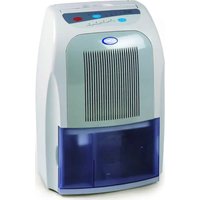
DO340DH - Humidifier DOMO - Free user manual and instructions
Find the device manual for free DO340DH DOMO in PDF.


| Product type | Dehumidifier |
| Brand | Domo |
| Model | DO340DH |
| Power supply | 230 V / 50 Hz |
| Operating modes | Air purification (Air clean), Clothes drying (Dry clothes), Continuous (Continuous), Automatic (Automatic) |
| Timer | 2 h, 4 h or 8 h (auto-off) |
| Water tank capacity | Removable tank with automatic shut-off when full |
| Continuous drainage | Possible with drain hose (inner diameter 15 mm, outer diameter ≤20 mm) |
| Air filter | Replaceable filter, lifespan about 6 months |
| Operating temperature | 0 °C to 36 °C |
| Automatic defrost | Yes, every 30 minutes (duration ~5 minutes) if temperature ≤15 °C |
| Cleaning and maintenance | Clean the exterior with a dry cloth; clean the tank with water; vacuum the air intake/outlets; do not use aggressive products |
| Safety | Automatic shut-off when tank full or temperature >36 °C; overheat protection; restarts after 3 minutes after stoppage |
| Warranty | 2 years |
| Usage | Indoors only, on a flat stable surface, keep a free space of at least 10 cm in front and 30 cm above |
Frequently Asked Questions - DO340DH DOMO
User questions about DO340DH DOMO
0 question about this device. Answer the ones you know or ask your own.
Ask a new question about this device
Download the instructions for your Humidifier in PDF format for free! Find your manual DO340DH - DOMO and take your electronic device back in hand. On this page are published all the documents necessary for the use of your device. DO340DH by DOMO.
USER MANUAL DO340DH DOMO
natural_image
Exterior view of a modern office building (no signage)DO340DH
PRODUCT OF LINEA 2000
GARANTIEVOORWAARDEN
CONDITIONS DE GARANTIE
This appliance has a two year warranty period. During this period the manufacturer is responsible for any failures which are the direct result of construction failure. When these failures occur the appliance will be repaired or replaced if necessary. The warranty will not be valid when the damage to the appliance is caused by wrong use, not following the instructions or repairs executed by a third party. The warranty will only be valid if the warranty application has been completed by the dealer at the time of purchase. All parts, such as brushes and batteries, which are subject to wear, are excluded from the warranty.
Type nr. Apparaat
natural_image
Symbol of a trash bin crossed with no text or numbers, representing waste sorting or disposal (no text present)
RECYCLING INFORMATIONEN
RECYCLING INFORMATION
The symbol on the product or on its packaging indicates that this product may not be treated as household waste. Instead it shall be brought to the applicable collection point for recycling of electrical and electronic equipment. By ensuring this product is disposed of correctly, you will help prevent potential negative consequences for the environment and human health, which could otherwise be caused by inappropriate waste handling of this product. For more detailed information about recycling of this product, please contact your local city office, your household waste disposal service or the shop where you purchased the product.
WAARSCHUWING
INSTALLATIE
In case of any abnormality, be sure to turn off the dehumidifier, disconnect the plug and contact your vendor. Abnormal operation may result in a failure of the unit, electric shock, fire or the like.
Never attempt to turn off the dehumidifier by disconnecting the plug.
Never modify the dehumidifier. Do not attempt to disassemble or service the unit yourself.
To avoid the risk of electric shock, never connect or disconnect the plug with wet hands.
This unit is intended for the connection to the power source of 230V alternative current.
Remove any dust from the blades of the power plug and insert the plug securely into an outlet.
To avoid the risk of fire or explosion, do not spray in the direction of the dehumidifier.
Do not put any inflammables or chemicals near the unit.
To prevent resin parts from melting or catching on fire, do not place the dehumidifier near heating appliances.
Do not connect the dehumidifier to an outlet having the electrical ratings below the dehumidifiers.
The power cord must not be damaged or modified. Do not put anything hot or heavy on the cord. Do not pull it out, or bundle it during operation.
To avoid damages to the power cord, do not pinch the cord in a door.
Never put rods or objects into the openings of the dehumidifier. Because this unit contains a fan running at hig speed, contact with the moving fan will cause serious injury.
Remove water that has been collected in the tank. Accidentally drinking of the water or using it for other purpose may cause illness and /or unforeseen accidents.
CAUTIONS
The dehumidifier must be set on a level and stable surface.
To prevent the water from freezing, do not use the dehumidifier and the drain hose at an ambient temperature below 0^ C.
Do not use the dehumidifier outside. Exposure tot direct sunlight or rain may result in overheating, electric shock and fire.
Do not put water vessel on the dehumidifier. In case of any spill of water, the water gets into the unit and deteriorates the insulation.
Never attempt to use the dehumdifier for special uses, such as food or preservation of art objects or the like. The deterioration of preserving quality my be caused.
Do not use the dehumidifier near highly inflammable products.
Do not use the unit in places subject to chemicals.
For continuous draining, make sure the drain hose is set properly without a rising slope.
Be careful that a heating appliance is not exposed to the wind from the dehumidifier.
Do not use the dehumidifier as a chair or footstool.
For safety purpose, disconnect the plug if the unit is not used for a long time.
Be sure to take hold of the power plug when plugging in and unplugging.
In case of using the dehumidifier in a closet, be sure to prevent children from getting in the closet.
Do not remove the float lever from the water tank.
To avoid damages to the power cord, do not pull out the cord when moving the unit.
Do not block up the air intakes and the air outlets. Do not cover the unit with washed clothes.
Prior to continuous operation for a long duration, periodical checking is required especially for the air clean filter, the drain hose, etc.
Turn off the unit and disconnect the power plug before starting any cleaning or other routine maintenance.
To avoid the risk of electric shock, never sprinkle or spill water on the dehumidifier when cleaning.
Turn off the unit and empty the water out of the water tank when moving the unit. Be sure to hold the handle when moving.
Defrosting operation
The evaporator within the dehumidifier frosts during the dehumidifying operation at room temperature of approx. 15^ C or less. For removing frost the defrosting devise works automatically at an interval of approx. 30 min or more, wit a duration of approx. 5 min.
Both the dehumidifying function and the air cleaning function stop during the defrosting operation.
Do not disconnect the plug of the unit or turn off the unit during the defrosting operation.
This dehumidifier is not suitable for keeping the humidity very low (approx. 50% or less)
This dehumidifier is designed to remove uncomfortable humidity in daily life and to use for auxiliary drying of washed clotes indoor. This is not suitable for keeping the humidity very low.
Room temperature rises during the operation
This dehumidifier does not have cooling function. It produces heat during operation and room temperature rises by 1^ C to 4^ C. The temperature gets higher while it is operated in a closet, or the like. Furthermore, room temperature rises because doors and windows are closed and heat is produced from other appliances in the room and the sun radiation.
DO340DH
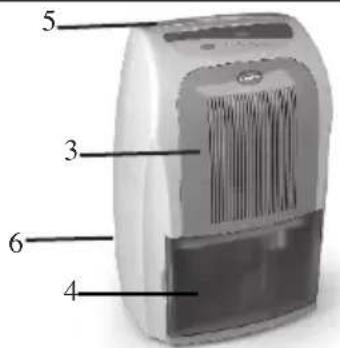
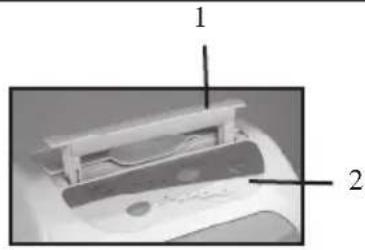
PARTS
- Handle
- Controle
- Air intake
- Water tank
- Upward air outlet
- Downward air outlet
INSTALLATION
For efficient operation of the dehumidifier the following space around the dehumidifier need to be respected :
Left, right and back 20 cm
Front : 10 cm
Top : 30 cm
CONTROLS
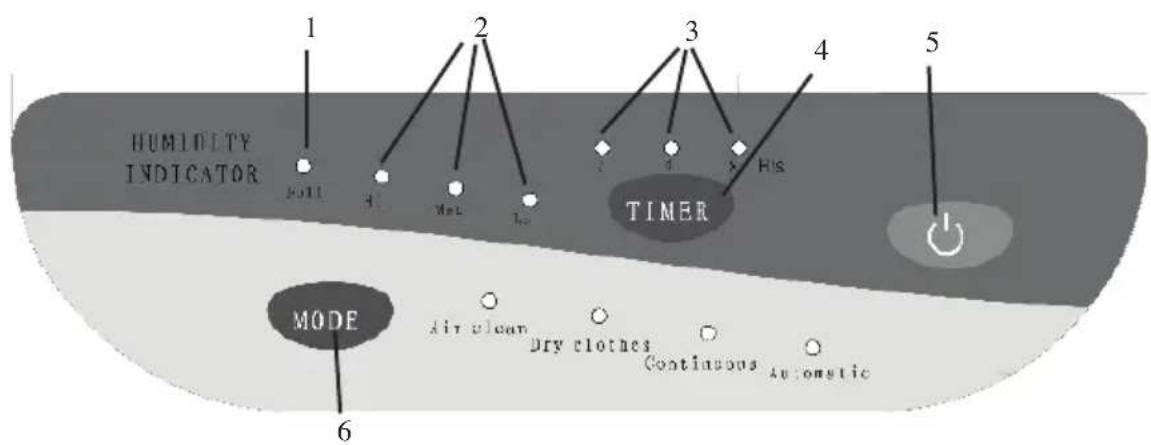
- Lamp lights up and the operation stops automatically when the water tank is full.
- The indication of current environment humidity.
- the timer lights show the remaining time of operation.
- press "timer" switch to set the timer for automatic stop.
- Run / stand-by
- To select the operation mode
air clean : only air cleaning without dehumidification
dry clothes : for super fast dehumidification
continuous : for non stop dehumidification
automatic : appliance determines when to dehumidify, when the humidity drops below 60% the appliance will stop dehumidifying and will only clean the air. When the humidity rises again above 60%, it will start dehumidifying again.
FUNCTION SELECTION
- To dehumidify a room for comfortable humidity. To dehumidify a room or keep a ceiling and/or walls from dew and getting moldy.
Use the automatic mode.
- To dehumidify a closet.
Use the continuous mode.
- To dry washed clothes faster.
Use the dry clothes mode
4 To dry a carpet or rug.
Use the dry clothes mode
- To dehumidify a small room or dry shoes
Use the dry clothes mode
- to make air clean in a room
Use the air clean mode
REPLACING THE FILTER
Remove the water tank
Remove the front cover.
Remove the filter holder from the cover.
Remove the filter from the filter holder.
Take the new air clean filter out of the bag and put it onto the filter holder, with the filter fitted into the four chatches in the cover.
Put the filter holder back in place. Press firmly In case of improper setting conditions, you cannot set the cover to the unit.
Replace the front cover.
Make sure the water tank is set properly
Your dehumidifier will not be operated when the water tank is full of water or not set properly.
How to remove :
Draw the water tank gently towards you by holding the side of the tank
How to reinstall :
Push the tank horizontally and gently.
When you empty water from the water tank
Remove the water tank from the dehumidifier.
Hold the tank by the handle and carry it gently.
Tilt the tank to the front and slowly emty the water out of the tank.
Set the tank in the dehumidifier.
Note : when the tank is full, the dehumidifier stops operating and the buzzer sounds.
The buzzer sounds for 10 seconds when the tank is taken out during the operation.
HOW TO OPERATE
Your dehumidifier will stop automatically after the hours set by the timer (2, 4, 8h)
DO340DH
If the unit is set to “Continuous” mode, the initial timer setting is “2H”. You can change the setting to ‘4H or “8H”.
Plug in the dehumdifier. The “automatic” mode lamp will flash. Make sure the water tank is set properly.
Open one of the air outlet flaps.
Press the “power” switch. “Automatic” mode lamp will light up.
Set the unit to the desired operation by pressing “mode” switch.
Press he “timer” button to select the operation time. The light will indicate the remaining time.
The unit will stop operating after the time has lapsed.
Warning : to avoid damage to the power cord, do not pinch he cord in a door.
Be sure to prevent children from getting in a closet when using the unit in the closet.
Stop operating :
The mode select lamp will go off and the unit will stop operating.
Close the flap
Note :
Be sure to open the flap during operation. If the flap is not opened fully during operation, the overheat prrevention device will work and the unit will stop operating.
Due to the protective function for the machine, the dehumidifying operation will be started after approx. 3 min. When the unit is plugged in or restarted immediately after stopped.
After recovery from a power failure, “automatic” mode lamp will flash. Press “power” switch again to satrt the operation.
Efficiency of the dehumidifier is influenced by the air outside the room. For operating efficiently, try to avoid opening and closing the windows and the doors.
For proper performance, operate the dehumidifier under the usable operating temperature. For safety purpose, the dehumidifying operation will be stopped automatically and changed to the air cleaning operation when the ambient temperature is higher than approx. 36^ C.
Circulation of the refrigerant may cause sound within the dehumidifier when the operation is started. After the circulation is stable, the sound will lower.
Except “continuous” mode, operation of the timer set will be cancelled whenever “mode” switch is pressed. Set the timer again after pressing “mode” switch, if necessary.
The timer stops when the water tank is full of water. After the tank is emptied, the timer will restart.
MAINTENANCE
Warning : to avoid electric shock, never plug in or unplug the unit with wet hands.
Caution : turn off the unit and disconnect the power plug before cleaning or other routine maintenance.
Do not remove the float lever from the water tank.
When the unit is not in use for a long time
Unplug the unit, bundle the power cord and hang the bundled cord at the back of the unit.
Empty the water out of the water tank, wipe the tank with cloth and repalce in position.
Clean the air clean filter.
For storing, stand the unit upright and avoid the exposure to direct sunlight.
Body of dehumidifier
Wipe the dehumidifier with a dry and soft cloth.
To remove heavy dirt, wipe it with a damp cloth. Never use a wet cloth for cleaning the controls.
To avoid deformation or cracking, do not use abrasive cleaners such as thinner.
Chemical cloth may cause a colour change of the plastic.
Water tank
Pull out the water tank and take it out.
Remove the tank cover and wash the inside of the tank with water.
The tank may be scratched, if you scrub it strongly with a brush.
Do not rremove the float lever from the tank.
Wipe off the water on the outside of the tank with a cloth. Put the tank cover onto the tank and replace the tank as it was.
Pass the handle through the hole of the tank cover.
Back and side air intake (maintenance every 2 weeks)
The dehumidifying capacity will be lowered when the air clean filter gets clogged.
Remove the cover from the unit an remove the filter holder. Then take out the air filter.
To remove the dust from the filter use a vacuum cleaner or pat them lightly.
If the filter is very durty, you can rinse it in luck warm water with a mild detergent.
Dry it thoroughly afterwards.
Air clean filter
The life span of an air clean filter is approx. 6 months.
After six months you need to replace it.
Do not leave the filter unused after it is taken out of the bag.
CONTINUOUS DRAINING
For continuous draining make sure that the drain hose is set properly without a rinsing slope.
To prevent the water from freezing, do not use the dehumidifier and drain hose at ambient temperate below 0^ C. If there is a place suitable for draining nearby, you can carry out the continuous draining operation.
The continuous operation enables the dehumidifying operation for hours and it is not
DO340DH
necessary to empty out the water tank.
Before operating continuous draining, be sure to turn off the dehumidifier and disconnect the power plug.
Preparation for continuous draining :
Hose for draining
Length : distance to the place for draining + approx. 30 cm.
Inner diameter : 15 mm
Outer diameter 20 mm or less
Make the hose opening by removing the cover from the drain hose by means of a minus screwdriver.
Put the drain hose into the hose opening and fit the hose to the drain hole.
Set the water tank. The unit will not operate without the water tank in place.

- GARANTIEVOORWAARDEN
- CONDITIONS DE GARANTIE
- RECYCLING INFORMATIONEN
- RECYCLING INFORMATION
- WAARSCHUWING
- INSTALLATIE
- CAUTIONS
- Defrosting operation
- Room temperature rises during the operation
- DO340DH
- PARTS
- INSTALLATION
- CONTROLS
- FUNCTION SELECTION
- REPLACING THE FILTER
- HOW TO OPERATE
- MAINTENANCE
- CONTINUOUS DRAINING
Brand : DOMO
Model : DO340DH
Category : Humidifier