
DO1111SV - Vacuum Cleaner DOMO - Free user manual and instructions
Find the device manual for free DO1111SV DOMO in PDF.


| Product type | Cordless stick vacuum |
| Brand | DOMO |
| Model | DO1111SV |
| Input voltage (adapter) | 100-240 V, 50/60 Hz |
| Output voltage (adapter) | 27 V, 0.5 A |
| Battery type | Rechargeable integrated |
| Initial charging time | 8 hours |
| Battery indicator | Blue lights |
| Suction modes | ECO (reduced power) and full power |
| Filtration system | HEPA filter, large particle filter, round black filter |
| Dust container capacity | Max level indicated on container |
| Included accessories | Floor nozzle with rotating brush, crevice nozzle, small dusting brush, wall mount with screws and anchors |
| Safety | Automatic shutdown in case of blockage or fingers caught in brush |
| Warranty | 2 years (device), 6 months (accessories and wear parts) |
| Maintenance and cleaning | Clean container and filters after each use, wash rotating brush if necessary |
| Customer service | +32 14 21 71 91, info@linea2000.be |
Frequently Asked Questions - DO1111SV DOMO
User questions about DO1111SV DOMO
0 question about this device. Answer the ones you know or ask your own.
Ask a new question about this device
Download the instructions for your Vacuum Cleaner in PDF format for free! Find your manual DO1111SV - DOMO and take your electronic device back in hand. On this page are published all the documents necessary for the use of your device. DO1111SV by DOMO.
USER MANUAL DO1111SV DOMO
natural_image
Purple handheld vacuum cleaner with black handle and white base (no visible text or symbols)DO1111SV
| Handleiding Steelstofzuiger | |
| Mode d'emploi Aspirateur-balai | |
| Gebrauchsanleitung Handstaubsauger | |
| Instruction booklet Stick vacuum cleaner | |
| Manual de instrucciones Aspirador escoba | |
| Istruzioni per l'uso Scopa elettrica | |
| Návod k použití Tyčový vysavač 2v1 | |
| Návod na použitie Tyčový vysávač 2v1 |

natural_image
Two black-and-white icons: a warning triangle with an exclamation mark and an open book with stacked pages (no text or symbols)natural_image
Product diagram of a black handheld device with numbered parts (11, 12, 13, 14), no visible text or symbols beyond labels.natural_image
Close-up of a hand holding a small black tool near a device component (no visible text or symbols)MUURBEVESTIGING
natural_image
Product assembly diagram showing a device with a camera and a separate camera module (no text or symbols visible)GEBRUIK
natural_image
Close-up of a black mechanical component with two labeled parts (1 and 2), no visible text or symbols.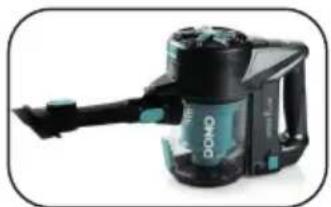
natural_image
Black and teal DODP vacuum cleaner with handle, no visible text or symbols on body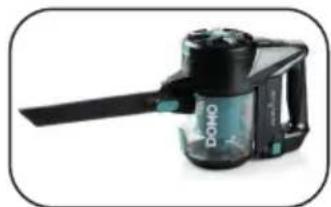
natural_image
Product photo of a black and white Domo-branded coffee maker with a long handle (no visible text or symbols)REINIGING EN ONDERHOUD
HET TOESTEL PROPER MAKEN
natural_image
Exploded view of a kitchen appliance showing internal components like blender, cup, and blender (no text or labels visible)natural_image
Close-up of a camera lens with a circular highlight on the rim (no text or symbols visible)natural_image
Hand holding a green and black vacuum cleaner (no text or symbols visible)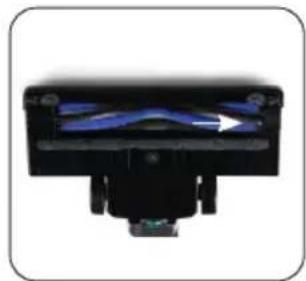
natural_image
Close-up of a black mechanical component with blue internal structure and green base (no visible text or symbols)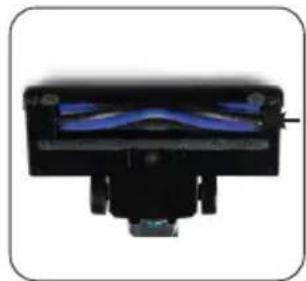
natural_image
Close-up of a black mechanical component with blue internal structure (no visible text or symbols)PROBLEEM EN OPLOSSING
natural_image
Recycling symbol icon with three chasing arrows forming a triangle (no text or labels)natural_image
Symbol of a trash bin crossed with two diagonal lines, no text or numbers presentnatural_image
Product photo of a black electronic device with labeled parts (no text or symbols visible)AVANT LA PREMIÈRE UTILISATION
natural_image
Close-up of a person using a BOMO-branded vacuum cleaner to lift a green tool (no visible text or symbols)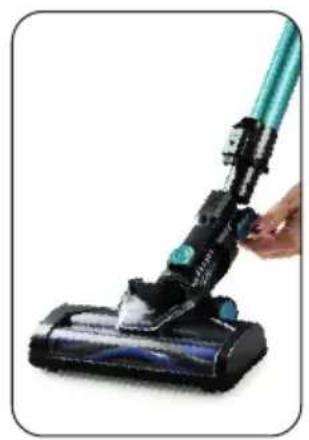
natural_image
Close-up of a hand holding a black vacuum cleaner with a teal handle (no text or symbols visible)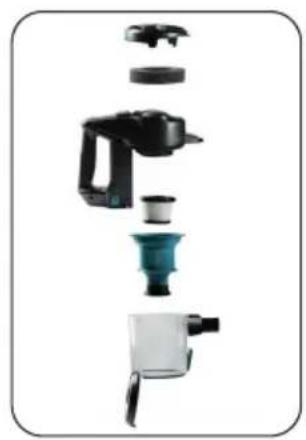
natural_image
Exploded view of a kitchen appliance showing internal components like blender, blender, and water dispenser (no text or labels visible)CHARGE
natural_image
Close-up of a hand inserting a small black tool into a device component (no visible text or symbols)SUPPORT MURAL
natural_image
Product diagram showing a device with a blue lens and a black connector, no visible text or symbolsUTILISATION
natural_image
Close-up of a black plastic component with two labeled parts (1 and 2), no visible text or symbols.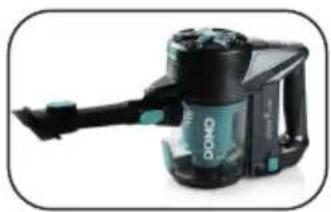
natural_image
Black and teal DOMO vacuum cleaner with handle, no visible text or symbols on body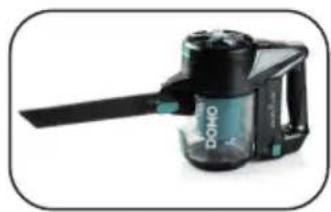
natural_image
Black and white photo of a DOHO digital camera with a handle (no visible text or symbols)NETTOYAGE ET ENTRETIEN
NETTOYER L'APPAREIL
natural_image
Exploded view of a kitchen appliance showing internal components like blender, blender, and blender (no text or labels visible)natural_image
Close-up of a car wheel rim with a circular highlight on the rim (no text or symbols visible)natural_image
Hand holding a green and black vacuum cleaner (no text or symbols visible)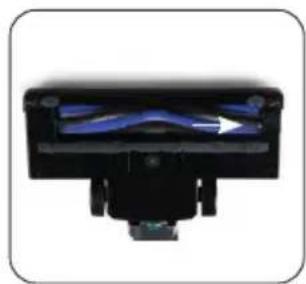
natural_image
Close-up of a black mechanical component with blue internal structure and arrow indicator (no text or symbols)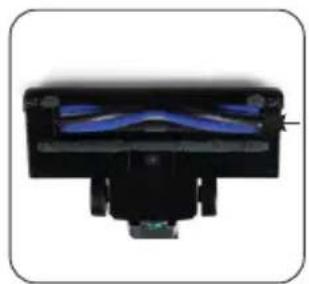
natural_image
Close-up of a black mechanical component with blue internal structure (no visible text or symbols)natural_image
Recycling symbol icon with three chasing arrows forming a triangle (no text or labels)natural_image
Symbol of a trash bin crossed with two diagonal lines, no text or numbers presentBATTERIE NON AMOVIBLE
natural_image
Product assembly diagram showing numbered components of a battery pack (no text or symbols visible)natural_image
Close-up of a hand inserting a small black plug into a black device component (no visible text or symbols)WANDBEFESTIGUNG
natural_image
Product assembly diagram showing a device with a blue control panel and a black connector (no text or symbols visible)GEBRAUCH
natural_image
Close-up of a black mechanical component with two labeled parts (1 and 2), no visible text or symbols.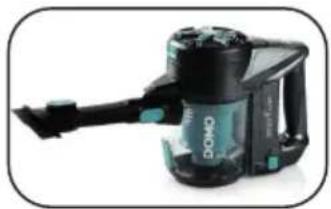
natural_image
Black and teal DOKO vacuum cleaner with handle, no visible text or symbols on body
natural_image
Black and white photo of a DOWO vacuum cleaner with a long handle (no visible text or symbols)natural_image
Exploded view of a kitchen appliance showing internal components like blender, cup, and blender (no text or labels visible)natural_image
Close-up of a camera lens with a circular highlight on the rim (no text or symbols visible)natural_image
Hand holding a blue and black vacuum cleaner (no text or symbols visible)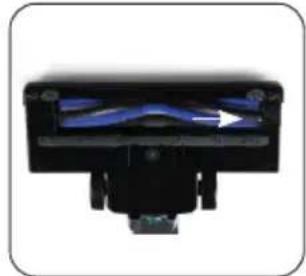
natural_image
Close-up of a black mechanical component with blue internal structure (no visible text or symbols)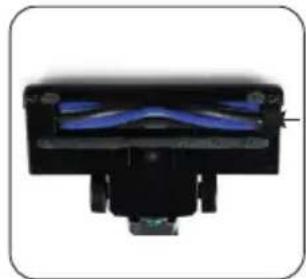
natural_image
Close-up of a black mechanical component with blue internal structure (no visible text or symbols)natural_image
Recycling symbol icon with three chasing arrows forming a triangle (no text or labels)natural_image
Symbol of a trash bin crossed with no text or numbers, representing waste sorting or disposal (no text present)NICHT HERAUSNEHMBARE BATTERIE
All of our products are always submitted to a strict quality control before they are sold to you.
Should you nevertheless experience problems with your device, we sincerely regret this. In that case, we kindly request you to contact our customer service.
Our staff will gladly assist you.

+32 14 21 71 91

info@linea2000.be
Monday – Thursday: 8.30 – 12.00 and 13.00 – 17.00
Friday: 8.30 - 12.00 and 13.00 - 16.30
This appliance has a two year warranty period. During this period the manufacturer is responsible for any failures that are the direct result of construction failure. When these failures occur the appliance will be repaired or replaced if necessary. The warranty will not be valid when the damage to the appliance is caused by wrong use, not following the instructions or repairs executed by a third party. The guarantee is issued with the original till receipt. All parts, which are subject to wear, are excluded from the warranty. If your device breaks down within the 2-year warranty period, you can return the device together with your receipt to the shop where you purchased it.
The guarantee on accessories and components that are liable to wear-and-tear is only 6 months.
The guarantee and responsibility of the supplier and manufacturer lapse automatically in the following cases:
- If the instructions in this manual have not been followed.
· In case of incorrect connection, e.g. electrical voltage that is too high.
· In case of incorrect, rough or abnormal use.
· In case of insufficient or incorrect maintenance.
· In case of repairs or alterations to the device by the consumer or non-authorised third parties. - If the customer used parts or accessories that are not recommended or provided by the supplier / manufacturer.
SAFETY INSTRUCTIONS
When using electrical appliances, basic safety precautions should always be taken, including the following:
- Read all instructions carefully. Keep this manual for future reference.
- Make sure all packaging materials and promotional stickers have been removed before using the appliance for the first time. Make sure children cannot play with the packaging materials.
· This appliance is intended to be used in household and similar applications such as:
· staff kitchen areas in shops, offices and other working environments;
- farm houses;
· by clients in hotels, motels and other residential type environments;
- bed and breakfast type environments.
· Children should be supervised to ensure that they do not play with the appliance.
This appliance can be used by children aged from 16 years and above and persons with reduced physical, sensory or mental capabilities or lack of experience and knowledge if they have been given
supervision or instruction concerning use of the appliance in a safe way and understand the hazards involved. Children shall not play with the appliance. Cleaning and user maintenance shall not be made by children unless they are older than 16 and supervised.
- Keep the appliance and its cord out of reach of children younger than 16 years.
· Attention: This appliance cannot be used with an external timer or a separate remote control. - Read all instructions before use.
- Before use, check if the voltage stated on the appliance corresponds with the voltage of the power net at your home.
- Do not let the cord hang on a hot surface or on the edge of a table or counter top.
- Never use the appliance when the cord or plug is damaged, after malfunction or when the appliance itself is damaged. In that case, take the appliance to the nearest qualified service center for check-up and repair.
- Close supervision is necessary when the appliance is used near or by children.
- The use of accessories that are not recommended or sold by the manufacturer can cause fire, electrical shock or injuries.
- Unplug the appliance when it is not in use, before assembling or disassembling any parts and before cleaning the appliance. Put all buttons and knobs into the 'off' position and unplug the appliance by grasping the plug. Never unplug by pulling the cord.
· Do not leave a working appliance unattended.
- Never place this appliance near a gas stove or electrical stove or in a place where it may come into contact with a warm appliance.
- Do not use the appliance outdoors.
- Only use the appliance for its intended use.
· Always use the appliance on a steady, dry and level surface.
- Only use the appliance for domestic use. The manufacturer can not be held responsible for accidents that result from improper use of the appliance or not following the instructions described in this manual.
· All repairs should be carried out by the manufacturer or its aftersales service.
· Never immerse the appliance, the cord or the plug in water or any other liquid.
- Make sure that children do not touch the cord or appliance.
- Keep the cord away from sharp edges and hot parts or other heat sources.
· Before use, remove all packaging materials and any promotional stickers.
- Do not use the vacuum cleaner to vacuum up detergents, liquids, needles, matches and other similar liquids, sharp objects or flammable objects.
- Do not use the vacuum cleaner to vacuum up cement, powder and other small particles. Also avoid vacuuming up large objects. The vacuum cleaner could be clogged, the motor could overheat or other damage may occur.
- Make sure that the air intake or the floor suction opening do not become blocked.
· Make sure that the machine does not come into contact with liquids.
- First charge a new battery up completely.
- Pull the plug from the outlet when the vacuum cleaner is fully charged.
· This product contains a rechargeable battery. Batteries should be recycled. Do not drill into the battery or expose it to high temperatures; the battery could explode.
Under extreme circumstances, there could be leakage of the battery. If the liquid from the battery comes into contact with the skin, wash it off immediately with water and soap or neutralize it with a mild acid such as lemon juice or vinegar. If the liquid comes into contact with the eyes, rinse them liberally with water for at least 10 minutes and contact a doctor.
- Do not place foreign objects in the openings of your machine. Do not use the machine if an opening is blocked. Keep the machine free from dust, dirt, hair or anything that could reduce the air supply.
- Remove large and sharp objects from the floor to prevent damage to the plastic components, the brushes and the motor.
- Keep hair, loose clothing, fingers and other body parts away from openings and moving parts.
· Never use the appliance without filters. This will damage the motor and render it unusable.
SAVE THESE INSTRUCTIONS FOR FUTURE REFERENCE
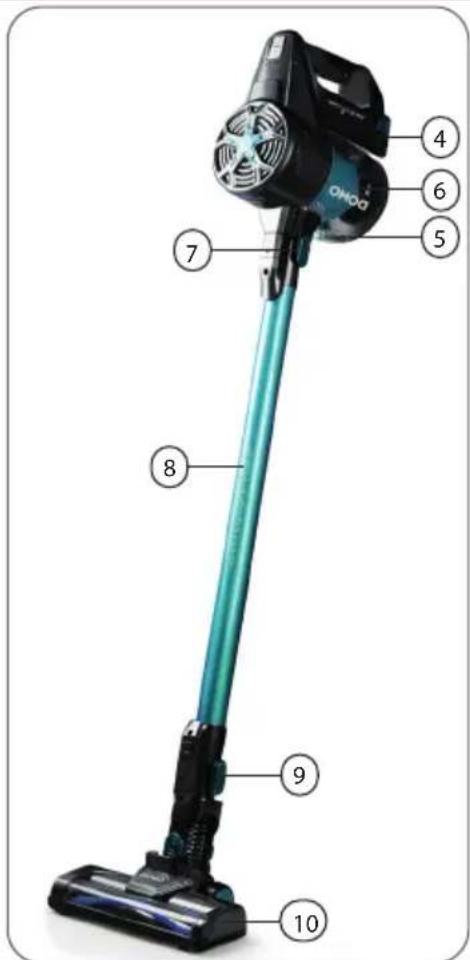
PARTS
-
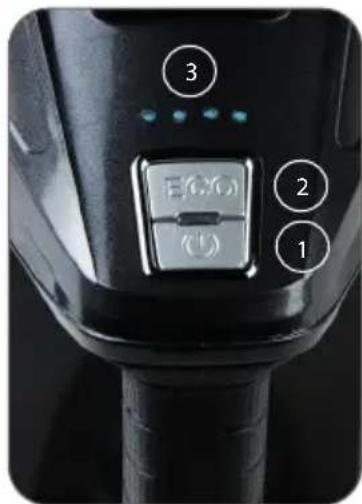
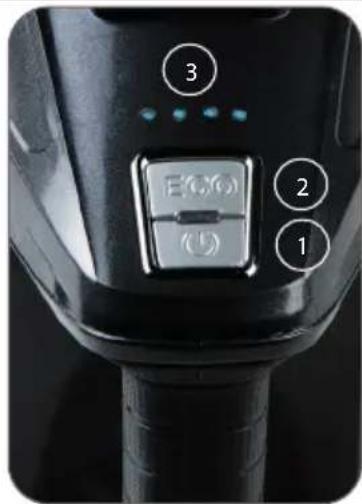
On-off button
-
ECO mode indicator
-
Battery level indicator
-
Battery
-
Unlock button for dust reservoir
-
Dust reservoir
-
Handle release button
-
Tube
-
Release button floor nozzle
-
Floor nozzle with rotating floor brush
-
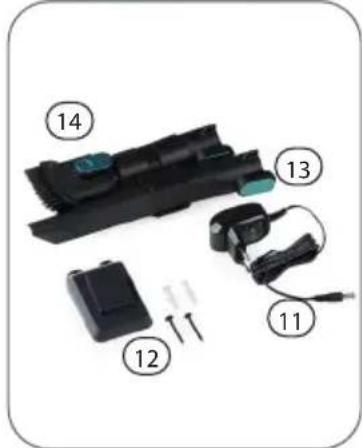
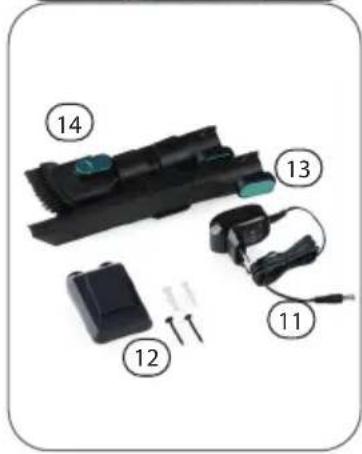
Adapter
-
Wall fixing (screws and plugs included)
-
Crevice vacuum cleaner
-
Dust brush
natural_image
Product diagram of a black handheld device with numbered parts (11, 12, 13, 14), no visible text or symbols beyond labels.BEFORE THE FIRST USE
To set up the machine properly, please follow the steps below:
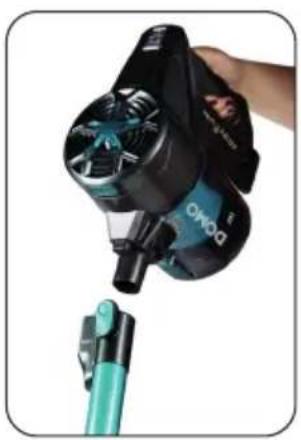
- Place the motor compartment on the shaft via the opening provided.
- Make sure the floor nozzle is clicked into the stick vacuum cleaner.
- Click the dust reservoir into the stick vacuum cleaner. You will find further information on the correct installation of the dirt receptacle under 'Cleaning and maintenance'.
natural_image
Close-up of a person using a BOMO-branded hairdryer tool, with no visible text or symbols on the device itself.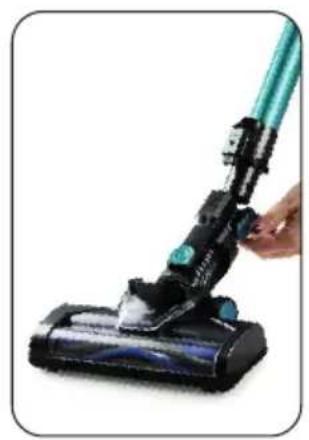
natural_image
Close-up of a hand holding a black vacuum cleaner with a teal handle (no text or symbols visible)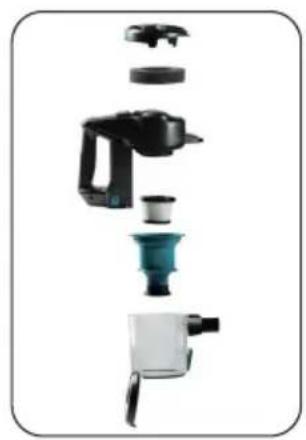
natural_image
Exploded view of a kitchen appliance showing internal components like blender, blender, and water dispenser (no text or labels visible)CHARGING
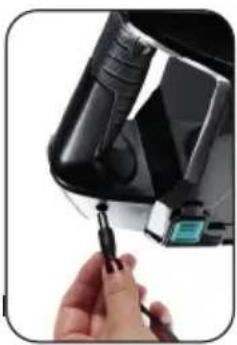
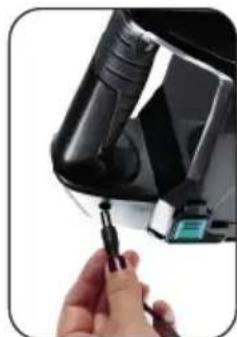
- Connect the adaptor to the upright vacuum cleaner via the connection provided on the appliance handle in order to charge the vacuum cleaner.
- The battery charge indicator indicates when the appliance has been fully charged. The lights will blink and will illuminate in turn when the battery is charging. When all the lights are on, the battery is fully charged.
· The machine cannot be started during charging.
- Prior to first use, charge the machine for 8 hours in order to be able to utilize the full capacity of the battery.
natural_image
Close-up of a hand inserting a small black plug into a device component (no visible text or symbols)WALL MOUNT
Please follow below instructions to fix the wall mount:
-
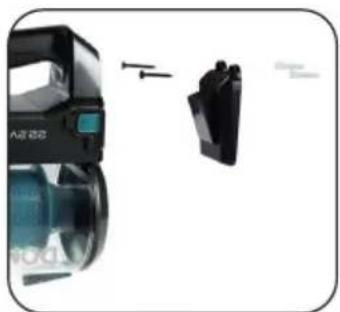
Drill 2 holes in the wall corresponding to the attachment points of the wall mount.
-
Insert the supplied plugs into the wall.
-
Fix the wall mount using the supplied screws.
-
To store the device, simply hang it on the wall mount.
natural_image
Product assembly diagram showing a device with a blue screen and two black components, no visible text or symbols.USE
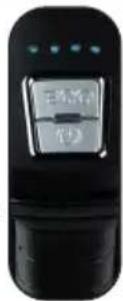
- Press the on/off button to turn the appliance on. The battery indicator light is blue and indicates the battery level. If the battery is almost empty, the indicator light will flash on and off.
- Pressing the ECO button will decrease the suction power and extend the autonomy. This way, you will be able to vacuum longer at a lower suction power. Press the ECO button again to let the appliance vacuum at full power.
- The autonomy depends on the type of surface. It will work for less time on carpets than on a hard surface.
· While vacuuming, warm air will come out of the motor compartment. This is normal.
- When you switch on the machine, the rotating floor brush at the bottom of the floor nozzle will begin to turn. This will cause the dirt in the opening to be shifted and thereby vacuumed up.
- The machine is equipped with a safety which will ensure that the machine shuts itself off if, for example, objects which are too large are sucked up, or if fingers become tangled in the floor brush. This is for personal safety and to protect the motor. To reverse the floor brush, press the on/off button once more.

For the best results, clean the dust reservoir and the filters after each use. This is better for the suction power and the life span of the machine. Make sure that the dust in the dust reservoir does not exceed the maximum level.
ACCESSORIES
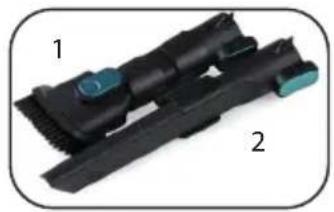
You can use the following accessories on the hand-held vacuum cleaner (by removing the shaft) or secure them on the shaft:
- Dust brush: for furniture, bookshelves, curtains and hard to clean surfaces.
- Crevice vacuum cleaner: for crevices, corners, stairs, keyboards,...
natural_image
Close-up of a black mechanical component with two labeled parts (1 and 2), no visible text or symbols beyond labels.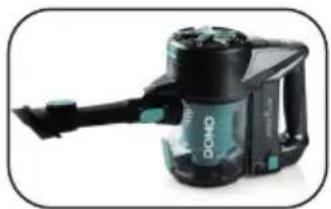
natural_image
Product photo of a black and teal DOMO vacuum cleaner (no visible text or symbols)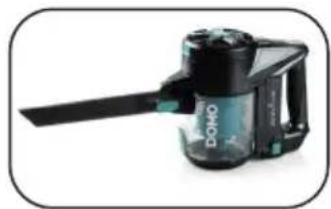
natural_image
Close-up of a black and white DOKO washing machine with a blue handle (no visible text or symbols)CLEANING AND MAINTENANCE
CLEANING THE MACHINE
Clean the machine with a slightly moist soft cloth. Dry the machine off well. Never submerge the machine in water!
CLEANING THE DUST RESERVOIR
- Never exceed the maximum indicator on the dust container. Empty the dust container by pressing the release button. The dust container falls open and you can then remove the coarse dirt.
-
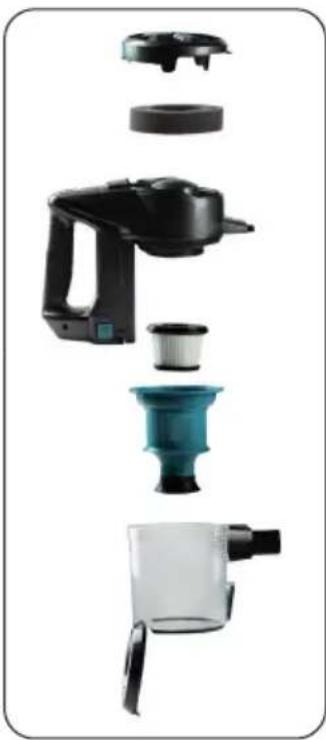
Remove the wand. Then take the handle in your right hand. Grasp the dirt receptacle with your left hand and turn it clockwise. The dirt receptacle will come loose from the motor section. You can now clean all the parts separately. We recommend you do this with compressed air. If you do not have compressed air, you can wash out the filters. Make sure they are completely dry before using them again.
-
Black round filter: this is located at the exit of the motor and filters the air even more after it comes out of the appliance.
- HEPA filter: this round dust filter captures the small dust particles.
- Plastic coarse debris filter: this ensures that the large dust particles remain in the dirt receptacle.
-
Dirt receptacle: this is where all large dirt particles are collected.
-
Pull the filters out of the dirt receptacle. Remove the HEPA filter from the coarse debris filter by pulling it up. Blow the filters clean with compressed air. You can also clean the filters under running water. Make sure they are completely dry before using the appliance again.
-
Replace the HEPA filter in the coarse debris filter.
-
Put the filters back in the dirt receptacle. Make sure that the notch in the filter lines up with the protrusion in the receptacle.
-
Put the dirt receptacle back on the motor section by turning it counter-clockwise. Make sure that the dash on the motor unit lines up with the lock symbol.
natural_image
Exploded view of a kitchen appliance showing internal components like blender, blender, and cup (no text or labels visible)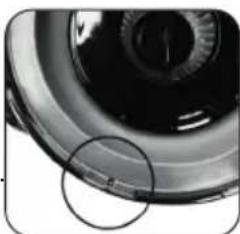
natural_image
Close-up of a camera lens with a highlighted circular area (no text or symbols visible)We advise replacing the filters regularly to ensure an optimal operation of the machine. Dirty filters will reduce the suction power drastically. After every cleaning, clean the dust reservoir and the filters to extend the life span of your machine.
CLEANING THE FLOOR BRUSH
-
Remove the floor nozzle from the upright vacuum cleaner. Press the release button at the back of the floor nozzle and remove it from the machine.
-
Slide the cover on the right side of the floor brush to the right.
-
Remove the rotating floor brush from the floor nozzle.
-
Remove hairs and other dirt that have wrapped around the floor brush. If you do not clean the floor brush regularly, it will become damaged and your machine will become unusable.
-
The rotating floor brush may be rinsed off under running water. Make sure that it is completely dry before using it.
-
Place the floor brush back into the floor nozzle when it is clean.
-
Slide the cover closed again to secure the floor brush.
-
Push the nozzle back onto the stick. The machine is now again ready for use.

natural_image
Hand holding a black vacuum cleaner with a teal handle, no visible text or symbols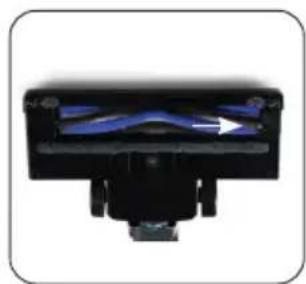
natural_image
Close-up of a black mechanical component with blue internal structure and arrow indicator (no text or symbols)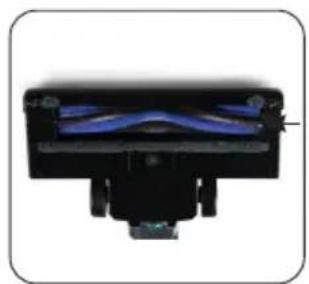
natural_image
Close-up of a black mechanical component with blue internal structure (no visible text or symbols)Stuck hairs can damage the machine or your floor. Always remove the hairs stuck on the brushes.
PROBLEM AND SOLUTION
| Problem Solution | |
| The battery charge indicator will flash on and off. | · The battery is empty. Charge the machine. |
| The machine does not start up. · The battery is empty. Charge the machine. | |
| The machine does not vacuum. · The filters are dirty/the dust reservoir is full. · The floor nozzle is clogged/the floor brush is blocked. · Clean the machine as described in this manual. | |
| The running time of the machine is shorter and shorter. | · The filters are dirty/the dust reservoir is full. · The machine is not sufficiently charged. Charge the machine fully and try again. · The battery is broken or old. Contact the after sales service. · Stuck hairs. Remove the hairs stuck on the brushes. |
SPECIFICATIONS ADAPTOR
| Published information Value and precision Unit | ||
| Linea 2000 BV – Dompel 9 – 2200 Herentals – Belgium | - | - |
| Model number DO1111SV - | ||
| Supply voltage 100-240 V | ||
| Power frequency 50/60 Hz | ||
| Output voltage 27 V | ||
| Output current 0,5 A | ||
| Output power 13,5 W | ||
| Average active efficiency | 87,49 | % |
| Efficiency at low load | 81,40 | % |
| Non-loaded energy consumption | 0,042 | W |
ENVIRONMENTAL GUIDELINES
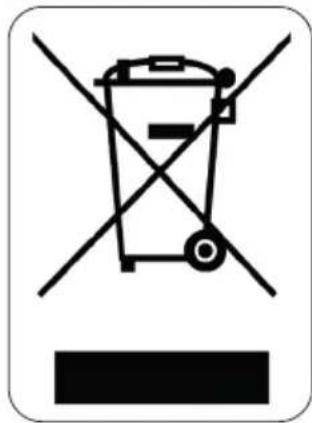
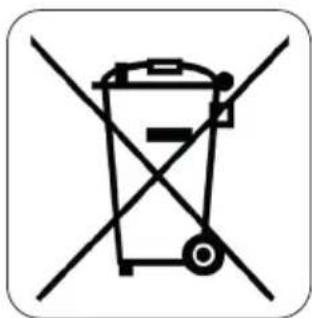
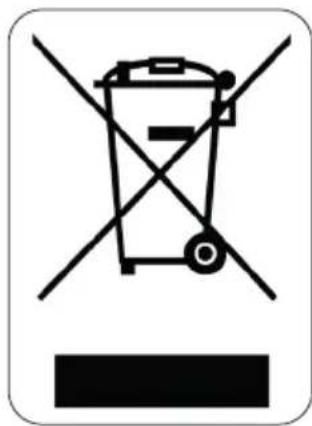
This symbol on the product or on its packaging indicates that this product may not be treated as household waste. Instead it must be brought to the applicable collection point for recycling of electrical and electronic equipment. By ensuring this product is disposed of correctly, you will help prevent potential negative consequences for the environment and human health, which could otherwise be caused by inappropriate waste handling of this product. For more detailed information about recycling of this product, please contact your local city office, your household waste disposal service or the shop where you purchased the product.
natural_image
Recycling symbol icon with three chasing arrows forming a triangle (no text or labels)The packaging is recyclable. Please treat the packaging ecologically.
natural_image
Symbol of a trash bin crossed with two diagonal lines, representing no waste or discharge (no text or numbers present)NON-REMOVABLE BATTERY
The appliance is battery-operated, and the battery must not be disposed of with household waste, even after use. You can take the appliance to a collection point for discarded electrical appliances (Recupel) in your neighbourhood (container park, specialist shop, etc.). Batteries contain substances that are dangerous to human health and to the environment.
GARANTIA
natural_image
Product assembly diagram showing numbered components of a battery pack (no text or symbols visible)natural_image
Close-up of a black and blue Omo OVOO device being lifted by a hand, with no visible text or symbols.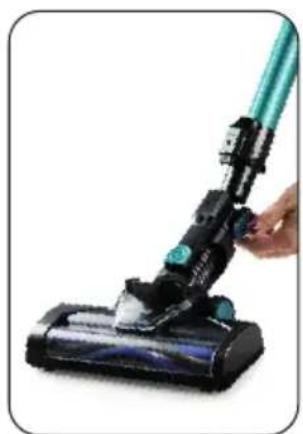
natural_image
Close-up of a hand holding a green and black vacuum cleaner (no text or symbols visible)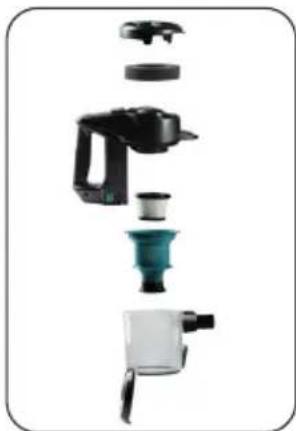
natural_image
Exploded view of a kitchen appliance showing internal components (no text or labels visible)CARGA
natural_image
Close-up of a hand holding a small black tool next to a black device with a green LCD screen (no visible text or symbols)SOPORTE MURAL
natural_image
Close-up of a black Audi AGS device with a blue lens and control panel, showing mechanical components (no text or symbols visible)USO
natural_image
Close-up of a black mechanical component with two labeled parts (1 and 2), no visible text or symbols.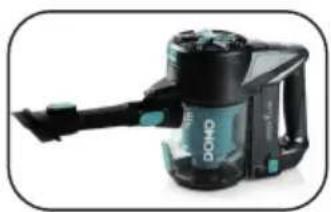
natural_image
Black and teal Dono vacuum cleaner device with handle and control panel (no visible text or symbols)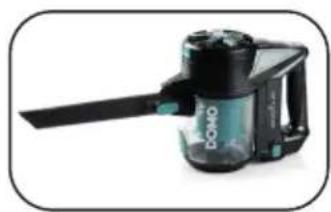
natural_image
Black and white photo of a Domo-branded vacuum cleaner (no visible text or symbols)LIMPIEZAY MANTENIMIENTO
LIMPIAR EL APARATO DE POLVO
natural_image
Close-up of a camera lens with a circular annotation highlighting the lens area (no text or symbols present)natural_image
Hand holding a black vacuum cleaner with a teal handle, no visible text or symbols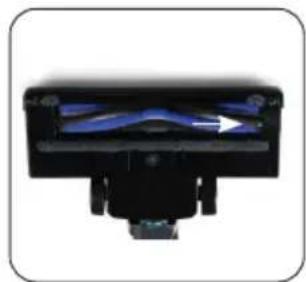
natural_image
Close-up of a black mechanical component with blue internal structure and a white arrow indicating direction (no text or symbols)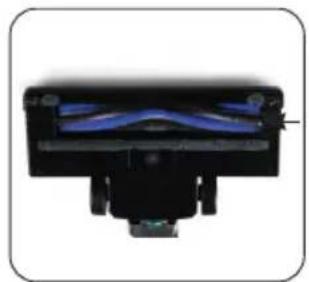
natural_image
Close-up of a black mechanical component with blue internal structure (no visible text or symbols)natural_image
Recycling symbol icon with three chasing arrows forming a triangle (no text or labels)natural_image
Symbol of a trash bin crossed with two diagonal lines, representing no waste or discharge (no text or numbers present)BATERÍA NO EXTRAÍBLE
natural_image
Product diagram of a handheld device with labeled parts (no text or symbols beyond numbered labels)PRIMA DELL'USO
natural_image
Close-up of a black and blue BOVO-branded hair dryer with a green handheld device attached (no visible text or symbols)
natural_image
Close-up of a hand holding a black vacuum cleaner with a teal handle (no text or symbols visible)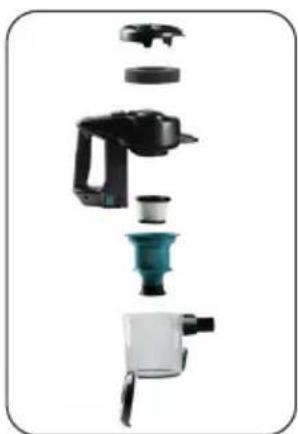
natural_image
Exploded view of a kitchen appliance showing internal components like blender, cup, and blender (no text or labels visible)CARICARE
natural_image
Close-up of a hand holding a small black tool next to a black device component (no visible text or symbols)SOSTEGNO A PARETE
natural_image
Product diagram showing a device with a blue-green lens and a black clip, connected by arrows (no text or symbols visible)UTILIZZO
natural_image
Close-up of a black mechanical component with two labeled parts (1 and 2), no visible text or symbols beyond labels.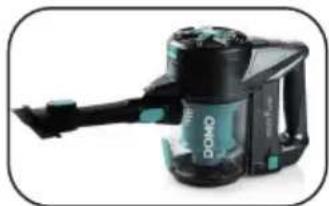
natural_image
Product photo of a black and teal DWMO vacuum cleaner (no visible text or symbols)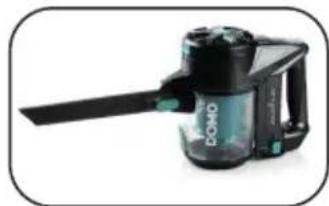
natural_image
Product photo of a black and white handheld device with a blue handle (no visible text or symbols)natural_image
Exploded view of a kitchen appliance showing internal components like blender, blender, and cup (no text or labels visible)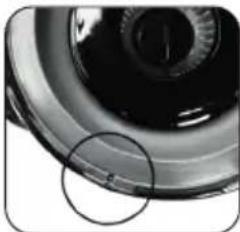
natural_image
Close-up of a mechanical component with a circular highlight and a small mark (no visible text or symbols)PULIRE LA SPAZZOLA PER I PAVIMENTI
natural_image
Hand holding a black vacuum cleaner with a teal handle, no visible text or symbols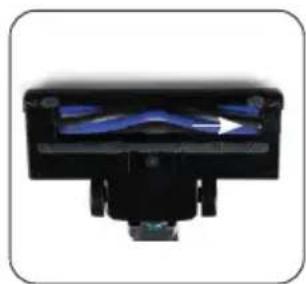
natural_image
Close-up of a black mechanical component with blue internal structure and arrow indicator (no text or symbols)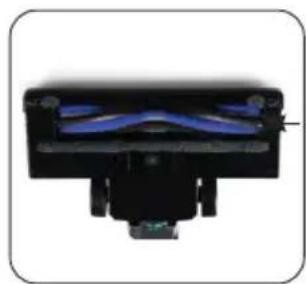
natural_image
Close-up of a black mechanical component with blue internal structure (no visible text or symbols)natural_image
Recycling symbol icon with three chasing arrows forming a triangle (no text or labels)natural_image
Symbol of a trash bin crossed with two diagonal lines, representing no waste or discharge (no text or numbers present)BATTERIA NON RIMOVIBILE
natural_image
Product diagram of a black handheld device with labeled parts (no text or symbols beyond numbered labels)PŘED PRVNÍM POUŽITÍM
natural_image
Close-up of a hand holding a black and teal Omo air purifier with a green handle, no visible text or symbols.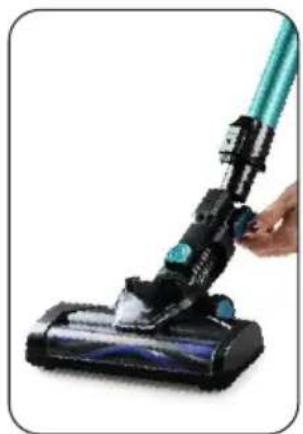
natural_image
Close-up of a hand holding a black vacuum cleaner with a teal handle (no text or symbols visible)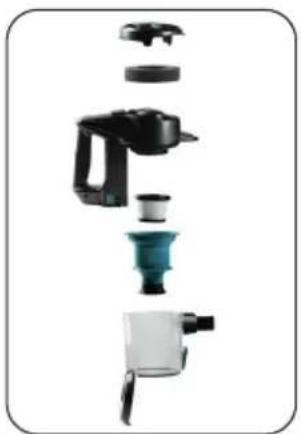
natural_image
Exploded view of a kitchen appliance showing internal components like blender, blender, and blender (no text or labels visible)NABÍJENÍ
natural_image
Close-up of a hand inserting a small black plug into a device component (no visible text or symbols)DRŽÁK NA STĚNU
natural_image
Product diagram showing a N23E device and a black mechanical component with directional arrows (no text or symbols)POUŽITÍ
natural_image
Close-up of a black plastic component with two labeled parts (1 and 2), no visible text or symbols.
natural_image
Black and teal DMMO vacuum cleaner with attached arm (no visible text or symbols)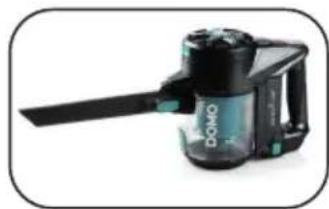
natural_image
Black and white photo of a Domo cleaning brush (no visible text or symbols)ČIŠTĚNÍ A ÚDRŽBA
ČIŠTĚNÍ PŘÍSTROJE
natural_image
Exploded view of a kitchen appliance showing internal components like blender, blender, and cup (no text or labels visible)natural_image
Close-up of a car wheel rim with a circular highlight on the rim (no text or symbols visible)natural_image
Hand holding a blue and black vacuum cleaner (no text or symbols visible)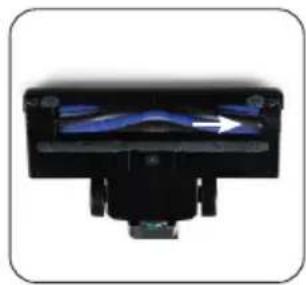
natural_image
Close-up of a black mechanical component with blue internal flow and an arrow indicating direction (no text or symbols)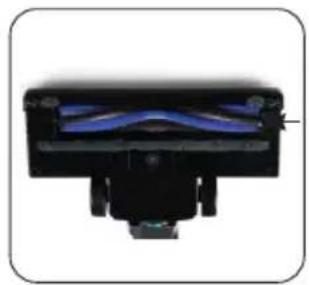
natural_image
Close-up of a black mechanical component with blue internal structure (no visible text or symbols)OHLED NA ŽÍVOTNÍ PROSTŘEDÍ
natural_image
Recycling symbol icon with three chasing arrows forming a triangle (no text or labels)natural_image
Symbol of a trash bin crossed with no text or numbers, indicating no waste or discharge (no text present)PEVNĚ ZABUDOVANÉ BATERIE
natural_image
Product diagram of a black handheld device with labeled parts (no text or symbols beyond numbered labels)PRED PRVÝM POUŽITÍM
natural_image
Close-up of a black BoMy brand hairdryer with a green brush tip, no visible text or symbols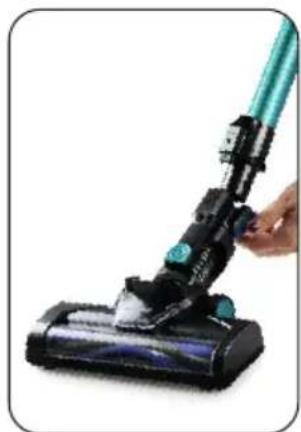
natural_image
Close-up of a hand using a black vacuum cleaner to clean or store air (no text or symbols visible)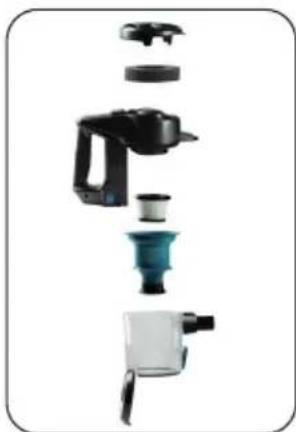
natural_image
Exploded view of a kitchen appliance showing internal components like blender, sink, and blender (no text or labels visible)NABÍJANIE
· Vysávač nabijete tak, že z boku rukoväte pripojíte nabíjací konektor.
- Svetelná kontrolka bude signalizovat' plné nabitie. Počas nabíjania budú blikat' a postupne sa rozsvecovat' kontrolky batérie (to značí, že sa nabíja). Pripravujeme svietit' všetky kontrolky batérie, tak je vysávač plne nabitý.
- Pri priebehu nabíjania nie je možné vysávač zapnút.
- Pri prvom dobíjanie dbajte na to, aby sa batéria nabíjala celých 8 hodín. Jedine takto sa správne "sformátuje".
natural_image
Close-up of a hand holding a small black tool, next to a black device with a digital display (no visible text or symbols)DRŽIAK NA STENU
natural_image
Close-up of a black A288 camera module with a blue lens and control panel, shown from an angle (no text or symbols visible)POUŽITIE
· Vysávač zapnite stlačením hlavného vypínača / spínača ON / OFF.
Modro podsvietený stupeň na kontrolke batérie značí, do akej miery je batéria nabitá.
Akonáhle bude skoro vybitá, tak sa kontrolka rozbliká a potom zhasne.
- Stlačením tlačidla ECO prepnete a znížite sací výkon, tým predlžite aktívny čas používania. Opätovným stlačením tlačidla ECO prípadne ECO režim vypnete a vrátite sa do nastavenia na plný výkon.
- Efektivita a výdrž prístroja pri upratovaní závisí od typu podlahy. Pri vysávaní koberca bude výdrž batérie podstatne menší než na hladké tvrdé ploche.
natural_image
Close-up of a black vacuum cleaner component with labeled parts 1 and 2 (no text or symbols on the device itself)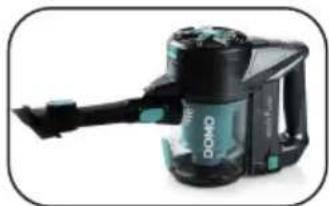
natural_image
Black and teal DOPD vacuum cleaner with attached arm (no visible text or symbols)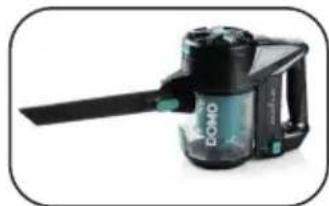
natural_image
Product photo of a black and white handheld device with a green handle (no visible text or symbols)ČISTENIE A ÚDRŽBA
ČISTENIE PRÍSTROJA
natural_image
Close-up of a car wheel rim with a circular highlight on the rim (no text or symbols visible)natural_image
Hand holding a green and black vacuum cleaner (no text or symbols visible)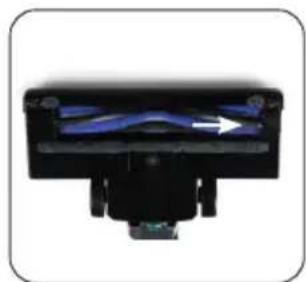
natural_image
Close-up of a black mechanical component with blue internal structure and white arrow indicating direction (no text or symbols)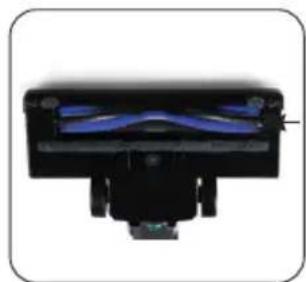
natural_image
Close-up of a black mechanical component with blue internal structure (no visible text or symbols)natural_image
Symbol of a trash bin crossed with no visible text or numbers, indicating no waste or discharge (no text present)natural_image
Recycling symbol icon with three chasing arrows forming a triangle (no text or labels)natural_image
Symbol of a trash bin crossed with a diagonal line, representing no waste or discharge (no text or numbers present)PEVNE ZABUDOVANÉ BATÉRIE
natural_image
Two cylindrical white objects with transparent caps, possibly milk or similar beverage (no text or symbols visible)
natural_image
Three product photos: square tiles, a clear glass coffee maker, and a rectangular container (no text or symbols visible)of scan hier:
ou scannez ici:
oder hier scannen:
or scan here:


- DO1111SV
- MUURBEVESTIGING
- GEBRUIK
- REINIGING EN ONDERHOUD
- HET TOESTEL PROPER MAKEN
- AVANT LA PREMIÈRE UTILISATION
- CHARGE
- SUPPORT MURAL
- UTILISATION
- NETTOYAGE ET ENTRETIEN
- NETTOYER L'APPAREIL
- BATTERIE NON AMOVIBLE
- WANDBEFESTIGUNG
- GEBRAUCH
- NICHT HERAUSNEHMBARE BATTERIE
- SAFETY INSTRUCTIONS
- PARTS
- BEFORE THE FIRST USE
- CHARGING
- WALL MOUNT
- USE
- ACCESSORIES
- CLEANING AND MAINTENANCE
- CLEANING THE MACHINE
- CLEANING THE DUST RESERVOIR
- CLEANING THE FLOOR BRUSH
- SPECIFICATIONS ADAPTOR
- ENVIRONMENTAL GUIDELINES
- NON-REMOVABLE BATTERY
- GARANTIA
- CARGA
- SOPORTE MURAL
- USO
- LIMPIEZAY MANTENIMIENTO
- LIMPIAR EL APARATO DE POLVO
- BATERÍA NO EXTRAÍBLE
- PRIMA DELL'USO
- CARICARE
- SOSTEGNO A PARETE
- UTILIZZO
- PULIRE LA SPAZZOLA PER I PAVIMENTI
- BATTERIA NON RIMOVIBILE
- PŘED PRVNÍM POUŽITÍM
- NABÍJENÍ
- DRŽÁK NA STĚNU
- POUŽITÍ
- ČIŠTĚNÍ A ÚDRŽBA
- ČIŠTĚNÍ PŘÍSTROJE
- OHLED NA ŽÍVOTNÍ PROSTŘEDÍ
- PEVNĚ ZABUDOVANÉ BATERIE
- PRED PRVÝM POUŽITÍM
- NABÍJANIE
- DRŽIAK NA STENU
- POUŽITIE
- ČISTENIE A ÚDRŽBA
- ČISTENIE PRÍSTROJA
- PEVNE ZABUDOVANÉ BATÉRIE
Brand : DOMO
Model : DO1111SV
Category : Vacuum Cleaner