
FF3N229NEIC - Freezer HISENSE - Free user manual and instructions
Find the device manual for free FF3N229NEIC HISENSE in PDF.


| Brand | Hisense |
| Model | FF3N229NEIC |
| Product type | No Frost Upright Freezer |
| Dimensions (W x D x H) | 595 mm x 660 mm x 1720 mm |
| Net volume | Approximately 229 liters (estimated) |
| Climate class | SN-T (from +10°C to +43°C) |
| Refrigerant | R600a (flammable, eco-friendly) |
| Power supply | 220-240 V / 50 Hz |
| Adjustable temperature range | -14°C to -24°C (or 7°F to -11°F) |
| Main functions | Super Freeze, Eco, Child Lock, Door Open Alarm, Touch Digital Display |
| Defrost type | No Frost (automatic) |
| Interior lighting | LED (energy efficiency class F, not user-replaceable) |
| Interior layout | 3 glass drawers (upper, middle, lower) + shelves |
| Adjustable feet | Yes, for leveling |
| Weight | Approximately 60 kg (estimated) |
| Energy consumption | Class F (according to energy label) |
| Noise level | Not specified, estimated 40 dB(A) |
| Maintenance and cleaning | Interior cleaning with baking soda and warm water; seals cleaned with mild detergent; frequency: every 2 months |
| Safety | Child lock, door alarm, automatic fan stop during defrost, flammable refrigerant R600a |
| Repairability | Spare parts available via Hisense after-sales service; repair by authorized technician recommended |
| General information | Manufacturer's warranty included; CE compliance; full manual available on notice-facile.com |
Frequently Asked Questions - FF3N229NEIC HISENSE
User questions about FF3N229NEIC HISENSE
0 question about this device. Answer the ones you know or ask your own.
Ask a new question about this device
Download the instructions for your Freezer in PDF format for free! Find your manual FF3N229NEIC - HISENSE and take your electronic device back in hand. On this page are published all the documents necessary for the use of your device. FF3N229NEIC by HISENSE.
USER MANUAL FF3N229NEIC HISENSE
Before operating this unit, please read this manual thoroughly, and retain for future reference.
This is a short version of the User's Manual. For more information, please scan the QR code above to view the full version of the manual.
NOTE:
-
Please adjust your mobile or tablet device to portrait mode during the browsing of electronic manuals to achieve the best viewing experience.
-
To ensure a smooth experience with the download feature of the electronic manuals, we recommend using Google Chrome, Microsoft Edge, or the Safari browser.
EN
English
SAFETY AND WARNING INFORMATION
Before using the appliance for the first time
Before connecting the appliance to the power mains, please read carefully the instructions for use which describe the appliance and its correct and safe use. The instructions apply to several appliance types/models; thus, settings or equipment may be described herein which is not available in your appliance. We recommend saving this instruction manual for future reference and attach it to the appliance if it is sold in the future.
Check for any damage or irregularities on your appliance. If you find your appliance is damaged, notify the retailer from which you have purchased the appliance.
Before connecting the appliance to the power mains, let the appliance rest in a vertical position for a minimum of 2 hours. This will reduce the possibility of operation faults due to the effect of transport on the cooling system.
Important safety instructions
WARNING
Risk of fire/flammable materials
The appliance must be connected to the power mains and grounded in compliance with the effective standards and regulations.
WARNING! Do not locate multiple portable socket-outlets or portable power supplies at the rear of the appliance.
Before cleaning the appliance, unplug it from the power mains (unplug the power cord from the wall outlet).
⚠ WARNING! If the supply cord is damaged, it must be replaced by the manufacturer, its service agent or similarly qualified persons in order to avoid a hazard.
⚠ WARNING! When positioning the appliance, ensure the supply cord is not trapped or damaged.
⚠ WARNING! The LED light must not be replaced by the user! If the LED light is damaged, contact the customer helpline for assistance.
SAFETY AND WARNING INFORMATION
WARNING! Do not use electrical appliances inside the food storage compartments of the appliance, unless they are of the type recommended by the manufacturer.
WARNING! Do not use mechanical devices or other means to accelerate the defrosting process, other than those recommended by the manufacturer.
⚠ WARNING! To avoid any hazard resulting from poor stability of the appliance, make sure it is installed as instructed.
Freeze burn hazard
To avoid freeze burn, never put frozen food in your mouth and do not touch frozen food.
Safety of children and vulnerable persons
The appliance is not intended for use by persons (including children) with reduced physical, sensory or mental capabilities, or lack of experience and knowledge, unless they have been given supervision or instruction concerning use of the appliance by a person responsible for their safety.
Children should be supervised to ensure that they do not play with the appliance.
Cleaning and user maintenance shall not be made by children without supervision.
Remove the packaging intended to protect the appliance or particular parts during transport and keep it outside the reach of children. It presents danger of injury or suffocation.
When removing a used appliance, disconnect the power cord, remove the door, and leave the shelves in the appliance. This will prevent children from locking themselves in the appliance.
For European markets only
This appliance can be used by children aged from 8 years and above and persons with reduced physical, sensory or mental capabilities or lack of experience and knowledge if they have been given supervision or instruction concerning use of the appliance in a safe way and understand the hazards involved.
Children shall not play with the appliance.
SAFETY AND WARNING INFORMATION
Cleaning and user maintenance shall not be made by children without supervision.
Children aged from 3 to 8 years are allowed to load and unload refrigerating appliances.
Warning regarding the refrigerant
The appliance contains a small amount of an environmentally friendly yet flammable gas R600a. Make sure that no parts of the cooling system are damaged. A gas leak is not hazardous to the environment, but it could cause eye injury or fire.
In case of a gas leak, ventilate the room thoroughly, disconnect the appliance from the power mains, and call a service technician.
Important information on the use of appliance
WARNING! This appliance is intended to be used in
household and similar applications such as:
- staff kitchen areas in shops, offices and other working environments;
- farm houses and by clients in hotels, motels and other residential type environments;
• bed and breakfast type environments;
• catering and similar non-retail applications.

WARNING! Keep ventilation openings, in the appliance enclosure or in the built-in structure, clear of obstruction.
The appliance may not be used outdoors and it may not be exposed to rain. Do not store explosive substances such as aerosol cans with a flammable propellant in this appliance.
If the appliance will be out of use for an extended period of time, switch it off using the relevant button, and unplug it from the power mains. Empty the appliance, defrost it, clean it, and leave the door ajar.
In case of an error or power supply failure, do not open the freezer compartment unless the freezer has not operated for over 16 hours. After this period, use the frozen food or provide sufficient cooling (e.g. a replacement appliance).
Technical information on the appliance
Rating plate can be found in the appliance interior. It indicates data on voltage, gross and net volume, type and amount of refrigerant, and information on the climate classes.
SAFETY AND WARNING INFORMATION
If the language on the rating plate is not the language of your choice or the language of your country, replace it with the one supplied.

WARNING! Do not damage the refrigerant circuit.
INSTALLING YOUR NEW APPLIANCE
- Stand your appliance in a dry and well ventilated place. Keep the appliance out of direct sunlight, rain or frost.
- The diagram shows the temperature range of each climate class. The climate class of this appliance is specified on the rating plate. Use beyond this range may result in poor performance.
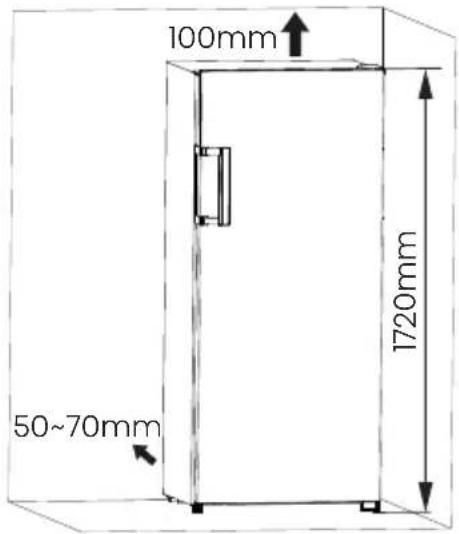
- Sufficient clear space should be available around the appliance to facilitate ventilation and heat dissipation.
- Suggested space is indicated in the figure.
| Climate class | Ambient temperature |
| SN | +10°C to +32°C |
| N | +16°C to +32°C |
| ST | +16°C to +38°C |
| T | +16°C to +43°C |
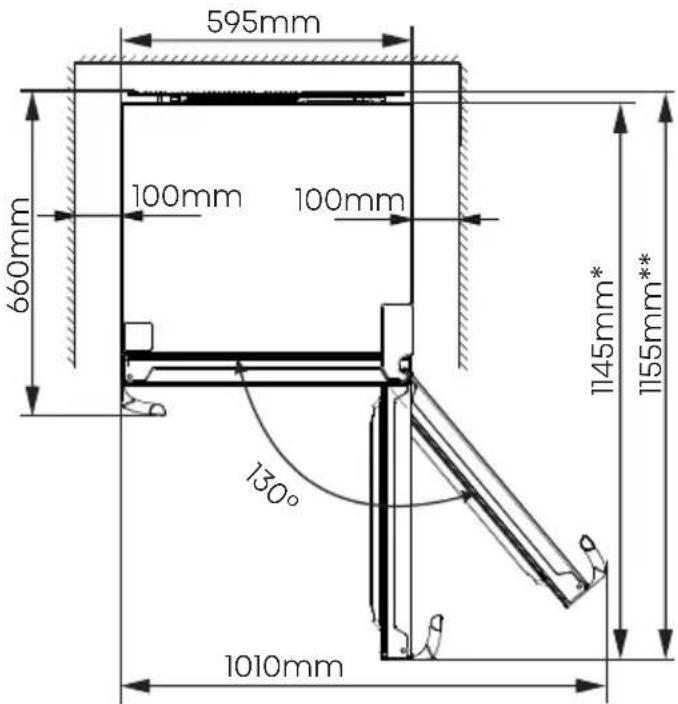
*: model without external condenser
**: model with external condenser
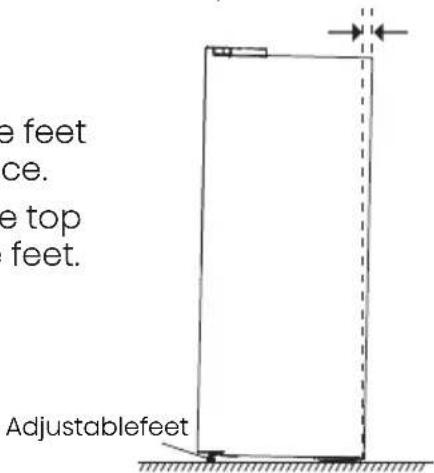
Leveling of appliance (if needed):
• The figure is for reference only.
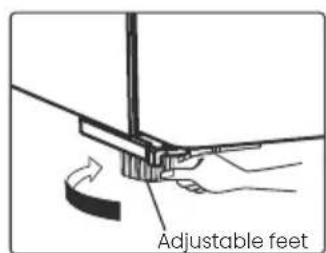
- The appliance is fitted with adjustable feet that can be used to level the appliance.
• To allow the doors to self-close, tilt the top backwards by turning the adjustable feet.
INSTALLING YOUR NEW APPLIANCE

WARNING
- For proper installation, this refrigerator must be placed on a level surface of hard material that is the same height as the rest of the flooring. This surface should be strong enough to support a fully loaded refrigerator.
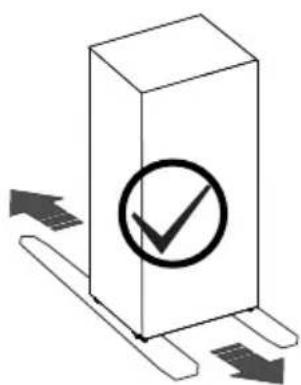
- The rollers should be only used for forward or backward movement. Moving the refrigerator sideways may damage your floor and the rollers.
natural_image
Simple 3D diagram of a rectangular box with a checkmark inside, surrounded by directional arrows (no text or symbols)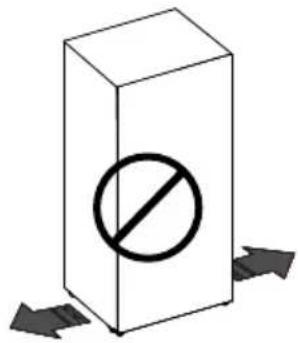
DESCRIPTION OF THE APPLIANCE
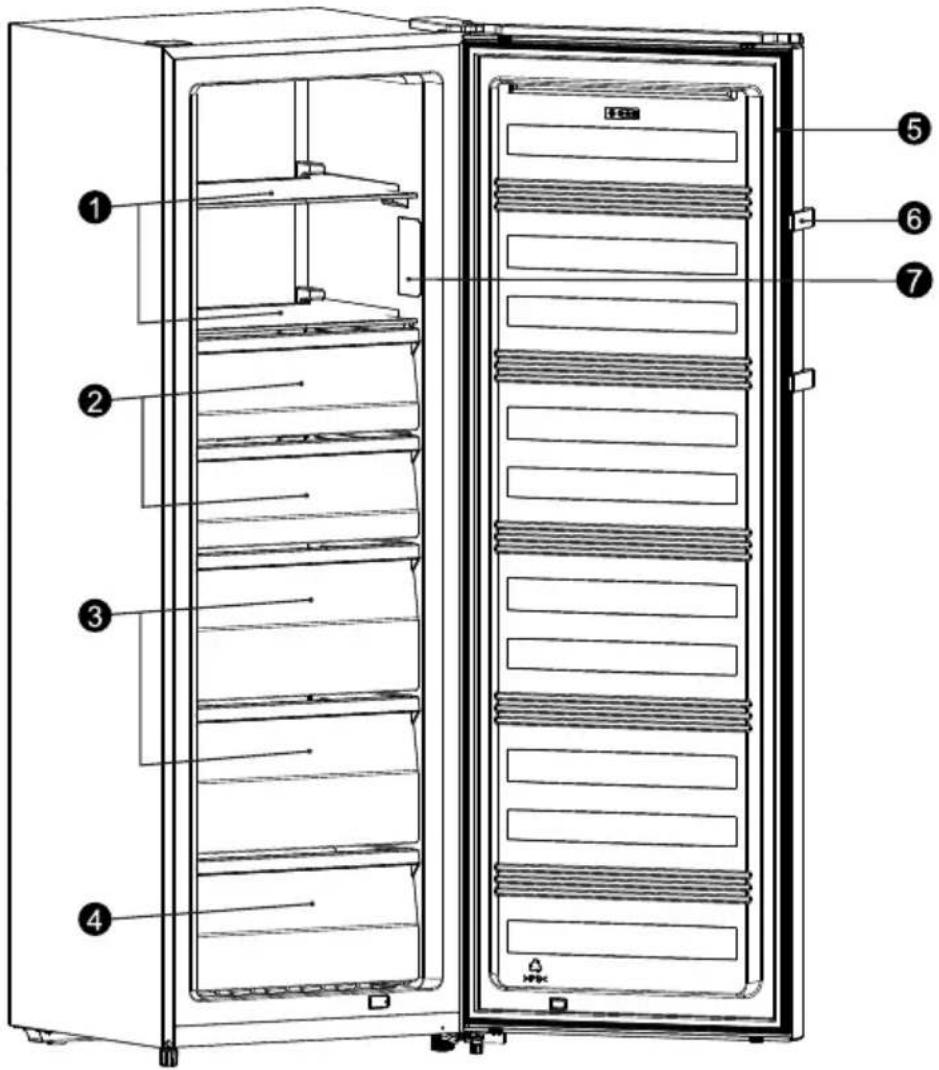
- Appliance interior equipment may change according to the appliance model.
-
The diagram may slightly differ from the appliance you purchased, please get more information in the E-manual.
-
Glass shelves
- Upper drawers
- Middle drawers
- Lower drawer
5 Door gasket - Handle *
- Display
* : Only in some models.
CONTROL PANEL
NOTE: Please refer to the E-manual for more information.
When the appliance is powered on for the first time, the backlighting of the icons on display panel starts working. If no buttons have been pressed and the doors are closed for 1 minute, the backlighting will
turn off.
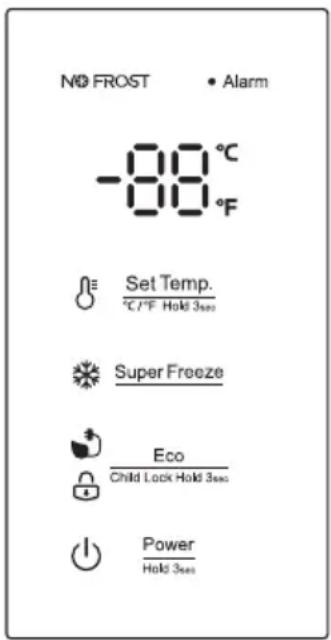
Controlling the temperature
For optimum food preservation, we recommend that when you start your freezer for the first time, the temperature for the freezer is set to -18^ ( 0^ ).
Caution!
When you set temperature, you set an average temperature for the whole freezer cabinet. Temperature inside each compartment may vary from the temperature values displayed on the panel, depending on how much food you store and where you place them. Ambient temperature may also affect the actual temperature inside the appliance.
NOTE: High temperature setting will accelerate food waste.
Set Temp. °C/°F Hold 3sec
Temp
In the unlocked state, you can switch the display mode from °C to °F by press the Set Temp. button for 3 seconds. In the unlocked state, press Set Temp. button, when the °C light is on, the freezer set temperature is
cyclically adjusted between -14^ and -24^ . When the ^ light is on, the freezer set temperature is cyclically adjusted between 7^ and -11^ .
Super Freeze
Super Freeze
Super Freeze will quickly lower the temperature within the freezer so food will freeze faster. This feature also helps to keep the vitamins and nutrition of fresh food for longer period.
- In the unlocked state, press Super Freeze button to enter the Super Freeze mode, the Super Freeze icon is lit and the temperature is set to -24^(-11^) . To freeze fresh food activate the Super Freeze function at least 24 hours before placing the food to complete prefreezing.
- Super Freeze mode automatically exits after about 52 hours.
- When Super Freeze function is on, in the unlocked state, you can switch it off by pressing Super Freeze button and the freezer temperature setting will revert back to the previous setting.
Eco Child Lock Hold 3sec Eco
If you are going to be away for a long period of time, you can turn it to Eco mode to save on electricity.
- In the unlocked state, press Eco Child Lock Hold Sun button to enter the Eco mode, the Eco icon is lit and the temperature is set to -17^(1^) .
- When the Eco function is on, in the unlocked state, you can switch it off by pressing Lock Hold 3sec button. The freezer temperature setting will revert back to the previous setting.
Child Lock
- When the light 🔒 is on, the freezer is locked. Press and hold the EcoCNB Lock Hold 3mm button for 3 seconds, the 🔒 light is off, the freezer is in the unlocked state. it can perform other button operation.
- If no button have been press for 20 seconds, the 🔊 light will be on.
CONTROL PANEL
- Alarm
Alarm
In case of alarm, • icon will be flashing and there will be buzzing sound.
Door Alarm
- When the door is open for over 2 minutes, the door alarm will sound, meanwhile the display panel show "dr". In case of door alarm, buzzer will sound 3 times every 1 minute.
• After the door alarm time exceeds more than 10 minutes, the buzzer stops beeping, the ● icon is off, and the display screen shows normal. The door alarm can also be cleared by closing the door.
• To save energy, please avoid keeping the door open for a long time when using the appliance.

Power Hold 3 sec
Power
Press and hold the 3w button for 3 seconds to turn the power function on or off.
- When the freezer is working, in the unlocked state, you can switch the appliance off by pressing Power Hold 3mm button for 3 seconds, the ⏻ light is on, meanwhile the display panel show“--”.
Important! Do not store any food in the freezer during this time.
- When the freezer is in standby mode and unlocked, press the button for 3 seconds, the light is off, the freezer will turn on and the display will shows normal.
NOTE: The display control only can be set in the unlocked state.
CLEANING AND CARE
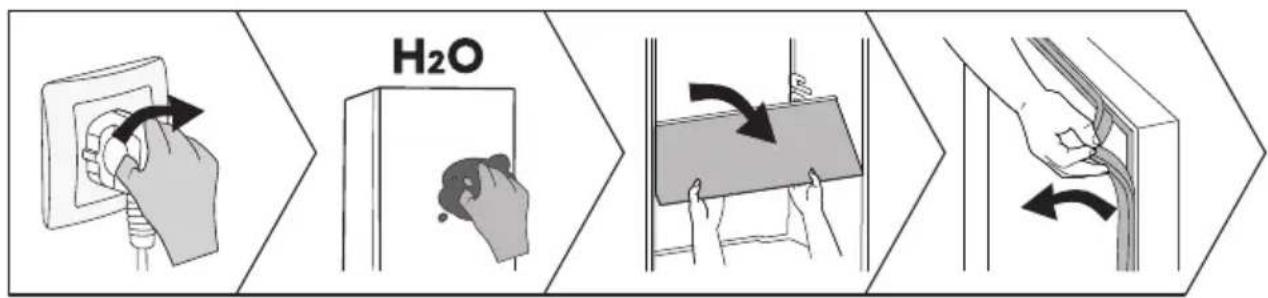
- For hygiene, clean the appliance (exterior and interior accessories) regularly at least every two months.
- Ensure the appliance is completely dry before switching back on and plugging back into the mains socket.
- Wipe the inside of the appliance with a weak solution of bicarbonate of soda, and then rinse with warm water using a wrung-out sponge or cloth.
• Take care to keep door seals clean. Sticky food and drinks can cause seals to stick to the cabinet. Wash the seals with a mild detergent and warm water. Rinse and dry them thoroughly after cleaning.
• This product contains a light source of energy efficiency class F. - For more cleaning details, please refer to the E-manual.
HELPFUL HINTS AND TIPS
Energy saving tips
We recommend that you follow the tips to save energy.
- Try to avoid keeping the door open for long periods.
- Ensure the appliance is away from any sources of heat.
- Don't set the temperature colder than necessary.
- Don't store warm food or evaporating liquid in the appliance.
Switching off your appliance
If the appliance needs to be switched off for an extended period, the following steps should be taken prevent mould on the appliance.
- Remove all food.
- Remove the power plug from the mains socket.
- Clean and dry the interior thoroughly.
- Ensure that all the doors are wedged open slightly to allow air to circulate.
- Please refer to the E-manual for more information.
TROUBLESHOOTING
- If you experience a problem with your appliance or are concerned that the appliance is not functioning correctly, you can carry out the following easy checks before calling for service.
- NOTE: You can find more relevant information in the E-manual.

WARNING
Don't try to repair the appliance yourself. If the problem persists after you have made the checks mentioned below, contact a qualified electrician, authorized service engineer or the shop where you purchased the product.

DANGER
Risk of child entrapment. Before you throw away your old refrigerator or freezer:
• Take off the doors.
- Leave the shelves in place so that children may not easily climb inside.
| Problem | Possible cause & Solution |
| Appliance is not working correctly | Check whether the power cord is plugged into the power outlet properly. |
| The ambient temperature is too low. Try setting the chamber temperature to a colder level to solve this problem. |
TROUBLESHOOTING
| Problem | Possible cause & Solution |
| A layer of frost occurs in the compartment | Check that the air outlets are not blocked by food and ensure food is placed within the appliance to allow sufficient ventilation. Ensure that the door can be fully closed. |
| Temperature inside is too warm | You may have left the doors open too long or too frequently; or the doors are kept open by some obstacle; or the appliance is located with insufficient clearance at the sides, back and top. |
| Unable to connect appliance to Wi-Fi network | The Wi-Fi password was entered incorrectly, or the network could not be found.For specific network configuration operations, please refer to the electronic manual. |
DISPOSAL OF THE APPLIANCE
It is prohibited to dispose of this appliance as household waste.
Packaging materials
Packaging materials with the recycle symbol are recyclable. Dispose of the packaging into a suitable waste collection container to recycle it.
Before disposal of the appliance
- Pull out the mains plug from the mains socket.
- Cut off the power cord and discard with the mains plug.

WARNING
Refrigerators contain refrigerant and gases in the insulation. Refrigerant and gases must be disposed of professionally as they may cause eye injuries or ignition.
Ensure that tubing of the refrigerant circuit is not damage prior to proper disposal.
| Correct Disposal of this product | |
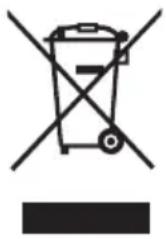 | This marking indicates that this product should no be disposed with other household wastes throughout the EU. To prevent possible harm to the environment or human health from uncontrolled waste disposal, recycle it responsibly to promote the sustainable reuse of material resources. To return your used device, please use the return and collection systems or contact the retailer where the product was purchased. They can take this product for environmental safe recycling. |
SUGGESTION OF USING THE APPLIANCE
To avoid contamination of food, please respect the following instructions:
- Opening the door for long periods can cause a significant increase of the temperature in the compartments of the appliance.
- Clean regularly surfaces that can come in contact with food and accessible drainage systems.
- Clean water tanks if they have not been used for 48h; flush the water system connected to a water supply if water has not been drawn for 5 days.(Special for models with water tanks)
- Store raw meat and fish in suitable containers in the refrigerator, so that it is not in contact with or drip onto other food.
- Two-star frozen-food compartments are suitable for storing pre-frozen food, storing or making ice-cream and making ice cubes.
- One-, two- and three-star compartments are not suitable for the freezing of fresh food.
- If the refrigerating appliance is left empty for long periods, switch off, defrost, clean, dry, and leave the door open to prevent mould developing within the appliance.
- NOTE: The information below is for reference only, as functions may vary by models. Please get more details in the E-manual.
| Order | Compartments type | Target storage temp.[°C] | Appropriate food | Storage life |
| 1 | Fridge | +2~+8 | Eggs, cooked food, packaged food, fruits and vegetables, dairy products, cakes, drinks and other foods which are not suitable for freezing | / |
| 2 | Four-star | ≤-18 | Seafood, freshwater aquatic products and meats | ≤3 months |
| 3 | Three-star | ≤-18 | ||
| 4 | Two-star | ≤-12 | ≤2 months | |
| 5 | One-star | ≤-6 | ≤1 month | |
| 6 | Zero-star | -6~0 | Fresh pork, beef, fish, chicken, some packaged processed foods, etc. Partially packed/wrapped up encapsulated processed foods (non-freezable foods) | ≤3 days |
| 7 | Chill | -3~+3 | Seafood, pork, beef, chicken, freshwater aquatic products, etc. | 2~7 days |
| 8 | Fresh Food | 0~+4 | Fresh pork, beef, fish, chicken, cooked food, etc. | ≤3 days |
| 9 | Wine | +5~+20 | Red wine, white wine, sparkling wine, etc. | / |
Hisense
life reimagined
MANUEL D'UTILISATION DE L'UTILISATEUR
natural_image
Simple 3D diagram of a rectangular box with a checkmark inside, surrounded by directional arrows (no text or symbols)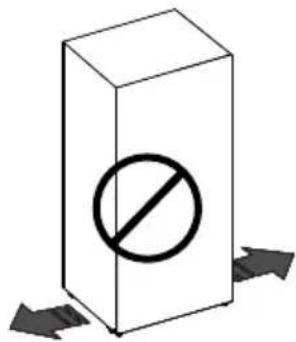
DESCRIPTION DE L'APPAREIL
PANNEAU DE COMMANDE
Super Freeze (Super congélation)
BEDIENUNGSANLEITUNG
WARNUNG
natural_image
Simple line drawing of a vertical rectangular structure with a horizontal dashed line and a vertical double-headed arrow, no text or symbols present.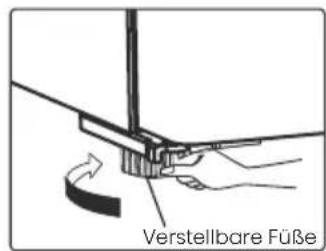
natural_image
Simple 3D diagram of a rectangular box with a checkmark inside, surrounded by directional arrows (no text or symbols)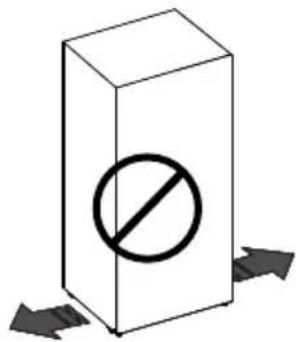
BEDIENFELD
Eco Child Lock Hold 3sec
Eco
MANUALE OPERATIVO PER L'UTENTE
natural_image
Simple 3D diagram of a rectangular box with a checkmark inside, surrounded by directional arrows (no text or symbols)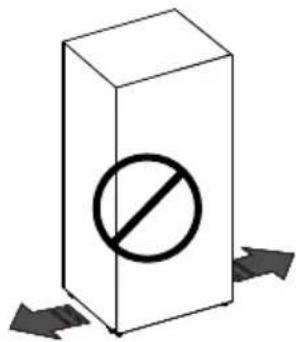
DESCRIZIONE DELL'APPARECCHIO
PANNELLO DI CONTROLLO
natural_image
Simple 3D diagram of a rectangular box with a checkmark inside, surrounded by directional arrows (no text or symbols)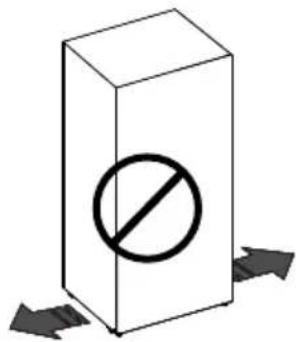
PANEL DE CONTROL
Eco Child Lock Hold 3sec
Eco
natural_image
Simple 3D diagram of a rectangular box with a checkmark inside, surrounded by directional arrows (no text or symbols)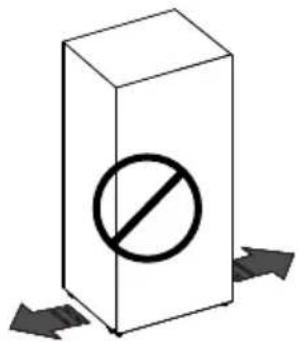
PAINEL DE CONTROLO
Eco Child Lock Hold 3sec
Eco
flowchart
graph LR
    A["Hand valve with pH drop"] --> B["Water inlet"]
    B --> C["Water outlet"]
    C --> D["Fluid transfer step with arrow indicating water movement"]
    D --> E["Hand valve with fluid transfer arrow"]
SUGESTÕES E DICAS ÚTEIS
GEBRUIKERHANDLEIDING
VEILIGHEIDS-EN WAARSCHUWINGSINFORMATIE
WAARSCHUWING
Brandgevaar/brandbare materialen
VEILIGHEIDS-EN WAARSCHUWINGSINFORMATIE
VEILIGHEIDS-EN WAARSCHUWINGSINFORMATIE
VEILIGHEIDS-EN WAARSCHUWINGSINFORMATIE
natural_image
Isometric diagram of a rectangular box with a checkmark inside, surrounded by directional arrows (no text or symbols)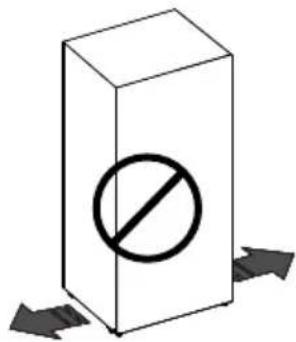
BESCHRIJVING VAN HET APPARAAT
BEDIENINGSPANEEEL
flowchart
graph LR
    A["Hand valve with inlet"] --> B["Hand valve with gas washing"]
    B --> C["Gas washing with H2O"]
    C --> D["Fluid transfer with arrow indicating water flow"]
    D --> E["Hand valve with inlet"]