MMO19S14ASTC - Microwave Oven MIDEA - Free user manual and instructions
Find the device manual for free MMO19S14ASTC MIDEA in PDF.


| Product Type | Over-the-Range Microwave Oven |
| Brand | Midea |
| Model | MMO19S14ASTC |
| Color | Stainless Steel (estimated) |
| Interior Capacity | 1.9 cu ft (approx. 53.8 L) |
| Dimensions (W x H x D) | Approx. 30 x 17 x 16 in (76.2 x 43.2 x 40.6 cm) (estimated) |
| Net Weight | 28.5 to 38.5 kg (63 to 85 lb) |
| Power Supply | 120 V ~ 60 Hz, 15 A, 1.6 kW |
| Input Power (Microwave) | 1500 W |
| Output Power (Microwave) | 1000 W |
| Frequency | 60 Hz |
| Control Type | Touch Digital with LED Display |
| Turntable | Yes, Glass |
| Main Functions | Sensor Cooking, Auto Defrost, Reheat, Popcorn, Vegetables, Snacks, Melt/Soften, Two-Stage Cooking, Quick Start (+30 sec), Clock, Timer, Power Level (11 levels) |
| Ventilation | Integrated Exhaust Hood (2 speeds), 3 Venting Modes (Top, Rear, Recirculation) |
| Lighting | Cooktop Light (High/Low/Off) |
| Child Lock | Yes (Control Lock) |
| Safety | Door Safety Locks, Grounding Required, Automatic Shutoff on Overheat (Protection Fan) |
| Allowed Materials | Microwave-safe dishes, glass, plastic, wax paper, etc. (avoid metal, aluminum, wood) |
| Cleaning | Mild soap and damp cloth; do not use metal pads; regular cleaning of grease filter |
| Included Accessories | Glass tray, roller ring, metal rack (for some models), shelf, grease filters, exhaust adapter, user manual |
| Installation | Requires upper cabinet and wall; dedicated 20 A grounded outlet; minimum height under cabinet: 30 in (76.2 cm) above cooking surface |
| Warranty | Standard (see manufacturer) |
Frequently Asked Questions - MMO19S14ASTC MIDEA
User questions about MMO19S14ASTC MIDEA
0 question about this device. Answer the ones you know or ask your own.
Ask a new question about this device
Download the instructions for your Microwave Oven in PDF format for free! Find your manual MMO19S14ASTC - MIDEA and take your electronic device back in hand. On this page are published all the documents necessary for the use of your device. MMO19S14ASTC by MIDEA.
USER MANUAL MMO19S14ASTC MIDEA
natural_image
Simple line drawing of a microwave oven with a handle and lid (no text or symbols)Household Microwave Oven
USER MANUAL
MMO19S14ASTC
Warning notices: Before using this product, please read this manual carefully and keep it for future reference. The design and specifications are subject to change without prior notice for product improvement. Consult with your dealer or manufacturer for details.
The diagram above is just for reference. Please take the appearance of the actual product as the standard.
THANK YOU LETTER
Thank you for choosing Midea! Before using your new Midea product, please read this manual thoroughly to ensure that you know how to operate the features and functions that your new appliance offers in a safe way.
CONTENTS
THANK YOU LETTER----EN-01
SAFETY INSTRUCTIONS----EN-02
SPECIFICATION----EN-11
PRODUCT OVERVIEW ----EN-12
PRODUCT INSTALLATION ----EN-13
OPERATION INSTRUCTIONS ----EN-51
TROUBLESHOOTING----EN-83
TRADEMARKS, COPYRIGHTS AND LEGAL STATEMENT ---EN-84
DATA PROTECTION NOTICE----EN-85
SAFETY INSTRUCTIONS
Intended Use
The following safety guidelines are intended to prevent unforeseen risks or damage from unsafe or incorrect operation of the appliance. Please check the packaging and appliance on arrival to make sure everything is intact to ensure safe operation. If you find any damage, please contact the retailer or dealer. Please note modifications or alterations to the appliance are not allowed for your safety concern. Unintended use may cause hazards and loss of warranty claims.
Explanation of Symbols
 | DangerThis symbol indicates that there are dangers to the life and health of persons due to extremely flammable gas. |
 | Warning of electrical voltageThis symbol indicates that there is a danger to life and health of persons due to voltage. |
 | WarningThe signal word indicates a hazard with a medium level of risk which, if not avoided, may result in death or serious injury. |
 | CautionThe signal word indicates a hazard with a low degree of risk which, if not avoided, may result in minor or moderate injury. |
 | AttentionThe signal word indicates important information (e.g. damage to property), but not danger. |
 | Observe instructionsThis symbol indicates that a service technician should only operate and maintain this appliance in accordance with the operating instructions. |
Read these operating instructions carefully and attentively before using/commissioning the unit and keep them in the immediate vicinity of the installation site or unit for later use.
PRECAUTIONS TO AVOID POSSIBLE EXPOSURE TO EXCESSIVE MICROWAVE ENERGY
a. Do not attempt to operate this oven with the door open since open door operation can result in harmful exposure to microwave energy.
It is important not to defeat or tamper with the safety interlocks.
b. Do not place any object between the oven front face and the door or allows soil or cleaner residue to accumulate on sealing surfaces.
c. Do not operate the oven if it is damaged. It is particularly important that the oven door close properly and that there is no damage to the:
- DOOR (bent)
- HINGES AND LATCHES (broken or loosened)
- DOOR SEALS AND SEALING SURFACES
d. The oven should not be adjusted or repaired by anyone except properly qualified service personnel.
IMPORTANT SAFETY INSTRUCTIONS
When using electrical appliances basic safety precautions should be followed, including the following:
WARNING
To reduce the risk of burns, electric shock, fire, injury to persons or exposure to excessive microwave energy:
- Read all instructions before using the appliance.
- Read and follow the specific: "PRECAUTIONS TO AVOID POSSIBLE EXPOSURE TO EXCESSIVE MICROWAVE ENERGY" found on page 03.
- This appliance must be grounded. Connect only to properly grounded outlet. See "GROUNDING INSTRUCTIONS" found on page 07.
• Install or locate this appliance only in accordance with the provided installation instructions. - Some products such as whole eggs and sealed containers - for example, closed glass jars - are able to explode and should not be heated in this oven.
- Use this appliance only for its intended use as described in the manual. Do not use corrosive chemicals or vapors in this appliance. This type of oven is specifically designed to heat, cook or dry food. It is not designed for industrial or laboratory use.
- HOT CONTENTS CAN CAUSE SEVERE BURNS. DO NOT ALLOW CHILDREN TO USE THE MICROWAVE. Use caution when removing hot items.
-
Do not operate this appliance if it has a damaged cord or plug, if it is not working properly, or if it has been damaged or dropped.
-
This appliance should be serviced only by qualified service personnel. Contact nearest authorized service facility for examination, repair, or adjustment.
- Do not cover or block any openings on the appliance.
- Do not store this appliance outdoors. Do not use this product near water - for example, near a kitchen sink, in a wet basement, near a swimming pool, or similar location.
- Do not immerse cord or plug in water.
- Keep cord away from heated surface.
- Do not let cord hang over edge of table or counter.
- When cleaning surfaces of door and oven that comes together on closing the door, use only mild, nonabrasive soaps, or detergent applied with a sponge or soft cloth.
- To reduce the risk of fire in the oven cavity:
- Do not overcook food. Carefully attend appliance when paper, plastic, or other combustible materials are placed inside the oven to facilitate cooking.
- Remove wire twist-ties from paper or plastic bag before placing bag in oven.
- If material inside of the oven ignite, keep oven door closed, turn oven off, and disconnect the power cord, or shut off power at the fuse or circuit breaker panel.
- Do not use the cavity for storage purposes. Do not leave paper products, cooking utensils, or food in the cavity when not in use.
- Liquids, such as water, coffee, or tea are able to be overheated beyond the boiling point without appearing to be boiling. Visible bubbling or boiling when the container is removed from the microwave oven is not always present.
THIS COULD RESULT IN VERY HOT LIQUID SUDDENLY BOILING OVER WHEN THE CONTAINER IS DISTURBED OR A UTENSIL IS INSERTED INTO THE LIQUID. To reduce the risk of injury to persons:
- Do not overheat the liquid.
- Stir the liquid both before and halfway through heating it.
- Do not use straight-sided containers with narrow necks.
- After heating, allow the container to stand in the microwave oven for a short time before removing the container.
- Use extreme care when inserting a spoon or other utensil into the container.
- Oversized food or oversized metal utensils should not be inserted in a microwave/toaster oven as they may create a fire or risk of electric shock.
- Do not clean with metal scouring pads. Pieces can burn off the pad and touch electrical parts involving a risk of electric shock.
- Do not use paper products when appliance is operated in the toaster mode.
- Do not store any materials, other than manufacturer's recommended accessories, in this oven when not in use.
- Do not cover racks or any other part of the oven with metal foil. This will cause overheating of the oven.
- Clean Ventilation Hoods Frequently - Grease should not be allowed to accumulate on hood or filter.
- When flaming foods under the hood, turn the fan on.
- Use care when cleaning the vent-hood filter. Corrosive cleaning agents, such as lyebased oven cleaners, may damage the filter.
- Suitable for use above both gas and electric cooking equipment.
SAVE THESE INSTRUCTIONS
GROUNDING INSTRUCTIONS
This appliance must be grounded. In the event of an electrical short circuit, grounding reduces the risk of electric shock by providing an escape wire for the electric current. This appliance is equipped with a cord having a grounding wire with a grounding plug. The plug must be plugged into an outlet that is properly installed and grounded.
WARNING
Improper use of the grounding can result in a risk of electric shock. Consult a qualified electrician or serviceman if the grounding instructions are not completely understood, or if doubt exists as to whether the appliance is properly grounded. If it is necessary to use an extension cord, use only a 3-wire extension cord that has a 3-blade grounded plug, and 3-slot receptacle that will accept the plug on the appliance. The marked rating of the extension cord shall be equal to or greater than the electrical rating of the appliance.
DANGER
Electric Shock Hazard
Touching some of the internal components can cause serious personal injury or death. Do not disassemble this appliance.
WARNING
Electric Shock Hazard
Improper use of the grounding can result in electric shock. Do not plug into an outlet until appliance is properly installed and grounded.
- A short power-supply cord is provided to reduce the risks resulting from becoming entangled in or tripping over a longer cord.
- Longer cord sets or extension cords are available and may be used if care is exercised in their use.
- If a long cord or extension cord is used:
- The marked electrical rating of the cord set or extension cord should be at least as great as the electrical rating of the appliance.
- The extension cord must be a grounding-type 3-wire cord.
- The longer cord should be arranged so that it will not drape over the counter top or tabletop where it can be pulled on by children or tripped over unintentionally.
RADIO INTERFERENCE
- Operation of the microwave oven may cause interference to your radio, TV or similar equipment.
- When there is interference, it may be reduced or eliminated by taking the following measures:
- Clean door and sealing surface of the oven
- Reorient the receiving antenna of radio or television.
- Relocate the microwave oven with respect to the receiver.
- Move the microwave oven away from the receiver.
- Plug the microwave oven into a different outlet so that microwave oven and receiver are on different branch circuits.
THIS DEVICE COMPLIES WITH PART 18 OF THE FCC RULES.
UTENSILS

CAUTION
Personal Injury Hazard
Tightly-closed utensils could explode. Closed containers should be opened and plastic pouches should be pierced before cooking.
See the instructions on "Materials you can use in microwave oven or to be avoided in microwave oven." There may be certain non-metallic utensils that are not safe to use for microwaving. If in doubt, you can test the utensil in question following the procedure below.
Utensil Test:
- Fill a microwave-safe container with 1 cup of cold water (250ml) along with the utensil in question.
- Cook on maximum power for 1 minute.
- Carefully feel the utensil. If the empty utensil is warm, do not use it for microwave cooking.
- Do not exceed 1 minute cooking time.
Materials you can use in microwave oven
| Utensils Remarks | |
| Browning dish | Follow manufacturer's instructions. The bottom of browning dish must be at least 3/16 inch (5mm) above the turntable. Incorrect usage may cause the turntable to break. |
| Dinnerware | Microwave-safe only. Follow manufacturer's instructions. Do not use cracked or chipped dishes. |
| Glass jars | Always remove lid. Use only to heat food until just warm. Most glass jars are not heat resistant and may break. |
| Glassware | Heat-resistant oven glassware only. Make sure there is no metallic trim. Do not use cracked or chipped dishes. |
| Oven cooking bags | Follow manufacturer's instructions. Do not close with metal tie. Make slits to allow steam to escape. |
| Paper plates and cups | Use for short-term cooking/warming only. Do not leave oven unattended while cooking. |
| Paper towels | Use to cover food for reheating and absorbing fat. Use with supervision for a short-term cooking only. |
| Parchment paper Use as a cover to prevent splattering or a wrap for steaming. | |
| Plastic | Microwave-safe only. Follow the manufacturer's instructions. Should be labeled "Microwave Safe". Some plastic containers soften, as the food inside gets hot. "Boiling bags" and tightly closed plastic bags should be slit, pierced or vented as directed by package. |
| Plastic wrap | Microwave-safe only. Use to cover food during cooking to retain moisture. Do not allow plastic wrap to touch food. |
| Thermometers Microwave-safe only (meat and candy thermometers). | |
| Wax paper Use as a cover to prevent splattering and retain moisture. | |
Materials to be avoided in microwave oven
| Utensils Remarks | |
| Aluminum tray May cause arcing. Transfer food into microwave-safe dish. | |
| Food carton with metal handle | May cause arcing. Transfer food into microwave-safe dish. |
| Metal or metal-trimmed utensils | Metal shields the food from microwave energy. Metal trim may cause arcing. |
| Metal twist ties May cause arcing and could cause a fire in the oven. | |
| Paper bags May cause a fire in the oven. | |
| Plastic foam | Plastic foam may melt or contaminate the liquid inside when exposed to high temperature. |
| Wood | Wood will dry out when used in the microwave oven and may split or crack. |
SPECIFICATION
MODEL
MMO19S14ASTC
Rated Voltage/Frequency 120VAC 60Hz
Rated Input(Microwave) 1500 W
Rated Output(Microwave) 1000 W
PRODUCT OVERVIEW
Setting Up Your Oven
PART NAMES
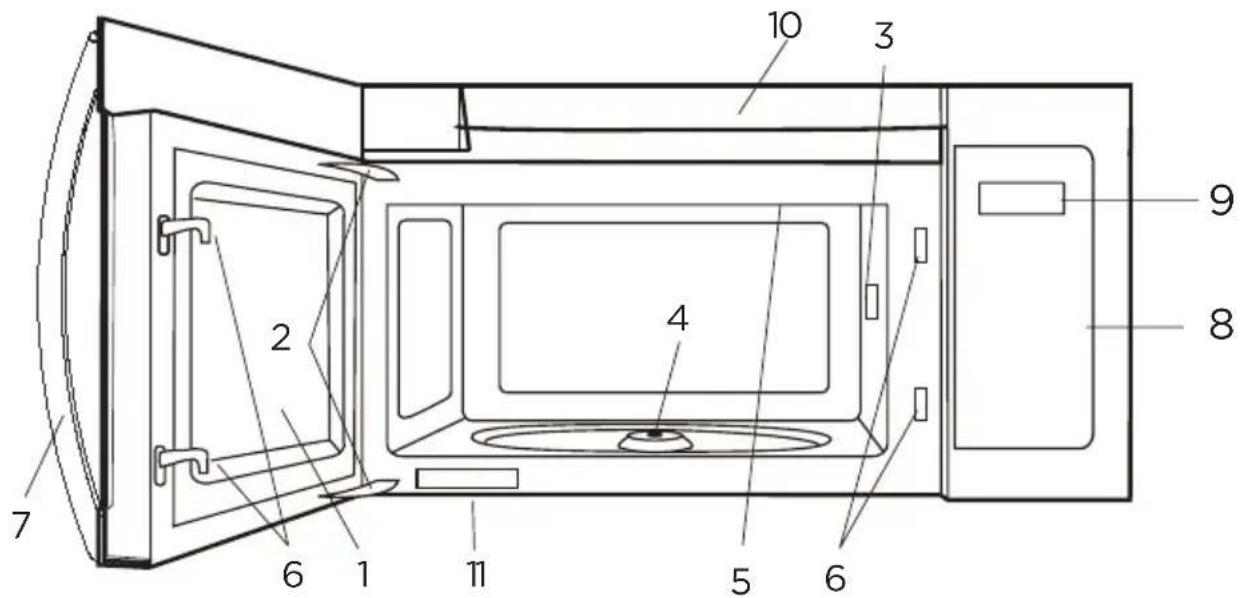
- Microwave oven door with see-through window
- Door hinges
- Waveguide cover: DO NOT REMOVE.
- Turntable motor shaft
- Microwave oven light
It will light when microwave oven is operating or door is open.
- Safety door latches
The microwave oven will not operate unless the door is securely closed.
- Handle
- Control panel
- Display
- Ventilation openings
- Rating label
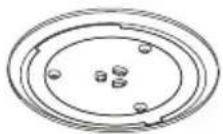
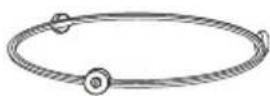
Glass turntable Turntable Ring Assembly
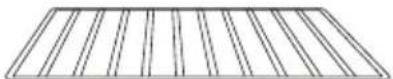
Rack for2-level cooking/reheating
PRODUCT INSTALLATION
Important Safety Instructions
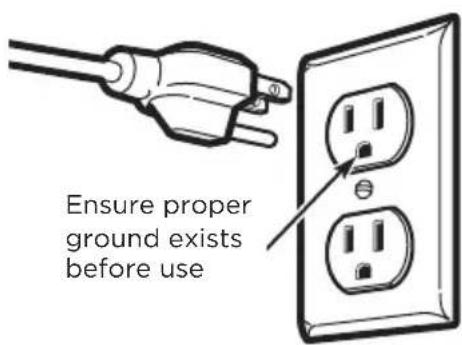
This product requires a three-prong grounded outlet. The installer must perform a ground continuity check on the power outlet box before beginning the installation to ensure that the outlet box is properly grounded. If not properly grounded, or if the outlet box does not meet electrical requirements noted (under ELECTRICAL REQUIREMENTS), a qualified electrician should be employed to correct any deficiencies.

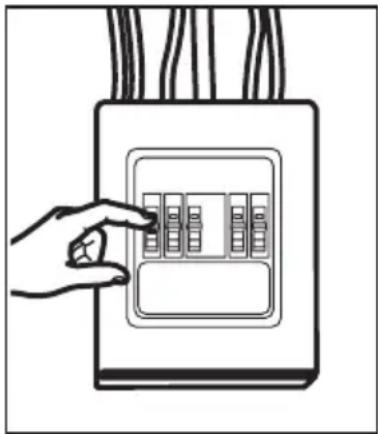
CAUTION:
For personal safety, remove house fuse or open circuit breaker before beginning installation to avoid severe or fatal shock injury.
natural_image
Hand placing a button into an electrical outlet with visible circuit breakers (no text or symbols)
CAUTION:
For personal safety, the mounting surface must be capable of supporting the cabinet load, in addition to the added weight of this 63-85 pound (28.5-38.5 kg) product, plus additional oven loads of up to 50 pounds (22.7 kg) or a total weight of 113-135 pounds (51.3-61.2 kg).

CAUTION:
For personal safety, this product cannot be installed in cabinet arrangements such as an island or a peninsula. It must be mounted to BOTH a top cabinet AND a wall.

NOTE:
For easier installation and personal safety, it is recommended that two people install this product.
IMPORTANT - PLEASE READ CAREFULLY. FOR PERSONAL SAFETY, THIS APPLIANCE MUST BE PROPERLY GROUNDED TO AVOID SEVERE OR FATAL SHOCK.
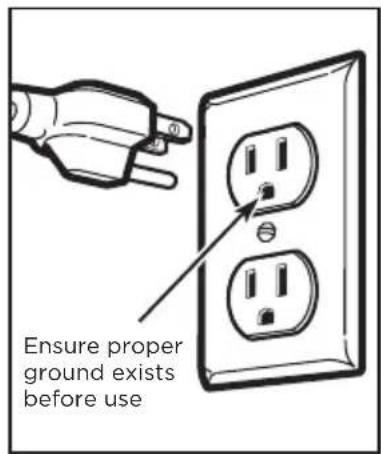
The power cord of this appliance is equipped with a three-prong (grounding) plug which mates with a standard three-prong (grounding) wall receptacle to minimize the possibility of electric shock hazard from this appliance.
You should have the wall receptacle and circuit checked by a qualified electrician to make sure the receptacle is properly grounded.
Where a standard two-prong wall receptacle is encountered, it is very important to have it replaced with a properly grounded three-prong wall receptacle, installed by a qualified electrician.
DO NOT, UNDER ANY CIRCUMSTANCES, CUT, DEFORM OR REMOVE ANY OF THE PRONGS FROM THE POWER CORD. DO NOT USE WITH AN EXTENSION CORD.
Electrical Requirements
Product rating is 120V\~60 Hz, 15 amps and 1.6 kilowatts. This product must be connected to a separate and dedicated supply circuit of the proper voltage and frequency. Wire size must conform to the requirements of the National Electrical Code or the prevailing local code for this kilowatt rating. The power supply cord and plug should be brought to a separate and dedicated 20 ampere branch circuit single grounded outlet. The outlet box should be located in the cabinet above the microwave oven. The outlier box and supply circuit should be installed by a qualified electrician and conform to the National Electrical Code or the prevailing local code.
Damage—Shipment/Installation
- If the unit is damaged in shipment, return the unit to the store in which it was bought for repair or replacement.
- If the unit is damaged by the customer, repair or replacement is the responsibility of the customer.
- If the unit is damaged by the installer (if other than the customer), repair or replacement must be made by arrangement between customer and installer.
Parts Included
HARDWARE PACKET
| PART QUANTITY | ||
 | Wood Screws (1⁄4" x 2") 2 | |
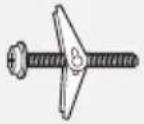 | Toggle Bolts (and wing nuts) (3/6" x 3") | 2 |
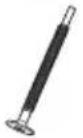 | Self-Aligning Machine Screws (1⁄4"-28 x 31⁄4") | 3 |
 | Nylon Grommet(for metal cabinets) | 1 |
You will find the installation hardware contained in a packet with the unit. Check to make sure you have all these parts.

NOTE:
Some extra parts are included.
ADDITIONAL PARTS
| PART QUANTITY | ||
 | Top Cabinet Template 1 | |
 | Rear Wall Template 1 | |
 | User Manual 1 | |
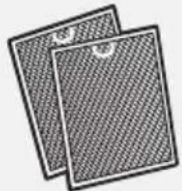 | Separately Packed Grease Filters | 2 |
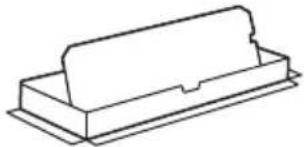 | Exhaust adaptor 1 | |
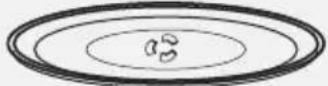 | Glass Tray 1 | |
 | Turntable Ring 1 | |
For some models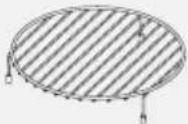 | Convection wire rack 1 | |
For some models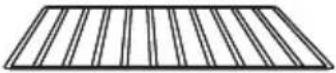 | Shelf 1 | |
For some models | PureAir ® Microwave Filter 1 | |
Tools You Will Need

1 Phillips screwdriver Pencil

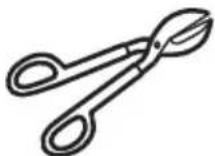
Tin snips (for cutting damper, if required)
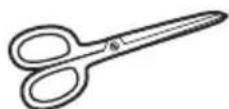
Scissors
(to cut template,
if necessary)
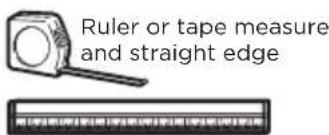
natural_image
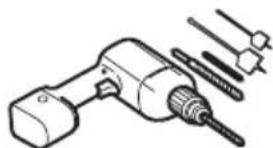
Technical illustration of a drill bit with multiple screw holes and a drill bit (no text or symbols)Electric drill with 316 ", 12 " and 58 " drill bits
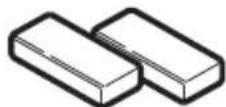
Filler blocks or scrap wood pieces, if needed for top cabinet spacing (used on recessed bottom cabinet installations only)
Gloves
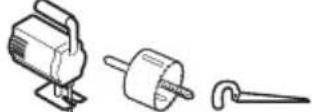

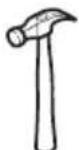
Saw (saber, hole or keyhole) Stud finder or Hammer (optional)
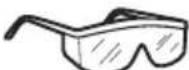
Safety goggles

Level
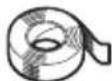
Duct and masking tape
MOUNTING SPACE
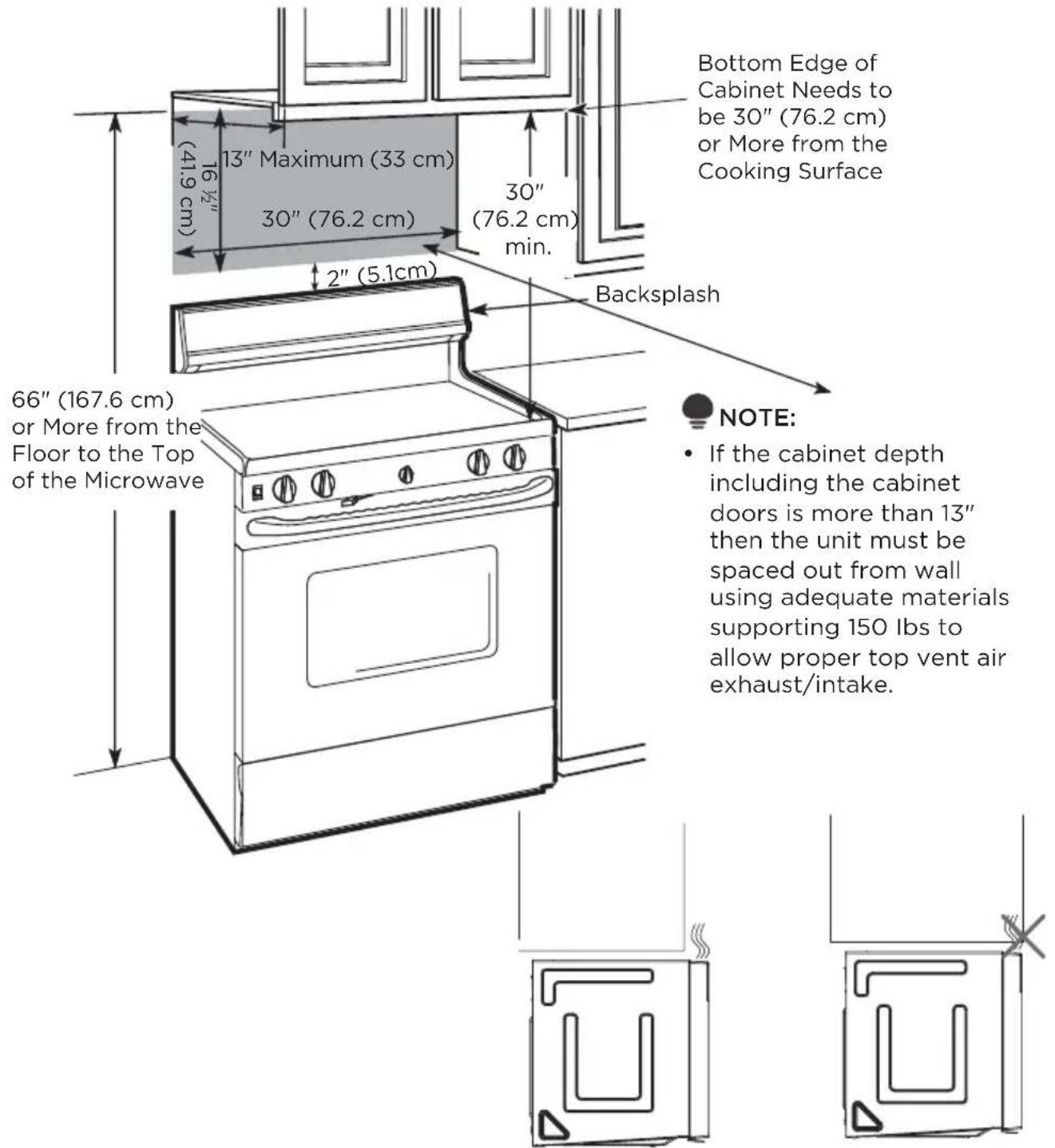

NOTE:
- The space between the cabinets must be 30" (76.2 cm) wide and free of obstructions.
- If you are going to vent your microwave oven to the outside, see Hood Exhaust Section for exhaust duct preparation.
- When installing the microwave oven beneath smooth, flat cabinets, be careful to follow the instructions on the top cabinet template for power cord clearance.
- As a guide to installation, see page 25 for Mounting Template Information.
1. Placement Of The Mounting Plate
A. REMOVING THE MICROWAVE OVEN FROM THE CARTON/REMOVING THE MOUNTING PLATE
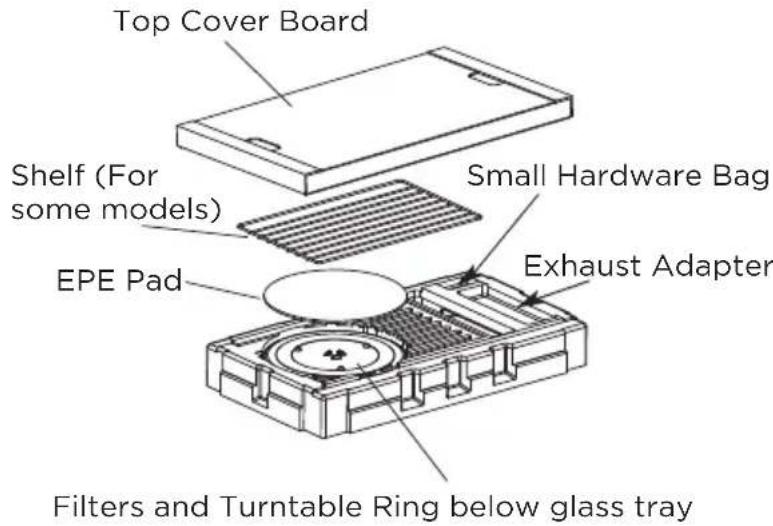
- Remove the top cover board, installation instructions, use and care, exhaust adapter, turntable ring, shelf, filters, glass tray and the small hardwarebag. Do not remove the Styrofoam protecting the front of the oven.
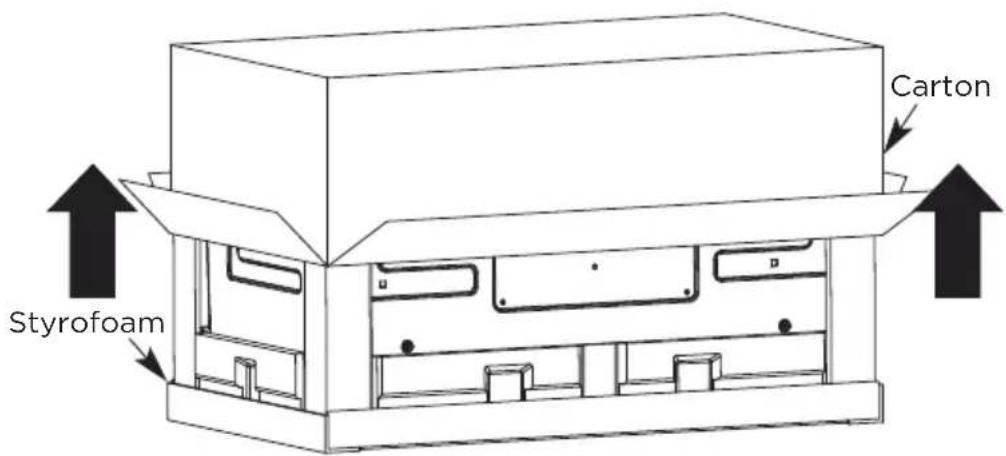
- Fold back all 4 carton flaps fully against carton sides. Then carefully roll the oven and carton over onto the top side. The oven should be resting in the Styrofoam.
-
Pull the carton up and off the oven.
-
Cut the middle of the outer protective plastic bag to remove the mounting plate
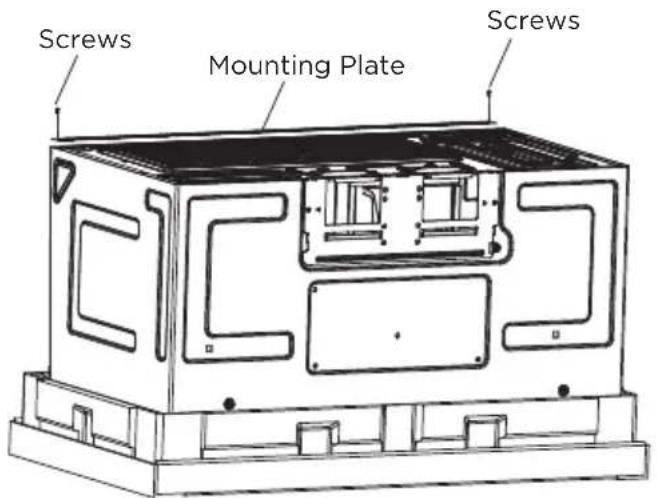
- Remove the screws from each end of the mounting plate. This plate will be used as the rear wall template and for mounting. Reinstall the screws into the holes where they were removed.
B. FINDING THE WALL STUDS
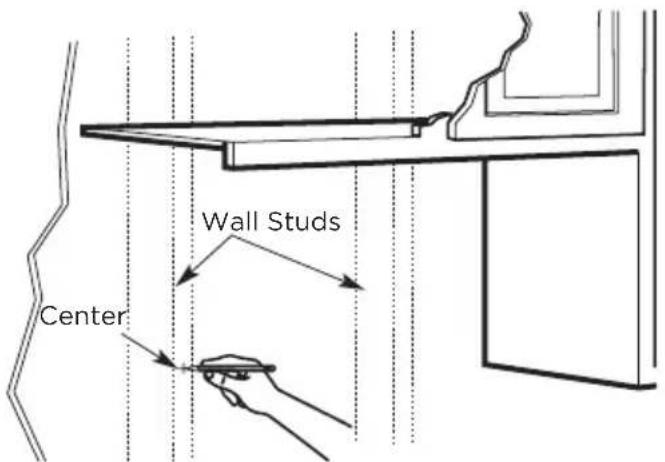
- Find the studs, using one of the following methods:
- Stud finder - a magnetic device which locates nails.
- Use a hammer to tap lightly across the mounting surface to find a solid sound. This will indicate a stud location.
-
After locating the stud(s), find the center by probing the wall with a small nail to find the edges of the stud. Then place a mark halfway between the edges. The center of any adjacent studs should be 16" (40.6 cm) or 24" (61 cm) from this mark.
-
Draw a line down the center of the studs.
THE MICROWAVE MUST BE CONNECTED TO AT LEAST ONE WALL STUD.
C. DETERMINING WALL PLATE LOCATION UNDER YOUR CABINET Plate position-beneath flat bottom cabinet
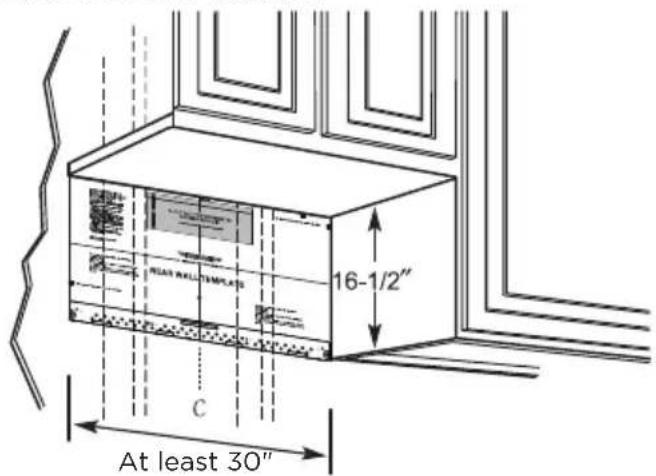
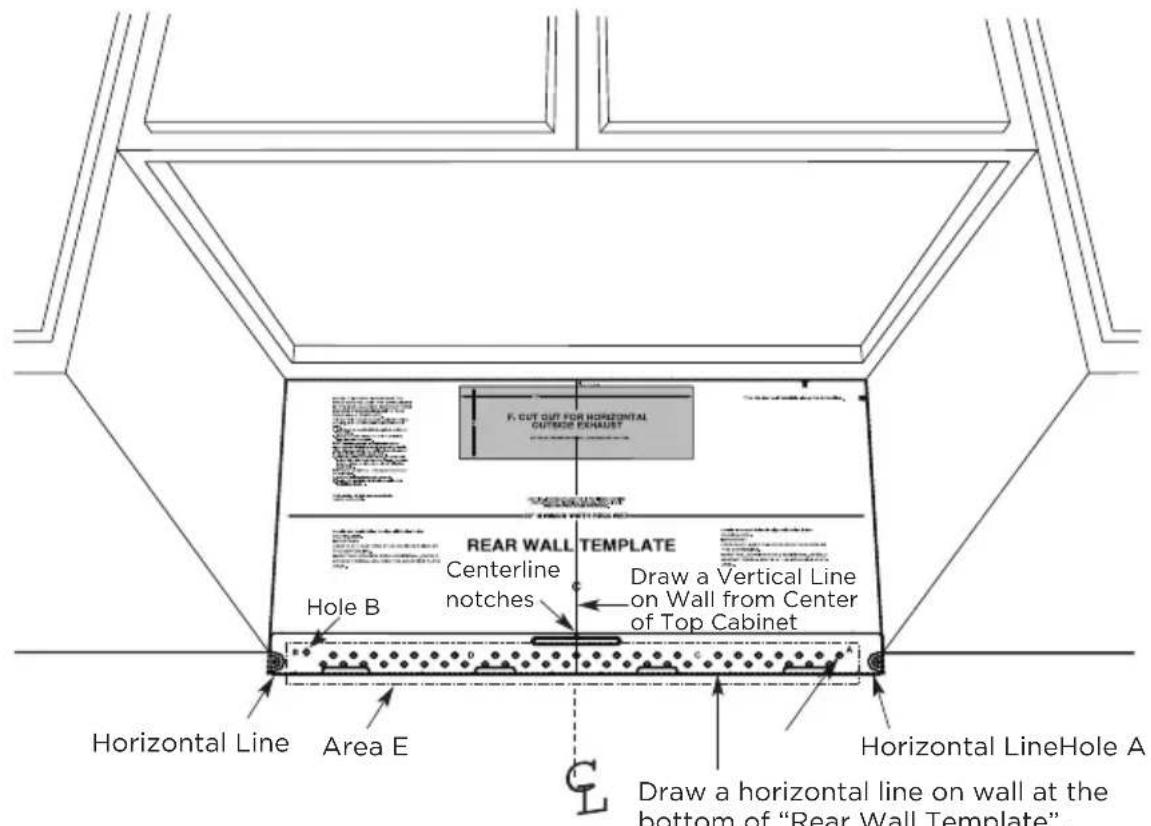
Draw a vertical line on the wall at the center of the 30" wide space. Tape the Rear Wall Template onto the wall matching the centerline and touching the bottom of the cabinet.
Plate position-beneath recessed bottom cabinet with front overhang
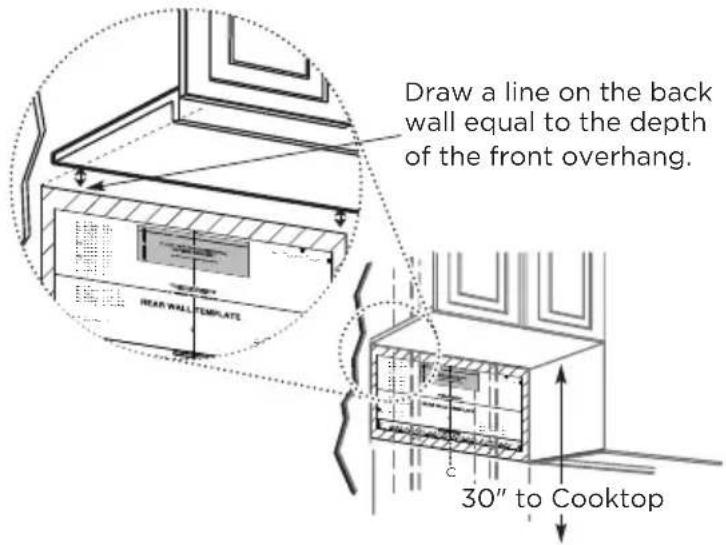
Plate position-beneath framed recessed cabinet bottom
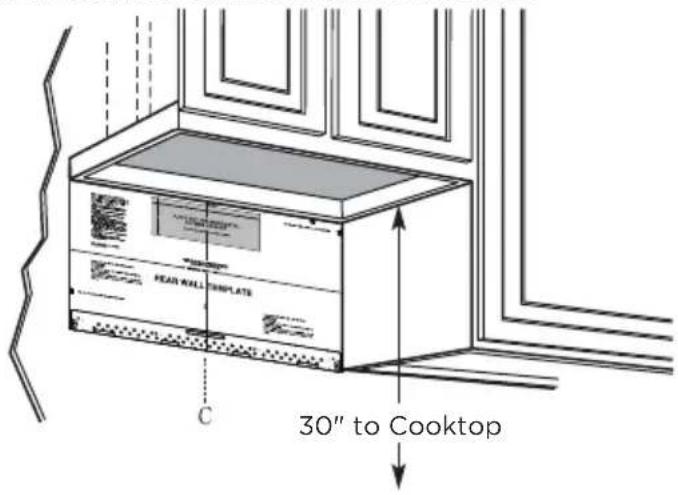
Draw a vertical line on the wall at the center of the 30" space. Tape the Rear Wall Template onto the wall matching the centerline and touching the bottom cabinet frame.
Your cabinets may have decorative trim that interferes with the microwave installation. Remove the decorative trim to install the microwave properly and to make it level.
Use a level to make sure the cabinet bottom is level.
If the cabinets have a front overhang only, with no back or side frame, install the mounting plate down the same distance as the front overhang depth. This will keep the microwave level.
- Measure the inside depth of the front overhang.
- Draw a horizontal line on the back wall an equal distance below the cabinet bottom as the inside depth of the front overhang.
- For this type of installation with front overhang only, align the mounting tabs with this horizontal line, not touching the cabinet bottom as described in Step D.
D. ALIGNING THE WALL PLATE

CAUTION:
Wear gloves to avoid cutting fingers on sharp edges.
- Draw a vertical line on the wall at the center of the 30" wide space.
- Draw a horizontal line on the wall at the bottom of "Rear Wall Template".
- Find a wall stud in area "E" of mounting plate Refer to section 1B. Finding the wall studs.
- For attaching the mounting plate into stud drill a 3/16" hole into wood stud. Drill a 5/8" hole for toggle bolt in 1 other location (Hole A or Hole B)

NOTE:
DO NOT MOUNT THE PLATE AT THIS TIME.

NOTE:
Holes A and B are inside area E. If neither of Holes A and B are not in a stud, find a stud somewhere in area E and draw a circle to line up with the stud. It is important to have at least one wood screw mounted firmly in a stud to support the weight of the microwave. Set the mounting plate aside.
2. Installation Types (Choose A, B or C)
This microwave oven is designed for adaptation to the following three types of ventilation:
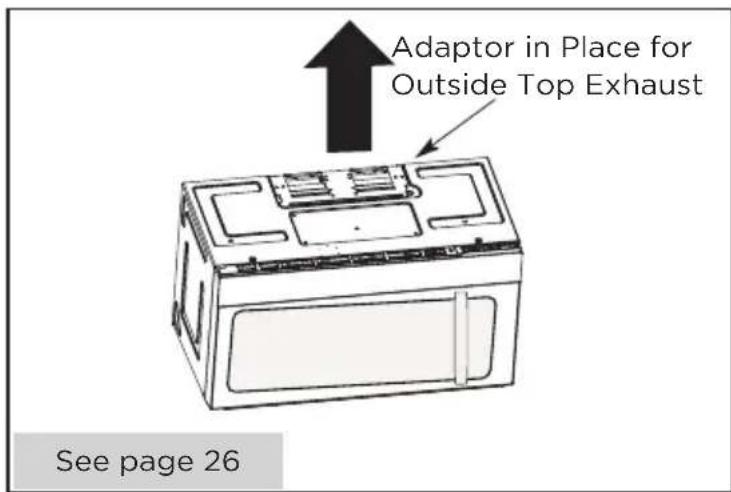
A. Outside Top Exhaust (Vertical Duct)
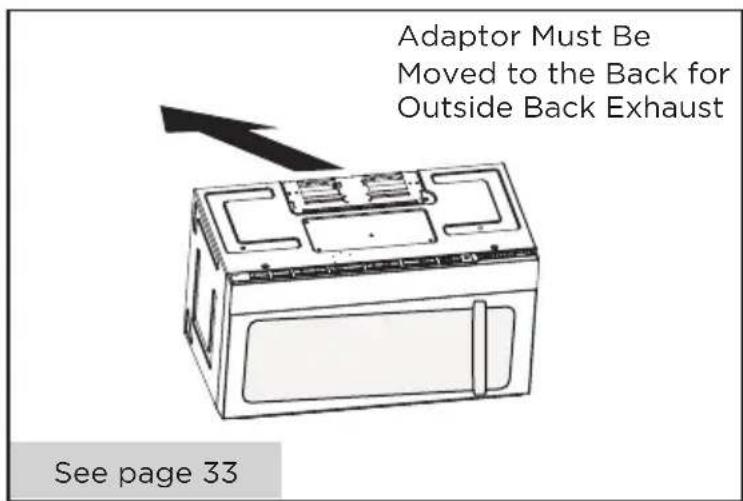
B. Outside Back Exhaust (Horizontal Duct)
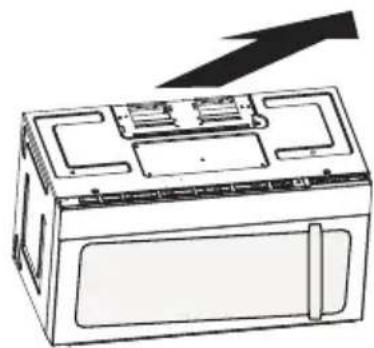
C. Recirculating (Non-Vented Ductless)

NOTE:
This microwave is shipped assembled for Recirculating. Select the type of ventilation required for your installation and proceed to that section.
A. OUTSIDE TOP EXHAUST (VERTICAL DUCT)
B. OUTSIDE BACK EXHAUST (HORIZONTAL DUCT)
C. RECIRCULATING (NON-VENTED DUCTLESS)
natural_image
Line drawing of a microwave oven with a black arrow indicating upward motion (no text or symbols)See page 41
Models are shipped for recirculating exhaust. Some models have a disposable charcoal filter installed to help remove smoke and odors.

NOTE:
Read the next two pages only if you plan to vent your exhaust to the outside. If you plan to recirculate the air back into the room, proceed to page 23-26.
Installation Instructions For External Exhaust Ducting

NOTE:
If you need to install ducts, note that the total duct length of 314 " x 10" (8.2 x 25.4 cm) rectangular or 5" (12.7 cm) diameter/6" " (15.2 cm) diameter round duct should not exceed 120 equivalent feet (36.5 m).
Outside ventilation requires an EXTERNAL EXHAUST DUCT. Read the following carefully.

NOTE:
It is important that venting be installed using the most direct route and with as few elbows as possible. This ensures clear venting of exhaust and helps prevent blockages. Also, make sure dampers swing freely and nothing is blocking the ducts.
Exhaust connection:
The exhaust adaptor has been designed to mate with a standard 314 " x 10" (8.2 x 25.4 cm) rectangular duct.
If a round duct is required, a rectangular-to-round transition adaptor must be used. A5" (12.7cm)/6" (15.2cm) diameter duct is acceptable to use.
Maximum duct length:
For satisfactory air movement, the total duct length of 314 " x 10" (8.2 x 25.4 cm) rectangular or 5" (12.7 cm) diameter/6" (15.2 cm) diameter round duct should not exceed 120 equivalent feet (36.5 m).
Elbows, transitions, wall and roof caps, etc., present additional resistance to airflow and are equivalent to a section of straight duct which is longer than their actual physical size. When calculating the total duct length, add the equivalent lengths of all transitions and adaptors plus the length of all straight duct sections. The chart below shows you how to calculate total equivalent ductwork length using the approximate feet of equivalent
length of some typical ducts.
| DUCT PIECES | EQUIVALENT LENGTH | x | NUMBER USED | = | EQUIVALENT LENGTH | |
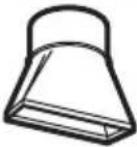 | Rectangular-to-Round Transition Adaptor* | 5 Ft. (1.5 m) x () = Ft. or m | ||||
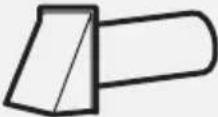 | Wall Cap 40 Ft. (12.2 m) x () = Ft. or m | |||||
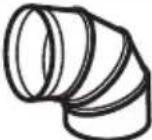 | 90° Elbow 10 Ft. (3 m) x () = Ft. or m | |||||
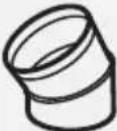 | 45° Elbow 5 Ft. (1.5 m) x () = Ft. or m | |||||
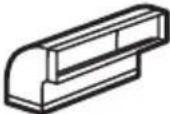 | 90° Elbow 25 Ft. (7.6 m) x () = Ft. or m | |||||
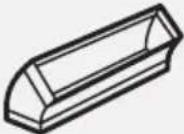 | 45° Elbow 5 Ft. (1.5 m) x () = Ft. or m | |||||
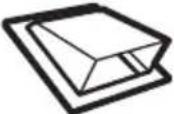 | Roof Cap 24 Ft. (7.3 m) x () = Ft. or m | |||||
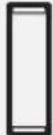 | Straight Duct 6" (15.2 cm) Round or 3 1⁄4" x 10" (8.2 x 25.4 cm Rectangular) | 1 Ft. (0.3 m) x () = Ft. or m | ||||
| Total Ductwork = Ft. or m | ||||||
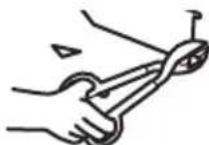
* IMPORTANT: If a rectangular-to-round transition adaptor is used, the bottom corners of the damper will have to be cut to fit, using the tin snips, in order to allow free movement of the damper.
Equivalent lengths of duct pieces are based on actual tests and reflect requirements for good venting performance with any vent hood.
External Exhaust Ducting
OUTSIDE TOP EXHAUST (EXAMPLE ONLY)
The following chart describes an example of one possible ductwork installation.
| DUCT PIECES | EQUIVALENT LENGTH | x | NUMBER USED | = | EQUIVALENT LENGTH | |
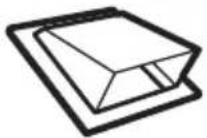 | Roof Cap 24 Ft. (7.3 m) x (1) = 24 Ft. (7.3 m) | |||||
| [xDTC] | 12 Ft. (3.6 m) Straight Duct (6"/15.2 cm Round) | 12 Ft. (3.6 m) x (1) = 12 Ft. (3.6 m) | ||||
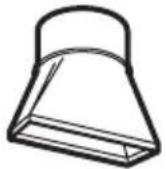 | Rectangular-to-Round Transition Adaptor* | 5 Ft. (1.5 m) x (1) = 5 Ft. (1.5 m) | ||||
| Equivalent lengths of duct pieces are based on actual tests and reflect requirements for good venting performance with any vent hood. | Total Length = 41 Ft. (12.5 m) | |||||

natural_image
Simple line drawing of a long, pointed object with a flanged base (no text or symbols)* IMPORTANT: If a rectangular-to-round transition adaptor is used, the bottom corners of the damper will have to be cut to fit, using the tin snips, in order to allow free movement of the damper.
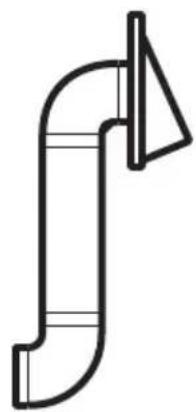
OUTSIDE BACK EXHAUST (EXAMPLE ONLY)
The following chart describes an example of one possible ductwork installation.
| DUCT PIECES | EQUIVALENT LENGTH | x | NUMBER USED | = | EQUIVALENT LENGTH | |
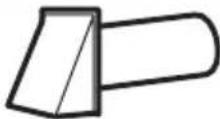 | Wall Cap 40 Ft. (12.2 m) x (1) = 40 Ft. (12.2 m) | |||||
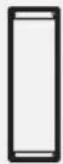 | 3 Ft. Straight Duct (3 1⁄4"x 10"/8.2 x 25.4 cm Rectangular) | 3 Ft. (0.9 m) x (1) = 3 Ft. (0.9 m) | ||||
Equivalent lengths of duct pieces are based on actual tests and reflect requirements for good venting performance with any vent hood.
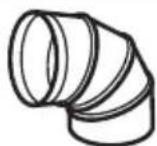
90^ Elbow 10 Ft. (3 m) x (2) = 20 Ft. (3 m)
Total Length = 63 Ft. (19.2 m)
natural_image
Pure line drawing of a curved pipe or duct with a triangular notch (no text or symbols)
NOTE:
For back exhaust, care should be taken to align exhaust with space between studs, or wall should be prepared at the time it is constructed by leaving enough space between the wall studs to accommodate exhaust.
A. OUTSIDE TOP EXHAUST (Vertical Duct)
INSTALLATION OVERVIEW
A1. Attach Mounting Plate to wall
A2. Prepare Top Cabinet
A3. Configure Microwave Blower for Outside/Top Exhaust
A4. Check Damper Operation
A5. Mount Microwave Oven
A6. Adjust Exhaust Adapter
A7. Connect Duct-work
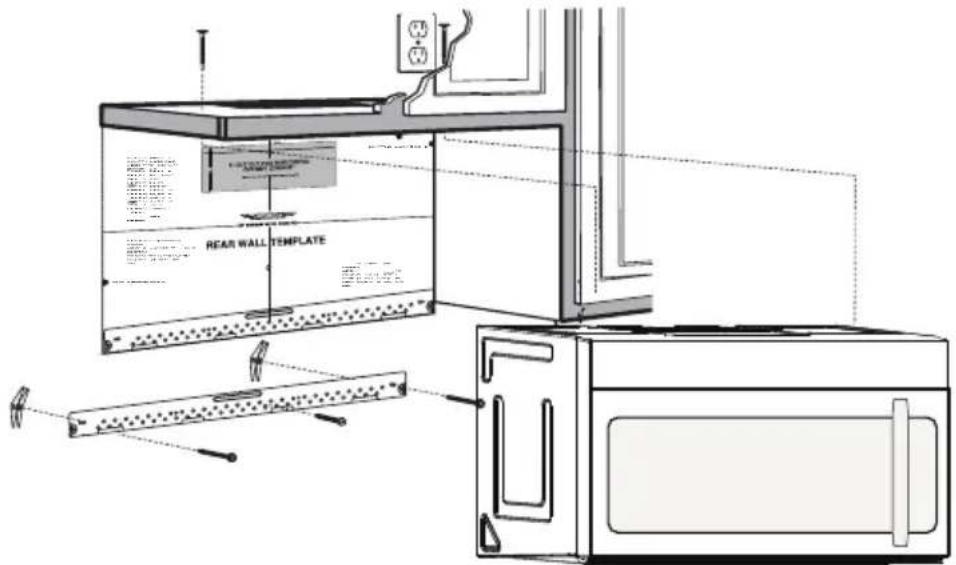
IMPORTANT NOTES:
- Make sure the screws for the Blower Motor and Blower Plate are securely tight-ended when they are installed. This will help to prevent excessive vibration.
- Make sure the Motor wiring has been properly routed and secured, and that the wires are not pinched.
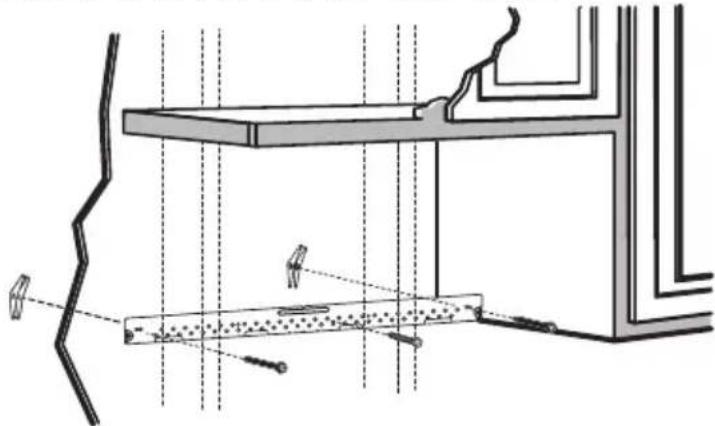
A1. ATTACH THE MOUNTING PLATE TO THE WALL
natural_image
Architectural cross-section diagram showing structural components and lighting fixtures (no text or labels)- Attach the plate to the wall using toggle bolts.
- At least one wood screw must be used to attach the plate to a wall stud.
- Remove the toggle wings from the bolts
- Insert the bolts into the mounting plate through the holes designated to go into drywall and reattach the toggle wings to 3/4" (19mm) onto each bolt.
To use toggle bolts:

- Place the mounting plate against the wall and insert the toggle wings into the holes in the wall to mount the plate.

NOTE:
Before tightening toggle bolts and wood screw, make sure the bottom of the mounting plate touches the bottom of the cabinet when pushed flush against the wall and the plate is properly centered under the cabinet.

CAUTION:
Be careful and avoid pinching fingers between the back of the mounting plate and the wall.
- Tighten all bolts. Pull the plate away from the wall to help tighten the bolts.
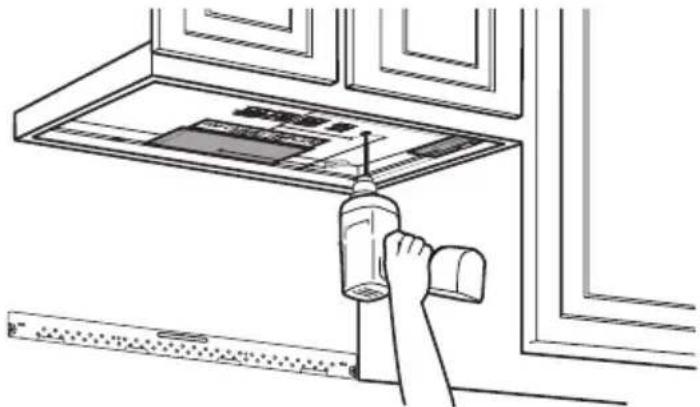
A2. USE TOP CABINET TEMPLATE FOR PREPARATION OF TOP CABINET
You need to drill holes for the top support screws, a hole large enough for the power cord to fit through, and a cutout large enough for the exhaust adaptor.
natural_image
Line drawing of a hand cleaning a kitchen appliance with a tool, no text or symbols present- Read the instructions on the TOP CABINET TEMPLATE.
- Tape it underneath the top cabinet.
- Drill the holes, following the instructions on the TOP CABINET TEMPLATE.

CAUTION:
Wear safety goggles when drilling holes in the cabinet bottom.
A3. ADAPTING MICROWAVE BLOWER FOR OUTSIDE TOP EXHAUST
- Place the microwave in its upright position, with the top of the unit facing up.
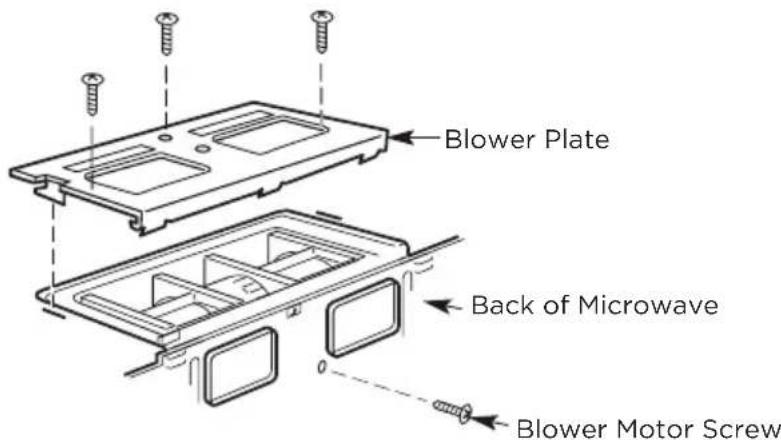
Remove the screw that holds the blower plate to the microwave. Remove and save the screw holding the blower motor to the microwave.
- Carefully pull out the blower unit. The wires will extend far enough to allow you to adjust the blower unit.
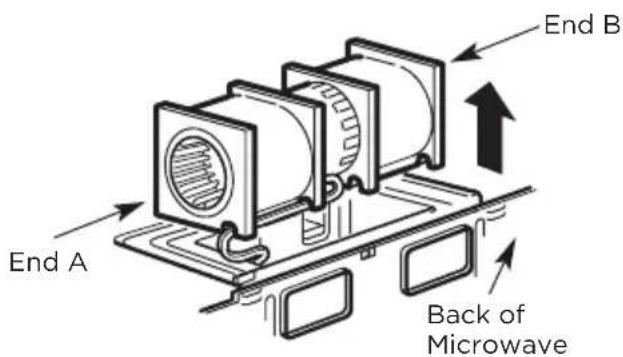
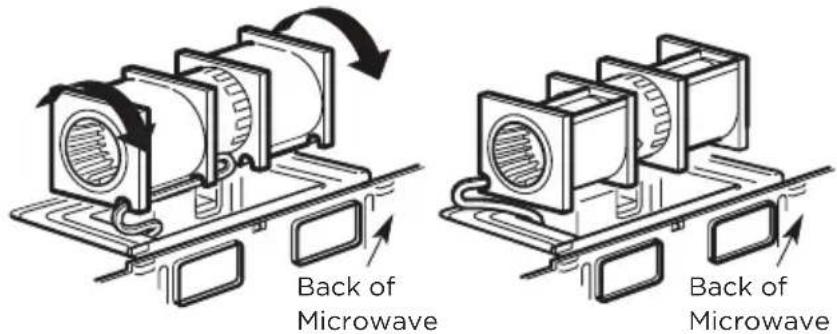
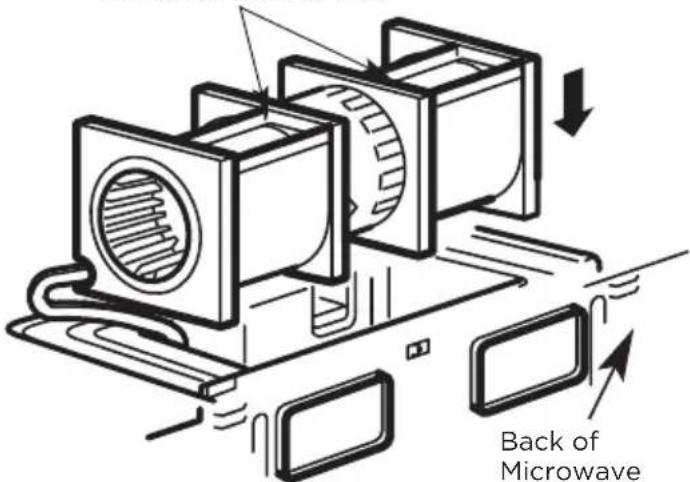
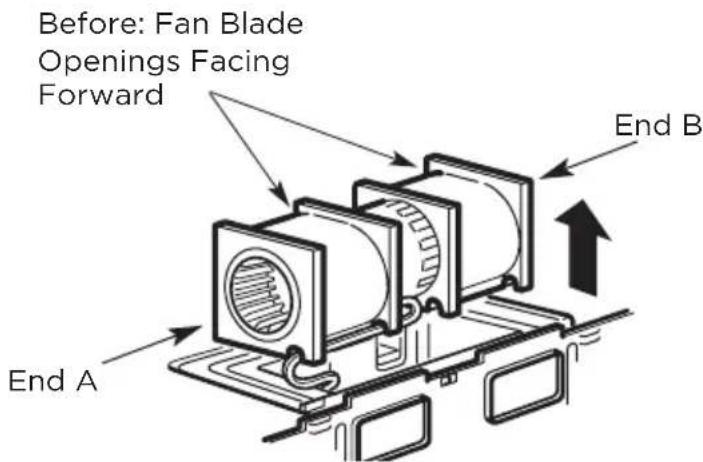
- Roll the blower unit 90^ so that fan blade openings are facing out the top of the microwave.
Before Rotation After Rotation
- Place the blower unit back into the opening.
AFTER: Fan Blade
Openings Facing Top

CAUTION:
Do not pull or stretch the blower unit wiring. Make sure the wires are not pinched, and that they are properly secured.
-
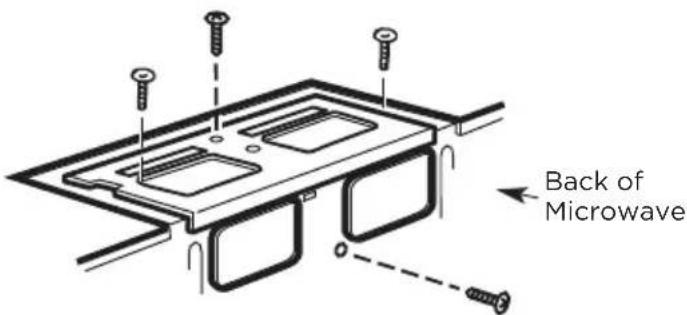
Secure blower unit to microwave with the screw removed in Step 1. Make sure the screw is tight.
-
Replace blower plate with the screw removed in Step 1. Make sure the screw is tight.
- Attach the exhaust adaptor to the top of the blower plate by sliding it into the guides of the blower plate.
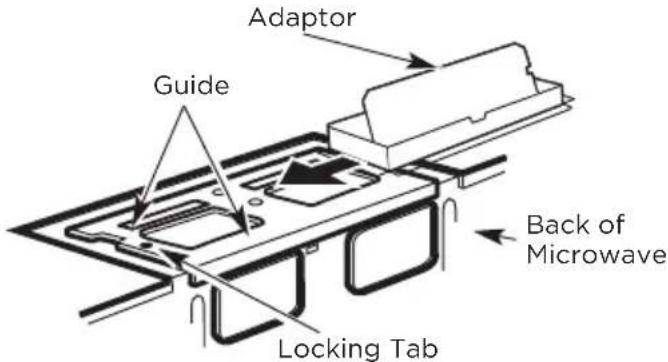
Push in securely until it is in the locking tabs. Take care to assure that the damper hinge is installed so that the damper swings freely.
- Make sure tape securing damper is removed and damper pivots easily before mounting microwave.
- You will need to make adjustments to assure proper alignment with your house exhaust duct after the microwave is installed.
natural_image
Three-panel line drawing showing a person handling a box, another with a cross symbol, and a third holding a box (no text or symbols present)FOR EASIER INSTALLATION AND PERSONAL SAFETY, WE RECOMMEND THAT TWO PEOPLE INSTALL THIS MICROWAVE OVEN.
IMPORTANT: Do not grip or use the handle or heat shield during installation. Do not remove the cardboard spacers between the heat shield and door.

NOTE:
If your cabinet is metal, use the nylon grommet around the power cord hole to prevent cutting of the cord.
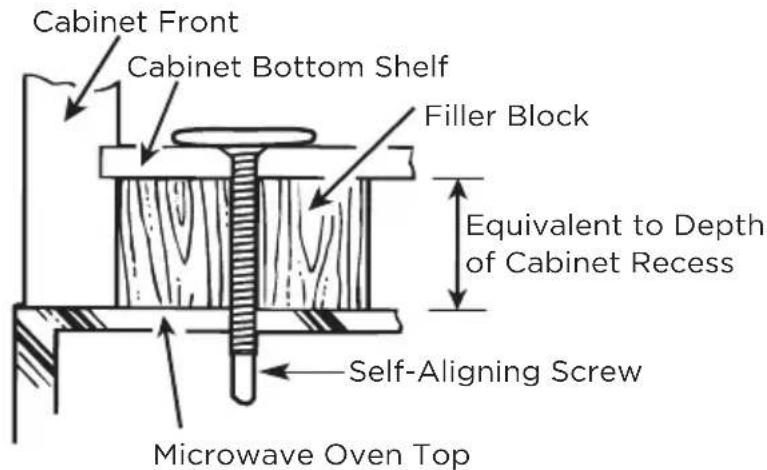
We recommend using filler blocks if the cabinet front hangs below the cabinet bottom shelf.
IMPORTANT: If filler blocks are not used, case damage may occur from overtightening screws.
NOTE: When mounting the microwave oven, thread power cord through hole in bottom of top cabinet. Keep it tight throughout steps 1-3. Do not pinch cord or lift oven by pulling cord.
- Insert a self-aligning screw through top center cabinet hole. Temporarily secure the oven by turning the screw at least two full turns after the threads have engaged. (It will be completely tightened later.) Be sure to keep power cord tight. Be careful not to pinch the cord, especially when mounting flush to bottom of cabinet.

- Attach the microwave oven to the top cabinet.
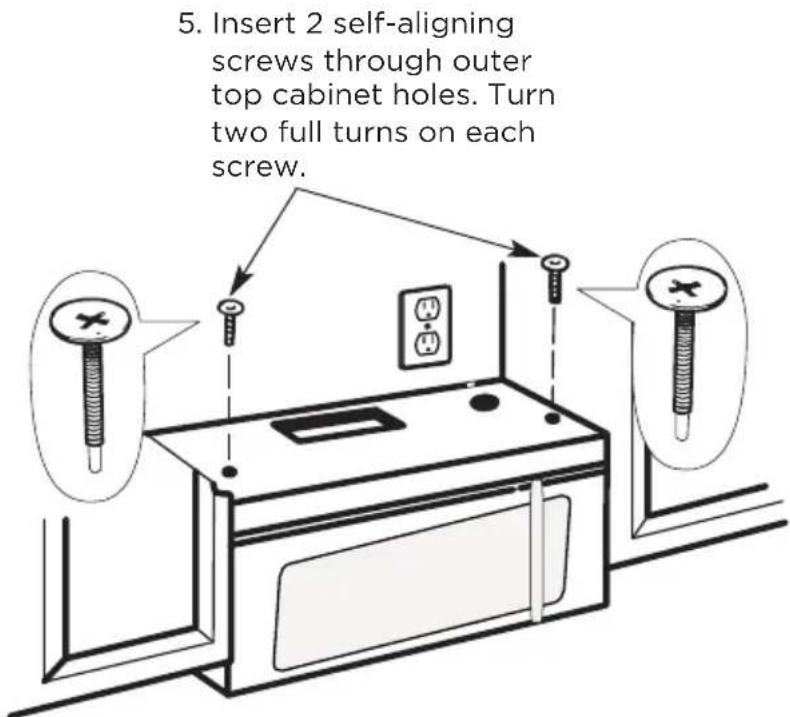
- Tighten the outer two screws to the top of the microwave oven. (While tightening screws, hold the microwave oven in place against the wall and the top cabinet.)
natural_image
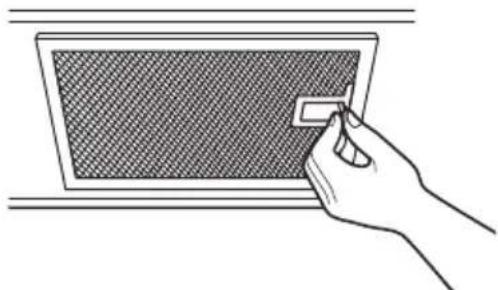
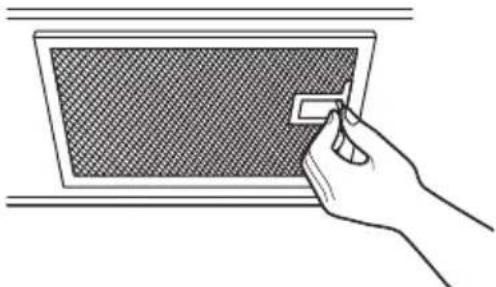
Hand inserting a small rectangular object into a textured grid-patterned panel (no text or symbols)- Install grease filters. See the Use & Care Guide packed with the microwave.
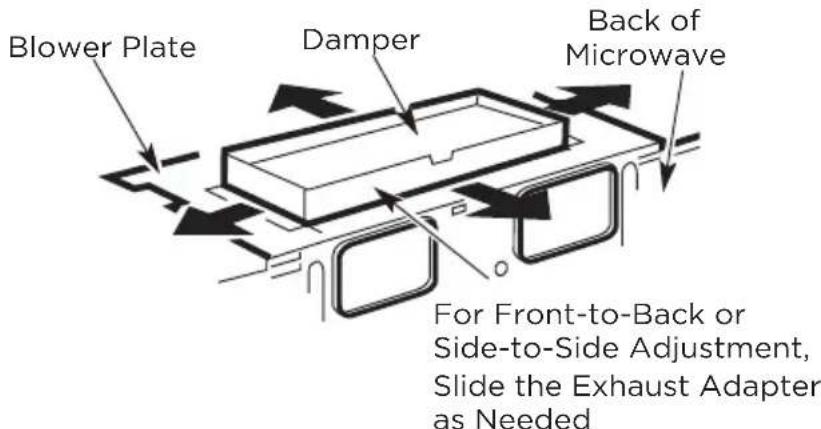
A6. ADJUST THE EXHAUST ADAPTOR
Open the top cabinet and adjust the exhaust adapter to connect to the house duct.
A7. CONNECTING DUCTWORK
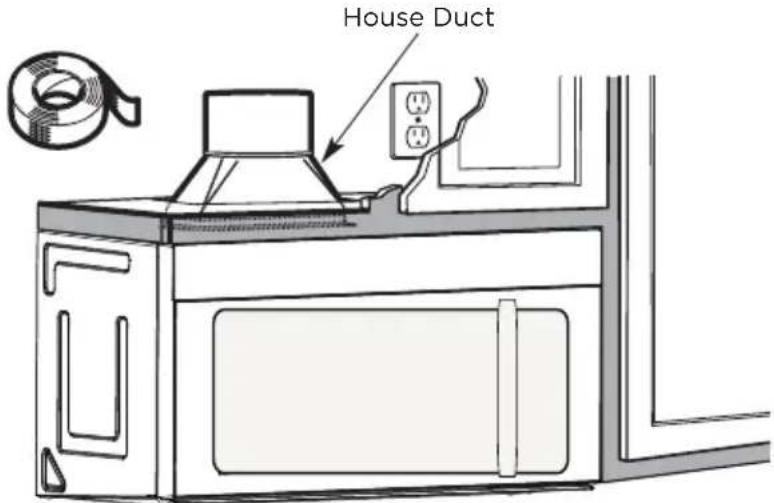
- Extend the house duct down to connect to the exhaust adapter.
- Seal exhaust duct joints using furnace duct tape for high temperature applications
B. OUTSIDE BACK EXHAUST (Horizontal Duct)
INSTALLATION OVERVIEW
B1. Prepare Rear Wall
B2. Remove Blower Plate
B3. Attach Mounting Plate to Wall
B4. Prepare Top Cabinet
B5. Adjust Blower
B6. Mount the Microwave Oven
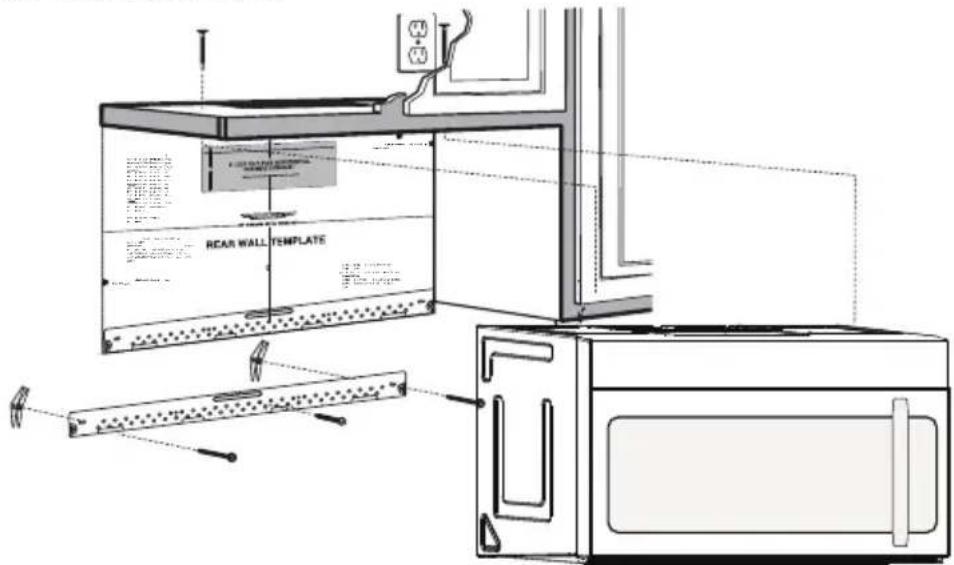
IMPORTANT NOTES:
- Make sure the screws for the blower motor and blower plate are securely tightened when they are reinstalled. This will help pre-vent excessive vibration.
- Make sure the motor wiring has been properly routed and se-cured and that the wires are not pinched.
B1. PREPARING THE REAR WALL FOR OUTSIDE BACK EXHAUST
You need to cut an opening in the rear wall for outside exhaust.
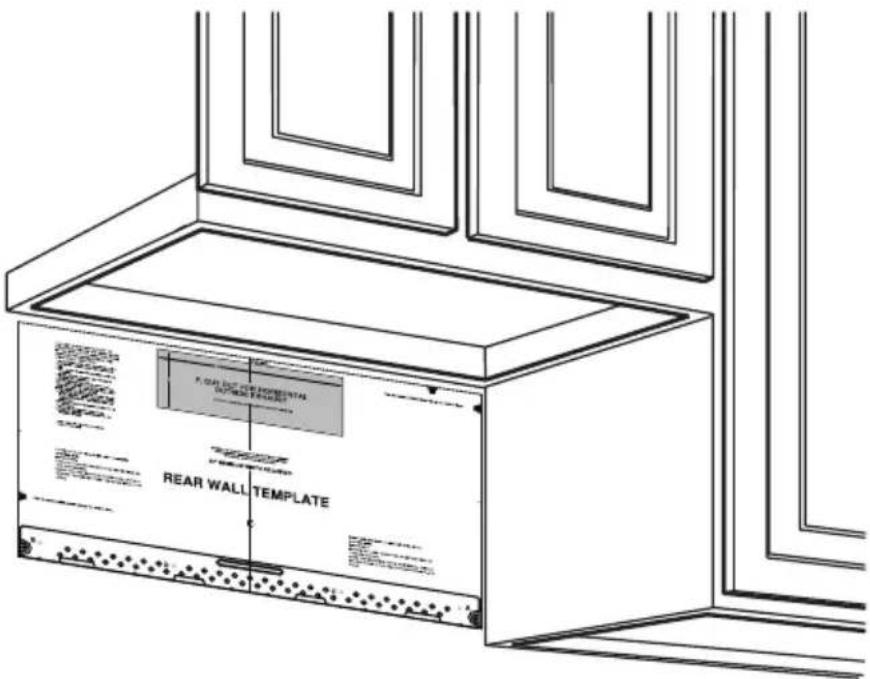
- Read the instructions on the REAR WALL TEMPLATE. Tape it to the rear wall.
- Cut the opening, following the instructions of the REAR WALL TEMPLATE.
B2. REMOVE BLOWER PLATE
Remove and save the screw that holds the blower plate to the microwave. Lift off the blower plate.
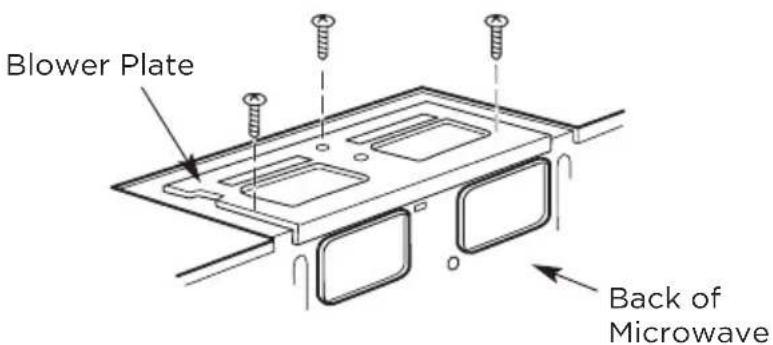
B3. ATTACH THE MOUNTING PLATE TO THE WALL
natural_image
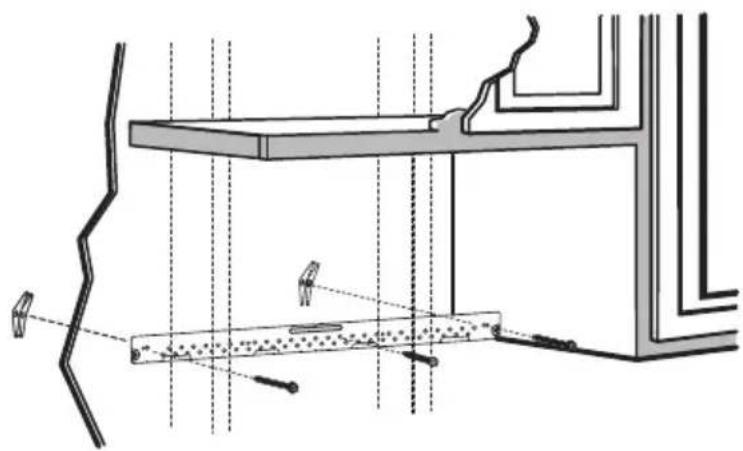
Technical line drawing of a structural assembly with beams, supports, and a beam with internal components (no text or symbols)Attach the plate to the wall using toggle bolts. At least one wood screw must be used to attach the plate to a wall stud.
- Remove the toggle wings from the bolts.
- Insert the bolts into the mounting plate through the holes designated to go into drywall and reattach the toggle wings to 3/4" (19 mm) onto each bolt.
To use toggle bolts:
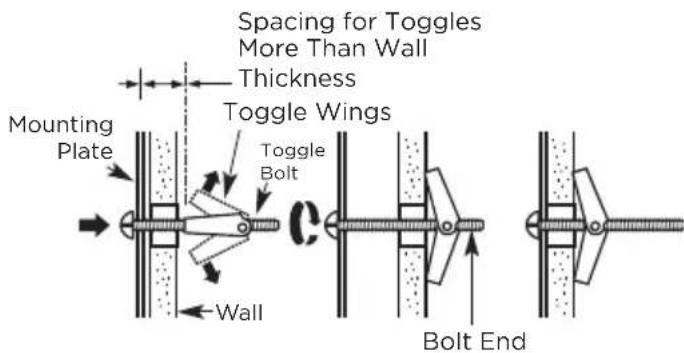
- Place the mounting plate against the wall and insert the toggle wings into the holes in the wall to mount the plate.

NOTE:
Before tightening toggle bolts and wood screw, make sure the bottom of the mounting plate touch the bottom of the cabinet when pushed flush against the wall and that the plate is properly centered under the cabinet.

CAUTION:
Be careful to avoid pinching fingers between the back of the mounting plate and the wall.
- Tighten all bolts. Pull the plate away from the wall to help tighten the bolts.
B4. USE TOP CABINET TEMPLATE FOR PREPARATION OF TOP CABINET
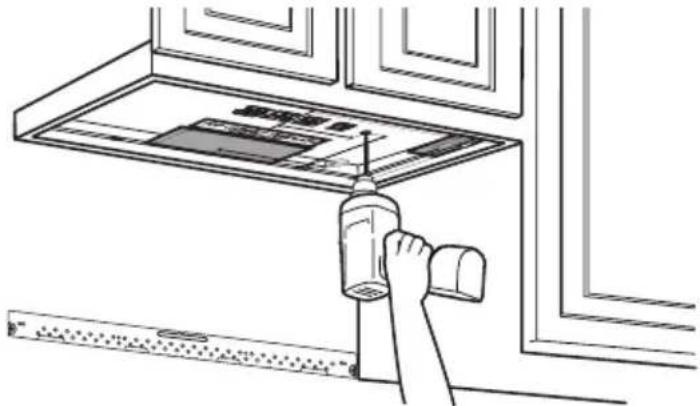
You need to drill holes for the top sup-port screws and a hole large enough for the power cord to fit through.
natural_image
Line drawing of a hand using a tool to clean or store items on a kitchen counter (no text or symbols visible)- Read the instructions on the TOP CABINET TEMPLATE.
- Tape it underneath the top cabinet.
- Drill the holes, following the instructions on the TOP CABINET TEMPLATE.

CAUTION:
Wear safety goggles when drilling holes in the cabinet bottom.
B5. ADAPTING MICROWAVE BLOWER FOR OUTSIDE BACK EXHAUST
- Remove and save screw that holds blower motor to microwave.
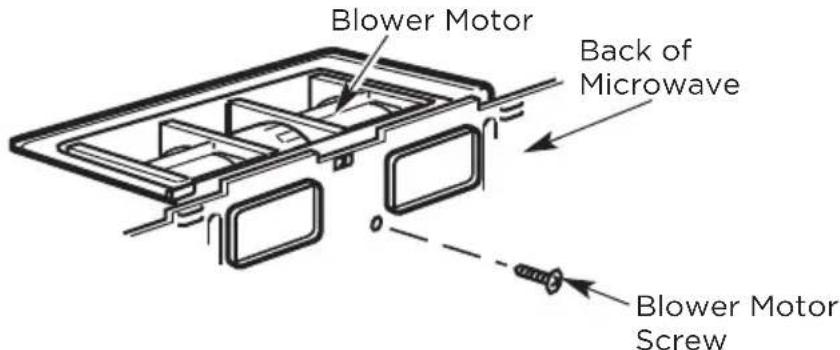
- Carefully pull out the blower unit. The wires will extend far enough to allow you to adjust the blower unit.
- Roll the blower unit 90°
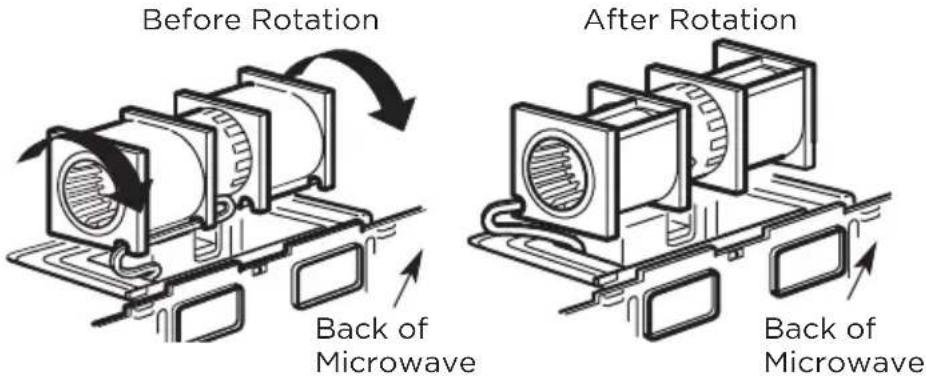
- Rotate blower unit counterclockwise 180°.
Before Rotation
natural_image
Diagram of a mechanical device with rotating components and labeled 'Back of' (no text or symbols on the diagram itself)Back of Microwave
After Rotation

natural_image
Technical line drawing of an electrical enclosure with labeled back view (no text or symbols beyond label)Back of Microwave
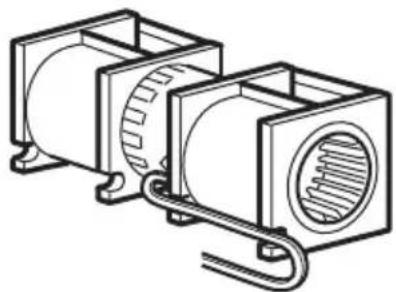
- Gently remove the wires from the grooves. Reroute the wires through grooves on other side of the blower unit.
Before Rotation
natural_image
Technical line drawing of two cylindrical electronic components with internal circuitry (no text or symbols)Wires Routed Through Right Side
After Rotation
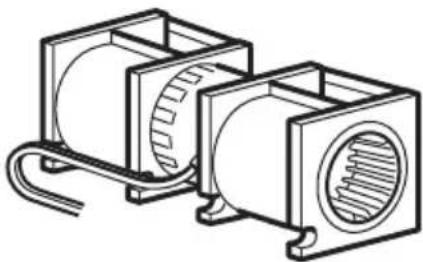
natural_image
Technical line drawing of two cylindrical electronic components with a coiled cable (no text or symbols)Wires Routed Through Left Side
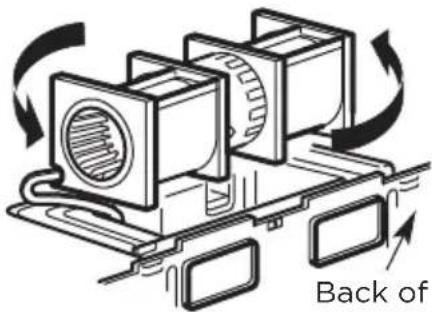
- Rotate the blower unit 90^ so that fan blade openings are facing out the back of the mi-crowave.
Before Rolling
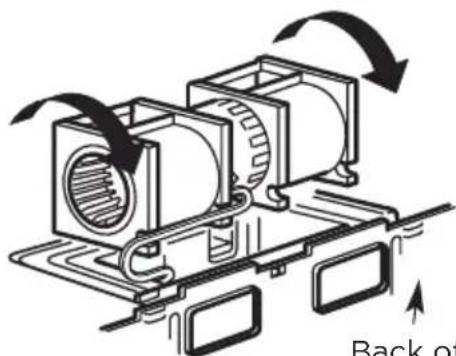
natural_image
Diagram of a mechanical assembly with rotating components and directional arrows, no readable text or symbolsBack of Microwave
After Rolling

natural_image
Technical diagram of a mechanical assembly with labeled components, showing internal components and directional arrows (no text or symbols beyond label)Back of Microwave
- Remove the knockout plates in the back of the unit with snips. (for some models)
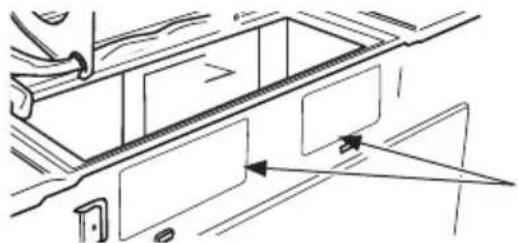
natural_image
Technical line drawing of a mechanical component with arrows indicating direction (no text or symbols)Back of Microwave
Knockout Plates:
Snip all 4 webs on each knockout panel and remove the metal knockouts for rear airflow. Please take care to remove any sharp edges created from removing the knockout plates.
- Place the blower unit back into the opening.
AFTER: Fan Blade
Openings Facing Back


CAUTION:
Do not pull or stretch the blower unit wiring. Make sure the wires are not pinched, and that they are properly secured.

NOTE:
The blower unit exhaust openings should match exhaust openings on rear of microwave oven.
- Secure the blower unit to the microwave with the original screw.
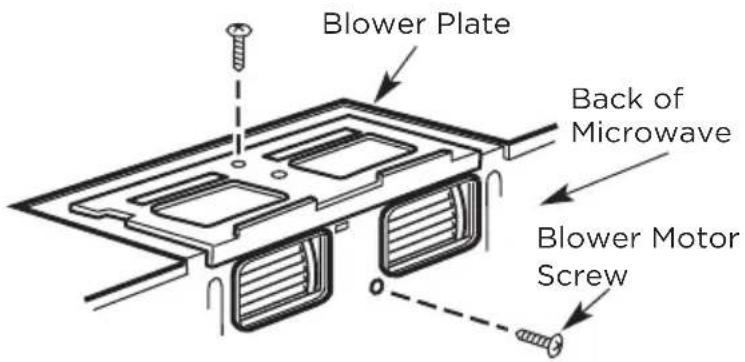
-
Replace the blower plate in the same position as before with the screw. Make sure the screw is tight.
-
Attach the exhaust adaptor to the rear of the oven by sliding it into the guides at the top center of the back of the oven.
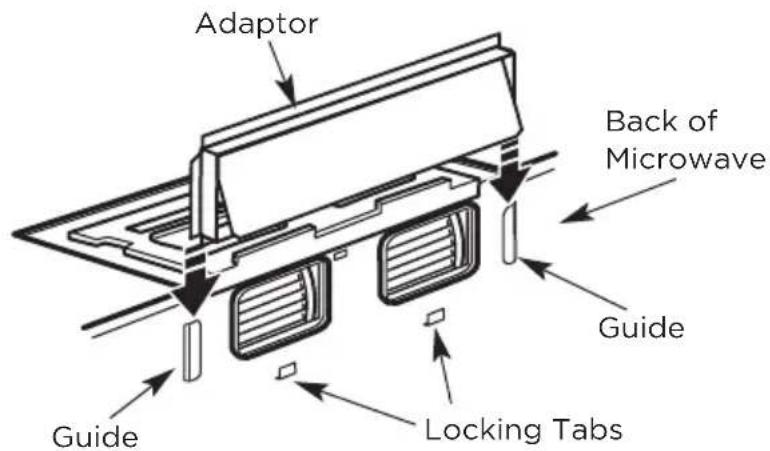
Push in securely until it is in the lower locking tabs. Take care to assure that the damper hinge is installed so that it is at the top and that the damper swings freely.
B6. MOUNT THE MICROWAVE OVEN
natural_image
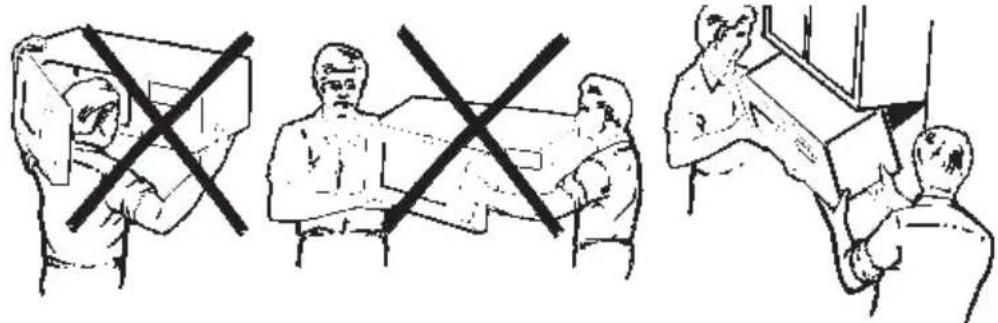
Illustration of three scenes showing people in a meeting or consultation setting, with no visible text or symbols.FOR EASIER INSTALLATION AND PERSONAL SAFETY, WE RECOMMEND THAT TWO PEOPLE INSTALL THIS MICROWAVE OVEN.
IMPORTANT: Do not grip or use the handle or heat shield during in-stallation. Do not remove the cardboard spacers between the heat shield and door.

NOTE:
If your cabinet is metal, use the nylon grommet around the power cord hole to prevent cutting of the cord.

NOTE:
We recommend using filler blocks of the cabinet front hangs below the cabinet bottom shelf.
IMPORTANT: If filler blocks are not used, case damage may occur from over tightening screws.
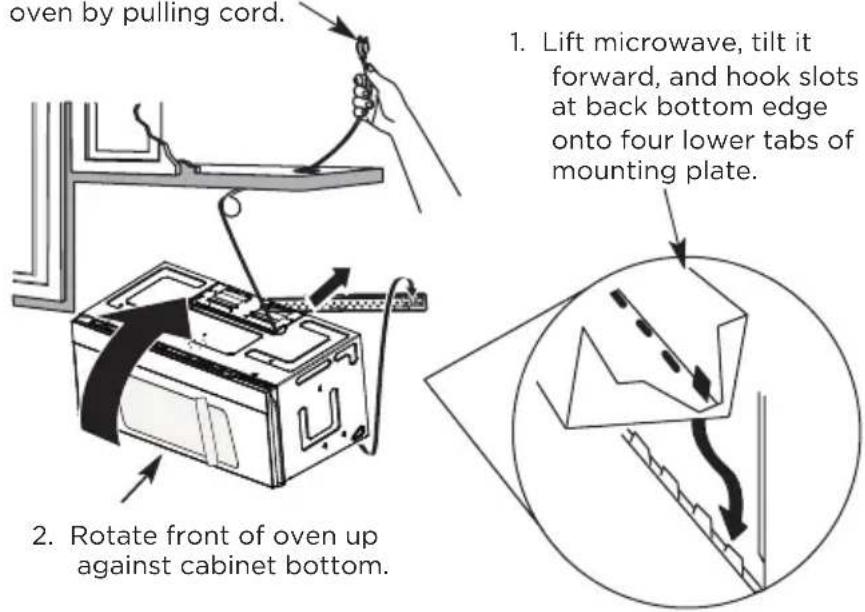
NOTE: When mounting the microwave oven, thread power cord through hole in bottom of top cabinet. Keep it tight throughout steps 1-3. Do not pinch cord or lift oven by pulling cord.
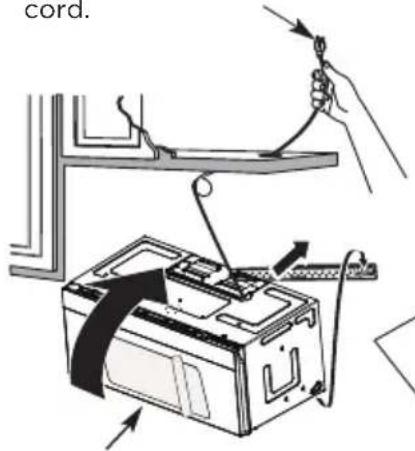
-
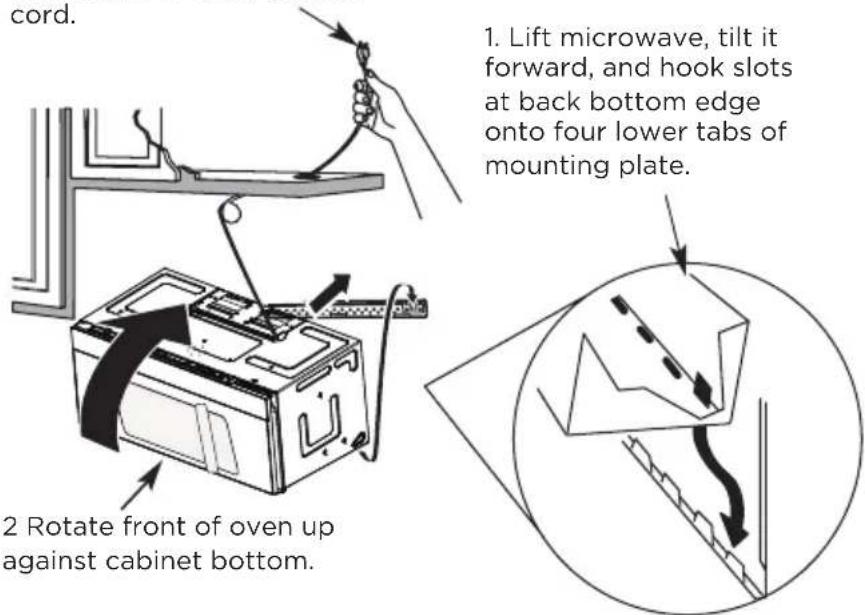
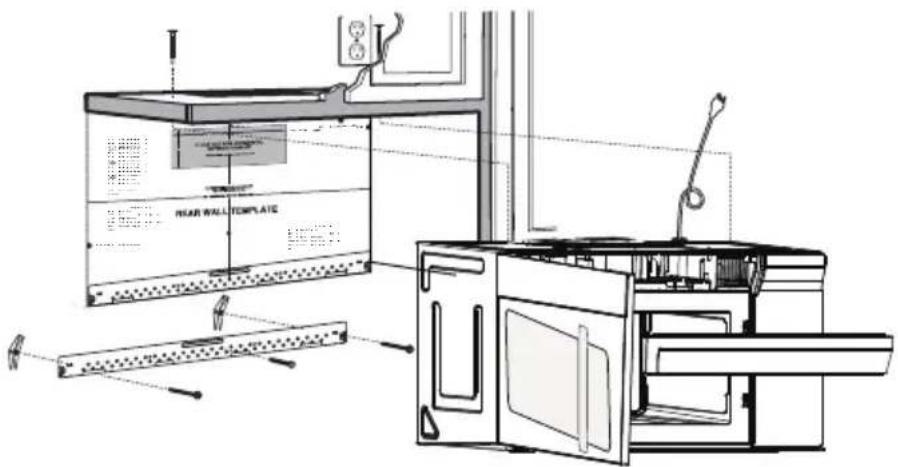
Rotate front of oven up against cabinet bottom.
-
Lift microwave, tilt it forward, and hook slots at back bottom edge onto four lower tabs of mounting plate.

natural_image
Diagram showing a mechanical setup with a block, directional arrows, and a stepped surface (no text or symbols)- Insert self-aligning screw through top center cabi-net hole. Temporarily secure the oven by turning the screw at least two full turns after the threads have engaged (it will be completely tightened later). Be sure to keep the power cord tight. Be careful not to pinch the cord, especially when mounting flush to bottom of cabinet.
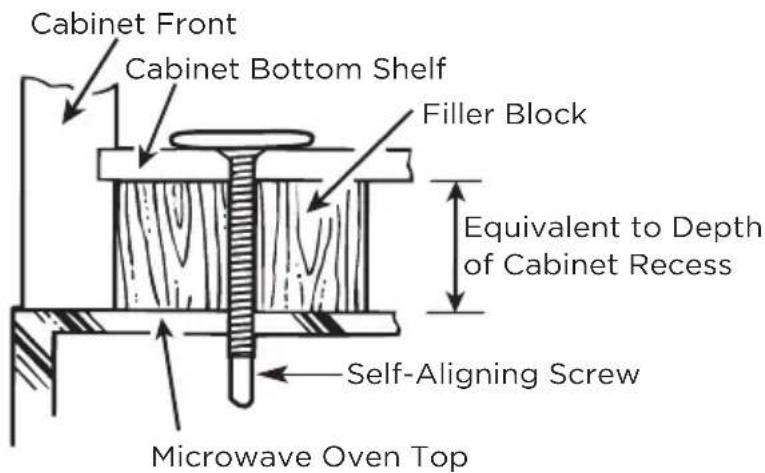
-
Attach the microwave oven to the top cabinet.
-
Insert 2 self-aligning screws through outer top cabinet holes. Turn two full turns on each screw.
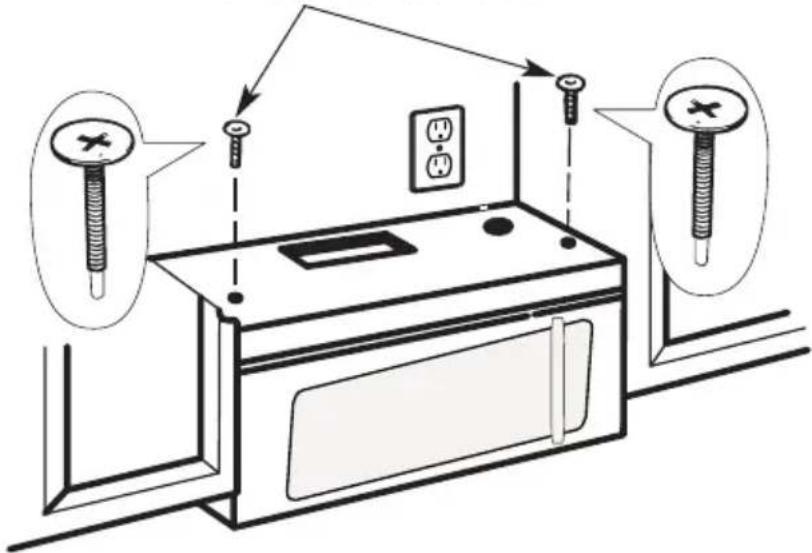
- Tighten the outer two screws to the top of the microwave oven. (While tightening screws, hold the microwave oven in place against the wall and the top cabinet.)
natural_image
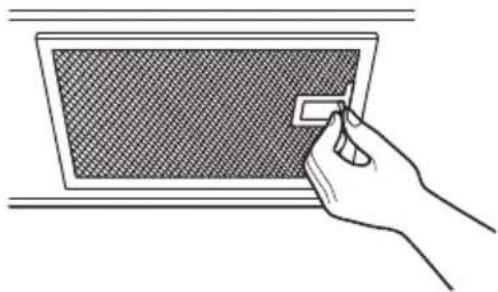
Hand inserting a small rectangular object into a grid-patterned panel (no text or symbols visible)- Install grease filters. See the Use & Care Guide that came with the microwave for more information.
C. RECIRCULATING (non vented ductless)
INSTALLATION OVERVIEW
C1. Attach Mounting Plate to Wall
C2. Prepare Top Cabinet
C3. Check Blower Plate
C4. Mount the Microwave Oven
C5. Install or change Charcoal Filter
IMPORTANT NOTES:
- Make sure the screws for the blower motor and blower plate are securely tightened when they are reinstalled. This will help prevent excessive vibration.
- Make sure the motor wiring has been properly routed and secured and that the wires are not pinched.
C1. ATTACH THE MOUNTING PLATE TO THE WALL
natural_image
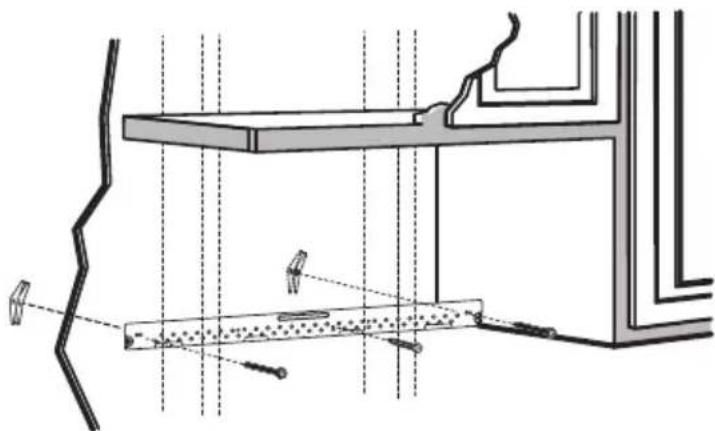
Architectural cross-section diagram showing structural components and lighting fixtures (no text or labels)Attach the plate to the wall using toggle bolts. At least one wood screw must be used to attach the plate to a wall stud.
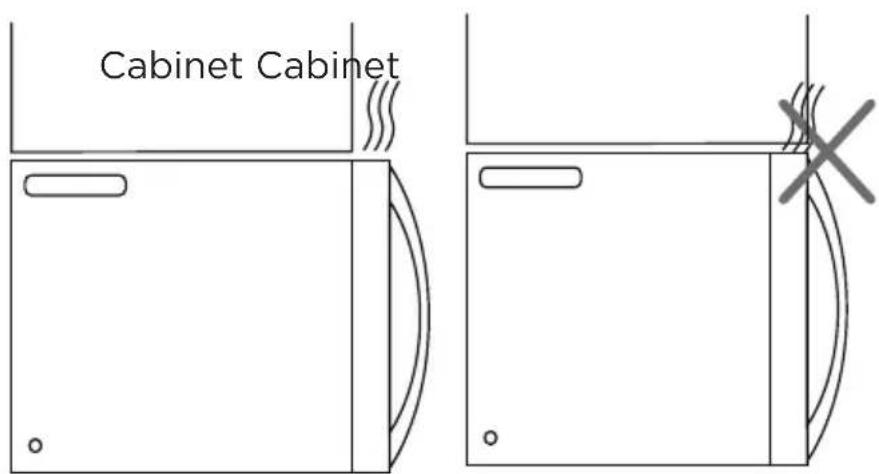
If the cabinet depth including the cabinet doors is more than 13", then the unit must be spaced out from wall using adequate materials supporting 150 lbs to allow proper top vent air exhaust/intake.
- Remove the toggle wings from the bolts.
- Insert the bolts into the mounting plate through the holes designated to go into drywall and reattach the toggle wings 3/4" to (19mm) onto each bolt.
To use toggle bolts:
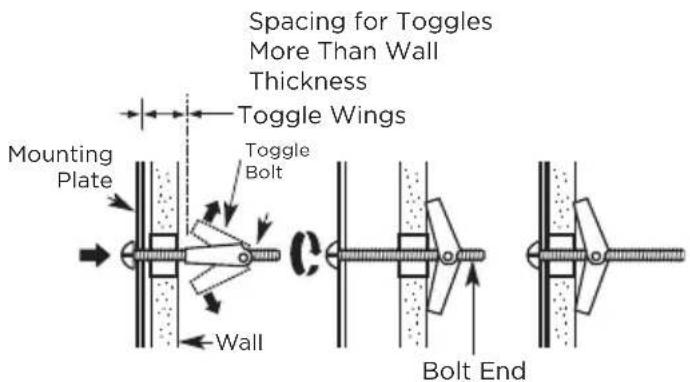
- Place the mounting plate against the wall and insert the toggle wings into the holes in the wall to mount the plate.

NOTE:
Before tightening toggle bolts and wood screw, make sure the bottom of the mounting plate touch the bottom of the cabinet when pushed flush against the wall and that the plate is properly centered under the cabinet.

CAUTION:
Be careful to avoid pinching fingers between the back of the mounting plate and the wall.
- Tighten all bolts. Pull the plate away from the wall to help tighten the bolts.
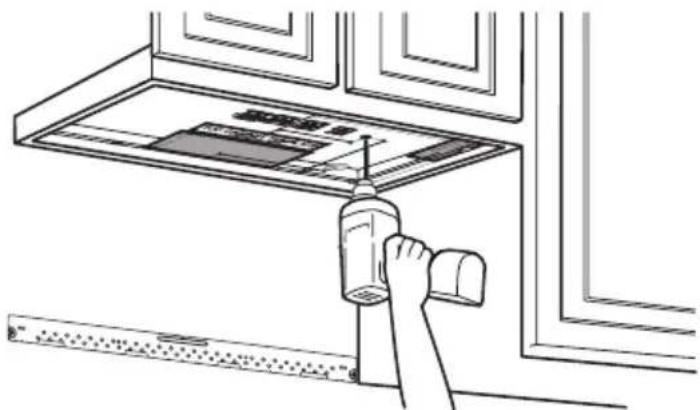
C2. USE TOP CABINET TEMPLATE FOR PREPARATION OF TOP CABINET
You need to drill holes for the top support screws and a hole large enough for the power cord to fit through.
natural_image
Line drawing of a hand cleaning a window with a spray bottle and ruler (no text or symbols)-
Read the instructions on the TOP CABINET TEMPLATE.
-
Tape it underneath the top cabinet.

NOTE:
Adjust top template accordingly if the microwave is being spaced out from the wall due to cabinet depth (including cabinet doors) of more than 13".
Drill the holes following instructions on the TOP CABINET TEMPLATE.

CAUTION:
Wear safety goggles when drilling holes in the cabinet bottom.
C3. CHECK BLOWER PLATE
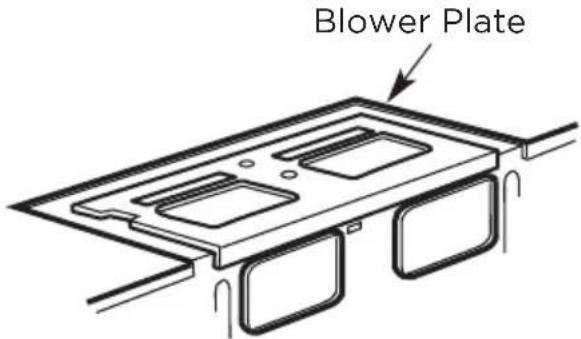
Place the microwave in its upright position, with the top of the unit facing up. Check to see that the blower plate is cor-rectly installed on the unit.
natural_image
Three-panel line drawing showing a person in different positions (no text or symbols)FOR EASIER INSTALLATION AND PERSONAL SAFETY, WE RECOMMEND THAT TWO PEOPLE INSTALL THIS MICROWAVE OVEN.
IMPORTANT: Do not grip or use the handle or heat shield during installation. Do not remove the cardboard spacers between the heat shield and door.

NOTE:
If your cabinet is metal, use the nylon grommet around the power cord hole to prevent cutting of the cord.

NOTE:
We recommend using filler blocks if the cabi-net front hangs below the cabinet bottom shelf.
IMPORTANT: If filler blocks are not used, case dam-age may occur from over tightening screws.
NOTE: When mounting the microwave oven, thread power cord through hole in bottom of top cabinet. Keep it tight throughout steps 1-3. Do not pinch cord or lift oven by pulling cord.
- Insert a self-aligning screw through top center cabinet hole. Temporarily secure the oven by turning the screw at least two full turns after the threads have engaged (It will be completely tightened later.) Be sure to keep power cord tight. Be careful not to pinch the cord, especially when mounting flush to bottom of cabinet.
-
Attach the microwave oven to the top cabinet.
-
Insert 2 self-aligning screws through outer top cabinet holes. Turn two full turns on each screw.
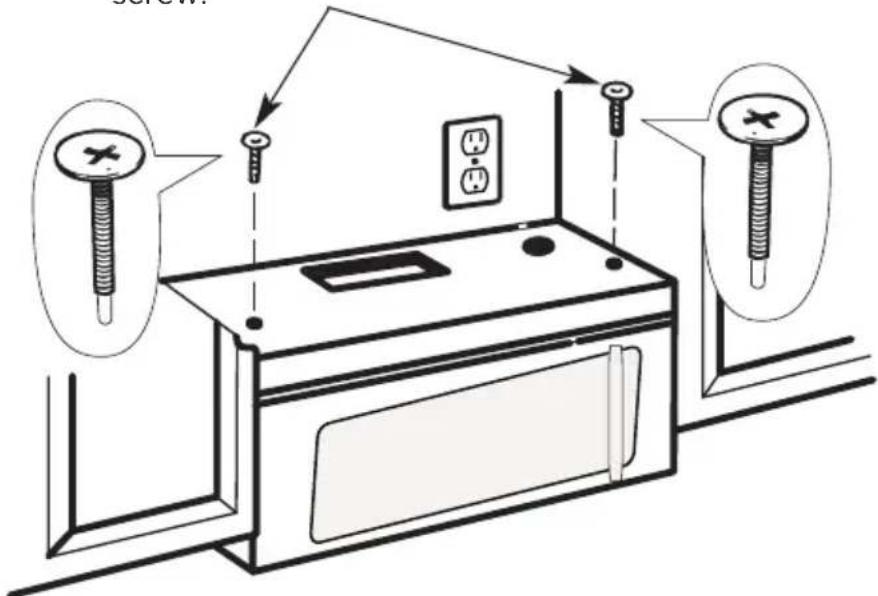
- Tighten the outer two screws to the top of the microwave oven. (While tightening screws, hold the microwave oven in place against the wall and the top cabinet.)
natural_image
Hand inserting a small rectangular object into a grid-patterned panel (no text or symbols visible)- Install grease filters. See the Use & Care Guide packed with the microwave.
C5. INSTALLING OR CHANGING THE CHARCOAL FILTER (Some Models)

NOTE:
The charcoal filter is factory installed in some models. Refer to the Use & Care Guide to see if yours is factory installed and for replacement information.
For models without the recirculation filter access door, follow these steps to replace or install a charcoal filter:
-
Unplug microwave oven or disconnect power.
-
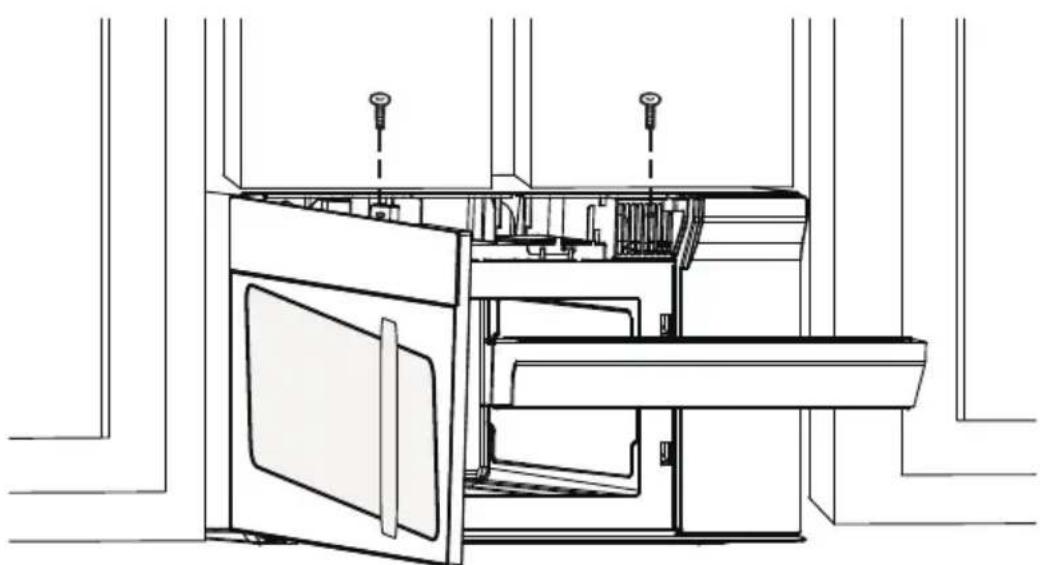
Open the microwave door and remove the two vent mounting screws located on top of the microwave using a #1 Phillips screwdriver.
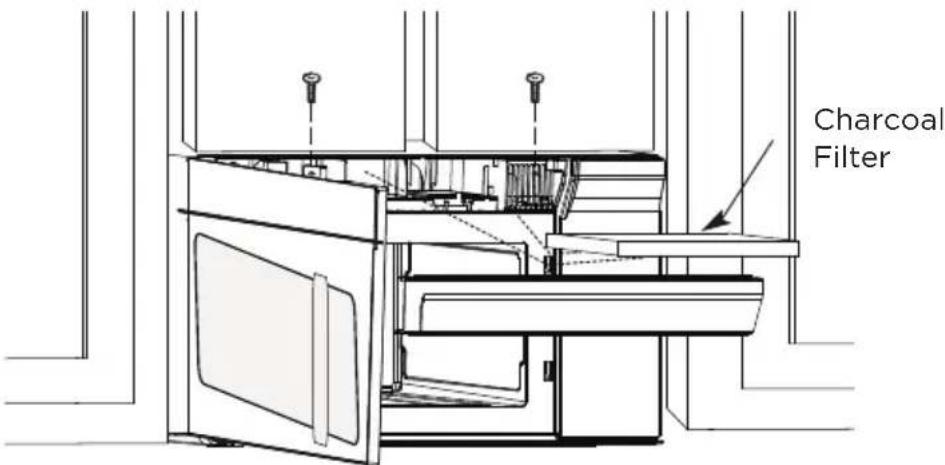
- Remove the charcoal filter by pushing the top of the filter inwards, then pull it forward out from the unit.
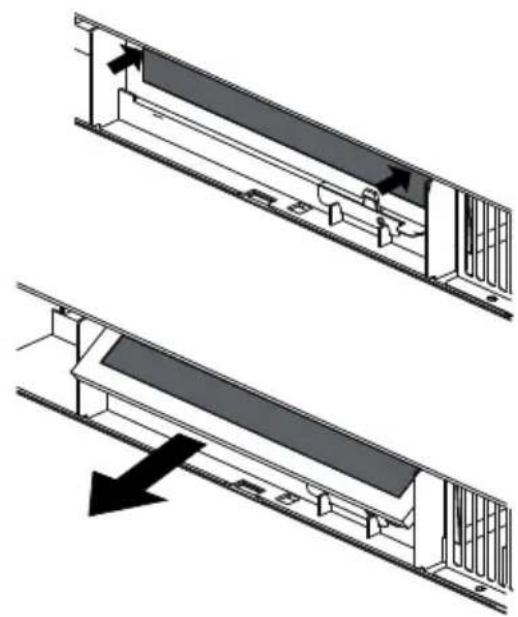
natural_image
Technical diagram showing two views of a mechanical assembly with no visible text or symbols- Slide the top of the new charcoal filter into the top of the filter cavity.
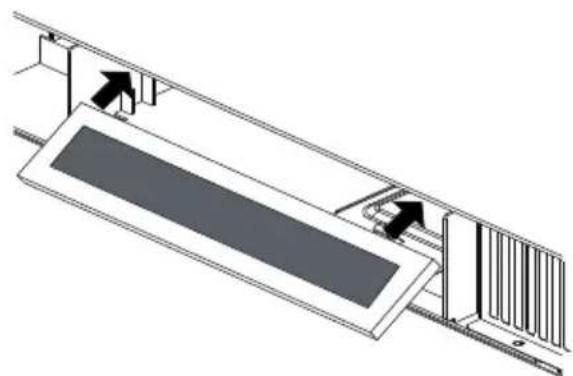
natural_image
Technical line drawing of a mechanical assembly with no visible text or symbols- Press the bottom of charcoal filter to place it into the correct position.
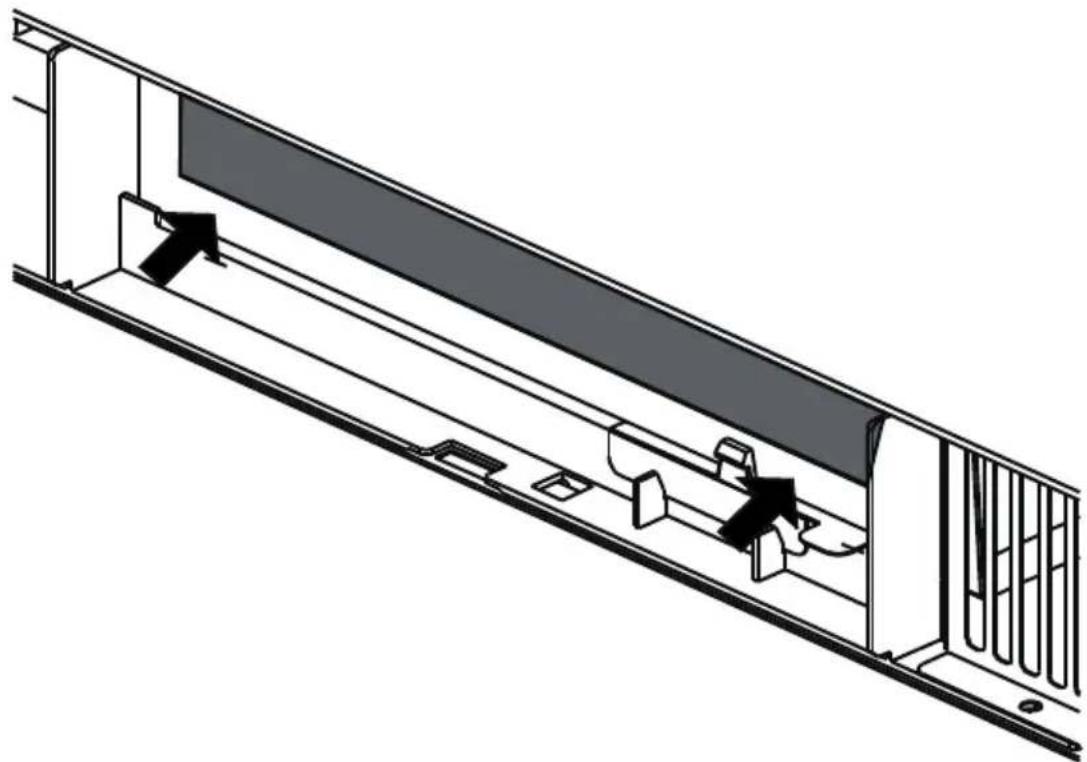
natural_image
Technical line drawing of a mechanical assembly with internal components and mounting brackets (no text or symbols)- Reinstall the vent by sliding the bottom of the vent into place. Push the vent top into position and slide right into place. Replace the two vent mounting screws located on top of the microwave using a #1 Phillips screwdriver.
natural_image
Technical line drawing of an open refrigerator with doors and control panel (no text or symbols)- Close the microwave door. Plug in microwave oven or reconnect power.
Before You Use Your Microwave
- Make sure the microwave oven has been installed according to instructions.
-
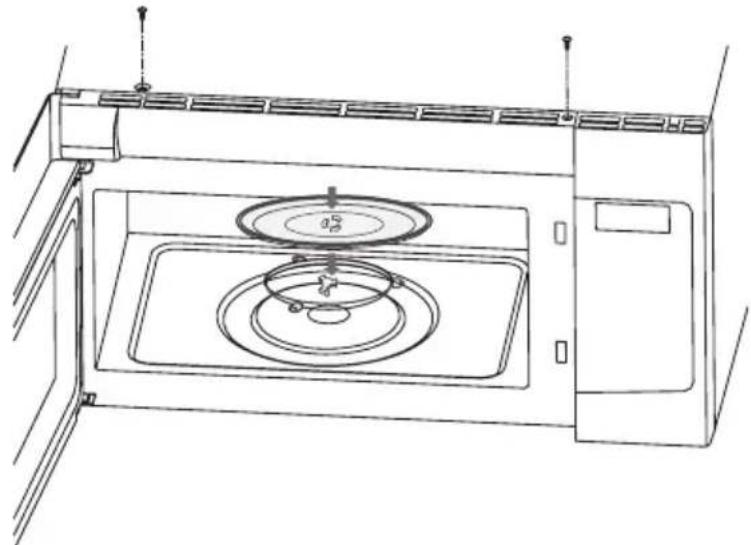
Remove all packing material from the microwave oven.
-
Install turntable ring and glas stray in cavity.
natural_image
Line drawing of a microwave oven with a circular fan and control panel (no text or symbols)- Plug power cord into a separate and dedicated 15- to 20-amp electrical outlet.
- Replace house fuse or turn breaker back on.

natural_image
Hand placing a button into an electrical outlet box (no text or symbols visible)- Read the User Manual.
- KEEP USER MANUAL FOR THE LOCAL INSPECTOR'S USE.
Operational Check
- Make sure the unit has been installed according to these instructions.
- Remove all packing materials from the oven.
- Replace house fuse or turn circuit breaker back on.
- Plug power cord into receptacle.
- Read operating instructions before testing the product.
- Turn on the exhaust fan at Turbo speed and confirm it is operating by using a tissue (it will stick to the filter).
- Confirm the outdoor ex-haust flapper has opened.
- Set the microwave oven for 1 minute and confirm the oven is operating normally using a cup of water.
- Keep these installation instruction for the local electrical inspector's use.
OPERATION INSTRUCTIONS
Control Panel
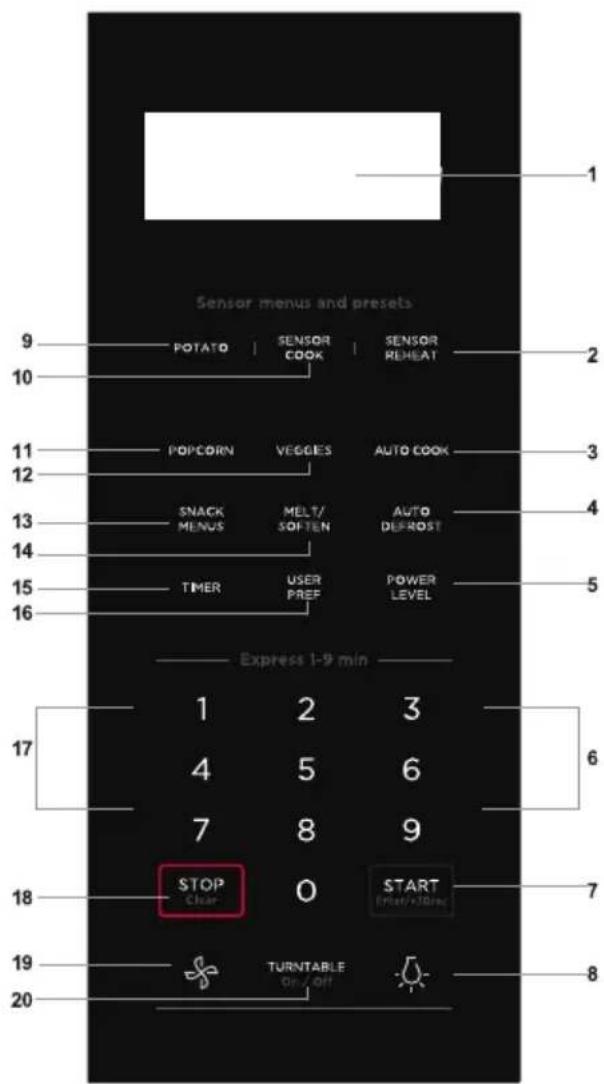
(1) Display:
The display includes a clock and indicators that show the time of day, cooking time settings, cook powers, sensor, quantities, weights and cooking functions selected.
(2) Sensor Reheat (5 different settings)
(3) Auto Cook
(4) Auto Defrost
(5) Power Level (11 power levels available)
(6) Numeric pads (0 thru 9)
(7) START/ESOesec
(8) Surface Light (High/Low/Off)
\~Press this pad to adjust the brightness of surface lights.
(9) Potato (1-4 potatoes)
(10) Sensor Cook
(11) Popcorn
(12) Veggies
(13) Snack Menus
(14) Melt/Soften
(15) Timer (On-Off)
(16) User pref
(17) Quick Start (9 instant key settings)
(18) Stop/Clear
(19) Exhaust (High/Low/Off) \~ Use to turn the exhaust fan off, or to adjust fan speed.
(20) Turntable (On-Off)
- Before operating your new oven make sure you read and understand this USER MANUAL completely.
- The clock can be disabled when the microwave is first plugged in and the Stop/Clear key is selected. To re-enable the clock follow clock instructions.
To Set the Clock
- Suppose you want to enter the correct time of day 10:59
Touch: Display Shows:
| 1. User pref | PRESS AGAIN FOR OPTIONS/12:00 ENTER TIME |
| When the oven is plugged into an outlet, please skip this step.( ) | |
| 2. 1 0 5 9 | PRESS START10:59 |
| 3. "Start/Enter/+30 Sec" | 10:59 |
NOTE
- If you begin to enter in an incorrect time (e.g. 2:89) the 8 is an invalid digit and cannot be entered. Enter the correct time.
- If you touch "Stop/ Clear" while setting the clock, the display will show the last time of day set or a blank display if no time of day has been set.
MANUAL COOKING
Time Cooking
Your Over the Range Microwave Oven can be programmed for 99 minutes 99 seconds (99:99). Always enter the seconds after the minutes, even if they are both zeros.
- Suppose you want to cook for 5 minutes, 30 seconds at 100% power,
| Touch: Display Shows: | |
| 1. 5 3 0 | PRESS START5:30 |
| 2. "Start/Enter/+30 Sec" | 5:30COOKTime counting down |
Interrupting Cooking
You can stop the oven during a cycle by opening the door. The oven stops heating and the fan turns off, but the light stays on.
To restart cooking, close the door and touch "Start/Enter/+30 Sec".
If you do not want to continue cooking, open the door and touch "Stop/Clear"
Using One Touch Start
Numeric key 1\~9 can be touched for a 1\~9 minutes' automatic start cooking feature.
This is a time saving pad that will automatically start cooking 2 seconds after selected.
| Touch: Display Shows: | |
| 1. 2 | 2:00cookTime counting down |
Using Add 30 Sec.
This is a time-saving pad. It is a simplified feature that lets you quickly set and start microwave cooking at 100% power.
- Suppose you want to cook for one minute.
| Touch: Display Shows: | |
| 1. "Start/Enter/+30 Sec" | :30COOK |
| 2. "Start/Enter/+30 Sec" | 1:00COOKTime counting down |
NOTE
"Food" will be displayed if a quick start cooking cycle or +30 sec key is not selected within 5 minutes of placing food in the microwave. You must open then close the door again to clear "Food" from the display.
Setting Timed Cooking With Power Level
This feature lets you program a specific cook time and power. For best results, there are 10 power level settings in addition to HIGH (100%) power.
- Suppose you want to cook for 5 minutes, 30 seconds at 80% power.
Touch: Display Shows:
| 1. 5 3 0 | PRESS START5:30 |
| 2. "Power Level" 3 times | PRESS STARTPL-80 |
| 3. "Start/Enter/+30 Sec" | 5:30COOKTime counting down |
NOTE
If you do not select a power level, the oven will automatically cook at HIGH (100%) power.
Setting Two-Stage Cooking
For best results, some recipes call for different power levels during a cook cycle. You can program your oven for two power level stages during the cooking cycle.
- Suppose you want to set a 2-stage cook cycle. The first stage is a 3 minute cook time at 80% cook power then a 7 minute cook time at 50% cook power.
| Touch: Display Shows: | |
| 1. 3 0 0To set a 3 minute cook time for first stage. | 3:00 PRESS START |
| 2. "Power Level" 3 times | PL-80 PRESS START |
| 3. 7 0 0To set a 7 minute cook power for the second stage. | 7:00 PRESS START |
| 4. "Power Level" 6 times | PL-50 PRESS START |
NOTE
You can program a "0" power second stage for standing time inside the oven.
| 5. "Start/Enter/+30 Sec" | 3:00 cookTime counting down |
To Set Power Level
There are eleven preset power levels.
Using lower power levels increases the cooking time which is recommended for foods such as cheese, milk and long slow cooking of meats. Consult cookbook or recipes for specific recommendations.
| PRESS POWER LEVEL PADNUMBER OF TIMES FOR DESIRED POWER | APPROXIMATEPERCENTAGE OF POWER | COMMON WORDS FORPOWER LEVELS |
| POWER LEVEL x 1 100% High | ||
| POWER LEVEL x 2 90% | ||
| POWER LEVEL x 3 80% | ||
| POWER LEVEL x 4 70% Medium High | ||
| POWER LEVEL x 5 60% | ||
| POWER LEVEL x 6 50% Medium | ||
| POWER LEVEL x 7 40% | ||
| POWER LEVEL x 8 30% Med Low/Defrost | ||
| POWER LEVEL x 9 20% | ||
| POWER LEVEL x 10 10% Low | ||
| POWER LEVEL x 11 0% | ||
Using the Rack
The rack allows several foods to be cooked or reheated at one time. However, for the best cooking and reheating, use Turntable ON function and cook with SENSOR COOKING or AUTO COOKING without the rack. When the rack is used, set time and power level manually. Allow plenty of space around and between the dishes.
Pay close attention to the cooking and reheating progress. Reposi- tion the foods and reverse them from the rack to turntable and/or stir them at least once during any cooking or reheating time. After cooking or reheating, stir if possible. Using a lower power level will assist in better cooking and reheating uniformity.
Avoid:
- Storing the rack in the microwave oven when not in use.
- Popping popcorn with the rack in the microwave oven.
• Using any browning dish on the rack.
• Using SENSOR COOKING and AUTO COOKING with the rack. - Cooking directly on the rack—use microwave-safe cookware.
NOTE
Turntable on/off function can be used in Manual Operation. See page 82
Manual Defrost
If the food that you wish to defrost is not listed on the Defrost chart or is above or below the limits in the amount column on the Defrost chart (see page 7-2),3you need to defrost manually.
You can defrost any frozen food, either raw or previously cooked,
by using power level for 30%.
For either raw or previously cooked frozen food cook approximately 4 minutes per pound. For example, defrost 4 minutes for 1 pound of frozen spaghetti sauce.
Always stop the oven periodically to remove or separate the portions that are defrosted. If food is not defrosted at the end of the estimated defrosting time, program the oven in 1 minute increments on power level 30% until totally defrosted.
When using plastic containers from the freezer, defrost only long enough to remove from the plastic in order to place in a microwave-safe dish.
SENSOR COOKING
Sensor cooking has an electronic controlled sensor that detects the vapor (moisture and humidity) emitted from the food as it heats. The sensor adjusts the cooking times and power level for various foods and quantities automatically.
Using Sensor Settings:
- Be sure the exterior of the cooking container and the interior of the oven are dry. Wipe off any moisture with a dry cloth or paper towel.
- The oven works with foods at normal storage temperature. For example, popcorn would be at room temperature.
-
More or less food than the quantity listed in the chart should be cooked following the guidelines in any microwave cookbook.
-
During the first part of SENSOR COOKING, food name will appear in the display. Do not open the oven door or press the STOP/lear pad during this part of the cycle. The meas-urement of vapor will be interrupted.
When the sensor detects the vapor emitted from the food, remainder of cooking time will appear. Door may be opened when remaining cooking time appears in the display. At this time, you may stir or season food, as desired.
- If the sensor does not detect vapor properly when popping popcorn, the oven will turn off, and the correct time of day will be displayed. If the sensor does not detect vapor properly when cooking other foods, AN ERROR CODE will be displayed, and the oven will turn off.
- Check food for temperature after cooking. If additional time is needed, continue to cook manually.
Covering Foods:
You may use the following to cover your foods:
- Casserole lid.
- Plastic wrap: Use plastic wrap recommended for microwave cooking. Cover dish loosely; allow approximately 1/2 inch to remain uncovered to allow steam to escape. Plastic wrap should not touch food.
- Wax paper: Cover dish completely; fold excess wrap under dish to secure. If dish is wider than paper, overlap two pieces at least one inch to cover.
Be careful when removing any covering to allow steam to escape away from you.
NOTES FOR SENSOR COOKING
- The final cooking result will vary according to the food condition (e.g. initial temperature, shape, quality). Check food for temperature after cooking. If additional time is needed, continue to cook manually.
- Stay near the oven while it's in use and check cooking progress frequently so that there is no chance of overcooking food.
- When SENSOR COOKING is selected Turntable On is automatically set for optimum cooking.
Sensor Cook
You can cook foods by pressing the Sensor 6ok pad multiple times. You don't need to calculate cooking time or power level.
- Suppose you want to cook frozen breakfast
| Touch: Display Shows: | |
| 1. "Sensor Cook" | PRESS AGAIN FOR OPTIONS/ PRESS STARTBACONSENSOR |
| 2. "Sensor Cook" | PRESS AGAIN FOR OPTIONS/ PRESS STARTFROZEN DINNERSENSOR |
| 3. "Sensor Cook" | PRESS AGAIN FOR OPTIONS/ PRESS STARTRICESENSOR |
| 4. "Sensor Cook" | PRESS AGAIN FOR OPTIONS/ PRESS STARTFROZEN BREAKFASTSENSOR |
| 5. "Start/Enter/+30 Sec" | FROZEN BREAKFASTSENSOR COOK |
Sensor Cook chart
| FOOD AMOUNT PROCEDURE | |
| 1.Bacon 1-3 slices Place bacon strips on a microwave bacon rack for best results. (Use dinner plate lined with paper towels if rack is not available). | |
| 2. Frozen Dinner 10 oz./ 20 oz. Place in an appropriately sized microwave container. Cover with plastic wrap. After cooking, stir and allow to stand for 3 minutes. | |
| 3. Rice 1-2 cups Place rice and twice as much liquid (water,chicken or vegetable stock) in a 2 quart microwave dish. Cover with plastic wrap and vent. After cooking, allow to stand for 10 minutes. Stir for fluffier rice. | |
| 4. Frozen Breakfast 8-12 oz. | Place in an appropriately sized microwave container. Cover with plastic wrap. After cooking, stir and allow to stand for 3 minutes. |
Sensor Reheat
- Suppose you want to reheat rolls with sensor reheat.
| Touch: Display Shows: Touch: Display Shows: | |||
| 1."Sensor Reheat" | PRESS AGAIN FOR OPTIONS/ PRESS STARTBEVERAGESENSOR | 5."Sensor Reheat" | PRESS AGAIN FOR OPTIONS/ PRESS STARTROLLSSENSOR |
| 2."Sensor Reheat" | PRESS AGAIN FOR OPTIONS/ PRESS STARTDINNER PLATESENSOR | 6."Start/Enter/+30 Sec" | ROLLSSENSOR COOK |
| 3."Sensor Reheat" | PRESS AGAIN FOR OPTIONS/ PRESS STARTSOUP SAUCESENSOR | ||
| 4."Sensor Reheat" | PRESS AGAIN FOR OPTIONS/ PRESS STARTCRASSEROLESENSOR | ||
Sensor Reheat chart
| FOOD AMOUNT PROCEDURE | ||
| Beverage 1 - 3 cups To reheat beverages. | Stir liquid briskly before and after heating to avoid "eruption". | |
| Dinner Plate 1-2 Plates Place on a low plate. Cover with vented plastic wrap. Let stand 3 minutes after cooking. | ||
| Soup/Sauce 1 Cup Place in shallow microwavable casserole. | Cover with vented plastic wrap. After cooking, stir and let stand 3 minutes. | |
| Casserole/Lasagna | 10.5 Oz | Place in a microwavable bowl or casserole. Cover with vented plastic wrap. After cooking, stir and let stand 3 minutes. |
| Roll/Muffin | 1-3 Pieces | Place on paper towel. Do not cover. |
ONE TOUCH COOKING
Popcorn
The Popcorn button on the quick touch pad lets you pop 3.3, 3.0, or a 1.75 ounce bag of commercially packaged microwave popcorn. Pop only one package at a time. If you are using a microwave popcorn popper, follow manufacturer's instructions.
- Suppose you want to pop a 3.3 oz. popcorn.
Touch: Display Shows:
| 1. "Popcorn" | PRESS AGAIN FOR OPTIONS/ PRESS START3.3oz |
| 2. "Start/Enter/+30 Sec" | POPCORNCOOKTime counting down |
Amount Press popcorn pad
| 3.3oz. once |
| 3.0 oz. 2 times |
| 1.75 oz. 3 times |
NOTES
- Remove the metal shelf from the microwave oven when cooking popcorn. Do not use regular paper bags. Do not re-pop un-popped kernels. Do not pop popcorn in glass cookware.
Veggies
There are 2 options (Frozen Vegetables, Fresh Vegetables) under the Veggies.
- Suppose you want to cook two cups of frozen veggies.
Touch: Display Shows:
| 1. "Veggies" | PRESS AGAIN FOR OPTIONS/ PRESS STARTFRESH |
| 2. "Veggies" | PRESS AGAIN FOR OPTIONS/ PRESS STARTFROZEN |
Vegetables chart
| FOOD(Initial temperature) | AMOUNT PROCEDURE |
| 1. Frozen Veggies(-18°C) | 2 Cups No need to add water. Cover contents with lid or plastic wrap.Press the vegetables button two times for Frozen Vegetables. After cooking, stir and let stand, covered for 3 minutes. |
| 2. Fresh Veggies(5 °C)BroccoliBrussels sproutsCabbageCauliflower (flowerets)Cauliflower (whole)SpinachZucchini | 2 Cups Wash and place in casserole. Add no water if vegetables have just been washed.Cover with lid for tender vegetables. Use plastic wrap for tender-crisp vegetables.Press the vegetables button once one time for Fresh Vegetables. After cooking, stir, Let stand, covered, for 2 to 5 minutes. |
| Carrots, slicedCorn on cobGreen beansWinter squash- diced- halves | Wash and place in casserole. Add 1-4 tbsp. water. Cover with lid for tender vegetables. Use plastic wrap cover for tender-crisp vegetables. Press the vegetables button one time for fresh vegetables. After cooking stir, Let stand, covered, for 2 to 5 minutes. |
Snack Menu
Snack Menu is for cooking/heating foods that take a short amount of time.
- Suppose you want to reheat 3 hot dogs.
| Touch: Display Shows: | |
| 1. "Snack Menus" | PRESS AGAIN FOR OPTIONS/ PRESS STARTFROZEN PIZZASENSOR |
| 2. "Snack Menus" | PRESS AGAIN FOR OPTIONS/ PRESS STARTHOT DOOS |
| 3. "Start/Enter/+30 Sec" | 1-6 |
| 4. 3 | PRESS START3 |
| 5. "Start/Enter/+30 Sec" | HOT BOOScookTime counting down |
Snack Menu chart
| FOOD AMOUNT PROCEDURE | |
| 1. Frozen Pizza* (6 - 8 oz) Use for frozen microwave pizza. Remove from package and unwrap. Follow package directions for use of package and/or silver crisping disk. | |
| 2. Hot Dogs 1 - 6 Pieces Place hot dog in bun. Wrap each with paper towel or napkin. | |
| 3. Meal in a Cup* 2.39 oz This setting is ideal for individual portions of canned food packed in a small microwavea-ble container, usually 6 to 8 ounces.After cooking, stir food and allow to stand 1 or 2 minutes. | |
| 4. Frozen kids Meals* 8.8 oz Use this pad for frozen, convenience foods. It will give satisfactory results for most brands. You may wish to try several and choose your favorite. Remove package from outer wrapping and follow p ackage d irections for c overing. After cooking, let stand, covered for 1 to 3 minutes. |
For the menus with *, please skip the step 3 and step 4.
Potato
- Suppose you want to cook 1 to 4 baked Potatoes.
| Touch: Display Shows: | |
| 1. "Potato" | PRESS STARTPOTATOSENSOR |
| 2. "Start/Enter/+30 Sec" | POTATOSENSOR COOK |
NOTES
- Cooking times are based on an average 8 ounce potato.
Baked Potato chart
| FOOD AMOUNT PROCEDURE |
| Potato 1-4 servings Pierce with fork in several places. Place on a paper towel on the turntable. After cooking, remove from oven and let stand for 5 minutes. |
Setting Melt/Soften
The oven uses low power to melt and soften items. See the following table.
- Suppose you want to melt 2 sticks of butter.
| Touch: Display Shows: | |
| 1. "Melt/Soften" | PRESS AGAIN FOR OPTIONS/ PRESS STARTMELT BUTTER |
| 2. "Start/Enter/+30 Sec" | ENTER 1-2 STK |
| 3. 2 | PRESS START2 STICK |
| 4. "Start/Enter/+30 Sec" | MELT BUTTERCOOKTime counting down |
Melt Table
| CATEGORY AMOUNT NUMBER | KEY | DIRECTION | |
| MELT BUTTER 1 or 2 sticks | 1, 2 | Unwrap and place in microwavable container. No need to cover butter. Stir at the end of cooking to complete melting. | |
| MELT CHOCOLATE | 2, 4 or 8 oz. | 2, 4, 8 | Chocolate chips or squares of baking choco-late may be used. Unwrap squares and place in microwavable container. Stir at the end of cooking to complete melting. |
| SOFTEN ICE CREAM | Pint, 1.5 Quart. | 1, 2 | Place container in oven. Icecream will be soft enough to make scooping easier. |
MELT TABLE
| CATEGORY AMOUNT NUMBERKEY | DIRECTION | |
| SOFTEN CREAM 3 or 8 oz.CHEESE | 3, 8 | Unwrap and place in microwavable contai-ner. Cream cheese will be at room tempera-ture and ready for use in recipe. |
AUTO COOKING
Auto Cook
Auto cook is divided into 2 parts-Quick Meals (Scrambled Eggs, Hot Cereal, Frozen Pizza, Fudge Brownies) and Dinner Recipes (Garlic Shrimp, Asiago Red Potatoes, Roasted Vegetable Medley, Lemon and Shrimp Risotto, White Chicken Chili).
| Key Food Amount | ||
| Auto Cook x1 Scrambled Eggs 1 - 6 Eggs | ||
| Auto Cook x2 Hot Cereal 1 - 3 Servings | ||
| Auto Cook x3 Frozen Pizza 12 oz | ||
| Auto Cook x4 Fudge Brownies 18-19 oz | ||
| Auto Cook x5 Garlic Shrimp Per Recipe | ||
| Auto Cook x6 Stuffed Mushrooms Per Recipe | ||
| Auto Cook x7 Asiago Red Potatoes | Per Recipe | |
| Auto Cook x8 Roasted Vegetable Medley | Per Recipe | |
| Auto Cook x9 Lemon Shrimp Risotto | Per Recipe | |
| Auto Cook x10 | White Chicken Chili | Per Recipe |
Quick Meals
- Suppose you want to cook Hot Cereal for 3 serving
| Touch: | Display Shows: |
| 1. "Auto Cook" | PRESS AGAIN FOR OPTIONS/ PRESS STARTSCRAMBLED EGGS |
| 2. "Auto Cook" | PRESS AGAIN FOR OPTIONS/ PRESS STARTHOT CEREAL |
| Touch: Display Shows: | |
| 3. "Start/Enter/+30 Sec" | 1-3 SERVING |
| 4. 3 | 3 SERVINGS PRESS START |
| 5. "Start/Enter/+30 Sec" | HOT CEREALCOOKTime counting down |
NOTES
When "AUTO COOKING" selected, Turntable On is automatically set for optimal cooking.
Quick Meals chart
| FOOD AMOUNT PROCEDURE | |
| 1. Scrambled Eggs 1 - 6 eggs Whisk together egg and milk (use 1/2 tablespoon milk for each egg) in a microwave safe bowl that has been coated with cooking spray. Select "Scrambled Eggs" under the Auto Cook menu and the desired number of eggs to be cooked. Stir half way through cooking time. | |
| 2. Hot Cereal 1- 3 servings Use individual packets or bulk cereal in your favorite variety: oatmeal, oat bran, cream of wheat, farina or wheaten. Follow package directions for the correct amount of water or milk. To prevent boilovers, it is very important to choose a large container because microwave cooking of cereal causes high boiling. Select "Hot Cereal" under the Auto Cook menu and the desired number servings. | |
| 3. Frozen Pizza* 12 oz Use for frozen microwave pizza. Remove from package and unwrap. Follow package directions for use of package and/or silver crisping disk. | |
| 4. Fudge Brownies* 18-19 oz Prepare brownie mix according to package directions. Spoon batter into an 8 x 8 inch micro-wave safe glass dish that has been coated with cooking spray. Select "Fudge Brownies" under the Auto Cook menu. |
For the menus with *, please skip the step 3 and step 4.
Dinner Recipes
- Suppose you want to cook Garlic shrimp.
| Touch: Display Shows: | |
| 1. "Auto Cook" | PRESS AGAIN FOR OPTIONS/ PRESS STARTSCRAMBLED EGGS |
| 2. "Auto Cook" | PRESS AGAIN FOR OPTIONS/ PRESS STARTHOT CEREAL |
| 3. "Auto Cook" | PRESS AGAIN FOR OPTIONS/ PRESS STARTFROZEN PIZZA |
| 4. "Auto Cook" | PRESS AGAIN FOR OPTIONS/ PRESS STARTFUDGE BROWNIES |
| 5. "Auto Cook" | PRESS AGAIN FOR OPTIONS/ PRESS STARTGARLIC SHRIMP |
| 6. "Start/Enter/+30 Sec" | GARLIC SHRIMPCOOKTime counting down |
Dinner Recipes
| Garlic Shrimp |
| 1⁄4 cup butter |
| 6 cloves garlic, minced |
| 2 tablespoons chopped fresh chives |
| 2 tablespoons lemon juice |
| 1 tablespoon chili pepper paste |
| Salt to taste |
| 1 pound raw, peeled and deveined large shrimp |
Place butter in a 2 quart microwave safe casserole dish with lid. Microwave on High power for 1 minute or until butter is melted. Stir in garlic, and microwave for an additional 1 minute. Stir in chives, lemon juice, chili pepper paste, and salt. Add shrimp, tossing to coat evenly. Cover, and microwave on High power for 5 minutes, or until shrimp is opaque, stirring after 3 minutes. Serve over hot cooked rice if desired.
Stuffed Mushrooms
1 pound whole baby bella mushrooms
2 tablespoons butter, melted
1 bunch green onion, chopped
14 cup shredded Parmesan cheese
2 tablespoons bread crumbs
1 teaspoon lemon juice
14 teaspoon garlic pepper
Crushed red pepper to taste
Remove stems from mushrooms and set aside. Arrange mushroom caps on microwave safe plate. Finely chop reserved mushroom stems. Combine butter, chopped mushroom stems, and green onion in a 1 quart microwave safe dish; microwave on High power for 2 minutes. Add remaining ingredients and mix well. Spoon stuffing into mushroom caps. Microwave on High power for 4 to 5 minutes, or until mushrooms are tender.
Asiago Red Potatoes
1 ¼ pound red potatoes, peeled and thinly sliced
2 tablespoons all purpose flour
12 teaspoon salt
1 14 cups milk
1 tablespoon butter, melted
5 ounces shredded Asiago cheese
Combine potatoes, flour, and salt in a zip top plastic bag; seal bag and shake to coat potatoes. Transfer potatoes to a lightly greased 2 quart microwave safe casserole dish. Add milk and butter, stirring well. Cover and microwave on 80% power for 12 minutes or until potatoes are tender; sprinkle with cheese and microwave on 80% power for an additional minute or until cheese melts.
Roasted Vegetables Medley
1 cup baby carrots
1 cup sliced yellow squash
1 cup sliced zucchini
12 cup sliced red bell pepper
12 cup thinly sliced onion
1 tablespoon butter
Garlic and herb seasoning to taste
Combine carrots, squash, zucchini, bell pepper, and onion in a 2 quart microwave safe casserole dish. Dot with butter and sprinkle with seasoning. Cover, and microwave on High power for 8 minutes or to desired degree of doneness.
Lemon and Shrimp Risotto
2 teaspoons butter
2 teaspoons olive oil
2 tablespoons finely chopped shallot
4 cups chicken broth
14 cup fresh squeezed lemon juice
2 cups risotto
1 pound medium shrimp, peeled and deveined
1 cup frozen peas, thawed
2 teaspoons grated lemon zest
14 teaspoon black pepper
^3/_4 teaspoon salt
Combine butter, olive oil, and shallot in a 1 quart microwave safe dish. Microwave on High for 1 minute or until shallot is tender. Set aside.
Combine chicken broth and lemon juice in a 2 quart microwave safe measuring cup or casserole dish. Cover with lid or vented plastic wrap. Microwave on High power for 10 minutes. Stir in reserved shallot mixture and risotto. Cover and continue to microwave on 50% power for 20 minutes. Stir in shrimp, peas, grated lemon zest, pepper, and salt. Cover and microwave on 50% power for 5 minutes or until shrimp is opaque.
White Chicken Chili
1 pound boneless, skinless chicken breast, cubed
12 cup chopped onion
3 garlic cloves, minced
1 (15 ounce) can white beans, drained
1 (4 ounce) can chopped green chili pepper
1 cup chicken broth
1 ½ teaspoon chili powder
^3/_4 teaspoon cumin
12 teaspoon salt
12 teaspoon black pepper
12 cup chopped fresh cilantro
2 tablespoons fresh lime juice
Combine chicken, onion, and garlic in a 2.5 quart microwave safe dish. Cover, and microwave on High for 6 minutes, or until chicken is fully cooked and onion is tender, stirring after 3 minutes.
Add white beans, chili pepper, chicken broth, chili powder, cumin, salt and pepper, stirring well. Cover and microwave on High for 10 minutes, stirring after 5 minutes.
Stir in cilantro and lime juice before serving.
AUTO DEFROST
Using Auto Defrost
The auto defrost feature provides you with the best defrosting method for frozen foods. The cooking guide will show you which defrost sequence is recommended for the food you are defrosting.
For added convenience, the Auto Defrost includes a built-in beep mechanism that reminds you to check, turn over, separate, or rearrange the food in order to get the best defrost results. Three different defrosting levels are provided:
- MEAT
- POULTRY
- FISH
Available weight is 0.1-6.0 lbs
- Suppose you want to defrost 1.2 lbs of fish.
Touch: Display Shows:
| 1. "Auto Defrost" | PRESS AGAIN FOR OPTIONS/ PRESS STARTDEFR.MEAT |
| 2. "Auto Defrost" | PRESS AGAIN FOR OPTIONS/ PRESS STARTDEFR.POULTRY |
| 3. "Auto Defrost" | PRESS AGAIN FOR OPTIONS/ PRESS STARTDEFR.FISH |
| 4. "Start/Enter/+30 Sec" | DEFR.ENTER WEIGHTb |
| 5. 1 and 2To enter weight | DEFR.1.2PRESS STARTlb |
| 6. "Start/Enter/+30 Sec" | DEFR.FISHCOOKTime counting down |
NOTES
The oven will beep during the "DEFROST" cycle. At this time, open the door and turn, separate, or rearrange the food. Remove any portions that have thawed. Return frozen portions to the oven and touch "Start/Enter/+30 Sec" to resume the defrost cycle.
Operating Tips
- For best results, remove fish, shell fish, meat and poultry from its original closed paper or plastic package (wrapper). Otherwise, the wrap will hold steam and juice close to the foods, which can cause the outer surface of the food to cook.
- For best results, roll your ground meat into a ball before freezing. During the DEFROST cycle, the microwave will signal when it is time to turn the meat over. Scrape off any excess frost from the meat and continue defrosting.
- Place foods in a shallow container or on a microwave roasting rack to catch drippings.
This table shows food type selections and the weights you can set for each type. For best results, loosen or remove covering on food.
| KEY PRESS Category WEIGHTS YOU CAN SET | (tenths of a pound) |
| Auto Defrost x 1 Meat 0.1 to 6.0 lbs | |
| Auto Defrost x 2 Poultry 0.1 to 6.0 lbs | |
| Auto Defrost x 3 Fish 0.1 to 6.0 lbs |
Weight conversion table
You are probably used to measuring food in pounds and ounces that are fractions of a pound (for example, 4 ounces equals 1/4 pound). However, in order to enter the weight of food in Auto Defrost, you must specify pounds and tenths of a pound. If the weight on the food package is in fractions of a pound, you can use the following table to convert the weight to decimals.
| Equivalent Weight | |
| OUNCES DECIMAL WEIGHT | |
| 1.6 .10 | |
| 3.2 .20 | |
| 4.0 .25 One-Quarter Pound | |
| 4.8 .30 | |
| 6.4 .40 | |
| 8.0 .50 One-Half Pound | |
| 9.6 .60 | |
| 11.2 .70 | |
| 12.0 .75 Three-Quarters Pound | |
| 12.8 | .80 |
| 14.4 .90 | |
| 16.0 | 1.0 One Pound |
NOTES
If the weight is between two decimals, round down to the lower weight for best defrosting results.
Auto Defrost Table
NOTE: Large, fatty pieces of meat or meat in irregular shapes, should have the narrow or fatty areas shielded at the beginning of the defrost sequence.
Meat Settings
| FOOD SETTING AT B | BEEP SPECIAL INSTRUCTIONS | ||
| BEEF | |||
| Ground Beef, Bulk MEAT Rem | move thawed portions with fork. Turn over. Return remainder to oven. | Do not defrost less than 1/4 lb. Freeze in ball shape. | |
| Ground Beef, Patties MEAT | Separate and rearrange. Do not defrost less than 2 oz. patties. Depress center when freezing. | ||
| Round Steak MEAT Turn over | Cover warm areas with aluminum foil. | Place in a microwave safe dish. | |
| Tenderloin Steak MEAT Turn | over. Cover warm areas with aluminum foil. | Place in a microwave safe dish. | |
| Stew Beef MEAT Remove thawed portions with fork. Separate remainder. | Place in a microwave safe dish. | ||
| Pot Roast, Chuck Roast MEAT | Return remainder to oven. Place in a microwave safe dish. | ||
| Rib Roast MEAT Turn over. Cover warm areas with aluminum foil. | Place in a microwave safe dish. | ||
| Rolled Rump Roast | MEAT Turn over. Cover warm areas with aluminum foil. | Place in a microwave safe dish. | |
| LAMB | |||
| Cubes for Stew | MEAT Turn over. Cover warm areas with aluminum foil. | Place in a microwave safe dish. | |
| Chops (1 inch thick) | MEAT Remove thawed portions with fork. Return remainder to oven. | Place in a microwave safe dish. | |
| PORK | |||
| Chops (1/2 inch thick) | MEAT Separate and rearrange. Place in a microwave safe dish. | ||
| Hot Dogs | MEAT Separate and rearrange. Place in a microwave safe dish. | ||
| Spareribs Country-style Ribs | MEAT Turn over. Cover warm areas with aluminum foil. | Place in a microwave safe dish. | |
| Sausage, Links | MEAT Separate and rearrange. Place in a microwave safe dish. | ||
| Sausage, Bulk | MEAT Remove thawed portions with fork. Turn over. Return remainder to oven. | Place in a microwave safe dish. | |
| Loin Roast, Boneless | MEAT Turn over. Cover warm areas with aluminum foil. | Place in a microwave safe dish. | |
Auto Defrost Table (Continued)
Poultry Settings
| FOOD SETTING AT | BEEP SPECIAL | INSTRUCTIONS | |
| CHICKEN | |||
| Whole(up to 6 lbs)Cut-up Separate pieces and rearrange. | POULTRY Turn over | breast side down.Cover warm areas with aluminum foil.Turn over. Cover warm areas with aluminum foil. | Place chicken breast-side up in a microwave safe dish. Finish defrosting by immersing in cold water.Remove giblets when chicken is partially-defrosted.Place in a microwave safe dish.Finish defrosting by immersing in cold water. |
| CORNISH | |||
| HENSWhole | POULTRY Turn over | Cover warm areas with aluminum foil. | Place in a microwave safe dish.Finish defrosting by immersing in cold water. |
| TURKEY | |||
| Breast(up to 6 lbs) | POULTRY Turn over | Cover warm areas with aluminum foil. | Place in a microwave safe dish.Finish defrosting by immersing in cold water. |
Fish Settings
| FOOD SETTING AT | BEEP SPECIAL INSTRUCTIONS | ||
| FISH | |||
| Fillets FISH Turn over. Separate | fillets when partially thawed, if possible. | Place in a microwave safe dish. Carefully separate fillets under cold water. | |
| Steaks FISH Separate and | rearrange. | Place in a microwave safe dish. Run cold water over to finish defrosting. | |
| Whole FISH Turn over | Place in a microwave safe dish. Cover | head and tail with foil; do not let foil touch sides of microwave. Finish defrosting by immersing in cold water. | |
| SHELLFISH | |||
| Crab meat | FISH | Break apart. Turn over. | Place in a microwave safe dish. |
| Lobster tails | FISH | Break apart. Turn over. | Place in a microwave safe dish. |
| Shrimp | FISH | Break apart. Turn over. | Place in a microwave safe dish. |
| Scallops | FISH | Break apart. Turn over. | Place in a microwave safe dish. |
Defrosting Tips
- When using Auto Defrost, the weight to be entered is the net weight in pounds and tenths of pounds (the weight of the food minus the container).
- Before starting, make sure to remove any and all metal twist-ties that often come with frozen food bags, and replace them with strings or elastic bands.
- Open containers, such as cartons, before placing them in the oven.
• Always slit or pierce plastic pouches or packaging. - If food is foil wrapped, remove foil and place food in a suitable container.
- Slit the skin of skinned food, such as sausage.
- Bend plastic pouches of food to ensure even defrosting.
- Always underestimate defrosting time. If defrosted food is still icy in the center, return it to the microwave oven for more defrosting.
- The length of defrosting time varies according to how solidly the food is frozen.
- The shape of the package effects how quickly food will defrost. Shallow packages will defrost more quickly than a deep container.
- As food begins to defrost, separate the pieces. change more easily to quicker.
- Use small pieces of aluminum foil to shield parts of food such as chicken wings, leg tips, fish tails, or areas that start to get warm. Make sure the foil does not touch the sides, top, or bottom of the oven. The foil can damage the oven lining.
- For better results, let food stand after defrosting.
- Turn over food during defrosting or standing time.
- Break apart and remove food as required.
CONVENIENT FEATURES
1. User pref
The microwave oven has settings that allow you to customize the operation for your convenience. Below is the table showing the various settings. Touch the User pref key multiple times to scroll to the desired setting function.
| Key press Option |
| User pref X 1 Clock |
| User pref X 2 Control Lock |
| User pref X 3 Volume (Off/Low/Med/High) |
| User pref X 4 Weight (lb/kg) |
| User pref X 5 Clock display |
| User pref X 6 Demo |
(1). Setting Clock
The clock can be disabled when the microwave is first plugged in and the "Stop/Clear" key is selected.
To re-enable the clock follow clock instructions.
- Suppose you want to set the clock for 10:59.
| Touch: Display Shows: | |
| 1. "User Pref" | PRESS AGAIN FOR OTTER/12:00 ENTER TIME |
| 2. 1059 ○ ○ | PRESS START10:59 |
| 3. "Start/Enter/+30 Sec" | 10:59 |
NOTES
- If you begin to enter in an incorrect time (e.g. 2:89) the 8 is an invalid digit and cannot be entered.
Enter the correct time. - If you touch "Stop/Clear" while setting the clock, the display will show the last time of day set or a blank display if no time of day has been set.
(2). Setting Control Lock On/Off
To turn ON Control Lock.
| Touch: Display Shows: | |
| 1. "User Pref" X 2 | PRESS AGAIN FOR OPTIONS PRESS STARTCONTROL LOCK |
| 2. "Start/Enter/+30 Sec" | LOCKED |
| To turn OFF the Control Lock, touch User pref then touch "Start/Enter/+30 Sec", UNLOCKED will display. | |
(3). Turning Sound Low/Med/High/Off
Audible signals are available to guide you when setting and using your oven.
- A programming tone will sound each time you touch a button.
- Three tones signal the end of a Kitchen Timer count down.
• Three tones signal the end of a cooking cycle. - Suppose you want to turn the audible signal off.
Touch: Display Shows:
| 1. "User Pref" | PRESS AGAIN FOR OPTIONS/ PRESS START12:00 ENTER TIME |
| 2. "User Pref" | PRESS AGAIN FOR OPTIONS/ PRESS STARTCONTROL LOCK |
| 3. "User Pref" | PRESS AGAIN FOR OPTIONS/ PRESS STARTVOLUME LOW/PRESS AGAIN FOR OPTIONS/ PRESS STARTVOLUME MEOPRESS AGAIN FOR OPTIONS/ PRESS STARTVOLUME HIGH/PRESS AGAIN FOR OPTIONS/ PRESS STARTVOLUME OFF |
| 4. "Start/Enter/+30 Sec" | OFF |
NOTES
When the cooking cycle is completed END will be displayed and the audible signal will sound if the sound is turned on.
(4). Setting Weight Lb/ Kg
- Suppose you want to toggle weight between pounds & kilograms.
| Touch: Display Shows: | |
| 1. "User Pref" | PRESS AGAIN FOR OPTIONS/12:00 ENTER TIME |
| 2. "User Pref" | PRESS AGAIN FOR OPTIONS/ PRESS STARTCONTROL LOCK |
| 3. "User Pref" | PRESS AGAIN FOR OPTIONS/ PRESS STARTVOLUME LOW/PRESS AGAIN FOR OPTIONS/ PRESS START |
| 4. "User Pref" | PRESS AGAIN FOR OPTIONS/ PRESS STARTLb / KG |
| 5. "Start/Enter/+30 Sec" | KG kgorLb lb |
NOTES
If the display shows kg, pressing the "Start/Enter/+30 Sec" button will reset the oven controls to lbs. To return to kg, you will have to press "User Pref" four times and then press "Start/Enter/+30 Sec".
(5). Setting Clock Display
- Suppose you want to set the clock display.
| Touch: Display Shows: | |
| 1. "User Pref" | PRESS AGAIN FOR OPTIONS/12:00 ENTER TIME |
| 2. "User Pref" | PRESS AGAIN FOR OPTIONS/PRESS STARTCONTROL LOCK |
| 3. "User Pref" | PRESS AGAIN FOR OPTIONS/PRESS STARTVOLUME LOW |
| 4. "User Pref" | PRESS AGAIN FOR OPTIONS/PRESS STARTLB / KG |
| 5. "User Pref" | PRESS AGAIN FOR OPTIONS/PRESS STARTCLOCK DISPLAYON or OFF |
| 6. "Start/Enter/+30 Sec" | PRESS AGAIN FOR OPTIONS/PRESS STARTOFF or ON |
(6). Setting Demo Mode On/Of
- Suppose you want to enter Demo mode. When Demo mode is ON programming functions will work in a rapid countdown mode with no cooking power.
| Touch: Display Shows: | |
| 1. "User Pref" | PRESS AGAIN FOR OPTIONS/12:00 ENTER TIME |
| 2. "User Pref" | PRESS AGAIN FOR OPTIONS/ PRESS STARTCONTROL LOCK |
| 3. "User Pref" | PRESS AGAIN FOR OPTIONS/ PRESS STARTVOLUME LOW |
| 4. "User Pref" | PRESS AGAIN FOR OPTIONS/ PRESS STARTLb / KG |
| 5. "User Pref" | PRESS AGAIN FOR OPTIONS/ PRESS STARTCLOCK DISPLAYON or OFF |
| 6. "User Pref" | PRESS AGAIN FOR OPTIONS/ PRESS STARTDEMO OFF or ON |
| 7. "Start/Enter/+30 Sec" | ON or OFF |
NOTES
When "Start/Enter/+30 Sec" is pressed and the previous setting was OFF then it will be set to ON. If you want to turn the demo mode back OFF you will have to again press User pref six times and then press "Start/Enter/+30 Sec".
2. Setting Kitchen Timer
Your microwave oven can be used as a kitchen timer. You can set up to 99 minutes, 99 seconds.
The kitchen timer can be used while the microwave oven is running.
• To set the timer for three minutes.
Touch: Display Shows:
| 1. "Timer" | ENTER TIME |
| 2. 3 0 0 | 3:00 |
| 3. "Timer" | 3:00 |
| Timer starts counting down |
3. Using Vent Fan
The vent button controls the fan, which has 2-speeds. If the vent fan is off, the first press of the button will set the fan to High, second touch will be LOW and third will be OFF.
Touch: Display Shows:
| 1. | HIGH |
| 2. | LOW |
| 3. | OFF |
NOTES
If the temperature from the range or cooktop below the oven gets too hot, the vent fan will automatically turn on to protect the oven.
It may stay on up to an hour to cool the oven.
When this occurs, the Vent button will not turn the fan off.
4. Using Cooktop Light
The light icon button controls the cooktop light. If the light is OFF the first touch of the light button will turn the light ON (high), second touch will reduce the power of the light to Low and third touch will be OFF.
| Touch: Display Shows: | |
| 1. 🎨 | HIGH |
| 2. 🎨 | LOW |
| 3. 🎨 | OFF |
5. Setting Turntable On/Off
Press Turntable On-Off to turn the turntable on or off.
For best cooking results, leave the turntable on. It can be turned off for large dishes.
| Touch: Display Shows: | |
| 1. "Turntable On-Off" | OFF |
| 2. "Turntable On-Off" | ON |
NOTES
Sometimes the turntable can become hot to the touch during and after cooking. Do not run the oven empty without food in it.
TROUBLESHOOTING
Check your problem by using the chart below and try the solutions for each problem. If the microwave oven still does not work properly, contact the nearest authorized service center.
| TROUBLE POSSIBLE CAUSE POSSIBLE REMEDY | ||
| Oven will not start | Electrical cord for oven is not plugged in.Door is open.Wrong operation is set. | Plug into the outlet.Close the door and try again.Check instructions. |
| Arcing or sparking | Materials to be avoided in microwave oven were used.The oven is operated when empty.Spilled food remains in the cavity. | Use microwave-safe cookware only.Do not operate with oven empty.Clean cavity with wet towel. |
| Unevenly cooked foods | Materials to be avoided in microwave oven were used.Food is not defrosted completely.Cooking time, power level is not suitable.Food is not turned or stirred. | Use microwave-safe cookware only.Completely defrost food.Use correct cooking time, power level.Turn or stir food. |
| Overcooked foods | Cooking time, power level is not suitable. | Use correct cooking time, power level. |
| Undercooked foods | Materials to be avoided in microwave oven were used.Food is not defrosted completely.Oven ventilation ports are restricted.Cooking time, power level is not suitable. | Use microwave-safe cookware only.Completely defrost food.Check to see that oven ventilation ports are not restricted.Use correct cooking time, power level. |
| Improper defrosting | Materials to be avoided in microwave oven were used.Cooking time, power level is not suitable.Food is not turned or stirred. | Use microwave-safe cookware only.Use correct cooking time, power level.Turn or stir food. |
TRADEMARKS, COPYRIGHTS AND LEGAL STATEMENT
Midea logo, word marks, trade name, trade dress and all versions thereof are valuable assets of Midea Group and/or its affiliates ("Midea"). to which Midea owns trademarks, copyrights and other intellectual property rights, and all goodwill derived from using any part of an Midea trademark. Use of Midea trademark for commercial purposes without the prior written consent of Midea may constitute trademark infringement or unfair competition in violation of relevant laws.
This manual is created by Midea and Midea reserves all copyrights thereof. No entity or individual may use, duplicate, modify, distribute in whole or in part this manual, or bundle or sell with other products without the prior written consent of Midea.
All the described functions and instructions were up to date at the time of printing this manual. However, the actual product may vary due to improved functions and designs.
DATA PROTECTION NOTICE
For the provision of the services agreed with the customer,
we agree to comply without restriction with all stipulations of applicable data protection law, in line with agreed countries within which services to the customer will be delivered.
Generally, our data processing is to fulfil our obligation under contract with you and for product safety reasons, to safeguard your rights in connection with warranty and product registration questions. In some cases, but only if appropriate data protection is ensured, personal data might be transferred to recipients located outside of the European Economic Area.
Further information are provided on request. You can contact our Data Protection Officer via MideaDPO@midea.com. To exercise your rights such as right to object your personal date being processed for direct marketing purposes, please contact us via MideaDPO@midea.com. To find further information, please follow the QR Code.

make yourself at home
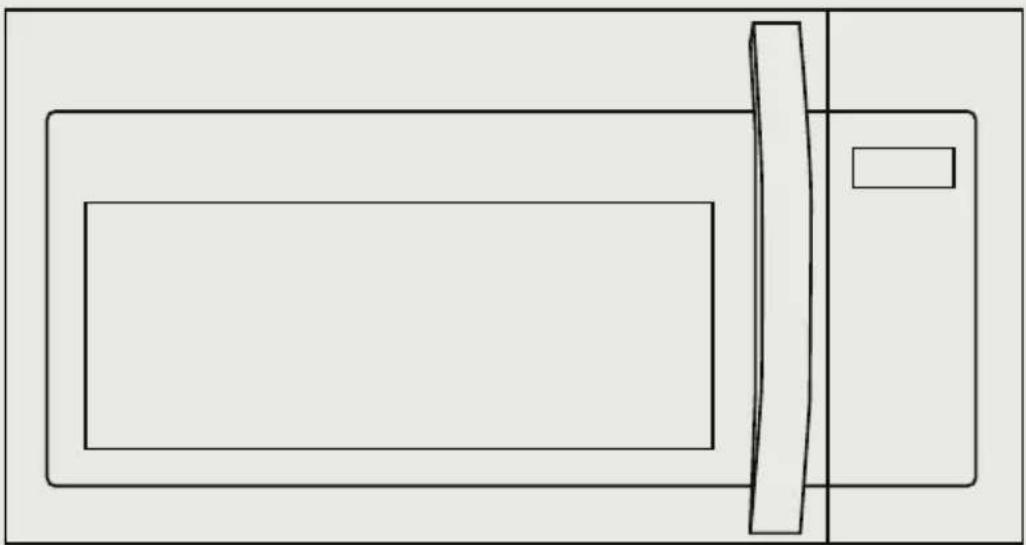
natural_image
Simple line drawing of a microwave oven with a handle and lid (no text or symbols)APERÇU DU PRODUIT ----FR-12
INSTALLATION DU PRODUIT ----FR-13
CONSIGNES D'UTILISATION ----FR-51
DÉPANNAGE ----FR-83
MARQUES COMMERCIALES, DROITS D'AUTEUR ET MENTIONS LÉGALES ----FR-84
AVIS SUR LA PROTECTION DES DONNÉES----FR-85
CONSIGNES DE SÉCURITÉ
Utilisation prévue
INSTALLATION DU PRODUIT
CONSIGNES DE SÉCURITÉ IMPORTANTES
natural_image
Illustration of a hand inserting a box into an electrical outlet (no text or symbols visible)
MISE EN GARDE :
Dommages—Expédition/Installation
natural_image
Technical illustration of a drill bit with multiple screw holes and a handle (no text or symbols)natural_image
Line drawing of a microwave oven with a black arrow indicating upward motion (no text or symbols)Voir page 41
natural_image
Simple line drawing of a cylindrical object with flanges and a tapered end (no text or symbols)natural_image
Pure line drawing of a pipe fitting with a triangular handle (no text or symbols)
REMARQUE :
REMARQUES IMPORTANTES :
natural_image
Architectural cross-section diagram showing structural components and lighting fixtures (no text or labels)natural_image
Line drawing of a hand using a tool to clean or store items on a kitchen counter (no text or symbols)natural_image
Three-panel line drawing showing a person in different positions (no text or symbols present)POUR FACILITER L'INSTALLATION ET PROCURER LA SÉCURITÉ PERSONNELLE, NOUS VOUS RECOMMANDONS QUE DEUX PERSONNES INSTALLENT CE FOUR À MICRO-ONDES.
natural_image
Hand inserting a small rectangular object into a grid-patterned panel (no text or symbols visible)natural_image
Technical line drawing of a structural assembly with beams, supports, and a vertical panel (no text or symbols)natural_image
Line drawing of a hand cleaning a kitchen appliance with a tool, no text or symbols presentnatural_image
Diagram of a mechanical device with rotating components and directional arrows, labeled 'Arrière' (no text or symbols on the diagram itself)natural_image
Technical line drawing of a mechanical component with labeled parts (no readable text or symbols)natural_image
Diagram of a mechanical or electrical component with rotating arrows indicating motion, no text or symbols present.natural_image
Technical line drawing of two cylindrical electronic components with internal circuitry (no text or symbols)natural_image
Technical line drawing of two cylindrical electronic components with a coiled cable (no text or symbols)natural_image
Diagram of a mechanical device with rotating components and directional arrows, labeled 'Arrière' (no text or symbols on the diagram itself)natural_image
Technical line drawing of a vehicle's front compartment with arrows indicating motion or force (no text or symbols)natural_image
Illustration showing three scenes of people in a meeting or office setting, with one person crossed out by a 'X' symbol (no text or symbols present)POUR FACILITER L'INSTALLATION ET PROCURER LA SÉCURITÉ PERSONNELLE, NOUS VOUS RECOMMANDONS QUE DEUX PERSONNES INSTALLENT CE FOUR À MICRO-ONDES.
natural_image
Hand inserting a small rectangular object into a grid-patterned panel (no text or symbols)natural_image
Architectural cross-section diagram showing structural components and lighting fixtures (no text or labels)natural_image
Line drawing of a hand using a tool to clean or install a ceiling-mounted device (no text or symbols visible)natural_image
Three-panel line drawing showing a person crossed out of a box, another with a cross symbol, and a third holding a box (no text or symbols present)POUR FACILITER L'INSTALLATION ET PROCURER LA SÉCURITÉ PERSONNELLE, NOUS VOUS RECOMMANDONS QUE DEUX PERSONNES INSTALLENT CE FOUR À MICRO-ONDES.
natural_image
Hand inserting a small rectangular object into a grid-patterned panel (no text or symbols)natural_image
Technical diagram showing two views of a mechanical assembly with no visible text or symbolsnatural_image
Technical diagram of a mechanical or electrical assembly with no visible text, numbers, or symbols.natural_image
Technical line drawing of a mechanical assembly with internal components and mounting brackets (no text or symbols)natural_image
Technical line drawing of an open oven or refrigerator with internal components and mounting fixtures (no text or symbols)natural_image
Line drawing of a microwave oven with internal dish and fan (no text or symbols)natural_image
Illustration of a hand inserting a component into an electrical outlet (no text or symbols)make yourself at home