
MD 14489 - Food Processor MEDION - Free user manual and instructions
Find the device manual for free MD 14489 MEDION in PDF.


| Brand | Medion |
| Model | MD 14489 |
| Product type | Electric vegetable grater |
| Power supply | 220-240 V ~ 50/60 Hz |
| Max power | 150 W |
| Operating time | 2 minutes maximum without pause |
| Number of blade inserts | 5 (fine slicing, coarse slicing, fine grating, coarse grating, parmesan) |
| Included accessories | Pusher, instruction manual, warranty card |
| Main functions | Slicing, fine and coarse grating, parmesan grating |
| Intended use | Vegetables, nuts, hard cheeses in household quantities |
| Cleaning of removable parts | Dishwasher safe or wash with hot water and dish soap |
| Cleaning the motor block | Wipe with a slightly damp soft cloth |
| Safety device | Maintained on/off button |
| Overheating protection | Automatic shut-off in case of overheating, cooling required |
| Warranty | 24 months |
| Authorized user categories | People with reduced abilities under supervision, not for children |
| Country of origin | Germany (Medion headquarters) |
Frequently Asked Questions - MD 14489 MEDION
User questions about MD 14489 MEDION
0 question about this device. Answer the ones you know or ask your own.
Ask a new question about this device
Download the instructions for your Food Processor in PDF format for free! Find your manual MD 14489 - MEDION and take your electronic device back in hand. On this page are published all the documents necessary for the use of your device. MD 14489 by MEDION.
USER MANUAL MD 14489 MEDION
natural_image
Black-and-white photo of a hand using a hairdryer to press food from a white electric cooker, with other kitchen grilles and bowls in the background (no text or symbols visible)natural_image
Diagram showing various pipe fitting shapes with no text or symbolsnatural_image
Diagram showing various pipe fitting shapes with cross marks, no text or symbols present7. Groenterasp bedienen

WAARSCHUWING!
natural_image
Diagram showing various pipe fitting shapes with no text or symbols- About these operating instructions....58
1.1. Warning symbols and keywords used in these instructions ....58
FR
-
Package contents
-
Proper use
-
Safety information
4.1. People not permitted to use this appliance ....60
4.2. General notes....60
4.3. Setting up and electrical connection ....61
4.4. Safe operation....61
4.5. Faults 62
4.6. Cleaning and maintenance 62
- Overview of the appliance 64
5.1. Cutting attachments....64
- Installation and initial use 65
6.1. Selecting cutter insert....65
6.2. Assembling the vegetable grater....65
- Operating the vegetable grater....66
- Cleaning the appliance....67
- End of operation 67
- Troubleshooting 67
- Disposal 68
- Technical data 68
- Declaration of conformity....69
- Legal notice 69
- General Warranty Conditions 70
- Service Address....72
1. About these operating instructions

Read the safety instructions carefully before using the appliance for the first time. Note the warnings on the appliance and in the operating instructions.
Always keep the operating instructions close to hand. If you sell the appliance or give it away, make sure you also hand over these operating instructions and the guarantee card.
1.1. Warning symbols and keywords used in these instructions

DANGER!
Warning of immediate mortal danger!
WARNING!
Warning of possible risk of fatal injury and/or serious irreversible injuries!
CAUTION!
Danger of possible minor or moderate injuries!

ATTENTION!
Please follow the instructions to avoid property damage!

NOTICE!
Additional information on using the appliance!

NOTICE!
Please follow the guidelines in the operating instructions!

WARNING!
Warning: risk of electric shock!

WARNING!
Warning: danger due to sharp edges and moving parts!

WARNING!
Warning of crushing due to moving parts!
- Bullet point/information on operating steps and results
▶ Tasks to be performed
2. Package contents
When unpacking, ensure that the following parts are included:
- Vegetable grater, incl.
-5 cutting attachments
-Pusher
- Operating instructions inc. guarantee documents
3. Proper use
This appliance is designed for the processing of foods in typical household quantities: for chopping vegetables, nuts or hard cheeses.
The appliance is intended for private use only and not for industrial/commercial use.
Please note that we shall not be liable in cases of improper use:
- Do not modify the appliance without our consent and do not use any auxiliary equipment which we have not approved or supplied.
- Use only spare parts and accessories that we have supplied or approved.
- Heed all the information in these operating instructions, especially the safety information. Any other use is deemed improper and can cause personal injury or damage to property.
- Do not use the appliance in areas where there is a risk of explosion. These areas include e.g. tank systems, fuel storage depots or areas in which solvents are being used. This appliance should also not be used in areas where the air is contaminated with fine particles (e.g. flour dust or sawdust).
- Do not expose the appliance to any extreme conditions. The following should be avoided:
–High humidity or moisture
-Extremely high or low temperatures
-Direct sunlight
-Naked flames
4. Safety information
4.1. People not permitted to use this appliance
- Keep the appliance and its accessories out of the reach of children.
- This appliance may not be used by children. The appliance and its connecting cable must be kept away from children.
- This appliance may be used by people with reduced physical, sensory or mental capabilities or lack of experience and/or knowledge if they are supervised and have been instructed in how to use the appliance safely and have understood the potential risks.
• Children must not be allowed to play with the appliance. - The appliance must always be disconnected from the mains when left unsupervised and before assembly, disassembly or cleaning.

WARNING!
Keep plastic packaging out of the reach of children. There is a risk of suffocation!
4.2. General notes
- Ensure the mains cable is out of harm's way and will not trip people up. Do not allow the mains cable to become trapped or squashed.
- Do not use the appliance if it or the connecting cables are visibly damaged or if the appliance itself has been dropped.
-
There are dangerous voltages inside the appliance. Never open the housing or insert objects into the ventilation slots. Risk of fatal electrical shock!
-
In order to disconnect the appliance completely from the power supply, pull the plug from the safety socket. Always pull the plug, never the mains cable.
- Appliances left connected to the mains power supply during thunderstorms may be damaged. Therefore, always remove the mains plug if there is a thunderstorm.
- Do not insert any foreign bodies into the feed tube or the outlet of the vegetable grater. Keep hair, clothing, hands, cutlery, mixing spoons or similar items away from the appliance during operation to avoid injuries or damage to property. Use only the supplied pusher to fill the appliance.
- Never use the appliance to chop fibrous or very hard foods (meat, ice cubes, etc.).
4.3. Setting up and electrical connection
- Connect the appliance only to a properly installed AC 220–240 V \~, 50/60 Hz safety plug socket that has at least a 16 A fuse. Do not use an extension cable.
- Place the appliance on a firm, level surface.
- Do not use an extension cable.
- Never place the appliance on the edge of a table – it could tip over and fall.
- Remove the plug from the safety socket after each use, before cleaning and during periods when the appliance is left unattended.
- Unwind the cable fully when using the appliance.
- Do not allow the mains cable to come into contact with hot objects or surfaces (e.g. cooker hob).
- Do not allow the mains cable to come into contact with water or other liquids.
4.4. Safe operation
- Never immerse the appliance in liquids!
- Do not use the appliance outdoors.
- Do not leave the appliance unattended during operation.


WARNING!
Moving and sharp-edged parts. There is a risk of injury. Avoid touching moving parts.
- Ensure that there are no foreign objects (spoon, dough scraper or similar items) in the feed tube or the outlet of the vegetable grater during operation.
- Never push food into the feed tube with your hands.
- The zester, grater and slicer inserts are very sharp. Avoid touching the blades.
4.5. Faults

WARNING!
Live components. There is a risk of electric shock. Therefore, please follow the instructions below:
- Avoid damaging the appliance or the power cable.
- Always check the power cable and the appliance for damage before each use.
- Never try to open and/or repair an appliance component yourself.
- Ensure that a defective appliance is repaired immediately by a specialist workshop. In order to reduce risks: if the mains cable for this appliance is damaged then it must be replaced by the Medion Service Centre or a similarly qualified person.
4.6. Cleaning and maintenance

WARNING!
Live components. There is a risk of electric shock. Therefore, please follow the instructions below:
- Never immerse the appliance in water or other liquids!
-
Disconnect the appliance plug from the safety socket before cleaning or servicing the appliance and before fitting or removing the attachments.
-
As a general rule, remove the attachments from the main appliance before cleaning.
- Do not allow any liquids to run over or into the motor unit! If liquids run over or into the appliance, switch off the appliance immediately and remove the mains plug from the safety socket. Clean the appliance thoroughly and allow it to dry completely.
5. Overview of the appliance
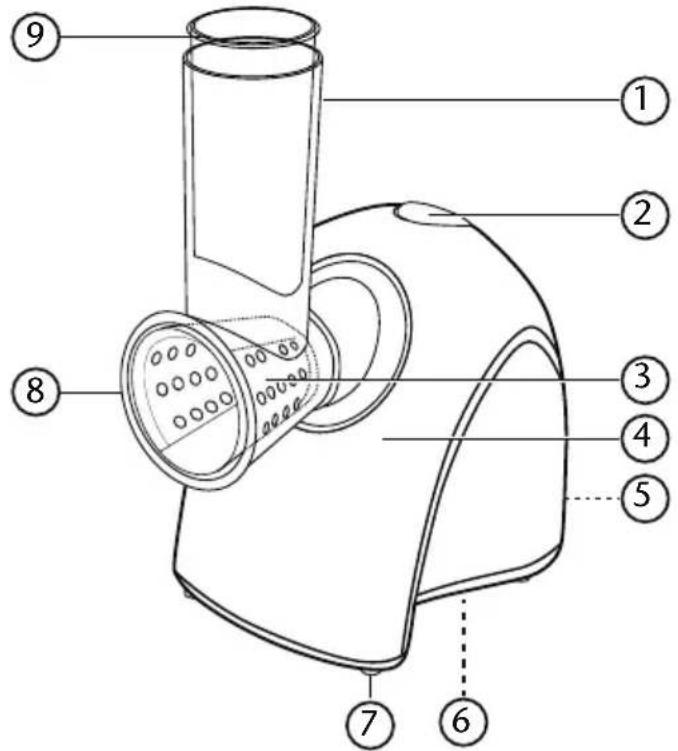
1) Feed tube
2) On/Off switch
3) Cutter insert
4) Motor unit
5) Mains cable (on rear, not shown)
6) Type plate (on underside, not shown)
7) Feet
8) Outlet
9) Pusher
5.1. Cutting attachments
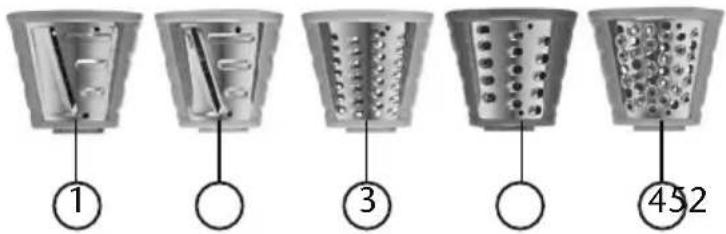
1) Slicer insert (green), fine
2) Slicer insert (turquoise), coarse
3) Grater insert (yellow), fine
4) Grater insert (red), coarse
5) Zester (orange)
6. Installation and initial use
Before using the appliance for the first time, rinse the cutter inserts, feed tube and pusher thoroughly and allow them to dry completely.
▶ Assemble the vegetable grater as described in the following section.
Place the vegetable grater on a stable, level surface.
▶ After assembly, connect the appliance to a 220–240 V \~ 50/60 Hz safety socket.

NOTICE
The appliance is driven by an electric motor. This can lead to a slight smell during initial operation. This smell is normal and is not a sign of a malfunctioning appliance. Ensure that there is adequate ventilation.
6.1. Selecting cutter insert
Depending on your requirements, you can select between 5 cutter inserts:
| Slicer insert (green), fine e.g. for slicing cucumbers, potatoes, bell peppers, onions, cabbage, courgettes, etc. |
| Slicer insert (turquoise), coarse |
| Grater insert (yellow), fine e.g. for finely grating carrots, courgettes, etc. |
| Grater insert (red), coarse e.g. for coarsely grating carrots, bell peppers, cheese, potatoes. etc. |
| Zester (orange) e.g. for grating dry bread, parmesan |
6.2. Assembling the vegetable grater
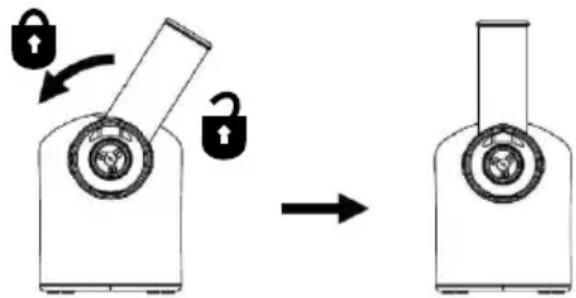
Place the feed tube with the locking tabs into the recesses on the appliance. Ensure that the feed tube is pointing upwards to the right (3)
Then turn it to the left until it clicks into place.
Now place the required cutter insert with the locking tabs into the recesses on the feed tube.
▶ Turn the cutter insert in a clockwise direction until it fits firmly in place.
7. Operating the vegetable grater

WARNING!
Sharp-edged parts. Never push food into the feed tube with your hands, forks, spoon handles or similar items. There is a risk of injury.

CAUTION!
Do not push food into the feed tube so hard that the motor audibly runs slower. Otherwise the motor could overheat and be damaged.

CAUTION!
Do not operate the appliance for longer than two minutes per session to avoid overheating the motor. Allow the motor to cool down between operations.
The appliance is assembled and connected as described above.
Place a container under the outlet.
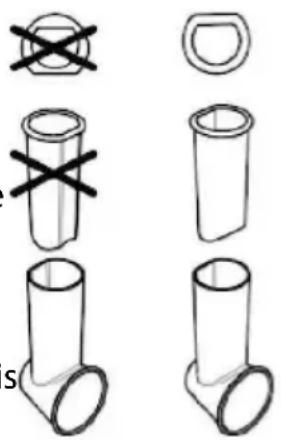
▶ Precut the vegetables if necessary so that they fit in the feed tube without jamming.
▶ Press and hold the on/off switch with one hand and use the pusher to press the vegetables in carefully with the other hand.
Ensure that the pusher fits inside the feed tube.
▶ After processing, let go of the on/off switch. The appliance is switched off.
▶ Disconnect the mains plug.
Clean the appliance immediately after use (see also "8. Cleaning the appliance"). Do not leave food to dry on the appliance.
natural_image
Diagram showing various pipe fitting shapes with cross marks, no text or symbols present8. Cleaning the appliance

WARNING!
Live components. There is a risk of electrical shock. Never immerse the motor unit in water or other liquids!
Always pull the plug from the mains socket before changing the cutter inserts or cleaning the appliance.

NOTICE!
Do not use any harsh or abrasive cleaning agents or objects to clean the accessories and the housing because these items could damage the surfaces. Use a mild cleaning agent e.g. washing-up liquid and a soft cloth. To avoid injuries, use only a washing-up brush or a similar suitable cleaning implement to clean the cutter inserts.

WARNING!
Sharp-edged parts. There is a risk of injury. Avoid touching the blades of the grater and slicer inserts.
Remove the feed tube and pusher as well as the cutter insert.
- Clean the parts with warm water and detergent or put them in the dishwasher.
▶ After using heavily staining foods (carrots, tomatoes, etc.) clean the feed tube and pusher immediately to prevent discolouration.
▶ Wipe the surface of the motor unit with a slightly damp, soft cloth.
9. End of operation
If you do not plan to use the product for an extended period, pull out the plug, clean the appliance as described above and store it in a dry place.
10. Troubleshooting
The appliance left our warehouse in perfect condition. If you do, however, discover a problem, see if you can solve it by using the solutions offered in the following table. If these do not work, contact our Customer Services department.
| Problem Possible cause Troubleshooting | ||
| The appliance is not working. | The plug is not connected to a safety socket. | Connect the appliance to a properly installed AC 220–240 V~, 50/60 Hz safety socket. |
| The appliance has over-heated. | Switch off the appliance for a few seconds and then switch it on again. If the appliance still doesn’t work, allow it to cool down for half an hour. | |
| Motor is running too slow | Too much pressure on the pusher | Do not press the pusher down so hard, work more slowly |
11. Disposal

Packaging
The product has been packaged to protect it from damage in transit. Packaging is raw material and can be re-used or added to the recycling system.

Appliance
Old appliances should not be disposed of with the normal household rubbish.
In accordance with Directive 2012/19/EU, the appliance must be properly disposed of at the end of its service life.
This involves separating the materials in the appliance for the purpose of recycling and avoiding any impact on the environment.
Take old appliances to a collection point for electrical scrap or a recycling centre.
Contact your local waste disposal company or your local authority for more information on this subject.
12. Technical data
Power supply 220–240 V \~50/60 Hz
Max output:150 W
Short-term operation: 2 minutes
Subject to technical modifications!
13. Declaration of conformity

Medion AG hereby declares that the appliance MD 14489 conforms to the following European Directives and standards:
• EMC Directive 2004/108/EC
• Low Voltage Directive 2006/95/EC
• Ecodesign Directive 2009/125/EC
• RoHS Directive 2011/65/EU.
Full declarations of conformity are available at www.medion.com/conformity.
14. Legal notice
Copyright © 2015
All rights reserved.
This operating manual is protected by copyright.
Mechanical, electronic and any other form of reproduction is prohibited without the written permission of the manufacturer. Copyright is owned by the company:
Medion AG
Am Zehnthof 77
45307 Essen
Germany
The operating manual can be reordered via the service hotline and is available for download via the service portal at www.medion.com/gb/service/start/.
You can also scan the QR code above and download the operating manual onto your mobile device via the service portal.

15. General Warranty Conditions
15.1. General information
The warranty period is 24 months and begins on the day the product is purchased. The warranty covers all types of material and product damage that could occur during normal use.
Please keep your original proof of purchase in a safe place. The warranty provider reserves the right to refuse to confirm the status of the warranty or to carry out a repair under warranty if a valid proof of purchase cannot be produced.
If it is necessary to return your device for repair, please ensure that it is suitably packaged for transportation. Unless otherwise specified, you shall bear the costs for sending the device and the transport risk. The warranty provider does not assume any liability for additional materials sent with the product that do not belong to the original package contents supplied with the product.
Please enclose as much information as possible about the fault when sending the device to the warranty provider. In order to make a valid claim under warranty and before returning the device, please contact the Service Hotline operated by the warranty provider or the Service Portal. They will provide you with information on how to proceed further.
This warranty has no effect on your statutory warranty rights and is subject to the laws of the country in which the first purchase of the product was made by the end customer.
15.1.1. Scope
In the event of a fault on your product that is covered by this warranty, the warranty provider guarantees to repair or replace the product. The decision about whether to repair or replace the device is taken by the warranty provider. Therefore, the warranty provider can at its own discretion decide to replace a device submitted for repair under warranty with a refurbished device of the same quality.
No warranty is provided for batteries or rechargeable batteries or for consumable materials i.e. parts which have to be replaced at regular intervals during the normal use of the product e.g. video projector lamps.
A pixel error (permanently coloured, light or dark point in an image) is not generally considered a fault. Please refer to the information provided in the manual for this product for the precise number of permissible defects in the image.
The warranty provider gives no warranty for burnt-in images on plasma or LCD devices that result from the improper use of the device. Please refer to the information provided in the manual for this product for precise instructions on operating your plasma or LCD device.
The warranty does not cover errors relating to the playback of data media that have been created in an incompatible format or as a result of using unsuitable software. If it is discovered during the repair that the fault concerned is not covered under warranty, the warranty provider reserves the right to invoice the customer for the
costs already incurred in the form of a flat-rate handling charge, as well as to charge the customer for the materials and labour required for the repair after submitting a cost estimate. You will be informed in advance as the customer about these repair charges; you are responsible for accepting or rejecting the repair process.
15.1.2. Exclusions
Malfunctions and damage to the device caused by external influences, accidental damage, improper use, changes made to the product, modifications, upgrades, the use of third-party parts, neglect, viruses or software faults, improper transport, improper packaging or loss during the return of the product are not covered by the warranty issued by the warranty provider.
The warranty will be invalidated if the fault to the device is caused by maintenance or repair carried out by someone other than a service partner authorized by the warranty provider. The warranty will also be invalidated if labels or serial numbers on the device or a component of the device have been modified or made illegible.
15.1.3. Service Hotline
Before sending the device to the warranty provider, you must contact us via the Service Hotline or the Service Portal. This ensures that you receive further information on how to make a valid claim under warranty.
The use of the hotline may be subject to a charge.
The Service Hotline should under no circumstances be considered a substitute for user training for software and hardware or reading the manual, nor does it provide support for third-party products.
15.2. Special warranty conditions for PC, notebook, pocket PC (PDA), devices with navigation functions (PNA), telephone devices, mobile telephones and devices with a memory function
Should any of the supplied options (e.g. memory cards, etc.) have a fault, you are entitled to a repair or replacement. The warranty covers material and labour costs for restoring the functionality of the product concerned.
The warranty can be invalidated if any damage to the product itself or the supplied options results from the addition of any hardware to your product that is not produced or distributed by the warranty provider.
A limited warranty is provided for supplied software. This applies to a pre-installed operating system and also to supplied programs. For software supplied with the device by the warranty provider, a warranty is issued that any data media, e.g. discs and CD-ROMs on which the software is supplied, shall be free from faults in terms of their materials and workmanship for a period of 90 days following purchase. In the event of a faulty data medium being supplied, the warranty provider shall replace the faulty data medium free of charge; any further claims are excluded. Excluding the warranty for data media, all software is supplied without warranty. Furthermore,
it is not warranted that this software shall function without interruption or errors or that it will meet your requirements. In the case of map material supplied for a device with navigation functions, no warranty is provided for its completeness.
It may be necessary to delete all data from the device in order to repair it. Please ensure that you have a backup copy for all of the data on the device before sending back the device. We expressly point out that the factory settings will be restored in the event of a repair. The warranty provider assumes no liability for the cost of a software configuration, lost revenue, loss of data or software, or other consequential damages.
15.3. Special warranty conditions for repair on site or replacement on site
If there is an entitlement to on-site repair or replacement, the specific warranty terms and conditions for on-site repair or replacement shall apply to your product. The following provisions must be ensured by you for carrying out repairs or replacements on site:
- Personnel from the warranty provider who arrive at your premises for the above-mentioned purpose must have unrestricted, safe and immediate access to the devices.
- Telecommunication facilities required by these personnel for the proper execution of your order, for testing and diagnostic purposes or for remedying faults must be provided by you at your own expense.
- You shall be personally responsible for restoring your own application software after completion of the service by the warranty provider.
- You shall be personally responsible for configuring and connecting any existing external devices after completion of the service by the warranty provider.
- The free cancellation period for repairs or replacements on site is at least 48 hours, thereafter we shall invoice you for any costs resulting from a late or missing cancellation.
16. Service Address

0333
3213106

01793
715716
(costs:
local)
Mo - Fr: 08:00 - 20:00
Sa - Su: 10:00 - 16:00

www.medion.co.uk
@ Please use the contact form at www.medion.com/contact